后端基于 Laravel,前端使用 Tailwind,Webpack 与 Laravel Mix 负责模块打包,支持 SCSS
Laravel启动器
base-site — Laravel 启动器模板
作者 waynestate
韦恩州立大学维护的 Laravel 网站启动模板,含 Tailwind 前端、Webpack 构建、菜单与 CMS 页面 JSON 对接、样式指南和测试工具链。
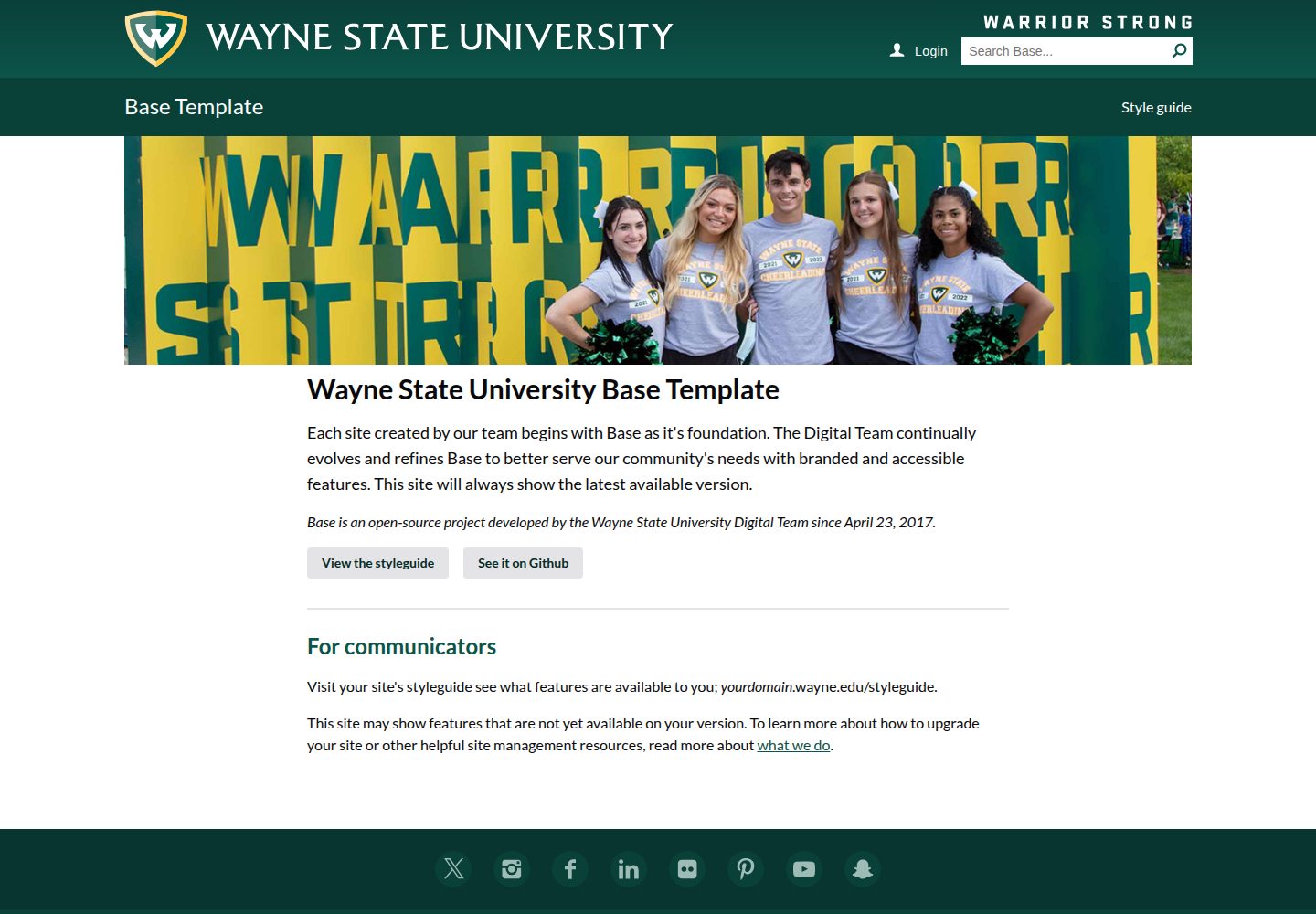
看看你的网站会是什么样
浏览真实页面截图,比较内容排版与手机效果。点击下方缩略图切换,放大查看整页细节。
全部页面与视图 2
截图用于了解视觉与布局,交互效果请以实际项目为准。
采集于 2026-10-01查看来源
值得关注的模板亮点
从已有项目资料中,快速了解它的特点。
菜单系统包含跨页顶部菜单、条件性左侧菜单和可变断点触发的滑出菜单
页面可由 CMS 自动生成,也可用 public 目录下的 JSON 文件复现并匹配到指定控制器
提供完整样式指南,用 PHP faker 数据展示全部可用组件,Hero 支持单张或轮播
集成 PHPUnit、Laravel Pint、PHPStan/Larastan、ESLint、Stylelint 及提交钩子
使用 Envoy 实现零停机部署,支持按分支或环境部署,环境配置由 PHPDotenv 管理
模板详细介绍
base-site 是韦恩州立大学(Wayne State University)在 GitHub 上开源的网站启动仓库,用于创建新网站。后端基于 Laravel,前端使用 Tailwind,模块打包通过 Webpack 与 Laravel Mix 完成,并支持 SCSS。仓库提供演示站点 base.wayne.edu,可查看实际页面效果。
模板包含较完整的页面与组件体系:顶部菜单跨页保留并随滚动跟随,有子项的页面显示左侧菜单,否则使用全宽布局;在可变断点触发滑出菜单,其中包含顶层菜单、左侧菜单、菜单下方推广位和横幅推广位。Hero 支持单张或轮播图片。YouTube 视频可自动以灯箱方式播放。
内容对接方面,页面由 CMS 自动生成,也可用 JSON 文件写入 public 目录来复现页面结构,路由匹配后交给指定控制器;菜单结构同样可从 CMS 拉取,或在 MenuRepository 中替换为数组数据。仓库还提供完整样式指南,用 PHP faker 数据展示每个可用组件;新闻列表/详情与人物列表/详情有对应的控制器和 CMS 页面创建步骤。
开发与质量工具链包括:PHPUnit 测试、Laravel Pint 代码风格检查、PHPStan/Larastan 静态分析、ESLint 与 Stylelint,以及提交钩子要求这些检查通过。部署使用 Envoy 实现零停机部署,支持按分支或环境部署。环境配置通过 PHPDotenv 管理,站点选项集中在 config/base.php。
需要注意:README 中提到的部分依赖(如 Laravel Mix、Laravel 5.6 文档链接、Faker)可能已随项目演进发生变化,使用前应以仓库实际依赖清单为准。演示图片、字体、图标等第三方素材的许可需单独核对,MIT 许可仅覆盖代码。
Laravel启动器
适合你的项目吗?
适用场景
- 为高校或机构搭建以 Laravel 为后端的网站,并需要菜单、新闻、人物等常见页面结构
- 需要将 CMS 生成的页面与自定义控制器、JSON 页面数据对接的项目
- 希望参考完整样式指南和组件库来统一前端视觉的 Laravel 项目
- 需要零停机部署流程和较完整测试、静态分析、代码风格检查工具链的团队
适合人群
- 熟悉 Laravel 与 Blade 模板、需要现成启动骨架的开发者
- 需要菜单、新闻、人物、样式指南等基础页面组件的机构网站项目
- 希望以 CMS 页面 JSON 对接方式组织内容、并保留自定义控制器扩展能力的团队
- 重视测试、静态分析与代码风格检查,并需要 Envoy 部署流程的项目
上手与定制指南
结合仓库当前版本的说明,按下面的资料检查内容、配置与运行要求。
- 1
按 README 步骤:配置 Laravel Homestead,克隆仓库后依次运行 make install、make build、make watch,再打开 https://domain.local:3000/ 查看 BrowserSync
- 2
站点选项在 config/base.php 中配置,服务器相关配置来自 .env 文件,需在部署服务器上手动创建或更新
- 3
部署前需在 Envoy.blade.php 中设置 $appname、$server_map、$source_repo、$deploy_basepath 等变量
- 4
使用 WSU API 需向 [email protected] 申请 API key
- 5
README 中部分依赖与文档链接可能已过时,使用前请核对仓库实际依赖清单
授权与来源资料
使用条件与限制
免费使用 · 保留许可声明本次收录的是公开仓库中采用 MIT 许可的免费版本;免费范围为该版本代码,不代表外部服务或第三方素材免费。
使用时需要遵守
- 允许免费使用、修改、商用和分发该版本代码。
- 分发代码副本或实质性部分时,保留原作者版权声明和完整 MIT 许可声明。
- 代码按现状提供;担保与责任限制以原许可证及适用法律为准。
额外费用与待核对事项
- 使用 WSU 提供的 API 需向 [email protected] 申请 API key,属于外部服务凭据要求,非代码许可限制。
- 开发环境依赖 Laravel Homestead 虚拟机,需额外安装配置。
- 部署需自行配置 Envoy.blade.php 中的服务器变量,并具备目标服务器访问权限。
- 演示图片、字体、图标及其他第三方素材需按各自许可核对,不能仅凭代码的 MIT 许可判断。
- 域名、托管、数据库、支付或 AI 等外部服务可能另外收费。
查看原文依据
Permission is hereby granted, free of charge
许可证原文
Request a WSU API key Email [email protected] with your request.
README 原文
Setup laravel homestead: http://laravel.com/docs/homestead
README 原文
https://github.com/waynestate/base-site/blob/master/LICENSEhttps://github.com/waynestate/base-site/blob/master/README.mdSetup the following config variables in `Envoy.blade.php`
README 原文
DeepSeek 根据仓库许可证和 README 整理 ·2026-10-01。结果仅覆盖已读取资料,依赖、图片、字体及后续条款变更以各自原文为准。
项目核对记录与介绍依据
模板资料
- 来源平台
- GitHub
- 资料与维护参考分
- 资料较完整 · 87 / 100
- 技术栈
- Laravel
- 网站类型
- 启动器
这个分数如何计算
本站按许可资料(最高30分)、演示链接(12分)、预览图(10分)、Star数(15分)、记录的维护时间(15分)、描述完整度(8分)、功能记录(5分)和分类资料(5分)计算。它不是代码、安全或性能测试,也不是 Google 评分;有链接不代表已实测可用。
这个项目需要核对什么
- 记录的仓库更新时间
- 2026-09-30
- 截图检查日期
- 2026-10-01
已收录演示链接。请用你的内容与屏幕尺寸检查;有演示不代表表单、认证或支付已经可用。
目录记录的主要技术栈是 Laravel。请通过依赖清单和锁文件核对实际版本与托管要求。这些说明基于收录资料,不代表代码审计或部署实测。
查看具体选型方法 →介绍的制作与核对状态
介绍由 AI 辅助整理目录与仓库资料。仓库作者不等于这篇介绍的审核者。
已完成服务器许可规则与 AI 来源核对;未经过人工编辑审核。
查看当时使用的来源资料
SHA-256: 5be946b722f117055a8ae38afb5626cc1d95ae5796f95e91ffed7e92fc81ed51
2026-10-01T02:25:02.110Z
来源文件 / 仓库Base Template
================
| Branch | Build | Coverage |
---|-------------------------------------------------------------------------------------------------------------------------------------------------------------------|---
| Master |  | [](https://coveralls.io/github/waynestate/base-site?branch=master) |
| Develop |  | [](https://coveralls.io/github/waynestate/base-site?branch=develop) |
Starter repository for creating a new website. Live demo can be found at https://base.wayne.edu/.
## Features
* Backend built on [Laravel](https://laravel.com/)
* Frontend built on [Tailwind](https://tailwindcss.com/)
* Module bundling using [Webpack](https://webpack.github.io/)
* Fluent webpack API using [Laravel Mix](https://laravel.com/docs/5.6/mix)
* Zero downtime deployment using [Envoy](https://laravel.com/docs/5.6/envoy)
* Configure multiple enviorments using [PHPDotenv](https://github.com/vlucas/phpdotenv)
* SCSS support
* Automatically inject JS/CSS while developing using [BrowserSync](https://browsersync.io/)
* [100% test code coverage](https://base.wayne.edu/coverages)
* [Public API documentation](https://base.wayne.edu/api)
* Commit hook that require the following to pass:
* Tests using [PHPUnit](https://phpunit.de/)
* PHP linting using [Laravel Pint](https://laravel.com/docs/9.x/pint)
* Static analysis using [PHPStan/Larastan](https://github.com/larastan/larastan)
* JS linting using [ESLint](http://eslint.org/)
* CSS/SCSS linting using [Stylelint](https://stylelint.io/)
* Menus
* Top level menu carried across all pages that follows you down the page as you scroll
* Left menu if a page has subitems, otherwise its a full width page
* Slideout menu that is triggered on a variable breakpoint that includes
* The top level menu grouped together
* Left menu
* Under menu promotions
* Banner promotion
* [Full styleguide](https://base.wayne.edu/styleguide) detailing out every available component using [PHP faker data](https://github.com/fzaninotto/Faker)
* [Single](https://base.wayne.edu/styleguide/hero/full) or [rotating](https://base.wayne.edu/styleguide/hero/full/rotate) hero images using [Flickity](https://flickity.metafizzy.co/)
* Automatically lightbox youtube videos using [Media Box](https://github.com/pinceladasdaweb/mediabox)
* Easy integration with a CMS by writing custom .json files to the public directory which are matched by to a route and sent to the specified controller
## Setup
1. Setup laravel homestead: http://laravel.com/docs/homestead
1. Clone the repository
1. run `make install`
1. run `make build`
1. run `make watch`
1. open https://domain.local:3000/ (for BrowserSync)
## Deployment
* Setup the following config variables in `Envoy.blade.php`
* `$appname`
* `$server_map`
* `$source_repo`
* `$deploy_basepath`
* Development: `envoy run deploy` or `make deploy`
* Production: `envoy run deploy --on="production"` or `make deployproduction`
* Any branch: `envoy run deploy --branch=feature/feature`
## Run tests
phpunit
## Run test coverage
1. `make coverage`
1. Open the coverages/index.html file in your browser
## Run static analysis
make phpstan
Or to run without progress bar (useful in CI environments):
make phpstandry
## Check for outdated packages
make status
## Update packages
make update
## Configure the site
1. Open `/config/base.php`
1. Edit the options to configure the site, some values are present in the `.env` file.
1. Server specific configuration options come from the `.env` file which need to be manually created/updated on the servers the app is deployed to.
## Request a WSU API key
Email [email protected] with your request.
## Adding `.env` variables
1. Add a config option to `config/base.php` called your_key using the `env()` function.
1. Using it in blade: `<script>var KEY = { API_KEY: {{ config('base.your_key' }} };</script> .`
1. Using it in PHP: `<?php $key = config('base.your_key'); ?>`
1. Add a blank entry to your local `.env.example` file for `your_key`
1. Add an entry with the actual value to your local `.env` file.
1. Commit the .env.example file. You may want to put the actual value in the example file when necessary.
1. Once the site is deployed you will want to add the actual value to the `.env` on each server.
## Developing global data that is passed down to all views via the `$request->data` variable
1. Open the folder `/app/Repositories`.
1. Create new class and implement the interface `RequestDataRepositoryContract`.
1. Fill out the `getRequestData` method and return an array.
1. Add the callback under the site in `config/base.php`
### Developing controllers
1. Open the folder `/app/Http/Controllers/`
1. This folder contains all the selectable templates from the CMS.
1. Controllers should:
* Dependency inject repositories into the constructor.
* Call repositories to obtain data to send to the view.
## Developing views
1. Open `/resources/views/`
1. This folder contains all the views for the front-end using the [blade templating engine](https://laravel.com/docs/)
1. Files must be saved in the format of: `homepage.blade.php`
1. Components: Contains views that are reusable
## Pages
Pages are written from the content management system automatically. To replicate what it writes you can use the following JSON format to create pages. Example homeage: `storage/app/public/index.json`.
```
{
"site" : {
"id" : 1,
"title" : "Base Site",
"subsite-folder" : null,
"parent" : {
"id" : null
}
},
"page" : {
"id" : 1,
"controller" : "HomepageController",
"title" : "Welcome!",
"description": "Lorem ipsum dolor sit amet, consectetur adipiscing elit. Sed turpis lorem, malesuada eu tellus vel, pharetra consequat lacus. Vestibulum eu metus nec massa viverra iaculis. Pellentesque libero eros, varius non sem et, dapibus aliquam magna. Praesent ultri",
"content" : {
"main" : "<p>Lorem ipsum dolor sit amet, consectetur adipiscing elit. Sed turpis lorem, malesuada eu tellus vel, pharetra consequat lacus. Vestibulum eu metus nec massa viverra iaculis. Pellentesque libero eros, varius non sem et, dapibus aliquam magna.</p>"
},
"keywords" : "",
"updated-at" : "",
"canonical" : ""
},
"menu" : {
"id" : 1
},
"data" : {
}
}
```
## Menus
Menus are automatically pulled from the content management system. To replicate the structure you can use the following array and replace the code in `App\Repositories\MenuRepository@getAllMenus`.
```
<?php
$menus = [
1 => [ // The menu_id specified from the .json file
1 => [ // First menu item
'menu_item_id' => '1', // Auto incrementing ID
'is_active' => '1', // To output the menu item or not
'page_id' => '1', // Page ID specified from the .json file
'target' => '', // HTML <a target="">
'display_name' => 'Home', // Title of the menu item
'class_name' => '', // CSS class name to be appended to the menu item
'relative_url' => '/', // The relative URL to this page
'submenu' => [], // Subitems, follow same structure and include another submenu => []
],
2 => [ // Second menu item...
],
],
];
```
## News listing & view
1. Create a CMS page called `news` in the root of the site and select the `ArticleController` as the template.
1. Create a CMS page called `news/topic` in the root of the site and select the `ArticleController` as the template.
1. Create a CMS page called `news/topics` in the root of the site and select the `TopicController` as the template.
1. If you need news for a subsite, follow these steps again while being within that subsite.
## Profile listing & view
1. Create a CMS page for the profile listing page (ex: `profiles`) and select the `ProfileController` as the template.
1. Create a CMS page for the profile view, it must be: `profile` and select the `ProfileController` as the template.
1. You can now visit `https://domain.local/profiles` and `http://domain.local/profile/{accessid}`.
## Style guide development for a new feature
Feature names should be singular and CamelCased. To create a new feature called "Spotlight": `php artisan base:feature Spotlight`
## Adding SVG icons
1. Load the fontello-config.json file into http://fontello.com/
1. Select the new icons and download the set.
1. Load the waynestate.svg file into https://icomoon.io/app/#/select
1. Select all the icons and download the set.
1. Open the new SVG icon(s) in the editor of your choice.
1. Save each file under resources/views/svg as a blade partial.
1. Remove the comment from the svg file.
1. Apply this code to the svg tag: `class="{{ $class ?? '' }}" aria-labelledby="{{ $name ?? '' }}"`.
## Using SVG icons
1. `<svg>` replace with: `@svg('filename', 'optional classes', 'optional label')`
## Lazy loading
1. `<img>` replace with: `@image('/path/to/image.jpg', 'alt text', 'optional classes')`
1. Background images: `<div data-src="/path/to/image.jpg"></div>`
## Contributing
Please see [CONTRIBUTING](CONTRIBUTING.md) for details.
## Licensing
Base Template is open-sourced software licensed under the [MIT license](http://opensource.org/licenses/MIT).
看看同类模板
对比同技术栈与用途的模板,找到更适合的视觉与内容结构。

sage
WordPress starter theme with Laravel Blade components and templates, Tailwind CSS, and block editor support
Laravel · 启动器

wave
Wave - The Software as a Service Starter Kit, designed to help you build the SAAS of your dreams 🚀 💰
Laravel · SaaS

filament-starter
A beautiful starting point for your next TALL stack project using Filament. ⚡
Laravel · 启动器

electrik
Laravel SaaS starter kit: auth, teams, Stripe billing, and Slate 3 — Composer package for Laravel 12
Laravel · SaaS

php-saas
The everything-included starter kit for your next idea
Laravel · SaaS

filament-jetstream
A Laravel starter kit built with Filament inspired by Jetstream.
Laravel · 启动器