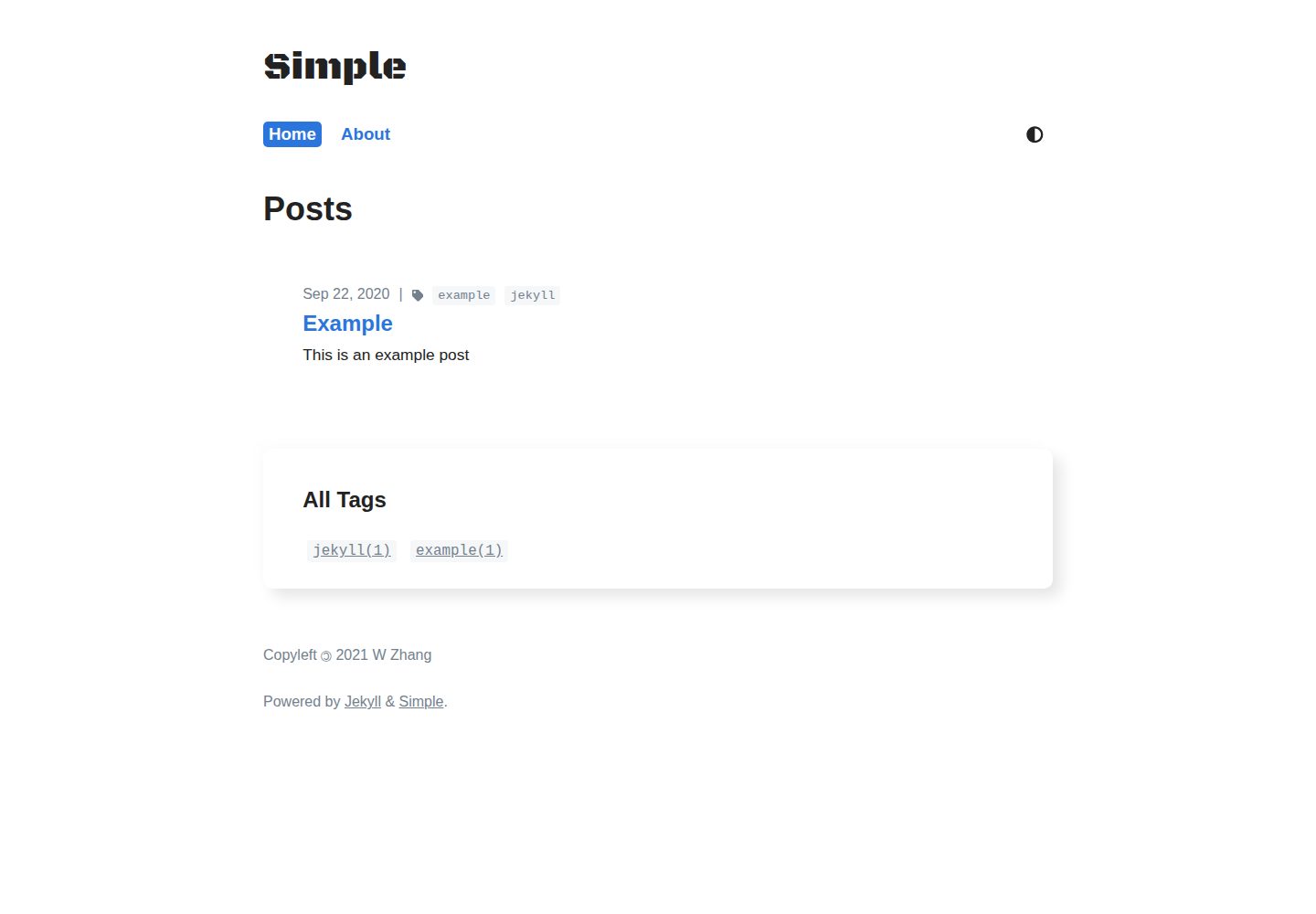
Provides four layouts: default, home, post, and tagpage
JekyllBlog
simple-jekyll-theme — Jekyll Blog Template
By WeixuanZ
A minimal Jekyll theme for blogs, compatible with GitHub Pages, featuring dark mode, tag pages, Ajax pagination, a dynamic table of contents, and code copy buttons.
Explore the design
Compare the page layouts and mobile experience. Open any screenshot for a closer look.
Desktop homepage1 / 3
Desktop captureTop of page
Actual screenshot captured by the server browser.
All pages & views 3
Screenshots show visual appearance; interactive behavior may differ.
Recorded 2026-10-02View source
What stands out
A quick read of the recorded project description.
Supports dark mode with transition animations and mobile adaptation
Tag system with a sorted tag cloud, plus a Python script to generate tag pages
Ajax pagination, dynamic table of contents, and code block copy buttons
Built-in RSS feed, SEO, and Google Tag Manager support
Compatible with GitHub Pages, and can also be used via gem or jekyll-remote-theme
Template Details
simple-jekyll-theme is a minimal Jekyll theme created by the author for their own blog at https://weixuanz.github.io. The repository is a trimmed clone of the theme portion of that site, with unrelated commits removed and adjustments made for general use. The theme provides four layouts: default, home, post, and tagpage. The home page supports pagination and allows custom content to be injected above the post list. Posts support tags, a table of contents, MathJax, and code copy buttons.
The theme is compatible with GitHub Pages, so Jekyll's tag plugins cannot be used. The author provides a Python-based scripts/tag_generator.py to generate tag pages, or you can manually create corresponding .md files under ./tag/. When installing via gem, _config.yml only copies key-value pairs; plugin and other configurations must be manually copied from the repository's default configuration.
The theme does not include a comment system or Algolia search; the README points to the author's separate repositories WeixuanZ/utterances and WeixuanZ/search. Image lazy loading relies on lazysizes, requiring data-src and the lazyload class. Icons use inline SVG by default, but you can configure a Font Awesome Kit to use <i /> instead.
JekyllBlog
Is it right for your project?
Use Cases
- Building a personal blog hosted on GitHub Pages
- Post lists that require tag archives and pagination
- Wanting table of contents navigation and code copy functionality within posts
- Blog sites that need dark mode and a mobile reading experience
Suitable For
- Individual developers who write blogs with Jekyll
- Sites that prefer minimal typography and fewer front-end dependencies
- Users who need a GitHub Pages-compatible solution
- Users willing to customize by copying files to override default styles
Getting started & customization
Use these recorded setup notes alongside the repository instructions for your chosen version.
- 1
GitHub Pages users are advised to fork the repository, rename it to <username>.github.io, and then configure it as described in the Development section
- 2
For gem installation, add gem "simple-jekyll-theme" to the Gemfile and run bundle, then set theme: simple-jekyll-theme in _config.yml
- 3
When using jekyll-remote-theme, copy the default _config.yml in full, because only key-value pairs are preconfigured
- 4
Pagination requires the home page file to be .html rather than .md, and permalink: pretty must be set
- 5
Tag pages can be generated with scripts/tag_generator.py, or you can manually create corresponding .md files under ./tag/
License & source material
Usage conditions & limitations
Free to use · keep license noticeThis entry covers the free version of the public repository under the MIT license; the free scope is the code of this version and does not imply that external services or third-party assets are free.
Must comply with when using
- You may use, modify, commercialize, and distribute the code of this version for free.
- When distributing copies or substantial portions of the code, retain the original author's copyright notice and the full MIT license notice.
- The code is provided as is; warranties and limitations of liability are governed by the original license and applicable law.
Additional costs & items to verify
- If you override the default footer, you must retain a link to this repository in the footer (attribution requirement).
- The default inline SVG icons come from Font Awesome under the CC BY 4.0 license and require attribution; that license differs from the theme code's MIT license.
- Enabling Google Analytics requires Google Tag Manager and configuring google-tag-manager-id, which is an external service.
- Using a Font Awesome Kit requires registering at fontawesome.com to obtain a kit identifier, which is an external service account.
- When using the gem method, the tag generation script must be downloaded separately and is not included in the gem.
- With the gem or remote-theme method, plugin and other configurations are not copied automatically and must be manually copied from the repository's default _config.yml.
- Demo images, fonts, icons, and other third-party assets must be checked against their respective licenses; you cannot judge solely based on the code's MIT license.
- External services such as domains, hosting, databases, payments, or AI may incur additional charges.
View Original Text Basis
Permission is hereby granted, free of charge
Original License Text
Please link to this repository in the footer if you overwrite the default one.
Original README
By default, svg icons used (in `./_includes/icons.html`) are from Font Awesome, which are licensed under the [Creative Commons Attribution 4.0 International license](https://creativecommons.org/licenses/by/4.0/). No modifications were made.
Original README
You can add Google Analytics through Google Tag Manager, add the following to your `_config.yml`:
Original README
You can register for a free kit at https://fontawesome.com.
Original README
You will need to download it separately if you are using the gem approach, perhaps using:
Original README
https://github.com/WeixuanZ/simple-jekyll-theme/blob/master/LICENSE.mdhttps://github.com/WeixuanZ/simple-jekyll-theme/blob/master/README.mdyou may need to copy other values (e.g. plugins) from the default `_config.yml` in this repository manually.
Original README
Compiled by DeepSeek based on repository license and README ·2026-10-02. Results only cover the materials read; dependencies, images, fonts, and subsequent term changes are subject to their respective original texts.
Project checks & description sources
Template Information
- Source platforms
- GitHub
- Documentation and maintenance reference score
- Partly documented · 68 / 100
- Technologies
- Jekyll
- Website type
- Blog
How this score is calculated
Our heuristic uses license records (up to 30), a demo link (12), a preview (10), stars (15), recorded maintenance (15), description completeness (8), feature records (5) and classification data (5). It is not a code, security or performance test, or a Google score. A link does not establish tested functionality.
What to verify for this project
- Repository update recorded
- 2021-04-19
- Screenshot last checked
- 2026-10-02
A demo link is listed. Check it with your own content and viewport sizes; its presence does not confirm that forms, authentication or payments work.
The catalog identifies Jekyll as the primary stack. Check the actual dependency manifest and lockfile for versions and hosting requirements. These notes use recorded metadata, not a code audit or a deployment test.
Use a selection guide →How this description was prepared
AI-assisted description based on catalog records and repository material. Repository authors are not automatically the reviewers of this description.
Automatically checked against source and license rules; no manual editorial review.
Inspect the recorded source material
SHA-256: d28578c21281ff020703540e36e6deb0e32003035cb86f82ee74687557e6bd03
2026-10-02T21:41:26.525Z
Source file / repository
<p align="center">
<a aria-label="build" href="https://github.com/WeixuanZ/simple-jekyll-theme/actions" target="_blank">
<img alt="GitHub Workflow Status" src="https://img.shields.io/github/workflow/status/weixuanz/simple-jekyll-theme/Gem%20Publish?style=flat-square">
</a>
<a aria-label="version" href="https://github.com/WeixuanZ/simple-jekyll-theme/blob/master/CHANGELOG.md">
<img alt="Version" src="https://img.shields.io/github/package-json/v/weixuanz/simple-jekyll-theme?style=flat-square">
</a>
<a aria-label="license" href="#license" target="_blank">
<img alt="License: MIT" src="https://img.shields.io/github/license/weixuanz/simple-jekyll-theme?style=flat-square">
</a>
</p>
A minimal Jekyll theme created for my blog - https://weixuanz.github.io.
* GitHub Pages compatible
* Optimised for speed (perfect score on PageSpeed Insight):
* No JQuery
* Minified HTML, CSS and JS
* Asynchronous loading of non-critical CSS
* Image lazy-loading
* And more...
* Dark mode support, with animated transition
* Mobile friendly
* Tag system, with sorted tag clouds
* Ajax pagination
* Dynamic TOC
* Code listings with copy button
* RSS Feed and SEO
* Google Tag Manager
<p align="center">
<a href="https://weixuanz.github.io/simple-jekyll-theme"><img alt="theme screenshot" src="/screenshot.png" width="400"></a>
</p>
---
This repository is a clone of that for my website, with commits not related to the theme stripped out, also with modifications for generalisation. For the commenting system (not included in this theme), check out [WeixuanZ/utterances](https://github.com/WeixuanZ/utterances). For Algolia search integration, [WeixuanZ/search](https://github.com/WeixuanZ/search) may be of interest.
* [Installation](#installation)
* [Usage](#usage)
* [Metadata](#metadata)
* [Navigation](#navigation)
* [Google Analytics \(optional\)](#google-analytics-optional)
* [Font Awesome Kit \(optional\)](#font-awesome-kit-optional)
* [Layouts](#layouts)
* [Homepage](#homepage)
* [Blog Posts and Tag Pages](#blog-posts-and-tag-pages)
* [Customising](#customising)
* [Contributing](#contributing)
* [Development](#development)
* [License](#license)
## Installation
> If you are hosting your site on GitHub Pages, fork this repository and follow the [Development](#development) setup **instead**, and rename it to `<username>.github.io`.
>
> Alternatively, you can use `remote_theme: weixuanz/simple-jekyll-theme` by including a whitelisted gem called _jekyll-remote-theme_ in your `_config.yml`, [more details here](https://docs.github.com/en/free-pro-team@latest/github/working-with-github-pages/adding-a-theme-to-your-github-pages-site-using-jekyll#adding-a-jekyll-theme-in-your-sites-_configyml-file). Note that you will need to include the default `_config.yml` **entriely**, since no configuration will be copied.
If you are not using GitHub pages, follow along. Add this line to your Jekyll site's `Gemfile`:
```ruby
gem "simple-jekyll-theme"
```
And then execute:
```bash
$ bundle
```
## Usage
Add this line to your Jekyll site's `_config.yml`:
```yaml
theme: simple-jekyll-theme
```
### Metadata
Set the keys shown below with desired values:
```yaml
permalink: pretty
title: Simple
author: W Zhang
tagline: "A minimal theme for blogs"
description: "Theme for my personal blog https://weixuanz.github.io"
url: "https://weixuanz.github.io/simple-jekyll-theme" # no "/" at the end
lang: en
paginate: 5 # number of posts displayed on each page
```
Please note that since only key-value pairs in `_config.yml` are supported for pre-configuring, **you may need to copy other values (e.g. plugins) from the default `_config.yml` in this repository manually.** This behaviour is not consistent betweenn the gem and _jekyll-remote-theme_ approaches. If something is not showing up, copy the entire default `_config.yml`. More informationn at [pre-configuring theme-gems](https://jekyllrb.com/docs/themes/#pre-configuring-theme-gems40).
> The `_config.yml` in this repository cannot purely contain key-value pairs because of the demo website.
#### Navigation
Add names and paths under the `navigation` key in `_config.yml` to specify links in the navigation bar:
```yaml
navigation:
- name: Home
link: /
- name: About
link: /about/
```
Note that the default permalink setting is `pretty`, you need to include `permalink: pretty` in `_config.yml`, and use the corresponding format when specifying `navigation`.
#### Google Analytics (optional)
You can add Google Analytics through Google Tag Manager, add the following to your `_config.yml`:
```yaml
google-tag-manager-id: GTM-xxxxxx
```
#### Font Awesome Kit (optional)
You can use the Font Awesome Kit instead of using the default hardcoded svg icons. This is useful if you want to include more icons than the ones defined in `./_includes/icons.html`. You can register for a free kit at https://fontawesome.com.
```yaml
font-awesome-kit: xxxxxxxxxx
```
If the above is specified in `_config.yml`, svg icon definitions will not be included, and `<i />` will be used.
### Layouts
The theme provides four layouts:
* `default.html` — The base layout that lays the foundation for subsequent layouts, can be used for standalone pages.
* `home.html` — The layout for your landing-page / home-page / index-page. [[More Info](#homepage)]
* `post.html` — The layout for your posts.
* `tagpage.html` — The layout for your tag pages.
**Note that you would have to include the corresponding font-matter to specify the layout, since Jekyll’s default settings cannot be overridden by a theme-config.**
#### Homepage
Add the following to `index.html` of your site:
```yaml
---
layout: home
title: Home
pagination:
enabled: true
---
```
Please note that for pagination to work, the index file must be in `.html` instead of `.md`.
All content from the file (if there's any) will be injected above the generated post list by the `home` layout. This will allow you to include non-posts related content to be published on the landing page.
#### Blog Posts and Tag Pages
Name your blog posts as `yyyy-mm-dd-name.md` and put them in `./_posts/`. Some important front matter configurations are listed below:
```yaml
---
layout: post
title: Example
author: W Zhang
description: This is an example post
tag: [example, jekyll]
toc: true
mathjax: true
---
```
A rather unfortunate result of supporting GitHub Pages is that the fantastic Jekyll tag gems cannot be used. I wrote a Python script `./scripts/tag_generator.py` based on [Long Qian's fantastic solution](https://longqian.me/2017/02/09/github-jekyll-tag/). You will need to download it separately if you are using the gem approach, perhaps using:
```bash
wget https://raw.githubusercontent.com/WeixuanZ/simple-jekyll-theme/master/scripts/tag_generator.py
```
You can use the provided `./scripts/pre-commit` git hook for automatic execution, or use `yarn run tag` if you cloned this repository.
On the other hand, if you prefer doing it manually, you simply need to create `.md` files under `./tag/`. For example, `./tag/jekyll.md` for a tag named _jekyll_ may contain the following:
```yaml
---
layout: tagpage
title: "Tag: jekyll"
tag: jekyll
---
```
Other than `blockquotes`, this theme also provides `.hint` and `.danger`, with blue and red left border respectively. They are implemented as classes on top of `blockquotes`, you can use the Kramdown syntax:
```markdown
> This is a hint
{:.hint}
```
The theme also includes the [lazysizes](https://github.com/aFarkas/lazysizes) package, to enable lazy-loading of images, use `data-src` instead of `src`, and add `lazyload` class.
```html
<figure>
<img data-src="/assets/images/example.png" class="lazyload">
<figcaption>Example figure</figcaption>
</figure>
```
### Customising
To override the default structure and style, simply create the concerned directory at the root of your site, copy the file you wish to customise to that directory, and then edit the file.
The files you may be particularly interested in:
```
.
├── _includes
│ ├── footer.html
│ ├── head.html -> <head /> in default layout
│ ├── custom-head.html -> placeholder for adding more metadata to <head />, e.g. png favicons
│ └── comment.html -> placeholder for commenting system
├── _sass
│ ├── blog.scss -> critical and non-critical styles related to blog posts, e.g. toc
│ ├── code.scss
│ ├── definitions.scss -> colour, font and mixin definitions
│ ├── main.scss -> critical styles
│ ├── mobile.scss -> media queries
│ └── print.scss
└── assets
└── js
├── main.js ┬> note that the minified versions xxxx.min.js are used
└── pagination.js ┘
```
## Contributing
Bug reports and pull requests are welcome on GitHub at https://github.com/weixuanz/simple-jekyll-theme. This project is intended to be a safe, welcoming space for collaboration, and contributors are expected to adhere to the [Contributor Covenant](https://contributor-covenant.org) code of conduct.
## Development
To set up your environment to develop this theme, run `bundle install` and `yarn install`.
To test your theme, run `bundle exec jekyll serve` and open your browser at `http://localhost:4000`. This starts a Jekyll server using the theme. Add pages, documents, data, etc. like normal to test the theme's contents. As you make modifications to the theme and content, the site will regenerate and you should see the changes in the browser after a refresh, just like normal.
I recommend using Google's Closure-compiler for minifying JavaScripts. If you have Homebrew installed, it's simply `brew install closure-compiler`. For automatic execution, you can also use the provided git hook.
When the theme is released, only the files in `_layouts`, `_includes`, `_sass` and `assets` tracked with Git will be bundled. To add a custom directory to the theme-gem, please edit the regexp in `simple-jekyll-theme.gemspec` accordingly.
## License
The theme is available as open source under the terms of the [MIT License](/LICENSE.md). Please link to this repository in the footer if you overwrite the default one.
By default, svg icons used (in `./_includes/icons.html`) are from Font Awesome, which are licensed under the [Creative Commons Attribution 4.0 International license](https://creativecommons.org/licenses/by/4.0/). No modifications were made.
Amazing open-source code used:
* Source-codes included in this gem:
* [Monokai theme colour definitions](https://gist.github.com/asaaki/1007420)
* [Theme switching script by Koos Looijesteijn](https://gist.github.com/kslstn/20f654fd27eb29619040c74fa6526919) (_Modified_)
* [jekyll-compress-html](https://github.com/penibelst/jekyll-compress-html) MIT
* [jekyll-toc](https://github.com/allejo/jekyll-toc) MIT (_Modification merged upstream_)
* Dependencies:
* JS libraries:
* [Clipboard.js](https://clipboardjs.com)
* [lazysizes](https://github.com/aFarkas/lazysizes)
* Jekyll plug-ins:
* [jekyll-seo-tag](https://github.com/jekyll/jekyll-seo-tag)
* [jekyll-sitemap](https://github.com/jekyll/jekyll-sitemap)
* [jekyll-feed](https://github.com/jekyll/jekyll-feed)
Explore similar templates
Compare previews and descriptions within the same stack and category.

al-folio
A Jekyll academic homepage theme for scholars and researchers, with a clean responsive design and out-of-the-box support for publication lists, project showcases, CVs, and blogs.
Jekyll · Portfolio

minimal-mistakes
Minimal Mistakes is a two-column Jekyll theme for personal sites, blogs, project documentation, or portfolios.
Jekyll · Portfolio

Beautiful Jekyll
Beautiful Jekyll is a mature, easy-to-use Jekyll blog theme maintained by Dean Attali since 2015, with over 50,000 users.
Jekyll · Blog

jekyll-TeXt-theme
A customizable Jekyll theme for personal sites, team sites, blogs, projects, and documentation.
Jekyll · Blog

startbootstrap-clean-blog-jekyll
The official Jekyll version of Start Bootstrap's Clean Blog theme, offering a blog home page, about page, contact page, and sample post pages, with a Formspree-powered contact form.
Jekyll · Blog

So Simple
A minimal reading-oriented Jekyll theme by Michael Rose for personal blogs, portfolios, and long-form reading. It offers multiple layouts, microformat markup, Disqus comments, Google Analytics, Jekyll SEO Tag, three skins, and aggregation by year, category, and tag with a grid view.
Jekyll · Blog