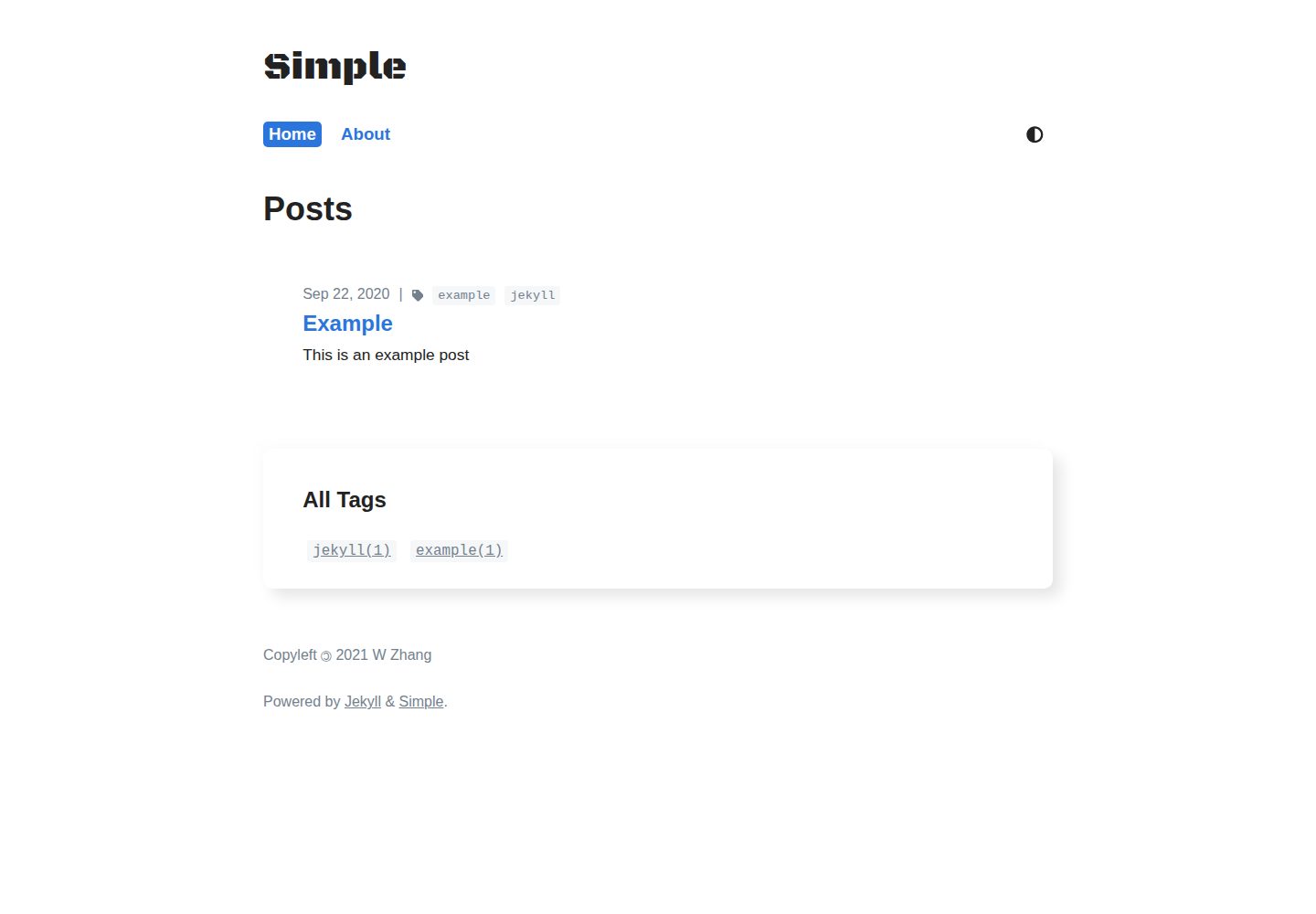
提供 default、home、post、tagpage 四种布局
Jekyll博客
simple-jekyll-theme — Jekyll 博客模板
作者 WeixuanZ
一个面向博客的极简 Jekyll 主题,支持 GitHub Pages,包含深色模式、标签页、Ajax 分页、动态目录与代码复制按钮。
看看你的网站会是什么样
浏览真实页面截图,比较内容排版与手机效果。点击下方缩略图切换,放大查看整页细节。
全部页面与视图 3
截图用于了解视觉与布局,交互效果请以实际项目为准。
采集于 2026-10-02查看来源
值得关注的模板亮点
从已有项目资料中,快速了解它的特点。
支持深色模式与过渡动画,移动端适配
标签系统与排序标签云,配合 Python 脚本生成标签页
Ajax 分页、动态目录、代码块复制按钮
内置 RSS Feed、SEO 与 Google Tag Manager 支持
兼容 GitHub Pages,也可通过 gem 或 jekyll-remote-theme 使用
模板详细介绍
simple-jekyll-theme 是作者为自己的博客 https://weixuanz.github.io 创建的极简 Jekyll 主题,仓库是站点主题部分的精简克隆,去掉了与主题无关的提交并做了通用化调整。主题提供 default、home、post、tagpage 四个布局,首页支持分页并可在文章列表上方注入自定义内容,文章支持标签、目录、MathJax 与代码复制按钮。
主题兼容 GitHub Pages,因此无法使用 Jekyll 的标签插件,作者提供了基于 Python 的 scripts/tag_generator.py 生成标签页,也可以手动在 ./tag/ 下创建对应 .md 文件。使用 gem 方式安装时,_config.yml 只会复制键值对,插件等配置需要从仓库默认配置中手动复制。
主题不包含评论系统与 Algolia 搜索,README 指向作者另外的仓库 WeixuanZ/utterances 与 WeixuanZ/search。图片懒加载依赖 lazysizes,需使用 data-src 并添加 lazyload 类。图标默认使用内联 SVG,也可配置 Font Awesome Kit 改用 <i />。
Jekyll博客
适合你的项目吗?
适用场景
- 搭建个人博客并托管在 GitHub Pages
- 需要标签归档与分页的文章列表
- 希望文章内提供目录导航和代码复制功能
- 需要深色模式与移动端阅读体验的博客站点
适合人群
- 使用 Jekyll 写博客的个人开发者
- 偏好极简排版与较少前端依赖的站点
- 需要 GitHub Pages 兼容方案的用户
- 愿意通过复制文件覆盖默认样式进行定制的用户
上手与定制指南
结合仓库当前版本的说明,按下面的资料检查内容、配置与运行要求。
- 1
GitHub Pages 用户建议 fork 仓库并重命名为 <username>.github.io,再按 Development 部分配置
- 2
使用 gem 方式需在 Gemfile 添加 gem "simple-jekyll-theme" 并执行 bundle,然后在 _config.yml 设置 theme: simple-jekyll-theme
- 3
使用 jekyll-remote-theme 时需完整复制默认 _config.yml,因为只有键值对会被预配置
- 4
分页要求首页文件为 .html 而非 .md,并设置 permalink: pretty
- 5
标签页可用 scripts/tag_generator.py 生成,或手动在 ./tag/ 下创建对应 .md 文件
授权与来源资料
使用条件与限制
免费使用 · 保留许可声明本次收录的是公开仓库中采用 MIT 许可的免费版本;免费范围为该版本代码,不代表外部服务或第三方素材免费。
使用时需要遵守
- 允许免费使用、修改、商用和分发该版本代码。
- 分发代码副本或实质性部分时,保留原作者版权声明和完整 MIT 许可声明。
- 代码按现状提供;担保与责任限制以原许可证及适用法律为准。
额外费用与待核对事项
- 若覆盖默认页脚,需在页脚保留指向该仓库的链接(署名要求)。
- 默认内联 SVG 图标来自 Font Awesome,采用 CC BY 4.0 许可,需保留署名;该许可与主题代码的 MIT 许可不同。
- 启用 Google Analytics 需通过 Google Tag Manager,并配置 google-tag-manager-id,属于外部服务。
- 使用 Font Awesome Kit 需在 fontawesome.com 注册获取 kit 标识,属于外部服务账号。
- 使用 gem 方式时,标签生成脚本需另行下载,不包含在 gem 中。
- gem 或 remote-theme 方式下,插件等配置不会自动复制,需手动从仓库默认 _config.yml 复制。
- 演示图片、字体、图标及其他第三方素材需按各自许可核对,不能仅凭代码的 MIT 许可判断。
- 域名、托管、数据库、支付或 AI 等外部服务可能另外收费。
查看原文依据
Permission is hereby granted, free of charge
许可证原文
Please link to this repository in the footer if you overwrite the default one.
README 原文
By default, svg icons used (in `./_includes/icons.html`) are from Font Awesome, which are licensed under the [Creative Commons Attribution 4.0 International license](https://creativecommons.org/licenses/by/4.0/). No modifications were made.
README 原文
You can add Google Analytics through Google Tag Manager, add the following to your `_config.yml`:
README 原文
You can register for a free kit at https://fontawesome.com.
README 原文
You will need to download it separately if you are using the gem approach, perhaps using:
README 原文
https://github.com/WeixuanZ/simple-jekyll-theme/blob/master/LICENSE.mdhttps://github.com/WeixuanZ/simple-jekyll-theme/blob/master/README.mdyou may need to copy other values (e.g. plugins) from the default `_config.yml` in this repository manually.
README 原文
DeepSeek 根据仓库许可证和 README 整理 ·2026-10-02。结果仅覆盖已读取资料,依赖、图片、字体及后续条款变更以各自原文为准。
项目核对记录与介绍依据
模板资料
- 来源平台
- GitHub
- 资料与维护参考分
- 资料一般 · 68 / 100
- 技术栈
- Jekyll
- 网站类型
- 博客
这个分数如何计算
本站按许可资料(最高30分)、演示链接(12分)、预览图(10分)、Star数(15分)、记录的维护时间(15分)、描述完整度(8分)、功能记录(5分)和分类资料(5分)计算。它不是代码、安全或性能测试,也不是 Google 评分;有链接不代表已实测可用。
这个项目需要核对什么
- 记录的仓库更新时间
- 2021-04-19
- 截图检查日期
- 2026-10-02
已收录演示链接。请用你的内容与屏幕尺寸检查;有演示不代表表单、认证或支付已经可用。
目录记录的主要技术栈是 Jekyll。请通过依赖清单和锁文件核对实际版本与托管要求。这些说明基于收录资料,不代表代码审计或部署实测。
查看具体选型方法 →介绍的制作与核对状态
介绍由 AI 辅助整理目录与仓库资料。仓库作者不等于这篇介绍的审核者。
已完成服务器许可规则与 AI 来源核对;未经过人工编辑审核。
查看当时使用的来源资料
SHA-256: d28578c21281ff020703540e36e6deb0e32003035cb86f82ee74687557e6bd03
2026-10-02T21:41:26.525Z
来源文件 / 仓库
<p align="center">
<a aria-label="build" href="https://github.com/WeixuanZ/simple-jekyll-theme/actions" target="_blank">
<img alt="GitHub Workflow Status" src="https://img.shields.io/github/workflow/status/weixuanz/simple-jekyll-theme/Gem%20Publish?style=flat-square">
</a>
<a aria-label="version" href="https://github.com/WeixuanZ/simple-jekyll-theme/blob/master/CHANGELOG.md">
<img alt="Version" src="https://img.shields.io/github/package-json/v/weixuanz/simple-jekyll-theme?style=flat-square">
</a>
<a aria-label="license" href="#license" target="_blank">
<img alt="License: MIT" src="https://img.shields.io/github/license/weixuanz/simple-jekyll-theme?style=flat-square">
</a>
</p>
A minimal Jekyll theme created for my blog - https://weixuanz.github.io.
* GitHub Pages compatible
* Optimised for speed (perfect score on PageSpeed Insight):
* No JQuery
* Minified HTML, CSS and JS
* Asynchronous loading of non-critical CSS
* Image lazy-loading
* And more...
* Dark mode support, with animated transition
* Mobile friendly
* Tag system, with sorted tag clouds
* Ajax pagination
* Dynamic TOC
* Code listings with copy button
* RSS Feed and SEO
* Google Tag Manager
<p align="center">
<a href="https://weixuanz.github.io/simple-jekyll-theme"><img alt="theme screenshot" src="/screenshot.png" width="400"></a>
</p>
---
This repository is a clone of that for my website, with commits not related to the theme stripped out, also with modifications for generalisation. For the commenting system (not included in this theme), check out [WeixuanZ/utterances](https://github.com/WeixuanZ/utterances). For Algolia search integration, [WeixuanZ/search](https://github.com/WeixuanZ/search) may be of interest.
* [Installation](#installation)
* [Usage](#usage)
* [Metadata](#metadata)
* [Navigation](#navigation)
* [Google Analytics \(optional\)](#google-analytics-optional)
* [Font Awesome Kit \(optional\)](#font-awesome-kit-optional)
* [Layouts](#layouts)
* [Homepage](#homepage)
* [Blog Posts and Tag Pages](#blog-posts-and-tag-pages)
* [Customising](#customising)
* [Contributing](#contributing)
* [Development](#development)
* [License](#license)
## Installation
> If you are hosting your site on GitHub Pages, fork this repository and follow the [Development](#development) setup **instead**, and rename it to `<username>.github.io`.
>
> Alternatively, you can use `remote_theme: weixuanz/simple-jekyll-theme` by including a whitelisted gem called _jekyll-remote-theme_ in your `_config.yml`, [more details here](https://docs.github.com/en/free-pro-team@latest/github/working-with-github-pages/adding-a-theme-to-your-github-pages-site-using-jekyll#adding-a-jekyll-theme-in-your-sites-_configyml-file). Note that you will need to include the default `_config.yml` **entriely**, since no configuration will be copied.
If you are not using GitHub pages, follow along. Add this line to your Jekyll site's `Gemfile`:
```ruby
gem "simple-jekyll-theme"
```
And then execute:
```bash
$ bundle
```
## Usage
Add this line to your Jekyll site's `_config.yml`:
```yaml
theme: simple-jekyll-theme
```
### Metadata
Set the keys shown below with desired values:
```yaml
permalink: pretty
title: Simple
author: W Zhang
tagline: "A minimal theme for blogs"
description: "Theme for my personal blog https://weixuanz.github.io"
url: "https://weixuanz.github.io/simple-jekyll-theme" # no "/" at the end
lang: en
paginate: 5 # number of posts displayed on each page
```
Please note that since only key-value pairs in `_config.yml` are supported for pre-configuring, **you may need to copy other values (e.g. plugins) from the default `_config.yml` in this repository manually.** This behaviour is not consistent betweenn the gem and _jekyll-remote-theme_ approaches. If something is not showing up, copy the entire default `_config.yml`. More informationn at [pre-configuring theme-gems](https://jekyllrb.com/docs/themes/#pre-configuring-theme-gems40).
> The `_config.yml` in this repository cannot purely contain key-value pairs because of the demo website.
#### Navigation
Add names and paths under the `navigation` key in `_config.yml` to specify links in the navigation bar:
```yaml
navigation:
- name: Home
link: /
- name: About
link: /about/
```
Note that the default permalink setting is `pretty`, you need to include `permalink: pretty` in `_config.yml`, and use the corresponding format when specifying `navigation`.
#### Google Analytics (optional)
You can add Google Analytics through Google Tag Manager, add the following to your `_config.yml`:
```yaml
google-tag-manager-id: GTM-xxxxxx
```
#### Font Awesome Kit (optional)
You can use the Font Awesome Kit instead of using the default hardcoded svg icons. This is useful if you want to include more icons than the ones defined in `./_includes/icons.html`. You can register for a free kit at https://fontawesome.com.
```yaml
font-awesome-kit: xxxxxxxxxx
```
If the above is specified in `_config.yml`, svg icon definitions will not be included, and `<i />` will be used.
### Layouts
The theme provides four layouts:
* `default.html` — The base layout that lays the foundation for subsequent layouts, can be used for standalone pages.
* `home.html` — The layout for your landing-page / home-page / index-page. [[More Info](#homepage)]
* `post.html` — The layout for your posts.
* `tagpage.html` — The layout for your tag pages.
**Note that you would have to include the corresponding font-matter to specify the layout, since Jekyll’s default settings cannot be overridden by a theme-config.**
#### Homepage
Add the following to `index.html` of your site:
```yaml
---
layout: home
title: Home
pagination:
enabled: true
---
```
Please note that for pagination to work, the index file must be in `.html` instead of `.md`.
All content from the file (if there's any) will be injected above the generated post list by the `home` layout. This will allow you to include non-posts related content to be published on the landing page.
#### Blog Posts and Tag Pages
Name your blog posts as `yyyy-mm-dd-name.md` and put them in `./_posts/`. Some important front matter configurations are listed below:
```yaml
---
layout: post
title: Example
author: W Zhang
description: This is an example post
tag: [example, jekyll]
toc: true
mathjax: true
---
```
A rather unfortunate result of supporting GitHub Pages is that the fantastic Jekyll tag gems cannot be used. I wrote a Python script `./scripts/tag_generator.py` based on [Long Qian's fantastic solution](https://longqian.me/2017/02/09/github-jekyll-tag/). You will need to download it separately if you are using the gem approach, perhaps using:
```bash
wget https://raw.githubusercontent.com/WeixuanZ/simple-jekyll-theme/master/scripts/tag_generator.py
```
You can use the provided `./scripts/pre-commit` git hook for automatic execution, or use `yarn run tag` if you cloned this repository.
On the other hand, if you prefer doing it manually, you simply need to create `.md` files under `./tag/`. For example, `./tag/jekyll.md` for a tag named _jekyll_ may contain the following:
```yaml
---
layout: tagpage
title: "Tag: jekyll"
tag: jekyll
---
```
Other than `blockquotes`, this theme also provides `.hint` and `.danger`, with blue and red left border respectively. They are implemented as classes on top of `blockquotes`, you can use the Kramdown syntax:
```markdown
> This is a hint
{:.hint}
```
The theme also includes the [lazysizes](https://github.com/aFarkas/lazysizes) package, to enable lazy-loading of images, use `data-src` instead of `src`, and add `lazyload` class.
```html
<figure>
<img data-src="/assets/images/example.png" class="lazyload">
<figcaption>Example figure</figcaption>
</figure>
```
### Customising
To override the default structure and style, simply create the concerned directory at the root of your site, copy the file you wish to customise to that directory, and then edit the file.
The files you may be particularly interested in:
```
.
├── _includes
│ ├── footer.html
│ ├── head.html -> <head /> in default layout
│ ├── custom-head.html -> placeholder for adding more metadata to <head />, e.g. png favicons
│ └── comment.html -> placeholder for commenting system
├── _sass
│ ├── blog.scss -> critical and non-critical styles related to blog posts, e.g. toc
│ ├── code.scss
│ ├── definitions.scss -> colour, font and mixin definitions
│ ├── main.scss -> critical styles
│ ├── mobile.scss -> media queries
│ └── print.scss
└── assets
└── js
├── main.js ┬> note that the minified versions xxxx.min.js are used
└── pagination.js ┘
```
## Contributing
Bug reports and pull requests are welcome on GitHub at https://github.com/weixuanz/simple-jekyll-theme. This project is intended to be a safe, welcoming space for collaboration, and contributors are expected to adhere to the [Contributor Covenant](https://contributor-covenant.org) code of conduct.
## Development
To set up your environment to develop this theme, run `bundle install` and `yarn install`.
To test your theme, run `bundle exec jekyll serve` and open your browser at `http://localhost:4000`. This starts a Jekyll server using the theme. Add pages, documents, data, etc. like normal to test the theme's contents. As you make modifications to the theme and content, the site will regenerate and you should see the changes in the browser after a refresh, just like normal.
I recommend using Google's Closure-compiler for minifying JavaScripts. If you have Homebrew installed, it's simply `brew install closure-compiler`. For automatic execution, you can also use the provided git hook.
When the theme is released, only the files in `_layouts`, `_includes`, `_sass` and `assets` tracked with Git will be bundled. To add a custom directory to the theme-gem, please edit the regexp in `simple-jekyll-theme.gemspec` accordingly.
## License
The theme is available as open source under the terms of the [MIT License](/LICENSE.md). Please link to this repository in the footer if you overwrite the default one.
By default, svg icons used (in `./_includes/icons.html`) are from Font Awesome, which are licensed under the [Creative Commons Attribution 4.0 International license](https://creativecommons.org/licenses/by/4.0/). No modifications were made.
Amazing open-source code used:
* Source-codes included in this gem:
* [Monokai theme colour definitions](https://gist.github.com/asaaki/1007420)
* [Theme switching script by Koos Looijesteijn](https://gist.github.com/kslstn/20f654fd27eb29619040c74fa6526919) (_Modified_)
* [jekyll-compress-html](https://github.com/penibelst/jekyll-compress-html) MIT
* [jekyll-toc](https://github.com/allejo/jekyll-toc) MIT (_Modification merged upstream_)
* Dependencies:
* JS libraries:
* [Clipboard.js](https://clipboardjs.com)
* [lazysizes](https://github.com/aFarkas/lazysizes)
* Jekyll plug-ins:
* [jekyll-seo-tag](https://github.com/jekyll/jekyll-seo-tag)
* [jekyll-sitemap](https://github.com/jekyll/jekyll-sitemap)
* [jekyll-feed](https://github.com/jekyll/jekyll-feed)
看看同类模板
对比同技术栈与用途的模板,找到更适合的视觉与内容结构。

al-folio
al-folio 是一个面向学者与研究人员的 Jekyll 作品集主题,设计简洁、响应式,适合搭建个人学术主页。
Jekyll · 作品集

minimal-mistakes
:triangular_ruler: Jekyll theme for building a personal site, blog, project documentation, or portfolio.
Jekyll · 作品集

Beautiful Jekyll
Beautiful Jekyll 是一个在 Jekyll 生态中经过长期打磨的博客主题,由 Dean Attali 维护,自 2015 年起积累了超过 5 万用户。
Jekyll · 博客

jekyll-TeXt-theme
💎 🐳 A super customizable Jekyll theme for personal site, team site, blog, project, documentation, etc.
Jekyll · 博客

startbootstrap-clean-blog-jekyll
A Jekyll version of the Clean Blog theme by Start Bootstrap
Jekyll · 博客

So Simple
So Simple 是 Michael Rose 开发的 Jekyll 主题,定位清晰:为文字和图片提供一个干净、可读性强的展示框架。
Jekyll · 博客