Paper-texture visuals: a single accent color, quiet grays, serif headings, and generous whitespace, with two independently switchable palettes, ink and fresh
AstroBlog
astro-theme-ink — Astro Blog Template
By willimt
A static personal blog theme built with Astro and UnoCSS, using paper-texture colors, serif headings, and whitespace-driven layout. It includes pagination, tags, archives, RSS, site search, light/dark themes, and optional Waline comments.
Explore the design
Compare the page layouts and mobile experience. Open any screenshot for a closer look.
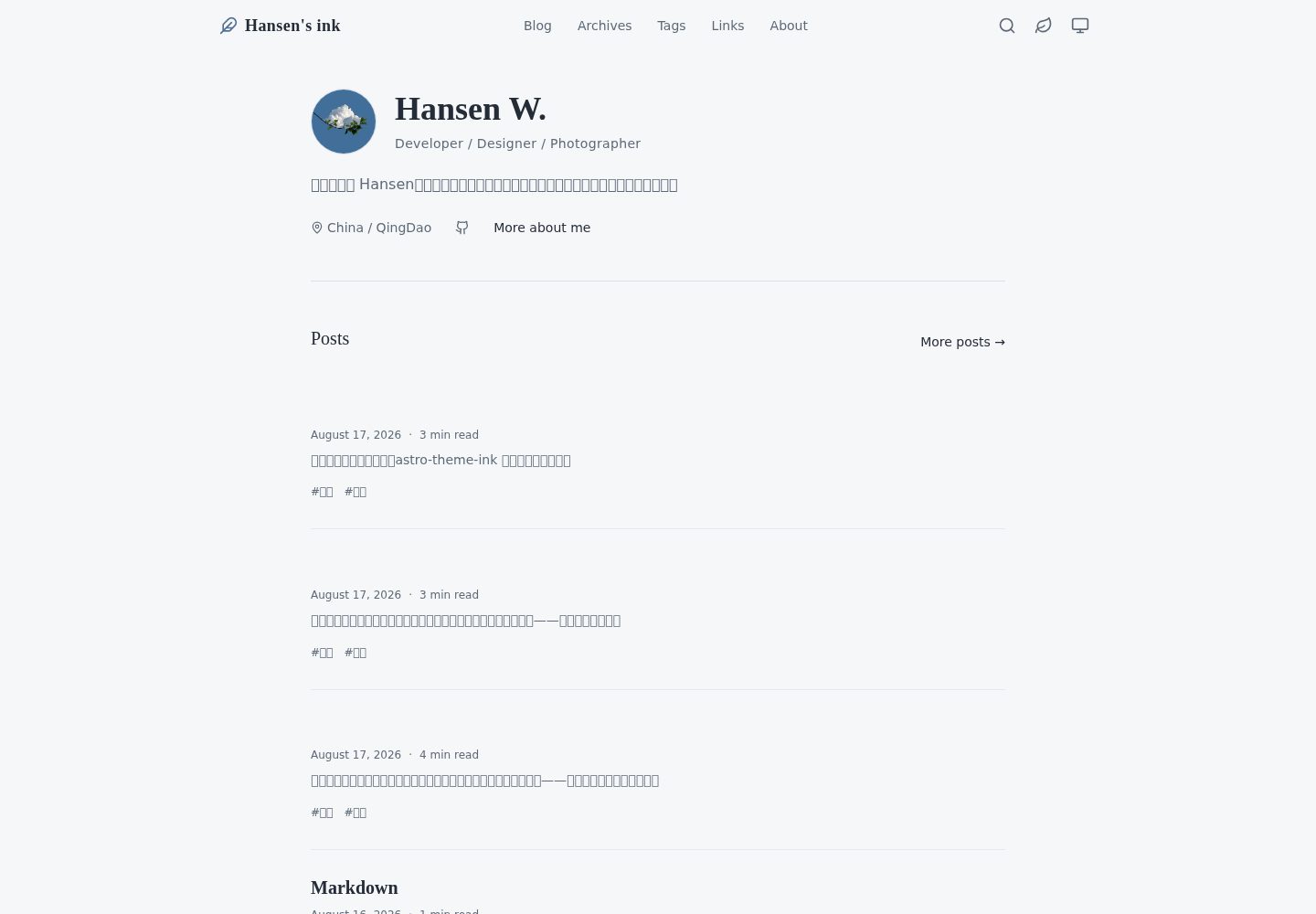
Desktop homepage1 / 3
Desktop captureTop of page
Actual screenshot captured by the server browser.
All pages & views 3
Screenshots show visual appearance; interactive behavior may differ.
Recorded 2026-09-30View source
What stands out
A quick read of the recorded project description.
Complete blog structure: paginated list, tags, yearly archives, RSS, sitemap, and a local search index generated at build time and queried in the browser
Reading experience components: desktop sticky table of contents, mobile table of contents, reading progress, reading time estimation, and previous/next links
Markdown enhancements: KaTeX math formulas, Mermaid diagrams, Shiki highlighting, line highlighting and diff, code titles, copy buttons, and automatic collapsing beyond 15 lines
Optional Waline comments and view counts: comments and counts are independent settings that can be enabled or disabled separately, and comments load only when near the viewport
Theme sync tooling: the theme:sync command or a local visual panel can sync theme updates to a separate blog repository while preserving posts and personal configuration
Template Details
astro-theme-ink is a static personal blog theme built with Astro and UnoCSS. It follows a paper-texture direction: a single accent color, quiet grays, generous whitespace, and serif headings, suited to long-form reading. The site generates pure static files at build time and can be deployed to any static host.
For content and pages, the theme provides a paginated blog list, tag pages, yearly archives, RSS and sitemap, plus a lightweight search index generated at build time and queried in the browser, with no third-party search service. The homepage is configuration-driven and can show sections such as recent posts, education history, skills, a tag cloud, and friend links. Post pages include a desktop sticky table of contents, a mobile table of contents, reading progress, reading time estimation, and previous/next links.
For writing and presentation, Markdown supports KaTeX math formulas, Mermaid diagrams, Shiki code highlighting, line highlighting and diff, code titles, copy buttons, and automatic collapsing beyond 15 lines. Local cover images generate responsive images, and body images lazy-load and support click-to-zoom. Comments and view counts use optional Waline; comments and counts are two independent settings that can be enabled separately.
For appearance and configuration, three modes are available: light, dark, and follow system, applied before first paint. Two palettes, warm ink and cool fresh, can be switched independently. Site title, author, navigation, homepage content, footer, posts per page, search toggle, Waline endpoint, and more are centralized in the typed src/site-config.ts. Design tokens such as colors, fonts, and border radius are in tokens.css, while the UnoCSS preset and typography are in uno.config.ts.
Limitations and notes: Node.js 22.12.0 or newer is required, and the repository pins pnpm 10.20.0. Comments, view counts, and similar features depend on an external Waline service, which you must deploy yourself or provide an endpoint for. When the theme and the real blog are in separate repositories, the theme:sync script can synchronize them; preview before applying, and handle REVIEW or CONFLICT results.
AstroBlog
Is it right for your project?
Use Cases
- Building a personal blog focused on long-form writing that needs quiet, reading-oriented typography and paper-texture colors
- Wanting a fully static blog that can be deployed after build to GitHub Pages, Vercel, Netlify, Cloudflare Pages, and other static hosts
- Technical writing scenarios that need math formulas, flowcharts, or code blocks with highlighting and collapsing in articles
- Independent blogs that want optional comments and view counts and do not rely on a third-party search service
- Using the theme as an upstream repository and syncing it to the actual blog repository via theme:sync while preserving posts, personal assets, and deployment configuration
Suitable For
- Individual bloggers familiar with Astro and Markdown who are willing to adjust site content through configuration files
- Developers who prefer static sites and want to choose their own static hosting platform
- Writing-oriented sites that need basic blog features such as tags, archives, RSS, and site search
- Developers who can accept Node.js 22.12.0 or newer and the pnpm toolchain
- Users who want external services such as comments and view counts to be integrated on demand rather than bound by default
Getting started & customization
Use these recorded setup notes alongside the repository instructions for your chosen version.
- 1
Requires Node.js 22.12.0 or newer; the repository pins pnpm 10.20.0. After installing dependencies, run pnpm dev, which listens on http://localhost:4321 by default
- 2
Site title, author, navigation, homepage sections, footer, posts per page, search toggle, and Waline endpoint are configured centrally in src/site-config.ts
- 3
During deployment, set the site address and subpath via the SITE_URL and BASE_PATH environment variables; SITE_URL affects sitemap, canonical, Open Graph, and RSS, and the GitHub Pages workflow sets both automatically
- 4
Comments and view counts use optional Waline and require you to provide an endpoint; they are independent settings, and leaving them empty disables the corresponding feature
- 5
When the theme and blog are in separate repositories, first preview with pnpm theme:sync --target ../Blog, then apply with --apply; after applying, run pnpm test and pnpm build, and commit .theme-sync.json
License & source material
Usage conditions & limitations
Free to use · keep license noticeThis entry covers the free version in the public repository under the MIT license; the free scope is the code of that version and does not mean external services or third-party assets are free.
Must comply with when using
- You may use, modify, commercialize, and distribute the code of this version for free.
- When distributing copies or substantial portions of the code, retain the original author's copyright notice and the full MIT license notice.
- The code is provided as is; warranties and limitations of liability are governed by the original license and applicable law.
Additional costs & items to verify
- Comments, post view counts, and site-wide visit counts are optional features that require you to deploy or provide a Waline service endpoint; leaving the corresponding endpoint empty disables the feature, and no built-in backend is provided.
- Running and building require Node.js 22.12.0 or newer and pnpm (the repository pins pnpm 10.20.0); the project cannot be built if this toolchain requirement is not met.
- When deploying to a host other than GitHub Pages, you must set SITE_URL yourself (it affects sitemap, canonical, Open Graph, and RSS); if the site is under a subpath, you must also set BASE_PATH.
- Shiki code block-related plugins and icon files are ported from astro-theme-pure and are subject to Apache-2.0; redistributing these parts requires complying with that license's attribution and other conditions, not only MIT.
- Demo images, fonts, icons, and other third-party assets must be checked against their respective licenses and cannot be judged solely by the code's MIT license.
- External services such as domains, hosting, databases, payments, or AI may incur additional charges.
View Original Text Basis
Permission is hereby granted, free of charge
Original License Text
Optional Waline comments, per-post page views and a footer-wide visit counter
Original README
Node.js 22.12.0 or newer (required by Astro 7)
Original README
The site URL and base path are read from the `SITE_URL` and `BASE_PATH` environment variables
Original README
https://github.com/willimt/astro-theme-ink/blob/main/LICENSEhttps://github.com/willimt/astro-theme-ink/blob/main/README.mdThe Shiki code-block pipeline in `src/plugins/shiki-custom-transformers.ts`, `src/plugins/shiki-official` and `public/icons/code.svg` is ported from that project under Apache-2.0.
Original README
Compiled by DeepSeek based on repository license and README ·2026-10-01. Results only cover the materials read; dependencies, images, fonts, and subsequent term changes are subject to their respective original texts.
Project checks & description sources
Template Information
- Source platforms
- GitHub
- Documentation and maintenance reference score
- More documented · 83 / 100
- Technologies
- Astro
- Website type
- Blog
How this score is calculated
Our heuristic uses license records (up to 30), a demo link (12), a preview (10), stars (15), recorded maintenance (15), description completeness (8), feature records (5) and classification data (5). It is not a code, security or performance test, or a Google score. A link does not establish tested functionality.
What to verify for this project
- Repository update recorded
- 2026-09-28
- Screenshot last checked
- 2026-10-01
A demo link is listed. Check it with your own content and viewport sizes; its presence does not confirm that forms, authentication or payments work.
The catalog identifies Astro as the primary stack. Check the actual dependency manifest and lockfile for versions and hosting requirements. These notes use recorded metadata, not a code audit or a deployment test.
Use a selection guide →How this description was prepared
AI-assisted description based on catalog records and repository material. Repository authors are not automatically the reviewers of this description.
Automatically checked against source and license rules; no manual editorial review.
Inspect the recorded source material
SHA-256: 56ec50740b0e16373ed66ebed1ef61302e21341e95a6c1e8c80d993b7f49349b
2026-10-01T14:46:40.079Z
Source file / repository# astro-theme-ink 墨
[English](./README.md) · [简体中文](./README.zh-CN.md)
A warm, paper-feel personal blog theme built with [Astro](https://astro.build) and [UnoCSS](https://unocss.dev). It keeps the palette quiet, gives headings a serif voice, and leaves enough room for long-form writing to breathe.
The site is fully static. Build it once, then serve the generated files from any static host.
## Screenshots
<p>
<img src="public/images/home-ink.png" alt="Home page in the ink palette" width="49%" />
<img src="public/images/home-fresh.png" alt="Home page in the fresh palette" width="49%" />
</p>
<p>
<img src="public/images/blog-content-ink.png" alt="Article page in the ink palette" width="49%" />
<img src="public/images/blog-content-fresh.png" alt="Article page in the fresh palette" width="49%" />
</p>
<p>
<img src="public/images/blog-index.png" alt="Blog index page" width="32%" />
<img src="public/images/about.png" alt="About page" width="32%" />
<img src="public/images/links.png" alt="Friend links page" width="32%" />
</p>
## What is included
- Blog pages with pagination, tags, yearly archives, RSS and sitemap
- A small, build-time search index searched in the browser; no third-party search service
- Light, dark and system themes, applied before first paint; warm ink and cool fresh palettes can be switched independently
- A configuration-driven home page with recent posts, education, skills, tag cloud and friend-link sections
- Sticky desktop table of contents, mobile table of contents, reading progress, reading-time estimates, and previous/next links
- Responsive local cover images, lazy-loaded article images, and click-to-zoom image viewing
- Markdown extras: KaTeX math, Mermaid diagrams, Shiki highlighting, line highlights/diffs, code titles, copy buttons and automatic folding after 15 lines
- Optional Waline comments, per-post page views and a footer-wide visit counter
- Canonical URLs, Open Graph and Twitter metadata, JSON-LD BlogPosting data, RSS full text and sitemap generation
## Requirements
- Node.js 22.12.0 or newer (required by Astro 7)
- pnpm; this repository is pinned to pnpm 10.20.0
## Run it locally
```bash
pnpm install
pnpm dev
```
The development server listens on <http://localhost:4321> by default.
For the day-to-day blogging and release workflow, see the [detailed blog guide](./docs/blog-guide.md). It explains the separation between a theme and a real blog, configuration, post URLs, captions, code and math, drafts, release checks and theme synchronization.
| Command | Purpose |
| ---------------------- | --------------------------------------------------------------------- |
| `pnpm dev` | Start the local development server |
| `pnpm check` | Run Astro and TypeScript diagnostics |
| `pnpm build` | Run diagnostics, then create the static site in `dist` |
| `pnpm test` | Run the Node regression suite |
| `pnpm preview` | Preview the built site locally |
| `pnpm sync` | Refresh Astro-generated types and content metadata |
| `pnpm format` | Format the repository with Prettier; this command writes files |
| `pnpm optimize:avatar` | Create `public/avatar.webp` from `public/avatar.png` (256 × 256 WebP) |
## Sync the theme into a blog
When the theme and the real blog live in separate repositories, always preview first and then apply the approved changes:
```powershell
cd D:/Code/astro-theme-ink
pnpm theme:sync --target ../Blog
pnpm theme:sync --target ../Blog --apply
```
The first command does not modify the blog. If you are already in the blog directory, explicitly name the theme source instead:
```powershell
pnpm theme:sync --source ../astro-theme-ink --target .
pnpm theme:sync --source ../astro-theme-ink --target . --apply
```
Run `pnpm test` and `pnpm build` in the blog after applying. Commit `.theme-sync.json` with the update. The script preserves posts, personal assets, domains and deployment settings; resolve `REVIEW` or `CONFLICT` results with the [sync guide](./docs/theme-sync.md).
For a local visual panel instead of the command line, run:
```powershell
pnpm theme:sync:ui
```
It opens `http://127.0.0.1:4175`, where you can set both directories, preview changes and explicitly apply them. The server listens only on the local machine. Use `--port 4300` to change the port or `--no-open` to print the address without opening a browser.
## Configure the site
Core site settings live in [src/site-config.ts](./src/site-config.ts). The file is typed, and most day-to-day changes belong there rather than in a component.
| Section | Controls |
| ---------------- | ---------------------------------------------------------------------------------------------- |
| `site` | Title, author, description, language, favicon, avatar, social image, default palette and theme |
| `header.menu` | Header navigation |
| `home` | Hero content, recent-post count, education, skills, and optional tag/friend sections |
| `footer` | Copyright text, footer links and social links |
| `blog.pageSize` | Number of posts per blog page |
| `search.enabled` | Whether the search entry point and search UI are shown |
| `pageview` | Waline endpoint for article views and the optional site-wide counter |
| `comment` | Waline endpoint for comments |
| `friends` | Items displayed on the `/links` page and, when enabled, on the home page |
Comments and counters are deliberately separate settings. Point both at the same Waline server if you want both features; leave either endpoint empty to disable that feature. Comments are loaded only when their section approaches the viewport.
The pages under [src/pages](./src/pages) and the prose on the About page remain normal Astro files, so they can be tailored without introducing a theme-specific configuration language.
`home.recentPosts` displays at most 5 posts; set it to `0` to hide the section. Footer quotes are on by default. Set `footer.showQuote` to `false` to hide them. Quotes are selected for the build date and rendered directly into HTML, without a client-side layout shift. They change only when the static site is rebuilt.
## Write a post
Add a Markdown file under [src/content/blog](./src/content/blog):
```markdown
---
title: 'Post title'
description: 'A concise summary for lists and metadata'
publishDate: 2026-08-17
updatedDate: 2026-08-18 # optional
language: 'English' # optional
heroImage: # optional local asset, relative to this file
src: ../../assets/cover.png
alt: 'Cover description'
tags: [astro, writing]
draft: false # optional; hidden from lists and search, still reachable by URL
comment: true # optional; per-post comment switch
---
Write in Markdown.
```
Folder posts work too: a file at `src/content/blog/notes/index.md` is published at `/blog/notes` rather than `/blog/notes/index`.
Use a local relative asset for `heroImage` so Astro can generate responsive images at build time. Images in the Markdown body are lazy-loaded and can be opened in the built-in lightbox. For a standalone Markdown image, its `alt` text is also shown as the caption, so make it descriptive.
````markdown
Inline math: $E = mc^2$
$$
\int_0^1 x^2\,dx = \frac{1}{3}
$$
```mermaid
flowchart LR
Write --> Build --> Publish
```
````
KaTeX is available on post pages. Mermaid is fetched and rendered in the browser only for a post that contains a Mermaid fence.
## Customize the look
- [src/assets/styles/tokens.css](./src/assets/styles/tokens.css): palettes, fonts, radii and other design tokens
- [uno.config.ts](./uno.config.ts): UnoCSS presets, theme mapping and typography
- [src/assets/styles/global.css](./src/assets/styles/global.css): global layout, code-block and motion rules
- [src/assets/styles/waline.css](./src/assets/styles/waline.css): Waline import and theme overrides
## Project layout
```
src/
├── site-config.ts # typed site and home-page settings
├── content.config.ts # blog collection schema
├── assets/styles/ # tokens and global/Waline styles
├── components/ # navigation, cards, TOC, comments and utilities
├── layouts/ # base and post layouts
├── pages/ # home, blog, tags, archives, links, about, search, RSS
├── plugins/ # Markdown image and Shiki transforms
├── utils/ # URLs, collections, reading time and theme helpers
└── content/blog/ # Markdown posts
```
## Deploy
`pnpm build` produces a static `dist` directory. It can be deployed to GitHub Pages, Vercel, Netlify, Cloudflare Pages, or any host that serves static files.
The site URL and base path are read from the `SITE_URL` and `BASE_PATH` environment variables (see [astro.config.ts](./astro.config.ts)). The bundled GitHub Pages workflow sets both automatically. On other hosts, set `SITE_URL` to your production origin — it feeds the sitemap, canonical URLs, Open Graph URLs and RSS — and set `BASE_PATH` only when the site lives under a sub-path such as `/blog/`.
## Credits and license
The design takes inspiration from [astro-theme-pure](https://github.com/cworld1/astro-theme-pure) (Apache-2.0), while the theme itself is an independent implementation. The Shiki code-block pipeline in `src/plugins/shiki-custom-transformers.ts`, `src/plugins/shiki-official` and `public/icons/code.svg` is ported from that project under Apache-2.0. This repository is released under the [MIT License](./LICENSE).
Explore similar templates
Compare previews and descriptions within the same stack and category.

astrowind
AstroWind is a free, open-source Astro starter theme using Astro and Tailwind CSS, released under the MIT license.
Astro · Blog

astro-paper
AstroPaper is a minimal, responsive, accessible, and SEO-friendly Astro blog theme. Articles are stored as Markdown/MDX in src/content/posts/, with subdirectories affecting URLs.
Astro · Blog

fuwari
Fuwari is a static blog template built with Astro and Tailwind CSS for personal blogs. It manages posts as Markdown files in src/content/posts/, with frontmatter for title, date, description, cover, tags, categories, draft status, and language.
Astro · Blog

Firefly
Firefly is a clean personal blog theme forked from Astro and Fuwari, offering four background modes, single/double sidebar and list/grid layouts, Pagefind client-side full-text search, and a six-language UI.
Astro · Blog

astro-theme-cactus
Astro Cactus is an Astro-based blog and portfolio theme that uses Markdown/MDX content collections to manage posts, notes, and tags, with frontmatter type-checked by a schema.
Astro · Portfolio

astrofy
Astrofy is a free and open-source personal portfolio website template built with Astro and TailwindCSS, with built-in blog, CV timeline, project showcase, store, and RSS feed modules.
Astro · Portfolio