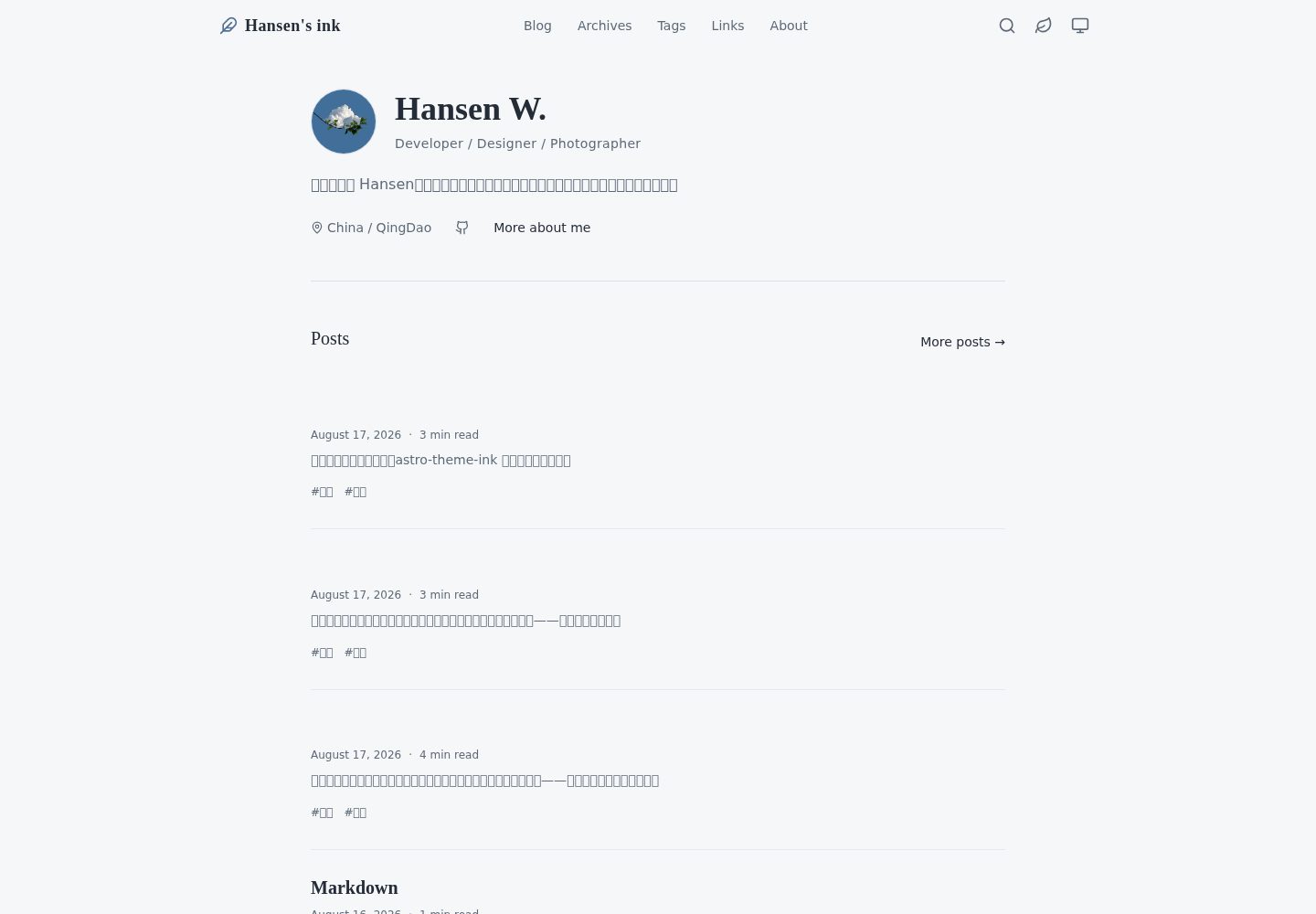
纸张质感视觉:单一强调色、安静灰色、衬线标题与充足留白,提供 ink 与 fresh 两套可独立切换的调色板
Astro博客
astro-theme-ink — Astro 博客模板
作者 willimt
基于 Astro 与 UnoCSS 的静态个人博客主题,采用纸张质感配色、衬线标题与留白排版,内置分页、标签、归档、RSS、站内搜索、深浅色主题与 Waline 评论等博客功能。
看看你的网站会是什么样
浏览真实页面截图,比较内容排版与手机效果。点击下方缩略图切换,放大查看整页细节。
全部页面与视图 3
截图用于了解视觉与布局,交互效果请以实际项目为准。
采集于 2026-09-30查看来源
值得关注的模板亮点
从已有项目资料中,快速了解它的特点。
完整博客结构:分页列表、标签、按年归档、RSS、sitemap,以及构建时生成、浏览器内查询的本地搜索索引
阅读体验组件:桌面端粘性目录、移动端目录、阅读进度、阅读时长估算与上一篇/下一篇链接
Markdown 增强:KaTeX 数学公式、Mermaid 图表、Shiki 高亮、行高亮与 diff、代码标题、复制按钮及超 15 行自动折叠
可选 Waline 评论与浏览量:评论和计数为独立设置,可分别启用或关闭,评论在接近视口时才加载
主题同步工具:theme:sync 命令或本地可视化面板可将主题更新同步到独立博客仓库,并保留文章与个人配置
模板详细介绍
astro-theme-ink 是一个用 Astro 和 UnoCSS 构建的静态个人博客主题,整体走纸张质感路线:单一强调色、安静的灰色、充足留白与衬线标题,适合长文阅读。站点在构建时生成纯静态文件,可部署到任意静态托管。
内容与页面方面,主题提供带分页的博客列表、标签页、按年归档、RSS 与 sitemap,以及一个构建时生成、在浏览器中查询的轻量搜索索引,不依赖第三方搜索服务。首页由配置驱动,可展示最近文章、教育经历、技能、标签云和友链等区块;文章页包含桌面端粘性目录、移动端目录、阅读进度、阅读时长估算和上一篇/下一篇链接。
写作与展示方面,Markdown 支持 KaTeX 数学公式、Mermaid 图表、Shiki 代码高亮、行高亮与 diff、代码标题、复制按钮以及超过 15 行自动折叠;本地封面图会生成响应式图片,正文图片懒加载并支持点击放大。评论与浏览量使用可选的 Waline,评论和计数是两个独立设置,可分别启用。
外观与配置方面,提供浅色、深色和跟随系统三种模式,并在首次绘制前应用;暖色 ink 与冷色 fresh 两套调色板可独立切换。站点标题、作者、导航、首页内容、页脚、每页文章数、搜索开关、Waline 端点等集中在类型化的 src/site-config.ts 中;配色、字体、圆角等设计令牌位于 tokens.css,UnoCSS 预设与排版在 uno.config.ts。
限制与注意:需要 Node.js 22.12.0 或更新版本,仓库固定使用 pnpm 10.20.0;评论、浏览量等依赖外部 Waline 服务,需自行部署或填写端点。主题与真实博客分仓时可用 theme:sync 脚本同步,先预览再应用,并需处理 REVIEW 或 CONFLICT 结果。
Astro博客
适合你的项目吗?
适用场景
- 搭建以长文写作为主的个人博客,需要安静、偏阅读向的排版与纸张质感配色
- 希望博客完全静态化,构建后部署到 GitHub Pages、Vercel、Netlify、Cloudflare Pages 等静态托管
- 需要在文章中写数学公式、流程图或带高亮与折叠的代码块的技术写作场景
- 希望评论与浏览量可选接入,且不依赖第三方搜索服务的独立博客
- 将主题作为上游仓库,通过 theme:sync 同步到实际博客仓库,同时保留文章、个人资源与部署配置
适合人群
- 熟悉 Astro 与 Markdown、愿意通过配置文件调整站点内容的个人博主
- 偏好静态站点、希望自行选择静态托管平台的开发者
- 需要标签、归档、RSS、站内搜索等基础博客功能的写作型站点
- 能接受 Node.js 22.12.0 以上与 pnpm 工具链的开发者
- 希望评论、浏览量等外部服务按需接入而非默认强绑定的用户
上手与定制指南
结合仓库当前版本的说明,按下面的资料检查内容、配置与运行要求。
- 1
环境要求 Node.js 22.12.0 或更新版本,仓库固定使用 pnpm 10.20.0;安装依赖后运行 pnpm dev,默认监听 http://localhost:4321
- 2
站点标题、作者、导航、首页区块、页脚、每页文章数、搜索开关与 Waline 端点等集中在 src/site-config.ts 中配置
- 3
部署时通过 SITE_URL 和 BASE_PATH 环境变量设置站点地址与子路径;SITE_URL 会影响 sitemap、canonical、Open Graph 与 RSS,GitHub Pages 工作流会自动设置两者
- 4
评论与浏览量使用可选的 Waline,需自行提供端点;两者是独立设置,留空即关闭对应功能
- 5
主题与博客分仓时,先用 pnpm theme:sync --target ../Blog 预览,再以 --apply 应用;应用后运行 pnpm test 与 pnpm build,并提交 .theme-sync.json
授权与来源资料
使用条件与限制
免费使用 · 保留许可声明本次收录的是公开仓库中采用 MIT 许可的免费版本;免费范围为该版本代码,不代表外部服务或第三方素材免费。
使用时需要遵守
- 允许免费使用、修改、商用和分发该版本代码。
- 分发代码副本或实质性部分时,保留原作者版权声明和完整 MIT 许可声明。
- 代码按现状提供;担保与责任限制以原许可证及适用法律为准。
额外费用与待核对事项
- 评论、文章浏览量与全站访问计数为可选功能,需自行部署或提供 Waline 服务端点;留空对应端点即关闭该功能,不提供内置后端。
- 运行与构建需要 Node.js 22.12.0 或更新版本,并使用 pnpm(仓库固定 pnpm 10.20.0),不满足该工具链要求则无法构建。
- 部署到非 GitHub Pages 主机时需自行设置 SITE_URL(影响 sitemap、canonical、Open Graph 与 RSS),站点位于子路径时还需设置 BASE_PATH。
- Shiki 代码块相关插件与图标文件移植自 astro-theme-pure,受 Apache-2.0 约束,再分发这些部分时需遵守该许可证的署名等条件,而非仅 MIT。
- 演示图片、字体、图标及其他第三方素材需按各自许可核对,不能仅凭代码的 MIT 许可判断。
- 域名、托管、数据库、支付或 AI 等外部服务可能另外收费。
查看原文依据
Permission is hereby granted, free of charge
许可证原文
Optional Waline comments, per-post page views and a footer-wide visit counter
README 原文
Node.js 22.12.0 or newer (required by Astro 7)
README 原文
The site URL and base path are read from the `SITE_URL` and `BASE_PATH` environment variables
README 原文
https://github.com/willimt/astro-theme-ink/blob/main/LICENSEhttps://github.com/willimt/astro-theme-ink/blob/main/README.mdThe Shiki code-block pipeline in `src/plugins/shiki-custom-transformers.ts`, `src/plugins/shiki-official` and `public/icons/code.svg` is ported from that project under Apache-2.0.
README 原文
DeepSeek 根据仓库许可证和 README 整理 ·2026-10-01。结果仅覆盖已读取资料,依赖、图片、字体及后续条款变更以各自原文为准。
项目核对记录与介绍依据
模板资料
- 来源平台
- GitHub
- 资料与维护参考分
- 资料较完整 · 83 / 100
- 技术栈
- Astro
- 网站类型
- 博客
这个分数如何计算
本站按许可资料(最高30分)、演示链接(12分)、预览图(10分)、Star数(15分)、记录的维护时间(15分)、描述完整度(8分)、功能记录(5分)和分类资料(5分)计算。它不是代码、安全或性能测试,也不是 Google 评分;有链接不代表已实测可用。
这个项目需要核对什么
- 记录的仓库更新时间
- 2026-09-28
- 截图检查日期
- 2026-10-01
已收录演示链接。请用你的内容与屏幕尺寸检查;有演示不代表表单、认证或支付已经可用。
目录记录的主要技术栈是 Astro。请通过依赖清单和锁文件核对实际版本与托管要求。这些说明基于收录资料,不代表代码审计或部署实测。
查看具体选型方法 →介绍的制作与核对状态
介绍由 AI 辅助整理目录与仓库资料。仓库作者不等于这篇介绍的审核者。
已完成服务器许可规则与 AI 来源核对;未经过人工编辑审核。
查看当时使用的来源资料
SHA-256: 56ec50740b0e16373ed66ebed1ef61302e21341e95a6c1e8c80d993b7f49349b
2026-10-01T14:46:40.079Z
来源文件 / 仓库# astro-theme-ink 墨
[English](./README.md) · [简体中文](./README.zh-CN.md)
A warm, paper-feel personal blog theme built with [Astro](https://astro.build) and [UnoCSS](https://unocss.dev). It keeps the palette quiet, gives headings a serif voice, and leaves enough room for long-form writing to breathe.
The site is fully static. Build it once, then serve the generated files from any static host.
## Screenshots
<p>
<img src="public/images/home-ink.png" alt="Home page in the ink palette" width="49%" />
<img src="public/images/home-fresh.png" alt="Home page in the fresh palette" width="49%" />
</p>
<p>
<img src="public/images/blog-content-ink.png" alt="Article page in the ink palette" width="49%" />
<img src="public/images/blog-content-fresh.png" alt="Article page in the fresh palette" width="49%" />
</p>
<p>
<img src="public/images/blog-index.png" alt="Blog index page" width="32%" />
<img src="public/images/about.png" alt="About page" width="32%" />
<img src="public/images/links.png" alt="Friend links page" width="32%" />
</p>
## What is included
- Blog pages with pagination, tags, yearly archives, RSS and sitemap
- A small, build-time search index searched in the browser; no third-party search service
- Light, dark and system themes, applied before first paint; warm ink and cool fresh palettes can be switched independently
- A configuration-driven home page with recent posts, education, skills, tag cloud and friend-link sections
- Sticky desktop table of contents, mobile table of contents, reading progress, reading-time estimates, and previous/next links
- Responsive local cover images, lazy-loaded article images, and click-to-zoom image viewing
- Markdown extras: KaTeX math, Mermaid diagrams, Shiki highlighting, line highlights/diffs, code titles, copy buttons and automatic folding after 15 lines
- Optional Waline comments, per-post page views and a footer-wide visit counter
- Canonical URLs, Open Graph and Twitter metadata, JSON-LD BlogPosting data, RSS full text and sitemap generation
## Requirements
- Node.js 22.12.0 or newer (required by Astro 7)
- pnpm; this repository is pinned to pnpm 10.20.0
## Run it locally
```bash
pnpm install
pnpm dev
```
The development server listens on <http://localhost:4321> by default.
For the day-to-day blogging and release workflow, see the [detailed blog guide](./docs/blog-guide.md). It explains the separation between a theme and a real blog, configuration, post URLs, captions, code and math, drafts, release checks and theme synchronization.
| Command | Purpose |
| ---------------------- | --------------------------------------------------------------------- |
| `pnpm dev` | Start the local development server |
| `pnpm check` | Run Astro and TypeScript diagnostics |
| `pnpm build` | Run diagnostics, then create the static site in `dist` |
| `pnpm test` | Run the Node regression suite |
| `pnpm preview` | Preview the built site locally |
| `pnpm sync` | Refresh Astro-generated types and content metadata |
| `pnpm format` | Format the repository with Prettier; this command writes files |
| `pnpm optimize:avatar` | Create `public/avatar.webp` from `public/avatar.png` (256 × 256 WebP) |
## Sync the theme into a blog
When the theme and the real blog live in separate repositories, always preview first and then apply the approved changes:
```powershell
cd D:/Code/astro-theme-ink
pnpm theme:sync --target ../Blog
pnpm theme:sync --target ../Blog --apply
```
The first command does not modify the blog. If you are already in the blog directory, explicitly name the theme source instead:
```powershell
pnpm theme:sync --source ../astro-theme-ink --target .
pnpm theme:sync --source ../astro-theme-ink --target . --apply
```
Run `pnpm test` and `pnpm build` in the blog after applying. Commit `.theme-sync.json` with the update. The script preserves posts, personal assets, domains and deployment settings; resolve `REVIEW` or `CONFLICT` results with the [sync guide](./docs/theme-sync.md).
For a local visual panel instead of the command line, run:
```powershell
pnpm theme:sync:ui
```
It opens `http://127.0.0.1:4175`, where you can set both directories, preview changes and explicitly apply them. The server listens only on the local machine. Use `--port 4300` to change the port or `--no-open` to print the address without opening a browser.
## Configure the site
Core site settings live in [src/site-config.ts](./src/site-config.ts). The file is typed, and most day-to-day changes belong there rather than in a component.
| Section | Controls |
| ---------------- | ---------------------------------------------------------------------------------------------- |
| `site` | Title, author, description, language, favicon, avatar, social image, default palette and theme |
| `header.menu` | Header navigation |
| `home` | Hero content, recent-post count, education, skills, and optional tag/friend sections |
| `footer` | Copyright text, footer links and social links |
| `blog.pageSize` | Number of posts per blog page |
| `search.enabled` | Whether the search entry point and search UI are shown |
| `pageview` | Waline endpoint for article views and the optional site-wide counter |
| `comment` | Waline endpoint for comments |
| `friends` | Items displayed on the `/links` page and, when enabled, on the home page |
Comments and counters are deliberately separate settings. Point both at the same Waline server if you want both features; leave either endpoint empty to disable that feature. Comments are loaded only when their section approaches the viewport.
The pages under [src/pages](./src/pages) and the prose on the About page remain normal Astro files, so they can be tailored without introducing a theme-specific configuration language.
`home.recentPosts` displays at most 5 posts; set it to `0` to hide the section. Footer quotes are on by default. Set `footer.showQuote` to `false` to hide them. Quotes are selected for the build date and rendered directly into HTML, without a client-side layout shift. They change only when the static site is rebuilt.
## Write a post
Add a Markdown file under [src/content/blog](./src/content/blog):
```markdown
---
title: 'Post title'
description: 'A concise summary for lists and metadata'
publishDate: 2026-08-17
updatedDate: 2026-08-18 # optional
language: 'English' # optional
heroImage: # optional local asset, relative to this file
src: ../../assets/cover.png
alt: 'Cover description'
tags: [astro, writing]
draft: false # optional; hidden from lists and search, still reachable by URL
comment: true # optional; per-post comment switch
---
Write in Markdown.
```
Folder posts work too: a file at `src/content/blog/notes/index.md` is published at `/blog/notes` rather than `/blog/notes/index`.
Use a local relative asset for `heroImage` so Astro can generate responsive images at build time. Images in the Markdown body are lazy-loaded and can be opened in the built-in lightbox. For a standalone Markdown image, its `alt` text is also shown as the caption, so make it descriptive.
````markdown
Inline math: $E = mc^2$
$$
\int_0^1 x^2\,dx = \frac{1}{3}
$$
```mermaid
flowchart LR
Write --> Build --> Publish
```
````
KaTeX is available on post pages. Mermaid is fetched and rendered in the browser only for a post that contains a Mermaid fence.
## Customize the look
- [src/assets/styles/tokens.css](./src/assets/styles/tokens.css): palettes, fonts, radii and other design tokens
- [uno.config.ts](./uno.config.ts): UnoCSS presets, theme mapping and typography
- [src/assets/styles/global.css](./src/assets/styles/global.css): global layout, code-block and motion rules
- [src/assets/styles/waline.css](./src/assets/styles/waline.css): Waline import and theme overrides
## Project layout
```
src/
├── site-config.ts # typed site and home-page settings
├── content.config.ts # blog collection schema
├── assets/styles/ # tokens and global/Waline styles
├── components/ # navigation, cards, TOC, comments and utilities
├── layouts/ # base and post layouts
├── pages/ # home, blog, tags, archives, links, about, search, RSS
├── plugins/ # Markdown image and Shiki transforms
├── utils/ # URLs, collections, reading time and theme helpers
└── content/blog/ # Markdown posts
```
## Deploy
`pnpm build` produces a static `dist` directory. It can be deployed to GitHub Pages, Vercel, Netlify, Cloudflare Pages, or any host that serves static files.
The site URL and base path are read from the `SITE_URL` and `BASE_PATH` environment variables (see [astro.config.ts](./astro.config.ts)). The bundled GitHub Pages workflow sets both automatically. On other hosts, set `SITE_URL` to your production origin — it feeds the sitemap, canonical URLs, Open Graph URLs and RSS — and set `BASE_PATH` only when the site lives under a sub-path such as `/blog/`.
## Credits and license
The design takes inspiration from [astro-theme-pure](https://github.com/cworld1/astro-theme-pure) (Apache-2.0), while the theme itself is an independent implementation. The Shiki code-block pipeline in `src/plugins/shiki-custom-transformers.ts`, `src/plugins/shiki-official` and `public/icons/code.svg` is ported from that project under Apache-2.0. This repository is released under the [MIT License](./LICENSE).
看看同类模板
对比同技术栈与用途的模板,找到更适合的视觉与内容结构。

astrowind
⭕️ AstroWind: A free template using Astro v7 and Tailwind CSS v4. Astro starter theme.
Astro · 博客

astro-paper
A minimal, accessible and SEO-friendly Astro blog theme.
Astro · 博客

fuwari
✨A static blog template built with Astro.
Astro · 博客

Firefly
Firefly 是一款基于 Astro 的静态博客主题,由 CuteLeaf 在 saicaca 的 Fuwari 模板基础上二次开发,主打清新美观的视觉风格。
Astro · 博客

astro-theme-cactus
A simple Astro theme. Use it to create your blog or website.
Astro · 作品集

astrofy
Astrofy is a free and open-source template for your Personal Portfolio Website built with Astro and TailwindCS…
Astro · 作品集