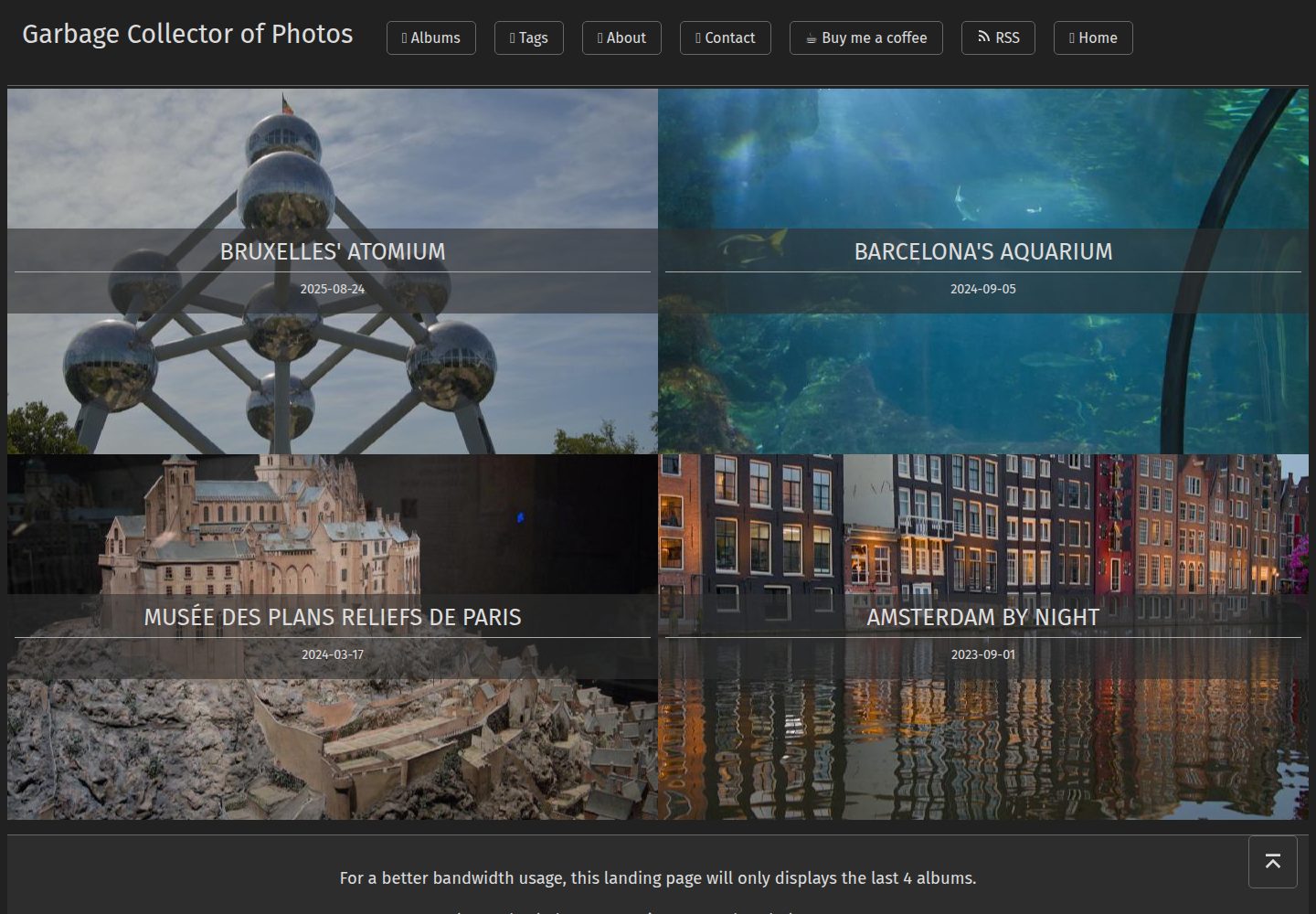
The homepage displays album covers; album pages arrange photos in two columns (one column on mobile), and clicking opens a large view
HugoHTMLPortfolioBlog
garbage-collector-photo-blog-theme — Hugo Portfolio Template
By Wivik
A Hugo-based photo album theme that displays album covers on the homepage, presents photos with EXIF information on photo pages, and includes a Python script to batch-generate album pages.
Explore the design
Compare the page layouts and mobile experience. Open any screenshot for a closer look.
Desktop homepage1 / 2
Desktop captureTop of page
Actual screenshot captured by the server browser.
All pages & views 2
Screenshots show visual appearance; interactive behavior may differ.
Recorded 2026-10-02View source
What stands out
A quick read of the recorded project description.
The photo view page renders EXIF metadata by default (shooting parameters, license information) and provides a download button for the original image
Each photo corresponds to an independent Markdown file, with title, description, ordering, and draft status configured individually via YAML metadata
Albums support layout controls such as breaking the line to highlight a single photo, adding descriptions, and adjusting thumbnail alignment (background-position values)
Includes the Python script new.py, which batch-generates the album index and individual photo pages in filename order, and supports appending tags with -t
The photo download button can be disabled via params.allowPhotoDownload
Template Details
This is a Hugo theme made for a personal photography blog. The author uses it to build their own photo site (photos.zedas.fr), and it is a rewrite of their previous theme. The homepage lists the cover of each album. After entering an album, photos are arranged in two columns (one column on mobile). Clicking a photo opens a large-image view that by default shows EXIF metadata (such as shooting parameters) and license information, and provides a link to download the original image.
The biggest difference from the previous version is how photos are managed: instead of using one page to link all photos, each photo gets its own Markdown file, configured individually through Hugo's YAML metadata block. The album itself can also be adjusted via metadata, for example to make a photo stand out across a line break, add descriptive text, or set thumbnail alignment.
The repository provides a Python script, new.py, for generating new albums: it reads images from a folder of the same name under the assets/ directory, creates the album index _index.md and a Markdown file for each photo in filename order, and supports appending tags with the -t argument. The theme has few configuration options; the main configurable item listed in the README is whether to allow photo downloads (params.allowPhotoDownload, enabled by default).
Before use, note that the default thumbnail default.png is not provided by the theme and must be placed in the assets/ directory yourself; the licensing of third-party assets such as images, fonts, and icons in the demo site must be checked separately and cannot be judged solely by the code's MIT license.
HugoHTMLPortfolioBlog
Is it right for your project?
Use Cases
- Building a personal photography album site that is photo-centric and minimizes textual distraction
- Adding an album-organized gallery to an existing Hugo site while preserving EXIF and license information for each photo
- A photography blog that needs individual captions, titles, or display order adjustments for each photo
- Quickly batch-generating album page structures from a local image folder using a script
Suitable For
- Photography enthusiasts who use Hugo and are familiar with YAML front matter configuration
- Personal portfolio authors who need to display EXIF shooting parameters and image license information
- Developers willing to prepare their own assets such as thumbnails and adjust the theme as needed
Getting started & customization
Use these recorded setup notes alongside the repository instructions for your chosen version.
- 1
After cloning the repository, add the theme to the Hugo configuration: theme: garbage-collector-photo-blog-theme
- 2
Create an album folder under the site's assets/ and place images in it; the folder name must match the script argument
- 3
Run python new.py <album-name> in the site root to generate _index.md and the Markdown file for each photo; use -t "tag1,tag2" to append tags
- 4
The default thumbnail default.png is not provided by the theme; place it in the assets/ directory yourself and point to the actual image in the photo key of the album's _index.md
- 5
The photo download button is controlled by params.allowPhotoDownload and is enabled by default
License & source material
Usage conditions & limitations
Free to use · keep license noticeThis listing covers the free version under the MIT license in the public repository; the free scope is the code of this version and does not mean that external services or third-party assets are free.
Must comply with when using
- You may use, modify, commercially use, and distribute the code of this version for free.
- When distributing copies or substantial portions of the code, retain the original author's copyright notice and the full MIT license notice.
- The code is provided as is; warranties and limitations of liability are governed by the original license and applicable law.
Additional costs & items to verify
- The Creative Commons formatting partial in the theme uses Remix Icons, which is licensed separately under the Apache License 2.0, not MIT; its license terms must be followed when redistributing or modifying.
- Some CSS (buttons, navigation header, etc.) comes from the SimpleCSS framework, a third-party source whose licensing is independent of the theme's MIT license and should be verified before use.
- The default thumbnail default.png is not provided by the theme; users must prepare it and place it in the assets/ directory, otherwise album thumbnails will not display properly.
- Album pages depend on the repository's Python script new.py for generation; using this theme requires a local Python runtime environment.
- Demo images, fonts, icons, and other third-party assets must be checked against their respective licenses and cannot be judged solely by the code's MIT license.
- External services such as domain, hosting, database, payment, or AI may incur additional charges.
View Original Text Basis
Permission is hereby granted, free of charge
Original License Text
The Creative Commons formater partial uses [Remix Icons](https://github.com/Remix-Design/remixicon) which are available under Apache License 2.0.
Original README
Some CSS parts come from the [SimpleCSS](https://simplecss.org) framework for general design like buttons and navigation header.
Original README
💡 The `default.png` file is not provided by this template, you can customize it by putting whichever file you want with this name in your `assets/` folder.
Original README
https://github.com/Wivik/garbage-collector-photo-blog-theme/blob/main/LICENSEhttps://github.com/Wivik/garbage-collector-photo-blog-theme/blob/main/README.mdAt the root directory of this theme, a Python script named `new.py` was made to generate a new album.
Original README
Compiled by DeepSeek based on repository license and README ·2026-10-02. Results only cover the materials read; dependencies, images, fonts, and subsequent term changes are subject to their respective original texts.
Project checks & description sources
Template Information
- Source platforms
- GitHub
- Documentation and maintenance reference score
- Partly documented · 73 / 100
- Technologies
- Hugo · HTML
- Website type
- Portfolio · Blog
How this score is calculated
Our heuristic uses license records (up to 30), a demo link (12), a preview (10), stars (15), recorded maintenance (15), description completeness (8), feature records (5) and classification data (5). It is not a code, security or performance test, or a Google score. A link does not establish tested functionality.
What to verify for this project
- Repository update recorded
- 2023-07-29
- Screenshot last checked
- 2026-10-02
A demo link is listed. Check it with your own content and viewport sizes; its presence does not confirm that forms, authentication or payments work.
The catalog identifies Hugo as the primary stack. Check the actual dependency manifest and lockfile for versions and hosting requirements. These notes use recorded metadata, not a code audit or a deployment test.
Use a selection guide →How this description was prepared
AI-assisted description based on catalog records and repository material. Repository authors are not automatically the reviewers of this description.
Automatically checked against source and license rules; no manual editorial review.
Inspect the recorded source material
SHA-256: 438ddc09b92154664aa96fd1bd2c27fa225f200164d224e91764c57b8ad81531
2026-10-02T21:11:53.809Z
Source file / repository# Garbage Collector of Photos Hugo Theme
[](https://sonarcloud.io/summary/new_code?id=Wivik_garbage-collector-photo-blog-theme)

## Introduction
This theme is a custom-made for [my Photo Blog](https://photos.zedas.fr) based on [Hugo](https://gohugo.io). It is a complete new version of my previous [theme](https://github.com/Wivik/garbage-collector-photo-blog) which remains available. The front page displays the album covers, and the post page displays the gallery content with no distraction, priority to the photos. The album can be adapted to put a focus on a perticular image, add a section break, a description, etc. Each photo is viewable on a display page that will also render the EXIF metadata suchs as the pictures settings and the license.
The biggest difference with my previous theme is the pictures management : instead of having one page that links all pictures, a markdown file is created for each of them. Each page is customizable using Hugo's YAML metadata block. Please refer to the explanations below.
## How to install
Clone this repository and add the theme to your Hugo configuration.
```bash
git clone https://github.com/Wivik/garbage-collector-photo-blog-theme
```
In your config file :
```yaml
theme: garbage-collector-photo-blog-theme
```
## Configuration
This theme is very simple to configure.
Example file :
```yaml
baseURL: 'https://yoursite.com'
languageCode: 'en-us'
title: "Garbage Collector of Photos"
theme: garbage-collector-photo-blog-theme
author:
name: Seb
menu:
main:
- identifier: "tags"
name: "📑 Tags"
url: "/tags/"
weight: 40
- identifier: "rss"
name: "RSS"
pre: <svg xmlns="http://www.w3.org/2000/svg" viewBox="0 0 24 24" width="16" height="16"><path d="M3 3C12.9411 3 21 11.0589 21 21H18C18 12.7157 11.2843 6 3 6V3ZM3 10C9.07513 10 14 14.9249 14 21H11C11 16.5817 7.41828 13 3 13V10ZM3 17C5.20914 17 7 18.7909 7 21H3V17Z" fill="rgba(220,220,220,1)"></path></svg>
url: "/index.xml"
weight: 50
privacy:
vimeo:
disabled: false
simple: true
twitter:
disabled: false
enableDNT: true
simple: true
instagram:
disabled: false
simple: true
youtube:
disabled: false
privacyEnhanced: true
```
Last element : the album generation script.
At the root directory of this theme, a Python script named `new.py` was made to generate a new album. You may create a symbolink link to your Hugo site root folder to use it.
Example with symlink :
```bash
cd <your hugo site root folder>
ln -s themes/garbage-collector-photo-blog-theme/new.py new.py
```
This script will create the new album main page (`_index.md`) and a page for each photo, took in the file name order (ex: `photo1.md`, `photo2.md`...). See explanations just after in the [How to use](#how-to-use) section.
## How to use
### Quickstart
Create a directory your Hugo site `assets/` folder, for example `my-photos-album`, and put your pictures inside it.
Use the script `new.py` to create the new album :
```bash
cd <your hugo website root folder>
python new.py my-photos-album
```
The name of the folder must match the folder name inside `assets/`.
The following structure in `contents/` will be created :
```bash
my-photos-album
├── dsc_2633.md
├── dsc_2634.md
├── dsc_2635.md
├── dsc_2636.md
├── dsc_2638.md
├── dsc_2639.md
├── dsc_2641.md
├── dsc_2642.md
└── _index.md
```
Open `my-photos-album/_index.md` and edit the `photo` key to set the album thumbnail which is set to `default.png`. Replace it with a photo from the album :
```yaml
---
title: "Test"
date: 2023-07-21T18:33:15+02:00
# photo: "default.png" <<< default thumbnail
photo: "my-photos-album/photo1.jpg"
draft: false
## Optional additional meta info for resources list
# description: A sub-title or description for the photo
tags:
- Album
---
```
💡 The `default.png` file is not provided by this template, you can customize it by putting whichever file you want with this name in your `assets/` folder.
If you open a photo, the content will be similar :
```yaml
---
photo: "my-photos-album/photo2.jpg"
weight: "2"
draft: false
## Optional additional meta info for resources list
# alt: Image alternative and screen-reader text
# title: A title for the photo
# description: A sub-title or description for the photo
---
```
Open your Hugo website, your photo album is here ! Now you can customize it.
### Customize your album
This theme uses the YAML metadata to configure your album behavior. By default, the photos will be displayed in rows of two photos. One if mobile screen. Click on a photo will open it in a larger view that will display by default the EXIF metadata and a link to download it in the original format. The photo download is the default behavior, you can disable it in [Theme configuration](#theme-specific-configurations).
The album can be customized with the following options.
#### Customize the album header (_index.md)
The album header supports the following options :
| Options | Type | Mandatory | Description |
| ------- | ---- | --------- | ----------- |
| `description` | `string` | Yes | The album description. It will be displayed before the first photo.<br />The usage of the multiline YAML syntax is supported (`description: \|`).<br />Markdown content is supported in the description. |
| `tags` | `list` | Yes | A list of tags. `Album` will be always be set and should stay, it's required to see all albums |
| `title` | `string` | Yes | The album title displayed in the front page and the album page |
Please refer to the comments in [archetypes/default.md](archetypes/default.md) for an up-to-date and exhaustive supported options.
The photo listing is customizable by editing each photo file to match how you want to display them.
#### Customize the photos display
The photo archetype supports the following options :
| Options | Type | Mandatory | Description |
| ------- | ---- | --------- | ----------- |
| `albumdisplay` | `string` | No | Adapt the alignment of the thumbnail in the album. Default is `middle`. Uses the [values](https://developer.mozilla.org/en-US/docs/Web/CSS/background-position) of the CSS attribute `background-position`.
| `description` | `string` | No | The album description. It will be displayed before the first photo.<br />The usage of the multiline YAML syntax is supported (`description: \|`).<br />Markdown content is supported in the description.<br />If `linebreak: true` is defined, the description will be shown below the photo in the album. |
| `draft` | `boolean` | No | A boolean, default `false` that controls the visibility of the photo. If set to `true`, the photo won't be displayed in the published version. |
| `linebreak` | `boolean` | No | If set to `true`, this photo will break the gallery and be emphased. If the description if filled, it will be displayed below the photo.<br />Default : `false`. |
| `photo` | `string` | Yes | The relative path to the photo in the `assets/` folder. Example : `my-photos/photo1.jpg` |
| `tags` | `list` | Yes | A list of tags. `Album` will be always be set and should stay, it's required to see all albums |
| `title` | `string` | No | The photo title. If filled, the title will be displayed at the bottom of the thumbnail. |
| `weight` | `int` | No | An integer used by Hugo to sort images. By default, the number is the number of a file in the photo lists, in alphabetic order. |
Please refer to the comments in [archetypes/photo.md](archetypes/photo.md) for an up-to-date and exhaustive supported options.
### Theme specific configurations
The theme can use the following configuration keys in your Hugo `config.yaml` file.
| Options | Type | Mandatory | Description |
| ------- | ---- | --------- | ----------- |
| `params.allowPhotoDownload` | `boolean` | No | Activate the "Download" button in the photo display page.<br />Default : `true`
### new.py reference
`new.py` is a helper script that will create your album. It currently supports the following options :
```bash
usage: new.py [-h] [-t TAGS] album
Add a new album to the gallery
positional arguments:
album Name of the album
options:
-h, --help show this help message and exit
-t TAGS, --tags TAGS Tags for the album, comma-separated. Example : -t "tag1,tag2,tag3"
```
Usage example :
```bash
cd <your hugo website root folder>
python new.py my-photos-album
```
```bash
cd <your hugo website root folder>
python new.py my-photos-album -t "Space,Penguins,Rocks"
```
The tags will be appended to the default "Album" tag in the `_index.md` file.
```yaml
---
title: "Test"
date: 2023-07-21T18:33:15+02:00
photo: "default.png"
draft: false
## Optional additional meta info for resources list
# description: A sub-title or description for the photo
tags:
- Album
- Space
- Penguins
- Rocks
---
```
## License and Attributions
This theme is licensed under the [MIT License](LICENSE).
Some CSS parts come from the [SimpleCSS](https://simplecss.org) framework for general design like buttons and navigation header.
The Creative Commons formater partial uses [Remix Icons](https://github.com/Remix-Design/remixicon) which are available under Apache License 2.0.
Explore similar templates
Compare previews and descriptions within the same stack and category.

hugo-PaperMod
A fast, clean, responsive Hugo theme for blogs and lightweight portfolios, with three layout modes (Regular, Home-Info, Profile), automatic and manual light/dark themes, Fuse.js client-side search, multilingual support, and built-in Open Graph, Twitter Cards, and Schema.org data.
Hugo · Portfolio

LoveIt
LoveIt is a clean, elegant, and feature-rich Hugo blog theme derived from LeaveIt and KeepIt, MIT-licensed. It offers light/dark modes, responsive layout, multilingual support, and search via Lunr.js or Algolia.
Hugo · Blog

hugo-coder
hugo-coder is a minimalist Hugo blog theme maintained by luizdepra under the MIT license. It provides a clean, text-focused blog appearance, configuration documentation in the docs directory, and a complete exampleSite with hugo.toml.
Hugo · Blog

blowfish
Blowfish is a Hugo personal website and blog theme built with Tailwind CSS 4, focused on lightness, simplicity, and content-first presentation.
Hugo · Blog

hugo-paper
hugo-paper is a simple, clean, and customizable Hugo blog theme configured through config.toml or hugo.toml.
Hugo · Blog

hextra
Hextra is a Hugo theme for documentation and blog sites, built on Hugo and Tailwind CSS with design referencing Nextra.
Hugo · Documentation