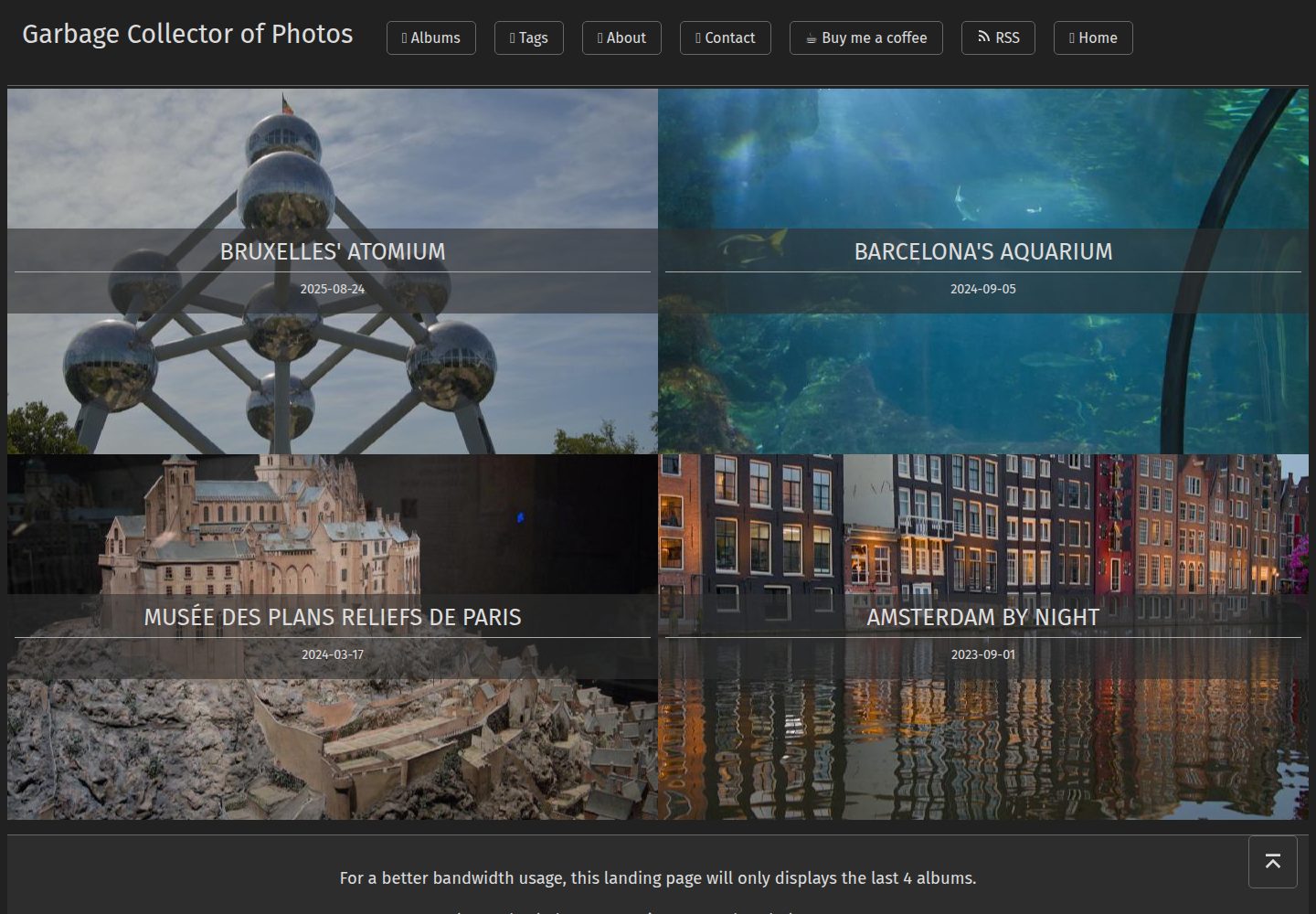
首页展示相册封面,相册页以两列(移动端一列)排列照片,点击可查看大图
HugoHTML作品集博客
garbage-collector-photo-blog-theme — Hugo 作品集模板
作者 Wivik
基于 Hugo 的相册主题,首页展示相册封面,照片页以图片为主并显示 EXIF 信息,附 Python 脚本批量生成相册页面。
看看你的网站会是什么样
浏览真实页面截图,比较内容排版与手机效果。点击下方缩略图切换,放大查看整页细节。
全部页面与视图 2
截图用于了解视觉与布局,交互效果请以实际项目为准。
采集于 2026-10-02查看来源
值得关注的模板亮点
从已有项目资料中,快速了解它的特点。
照片查看页默认渲染 EXIF 元数据(拍摄参数、许可信息)并提供原图下载按钮
每张照片对应一个独立 Markdown 文件,通过 YAML 元数据单独配置标题、描述、排序与草稿状态
相册支持断行突出单张照片、添加描述、调整缩略图对齐(background-position 取值)等排版控制
附带 Python 脚本 new.py,按文件名顺序批量生成相册首页与各照片页面,支持 -t 追加标签
可通过 params.allowPhotoDownload 关闭照片下载按钮
模板详细介绍
这是一个为个人摄影博客制作的 Hugo 主题,作者用它搭建自己的照片站点(photos.zedas.fr),也是其上一版主题的重写版本。首页列出各相册的封面,进入相册后以两列(移动端一列)排列照片,点击照片打开大图查看页,默认展示 EXIF 元数据(如拍摄参数)与许可信息,并提供原图下载入口。
与上一版最大的区别在照片管理方式:不再用一个页面链接所有照片,而是为每张照片生成独立的 Markdown 文件,每页通过 Hugo 的 YAML 元数据块单独配置。相册本身也可通过元数据调整,例如让某张照片跨断行突出显示、添加描述文字、设置缩略图对齐方式等。
仓库提供一个 Python 脚本 new.py 用于生成新相册:它读取 assets/ 目录下同名文件夹中的图片,按文件名顺序创建相册首页 _index.md 以及每张照片对应的 Markdown 文件,并支持用 -t 参数追加标签。主题配置项较少,README 中列出的可配置项主要是是否允许照片下载(params.allowPhotoDownload,默认开启)。
使用前需注意:默认缩略图 default.png 不由主题提供,需要自行放入 assets/ 目录;演示站点中的图片、字体、图标等第三方素材的授权需单独核对,不能仅凭代码的 MIT 许可判断。
HugoHTML作品集博客
适合你的项目吗?
适用场景
- 搭建以照片为主、弱化文字干扰的个人摄影相册站点
- 为已有 Hugo 站点增加按相册组织的图库,并保留每张照片的 EXIF 与许可信息
- 需要为每张照片单独撰写说明、标题或调整展示顺序的摄影博客
- 希望用脚本从本地图片文件夹快速批量生成相册页面结构
适合人群
- 使用 Hugo 并熟悉 YAML front matter 配置的摄影爱好者
- 需要展示 EXIF 拍摄参数与图片许可信息的个人作品集作者
- 愿意自行准备缩略图等素材、按需调整主题的开发者
上手与定制指南
结合仓库当前版本的说明,按下面的资料检查内容、配置与运行要求。
- 1
克隆仓库后将主题加入 Hugo 配置:theme: garbage-collector-photo-blog-theme
- 2
在站点 assets/ 下创建相册文件夹并放入图片,文件夹名需与脚本参数一致
- 3
在站点根目录运行 python new.py <相册名> 生成 _index.md 与各照片 Markdown 文件,可用 -t "tag1,tag2" 追加标签
- 4
默认缩略图 default.png 不由主题提供,需自行放入 assets/ 目录,并在相册 _index.md 的 photo 键中指向实际图片
- 5
照片下载按钮由 params.allowPhotoDownload 控制,默认开启
授权与来源资料
使用条件与限制
免费使用 · 保留许可声明本次收录的是公开仓库中采用 MIT 许可的免费版本;免费范围为该版本代码,不代表外部服务或第三方素材免费。
使用时需要遵守
- 允许免费使用、修改、商用和分发该版本代码。
- 分发代码副本或实质性部分时,保留原作者版权声明和完整 MIT 许可声明。
- 代码按现状提供;担保与责任限制以原许可证及适用法律为准。
额外费用与待核对事项
- 主题中 Creative Commons 格式化 partial 使用了 Remix Icons 图标,该图标集采用 Apache License 2.0 单独授权,并非 MIT;再分发或修改时需遵守其许可条款。
- 部分 CSS(按钮、导航头部等)来自 SimpleCSS 框架,属于第三方来源,其授权与主题的 MIT 许可相互独立,使用前应自行核实。
- 默认缩略图 default.png 不由主题提供,需用户自行准备并放入 assets/ 目录,否则相册缩略图无法正常显示。
- 相册页面依赖仓库内的 Python 脚本 new.py 生成,使用该主题需具备本地 Python 运行环境。
- 演示图片、字体、图标及其他第三方素材需按各自许可核对,不能仅凭代码的 MIT 许可判断。
- 域名、托管、数据库、支付或 AI 等外部服务可能另外收费。
查看原文依据
Permission is hereby granted, free of charge
许可证原文
The Creative Commons formater partial uses [Remix Icons](https://github.com/Remix-Design/remixicon) which are available under Apache License 2.0.
README 原文
Some CSS parts come from the [SimpleCSS](https://simplecss.org) framework for general design like buttons and navigation header.
README 原文
💡 The `default.png` file is not provided by this template, you can customize it by putting whichever file you want with this name in your `assets/` folder.
README 原文
https://github.com/Wivik/garbage-collector-photo-blog-theme/blob/main/LICENSEhttps://github.com/Wivik/garbage-collector-photo-blog-theme/blob/main/README.mdAt the root directory of this theme, a Python script named `new.py` was made to generate a new album.
README 原文
DeepSeek 根据仓库许可证和 README 整理 ·2026-10-02。结果仅覆盖已读取资料,依赖、图片、字体及后续条款变更以各自原文为准。
项目核对记录与介绍依据
模板资料
- 来源平台
- GitHub
- 资料与维护参考分
- 资料一般 · 73 / 100
- 技术栈
- Hugo · HTML
- 网站类型
- 作品集 · 博客
这个分数如何计算
本站按许可资料(最高30分)、演示链接(12分)、预览图(10分)、Star数(15分)、记录的维护时间(15分)、描述完整度(8分)、功能记录(5分)和分类资料(5分)计算。它不是代码、安全或性能测试,也不是 Google 评分;有链接不代表已实测可用。
这个项目需要核对什么
- 记录的仓库更新时间
- 2023-07-29
- 截图检查日期
- 2026-10-02
已收录演示链接。请用你的内容与屏幕尺寸检查;有演示不代表表单、认证或支付已经可用。
目录记录的主要技术栈是 Hugo。请通过依赖清单和锁文件核对实际版本与托管要求。这些说明基于收录资料,不代表代码审计或部署实测。
查看具体选型方法 →介绍的制作与核对状态
介绍由 AI 辅助整理目录与仓库资料。仓库作者不等于这篇介绍的审核者。
已完成服务器许可规则与 AI 来源核对;未经过人工编辑审核。
查看当时使用的来源资料
SHA-256: 438ddc09b92154664aa96fd1bd2c27fa225f200164d224e91764c57b8ad81531
2026-10-02T21:11:53.809Z
来源文件 / 仓库# Garbage Collector of Photos Hugo Theme
[](https://sonarcloud.io/summary/new_code?id=Wivik_garbage-collector-photo-blog-theme)

## Introduction
This theme is a custom-made for [my Photo Blog](https://photos.zedas.fr) based on [Hugo](https://gohugo.io). It is a complete new version of my previous [theme](https://github.com/Wivik/garbage-collector-photo-blog) which remains available. The front page displays the album covers, and the post page displays the gallery content with no distraction, priority to the photos. The album can be adapted to put a focus on a perticular image, add a section break, a description, etc. Each photo is viewable on a display page that will also render the EXIF metadata suchs as the pictures settings and the license.
The biggest difference with my previous theme is the pictures management : instead of having one page that links all pictures, a markdown file is created for each of them. Each page is customizable using Hugo's YAML metadata block. Please refer to the explanations below.
## How to install
Clone this repository and add the theme to your Hugo configuration.
```bash
git clone https://github.com/Wivik/garbage-collector-photo-blog-theme
```
In your config file :
```yaml
theme: garbage-collector-photo-blog-theme
```
## Configuration
This theme is very simple to configure.
Example file :
```yaml
baseURL: 'https://yoursite.com'
languageCode: 'en-us'
title: "Garbage Collector of Photos"
theme: garbage-collector-photo-blog-theme
author:
name: Seb
menu:
main:
- identifier: "tags"
name: "📑 Tags"
url: "/tags/"
weight: 40
- identifier: "rss"
name: "RSS"
pre: <svg xmlns="http://www.w3.org/2000/svg" viewBox="0 0 24 24" width="16" height="16"><path d="M3 3C12.9411 3 21 11.0589 21 21H18C18 12.7157 11.2843 6 3 6V3ZM3 10C9.07513 10 14 14.9249 14 21H11C11 16.5817 7.41828 13 3 13V10ZM3 17C5.20914 17 7 18.7909 7 21H3V17Z" fill="rgba(220,220,220,1)"></path></svg>
url: "/index.xml"
weight: 50
privacy:
vimeo:
disabled: false
simple: true
twitter:
disabled: false
enableDNT: true
simple: true
instagram:
disabled: false
simple: true
youtube:
disabled: false
privacyEnhanced: true
```
Last element : the album generation script.
At the root directory of this theme, a Python script named `new.py` was made to generate a new album. You may create a symbolink link to your Hugo site root folder to use it.
Example with symlink :
```bash
cd <your hugo site root folder>
ln -s themes/garbage-collector-photo-blog-theme/new.py new.py
```
This script will create the new album main page (`_index.md`) and a page for each photo, took in the file name order (ex: `photo1.md`, `photo2.md`...). See explanations just after in the [How to use](#how-to-use) section.
## How to use
### Quickstart
Create a directory your Hugo site `assets/` folder, for example `my-photos-album`, and put your pictures inside it.
Use the script `new.py` to create the new album :
```bash
cd <your hugo website root folder>
python new.py my-photos-album
```
The name of the folder must match the folder name inside `assets/`.
The following structure in `contents/` will be created :
```bash
my-photos-album
├── dsc_2633.md
├── dsc_2634.md
├── dsc_2635.md
├── dsc_2636.md
├── dsc_2638.md
├── dsc_2639.md
├── dsc_2641.md
├── dsc_2642.md
└── _index.md
```
Open `my-photos-album/_index.md` and edit the `photo` key to set the album thumbnail which is set to `default.png`. Replace it with a photo from the album :
```yaml
---
title: "Test"
date: 2023-07-21T18:33:15+02:00
# photo: "default.png" <<< default thumbnail
photo: "my-photos-album/photo1.jpg"
draft: false
## Optional additional meta info for resources list
# description: A sub-title or description for the photo
tags:
- Album
---
```
💡 The `default.png` file is not provided by this template, you can customize it by putting whichever file you want with this name in your `assets/` folder.
If you open a photo, the content will be similar :
```yaml
---
photo: "my-photos-album/photo2.jpg"
weight: "2"
draft: false
## Optional additional meta info for resources list
# alt: Image alternative and screen-reader text
# title: A title for the photo
# description: A sub-title or description for the photo
---
```
Open your Hugo website, your photo album is here ! Now you can customize it.
### Customize your album
This theme uses the YAML metadata to configure your album behavior. By default, the photos will be displayed in rows of two photos. One if mobile screen. Click on a photo will open it in a larger view that will display by default the EXIF metadata and a link to download it in the original format. The photo download is the default behavior, you can disable it in [Theme configuration](#theme-specific-configurations).
The album can be customized with the following options.
#### Customize the album header (_index.md)
The album header supports the following options :
| Options | Type | Mandatory | Description |
| ------- | ---- | --------- | ----------- |
| `description` | `string` | Yes | The album description. It will be displayed before the first photo.<br />The usage of the multiline YAML syntax is supported (`description: \|`).<br />Markdown content is supported in the description. |
| `tags` | `list` | Yes | A list of tags. `Album` will be always be set and should stay, it's required to see all albums |
| `title` | `string` | Yes | The album title displayed in the front page and the album page |
Please refer to the comments in [archetypes/default.md](archetypes/default.md) for an up-to-date and exhaustive supported options.
The photo listing is customizable by editing each photo file to match how you want to display them.
#### Customize the photos display
The photo archetype supports the following options :
| Options | Type | Mandatory | Description |
| ------- | ---- | --------- | ----------- |
| `albumdisplay` | `string` | No | Adapt the alignment of the thumbnail in the album. Default is `middle`. Uses the [values](https://developer.mozilla.org/en-US/docs/Web/CSS/background-position) of the CSS attribute `background-position`.
| `description` | `string` | No | The album description. It will be displayed before the first photo.<br />The usage of the multiline YAML syntax is supported (`description: \|`).<br />Markdown content is supported in the description.<br />If `linebreak: true` is defined, the description will be shown below the photo in the album. |
| `draft` | `boolean` | No | A boolean, default `false` that controls the visibility of the photo. If set to `true`, the photo won't be displayed in the published version. |
| `linebreak` | `boolean` | No | If set to `true`, this photo will break the gallery and be emphased. If the description if filled, it will be displayed below the photo.<br />Default : `false`. |
| `photo` | `string` | Yes | The relative path to the photo in the `assets/` folder. Example : `my-photos/photo1.jpg` |
| `tags` | `list` | Yes | A list of tags. `Album` will be always be set and should stay, it's required to see all albums |
| `title` | `string` | No | The photo title. If filled, the title will be displayed at the bottom of the thumbnail. |
| `weight` | `int` | No | An integer used by Hugo to sort images. By default, the number is the number of a file in the photo lists, in alphabetic order. |
Please refer to the comments in [archetypes/photo.md](archetypes/photo.md) for an up-to-date and exhaustive supported options.
### Theme specific configurations
The theme can use the following configuration keys in your Hugo `config.yaml` file.
| Options | Type | Mandatory | Description |
| ------- | ---- | --------- | ----------- |
| `params.allowPhotoDownload` | `boolean` | No | Activate the "Download" button in the photo display page.<br />Default : `true`
### new.py reference
`new.py` is a helper script that will create your album. It currently supports the following options :
```bash
usage: new.py [-h] [-t TAGS] album
Add a new album to the gallery
positional arguments:
album Name of the album
options:
-h, --help show this help message and exit
-t TAGS, --tags TAGS Tags for the album, comma-separated. Example : -t "tag1,tag2,tag3"
```
Usage example :
```bash
cd <your hugo website root folder>
python new.py my-photos-album
```
```bash
cd <your hugo website root folder>
python new.py my-photos-album -t "Space,Penguins,Rocks"
```
The tags will be appended to the default "Album" tag in the `_index.md` file.
```yaml
---
title: "Test"
date: 2023-07-21T18:33:15+02:00
photo: "default.png"
draft: false
## Optional additional meta info for resources list
# description: A sub-title or description for the photo
tags:
- Album
- Space
- Penguins
- Rocks
---
```
## License and Attributions
This theme is licensed under the [MIT License](LICENSE).
Some CSS parts come from the [SimpleCSS](https://simplecss.org) framework for general design like buttons and navigation header.
The Creative Commons formater partial uses [Remix Icons](https://github.com/Remix-Design/remixicon) which are available under Apache License 2.0.
看看同类模板
对比同技术栈与用途的模板,找到更适合的视觉与内容结构。

hugo-PaperMod
PaperMod 是 Hugo 生态里知名度较高的主题之一,定位很明确:给博客和轻量作品集站点提供一套干净、响应式的阅读界面。
Hugo · 作品集

LoveIt
❤️A clean, elegant but advanced blog theme for Hugo 一个简洁、优雅且高效的 Hugo 主题
Hugo · 博客

hugo-coder
A minimalist blog theme for hugo.
Hugo · 博客

blowfish
Personal Website & Blog Theme for Hugo
Hugo · 博客

hugo-paper
🪺 A simple, clean, customizable Hugo theme
Hugo · 博客

hextra
Hextra 是一个 Hugo 主题,定位在文档站与博客之间:既提供侧边栏导航、目录、面包屑、分页这类文档站结构,也能承载博客内容。
Hugo · 文档