Uses the Astro Islands architecture to support partial hydration and client-side interactivity while maintaining static rendering
AstroBlog
wonderstk-blog — Astro Blog Template
By WonderSTK
wonderstk-blog is a static blog template built on Astro, Tailwind, and shadcn/ui. It uses MDX for writing posts, supports KaTeX formulas, code highlighting, author and tag pages, RSS and sitemap, and can be deployed via Vercel.
Explore the design
Compare the page layouts and mobile experience. Open any screenshot for a closer look.
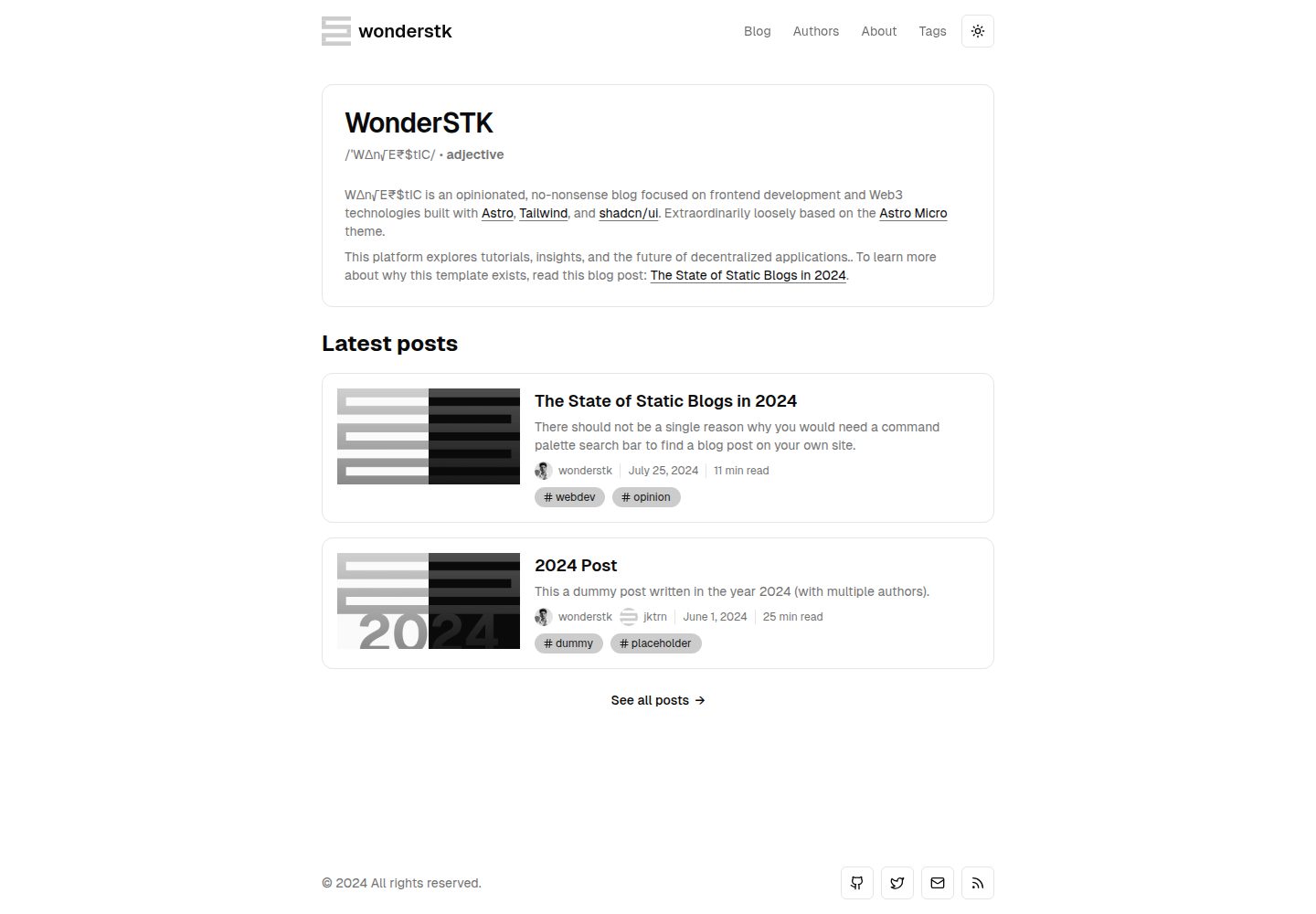
Desktop homepage1 / 3
Desktop captureTop of page
Actual screenshot captured by the server browser.
All pages & views 3
Screenshots show visual appearance; interactive behavior may differ.
Recorded 2026-10-12View source
What stands out
A quick read of the recorded project description.
Adopts shadcn/ui's Tailwind color conventions, automatically adapting to light and dark themes, and provides theme-aware components such as navigation and buttons
Implements code block styling, highlighting, and code block titles/captions via rehype-pretty-code and Shiki
Writes blog posts in MDX and supports rendering LaTeX math formulas with KaTeX
Supports author profiles and author pages, adding multiple authors per post, and tag pages for post categorization and discovery
Provides per-post metadata and Open Graph tag control, and generates RSS subscription and sitemap
Template Details
wonderstk-blog is a static blog template that the author calls opinionated and no-frills, and states it is loosely inspired by Astro Micro. The template is built with Astro, styled with Tailwind, uses components from shadcn/ui, and writes post content in MDX. The README lists author pages, tag pages, RSS subscription, sitemap, per-post metadata and Open Graph tag control, KaTeX math formula rendering, code block styling and titles/captions based on Shiki and rehype-pretty-code, and SPA-mode transition animations via Astro View Transitions.
The README does not provide the template's directory structure, content collection configuration, theme customization details, multilingual support notes, or accessibility compliance notes; it also does not describe deployment methods other than Vercel. The preview screenshots only demonstrate that desktop and mobile pages exist, not specific page functionality.
AstroBlog
Is it right for your project?
Use Cases
- Building a personal blog focused on technical articles that requires code highlighting and math formula rendering
- Writing scenarios that want to embed component-based content in posts using MDX
- Content sites that need author pages, multi-author attribution, and tag categorization to organize posts
- Blogs that need to control SEO metadata and Open Graph tags individually for each post
- Projects that want to deploy a static blog to Vercel
Suitable For
- Developers familiar with Astro and MDX who want to use an existing static blog template directly
- Technical blog authors who need code highlighting, KaTeX formulas, and light/dark theme adaptation
- Sites that need basic content organization features such as author pages, tag pages, RSS, and sitemap
- Users planning to deploy a static site with Vercel
Getting started & customization
Use these recorded setup notes alongside the repository instructions for your chosen version.
- 1
Click “Use this template” on GitHub to create your own repository, then clone it locally and enter the project directory
- 2
Run npm install to install dependencies
- 3
Run npm run dev to start the development server, and visit http://localhost:1234
- 4
Available commands include npm run start (dev alias), npm run build (type check and build), npm run preview (preview the build result), npm run astro (Astro CLI), and npm run prettier (format all files with Prettier)
- 5
The README does not describe environment variables, content directory structure, or specific deployment configuration other than Vercel
License & source material
Usage conditions & limitations
Free to use · keep license noticeThis entry covers the free version under the MIT license in the public repository; the free scope is the code of that version and does not mean external services or third-party assets are free.
Must comply with when using
- Allows free use, modification, commercial use, and distribution of that version's code.
- When distributing copies or substantial portions of the code, retain the original author's copyright notice and the complete MIT license notice.
- The code is provided as is; warranties and limitations of liability are governed by the original license and applicable law.
Additional costs & items to verify
- Demo images, fonts, icons, and other third-party assets must be checked against their respective licenses and cannot be judged solely by the code's MIT license.
- External services such as domains, hosting, databases, payments, or AI may incur additional charges.
View Original Text Basis
https://github.com/WonderSTK/wonderstk-blog/blob/main/LICENSEhttps://github.com/WonderSTK/wonderstk-blog/blob/main/README.mdPermission is hereby granted, free of charge
Original License Text
Compiled by DeepSeek based on repository license and README ·2026-10-12. Results only cover the materials read; dependencies, images, fonts, and subsequent term changes are subject to their respective original texts.
Project checks & description sources
Template Information
- Source platforms
- GitHub
- Documentation and maintenance reference score
- Partly documented · 74 / 100
- Technologies
- Astro
- Website type
- Blog
How this score is calculated
Our heuristic uses license records (up to 30), a demo link (12), a preview (10), stars (15), recorded maintenance (15), description completeness (8), feature records (5) and classification data (5). It is not a code, security or performance test, or a Google score. A link does not establish tested functionality.
What to verify for this project
- Repository update recorded
- 2024-12-08
- Screenshot last checked
- 2026-10-12
A demo link is listed. Check it with your own content and viewport sizes; its presence does not confirm that forms, authentication or payments work.
The catalog identifies Astro as the primary stack. Check the actual dependency manifest and lockfile for versions and hosting requirements. These notes use recorded metadata, not a code audit or a deployment test.
Use a selection guide →How this description was prepared
AI-assisted description based on catalog records and repository material. Repository authors are not automatically the reviewers of this description.
Review declaration: codex-user-requested-batch-review-20261015 · 2026-10-15
Inspect the recorded source material
SHA-256: 96de03315523fccf9e1f5335a6b35af9b4a8d6a6bbaa0e4d2a82401ce391c8ad
2026-10-12T20:23:20.633Z
Source file / repository<div align="center"> ## wonderstk </div> wonderstk is an opinionated, no-frills static blogging template built with [Astro](https://astro.build/), [Tailwind](https://tailwindcss.com/), and [shadcn/ui](https://ui.shadcn.com/). Extraordinarily loosely based off the [Astro Micro](https://astro-micro.vercel.app/) > [!NOTE] > To learn more about why this template exists, read [The State of Static Blogs in 2024](https://wonderstk-blog.vercel.app/blog/the-state-of-static-blogs), where I share my take on what constitutes a great blogging template and my goals while developing this one. ## Features - [Astro](https://astro.build/)’s [Islands](https://docs.astro.build/en/concepts/islands/) architecture for partial/selective hydration and client-side interactivity while maintaining a fast-to-render static site. - [shadcn/ui](https://ui.shadcn.com/)’s [Tailwind](https://tailwindcss.com/) color convention for automatic styling across both light and dark themes. Includes accessible, theme-aware UI components for navigation, buttons, etc. - [rehype-pretty-code](https://rehype-pretty.pages.dev/) with [Shiki](https://github.com/shikijs/shiki) for advanced code block styling, highlighting, and code block titles/captions. - Blog post authoring using [MDX](https://mdxjs.com/) for component-style content, alongside $\LaTeX$ rendering using [KaTeX](https://katex.org/). - Astro [View Transitions](https://docs.astro.build/en/guides/view-transitions/) in <abbr title="Single Page Application">SPA</abbr> mode for smooth, opt-in animations during route switching. - SEO optimization with fine-grained control over metadata and [Open Graph](https://ogp.me/) tags for each post. - [RSS](https://en.wikipedia.org/wiki/RSS) feeds and sitemap generation! - Supports author profiles (with a dedicated authors page) and adding multiple authors per post. - Supports project tags (with a dedicated tags page) for easy post categorization and discovery. ## Technology Stack This is a list of the various technologies used to build this template: | Category | Technology Name | | ------------------- | -------------------------------------------------------------------------------------------------- | | Framework | [Astro](https://astro.build/) | | Styling | [Tailwind](https://tailwindcss.com) | | Components | [shadcn/ui](https://ui.shadcn.com/) | | Content | [MDX](https://mdxjs.com/) | | Syntax Highlighting | [Shiki](https://github.com/shikijs/shiki) + [rehype-pretty-code](https://rehype-pretty.pages.dev/) | | Graphics | [Figma](https://www.figma.com/) | | Deployment | [Vercel](https://vercel.com) | ## Getting Started 1. Hit “Use this template”, the big green button on the top right, to create a new repository in your own GitHub account with this template. 2. Clone the repository: ```bash git clone https://github.com/[YOUR_USERNAME]/[YOUR_REPO_NAME].git cd [YOUR_REPO_NAME] ``` 3. Install dependencies: ```bash npm install ``` 4. Start the development server: ```bash npm run dev ``` 5. Open your browser and visit `http://localhost:1234` to get started. The following commands are also available: | Command | Description | | ------------------ | --------------------------------------------------------------- | | `npm run start` | Alias for `npm run dev` | | `npm run build` | Run type checking and build the project | | `npm run preview` | Previews the built project | | `npm run astro` | Run Astro CLI commands | | `npm run prettier` | Blanket format all files using [Prettier](https://prettier.io/) | Built with ♥ by [wonderstk](https://personal-portfolio-liard-five.vercel.app/)!
Explore similar templates
Compare previews and descriptions within the same stack and category.

astrowind
AstroWind is a free, open-source Astro starter theme using Astro and Tailwind CSS, released under the MIT license.
Astro · Blog

astro-paper
An Astro blog theme with Markdown/MDX content, Tailwind styling and Pagefind search. Search is a feature of the blog, rather than a separate tool-site product.
Astro · Blog

fuwari
Fuwari is a static blog template built with Astro and Tailwind CSS for personal blogs. It manages posts as Markdown files in src/content/posts/, with frontmatter for title, date, description, cover, tags, categories, draft status, and language.
Astro · Blog

Firefly
Firefly is a clean personal blog theme forked from Astro and Fuwari, offering four background modes, single/double sidebar and list/grid layouts, Pagefind client-side full-text search, and a six-language UI.
Astro · Blog

astro-theme-cactus
An Astro blog and notes starter with Markdown/MDX content, Tailwind styling and Pagefind search. Its main purpose is publishing posts and notes.
Astro · Blog

astrofy
Astrofy is a free and open-source personal portfolio website template built with Astro and TailwindCSS, with built-in blog, CV timeline, project showcase, store, and RSS feed modules.
Astro · Portfolio