使用 Astro Islands 架构,在保持静态渲染的同时支持局部水合与客户端交互
Astro博客
wonderstk-blog — Astro 博客模板
作者 WonderSTK
wonderstk-blog 是一个基于 Astro、Tailwind 与 shadcn/ui 的静态博客模板,使用 MDX 撰写文章,支持 KaTeX 公式、代码高亮、作者与标签页面、RSS 与站点地图,并可通过 Vercel 部署。
看看你的网站会是什么样
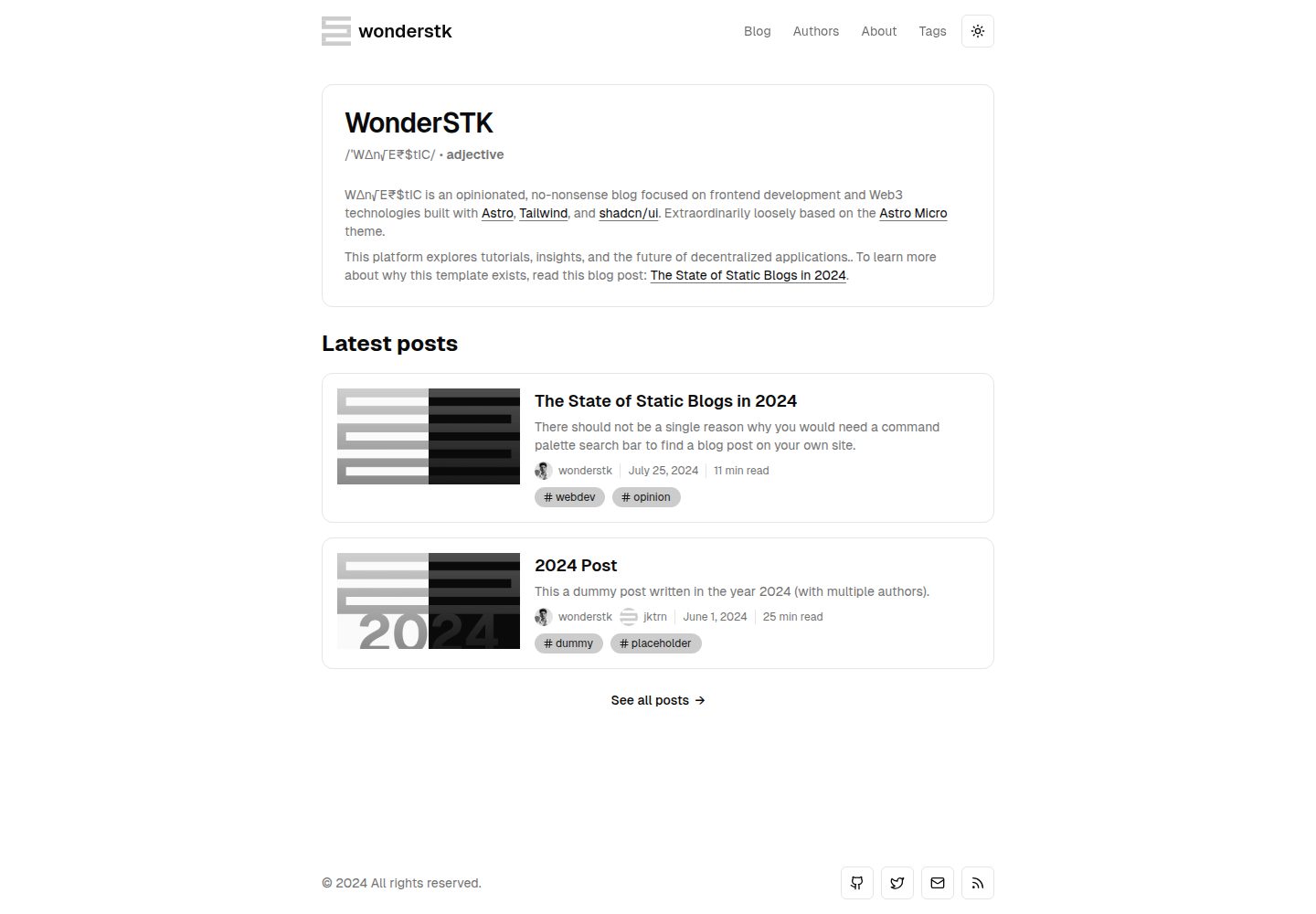
浏览真实页面截图,比较内容排版与手机效果。点击下方缩略图切换,放大查看整页细节。
全部页面与视图 3
截图用于了解视觉与布局,交互效果请以实际项目为准。
采集于 2026-10-12查看来源
值得关注的模板亮点
从已有项目资料中,快速了解它的特点。
采用 shadcn/ui 的 Tailwind 颜色约定,自动适配亮色与暗色主题,并提供导航、按钮等主题感知组件
通过 rehype-pretty-code 与 Shiki 实现代码块样式、高亮以及代码块标题/说明
使用 MDX 撰写博客文章,并支持 KaTeX 渲染 LaTeX 数学公式
支持作者资料与作者页面、每篇文章添加多位作者,以及标签页面用于文章分类与发现
提供每篇文章的元数据与 Open Graph 标签控制,并生成 RSS 订阅与站点地图
模板详细介绍
wonderstk-blog 是一个静态博客模板,作者称其为 opinionated、no-frills,并说明其灵感松散地来自 Astro Micro。模板使用 Astro 构建,样式基于 Tailwind,组件来自 shadcn/ui,文章内容使用 MDX 编写。README 列出了作者页面、标签页面、RSS 订阅、站点地图、每篇文章的元数据与 Open Graph 标签控制、KaTeX 数学公式渲染、基于 Shiki 与 rehype-pretty-code 的代码块样式与标题/说明,以及 Astro View Transitions 的 SPA 模式过渡动画。
README 未提供模板的目录结构、内容集合配置方式、主题定制细节、多语言支持说明或无障碍合规说明;也未说明除 Vercel 之外的其他部署方式。预览截图仅证明桌面与移动端页面存在,不证明具体页面功能。
Astro博客
适合你的项目吗?
适用场景
- 搭建以技术文章为主、需要代码高亮与数学公式渲染的个人博客
- 希望用 MDX 在文章中嵌入组件式内容的写作场景
- 需要作者页面、多作者署名与标签分类来组织文章的内容站点
- 需要为每篇文章单独控制 SEO 元数据与 Open Graph 标签的博客
- 希望将静态博客部署到 Vercel 的项目
适合人群
- 熟悉 Astro 与 MDX、希望直接使用现成静态博客模板的开发者
- 需要代码高亮、KaTeX 公式和亮暗主题适配的技术博客作者
- 需要作者页面、标签页面、RSS 与站点地图等基础内容组织功能的站点
- 计划使用 Vercel 部署静态站点的用户
上手与定制指南
结合仓库当前版本的说明,按下面的资料检查内容、配置与运行要求。
- 1
在 GitHub 上点击 “Use this template” 创建自己的仓库,然后克隆到本地并进入项目目录
- 2
运行 npm install 安装依赖
- 3
运行 npm run dev 启动开发服务器,并访问 http://localhost:1234
- 4
可用命令包括 npm run start(dev 别名)、npm run build(类型检查并构建)、npm run preview(预览构建结果)、npm run astro(Astro CLI)与 npm run prettier(使用 Prettier 格式化全部文件)
- 5
README 未说明环境变量、内容目录结构或除 Vercel 之外的具体部署配置
授权与来源资料
使用条件与限制
免费使用 · 保留许可声明本次收录的是公开仓库中采用 MIT 许可的免费版本;免费范围为该版本代码,不代表外部服务或第三方素材免费。
使用时需要遵守
- 允许免费使用、修改、商用和分发该版本代码。
- 分发代码副本或实质性部分时,保留原作者版权声明和完整 MIT 许可声明。
- 代码按现状提供;担保与责任限制以原许可证及适用法律为准。
额外费用与待核对事项
- 演示图片、字体、图标及其他第三方素材需按各自许可核对,不能仅凭代码的 MIT 许可判断。
- 域名、托管、数据库、支付或 AI 等外部服务可能另外收费。
查看原文依据
https://github.com/WonderSTK/wonderstk-blog/blob/main/LICENSEhttps://github.com/WonderSTK/wonderstk-blog/blob/main/README.mdPermission is hereby granted, free of charge
许可证原文
DeepSeek 根据仓库许可证和 README 整理 ·2026-10-12。结果仅覆盖已读取资料,依赖、图片、字体及后续条款变更以各自原文为准。
项目核对记录与介绍依据
模板资料
- 来源平台
- GitHub
- 资料与维护参考分
- 资料一般 · 74 / 100
- 技术栈
- Astro
- 网站类型
- 博客
这个分数如何计算
本站按许可资料(最高30分)、演示链接(12分)、预览图(10分)、Star数(15分)、记录的维护时间(15分)、描述完整度(8分)、功能记录(5分)和分类资料(5分)计算。它不是代码、安全或性能测试,也不是 Google 评分;有链接不代表已实测可用。
这个项目需要核对什么
- 记录的仓库更新时间
- 2024-12-08
- 截图检查日期
- 2026-10-12
已收录演示链接。请用你的内容与屏幕尺寸检查;有演示不代表表单、认证或支付已经可用。
目录记录的主要技术栈是 Astro。请通过依赖清单和锁文件核对实际版本与托管要求。这些说明基于收录资料,不代表代码审计或部署实测。
查看具体选型方法 →介绍的制作与核对状态
介绍由 AI 辅助整理目录与仓库资料。仓库作者不等于这篇介绍的审核者。
审核声明: codex-user-requested-batch-review-20261015 · 2026-10-15
查看当时使用的来源资料
SHA-256: 96de03315523fccf9e1f5335a6b35af9b4a8d6a6bbaa0e4d2a82401ce391c8ad
2026-10-12T20:23:20.633Z
来源文件 / 仓库<div align="center"> ## wonderstk </div> wonderstk is an opinionated, no-frills static blogging template built with [Astro](https://astro.build/), [Tailwind](https://tailwindcss.com/), and [shadcn/ui](https://ui.shadcn.com/). Extraordinarily loosely based off the [Astro Micro](https://astro-micro.vercel.app/) > [!NOTE] > To learn more about why this template exists, read [The State of Static Blogs in 2024](https://wonderstk-blog.vercel.app/blog/the-state-of-static-blogs), where I share my take on what constitutes a great blogging template and my goals while developing this one. ## Features - [Astro](https://astro.build/)’s [Islands](https://docs.astro.build/en/concepts/islands/) architecture for partial/selective hydration and client-side interactivity while maintaining a fast-to-render static site. - [shadcn/ui](https://ui.shadcn.com/)’s [Tailwind](https://tailwindcss.com/) color convention for automatic styling across both light and dark themes. Includes accessible, theme-aware UI components for navigation, buttons, etc. - [rehype-pretty-code](https://rehype-pretty.pages.dev/) with [Shiki](https://github.com/shikijs/shiki) for advanced code block styling, highlighting, and code block titles/captions. - Blog post authoring using [MDX](https://mdxjs.com/) for component-style content, alongside $\LaTeX$ rendering using [KaTeX](https://katex.org/). - Astro [View Transitions](https://docs.astro.build/en/guides/view-transitions/) in <abbr title="Single Page Application">SPA</abbr> mode for smooth, opt-in animations during route switching. - SEO optimization with fine-grained control over metadata and [Open Graph](https://ogp.me/) tags for each post. - [RSS](https://en.wikipedia.org/wiki/RSS) feeds and sitemap generation! - Supports author profiles (with a dedicated authors page) and adding multiple authors per post. - Supports project tags (with a dedicated tags page) for easy post categorization and discovery. ## Technology Stack This is a list of the various technologies used to build this template: | Category | Technology Name | | ------------------- | -------------------------------------------------------------------------------------------------- | | Framework | [Astro](https://astro.build/) | | Styling | [Tailwind](https://tailwindcss.com) | | Components | [shadcn/ui](https://ui.shadcn.com/) | | Content | [MDX](https://mdxjs.com/) | | Syntax Highlighting | [Shiki](https://github.com/shikijs/shiki) + [rehype-pretty-code](https://rehype-pretty.pages.dev/) | | Graphics | [Figma](https://www.figma.com/) | | Deployment | [Vercel](https://vercel.com) | ## Getting Started 1. Hit “Use this template”, the big green button on the top right, to create a new repository in your own GitHub account with this template. 2. Clone the repository: ```bash git clone https://github.com/[YOUR_USERNAME]/[YOUR_REPO_NAME].git cd [YOUR_REPO_NAME] ``` 3. Install dependencies: ```bash npm install ``` 4. Start the development server: ```bash npm run dev ``` 5. Open your browser and visit `http://localhost:1234` to get started. The following commands are also available: | Command | Description | | ------------------ | --------------------------------------------------------------- | | `npm run start` | Alias for `npm run dev` | | `npm run build` | Run type checking and build the project | | `npm run preview` | Previews the built project | | `npm run astro` | Run Astro CLI commands | | `npm run prettier` | Blanket format all files using [Prettier](https://prettier.io/) | Built with ♥ by [wonderstk](https://personal-portfolio-liard-five.vercel.app/)!
看看同类模板
对比同技术栈与用途的模板,找到更适合的视觉与内容结构。

astrowind
⭕️ AstroWind: A free template using Astro v7 and Tailwind CSS v4. Astro starter theme.
Astro · 博客

astro-paper
基于 Astro 的博客主题,使用 Markdown/MDX 内容、Tailwind 样式和 Pagefind 搜索。搜索属于博客功能,不代表独立工具站产品。
Astro · 博客

fuwari
✨A static blog template built with Astro.
Astro · 博客

Firefly
Firefly 是一款基于 Astro 的静态博客主题,由 CuteLeaf 在 saicaca 的 Fuwari 模板基础上二次开发,主打清新美观的视觉风格。
Astro · 博客

astro-theme-cactus
面向博客与笔记发布的 Astro 启动模板,支持 Markdown/MDX 内容、Tailwind 样式与 Pagefind 搜索,主要用途是发布文章和笔记。
Astro · 博客

astrofy
Astrofy is a free and open-source template for your Personal Portfolio Website built with Astro and TailwindCS…
Astro · 作品集