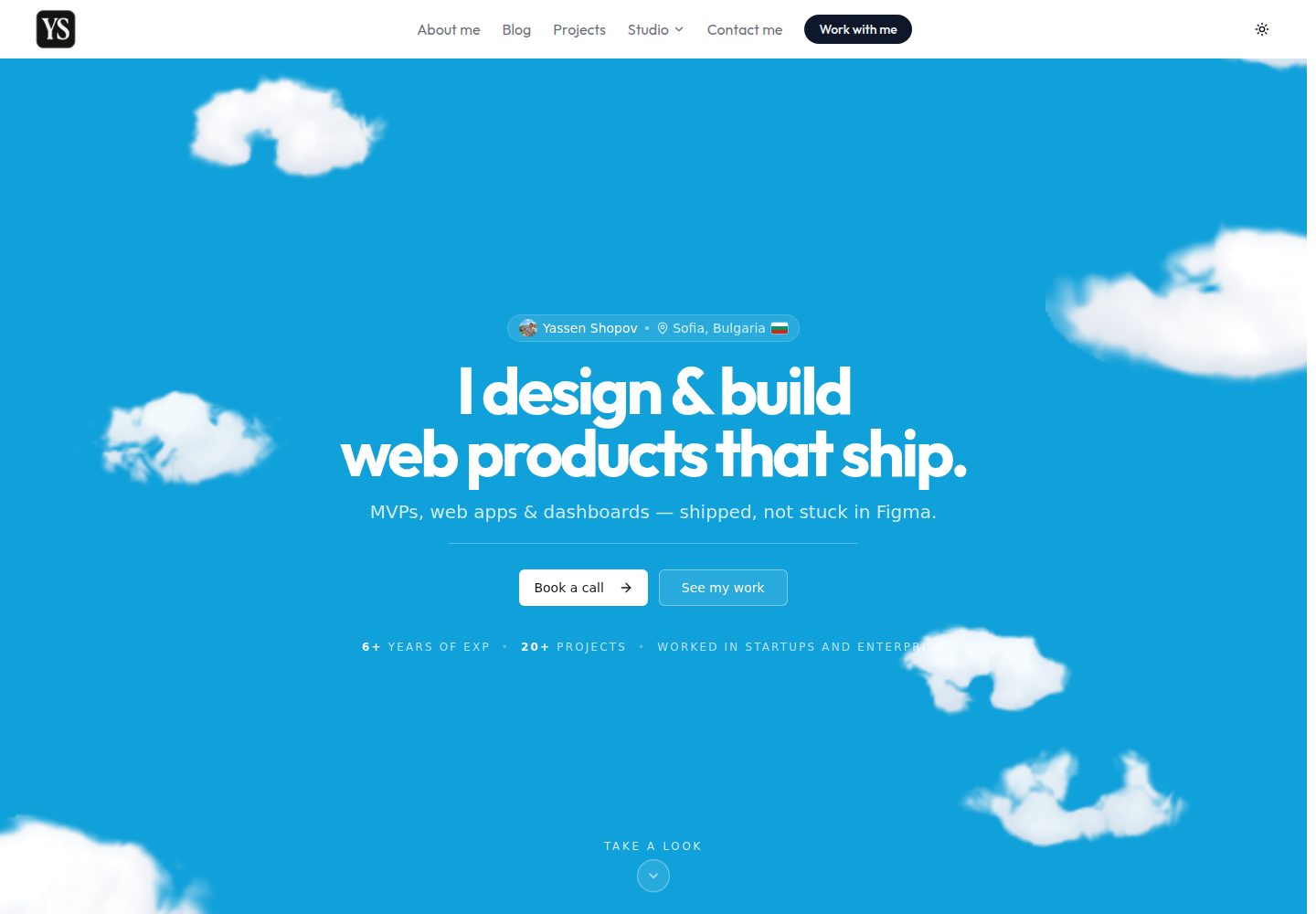
Includes multiple content sections such as a blog, project showcase, Notion templates gallery, digital art gallery, and media library
Next.jsReactPortfolioBlog
yassenshopov.com — Next.js Portfolio Template
By yassenshopov
Yassen Shopov's personal website, built with Next.js App Router and TypeScript, includes the blog "Life Engineering", project showcase, Notion templates gallery, digital art gallery, and a media library with drag-and-drop ranking.
Explore the design
Compare the page layouts and mobile experience. Open any screenshot for a closer look.
Desktop homepage1 / 3
Desktop captureTop of page
Actual screenshot captured by the server browser.
All pages & views 3
Screenshots show visual appearance; interactive behavior may differ.
Recorded 2026-10-04View source
What stands out
A quick read of the recorded project description.
The media library supports a drag-and-drop tier list, and in development allows drag-and-drop cover uploads and inline editing of ratings and dates
Content is stored in local JSON and validated at build time with Zod; blog posts use Markdown fields and reading time is calculated automatically
Uses React Server Components, using client components only when state or event handling is needed
Integrates Resend for contact form email delivery, with optional Vercel Blob offloading for image assets
Provides a toolchain including ESLint, Prettier, Vitest, and Playwright, plus a GitHub Actions CI workflow
Template Details
This template is the source code for Yassen Shopov's personal website, built with Next.js App Router, TypeScript (strict), and Tailwind CSS, and deployed on Vercel. The site contains several content sections: the blog "Life Engineering", a project showcase, a Notion templates gallery, a digital art gallery, and a media library (books, movies, and series) that supports a drag-and-drop tier list. Content is stored in local JSON and validated at build time with Zod; blog posts use Markdown fields, and reading time is calculated automatically. The site favors React Server Components, marking client components only when state or event handling is needed. The contact form sends email via Resend, and image assets can optionally be offloaded to Vercel Blob. In the development environment, the media library supports drag-and-drop cover uploads and inline editing of ratings/dates; these write operations are handled by API routes available only in development and are disabled in production. The repository uses the MIT license, allowing free use, modification, commercial use, and distribution of the code, but third-party assets (such as images and fonts) must be checked separately for licensing, and external services (domain, hosting, email, etc.) may incur costs.
Next.jsReactPortfolioBlog
Is it right for your project?
Use Cases
- Building a personal website that simultaneously showcases a blog, project work, and Notion templates
- Creating a media library (books, movies, series) with a drag-and-drop tier list
- Building a static content site that uses local JSON as its content source and validates at build time
- Quickly maintaining media library entries in the development environment through drag-and-drop and inline editing
- Using it as a reference project for learning Next.js App Router and React Server Components
Suitable For
- Developers or creators who need an integrated personal blog and portfolio
- Static site projects that want to manage content with local JSON and avoid database dependencies
- Personal projects that need media library tier list interaction
- Front-end developers familiar with Next.js, TypeScript, and Tailwind CSS
Getting started & customization
Use these recorded setup notes alongside the repository instructions for your chosen version.
- 1
Run npm install to install dependencies, and use npm run dev to start the development server (default port 26)
- 2
If contact form email delivery is needed, configure RESEND_API_KEY and CONTACT_FROM_EMAIL in .env.local
- 3
BLOB_READ_WRITE_TOKEN is required only when running the image migration script
- 4
Blog posts and media library entries are added by editing the JSON files under src/data/, with the format validated by Zod at build time
- 5
Media library editing in the development environment writes back to JSON through routes under app/api/library/, and is disabled in production
License & source material
Usage conditions & limitations
Free to use · keep license noticeThis entry covers the free version under the MIT license in the public repository; the free scope is the code of this version and does not mean that external services or third-party assets are free.
Must comply with when using
- Free use, modification, commercial use, and distribution of this version's code are allowed.
- When distributing copies or substantial portions of the code, retain the original author's copyright notice and the complete MIT license notice.
- The code is provided as is; warranties and limitations of liability are governed by the original license and applicable law.
Additional costs & items to verify
- Contact form email delivery depends on the Resend service, and you must register and configure RESEND_API_KEY yourself; without configuration this feature is unavailable, and using Resend may be subject to its terms of service and fees.
- The image migration script depends on the external Vercel Blob storage service and requires BLOB_READ_WRITE_TOKEN; using this service requires registering a Vercel account and may incur costs.
- The media library's drag-and-drop cover upload and inline editing of ratings/dates are available only in the development environment; the related API routes are disabled in production, so content cannot be edited online.
- Deployment depends on the Vercel platform and requires registering a Vercel account; using its hosting service may incur costs and is subject to its terms of service.
- Demo images, fonts, icons, and other third-party assets must be checked under their respective licenses and cannot be judged solely by the code's MIT license.
- External services such as domain, hosting, database, payment, or AI may incur separate charges.
View Original Text Basis
Permission is hereby granted, free of charge
Original License Text
RESEND_API_KEY=... # contact form email delivery (optional in dev)
Original README
BLOB_READ_WRITE_TOKEN=... # only needed to run scripts/migrate-images-to-blob.mjs
Original README
these write back to the JSON via the dev-only routes under `app/api/library/` (disabled in production)
Original README
https://github.com/yassenshopov/yassenshopov.com/blob/main/LICENSEhttps://github.com/yassenshopov/yassenshopov.com/blob/main/README.mdPushes to `main` deploy automatically on Vercel.
Original README
Compiled by DeepSeek based on repository license and README ·2026-10-04. Results only cover the materials read; dependencies, images, fonts, and subsequent term changes are subject to their respective original texts.
Project checks & description sources
Template Information
- Source platforms
- GitHub
- Documentation and maintenance reference score
- More documented · 88 / 100
- Technologies
- Next.js · React
- Website type
- Portfolio · Blog
How this score is calculated
Our heuristic uses license records (up to 30), a demo link (12), a preview (10), stars (15), recorded maintenance (15), description completeness (8), feature records (5) and classification data (5). It is not a code, security or performance test, or a Google score. A link does not establish tested functionality.
What to verify for this project
- Repository update recorded
- 2026-09-28
- Screenshot last checked
- 2026-10-04
A demo link is listed. Check it with your own content and viewport sizes; its presence does not confirm that forms, authentication or payments work.
The catalog identifies Next.js as the primary stack. Check the actual dependency manifest and lockfile for versions and hosting requirements. These notes use recorded metadata, not a code audit or a deployment test.
Use a selection guide →How this description was prepared
AI-assisted description based on catalog records and repository material. Repository authors are not automatically the reviewers of this description.
Review declaration: [email protected] · 2026-10-04
Inspect the recorded source material
SHA-256: e1611613b65e70f3b025310a43092bdafa27a68ef72ec6f724cc8dea7188ff70
2026-10-04T03:13:46.583Z
Source file / repository# yassenshopov.com
Personal website of Yassen Shopov — blog ("Life Engineering"), project showcase,
Notion templates, a digital-art gallery, and a media **Library** (books, movies &
series) with a drag-to-rank tier list.
Built with the Next.js App Router, TypeScript (strict), and Tailwind CSS, and
deployed on Vercel.
## Tech stack
- **Framework:** Next.js 15 (App Router, React Server Components)
- **Language:** TypeScript (strict)
- **Styling:** Tailwind CSS + `tailwindcss-animate`, shadcn/ui-style primitives (Radix)
- **Content:** local JSON (blog posts, library items, tier boards), validated with Zod
- **Email:** Resend (contact form)
- **Assets:** Vercel Blob for offloaded images
- **Tooling:** ESLint (flat config), Prettier, Vitest, Playwright, Husky + lint-staged
- **CI/CD:** GitHub Actions (lint · typecheck · test · build), Lighthouse CI, Dependabot
## Getting started
```bash
npm install
npm run dev # http://localhost:26
```
Create a `.env.local` for the optional integrations:
```bash
RESEND_API_KEY=... # contact form email delivery (optional in dev)
CONTACT_FROM_EMAIL=... # verified Resend sender (falls back to [email protected])
BLOB_READ_WRITE_TOKEN=... # only needed to run scripts/migrate-images-to-blob.mjs
```
## Scripts
| Command | Description |
| --------------------------------- | ----------------------------------------------- |
| `npm run dev` | Start the dev server (Turbopack) on port 26 |
| `npm run build` | Production build |
| `npm run lint` / `lint:fix` | ESLint over the app source |
| `npm run typecheck` | `tsc --noEmit` |
| `npm run format` / `format:check` | Prettier |
| `npm test` / `test:watch` | Vitest unit tests |
| `npm run e2e` | Playwright end-to-end tests |
| `npm run analyze` | Build with the bundle analyzer (`ANALYZE=true`) |
## Architecture
```
src/
app/ # App Router routes (each section has page.tsx + layout.tsx)
api/ # Route handlers (contact + dev-only library admin)
error.tsx # Route error boundary · global-error.tsx · not-found.tsx
components/ # UI — server components by default, 'use client' only where needed
home/ blog/ library/ projects/ about/ notion/ ui/
Reveal.tsx # CSS scroll-reveal wrapper (replaces framer-motion fade-ins)
data/ # Content + typed access layer (see "Data layer" below)
hooks/ # Client hooks (useLibrary, useLibraryEntryEditor)
lib/ # Pure helpers (blog, library-utils, rate-limit, format-date, …)
types/ # Shared types (blog)
```
### Server vs client boundaries
The site favours **React Server Components**. Sections are only marked
`'use client'` when they need state, effects, or event handlers. Presentational
scroll-in animations use `components/Reveal.tsx` — a tiny client leaf backed by
CSS in `globals.css` (with reduced-motion and no-JS fallbacks) — so the sections
that use it stay on the server.
### Data layer
Content lives as local JSON with a typed, validated access layer:
- **Blog** — `data/blog-posts.json` holds posts (markdown in a `content` field).
`lib/blog.ts` is **server-only**: it Zod-validates the payload, sorts newest-first,
and pre-computes reading time. Only the single post being viewed is sent to the
client. The canonical type is `types/blog.ts` (`BlogPost`).
- **Library** — `data/library-items.json` (~400 works). `data/library.ts` holds the
**client-safe types + pure helpers**; `data/library.server.ts` is **server-only**
and owns the JSON import + Zod validation. The `/library` and `/library/tier-list`
routes are server components that load the validated catalogue and pass it into
client islands (`components/library/LibraryView.tsx`, `LibraryTierListView.tsx`),
keeping the big JSON and Zod out of the browser bundle.
- **Tier list** — `data/library-tiers.json` stores ordered item ids per board/tier;
`data/library-tiers.ts` normalizes it at the boundary (Zod-free so it stays
client-safe for the `TierBadge`).
## Authoring content
### Add a blog post
Append an entry to the `posts` array in `src/data/blog-posts.json`:
```jsonc
{
"slug": "my-post", // URL: /blog/my-post (must be unique)
"title": "My Post",
"description": "One-line summary used in cards and metadata.",
"date": "2026-06-28", // ISO; drives ordering + prev/next
"coverImage": "/resources/images/blog/my-post.webp",
"tags": ["engineering"],
"author": "Yassen Shopov",
"content": "# Heading\n\nMarkdown body…",
}
```
The schema is enforced at build time (`lib/blog.ts`) — a malformed post fails the
build rather than rendering broken. Reading time is derived automatically.
### Add a library item
Append to `src/data/library-items.json` (validated by `data/library.server.ts`):
```jsonc
{
"id": "unique-id",
"title": "The Work",
"type": "book", // "book" | "movie" | "series"
"author": "Author Name", // or "director" / "creator"
"genre": ["Sci-Fi"],
"description": "Short blurb.",
"coverImage": "/resources/images/library/the-work.webp",
"entries": [
// one per reading/watch; supports re-reads
{ "status": "completed", "rating": 5, "dateCompleted": "2026-01-15" },
],
}
```
In development you can also drag-and-drop a new cover onto a card, and edit
ratings/dates inline from the item modal — these write back to the JSON via the
dev-only routes under `app/api/library/` (disabled in production).
## Deployment
Pushes to `main` deploy automatically on Vercel. CI must pass first
(`.github/workflows/ci.yml`): Prettier → ESLint → typecheck → unit tests → build.
## License
MIT — see [LICENSE](LICENSE).
Explore similar templates
Compare previews and descriptions within the same stack and category.

tailwind-nextjs-starter-blog
A Next.js and Tailwind CSS blog starter template using Contentlayer for Markdown/MDX, with built-in SEO, code highlighting, and tags. It targets personal technical blogs and migration from Jekyll/Hugo to React, and supports one-click Vercel deployment.
Next.js · Blog

react-resume-template
A personal resume website template for software developers, built with Next.js, React, and TypeScript and styled with Tailwind CSS. Site content is driven by a single data file at /src/data/data.tsx, with types in dataDef.ts and images in src/images/.
Next.js · Portfolio

Nextjs-tailwindcss-blog-template
A personal blog template built with Next.js and Tailwind CSS, using Velite to process Markdown content. It includes home, about, contact and article pages, with a demo site and a companion YouTube tutorial.
Next.js · Blog

Next-js-Blog-Boilerplate
A blog starter built on Next.js 12 and Tailwind CSS 3, integrating TypeScript, ESLint, Prettier, and PostCSS.
Next.js · Blog

nextjs-blog-theme
A Next.js 15 and Tailwind CSS 4.x blog starter by Netlify, designed by Bejamas, with MDX support, dark/light theme switching, and environment-variable configuration. It includes a visual setup wizard for deploying to Netlify and manages content via local .mdx files.
Next.js · Blog

blog
A personal blog forked from Timlrx's tailwind-nextjs-starter-blog, built with Next.js, React, and Tailwind CSS. Content is stored as Markdown/MDX under data/, with site, author, navigation, and project data in separate files.
Next.js · Blog