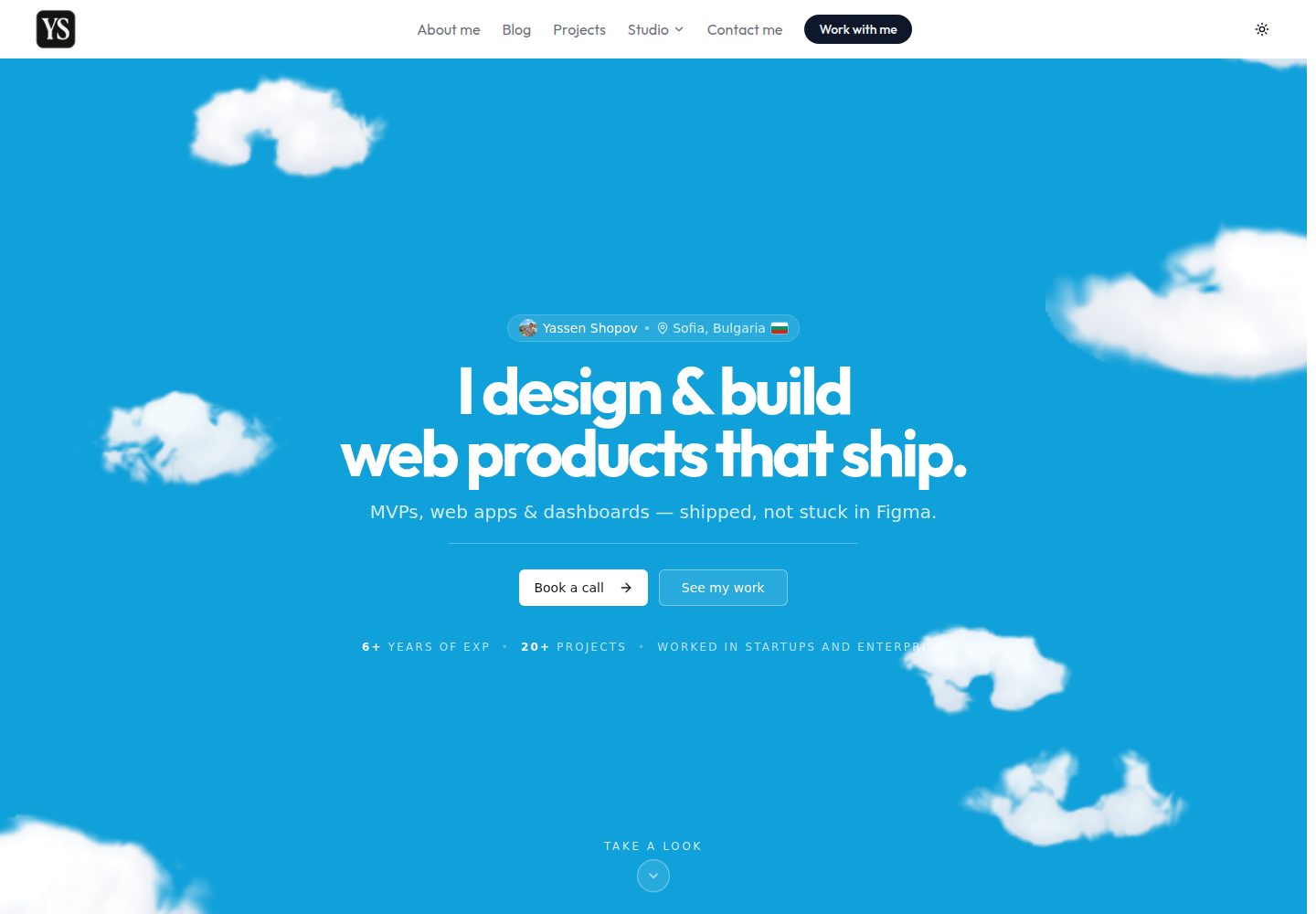
包含博客、项目展示、Notion 模板画廊、数字艺术画廊和媒体库等多个内容板块
Next.jsReact作品集博客
yassenshopov.com — Next.js 作品集模板
作者 yassenshopov
Yassen Shopov 的个人网站,基于 Next.js App Router 与 TypeScript 构建,包含博客“Life Engineering”、项目展示、Notion 模板画廊、数字艺术画廊以及带拖拽排名功能的媒体库。
看看你的网站会是什么样
浏览真实页面截图,比较内容排版与手机效果。点击下方缩略图切换,放大查看整页细节。
全部页面与视图 3
截图用于了解视觉与布局,交互效果请以实际项目为准。
采集于 2026-10-04查看来源
值得关注的模板亮点
从已有项目资料中,快速了解它的特点。
媒体库支持拖拽排序的 tier list,并可在开发环境下拖拽上传封面、行内编辑评分与日期
内容以本地 JSON 存储,通过 Zod 在构建时校验,博客文章使用 Markdown 字段并自动计算阅读时长
采用 React Server Components,仅在需要状态或事件处理时使用客户端组件
集成 Resend 用于联系表单邮件发送,可选使用 Vercel Blob 卸载图片资源
提供 ESLint、Prettier、Vitest、Playwright 等工具链,以及 GitHub Actions CI 流程
模板详细介绍
该模板是 Yassen Shopov 的个人网站源码,使用 Next.js App Router、TypeScript(strict)和 Tailwind CSS 构建,部署于 Vercel。网站包含多个内容板块:博客“Life Engineering”、项目展示、Notion 模板画廊、数字艺术画廊,以及一个媒体库(书籍、电影与剧集),媒体库支持拖拽排序的 tier list。内容以本地 JSON 存储,并通过 Zod 在构建时校验,博客文章使用 Markdown 字段,阅读时长自动计算。网站偏向使用 React Server Components,仅在需要状态或事件处理时标记客户端组件。联系表单通过 Resend 发送邮件,图片资源可选用 Vercel Blob 卸载。开发环境下,媒体库支持拖拽上传封面和行内编辑评分/日期,这些写操作通过仅开发环境可用的 API 路由完成,生产环境禁用。仓库采用 MIT 许可,允许免费使用、修改、商用和分发代码,但第三方素材(如图片、字体)需单独核对许可,外部服务(域名、托管、邮件等)可能产生费用。
Next.jsReact作品集博客
适合你的项目吗?
适用场景
- 搭建个人网站,同时展示博客、项目作品和 Notion 模板
- 创建带有拖拽排序 tier list 的媒体库(书籍、电影、剧集)
- 构建以本地 JSON 为内容源、构建时校验的静态内容站点
- 在开发环境下通过拖拽和行内编辑快速维护媒体库条目
- 作为学习 Next.js App Router 与 React Server Components 的参考项目
适合人群
- 需要个人博客与作品集一体化展示的开发者或创作者
- 希望用本地 JSON 管理内容并避免数据库依赖的静态站点项目
- 对媒体库 tier list 交互功能有需求的个人项目
- 熟悉 Next.js、TypeScript 和 Tailwind CSS 的前端开发者
上手与定制指南
结合仓库当前版本的说明,按下面的资料检查内容、配置与运行要求。
- 1
运行 npm install 安装依赖,使用 npm run dev 启动开发服务器(默认端口 26)
- 2
如需联系表单邮件发送,在 .env.local 中配置 RESEND_API_KEY 和 CONTACT_FROM_EMAIL
- 3
仅在运行图片迁移脚本时需要配置 BLOB_READ_WRITE_TOKEN
- 4
博客文章和媒体库条目通过编辑 src/data/ 下的 JSON 文件添加,格式由 Zod 在构建时校验
- 5
开发环境下的媒体库编辑功能通过 app/api/library/ 下的路由写回 JSON,生产环境禁用
授权与来源资料
使用条件与限制
免费使用 · 保留许可声明本次收录的是公开仓库中采用 MIT 许可的免费版本;免费范围为该版本代码,不代表外部服务或第三方素材免费。
使用时需要遵守
- 允许免费使用、修改、商用和分发该版本代码。
- 分发代码副本或实质性部分时,保留原作者版权声明和完整 MIT 许可声明。
- 代码按现状提供;担保与责任限制以原许可证及适用法律为准。
额外费用与待核对事项
- 联系表单邮件发送依赖 Resend 服务,需自行注册并配置 RESEND_API_KEY;未配置时该功能不可用,且使用 Resend 可能受其服务条款与费用限制。
- 图片迁移脚本依赖 Vercel Blob 外部存储服务,需配置 BLOB_READ_WRITE_TOKEN;使用该服务需注册 Vercel 账户并可能产生费用。
- 媒体库的拖拽上传封面与行内编辑评分/日期功能仅在开发环境可用,生产环境相关 API 路由被禁用,无法在线编辑内容。
- 部署依赖 Vercel 平台,需注册 Vercel 账户;使用其托管服务可能产生费用,且受其服务条款约束。
- 演示图片、字体、图标及其他第三方素材需按各自许可核对,不能仅凭代码的 MIT 许可判断。
- 域名、托管、数据库、支付或 AI 等外部服务可能另外收费。
查看原文依据
Permission is hereby granted, free of charge
许可证原文
RESEND_API_KEY=... # contact form email delivery (optional in dev)
README 原文
BLOB_READ_WRITE_TOKEN=... # only needed to run scripts/migrate-images-to-blob.mjs
README 原文
these write back to the JSON via the dev-only routes under `app/api/library/` (disabled in production)
README 原文
https://github.com/yassenshopov/yassenshopov.com/blob/main/LICENSEhttps://github.com/yassenshopov/yassenshopov.com/blob/main/README.mdPushes to `main` deploy automatically on Vercel.
README 原文
DeepSeek 根据仓库许可证和 README 整理 ·2026-10-04。结果仅覆盖已读取资料,依赖、图片、字体及后续条款变更以各自原文为准。
项目核对记录与介绍依据
模板资料
- 来源平台
- GitHub
- 资料与维护参考分
- 资料较完整 · 88 / 100
- 技术栈
- Next.js · React
- 网站类型
- 作品集 · 博客
这个分数如何计算
本站按许可资料(最高30分)、演示链接(12分)、预览图(10分)、Star数(15分)、记录的维护时间(15分)、描述完整度(8分)、功能记录(5分)和分类资料(5分)计算。它不是代码、安全或性能测试,也不是 Google 评分;有链接不代表已实测可用。
这个项目需要核对什么
- 记录的仓库更新时间
- 2026-09-28
- 截图检查日期
- 2026-10-04
已收录演示链接。请用你的内容与屏幕尺寸检查;有演示不代表表单、认证或支付已经可用。
目录记录的主要技术栈是 Next.js。请通过依赖清单和锁文件核对实际版本与托管要求。这些说明基于收录资料,不代表代码审计或部署实测。
查看具体选型方法 →介绍的制作与核对状态
介绍由 AI 辅助整理目录与仓库资料。仓库作者不等于这篇介绍的审核者。
审核声明: [email protected] · 2026-10-04
查看当时使用的来源资料
SHA-256: e1611613b65e70f3b025310a43092bdafa27a68ef72ec6f724cc8dea7188ff70
2026-10-04T03:13:46.583Z
来源文件 / 仓库# yassenshopov.com
Personal website of Yassen Shopov — blog ("Life Engineering"), project showcase,
Notion templates, a digital-art gallery, and a media **Library** (books, movies &
series) with a drag-to-rank tier list.
Built with the Next.js App Router, TypeScript (strict), and Tailwind CSS, and
deployed on Vercel.
## Tech stack
- **Framework:** Next.js 15 (App Router, React Server Components)
- **Language:** TypeScript (strict)
- **Styling:** Tailwind CSS + `tailwindcss-animate`, shadcn/ui-style primitives (Radix)
- **Content:** local JSON (blog posts, library items, tier boards), validated with Zod
- **Email:** Resend (contact form)
- **Assets:** Vercel Blob for offloaded images
- **Tooling:** ESLint (flat config), Prettier, Vitest, Playwright, Husky + lint-staged
- **CI/CD:** GitHub Actions (lint · typecheck · test · build), Lighthouse CI, Dependabot
## Getting started
```bash
npm install
npm run dev # http://localhost:26
```
Create a `.env.local` for the optional integrations:
```bash
RESEND_API_KEY=... # contact form email delivery (optional in dev)
CONTACT_FROM_EMAIL=... # verified Resend sender (falls back to [email protected])
BLOB_READ_WRITE_TOKEN=... # only needed to run scripts/migrate-images-to-blob.mjs
```
## Scripts
| Command | Description |
| --------------------------------- | ----------------------------------------------- |
| `npm run dev` | Start the dev server (Turbopack) on port 26 |
| `npm run build` | Production build |
| `npm run lint` / `lint:fix` | ESLint over the app source |
| `npm run typecheck` | `tsc --noEmit` |
| `npm run format` / `format:check` | Prettier |
| `npm test` / `test:watch` | Vitest unit tests |
| `npm run e2e` | Playwright end-to-end tests |
| `npm run analyze` | Build with the bundle analyzer (`ANALYZE=true`) |
## Architecture
```
src/
app/ # App Router routes (each section has page.tsx + layout.tsx)
api/ # Route handlers (contact + dev-only library admin)
error.tsx # Route error boundary · global-error.tsx · not-found.tsx
components/ # UI — server components by default, 'use client' only where needed
home/ blog/ library/ projects/ about/ notion/ ui/
Reveal.tsx # CSS scroll-reveal wrapper (replaces framer-motion fade-ins)
data/ # Content + typed access layer (see "Data layer" below)
hooks/ # Client hooks (useLibrary, useLibraryEntryEditor)
lib/ # Pure helpers (blog, library-utils, rate-limit, format-date, …)
types/ # Shared types (blog)
```
### Server vs client boundaries
The site favours **React Server Components**. Sections are only marked
`'use client'` when they need state, effects, or event handlers. Presentational
scroll-in animations use `components/Reveal.tsx` — a tiny client leaf backed by
CSS in `globals.css` (with reduced-motion and no-JS fallbacks) — so the sections
that use it stay on the server.
### Data layer
Content lives as local JSON with a typed, validated access layer:
- **Blog** — `data/blog-posts.json` holds posts (markdown in a `content` field).
`lib/blog.ts` is **server-only**: it Zod-validates the payload, sorts newest-first,
and pre-computes reading time. Only the single post being viewed is sent to the
client. The canonical type is `types/blog.ts` (`BlogPost`).
- **Library** — `data/library-items.json` (~400 works). `data/library.ts` holds the
**client-safe types + pure helpers**; `data/library.server.ts` is **server-only**
and owns the JSON import + Zod validation. The `/library` and `/library/tier-list`
routes are server components that load the validated catalogue and pass it into
client islands (`components/library/LibraryView.tsx`, `LibraryTierListView.tsx`),
keeping the big JSON and Zod out of the browser bundle.
- **Tier list** — `data/library-tiers.json` stores ordered item ids per board/tier;
`data/library-tiers.ts` normalizes it at the boundary (Zod-free so it stays
client-safe for the `TierBadge`).
## Authoring content
### Add a blog post
Append an entry to the `posts` array in `src/data/blog-posts.json`:
```jsonc
{
"slug": "my-post", // URL: /blog/my-post (must be unique)
"title": "My Post",
"description": "One-line summary used in cards and metadata.",
"date": "2026-06-28", // ISO; drives ordering + prev/next
"coverImage": "/resources/images/blog/my-post.webp",
"tags": ["engineering"],
"author": "Yassen Shopov",
"content": "# Heading\n\nMarkdown body…",
}
```
The schema is enforced at build time (`lib/blog.ts`) — a malformed post fails the
build rather than rendering broken. Reading time is derived automatically.
### Add a library item
Append to `src/data/library-items.json` (validated by `data/library.server.ts`):
```jsonc
{
"id": "unique-id",
"title": "The Work",
"type": "book", // "book" | "movie" | "series"
"author": "Author Name", // or "director" / "creator"
"genre": ["Sci-Fi"],
"description": "Short blurb.",
"coverImage": "/resources/images/library/the-work.webp",
"entries": [
// one per reading/watch; supports re-reads
{ "status": "completed", "rating": 5, "dateCompleted": "2026-01-15" },
],
}
```
In development you can also drag-and-drop a new cover onto a card, and edit
ratings/dates inline from the item modal — these write back to the JSON via the
dev-only routes under `app/api/library/` (disabled in production).
## Deployment
Pushes to `main` deploy automatically on Vercel. CI must pass first
(`.github/workflows/ci.yml`): Prettier → ESLint → typecheck → unit tests → build.
## License
MIT — see [LICENSE](LICENSE).
看看同类模板
对比同技术栈与用途的模板,找到更适合的视觉与内容结构。

tailwind-nextjs-starter-blog
tailwind-nextjs-starter-blog 是一个面向个人技术博客的 Next.js 与 Tailwind CSS 启动模板,其 v2 版本基于 App Router 与 React Server Comp…
Next.js · 博客

react-resume-template
A personal resume website template built with React.js, Typescript, Next.js, and styled with Tailwind css
Next.js · 作品集

Nextjs-tailwindcss-blog-template
⭐Build SEO optimized personal blog website with Next.js, Tailwind CSS and Contentlayer. If you want to learn t…
Next.js · 博客

Next-js-Blog-Boilerplate
Next-js-Blog-Boilerplate 是一套面向个人与技术博客的启动代码,基于 Next.js 12 与 Tailwind CSS 3 构建,同时集成了 TypeScript、ESLint、Prettier …
Next.js · 博客

nextjs-blog-theme
nextjs-blog-theme 是 Netlify 团队维护的一个博客启动模板,基于 Next.js 15(Pages Router)和 Tailwind CSS 4.x 构建,设计由 Bejamas 机构完成。
Next.js · 博客

blog
🚀 My personal blog made with Tailwind CSS and NextJS. Template from Timlrx. Feel free to fork, follow and use…
Next.js · 博客