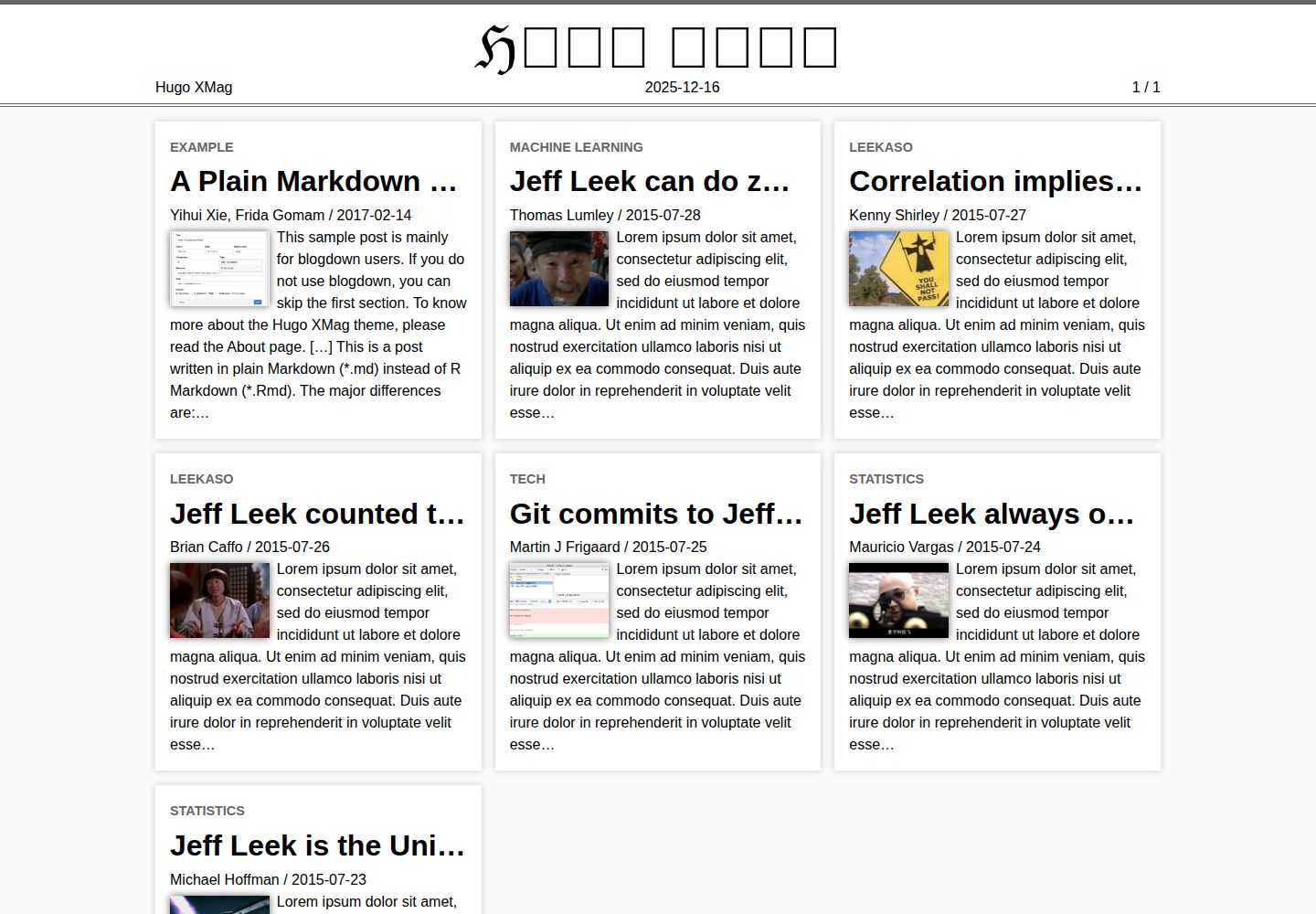
Homepage uses a magazine-style responsive article summary block layout, inspired by Wikipedia's Signpost
HugoBlog
hugo-xmag — Hugo Blog Template
By yihui
hugo-xmag is a minimal magazine-style theme developed by yihui based on the Hugo theme XMin. The homepage uses a summary block layout similar to Wikipedia's Signpost, making it suitable for building blogs or magazine-style sites centered on article lists.
Explore the design
Compare the page layouts and mobile experience. Open any screenshot for a closer look.
Desktop homepage1 / 3
Desktop captureTop of page
Actual screenshot captured by the server browser.
All pages & views 3
Screenshots show visual appearance; interactive behavior may differ.
Recorded 2026-10-02View source
What stands out
A quick read of the recorded project description.
Summary blocks support thumbnails, and the site title uses a Blackletter font
Author information and site information are displayed at the bottom of articles; single pages can show categories, tags, and a table of contents
Supports rendering LaTeX mathematical formulas via MathJax and syntax highlighting for code blocks via highlight.js
Most features can be configured through config.toml, while a few require enabling via custom layouts
Based on the same author's XMin theme, continuing the minimalist design
Template Details
hugo-xmag is a Hugo theme developed by yihui. It is designed based on the same author's XMin theme, continuing the minimalist approach, but introduces magazine-style layout on the homepage, inspired by Wikipedia's Signpost. The homepage displays content in responsive article summary blocks, which can include thumbnails, and the site title is presented in a Blackletter font.
The theme provides several editorial features at the article level: author information and site information are displayed at the bottom of articles, single pages can show categories and tags, and a table of contents is provided. It supports rendering LaTeX mathematical formulas via MathJax, syntax highlighting for code blocks via highlight.js, and Google Analytics. Most features can be configured through config.toml, while a few require enabling via custom layouts. Detailed instructions are on the theme's official About page.
There are some limitations to note. The README explicitly states that the standard Hugo Quickstart guide does not apply: when reaching step 3, do not go past git init. For non-R users, the installation method is to download and extract the repository, copy the theme to the themes/ directory, then copy exampleSite to the site root, and continue from step 5 of the Quickstart. R users can create a site via the blogdown package with blogdown::new_site(theme = 'yihui/hugo-xmag'). The theme code is under the MIT license, but third-party assets such as demo images, fonts, and icons require separate license verification.
HugoBlog
Is it right for your project?
Use Cases
- Building a blog with an article summary list as the homepage
- Creating a personal content site with a magazine-style homepage layout
- Publishing technical articles that include LaTeX mathematical formulas or code blocks
- Creating and managing a site in an R environment using blogdown
Suitable For
- Developers familiar with basic Hugo usage who can handle theme installation themselves
- Bloggers who want to present multiple articles as summary blocks on the homepage
- Writing scenarios that require support for mathematical formulas and code highlighting
- Users working with R and the blogdown workflow
Getting started & customization
Use these recorded setup notes alongside the repository instructions for your chosen version.
- 1
The standard Hugo Quickstart guide does not apply: when reaching step 3, do not go past git init
- 2
For non-R users: download and extract the repository, copy the theme to the themes/ directory, then copy exampleSite to the site root, and continue from step 5 of the Quickstart
- 3
R users can install the blogdown package and run blogdown::new_site(theme = 'yihui/hugo-xmag') to create a site
- 4
Most features are configured through config.toml; a few require enabling via custom layouts. See the theme's official About page for details
- 5
The theme code is under the MIT license, but third-party assets such as demo images, fonts, and icons must be verified under their respective licenses
License & source material
Usage conditions & limitations
Free to use · keep license noticeThis entry covers the free version under the MIT license in the public repository; the free scope applies to that version's code and does not imply that external services or third-party assets are free.
Must comply with when using
- Free use, modification, commercial use, and distribution of this version's code are permitted.
- When distributing copies or substantial portions of the code, retain the original author's copyright notice and the full MIT license notice.
- The code is provided as is; warranties and limitations of liability are governed by the original license and applicable law.
Additional costs & items to verify
- The standard Hugo Quickstart guide does not apply: when reaching step 3, do not go past git init; install the theme using the alternative steps provided in the README.
- R users need to additionally install the blogdown package to create a site with blogdown::new_site(), while non-R users must manually copy the theme and exampleSite directories.
- Most features are configured through config.toml; a few require writing custom layouts to enable and are not available out of the box.
- Demo images, fonts, icons, and other third-party assets must be verified under their respective licenses and cannot be judged solely by the code's MIT license.
- External services such as domain, hosting, database, payment, or AI may incur additional charges.
View Original Text Basis
Permission is hereby granted, free of charge
Original License Text
The standard [Quickstart Guide](https://gohugo.io/getting-started/quick-start/) fails. In Step 3 do not proceed past `git init`.
Original README
If you are an R user, the easiest way to get started with this theme is to install the **blogdown** package
Original README
https://github.com/yihui/hugo-xmag/blob/master/LICENSE.mdhttps://github.com/yihui/hugo-xmag/blob/master/README.mdMost features can be configured through `config.toml`, and a few can be enabled by custom layouts.
Original README
Compiled by DeepSeek based on repository license and README ·2026-10-02. Results only cover the materials read; dependencies, images, fonts, and subsequent term changes are subject to their respective original texts.
Project checks & description sources
Template Information
- Source platforms
- GitHub
- Documentation and maintenance reference score
- More documented · 91 / 100
- Technologies
- Hugo
- Website type
- Blog
How this score is calculated
Our heuristic uses license records (up to 30), a demo link (12), a preview (10), stars (15), recorded maintenance (15), description completeness (8), feature records (5) and classification data (5). It is not a code, security or performance test, or a Google score. A link does not establish tested functionality.
What to verify for this project
- Repository update recorded
- 2026-06-08
- Screenshot last checked
- 2026-10-02
A demo link is listed. Check it with your own content and viewport sizes; its presence does not confirm that forms, authentication or payments work.
The catalog identifies Hugo as the primary stack. Check the actual dependency manifest and lockfile for versions and hosting requirements. These notes use recorded metadata, not a code audit or a deployment test.
Use a selection guide →How this description was prepared
AI-assisted description based on catalog records and repository material. Repository authors are not automatically the reviewers of this description.
Automatically checked against source and license rules; no manual editorial review.
Inspect the recorded source material
SHA-256: b00e54561f8c776d0878ae563ad1e7845054f46f9789bf225b3295225bc8e5e4
2026-10-02T06:42:06.556Z
Source file / repository# HUGO XMAG
**XMag** is designed based on the Hugo theme [**XMin**](https://github.com/yihui/hugo-xmin), and similarly, features minimalism but with a magazine style on the homepage inspired by [The Signpost](https://en.wikipedia.org/wiki/Wikipedia:Wikipedia_Signpost) on Wikipedia.
This theme includes a few cool features:
- Responsive article summary blocks on homepage
- Thumbnails in summary blocks
- Magazine title in Blackletter (𝔅𝔏𝔄ℭ𝔎 𝔏𝔈𝔗𝔗𝔈ℜ)
- Github edit links
- Author info and site info at the bottom of an article
- MathJax for LaTeX math expressions
It also supports features that are probably not even worth mentioning:
- Google Analytics
- highlight.js for syntax highlighting of code blocks
- Display categories and tags on single pages
- Table of contents for single pages
Most features can be configured through `config.toml`, and a few can be enabled by custom layouts. Please see the detailed documentation on the [About](https://xmag.yihui.org/about/) page of the theme website. The source code is available [on Github](https://github.com/yihui/hugo-xmag) (MIT license).
## Quickstart guide
If you are an R user, the easiest way to get started with this theme is to install the **blogdown** package, and [use `blogdown::new_site()` to create a new site](https://bookdown.org/yihui/blogdown/a-quick-example.html):
```r
install.packages('blogdown')
blogdown::new_site(theme = 'yihui/hugo-xmag')
```
If you do not use R, please read on.
**Watch out** The standard [Quickstart Guide](https://gohugo.io/getting-started/quick-start/) fails. In Step 3 do not proceed past `git init`.
Then, to install this theme in your Hugo site
1. Download this repo and unzip it
1. Change directory to the site root
1. Copy the downloaded theme into `themes/`: `cp -r ~/Downloads/hugo-mag-master themes/hugo-mag`
1. Copy the example site into your site root: `cp -r themes/hugo-mag/exampleSite .`
Now resume the Quickstart Guide at Step 5.
[](https://xmag.yihui.org)
Explore similar templates
Compare previews and descriptions within the same stack and category.

hugo-PaperMod
A fast, clean, responsive Hugo theme for blogs and lightweight portfolios, with three layout modes (Regular, Home-Info, Profile), automatic and manual light/dark themes, Fuse.js client-side search, multilingual support, and built-in Open Graph, Twitter Cards, and Schema.org data.
Hugo · Portfolio

LoveIt
LoveIt is a clean, elegant, and feature-rich Hugo blog theme derived from LeaveIt and KeepIt, MIT-licensed. It offers light/dark modes, responsive layout, multilingual support, and search via Lunr.js or Algolia.
Hugo · Blog

hugo-coder
hugo-coder is a minimalist Hugo blog theme maintained by luizdepra under the MIT license. It provides a clean, text-focused blog appearance, configuration documentation in the docs directory, and a complete exampleSite with hugo.toml.
Hugo · Blog

blowfish
Blowfish is a Hugo personal website and blog theme built with Tailwind CSS 4, focused on lightness, simplicity, and content-first presentation.
Hugo · Blog

hugo-paper
hugo-paper is a simple, clean, and customizable Hugo blog theme configured through config.toml or hugo.toml.
Hugo · Blog

hextra
Hextra is a Hugo theme for documentation and blog sites, built on Hugo and Tailwind CSS with design referencing Nextra.
Hugo · Documentation