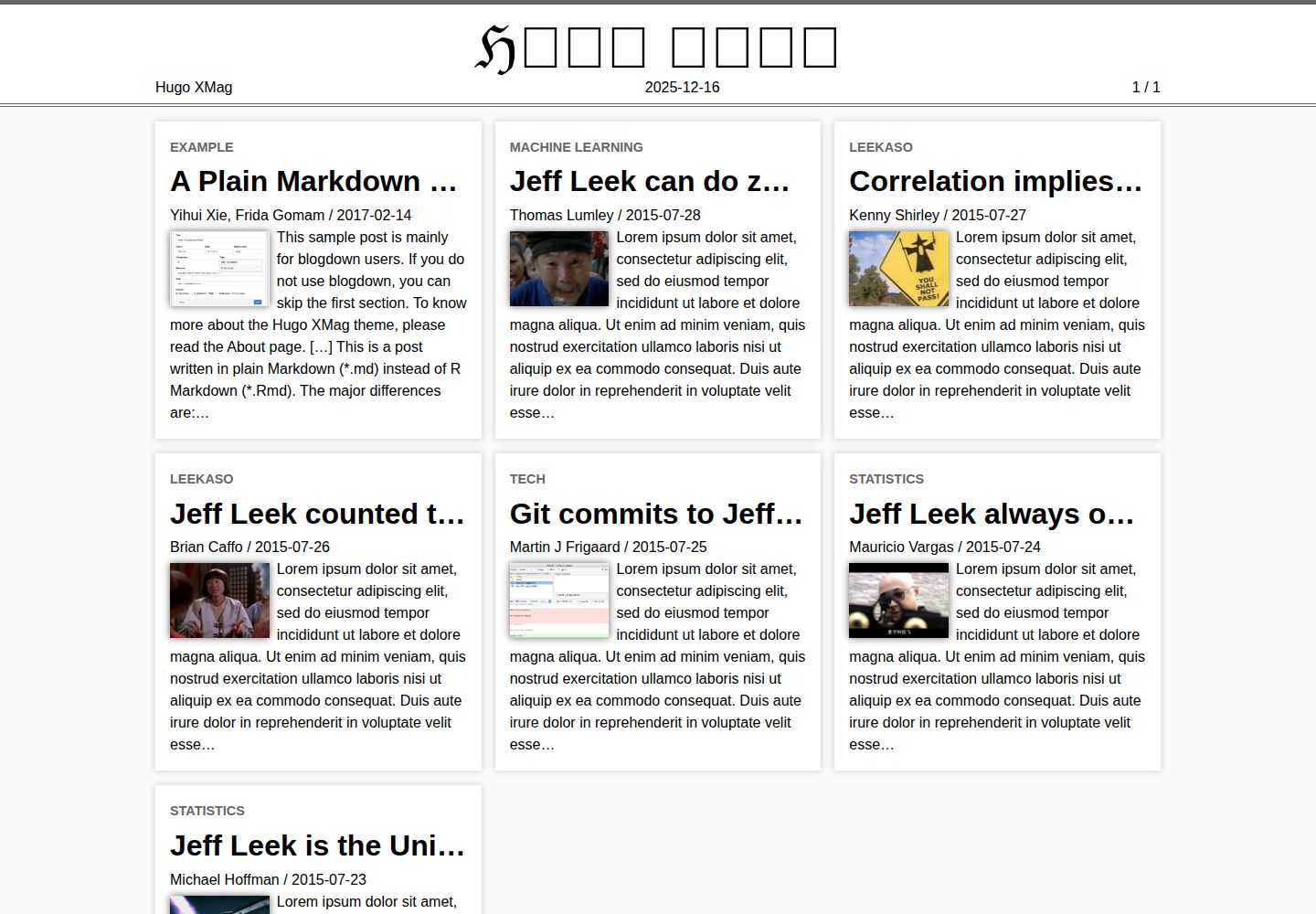
首页采用杂志式响应式文章摘要块布局,灵感来自维基百科《Signpost》
Hugo博客
hugo-xmag — Hugo 博客模板
作者 yihui
hugo-xmag 是 yihui 基于 Hugo 主题 XMin 开发的极简杂志风格主题,首页采用类似维基百科《Signpost》的摘要块布局,适合搭建以文章列表为核心的博客或杂志型站点。
看看你的网站会是什么样
浏览真实页面截图,比较内容排版与手机效果。点击下方缩略图切换,放大查看整页细节。
全部页面与视图 3
截图用于了解视觉与布局,交互效果请以实际项目为准。
采集于 2026-10-02查看来源
值得关注的模板亮点
从已有项目资料中,快速了解它的特点。
摘要块支持缩略图,站点标题使用 Blackletter 字体
文章底部展示作者信息与站点信息,单页可显示分类、标签和目录
支持 MathJax 渲染 LaTeX 数学公式,highlight.js 高亮代码块
多数功能可通过 config.toml 配置,少数需自定义布局启用
基于同作者的 XMin 主题,延续极简设计
模板详细介绍
hugo-xmag 是一个 Hugo 主题,由 yihui 开发,设计上以同作者的 XMin 主题为基础,延续极简思路,但在首页引入杂志式排版,灵感来自维基百科的《Signpost》。首页以响应式文章摘要块展示内容,摘要块可带缩略图,站点标题使用 Blackletter 字体呈现。
主题在文章层面提供若干编辑相关功能:文章底部显示作者信息与站点信息,单页可显示分类与标签,并提供目录;支持通过 MathJax 渲染 LaTeX 数学公式,通过 highlight.js 对代码块做语法高亮,也支持 Google Analytics。多数功能可通过 config.toml 配置,少数需要通过自定义布局启用,详细说明见主题官网的 About 页面。
使用上有一些需要注意的限制。README 明确指出标准 Hugo Quickstart 指南不适用:执行到第 3 步时不要越过 git init。非 R 用户的安装方式是下载仓库并解压,将主题复制到 themes/ 目录,再把 exampleSite 复制到站点根目录,之后从 Quickstart 的第 5 步继续。R 用户可通过 blogdown 包的 blogdown::new_site(theme = 'yihui/hugo-xmag') 创建站点。主题代码采用 MIT 许可,但演示图片、字体、图标等第三方素材需单独核对许可。
Hugo博客
适合你的项目吗?
适用场景
- 搭建以文章摘要列表为首页的博客
- 制作带有杂志式首页排版的个人内容站点
- 发布包含 LaTeX 数学公式或代码块的技术文章
- 使用 blogdown 在 R 环境中创建并管理站点
适合人群
- 熟悉 Hugo 基本用法、能自行处理主题安装的开发者
- 希望在首页以摘要块形式呈现多篇文章的博客作者
- 需要数学公式与代码高亮支持的写作场景
- 使用 R 与 blogdown 工作流的用户
上手与定制指南
结合仓库当前版本的说明,按下面的资料检查内容、配置与运行要求。
- 1
标准 Hugo Quickstart 指南不适用:执行到第 3 步时不要越过 git init
- 2
非 R 用户:下载并解压仓库,将主题复制到 themes/ 目录,再把 exampleSite 复制到站点根目录,然后从 Quickstart 第 5 步继续
- 3
R 用户可安装 blogdown 包,执行 blogdown::new_site(theme = 'yihui/hugo-xmag') 创建站点
- 4
多数功能通过 config.toml 配置,少数功能需通过自定义布局启用,详见主题官网 About 页面
- 5
主题代码为 MIT 许可,但演示图片、字体、图标等第三方素材需按各自许可核对
授权与来源资料
使用条件与限制
免费使用 · 保留许可声明本次收录的是公开仓库中采用 MIT 许可的免费版本;免费范围为该版本代码,不代表外部服务或第三方素材免费。
使用时需要遵守
- 允许免费使用、修改、商用和分发该版本代码。
- 分发代码副本或实质性部分时,保留原作者版权声明和完整 MIT 许可声明。
- 代码按现状提供;担保与责任限制以原许可证及适用法律为准。
额外费用与待核对事项
- 标准 Hugo Quickstart 指南不适用:执行到第 3 步时不要越过 git init,需按 README 提供的替代步骤安装主题。
- R 用户需额外安装 blogdown 包才能使用 blogdown::new_site() 创建站点,非 R 用户则需手动复制主题与 exampleSite 目录。
- 多数功能通过 config.toml 配置,少数功能需自行编写自定义布局才能启用,并非开箱即用。
- 演示图片、字体、图标及其他第三方素材需按各自许可核对,不能仅凭代码的 MIT 许可判断。
- 域名、托管、数据库、支付或 AI 等外部服务可能另外收费。
查看原文依据
Permission is hereby granted, free of charge
许可证原文
The standard [Quickstart Guide](https://gohugo.io/getting-started/quick-start/) fails. In Step 3 do not proceed past `git init`.
README 原文
If you are an R user, the easiest way to get started with this theme is to install the **blogdown** package
README 原文
https://github.com/yihui/hugo-xmag/blob/master/LICENSE.mdhttps://github.com/yihui/hugo-xmag/blob/master/README.mdMost features can be configured through `config.toml`, and a few can be enabled by custom layouts.
README 原文
DeepSeek 根据仓库许可证和 README 整理 ·2026-10-02。结果仅覆盖已读取资料,依赖、图片、字体及后续条款变更以各自原文为准。
项目核对记录与介绍依据
模板资料
- 来源平台
- GitHub
- 资料与维护参考分
- 资料较完整 · 91 / 100
- 技术栈
- Hugo
- 网站类型
- 博客
这个分数如何计算
本站按许可资料(最高30分)、演示链接(12分)、预览图(10分)、Star数(15分)、记录的维护时间(15分)、描述完整度(8分)、功能记录(5分)和分类资料(5分)计算。它不是代码、安全或性能测试,也不是 Google 评分;有链接不代表已实测可用。
这个项目需要核对什么
- 记录的仓库更新时间
- 2026-06-08
- 截图检查日期
- 2026-10-02
已收录演示链接。请用你的内容与屏幕尺寸检查;有演示不代表表单、认证或支付已经可用。
目录记录的主要技术栈是 Hugo。请通过依赖清单和锁文件核对实际版本与托管要求。这些说明基于收录资料,不代表代码审计或部署实测。
查看具体选型方法 →介绍的制作与核对状态
介绍由 AI 辅助整理目录与仓库资料。仓库作者不等于这篇介绍的审核者。
已完成服务器许可规则与 AI 来源核对;未经过人工编辑审核。
查看当时使用的来源资料
SHA-256: b00e54561f8c776d0878ae563ad1e7845054f46f9789bf225b3295225bc8e5e4
2026-10-02T06:42:06.556Z
来源文件 / 仓库# HUGO XMAG
**XMag** is designed based on the Hugo theme [**XMin**](https://github.com/yihui/hugo-xmin), and similarly, features minimalism but with a magazine style on the homepage inspired by [The Signpost](https://en.wikipedia.org/wiki/Wikipedia:Wikipedia_Signpost) on Wikipedia.
This theme includes a few cool features:
- Responsive article summary blocks on homepage
- Thumbnails in summary blocks
- Magazine title in Blackletter (𝔅𝔏𝔄ℭ𝔎 𝔏𝔈𝔗𝔗𝔈ℜ)
- Github edit links
- Author info and site info at the bottom of an article
- MathJax for LaTeX math expressions
It also supports features that are probably not even worth mentioning:
- Google Analytics
- highlight.js for syntax highlighting of code blocks
- Display categories and tags on single pages
- Table of contents for single pages
Most features can be configured through `config.toml`, and a few can be enabled by custom layouts. Please see the detailed documentation on the [About](https://xmag.yihui.org/about/) page of the theme website. The source code is available [on Github](https://github.com/yihui/hugo-xmag) (MIT license).
## Quickstart guide
If you are an R user, the easiest way to get started with this theme is to install the **blogdown** package, and [use `blogdown::new_site()` to create a new site](https://bookdown.org/yihui/blogdown/a-quick-example.html):
```r
install.packages('blogdown')
blogdown::new_site(theme = 'yihui/hugo-xmag')
```
If you do not use R, please read on.
**Watch out** The standard [Quickstart Guide](https://gohugo.io/getting-started/quick-start/) fails. In Step 3 do not proceed past `git init`.
Then, to install this theme in your Hugo site
1. Download this repo and unzip it
1. Change directory to the site root
1. Copy the downloaded theme into `themes/`: `cp -r ~/Downloads/hugo-mag-master themes/hugo-mag`
1. Copy the example site into your site root: `cp -r themes/hugo-mag/exampleSite .`
Now resume the Quickstart Guide at Step 5.
[](https://xmag.yihui.org)
看看同类模板
对比同技术栈与用途的模板,找到更适合的视觉与内容结构。

hugo-PaperMod
PaperMod 是 Hugo 生态里知名度较高的主题之一,定位很明确:给博客和轻量作品集站点提供一套干净、响应式的阅读界面。
Hugo · 作品集

LoveIt
❤️A clean, elegant but advanced blog theme for Hugo 一个简洁、优雅且高效的 Hugo 主题
Hugo · 博客

hugo-coder
A minimalist blog theme for hugo.
Hugo · 博客

blowfish
Personal Website & Blog Theme for Hugo
Hugo · 博客

hugo-paper
🪺 A simple, clean, customizable Hugo theme
Hugo · 博客

hextra
Hextra 是一个 Hugo 主题,定位在文档站与博客之间:既提供侧边栏导航、目录、面包屑、分页这类文档站结构,也能承载博客内容。
Hugo · 文档