Dark mode supports automatic detection, manual toggling, and per-palette overrides
HugoBlog
explore — Hugo Blog Template
By yogirk
Explore is a minimal, text-focused theme for Hugo, suited to academic sites, personal blogs, and essays, with an emphasis on readability, accessibility, and maintainability.
Explore the design
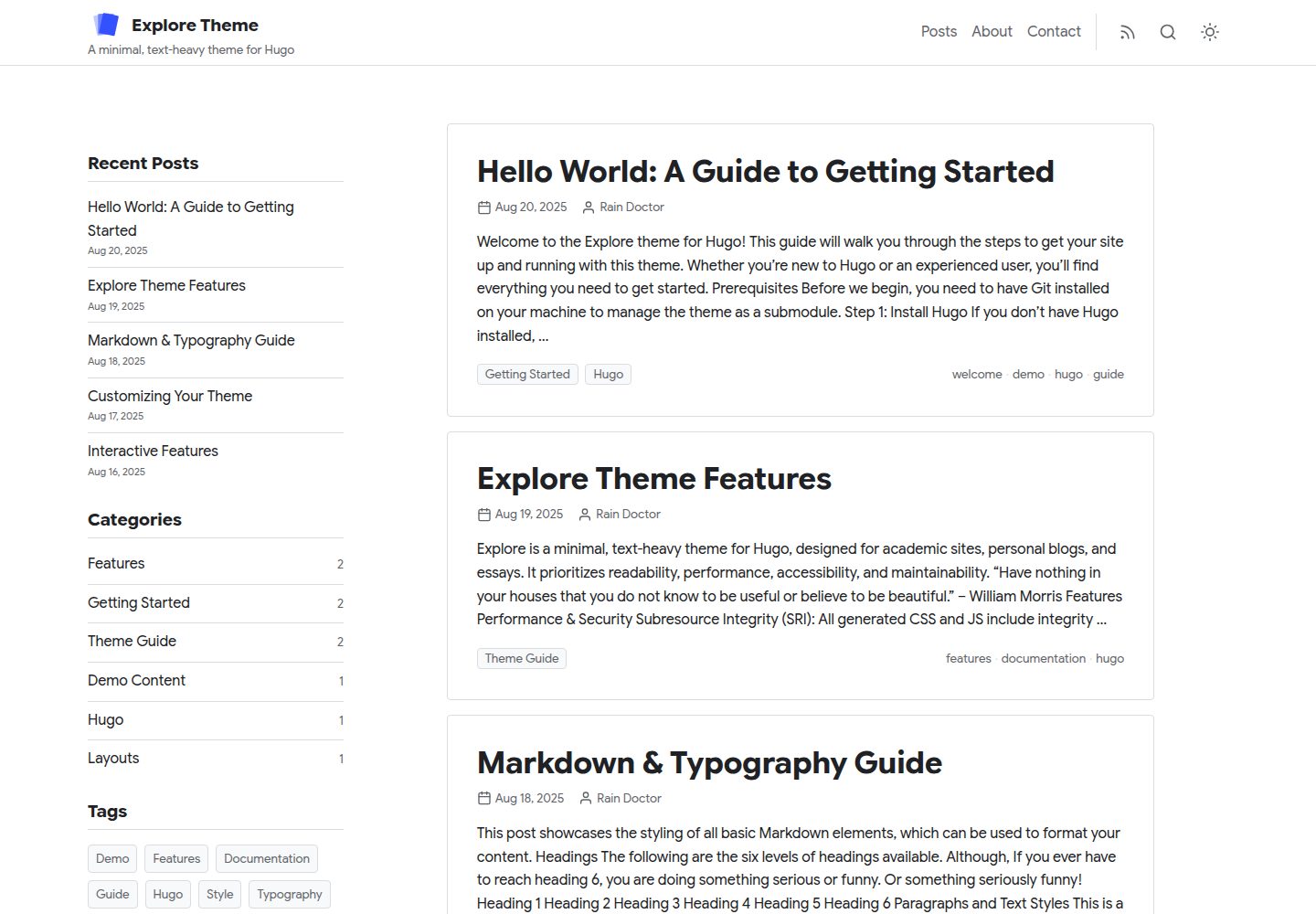
Compare the page layouts and mobile experience. Open any screenshot for a closer look.
Desktop homepage1 / 3
Desktop captureTop of page
Actual screenshot captured by the server browser.
All pages & views 3
Screenshots show visual appearance; interactive behavior may differ.
Recorded 2026-10-02View source
What stands out
A quick read of the recorded project description.
Includes two self-hosted font presets, Inter and Google Sans, with no external font requests
Provides four color schemes—default, ocean, forest, and slate—and allows custom primary and accent colors
Client-side search can use Fuse.js (zero configuration) or Pagefind (for larger sites)
Automatically provides a reading progress bar, code copy, ScrollSpy table of contents, and breadcrumbs
The figure shortcode outputs WebP, LQIP blurred placeholders, and responsive srcset images
Template Details
Explore is a Hugo theme published on GitHub, with both the repository and demo site publicly accessible, under the MIT license. It is positioned as a minimal, text-focused theme, targeting academic sites, personal blogs, and essay writing.
The theme offers several configurable options: dark mode supports automatic detection, manual toggling, and per-palette overrides; it includes two self-hosted font presets (Inter and Google Sans) with no external font requests; it provides four color schemes—default, ocean, forest, and slate—and also allows custom primary and accent colors under the default scheme. Interface components include a reading progress bar, code copy, ScrollSpy table of contents, and breadcrumbs, all enabled automatically according to theme settings. The homepage supports multiple content sections with section badges, and archives can be grouped by year or month.
For search, the theme offers two client-side options: Fuse.js requires no extra build step and suits small to medium sites; Pagefind requires running an indexing command after the build and targets larger sites. Images can be rendered via the figure shortcode to output WebP, LQIP blurred placeholders, and responsive srcset sizes; the callout shortcode generates info or warning style callout boxes.
Usage limitations and notes: the theme depends on Hugo for building, and you need to add it as a submodule following the README quick start and configure it in config.toml; Fuse.js search requires JSON in the homepage output, while Pagefind requires installing the CLI and running the index command after hugo build. Licenses for third-party assets such as demo images, fonts, and icons must be checked separately and cannot be assumed from the code's MIT license alone.
HugoBlog
Is it right for your project?
Use Cases
- Building a personal blog focused on long-form reading
- Creating an academic personal homepage or a site for papers and essays
- Text-focused sites that need dark mode and multiple color scheme switching
- Hugo sites that want client-side search without relying on a backend service
- Blogs that need archives by year or month and multiple content sections on the homepage
Suitable For
- Developers or writers building sites with Hugo
- Bloggers who prefer minimal, text-first typography
- Site maintainers who need accessibility and semantic HTML foundations
- Users who want to use and modify the theme code under the MIT license
Getting started & customization
Use these recorded setup notes alongside the repository instructions for your chosen version.
- 1
Run git submodule add https://github.com/yogirk/explore.git themes/explore in the Hugo site root to add the theme
- 2
You can copy config.toml from the theme's exampleSite to the site root as a starting point; it already sets theme = "explore"
- 3
When using Fuse.js search, include JSON in the homepage outputs in config.toml
- 4
When using Pagefind search, install the Pagefind CLI and run npx pagefind --site public after hugo build to create the index
- 5
Theme parameters are centralized under [params] in config.toml; any items not overridden use built-in defaults
License & source material
Usage conditions & limitations
Free to use · keep license noticeThis entry covers the free version in the public repository under the MIT license; the free scope applies to that version's code and does not mean external services or third-party assets are free.
Must comply with when using
- You may use, modify, commercialize, and distribute this version's code for free.
- When distributing copies or substantial portions of the code, retain the original author's copyright notice and the full MIT license notice.
- The code is provided as is; warranties and limitations of liability are governed by the original license and applicable law.
Additional costs & items to verify
- Using the Pagefind search option requires installing the Pagefind CLI and running the index command after hugo build; the Fuse.js option requires no extra build step.
- When using Fuse.js search, you must include JSON in the homepage outputs in config.toml, otherwise search will not work.
- The theme must be added as a git submodule to the Hugo site's themes/explore directory and depends on a Hugo build environment.
- Demo images, fonts, icons, and other third-party assets must be checked against their respective licenses and cannot be assumed from the code's MIT license alone.
- External services such as domains, hosting, databases, payments, or AI may incur separate charges.
View Original Text Basis
Permission is hereby granted, free of charge
Original License Text
Install the Pagefind CLI: `npm install -g pagefind`.
Original README
Ensure `JSON` is in your homepage's `outputs` in `config.toml`.
Original README
https://github.com/yogirk/explore/blob/main/LICENSEhttps://github.com/yogirk/explore/blob/main/README.mdgit submodule add https://github.com/yogirk/explore.git themes/explore
Original README
Compiled by DeepSeek based on repository license and README ·2026-10-02. Results only cover the materials read; dependencies, images, fonts, and subsequent term changes are subject to their respective original texts.
Project checks & description sources
Template Information
- Source platforms
- GitHub
- Documentation and maintenance reference score
- More documented · 87 / 100
- Technologies
- Hugo
- Website type
- Blog
How this score is calculated
Our heuristic uses license records (up to 30), a demo link (12), a preview (10), stars (15), recorded maintenance (15), description completeness (8), feature records (5) and classification data (5). It is not a code, security or performance test, or a Google score. A link does not establish tested functionality.
What to verify for this project
- Repository update recorded
- 2026-04-06
- Screenshot last checked
- 2026-10-02
A demo link is listed. Check it with your own content and viewport sizes; its presence does not confirm that forms, authentication or payments work.
The catalog identifies Hugo as the primary stack. Check the actual dependency manifest and lockfile for versions and hosting requirements. These notes use recorded metadata, not a code audit or a deployment test.
Use a selection guide →How this description was prepared
AI-assisted description based on catalog records and repository material. Repository authors are not automatically the reviewers of this description.
Automatically checked against source and license rules; no manual editorial review.
Inspect the recorded source material
SHA-256: 96d0883b8e3dfadb11a493919fafb6e6928f4ed08f25aac5181bcb23b70dcb3f
2026-10-02T17:12:34.347Z
Source file / repository# Explore - A Hugo Theme
**Explore** is a minimal, text-heavy theme for [Hugo](https://gohugo.io/). It is designed for academic sites, personal blogs, and essays, and prioritizes readability, performance, accessibility, and maintainability.
[](https://yogirk.github.io/explore/)
<p align="center">
<img src="explore-light-mode.png" alt="Explore Theme Light Mode" width="49%">
<img src="explore-dark-mode.png" alt="Explore Theme Dark Mode" width="49%">
</p>
## Features
- Dark mode with auto-detection, manual toggle, and per-palette dark overrides
- Two self-hosted font presets (Inter, Google Sans) — no external requests
- Four color palettes (`default`, `ocean`, `forest`, `slate`) or custom primary/accent
- Three-tier design token architecture (primitive, semantic, component)
- Client-side search via Fuse.js (zero-config) or Pagefind (large sites)
- Reading progress bar, code copy, ScrollSpy ToC, breadcrumbs — all automatic
- WCAG 2.1 AA: semantic HTML, ARIA landmarks, keyboard navigation
- SEO: JSON-LD structured data, OpenGraph, Twitter Cards
- SRI hashes, IIFE scripts, Hugo Pipes asset pipeline
- Multi-section homepage with section badges and year/month grouped archives
- Responsive figure shortcode with WebP and LQIP blur-up
## Quickstart
For a detailed walkthrough, see the [Getting Started Guide](exampleSite/content/posts/hello-world.md). Here's the short version:
1. **Add the theme as a submodule:**
From the root of your Hugo site, run:
```bash
git submodule add https://github.com/yogirk/explore.git themes/explore
```
2. **Use the example configuration:**
Copy the example configuration file from the theme to your site's root directory. This is the fastest way to see all features in action.
```bash
cp themes/explore/exampleSite/config.toml .
```
The example `config.toml` already has `theme = "explore"` set.
3. **Run the Hugo server:**
```bash
hugo server
```
Your site is now available at `http://localhost:1313/`.
## Configuration
All theme options are configured in your site's `config.toml` file under the `[params]` section.
```toml
# --- Site-level settings ---
baseURL = "https://example.org/"
languageCode = "en-us"
title = "My Site"
theme = "explore"
summaryLength = 70
[outputs]
home = ["HTML", "RSS", "JSON"] # JSON required for Fuse.js search
[build]
writeStats = true # Required for Hugo Pipes
[pagination]
pagerSize = 5
# --- Theme Parameters ---
# Every parameter below has a built-in default. Override only what you need.
[params]
author = "Your Name"
description = "A description of your site."
logo = "" # Path in /static, e.g. "images/logo.svg". Empty = text title.
tagline = ""
# dateFormat = "Jan 2, 2006" # Go reference-time layout
# mainSections = ["posts"] # Content sections shown on homepage
[params.ui]
stickyHeader = true
showSearch = true
searchEngine = "fuse" # "fuse" or "pagefind"
[params.style]
fontPreset = "inter" # "inter" or "google-sans"
palette = "default" # "default", "ocean", "forest", or "slate"
# primary = "#1a73e8" # Override primary color (only when palette = "default")
# accent = "#1e8e3e" # Override accent color (only when palette = "default")
containerMaxWidth = "1280px"
maxWidthCh = 75
[params.sidebar]
globalPosition = "right" # "left", "right", "bottom", or "off"
widgets = ["recent", "categories", "tags"]
recentCount = 5
[params.list]
listView = "default" # "default" or "compact"
showExcerpt = true
showSectionBadge = false # badge on items from non-primary sections
groupBy = "none" # "none", "year", or "month"
[params.single]
showPrevNext = true
showRelated = true
relatedCount = 4
[params.single.toc]
enable = true
position = "inline" # "inline", "left", "right", or "off"
```
## Font & Color Customization
### Font Presets
| Preset | Sans-Serif | Monospace | Character |
|--------|-----------|-----------|-----------|
| `inter` (default) | Inter | JetBrains Mono | Clean, neutral, highly legible |
| `google-sans` | Google Sans Flex | Google Sans Code | Friendly, geometric, modern |
Set via `params.style.fontPreset` in your `config.toml`. Both presets are self-hosted — no external font requests are made.
### Color Palettes
| Palette | Light Primary | Light Accent | Character |
|---------|--------------|-------------|-----------|
| `default` | `#1a73e8` | `#1e8e3e` | Familiar blue/green — works everywhere |
| `ocean` | `#0077b6` | `#00838f` | Deep teal — calm, professional |
| `forest` | `#2d6a4f` | `#52b788` | Natural green — warm, organic |
| `slate` | `#475569` | `#64748b` | Understated gray — minimal, editorial |
Each palette defines independent dark-mode overrides to maintain contrast and readability. When `palette` is set to anything other than `default`, the `primary` and `accent` values in your config are ignored in favor of the palette's built-in values.
## Search Setup
The theme supports two client-side search engines, configured via `params.ui.searchEngine`.
### 1. Fuse.js (Default & Easiest)
Fuse.js is a lightweight fuzzy search library that works out of the box with zero extra build steps. It's ideal for small to medium-sized sites.
**Setup:**
1. Set `searchEngine = "fuse"` in `config.toml`.
2. Ensure `JSON` is in your homepage's `outputs` in `config.toml`.
### 2. Pagefind
Pagefind is a powerful static search solution suitable for larger sites. It requires an extra command-line step after building.
**Setup:**
1. Set `searchEngine = "pagefind"` in `config.toml`.
2. Install the Pagefind CLI: `npm install -g pagefind`.
3. After building your site with `hugo`, run Pagefind to index the output:
```bash
hugo
npx pagefind --site public
```
## Shortcodes
### Figure
A shortcode for responsive, optimized images. It generates WebP format with LQIP (Low-Quality Image Placeholder) blur-up effect and `srcset` for responsive sizing.
```go-html-template
{{</* figure
src="my-image.jpg"
alt="An accessible description"
caption="A **Markdown** caption."
*/>}}
```
### Callout
A shortcode to create styled boxes to draw attention to important information.
```go-html-template
{{</* callout type="info" */>}}
**Info:** This is an informational callout. It's useful for tips and notes.
{{</* /callout */>}}
{{</* callout type="warning" */>}}
**Warning:** This is a warning callout. Use it for important caveats.
{{</* /callout */>}}
```
## License
The Explore theme is licensed under the **MIT** license. See `LICENSE` for more details.
Explore similar templates
Compare previews and descriptions within the same stack and category.

hugo-PaperMod
A fast, clean, responsive Hugo theme for blogs and lightweight portfolios, with three layout modes (Regular, Home-Info, Profile), automatic and manual light/dark themes, Fuse.js client-side search, multilingual support, and built-in Open Graph, Twitter Cards, and Schema.org data.
Hugo · Portfolio

LoveIt
LoveIt is a clean, elegant, and feature-rich Hugo blog theme derived from LeaveIt and KeepIt, MIT-licensed. It offers light/dark modes, responsive layout, multilingual support, and search via Lunr.js or Algolia.
Hugo · Blog

hugo-coder
hugo-coder is a minimalist Hugo blog theme maintained by luizdepra under the MIT license. It provides a clean, text-focused blog appearance, configuration documentation in the docs directory, and a complete exampleSite with hugo.toml.
Hugo · Blog

blowfish
Blowfish is a Hugo personal website and blog theme built with Tailwind CSS 4, focused on lightness, simplicity, and content-first presentation.
Hugo · Blog

hugo-paper
hugo-paper is a simple, clean, and customizable Hugo blog theme configured through config.toml or hugo.toml.
Hugo · Blog

hextra
Hextra is a Hugo theme for documentation and blog sites, built on Hugo and Tailwind CSS with design referencing Nextra.
Hugo · Documentation