深色模式支持自动检测、手动切换,并可针对每套调色板单独覆盖
Hugo博客
explore — Hugo 博客模板
作者 yogirk
Explore 是一个面向 Hugo 的极简文字型主题,适合学术站点、个人博客与随笔,强调可读性、无障碍与可维护性。
看看你的网站会是什么样
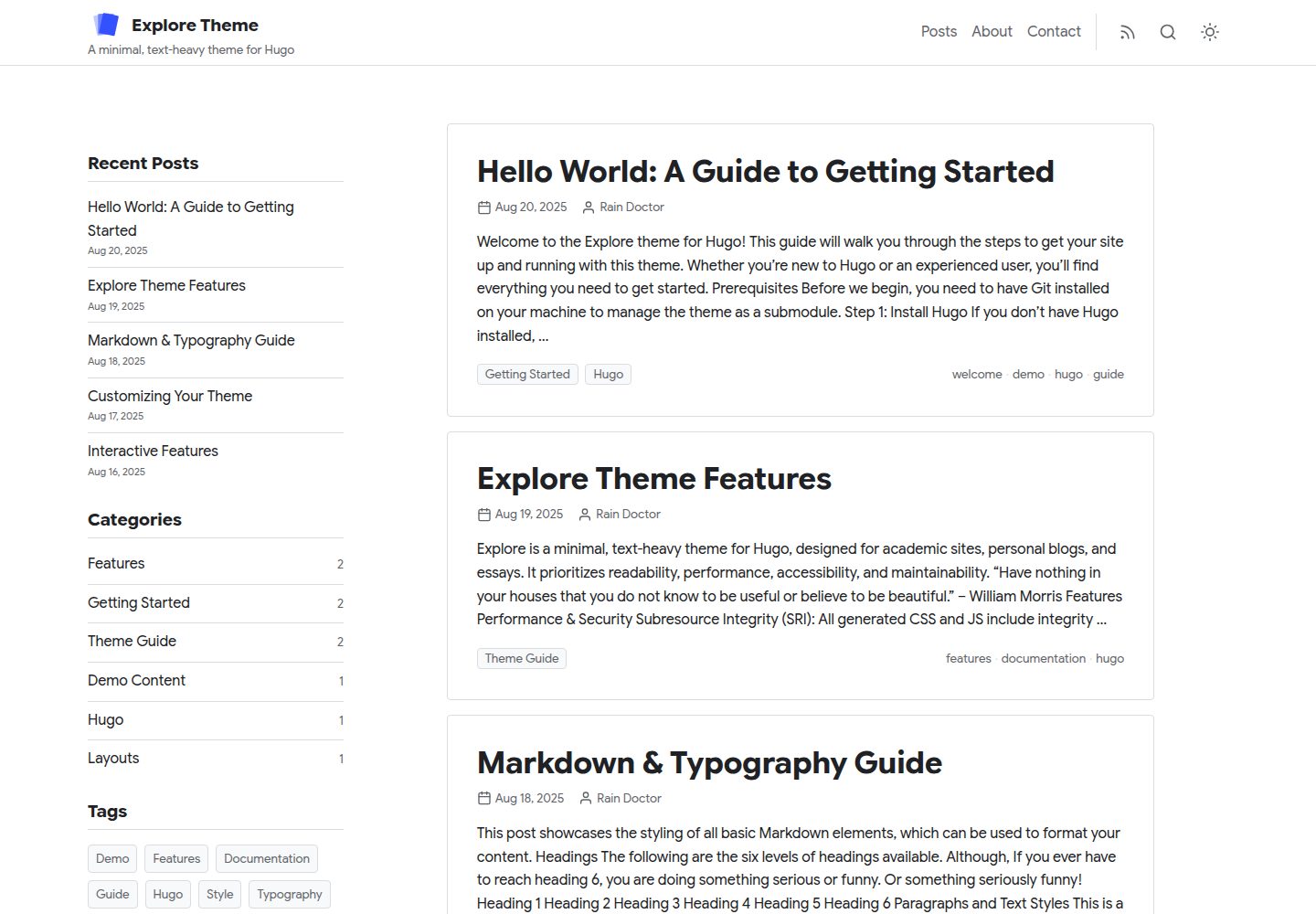
浏览真实页面截图,比较内容排版与手机效果。点击下方缩略图切换,放大查看整页细节。
全部页面与视图 3
截图用于了解视觉与布局,交互效果请以实际项目为准。
采集于 2026-10-02查看来源
值得关注的模板亮点
从已有项目资料中,快速了解它的特点。
内置 Inter 与 Google Sans 两套自托管字体预设,不发起外部字体请求
提供 default、ocean、forest、slate 四套配色,也可自定义主色与强调色
客户端搜索可选 Fuse.js(零配置)或 Pagefind(适合较大站点)
自动提供阅读进度条、代码复制、ScrollSpy 目录与面包屑
figure 短代码输出 WebP、LQIP 模糊占位与 srcset 响应式图片
模板详细介绍
Explore 是发布在 GitHub 上的 Hugo 主题,仓库与演示站均可公开访问,采用 MIT 许可。它定位为极简、以文字内容为主的主题,目标场景包括学术站点、个人博客和随笔写作。
主题在配置层面提供了若干可切换项:深色模式支持自动检测、手动切换以及按调色板单独覆盖;内置两套自托管字体预设(Inter、Google Sans),不发起外部字体请求;提供 default、ocean、forest、slate 四套配色,也可在 default 下自定义主色与强调色。界面组件包括阅读进度条、代码复制、ScrollSpy 目录和面包屑,均按主题设定自动生效。首页支持多内容分区展示与分区徽章,归档可按年或按月分组。
搜索方面,主题提供两种客户端方案:Fuse.js 零额外构建步骤,适合中小站点;Pagefind 需要构建后额外运行索引命令,面向较大站点。图片可通过 figure 短代码输出 WebP、LQIP 模糊占位与 srcset 响应式尺寸;callout 短代码用于生成信息或警告样式的提示框。
使用限制与注意点:主题依赖 Hugo 构建,需要按 README 的快速开始将主题作为子模块加入并在 config.toml 中配置;Fuse.js 搜索要求首页输出中包含 JSON,Pagefind 需要额外安装 CLI 并在 hugo 构建后执行索引。演示图片、字体、图标等第三方素材的许可需单独核对,不能仅凭代码的 MIT 许可判断。
Hugo博客
适合你的项目吗?
适用场景
- 搭建以长文阅读为主的个人博客
- 建立学术个人主页或论文、随笔类站点
- 需要深色模式与多套配色切换的文字型站点
- 希望使用客户端搜索而不依赖后端服务的 Hugo 站点
- 需要按年或按月归档、并在首页展示多个内容分区的博客
适合人群
- 使用 Hugo 构建站点的开发者或写作者
- 偏好极简、文字优先排版的博客作者
- 需要无障碍与语义化 HTML 基础的站点维护者
- 希望以 MIT 许可使用并自行修改主题代码的用户
上手与定制指南
结合仓库当前版本的说明,按下面的资料检查内容、配置与运行要求。
- 1
在 Hugo 站点根目录执行 git submodule add https://github.com/yogirk/explore.git themes/explore 添加主题
- 2
可将主题 exampleSite 中的 config.toml 复制到站点根目录作为起点,其中已设置 theme = "explore"
- 3
使用 Fuse.js 搜索时,需在 config.toml 的首页 outputs 中包含 JSON
- 4
使用 Pagefind 搜索时,需安装 Pagefind CLI,并在 hugo 构建后运行 npx pagefind --site public 建立索引
- 5
主题参数集中在 config.toml 的 [params] 下,未覆盖的项使用内置默认值
授权与来源资料
使用条件与限制
免费使用 · 保留许可声明本次收录的是公开仓库中采用 MIT 许可的免费版本;免费范围为该版本代码,不代表外部服务或第三方素材免费。
使用时需要遵守
- 允许免费使用、修改、商用和分发该版本代码。
- 分发代码副本或实质性部分时,保留原作者版权声明和完整 MIT 许可声明。
- 代码按现状提供;担保与责任限制以原许可证及适用法律为准。
额外费用与待核对事项
- 使用 Pagefind 搜索方案时需额外安装 Pagefind CLI,并在 hugo 构建后运行索引命令;Fuse.js 方案则无需额外构建步骤。
- 使用 Fuse.js 搜索时,必须在 config.toml 的首页 outputs 中包含 JSON,否则搜索无法工作。
- 主题需以 git 子模块方式加入 Hugo 站点的 themes/explore 目录,并依赖 Hugo 构建环境。
- 演示图片、字体、图标及其他第三方素材需按各自许可核对,不能仅凭代码的 MIT 许可判断。
- 域名、托管、数据库、支付或 AI 等外部服务可能另外收费。
查看原文依据
Permission is hereby granted, free of charge
许可证原文
Install the Pagefind CLI: `npm install -g pagefind`.
README 原文
Ensure `JSON` is in your homepage's `outputs` in `config.toml`.
README 原文
https://github.com/yogirk/explore/blob/main/LICENSEhttps://github.com/yogirk/explore/blob/main/README.mdgit submodule add https://github.com/yogirk/explore.git themes/explore
README 原文
DeepSeek 根据仓库许可证和 README 整理 ·2026-10-02。结果仅覆盖已读取资料,依赖、图片、字体及后续条款变更以各自原文为准。
项目核对记录与介绍依据
模板资料
- 来源平台
- GitHub
- 资料与维护参考分
- 资料较完整 · 87 / 100
- 技术栈
- Hugo
- 网站类型
- 博客
这个分数如何计算
本站按许可资料(最高30分)、演示链接(12分)、预览图(10分)、Star数(15分)、记录的维护时间(15分)、描述完整度(8分)、功能记录(5分)和分类资料(5分)计算。它不是代码、安全或性能测试,也不是 Google 评分;有链接不代表已实测可用。
这个项目需要核对什么
- 记录的仓库更新时间
- 2026-04-06
- 截图检查日期
- 2026-10-02
已收录演示链接。请用你的内容与屏幕尺寸检查;有演示不代表表单、认证或支付已经可用。
目录记录的主要技术栈是 Hugo。请通过依赖清单和锁文件核对实际版本与托管要求。这些说明基于收录资料,不代表代码审计或部署实测。
查看具体选型方法 →介绍的制作与核对状态
介绍由 AI 辅助整理目录与仓库资料。仓库作者不等于这篇介绍的审核者。
已完成服务器许可规则与 AI 来源核对;未经过人工编辑审核。
查看当时使用的来源资料
SHA-256: 96d0883b8e3dfadb11a493919fafb6e6928f4ed08f25aac5181bcb23b70dcb3f
2026-10-02T17:12:34.347Z
来源文件 / 仓库# Explore - A Hugo Theme
**Explore** is a minimal, text-heavy theme for [Hugo](https://gohugo.io/). It is designed for academic sites, personal blogs, and essays, and prioritizes readability, performance, accessibility, and maintainability.
[](https://yogirk.github.io/explore/)
<p align="center">
<img src="explore-light-mode.png" alt="Explore Theme Light Mode" width="49%">
<img src="explore-dark-mode.png" alt="Explore Theme Dark Mode" width="49%">
</p>
## Features
- Dark mode with auto-detection, manual toggle, and per-palette dark overrides
- Two self-hosted font presets (Inter, Google Sans) — no external requests
- Four color palettes (`default`, `ocean`, `forest`, `slate`) or custom primary/accent
- Three-tier design token architecture (primitive, semantic, component)
- Client-side search via Fuse.js (zero-config) or Pagefind (large sites)
- Reading progress bar, code copy, ScrollSpy ToC, breadcrumbs — all automatic
- WCAG 2.1 AA: semantic HTML, ARIA landmarks, keyboard navigation
- SEO: JSON-LD structured data, OpenGraph, Twitter Cards
- SRI hashes, IIFE scripts, Hugo Pipes asset pipeline
- Multi-section homepage with section badges and year/month grouped archives
- Responsive figure shortcode with WebP and LQIP blur-up
## Quickstart
For a detailed walkthrough, see the [Getting Started Guide](exampleSite/content/posts/hello-world.md). Here's the short version:
1. **Add the theme as a submodule:**
From the root of your Hugo site, run:
```bash
git submodule add https://github.com/yogirk/explore.git themes/explore
```
2. **Use the example configuration:**
Copy the example configuration file from the theme to your site's root directory. This is the fastest way to see all features in action.
```bash
cp themes/explore/exampleSite/config.toml .
```
The example `config.toml` already has `theme = "explore"` set.
3. **Run the Hugo server:**
```bash
hugo server
```
Your site is now available at `http://localhost:1313/`.
## Configuration
All theme options are configured in your site's `config.toml` file under the `[params]` section.
```toml
# --- Site-level settings ---
baseURL = "https://example.org/"
languageCode = "en-us"
title = "My Site"
theme = "explore"
summaryLength = 70
[outputs]
home = ["HTML", "RSS", "JSON"] # JSON required for Fuse.js search
[build]
writeStats = true # Required for Hugo Pipes
[pagination]
pagerSize = 5
# --- Theme Parameters ---
# Every parameter below has a built-in default. Override only what you need.
[params]
author = "Your Name"
description = "A description of your site."
logo = "" # Path in /static, e.g. "images/logo.svg". Empty = text title.
tagline = ""
# dateFormat = "Jan 2, 2006" # Go reference-time layout
# mainSections = ["posts"] # Content sections shown on homepage
[params.ui]
stickyHeader = true
showSearch = true
searchEngine = "fuse" # "fuse" or "pagefind"
[params.style]
fontPreset = "inter" # "inter" or "google-sans"
palette = "default" # "default", "ocean", "forest", or "slate"
# primary = "#1a73e8" # Override primary color (only when palette = "default")
# accent = "#1e8e3e" # Override accent color (only when palette = "default")
containerMaxWidth = "1280px"
maxWidthCh = 75
[params.sidebar]
globalPosition = "right" # "left", "right", "bottom", or "off"
widgets = ["recent", "categories", "tags"]
recentCount = 5
[params.list]
listView = "default" # "default" or "compact"
showExcerpt = true
showSectionBadge = false # badge on items from non-primary sections
groupBy = "none" # "none", "year", or "month"
[params.single]
showPrevNext = true
showRelated = true
relatedCount = 4
[params.single.toc]
enable = true
position = "inline" # "inline", "left", "right", or "off"
```
## Font & Color Customization
### Font Presets
| Preset | Sans-Serif | Monospace | Character |
|--------|-----------|-----------|-----------|
| `inter` (default) | Inter | JetBrains Mono | Clean, neutral, highly legible |
| `google-sans` | Google Sans Flex | Google Sans Code | Friendly, geometric, modern |
Set via `params.style.fontPreset` in your `config.toml`. Both presets are self-hosted — no external font requests are made.
### Color Palettes
| Palette | Light Primary | Light Accent | Character |
|---------|--------------|-------------|-----------|
| `default` | `#1a73e8` | `#1e8e3e` | Familiar blue/green — works everywhere |
| `ocean` | `#0077b6` | `#00838f` | Deep teal — calm, professional |
| `forest` | `#2d6a4f` | `#52b788` | Natural green — warm, organic |
| `slate` | `#475569` | `#64748b` | Understated gray — minimal, editorial |
Each palette defines independent dark-mode overrides to maintain contrast and readability. When `palette` is set to anything other than `default`, the `primary` and `accent` values in your config are ignored in favor of the palette's built-in values.
## Search Setup
The theme supports two client-side search engines, configured via `params.ui.searchEngine`.
### 1. Fuse.js (Default & Easiest)
Fuse.js is a lightweight fuzzy search library that works out of the box with zero extra build steps. It's ideal for small to medium-sized sites.
**Setup:**
1. Set `searchEngine = "fuse"` in `config.toml`.
2. Ensure `JSON` is in your homepage's `outputs` in `config.toml`.
### 2. Pagefind
Pagefind is a powerful static search solution suitable for larger sites. It requires an extra command-line step after building.
**Setup:**
1. Set `searchEngine = "pagefind"` in `config.toml`.
2. Install the Pagefind CLI: `npm install -g pagefind`.
3. After building your site with `hugo`, run Pagefind to index the output:
```bash
hugo
npx pagefind --site public
```
## Shortcodes
### Figure
A shortcode for responsive, optimized images. It generates WebP format with LQIP (Low-Quality Image Placeholder) blur-up effect and `srcset` for responsive sizing.
```go-html-template
{{</* figure
src="my-image.jpg"
alt="An accessible description"
caption="A **Markdown** caption."
*/>}}
```
### Callout
A shortcode to create styled boxes to draw attention to important information.
```go-html-template
{{</* callout type="info" */>}}
**Info:** This is an informational callout. It's useful for tips and notes.
{{</* /callout */>}}
{{</* callout type="warning" */>}}
**Warning:** This is a warning callout. Use it for important caveats.
{{</* /callout */>}}
```
## License
The Explore theme is licensed under the **MIT** license. See `LICENSE` for more details.
看看同类模板
对比同技术栈与用途的模板,找到更适合的视觉与内容结构。

hugo-PaperMod
PaperMod 是 Hugo 生态里知名度较高的主题之一,定位很明确:给博客和轻量作品集站点提供一套干净、响应式的阅读界面。
Hugo · 作品集

LoveIt
❤️A clean, elegant but advanced blog theme for Hugo 一个简洁、优雅且高效的 Hugo 主题
Hugo · 博客

hugo-coder
A minimalist blog theme for hugo.
Hugo · 博客

blowfish
Personal Website & Blog Theme for Hugo
Hugo · 博客

hugo-paper
🪺 A simple, clean, customizable Hugo theme
Hugo · 博客

hextra
Hextra 是一个 Hugo 主题,定位在文档站与博客之间:既提供侧边栏导航、目录、面包屑、分页这类文档站结构,也能承载博客内容。
Hugo · 文档