Built on Next.js and React, using TypeScript strict mode and Zod validation
Next.jsReactSaaSStarter
plinth — Next.js SaaS Template
By yoni-crypto
Plinth is an open-source SaaS starter built on Next.js and React, with built-in authentication, billing, multi-tenancy, notifications, audit logs, and other modules, under the MIT license.
Explore the design
Compare the page layouts and mobile experience. Open any screenshot for a closer look.
Desktop homepage1 / 3
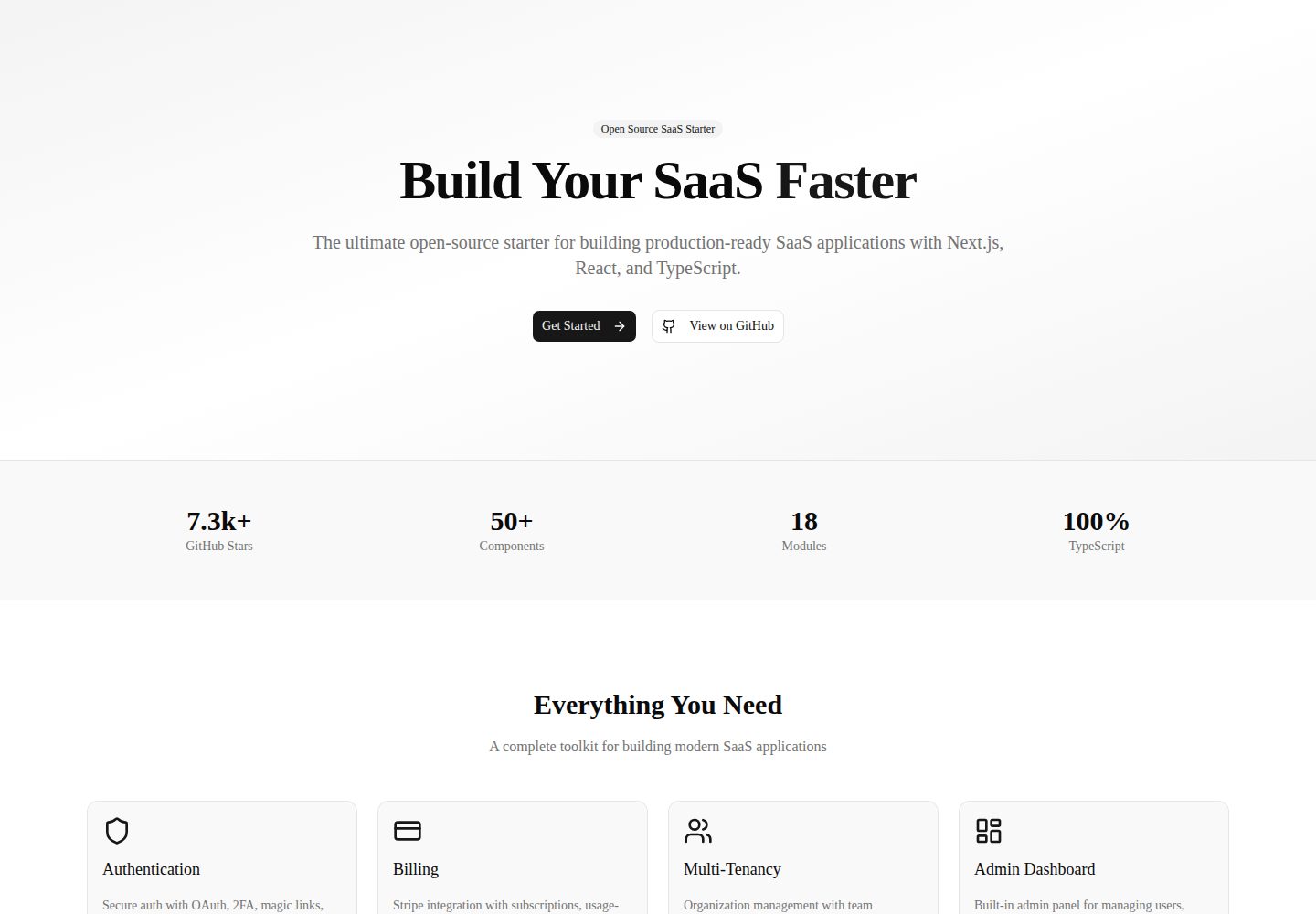
Desktop captureTop of page
Actual screenshot captured by the server browser.
All pages & views 3
Screenshots show visual appearance; interactive behavior may differ.
Recorded 2026-10-01View source
What stands out
A quick read of the recorded project description.
Includes common SaaS modules such as authentication, RBAC, multi-tenancy, billing, notifications, and audit logs
Payment, email, storage, and other modules offer multiple adapters, allowing switching between Stripe/Chapa, Resend/SMTP, UploadThing/S3/local
Database uses PostgreSQL with Drizzle ORM, providing scripts such as db:push and db:seed
Offers Docker Compose and Vercel deployment options, and includes Playwright end-to-end tests
Uses the MIT license, allowing free use, modification, commercial use, and distribution of this version of the code
Template Details
Plinth is an open-source project published by yoni-crypto on GitHub, positioned as a modular development platform for modern web applications and SaaS products. Built on Next.js and React, it provides modules for authentication, authorization, billing, multi-tenancy, notifications, audit logs, API keys, webhooks, feature flags, email, storage, rate limiting, background jobs, analytics, AI integration, internationalization, blog and documentation, end-to-end testing, error monitoring, credits system, waitlist, user impersonation, onboarding flows, health checks, and CLI. The project uses TypeScript strict mode, PostgreSQL with Drizzle ORM for the database, Better Auth for authentication, Stripe and Chapa for payments, React Email, Resend, and SMTP for email, and UploadThing, S3/R2, and a local adapter for storage.
The repository provides quick start steps, requiring Node.js 22+, pnpm 9+, and PostgreSQL 16+. Initialize the database with pnpm db:push, seed demo data with pnpm db:seed, and demo accounts are provided. Environment variables are divided into required and optional categories; the required ones are DATABASE_URL and AUTH_SECRET. Deployment options include Vercel, Docker, and manual builds. The project structure is organized by module, including the packages/cli scaffolding tool, MDX blog under content, a docs site, and Playwright end-to-end tests under tests.
Regarding licensing, the repository uses the MIT license, allowing free use, modification, commercial use, and distribution of this version of the code, provided that the copyright notice and license notice are retained when distributing. Third-party assets such as demo images, fonts, and icons require separate license verification; external services such as domains, hosting, databases, payments, or AI may incur additional charges. The features and configuration items listed in the README are the project's own description and have not been individually verified for operational status in this material.
Next.jsReactSaaSStarter
Is it right for your project?
Use Cases
- Rapidly prototyping a SaaS product with authentication, billing, and multi-tenancy capabilities
- Combining backend features such as authentication, notifications, auditing, and API keys in a modular way
- Subscription and usage-based billing scenarios requiring support for both Stripe and Chapa payment channels
- Web applications requiring internationalization, blog, and documentation content management
- Teams wanting to deploy via Docker or Vercel while retaining end-to-end tests
Suitable For
- Full-stack developers familiar with Next.js, React, and TypeScript
- Independent developers or small teams needing SaaS foundational modules to shorten initial setup time
- Projects accepting the PostgreSQL and Drizzle ORM technology choices
- Teams wanting to build upon MIT-licensed code and configure external services themselves
Getting started & customization
Use these recorded setup notes alongside the repository instructions for your chosen version.
- 1
Requires Node.js 22+, pnpm 9+, and PostgreSQL 16+
- 2
Copy .env.example to .env and configure at least DATABASE_URL and AUTH_SECRET
- 3
Run pnpm install, pnpm db:push, and pnpm db:seed, then run pnpm dev
- 4
Demo accounts are [email protected] and [email protected], both with password password123
- 5
OAuth, email, storage, payment, analytics, AI, Inngest, etc. are optional configurations and require filling in the corresponding environment variables as needed
License & source material
Usage conditions & limitations
Free to use · keep license noticeThis entry covers the free version under the MIT license in the public repository; the free scope is the code of this version and does not imply that external services or third-party assets are free.
Must comply with when using
- Free use, modification, commercial use, and distribution of this version of the code are permitted.
- When distributing copies or substantial portions of the code, retain the original author's copyright notice and the full MIT license notice.
- The code is provided as is; warranties and limitations of liability are governed by the original license and applicable law.
Additional costs & items to verify
- Email functionality uses the log adapter by default; to send real emails, you must configure Resend or SMTP services yourself, which may incur third-party fees.
- The billing module relies on external payment services Stripe or Chapa; you must register accounts and configure keys yourself, and these services may charge.
- Storage uses a local adapter by default; if you choose UploadThing or S3/R2, you must configure the corresponding cloud service accounts, which may incur fees.
- Analytics relies on the external PostHog service; you must apply for a key yourself, and usage beyond the free tier may incur charges.
- AI integration relies on the OpenAI API; you must provide your own key, and calls are billed by usage.
- Background jobs rely on the external Inngest service; you must configure an event key, which may incur third-party fees.
- Error monitoring relies on the external Sentry service; you must configure a DSN, and usage beyond the free tier may incur charges.
- OAuth login requires you to register an application with Google or GitHub and configure client credentials yourself.
- Demo images, fonts, icons, and other third-party assets must be checked against their respective licenses; they cannot be judged solely by the code's MIT license.
- External services such as domains, hosting, databases, payments, or AI may incur additional charges.
View Original Text Basis
Permission is hereby granted, free of charge
Original License Text
EMAIL_PROVIDER=resend|smtp|log
Original README
PAYMENT_PROVIDER=stripe|chapa
Original README
STORAGE_PROVIDER=uploadthing|s3|local
Original README
NEXT_PUBLIC_POSTHOG_KEY=
Original README
OPENAI_API_KEY=
Original README
INNGEST_EVENT_KEY=
Original README
NEXT_PUBLIC_SENTRY_DSN=
Original README
https://github.com/yoni-crypto/plinth/blob/main/LICENSEhttps://github.com/yoni-crypto/plinth/blob/main/README.mdGOOGLE_CLIENT_ID=
Original README
Compiled by DeepSeek based on repository license and README ·2026-10-01. Results only cover the materials read; dependencies, images, fonts, and subsequent term changes are subject to their respective original texts.
Project checks & description sources
Template Information
- Source platforms
- GitHub
- Documentation and maintenance reference score
- More documented · 85 / 100
- Technologies
- Next.js · React
- Website type
- SaaS · Starter
How this score is calculated
Our heuristic uses license records (up to 30), a demo link (12), a preview (10), stars (15), recorded maintenance (15), description completeness (8), feature records (5) and classification data (5). It is not a code, security or performance test, or a Google score. A link does not establish tested functionality.
What to verify for this project
- Repository update recorded
- 2026-09-16
- Screenshot last checked
- 2026-10-01
A demo link is listed. Check it with your own content and viewport sizes; its presence does not confirm that forms, authentication or payments work.
The catalog identifies Next.js as the primary stack. Check the actual dependency manifest and lockfile for versions and hosting requirements. These notes use recorded metadata, not a code audit or a deployment test.
Use a selection guide →How this description was prepared
AI-assisted description based on catalog records and repository material. Repository authors are not automatically the reviewers of this description.
Automatically checked against source and license rules; no manual editorial review.
Inspect the recorded source material
SHA-256: 65cac03f8696c15cf77311b210bd5dc69c9f531c8685f337c37618b1f096d487
2026-10-01T00:57:31.012Z
Source file / repository<div align="center"> # Plinth **The open-source developer platform for building modern web applications and SaaS products.** [](https://github.com/yoni-crypto/plinth) [](https://github.com/yoni-crypto/plinth) [](https://github.com/yoni-crypto/plinth/issues) [](https://github.com/yoni-crypto/plinth/blob/main/LICENSE) [](https://github.com/yoni-crypto/plinth/actions/workflows/ci.yml) [Documentation](https://github.com/yoni-crypto/plinth#documentation) · [Report Bug](https://github.com/yoni-crypto/plinth/issues) · [Request Feature](https://github.com/yoni-crypto/plinth/issues) </div> --- ## Why Plinth? Building a SaaS product from scratch requires months of work on authentication, billing, multi-tenancy, notifications, and dozens of other features. **Plinth** gives you all of this out of the box — production-ready, modular, and provider-agnostic. - **Ship in days, not months** — Pre-built auth, billing, RBAC, notifications, audit logs, and more - **Provider-agnostic** — Swap Stripe for Chapa, Resend for SMTP, S3 for local storage — no vendor lock-in - **Type-safe everywhere** — Full TypeScript with Zod validation and Drizzle ORM - **Production-ready** — Security headers, rate limiting, Docker support, CI/CD included - **Modular architecture** — Use only what you need, extend what you want ## Features | Feature | Description | |---|---| | **Authentication** | Better Auth with OAuth, 2FA, magic links, and session management | | **Authorization** | RBAC with Owner/Admin/Member/Viewer roles + granular permissions | | **Billing** | Stripe + Chapa adapters, plans, subscriptions, feature gates, usage limits | | **Multi-tenancy** | Organization-based isolation with membership management | | **Notifications** | In-app notification system with read/unread tracking | | **Audit Logging** | Complete audit trail for all user and admin actions | | **API Keys** | Prefix-based key management with scoping and expiration | | **Webhooks** | Outgoing webhooks with HMAC-SHA256 signatures and delivery logging | | **Feature Flags** | Global, user-specific, and org-specific overrides | | **Email** | React Email templates + Resend + SMTP adapters | | **Storage** | UploadThing + S3/R2 + local adapters with file validation | | **Rate Limiting** | Sliding window algorithm with response headers | | **Admin Panel** | User management, org management, system stats | | **Background Jobs** | Inngest for async task processing | | **Analytics** | PostHog integration for user analytics | | **AI Integration** | Vercel AI SDK for chat and completions | | **i18n** | next-intl for internationalization (10 languages) | | **Blog/Docs** | MDX-powered content management | | **E2E Tests** | Playwright for end-to-end testing | | **Error Monitoring** | Sentry integration for error tracking | | **Credits System** | Usage-based billing with credit management | | **Waitlist** | Launch waitlist with referral tracking | | **User Impersonation** | Admin can login as user for support | | **Onboarding** | Multi-step onboarding flow | | **Health Checks** | Database latency monitoring and status endpoints | | **CLI** | Project scaffolding and module generation | ## Tech Stack | Layer | Technology | |---|---| | Framework | [Next.js 15](https://nextjs.org/) + [React 19](https://react.dev/) | | Language | [TypeScript 5](https://www.typescriptlang.org/) (strict mode) | | Styling | [Tailwind CSS v4](https://tailwindcss.com/) + [shadcn/ui](https://ui.shadcn.com/) | | Database | [PostgreSQL](https://www.postgresql.org/) + [Drizzle ORM](https://orm.drizzle.team/) | | Auth | [Better Auth](https://better-auth.com/) (OAuth, 2FA, magic links) | | Payments | [Stripe](https://stripe.com/) + [Chapa](https://chapa.co/) | | Email | [React Email](https://react.email/) + [Resend](https://resend.com/) + SMTP | | Storage | [UploadThing](https://uploadthing.com/) + [AWS S3](https://aws.amazon.com/s3/) | | Analytics | [PostHog](https://posthog.com/) | | AI | [Vercel AI SDK](https://sdk.vercel.ai/) | | Background Jobs | [Inngest](https://inngest.com/) | | Error Monitoring | [Sentry](https://sentry.io/) | | i18n | [next-intl](https://next-intl.dev/) | | Testing | [Vitest](https://vitest.dev/) + [Playwright](https://playwright.dev/) | | Deployment | [Docker](https://www.docker.com/) + [Vercel](https://vercel.com/) | ## Quick Start ### Prerequisites - Node.js 22+ - pnpm 9+ - PostgreSQL 16+ ### Installation ```bash # Clone the repository git clone https://github.com/yoni-crypto/plinth.git cd plinth # Install dependencies pnpm install # Set up environment variables cp .env.example .env # Edit .env with your configuration # Initialize database pnpm db:push # Seed with demo data pnpm db:seed # Start development server pnpm dev ``` Visit [http://localhost:3000](http://localhost:3000) ### Demo Credentials | Email | Password | Role | |---|---|---| | [email protected] | password123 | Super Admin | | [email protected] | password123 | Member | ## Configuration ### Required ```env DATABASE_URL=postgresql://user:password@localhost:5432/plinth AUTH_SECRET=your-secret-key-at-least-32-chars ``` ### Optional ```env # OAuth GOOGLE_CLIENT_ID= GOOGLE_CLIENT_SECRET= GITHUB_CLIENT_ID= GITHUB_CLIENT_SECRET= # Auth AUTH_EXPIRES_IN=7d # Email (default: log) EMAIL_PROVIDER=resend|smtp|log [email protected] # Storage (default: local) STORAGE_PROVIDER=uploadthing|s3|local STORAGE_BUCKET=uploads # Payments (default: stripe) PAYMENT_PROVIDER=stripe|chapa # UploadThing UPLOADTHING_SECRET= UPLOADTHING_APP_ID= # PostHog Analytics NEXT_PUBLIC_POSTHOG_KEY= NEXT_PUBLIC_POSTHOG_HOST=https://app.posthog.com # Sentry NEXT_PUBLIC_SENTRY_DSN= SENTRY_AUTH_TOKEN= # AI OPENAI_API_KEY= # Inngest INNGEST_EVENT_KEY= INNGEST_SIGNING_KEY= # App NEXT_PUBLIC_APP_URL=http://localhost:3000 ``` See [`.env.example`](.env.example) for all available options. ## Scripts | Command | Description | |---|---| | `pnpm dev` | Start development server | | `pnpm build` | Build for production | | `pnpm start` | Start production server | | `pnpm lint` | Run ESLint | | `pnpm typecheck` | Run TypeScript type checking | | `pnpm test` | Run Vitest tests | | `pnpm test:e2e` | Run Playwright E2E tests | | `pnpm db:push` | Push schema to database | | `pnpm db:generate` | Generate migration files | | `pnpm db:migrate` | Run migrations | | `pnpm db:studio` | Open Drizzle Studio | | `pnpm db:seed` | Seed database with demo data | ## Docker ```bash # Start with Docker Compose docker compose up -d # Run migrations docker compose exec app pnpm db:push # Seed database docker compose exec app pnpm db:seed ``` ## Project Structure ``` plinth/ ├── src/ │ ├── app/ # Next.js App Router │ │ ├── (auth)/ # Login, Register, 2FA, etc. │ │ ├── (dashboard)/ # Dashboard, Settings, Admin, Onboarding │ │ ├── (marketing)/ # Blog, Docs │ │ └── api/ # API routes │ ├── components/ # UI components │ │ ├── ui/ # shadcn primitives (50+ components) │ │ ├── layout/ # AppShell, Sidebar, Header │ │ ├── forms/ # FormField, FormSection │ │ ├── data/ # DataTable, SearchInput │ │ └── shared/ # EmptyState, ErrorState, Loading │ ├── config/ # Environment validation (Zod) │ ├── lib/ # Utilities, DB client, schema │ │ ├── auth/ # Better Auth configuration │ │ ├── analytics/ # PostHog integration │ │ ├── jobs/ # Inngest background jobs │ │ └── ai/ # Vercel AI SDK │ ├── hooks/ # Custom React hooks │ ├── i18n/ # Internationalization config │ ├── messages/ # Translation files (10 languages) │ └── modules/ # Feature modules │ ├── auth/ # Authentication & sessions │ ├── billing/ # Plans, subscriptions, gates, credits │ ├── rbac/ # Roles & permissions │ ├── organizations/ # Multi-tenancy │ ├── notifications/ # In-app notifications │ ├── audit/ # Audit logging │ ├── api-keys/ # API key management │ ├── webhooks/ # Outgoing webhooks │ ├── payments/ # Stripe & Chapa adapters │ ├── email/ # React Email + Resend + SMTP │ ├── storage/ # UploadThing + S3 & local storage │ ├── feature-flags/ # Feature flag system │ ├── admin/ # Admin module + impersonation │ ├── rate-limit/ # Rate limiting │ ├── waitlist/ # Launch waitlist system │ └── module-system/ # Plugin architecture ├── packages/ │ └── cli/ # CLI tool for scaffolding ├── content/ # MDX blog posts ├── docs/ # Documentation site ├── scripts/ # Seed & utility scripts ├── tests/ # E2E tests (Playwright) └── sentry.client.config.ts # Sentry configuration ``` ## Deployment ### Vercel (Recommended) 1. Push to GitHub 2. Import repository in [Vercel](https://vercel.com) 3. Configure environment variables 4. Deploy ### Docker ```bash docker compose -f docker-compose.yml up -d ``` ### Manual ```bash pnpm build pnpm start ``` ## Contributing Contributions are welcome! Please read our [Contributing Guide](CONTRIBUTING.md) first. 1. Fork the repository 2. Create your feature branch (`git checkout -b feature/amazing-feature`) 3. Commit your changes (`git commit -m 'feat: add amazing feature'`) 4. Push to the branch (`git push origin feature/amazing-feature`) 5. Open a Pull Request ## License This project is licensed under the MIT License — see the [LICENSE](LICENSE) file for details. --- <div align="center"> **Built with ❤️ by [yoni-crypto](https://github.com/yoni-crypto)** If you find Plinth useful, please give it a ⭐ on GitHub! </div>
Explore similar templates
Compare previews and descriptions within the same stack and category.

Next.js SaaS Starter
The official Next.js SaaS starter template, integrating email/password authentication, Stripe Checkout subscriptions, a dashboard with user/team CRUD, basic Owner/Member RBAC, and activity logging.
Next.js · SaaS

Next.js Commerce
Vercel's officially maintained Next.js App Router ecommerce starter with deep Shopify integration, offering a complete product catalog, cart, and checkout flow. Core logic is modular for swapping backends, and community provider versions exist for BigCommerce, Medusa, and Saleor.
Next.js · E-commerce

Next-js-Boilerplate
A developer-first Next.js 16 starter with Tailwind CSS 4 and TypeScript, supporting both App Router and Page Router.
Next.js · Starter

tailwind-nextjs-starter-blog
A Next.js and Tailwind CSS blog starter template using Contentlayer for Markdown/MDX, with built-in SEO, code highlighting, and tags. It targets personal technical blogs and migration from Jekyll/Hugo to React, and supports one-click Vercel deployment.
Next.js · Blog

next-forge
next-forge is a Turborepo-based Next.js template maintained by Vercel, positioned as a starting point for SaaS products.
Next.js · Starter

SaaS-Boilerplate
SaaS-Boilerplate is an open-source SaaS starter template built with Next.js App Router, React 19, TypeScript, Tailwind CSS, and Shadcn UI.
Next.js · SaaS