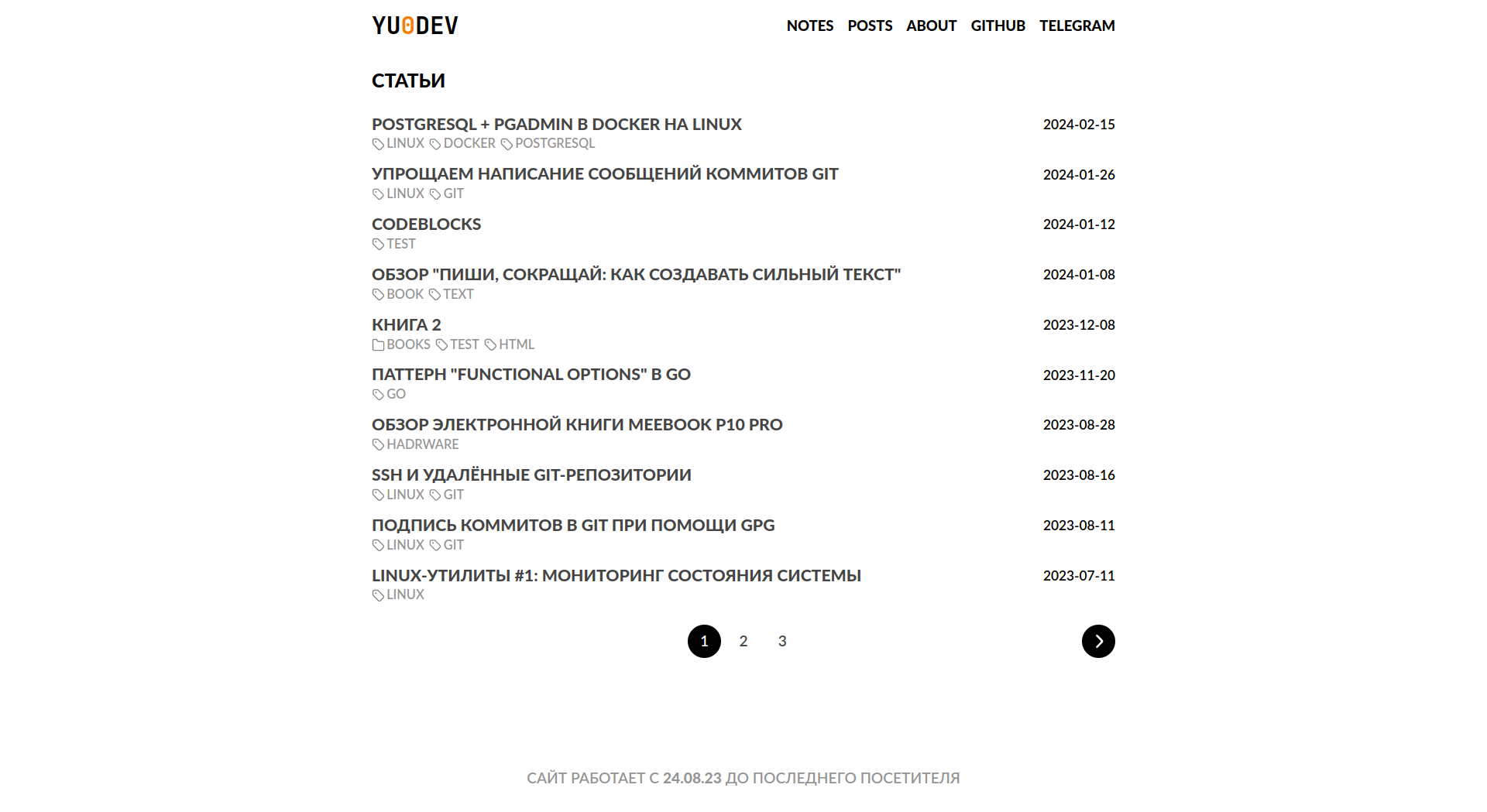
Based on the Minos theme and devpew.com design, with a minimal, content-first layout approach
HugoTool Site
hugo-theme-yuminos — Hugo Tool Template
By Yu-Leo
Yuminos is a minimal theme for the Hugo static site generator, based on the Minos theme and the design of devpew.com. It is released under the MIT license and is suited to content-focused blogs and technical article sites.
Explore the design
Compare the page layouts and mobile experience. Open any screenshot for a closer look.
Author preview
Author-provided preview
Preview provided in the project README.
One original preview is available. Open the full image to inspect the design.
Screenshots show visual appearance; interactive behavior may differ.
Recorded 2026-10-03View source
What stands out
A quick read of the recorded project description.
Built-in KaTeX support for rendering inline and display TeX formulas, integrated with copy-tex for copying raw TeX
Code blocks include a copy button, built-in gruvbox color scheme, and support for shell prompts and custom diff styles
Integrates giscus comments and Yandex Metrica, configurable per site or per article
Provides optional features such as article alert blocks, ToDo blocks, collapsible blocks, Goat diagrams, site start time, and Thinkpad-style keys
Template Details
Yuminos is a minimal theme developed by Yu-Leo for the Hugo static site generator. It is based on carsonip's Minos theme and references the design of Dmitry Kovalyov's devpew.com site. The project is released under the MIT license, and the repository provides author screenshots and a demo site link.
The theme follows a content-first design approach and offers configurable features such as pagination, KaTeX math rendering, code block copy buttons, Open Graph meta tags, giscus comments, Yandex Metrica analytics, article alert blocks, ToDo blocks, collapsible blocks, Goat diagrams, site start time, and Thinkpad-style keyboard keys.
It is worth noting that the author explicitly states in the README that the project is still in development and may contain UI/UX and implementation errors or suboptimal code. The author specifically points out that when the table of contents option is enabled, its display and functionality are not guaranteed to work properly. In addition, known issues such as copying code block line numbers and the lineNos=table option of the highlight shortcode are listed in the documentation.
HugoTool Site
Is it right for your project?
Use Cases
- Building a text-focused technical blog or personal site with Hugo
- Needing to display mathematical formulas in articles and support copying raw TeX source
- Wanting code blocks with copy buttons, line numbers, and gruvbox-style highlighting
- Wanting to integrate a comment system based on GitHub Discussions via giscus
- Needing to mark unfinished writing content with ToDo blocks before publishing
Suitable For
- Developers familiar with Hugo directory structure and configuration files who can install the theme themselves
- Site authors whose main content format is long-form articles, tutorials, or notes
- Users who accept that the project is in development and are willing to troubleshoot known issues themselves
- Personal sites that need common blog features such as KaTeX, code highlighting, and comments
Getting started & customization
Use these recorded setup notes alongside the repository instructions for your chosen version.
- 1
Clone the repository into the site's themes/ directory, or add it as a git submodule
- 2
Set theme = "hugo-theme-yuminos" in the site configuration file (default hugo.toml)
- 3
When installed as a submodule, update it with git submodule update --remote themes/hugo-theme-yuminos
- 4
For code block related features, it is recommended to configure goldmark and markup.highlight options as described in the README
- 5
The author states that the project is still in development and that the table of contents display is not guaranteed to work properly; verify it yourself before enabling
License & source material
Usage conditions & limitations
Free to use · keep license noticeThis entry covers the free version under the MIT license in the public repository; the free scope applies to that version's code and does not imply that external services or third-party assets are free.
Must comply with when using
- You may use, modify, commercialize, and distribute this version's code for free.
- When distributing copies or substantial portions of the code, retain the original author's copyright notice and the full MIT license notice.
- The code is provided as is; warranties and limitations of liability are governed by the original license and applicable law.
Additional costs & items to verify
- The project is still in development and may contain UI/UX and implementation errors; evaluate stability yourself before use.
- When the table of contents option is enabled in the configuration, its display and functionality are not guaranteed to work properly.
- When line numbers are enabled for code blocks (lineNos=true), the copy button copies line numbers along with the code to the clipboard.
- The lineNos=table option of the highlight shortcode displays incorrectly; it is recommended to use lineNos=inline instead.
- The comment feature relies on the third-party giscus service and requires configuring parameters such as the GitHub repository, repoID, and categoryID.
- The analytics feature relies on the third-party Yandex Metrica service and requires providing yandexMetrikaId.
- Interface icons come from third-party SVG icon collections; their licenses are independent of the theme's MIT license and must be verified separately.
- Demo images, fonts, icons, and other third-party assets must be checked against their respective licenses; the code's MIT license alone cannot be used to judge them.
- External services such as domains, hosting, databases, payments, or AI may incur additional charges.
View Original Text Basis
Permission is hereby granted, free of charge
Original License Text
Проект находится в стадии разработки. **Может содержать ошибки**
Original README
Корректное **отображение** и функционирование **table of content** при включении данной опции в конфиге **не гарантируется!**
Original README
при включении нумерации строк (`{lineNos=true}`) номера строк так же копируются в буффер обмена
Original README
Опция `lineNos=table` имеет некорректное отображение. Рекомендую использовать `lineNos=inline`
Original README
Присутствует интеграция с системой комментариев [giscus](https://giscus.app/ru).
Original README
Присутствует интеграция с сервисом [Яндекс.Метрика](https://metrika.yandex.ru/promo/product).
Original README
https://github.com/Yu-Leo/hugo-theme-yuminos/blob/main/LICENSEhttps://github.com/Yu-Leo/hugo-theme-yuminos/blob/main/README.mdВ интерфейсе используются иконки из [коллекции](https://www.svgrepo.com/collection/gentlecons-interface-icons/).
Original README
Compiled by DeepSeek based on repository license and README ·2026-10-03. Results only cover the materials read; dependencies, images, fonts, and subsequent term changes are subject to their respective original texts.
Project checks & description sources
Template Information
- Source platforms
- GitHub
- Documentation and maintenance reference score
- Partly documented · 56 / 100
- Technologies
- Hugo
- Website type
- Tool Site
How this score is calculated
Our heuristic uses license records (up to 30), a demo link (12), a preview (10), stars (15), recorded maintenance (15), description completeness (8), feature records (5) and classification data (5). It is not a code, security or performance test, or a Google score. A link does not establish tested functionality.
What to verify for this project
- Repository update recorded
- 2024-02-15
- Screenshot last checked
- 2026-10-03
No demo link is recorded. Use the repository instructions to evaluate the project locally; the screenshot alone cannot establish interactive behavior.
The catalog identifies Hugo as the primary stack. Check the actual dependency manifest and lockfile for versions and hosting requirements. These notes use recorded metadata, not a code audit or a deployment test.
Use a selection guide →How this description was prepared
AI-assisted description based on catalog records and repository material. Repository authors are not automatically the reviewers of this description.
Automatically checked against source and license rules; no manual editorial review.
Inspect the recorded source material
SHA-256: dc52f62a1cedab7ab6e69cc430da0a40e9d377ff64a76335b66a2f7882894934
2026-10-03T00:17:59.480Z
Source file / repository<h1 align="center"> Yuminos </h1>
<p align="center">
<a href="https://github.com/Yu-Leo/hugo-theme-yuminos/blob/main/LICENSE" target="_blank"> <img alt="license" src="https://img.shields.io/github/license/Yu-Leo/hugo-theme-yuminos?style=for-the-badge&labelColor=090909"></a>
<a href="https://github.com/Yu-Leo/hugo-theme-yuminos/releases/latest" target="_blank"> <img alt="last release" src="https://img.shields.io/github/v/release/Yu-Leo/hugo-theme-yuminos?style=for-the-badge&labelColor=090909"></a>
<a href="https://github.com/Yu-Leo/hugo-theme-yuminos/commits/main" target="_blank"> <img alt="last commit" src="https://img.shields.io/github/last-commit/Yu-Leo/hugo-theme-yuminos?style=for-the-badge&labelColor=090909"></a>
<a href="https://github.com/Yu-Leo/hugo-theme-yuminos/graphs/contributors" target="_blank"> <img alt="commit activity" src="https://img.shields.io/github/commit-activity/m/Yu-Leo/hugo-theme-yuminos?style=for-the-badge&labelColor=090909"></a>
</p>
**[Yuminos](https://github.com/Yu-Leo/hugo-theme-yuminos)** - минималистичная и функциональная тема для генератора статических сайтов [Hugo](https://gohugo.io/).
Основана на теме [Minos](https://github.com/carsonip/hugo-theme-minos) и дизайне [сайта](https://devpew.com/) Дмитрия Ковалёва.
Демонстрация темы: https://yu-leo.github.io/yu0dev/
## ❗Дисклеймер
1. Проект находится в стадии разработки. **Может содержать ошибки** и недочеты как в UI/UX, так и в реализации задуманного: "костыли", не оптимальные решения, дублирование кода, некрасивый код и т. д. и т. п. [Issues](https://github.com/Yu-Leo/hugo-theme-yuminos/issues) с замечаниями и предложениями, а так же [Pull Requests](https://github.com/Yu-Leo/hugo-theme-yuminos/pulls) с исправлениями приветствуются!
2. Корректное **отображение** и функционирование **table of content** при включении данной опции в конфиге **не гарантируется!**
## 🗿 Философия темы
- Минималистичность дизайна
- Контент первичен. Оформление темы не должно мешать его восприятию
- Широкие возможности для авторов контента важны
## 🖼 Скриншоты
**Главная страница**

**Страница тега**

**Страница статьи (начало)**

**Страница статьи (конец)**

## 🔨 Установка
Для того чтобы установить тему **Yuminos**:
1. Склонируйте этот репозиторий в директорию `themes/` Вашего сайта:
```shell
git clone https://github.com/Yu-Leo/hugo-theme-yuminos
```
либо добавьте его как подмодуль, если в директории с Вашим сайтом инициализирован git-репозиторий:
```shell
git submodule add https://github.com/Yu-Leo/hugo-theme-yuminos
```
2. Укажите название темы в конфигурационном файле. По умолчанию - в файле `hugo.toml` в директории Вашего сайта:
```toml
theme = "hugo-theme-yuminos"
```
## ⬆ Обновление
Если тема была установлена как git-подмодуль, обновить её можно следующим образом:
```shell
git submodule update --remote themes/hugo-theme-yuminos
```
## ⭐ Возможности
### Пагинация
Используется на страницах, содержащих списки постов: главная страница, страницы тегов и категорий.
```toml
paginate = 50
```
### KaTeX
В теме присутствует поддержка отображения `TeX` вёрстки при помощи [KaTeX](https://github.com/KaTeX/KaTeX). Включить либо отключить рендеринг можно в соответствующем параметре в конфиге:
```toml
[params]
katex = true
```
<details>
<summary>Скриншот</summary>

</details>
- Inline верстка должна обрамляться последовательностями `\\(` и `\\)`.
- Отдельные блоки, выравниваемые по центру, - последовательностями `$$`
- Дополнение [copy-tex](https://github.com/KaTeX/KaTeX/tree/main/contrib/copy-tex) заменяет отрендеренные фрагменты на исходную TeX-верстку при выделении и копировании
- Поддерживаемые операции: https://katex.org/docs/supported.html
- Простой TeX редактор: https://latexeditor.lagrida.com/
### Блоки кода
Все блоки кода содержат кнопку "копировать", по нажатию на которую содержимое соответствующего блока копируется в буфер обмена. Вне зависимости от того, оформлены блоки кода в разметке Markdown или добавлены при помощи Hugo shortcodes.
❗Баг в текущей реализации: при включении нумерации строк (`{lineNos=true}`) номера строк так же копируются в буффер обмена.
Тема Yuminos подразумевает использование цветовой схемы `gruvbox` для блоков кода. Цвета кнопки копирования взяты из её палитры. Тема содержит встроенные стили для блоков кода ([highlight-style.css](./static/css/highlight-style.css)), основанные на теме `gruvbox`. Размер табуляции равен 4 пробелам.
Рекомендую установить следующие настройки в конфигурационном файле:
```toml
[markup]
defaultMarkdownHandler = 'goldmark'
[markup.goldmark]
[markup.goldmark.renderer]
unsafe = true
[markup.goldmark.extensions]
highlight = true
[markup.highlight]
lineNumbersInTable=false
noClasses=false
```
<details>
<summary>Скриншот</summary>

</details>
#### Shell
Если в качестве языка для блока с кодом указан `shell`, то к каждой строке такого блока будет добавлен символ "$". Он не будет выделяться курсором вместе с остальным текстом и не будет копироваться в буфер обмена при нажатии кнопки копирования. Эту фичу можно использовать для оформления запускаемых из терминала команд.
<details>
<summary>Скриншот</summary>

</details>
#### Diff
Встроенные стили для блоков кода (highlight-style.css) имеют кастомное оформление для языка `diff`:
<details>
<summary>Исходный код (.md)</summary>
```
diff --git a/.signer2.go b/.signer2.go
var hello = function() {
- return "hello";
+ return "hello world";
}
!strong text
text
@subheading
Index asdfasdf
= asfdasfasfd
```
</details>
<details>
<summary>Скриншот</summary>

</details>
#### Highlight shortcode
[Документация](https://gohugo.io/content-management/syntax-highlighting/). [Справка](https://www.veriphor.com/articles/code-block-render-hooks/)
❗ Опция `lineNos=table` имеет некорректное отображение. Рекомендую использовать `lineNos=inline`
#### Title
Можно задать название для блока кода. Для этого нужно указать его после названия языка: `rust {title="main.rs"}`
<details>
<summary>Исходный код (.md)</summary>

</details>
<details>
<summary>Скриншот</summary>

</details>
### Мета-теги
Для улучшения SEO шаблоны темы содержат мета-теги. Значения тегов `title`, `description` и `keywords` берутся из параметров поста. При отсутствии в параметрах поста - из конфигурационного файла сайта.
#### Для всего сайта
Значения задаются в конфигурационном файле:
```toml
[params]
description = "Site description"
keywords = ["keyword1", "keyword2"]
[params.author]
name = "Author name"
```
#### Для конкретного поста
Значения задаются в параметрах поста:
```
---
title: "Тестовая страница"
description: "Это тестовая страница, демонстрирующая возможности темы"
keywords: ["keyword1", "keyword2"]
---
```
#### Open Graph
Присутствует поддержка мета-тегов Open Graph: `og:title`, `og:description`, `og:type`, `og:url`.
### Комментарии. Giscus
Присутствует интеграция с системой комментариев [giscus](https://giscus.app/ru).
Настройки в конфигурационном файле:
```toml
[params]
[params.comments]
enabled = true
[params.comments.giscus]
repo = "repo-name"
repoID = "repo-id"
category = "category-name"
categoryID = "category-id"
mapping = "title"
reactionsEnabled = 1
emitMetadata = 0
lazy = false
lang = "en"
```
Для каждого поста можно отдельно отключить комментарии в его параметрах:
```
---
comments: false
---
```
### Яндекс.Метрика
Присутствует интеграция с сервисом [Яндекс.Метрика](https://metrika.yandex.ru/promo/product).
Настройки в конфигурационном файле:
```toml
[params]
yandexMetrikaId = "1234567890"
```
### Alerts
К каждому посту можно добавить алёрт, который будет отображаться перед его содержимым.
Для этого нужно указать в параметрах поста следующие строки:
```yaml
---
page:
alert:
message: "Содержимое алёрта. Можно использовать **Markdown**"
type: "danger"
---
```
Типы алёртов:
- `info` (синий)
- `success` (зелёный)
- `danger` (красный)
Если Вам нужен информационный алёрт, можно использовать сокращённую форму:
```yaml
---
page:
alert: "Информационный алерт"
---
```
<details>
<summary>Скриншоты</summary>


</details>
### Блоки ToDo
Полезны, если в процессе написания поста Вы хотите оставить какие-либо заметки на будущее и не забыть удалить их перед публикацией.
Все ToDo-блоки, содержащиеся в посте, автоматически будут подсчитаны. В начале поста будет отображаться алёрт с их количеством, если оно больше 0.
#### Блок с содержимым
Добавляется в пост следующим образом:
```markdown
{{< todo >}}
Содержимое блока ToDo. Можно использовать **Markdown**
{{< /todo >}}
```
#### Блок без содержимого
Добавляется в пост следующим образом:
```markdown
{{< td >}}
```
<details>
<summary>Скриншоты</summary>


</details>
### Скрытые блоки
Синтаксис:
<details>
<summary>Исходный код</summary>
```html
<details>
<summary>Подробнее</summary>
## Скрытый блок
Lorem ipsum dolor sit amet, officia excepteur ex fugiat reprehenderit enim labore culpa sint ad nisi Lorem pariatur mollit ex esse exercitation amet. Nisi anim cupidatat excepteur officia. Reprehenderit nostrud nostrud ipsum Lorem est aliquip amet voluptate voluptate dolor minim nulla est proident. Nostrud officia pariatur ut officia. Sit irure elit esse ea nulla sunt ex occaecat reprehenderit commodo officia dolor Lorem duis laboris cupidatat officia voluptate. Culpa proident adipisicing id nulla nisi laboris ex in Lorem sunt duis officia eiusmod. Aliqua reprehenderit commodo ex non excepteur duis sunt velit enim. Voluptate laboris sint cupidatat ullamco ut ea consectetur et est culpa et culpa duis.
> Цитата
</details>
```
</details>
<details>
<summary>Скриншот (блок скрыт)</summary>

</details>
<details>
<summary>Скриншот (блок открыт)</summary>

</details>
### Goat
Присутствует поддержка [Goat](https://github.com/blampe/goat).
<details>
<summary>Исходный код</summary>
```goat
. . . .--- 1 .-- 1 / 1
/ \ | | .---+ .-+ +
/ \ .---+---. .--+--. | '--- 2 | '-- 2 / \ 2
+ + | | | | ---+ ---+ +
/ \ / \ .-+-. .-+-. .+. .+. | .--- 3 | .-- 3 \ / 3
/ \ / \ | | | | | | | | '---+ '-+ +
1 2 3 4 1 2 3 4 1 2 3 4 '--- 4 '-- 4 \ 4
```
</details>
<details>
<summary>Скриншот</summary>

</details>
### StartTime
Если данная опция включена, в футере будет выводиться `startTime` - дата, с которой работает сайт.
```toml
[params]
startTime = "2023-08-24T10:00:00"
```
<details>
<summary>Скриншот</summary>

</details>
### Thinkpad-like кнопки
Если данная опция включена, обрамленные тегом `<kbd>...</kbd>` символы будут иметь стиль, схожий со стилем кнопок на клавиатурах ноутбуков Lenovo Thinkpad.
```toml
[params]
thinkpadKbd = true
```
<details>
<summary>Скриншот</summary>

</details>
Обычный вид кнопок (опция выключена):
<details>
<summary>Скриншот</summary>

</details>
### Кастомное название сайта
По умолчанию в левом углу хэдера сайта будет отображаться содержимое параметра `title` из конфигурационного файла.
Если вы хотите использовать кастомное название сайта с собственными стилями, включите соответствующую настройку в конфигурационном файле:
```toml
[params]
customTitle = true
```
в таком случае на место названия сайта будет подставлено содержимое файла `layouts/partials/custom-title.html`.
## 🎨 UI
### Шрифты
Основной текст: **Lato**
Моноширинный текст: **JetBrains Mono**
### Цветовая палитра
На данный момент тема содержит **только светлое оформление**, основанное на следующей цветовой палитре:
- Белый: `#ffffff` - фоновый цвет
- Черный: `#000000` - основной цвет текста
- Оттенки серого:
- `#939393` - иконки и названия тегов и категорий, иконки ссылки в заголовках в постах, текст в футере сайта
- `#f2f2f2` - фон для inline-кода
- `#495057` - фон для клавиш
- `#444444` - ссылки и заголовки постов в списках
- Оранжевый: `#F37E0C` - основной контрастный цвет
- Синий: `#0C7C96` - алёрт типа `info`
- Зелёный: `#0AC20A` - алёрт типа `success`
- Красный: `#E10B39` - алёрт типа `danger`
- Фиолетовый: `#5815A4` - ToDo блоки и алёрты
### Иконки
В интерфейсе используются иконки из [коллекции](https://www.svgrepo.com/collection/gentlecons-interface-icons/).
## 📝 Лицензия
- Автор темы **Minos** для [Hexo](https://hexo.io/ru/): [@ppoffice](https://github.com/ppoffice)
- Порт для Hugo: [@carsonip](https://github.com/carsonip)
- Дополнения: [@devpew](https://github.com/devpew)
- Автор темы **Yuminos**: [@Yu-Leo](https://github.com/yu-leo)
Проект разрабатывается под лицензией **MIT**. Полный текст - в файле [LICENSE](https://github.com/Yu-Leo/hugo-theme-yuminos/blob/main/LICENSE). Explore similar templates
Compare previews and descriptions within the same stack and category.

hugo-coder
hugo-coder is a minimalist Hugo blog theme maintained by luizdepra under the MIT license. It provides a clean, text-focused blog appearance, configuration documentation in the docs directory, and a complete exampleSite with hugo.toml.
Hugo · Blog

doks
Doks is a Hugo documentation theme in the Thulite ecosystem, built for long-form reading with a minimal responsive layout and documentation-optimized typography. It includes FlexSearch-powered configurable search, dark/light mode, code syntax highlighting, i18n, multi-version documentation management, and blog pages.
Hugo · Tool Site

hugo-theme-introduction
Introduction is a minimal Hugo theme that can be configured as a single-page site or a full site with multiple sections. Homepage sections are generated from Markdown files under content/home/, with weight sorting and optional images.
Hugo · Portfolio

lotusdocs
Lotus Docs is a free, MIT-licensed Hugo documentation theme by Colin Wilson, built on Bootstrap 5. It provides responsive documentation layouts, dark mode, i18n, FlexSearch-based static search, Prism.js highlighting, KaTeX, Mermaid, and landing page templates.
Hugo · Documentation

airspace-hugo
Airspace is a multipurpose Hugo theme by Themefisher for portfolio, blog, and business sites.
Hugo · Portfolio
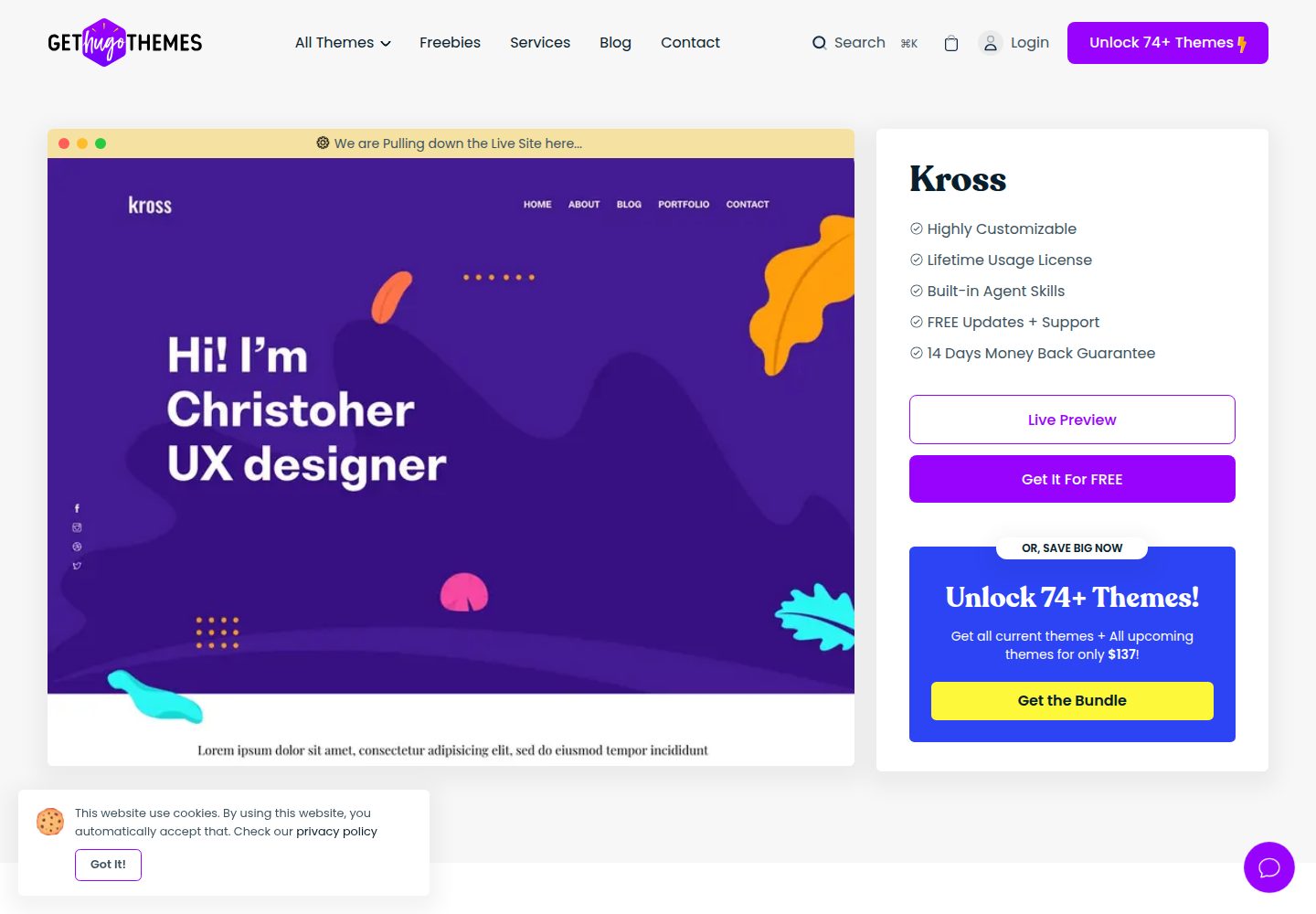
kross-hugo
Kross is a Hugo personal portfolio theme by Themefisher, offering more than 8 pre-built pages including home, about, blog, portfolio, and contact.
Hugo · Portfolio