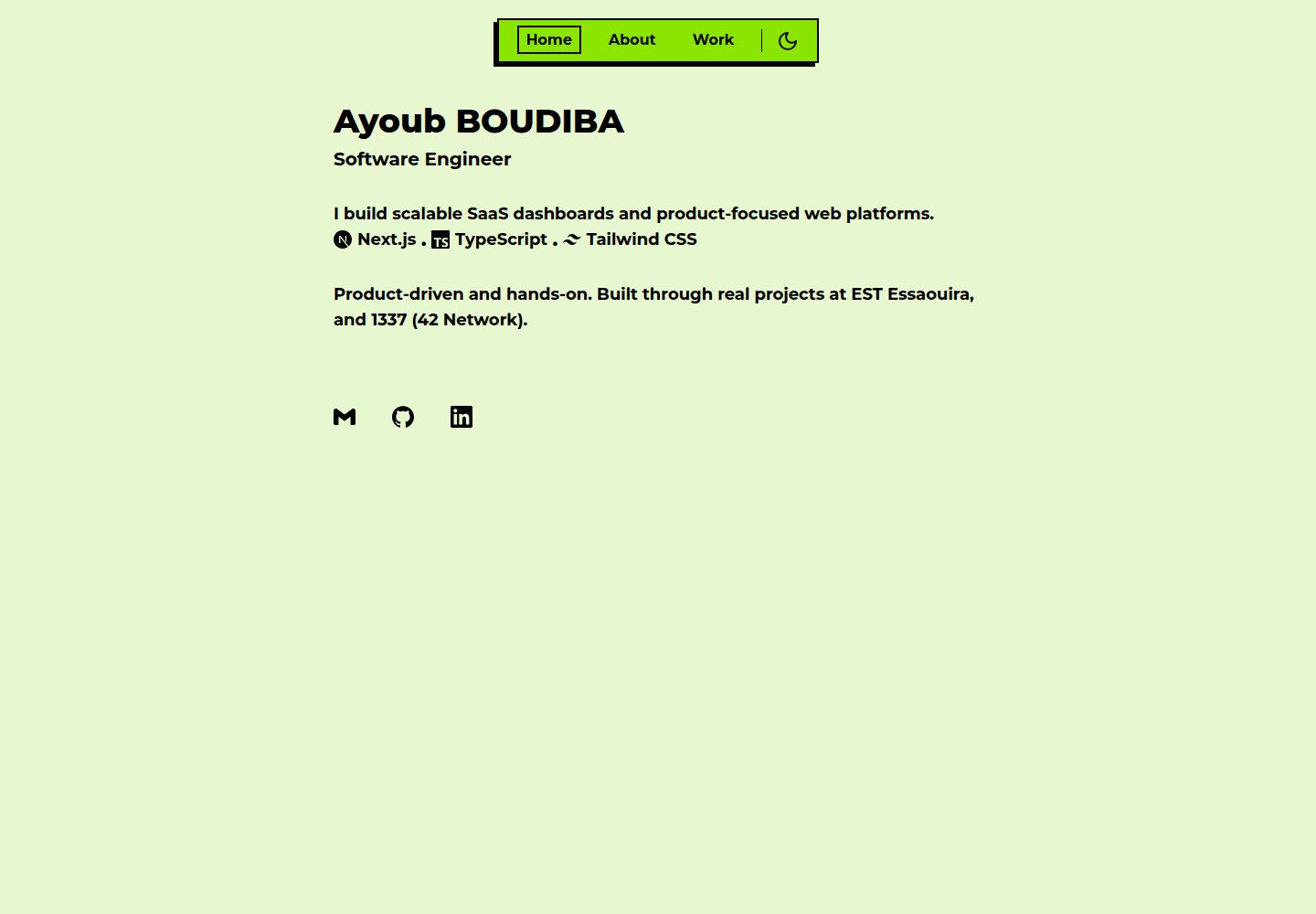
Neobrutalist visual style: thick borders, offset shadows, rounded-base (0px) corners, with colors defined as CSS variables in :root and .dark
Next.jsReactPortfolio
Portfolio (YubieTheSAVAGE) — Next.js Portfolio Template
By YubieTheSAVAGE
A Next.js + Tailwind portfolio template based on neobrutalism-templates/portfolio, featuring a neobrutalist style with three pages: Home, About, and Work, with content driven by data files under src/data.
Explore the design
Compare the page layouts and mobile experience. Open any screenshot for a closer look.
Desktop homepage1 / 3
Desktop captureTop of page
Actual screenshot captured by the server browser.
All pages & views 3
Screenshots show visual appearance; interactive behavior may differ.
Recorded 2026-10-14View source
What stands out
A quick read of the recorded project description.
Three pages: Home, About, Work, with navigation driven by data in src/data/nav.ts, hiding/showing on scroll
System-following light/dark theme switching using next-themes, with the preference persisted
Page transition animations using next-view-transitions; internal links must use its <Link> component
Content as data: experience, skills, and projects are driven by experience.ts, skills.ts, and projects.ts under src/data
Built-in sitemap.ts and robots.ts generate /sitemap.xml and /robots.txt
Template Details
This is a neobrutalism-styled Next.js + Tailwind portfolio template built on the neobrutalism-templates/portfolio template, using thick borders, flat shadows, and a clear typographic hierarchy to present work and experience.
The template provides three pages: Home (/) displays an introduction, tech stack, and social/contact links; About (/about) shows a personal bio, skills grouped by category, and work experience with dates and links; Work (/work) presents projects as cards with preview images and optional "Visit" and "Github" links. Navigation is driven by data in src/data/nav.ts and hides on scroll down and shows on scroll up.
For theming, next-themes is used to implement system-following light/dark switching, with the toggle button in the navigation bar and the preference persisted; all neobrutalist colors are defined as CSS variables in :root and .dark in src/app/globals.css. Page transitions use next-view-transitions for animated transitions, and internal links must use that library's <Link> component.
Experience data on the About page comes from src/data/experience.ts, where each entry includes a company (with optional website link), role, date range, and description (supporting multiple paragraphs split by line breaks). Skills data comes from src/data/skills.ts, where each skill has a name and iconKey, mapped by SkillIcon to the corresponding Simple Icons icon, with a tooltip on hover; in development, you can verify that skills in the UI are in the RESUME_SKILL_NAMES list. Work page projects are defined in src/data/projects.ts, including name, description, previewImage, and optional liveLink and repoUrl, with cards using Next.js Image and a fixed aspect ratio.
For styling, the Montserrat font is used, tw-animate-css provides entrance animations (fade-in, slide-in, zoom-in) with staggered delays set on the About and Work pages, and custom scrollbar colors for light and dark themes are defined in globals.css. For SEO, src/app/sitemap.ts generates /sitemap.xml (using NEXT_PUBLIC_SITE_URL), and src/app/robots.ts provides /robots.txt allowing all crawlers and pointing to the sitemap. The README does not provide information about build artifacts, deployment platforms, or performance.
Next.jsPortfolio
Is it right for your project?
Use Cases
- Individual developers or designers building a portfolio site to showcase projects, skills, and work experience
- Next.js projects that want a quick start with a neobrutalist style
- Portfolio sites that need light/dark theme switching and page transition animations
- Static sites where content is maintained through data files, avoiding frequent changes to page components
Suitable For
- Developers familiar with Next.js App Router and Tailwind CSS
- Personal portfolio needs that prefer a neobrutalist visual style
- Users who want to update content by editing data files under src/data
- Static sites that need light/dark themes and page transition animations
Getting started & customization
Use these recorded setup notes alongside the repository instructions for your chosen version.
- 1
The project uses pnpm (see packageManager in package.json); bun.lock is also present, so bun can be used to install dependencies
- 2
Install dependencies: pnpm i or bun install; run locally: pnpm dev or bun run dev
- 3
Home page copy is edited in src/app/page.tsx; social links are configured in the links array in src/components/links.tsx
- 4
Edit experience, skills, and projects in src/data/experience.ts, src/data/skills.ts, and src/data/projects.ts respectively; place project preview images in public/ and set the previewImage path
- 5
The Work page preview image default aspect ratio is 71/26 (corresponding to 710×260); you can adjust the AspectRatio ratio prop in src/app/work/page.tsx
License & source material
Usage conditions & limitations
Free to use · keep license noticeThis entry covers the free version under the MIT license in the public repository; the free scope is the code of that version and does not mean external services or third-party assets are free.
Must comply with when using
- You are allowed to use, modify, commercially use, and distribute the code of this version for free.
- When distributing copies or substantial portions of the code, retain the original author's copyright notice and the full MIT license notice.
- The code is provided as is; warranties and limitations of liability are governed by the original license and applicable law.
Additional costs & items to verify
- Demo images, fonts, icons, and other third-party assets must be checked against their respective licenses; they cannot be judged solely by the code's MIT license.
- External services such as domains, hosting, databases, payments, or AI may incur additional charges.
View Original Text Basis
https://github.com/YubieTheSAVAGE/Portfolio/blob/main/LICENSEhttps://github.com/YubieTheSAVAGE/Portfolio/blob/main/README.mdPermission is hereby granted, free of charge
Original License Text
Compiled by DeepSeek based on repository license and README ·2026-10-14. Results only cover the materials read; dependencies, images, fonts, and subsequent term changes are subject to their respective original texts.
Project checks & description sources
Template Information
- Source platforms
- GitHub
- Documentation and maintenance reference score
- More documented · 80 / 100
- Technologies
- Next.js · React
- Website type
- Portfolio
How this score is calculated
Our heuristic uses license records (up to 30), a demo link (12), a preview (10), stars (15), recorded maintenance (15), description completeness (8), feature records (5) and classification data (5). It is not a code, security or performance test, or a Google score. A link does not establish tested functionality.
What to verify for this project
- Repository update recorded
- 2026-05-05
- Screenshot last checked
- 2026-10-14
A demo link is listed. Check it with your own content and viewport sizes; its presence does not confirm that forms, authentication or payments work.
The catalog identifies Next.js as the primary stack. Check the actual dependency manifest and lockfile for versions and hosting requirements. These notes use recorded metadata, not a code audit or a deployment test.
Use a selection guide →How this description was prepared
AI-assisted description based on catalog records and repository material. Repository authors are not automatically the reviewers of this description.
Review declaration: codex-user-requested-batch-review-20261015 · 2026-10-15
Inspect the recorded source material
SHA-256: e206051fd0304511762f17b29362f902f9a7165a3e8c4980254c78206476e443
2026-10-14T17:00:52.123Z
Source file / repository<img src="public/preview.png" alt="Portfolio preview" width="710" />
# Portfolio
A **neobrutalism-styled** Next.js + Tailwind portfolio, based on the [neobrutalism-templates/portfolio](https://github.com/neobrutalism-templates/portfolio) template. It uses bold borders, flat shadows, and a clear typographic hierarchy to present your work and experience.
---
## Features
### Multi-page structure
- **Home** (`/`) — Intro, tech stack, and social/contact links.
- **About** (`/about`) — Bio, skills by category, and work experience with dates and links.
- **Work** (`/work`) — Project cards with preview images and optional “Visit” / “Github” links.
Navigation is data-driven from `src/data/nav.ts`. The nav bar hides on scroll-down and shows on scroll-up for a cleaner reading experience.
### Theme (light / dark)
- **next-themes** powers a system-aware light/dark toggle.
- A theme switcher (sun/moon) lives in the nav; preference is persisted.
- All neobrutalism colors are defined as CSS variables in `src/app/globals.css` for both `:root` (light) and `.dark`, so the whole site respects the active theme.
### View transitions
- **next-view-transitions** is used for smooth page changes.
- Internal links use the library’s `<Link>` so route changes are animated instead of full reloads.
### About page: experience & skills
- **Experience** — Entries come from `src/data/experience.ts`. Each role has company (optional website link), role title, date range, and a description that supports multiple paragraphs (split by newlines).
- **Skills** — Categories and items are defined in `src/data/skills.ts`. Each skill has a name and an `iconKey` used by `SkillIcon` to show the correct Simple Icons icon. Tooltips show the skill name on hover. In development, the app can warn if a skill in the UI is not in the canonical resume list (`RESUME_SKILL_NAMES`).
- **Highlight** — The `<Highlight>` component in `src/components/ui/highlight.tsx` is used for emphasis in text (default marker style, or `border` / `subtle` variants).
### Work page: projects
- Projects are defined in `src/data/projects.ts`: `name`, `description`, `previewImage`, and optional `liveLink` and `repoUrl`.
- Each project is rendered as a card with an image (via Next.js `Image` and a fixed aspect ratio), description, and “Visit” / “Github” buttons when the URLs are set.
### Styling and UX
- **Neobrutalism** — Strong borders, offset box shadows, and `rounded-base` (0px) for a blunt, grid-like look. Custom design tokens (e.g. `--main`, `--border`, `--shadow`) drive the style.
- **Font** — Montserrat (Google Font) is applied in the root layout.
- **Animations** — `tw-animate-css` is used for entrance animations (fade-in, slide-in, zoom-in) with staggered delays on the About and Work pages.
- **Scrollbar** — Custom scrollbar colors for light and dark themes in `globals.css`.
---
## How it works
1. **Layout** (`src/app/layout.tsx`) — Wraps the app with `ViewTransitions`, `ThemeProvider`, and a fixed `Nav`. Page content is rendered in a constrained main area below the nav.
2. **Content** — Copy and structure live in the page components; reusable content (nav, projects, experience, skills, links) is driven by files in `src/data/` and components in `src/components/` and `src/components/sections/`.
3. **Routing** — Standard Next.js App Router: `src/app/page.tsx` (home), `src/app/about/page.tsx`, `src/app/work/page.tsx`. The nav uses `usePathname()` to highlight the active route.
4. **Icons** — Social/tech icons use `@icons-pack/react-simple-icons`; the About skills use a custom `SkillIcon` that maps `iconKey` to the correct Simple Icon.
### SEO & Google indexing
- **Sitemap** — `src/app/sitemap.ts` generates `/sitemap.xml` with Home, About, and Work (uses `NEXT_PUBLIC_SITE_URL`).
- **Robots** — `src/app/robots.ts` serves `/robots.txt` allowing all crawlers and pointing to the sitemap.
- To **show up on Google**: deploy the site, then go to [Google Search Console](https://search.google.com/search-console), add the property (e.g. `https://boudiba.me`), and submit the sitemap URL (`https://boudiba.me/sitemap.xml`). Use “URL inspection” → “Request indexing” for the homepage to speed up the first crawl.
---
## Get started
You can [create a new repo](https://github.com/neobrutalism-templates/portfolio/generate) from the original template, or clone this repo.
### Installation
This project uses **pnpm** (see `packageManager` in `package.json`). A `bun.lock` is also present, so you can use **bun** if you prefer.
```bash
pnpm i
# or
bun install
```
### Run locally
```bash
pnpm dev
# or
bun run dev
```
---
## Config
### Global
- **Metadata** — In `src/app/layout.tsx`, set `metadata` (e.g. `title`, `description`).
- **Favicon** — Replace `src/app/favicon.ico`.
### Home page
- **Copy** — Edit `src/app/page.tsx` (name, role, bio, tech stack array).
- **Links** — In `src/components/links.tsx`, edit the `links` array. Each entry needs `icon` (from `@icons-pack/react-simple-icons`) and `href`. Use the [Simple Icons](https://simpleicons.org/) site and import with the `Si` prefix (e.g. `SiGithub`).
### Nav
- **Routes** — Edit `src/data/nav.ts` (`NAV_LINKS`: `path` and `text`).
### About page
- **Experience** — Edit `src/data/experience.ts`. Each entry: `company`, `role`, `description` (multi-line string), `startDate`, `endDate`, optional `website`.
- **Skills** — Edit `src/data/skills.ts`. Adjust the `skills` object (categories and `{ name, iconKey }`). Keep `RESUME_SKILL_NAMES` in sync if you use the dev-only validation. Icon keys must match what `SkillIcon` supports (e.g. Simple Icons slug style).
### Work page
- **Projects** — Edit `src/data/projects.ts`. Each project: `name`, `description`, `previewImage`, optional `liveLink`, optional `repoUrl`.
- **Preview images** — Put assets in `public/` and set `previewImage` to `'/' + filename`, e.g. `previewImage: '/my-project.png'`.
- **Aspect ratio** — In `src/app/work/page.tsx`, the preview uses `<AspectRatio ratio={71 / 26}>`. Change the `ratio` prop if your images use a different aspect ratio (default assumes 710×260).
### Styling
- **Neobrutalism** — To change colors or tokens, edit `:root` and `.dark` in `src/app/globals.css`. For more options, see the [styling docs](https://neobrutalism.dev/styling) and copy the desired setup into your CSS.
---
## License
See [LICENSE](LICENSE).
Explore similar templates
Compare previews and descriptions within the same stack and category.

react-resume-template
A personal resume website template for software developers, built with Next.js, React, and TypeScript and styled with Tailwind CSS. Site content is driven by a single data file at /src/data/data.tsx, with types in dataDef.ts and images in src/images/.
Next.js · Portfolio

nxt-lnk
nxt-lnk is a Next.js-based bio link page template that manages personal information and links via BioData.js and LinksData.js, positioned as a self-hosted alternative to Linktree. It groups links by type, supports enabling/disabling individual links, and offers hexagonal or oval avatars.
Next.js · Portfolio

sylph
Sylph is a minimal portfolio and blog template built on Next.js, supporting MDX/Markdown writing, light/dark themes, and automatic OG image generation. It includes sitemap, robots.txt, metadata, and syntax highlighting, with automatic blog timestamps.
Next.js · Portfolio

sleek-portfolio
A modern, responsive portfolio template built with Next.js 15, TypeScript, Tailwind CSS, and Shadcn UI. It includes an MDX blog, project showcase, work experience timeline, and a contact form that receives messages via Telegram Bot.
Next.js · Portfolio

research-website-template
A React + Next.js template for research personal websites, aimed at PhD students and researchers. It centralizes publications, projects, and other content in src/data as arrays of objects, with optional fields automatically generating UI components.
Next.js · Portfolio

shadcn-portfolio
A developer portfolio template built with Next.js 15, shadcn/ui, Tailwind CSS, and Framer Motion, featuring an MDX blog, light and dark modes, responsive design, and SEO meta tags.
Next.js · Portfolio