Built with Next.js, TypeScript React, Tailwind CSS, and DaisyUI
Next.jsReactPortfolio
Next-Portfolio-Template — Next.js Portfolio Template
By zacharyLYH
A minimalist portfolio template built with Next.js, TypeScript, Tailwind CSS, and DaisyUI that renders a personal homepage by parsing a JSON file, including sections such as Hero, About Me, Experiences, Projects, and Commendations.
Explore the design
Compare the page layouts and mobile experience. Open any screenshot for a closer look.
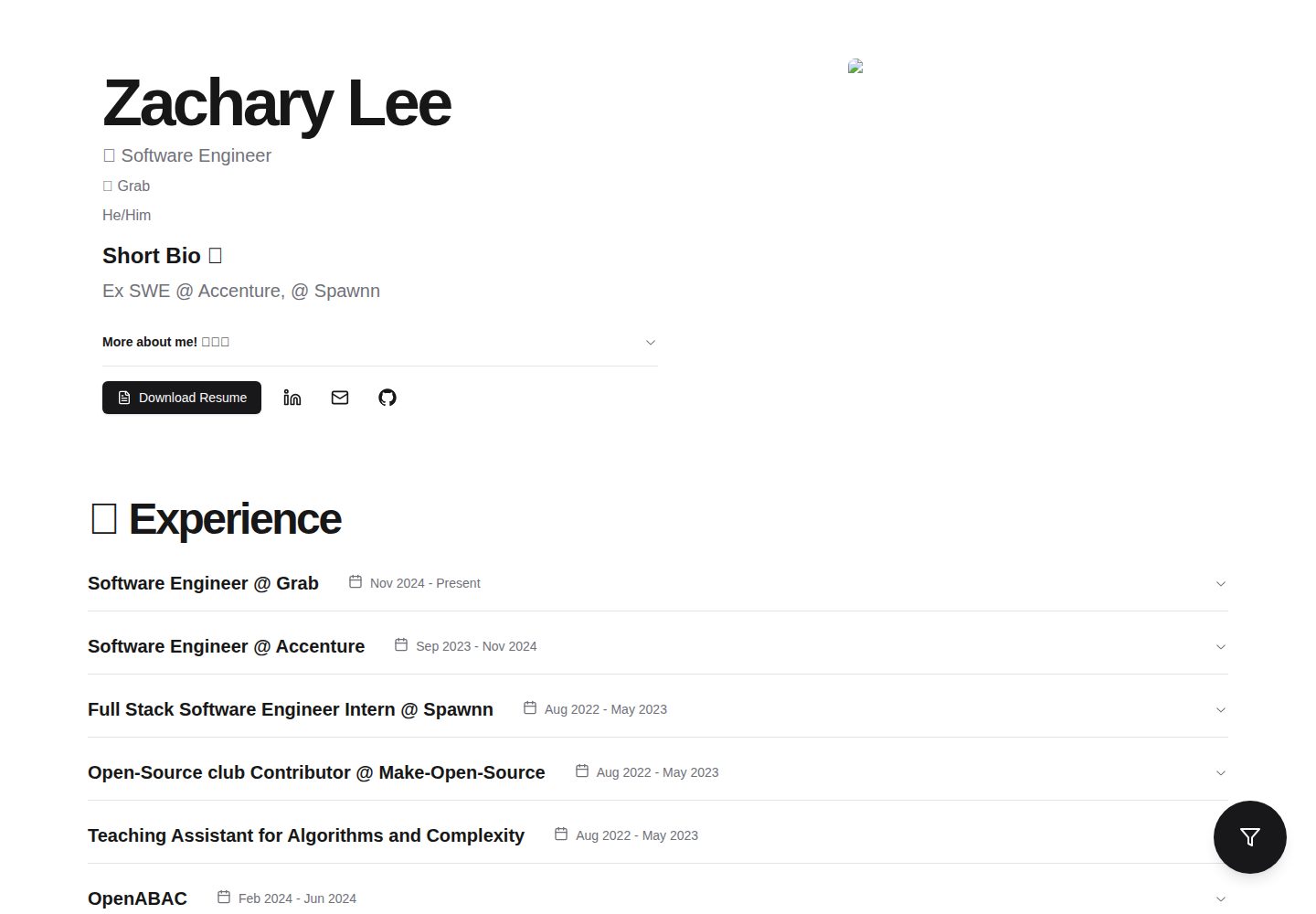
Desktop homepage1 / 3
Desktop captureTop of page
Actual screenshot captured by the server browser.
All pages & views 3
Screenshots show visual appearance; interactive behavior may differ.
Recorded 2026-10-13View source
What stands out
A quick read of the recorded project description.
Configure content via a JSON file, supporting object types such as Bio, Project, Experience, and Footer
Includes typical portfolio sections such as Hero, About Me, Experiences, Projects, and Commendations
Projects support pagination (up to 6 cards per page) and filtering by skill
Skills and links are displayed with icons; icons must be placed in /public/icons and /utilities/iconsList.ts must be updated
Long paragraphs are split by periods into list items with colored dots
Template Details
Next-Portfolio-Template is a minimalist portfolio template built with the Next.js framework, TypeScript React, Tailwind CSS, and the DaisyUI component library. The program reads a user-provided JSON file with a specific syntax and renders the page; users only need to understand JSON syntax and Next.js deployment strategies to use it. The template supports the following sections: Hero page (name, title, TLDR, image, resume/transcript documents, job search status), About Me (self-introduction, more fun facts), Experiences (TLDR, story, start and end dates, related links, location, ongoing or past, skills involved), Projects (TLDR, story, related links, ongoing or past, skills involved, whether featured), Social Links, Commendations (recommender image, name, comment, full title, single social link). The README states that users mainly interact with the /Render/Renderfile.ts file, and currently supports four JSON object types: Bio, Project, Experience, and Footer. The README does not provide information about performance, production readiness, or integration with other tools.
Next.jsReactPortfolio
Is it right for your project?
Use Cases
- Individual developers or students creating a static website to showcase their portfolio and experience
- Quickly building a personal homepage with modules such as projects, experience, and recommendations
- Updating portfolio content by modifying a JSON file instead of writing components
- Hosting a Next.js portfolio for free on Vercel
Suitable For
- Developers familiar with JSON syntax and Next.js deployment
- Users who want to showcase their experience and projects in a minimalist style
- Creators who need to flexibly add multiple projects and experiences with filtering support
Getting started & customization
Use these recorded setup notes alongside the repository instructions for your chosen version.
- 1
Requires NodeJS V16.8 or higher
- 2
After forking the project, run yarn install or npm i to install dependencies
- 3
Use yarn run dev or npm run dev to start the development environment for testing
- 4
Optionally run npm run build to verify the build before deployment
- 5
Can be deployed to Vercel for free hosting
License & source material
Usage conditions & limitations
Free to use · keep license noticeThis entry covers the free version of the public repository under the BSD-2-Clause license; the free scope applies to that version's code and does not imply that external services or third-party assets are free.
Must comply with when using
- Free use, modification, commercial use, and distribution in source or binary form are permitted.
- Source code distribution must retain the copyright notice, the two conditions, and the disclaimer; binary distribution must reproduce these in the documentation or accompanying materials.
- The code is provided as is; warranties and limitations of liability are governed by the original license and applicable law.
Additional costs & items to verify
- Demo images, fonts, icons, and other third-party assets must be checked against their respective licenses; they cannot be judged solely by the code's BSD-2-Clause license.
- External services such as domains, hosting, databases, payments, or AI may incur additional charges.
- The personal avatar image must be named headshot.jpeg and placed in the /public directory, otherwise it will not display correctly.
- Email in social links currently only supports Gmail; other email providers require custom implementation or submitting an issue.
- Currently only Gmail email is supported; other email providers require custom implementation or submitting an issue.
- When adding custom icons, you must observe copyright and usage restriction rules yourself; the project provides no icon copyright guarantee.
- The project requests that users retain the acknowledgment of the template creator in the code for searchability.
- Using this template requires NodeJS V16.8 or higher.
- Not all feature combinations have been tested; missing certain fields may cause UI breakage.
View Original Text Basis
Redistribution and use in source and binary forms, with or without modification, are permitted
Original License Text
- `headshot.jpeg`: Your profile picture (mandatory) **must be named exactly headshot.jpeg**
Original README
"[email protected]", //CURRENTLY ONLY GMAIL IS SUPPORTED
Original README
- Currently, the only emails supported use `gmail`. If any other emails are desired, you may implement it yourself or raise an [issue](https://github.com/zacharyLYH/Next-Portfolio-Template/issues).
Original README
> 1. Go find your icon, from a site of your choice (keep in mind copyright and usage restriction rules), download the icon as an SVG. A great source of icons has been [IconScount](https://iconscout.com/).
Original README
- In the code, we leave some awknowledgement to the creator of this portfolio template; we kindly ask you to leave it in for searchability purposes!
Original README
- NodeJS V16.8 and up
Original README
https://github.com/zacharyLYH/Next-Portfolio-Template/blob/main/LICENSEhttps://github.com/zacharyLYH/Next-Portfolio-Template/blob/main/README.md> At the time of writing this, not every combination of features have been tested. In other words, missing certain fields might cause UI damages, and should be reported [here](https://github.com/zacharyLYH/Next-Portfolio-Template/issues).
Original README
Compiled by DeepSeek based on repository license and README ·2026-10-13. Results only cover the materials read; dependencies, images, fonts, and subsequent term changes are subject to their respective original texts.
Project checks & description sources
Template Information
- Source platforms
- GitHub
- Documentation and maintenance reference score
- Partly documented · 73 / 100
- Technologies
- Next.js · React
- Website type
- Portfolio
How this score is calculated
Our heuristic uses license records (up to 30), a demo link (12), a preview (10), stars (15), recorded maintenance (15), description completeness (8), feature records (5) and classification data (5). It is not a code, security or performance test, or a Google score. A link does not establish tested functionality.
What to verify for this project
- Repository update recorded
- 2023-08-22
- Screenshot last checked
- 2026-10-13
A demo link is listed. Check it with your own content and viewport sizes; its presence does not confirm that forms, authentication or payments work.
The catalog identifies Next.js as the primary stack. Check the actual dependency manifest and lockfile for versions and hosting requirements. These notes use recorded metadata, not a code audit or a deployment test.
Use a selection guide →How this description was prepared
AI-assisted description based on catalog records and repository material. Repository authors are not automatically the reviewers of this description.
Review declaration: codex-user-requested-batch-review-20261015 · 2026-10-15
Inspect the recorded source material
SHA-256: f44ff8dadd0162528744edadda1f6e136c07a9c7d27dec3ee45ec79d470f9ced
2026-10-13T18:01:04.421Z
Source file / repository# TLDR
A minimalistic portfolio template built using the [NextJS](https://nextjs.org/) framework on Typescript React, Tailwind CSS, and DaisyUI component library. Some typical portfolio sections supported here include
- Hero page
- Name
- Title
- TLDR
- Image
- Resume and or Transcript document support
- Job status
- About Me
- About me
- More fun facts
- Experiences
- TLDR
- Story
- Start and end date
- Links to any work related to this experience
- Experience location
- Ongoing or previous
- Skills involved in this experience
- Projects
- TLDR
- Story
- Links to any work related to this experience
- Ongoing or previous
- Skills involved in this experience
- Featured or not featured
- Social Links
- Commendations
- Image of commender, or a blank image otherwise
- Name of commender
- The compliment
- Commender's credentials in full
- Social link (singular) to commender
On a high level, the program takes a JSON file with specific syntax, supplied by the user. The software parses the file and renders it. Assuming no desire to modify the current implementation, a user only needs to understand JSON syntax and NextJS deployment strategies.
# Knowledge prerequisites to adapt a portfolio out of this template
- NextJS deployment
- [Vercel](https://vercel.com/solutions/nextjs?utm_source=google&utm_medium=cpc&utm_campaign=18576682555&utm_campaign_id=18576682555&utm_term=deploy%20nextjs&utm_content=141733725825_627677616427&gclid=EAIaIQobChMIn9fG29fg_QIVGzizAB2FIAYfEAAYASAAEgJK7PD_BwE)
- Working JSON knowledge
- NodeJS V16.8 and up
- Optional: Typescript React, Tailwind CSS, DaisyUI if you desire to modify the template
# Usage documentation
A user would mostly interact with the `Renderfile.ts` file, which lives inside `/Render`. Currently, we have 4 JSON object types that are supported, `Bio`, `Project`, `Experience`, `Footer`. We'll proceed with defining the layout of the `Renderfile` for now, but you may open up a [sample](https://github.com/zacharyLYH/Next-Portfolio-Template/blob/main/Render/Renderfile.ts) `Renderfile` for side by side comparison.
On a high level, a user with the aforementioned skill requisites should
1. Fork the project
2. Read the remainder of the documentation and understand the syntax and requirements that the parser uses
3. `yarn install` or `npm i`
4. Make changes where appropriate
5. For testing, spin up a development environment using `yarn run dev` or `npm run dev`. Note, the `dev` environment comes with hot reloading built in.
6. Before deploying, optionally run `npm run build`. This confirms that your build is possible, and makes the deploying step a breeze.
7. Host it for free on [Vercel](https://vercel.com/solutions/nextjs?utm_source=google&utm_medium=cpc&utm_campaign=18576682555&utm_campaign_id=18576682555&utm_term=deploy%20nextjs&utm_content=141733725825_627677616427&gclid=EAIaIQobChMIn9fG29fg_QIVGzizAB2FIAYfEAAYASAAEgJK7PD_BwE)
### Images, Icons, and documents
Icons are central to this portfolio template. The idea is, instead of telling your reader about your skills, why not link it as an icon? The result is a more engaging and memorable portfolio. To follow along this section, open up [the example repo](https://github.com/zacharyLYH/Next-Portfolio-Template/tree/main/public). All static objects, such as images, icons, and documents go into the `/public` folder. Further, icons go into the `/icons` folder. Some items stay in the `/public` folder itself, including
- `headshot.jpeg`: Your profile picture (mandatory) **must be named exactly headshot.jpeg**
- `resume.pdf`: Your resume in a pdf form (optional)
- `transcript.pdf`: Your student transcript (optional)
- `titleicon.png`: The icon showing on your browser's title field.
### Icons
You need to be especially careful about icons. **Icons are used in skills and links**. You may find the list of supported icons in `/utilities/iconsList.ts`. Any icon you need that is currently unsupported can be requested through an issue or implemented on your own. In general, we recommend the use of SVGs as your icons.
> To add your own icons
>
> **Make sure we don't already have your icon in `/utilities/iconsList.ts`**
>
> 1. Go find your icon, from a site of your choice (keep in mind copyright and usage restriction rules), download the icon as an SVG. A great source of icons has been [IconScount](https://iconscout.com/).
> 2. Move your icon to `/public/icons`
> 3. Update `/utilities/iconsList.ts`. **Crucial: Make sure the icon's name and the listing in `/utilities/iconsList.ts` is exactly the same.**
> Keywords are highly sensitive, ie. do not misspell key words and please follow capitalization rules as defined, throughout the document.
> At the time of writing this, not every combination of features have been tested. In other words, missing certain fields might cause UI damages, and should be reported [here](https://github.com/zacharyLYH/Next-Portfolio-Template/issues).
### Lengthy paragraph splitting
In the current implementation, long paragraphs are split by periods `.`, seperated into bullet points, and a colored circle will sit in place of the bullet point. Check out [the implementation](https://github.com/zacharyLYH/Next-Portfolio-Template/blob/main/utilities/splitLines.tsx). Currently, places affected by `BeautifyParagraph` are:
- Bio aboutMe
- Experience story
- Project story
### Bio
This is the shape of the `Bio` section, replace text values as appropriate.
```
type: "Bio", //SPELL THIS CORRECTLY
name: "John Smith",
title: "Software Engineer II",
socialLinks: [
"https://github.com",
"https://www.linkedin.com",
"[email protected]", //CURRENTLY ONLY GMAIL IS SUPPORTED
],
tldr: "Full Stack developer; Love portfolio apps!",
aboutMe: "A user interface is like a joke. If you have to explain it, it’s not that good.",
image: "/headshot.jpeg", //YOUR PROFILE PIC HAS TO BE CALLED THIS
hobbies: [
"I love cooking",
"Ex high school swim team champion 2018",
],
jobStatus: "Interview Ready",
docs: {
resume: "/resume.pdf",
transcript: "/transcript.pdf",
}
```
- `aboutMe` is affected by [`BeautifyParagraph`](#lengthy-paragraph-splitting).
- In general, don't make any one section too long. A section too long throws off the readability of your portfolio, and in the worst case might trigger some overflow bugs (feel free to fix any with a PR if it happens though).
- Feel free to have a lengthy `aboutMe`.
- Currently, the only emails supported use `gmail`. If any other emails are desired, you may implement it yourself or raise an [issue](https://github.com/zacharyLYH/Next-Portfolio-Template/issues).
- The `hobbies` section is not exactly just for hobbies. On the UI , we call that section `More fun facts`, because you're probably a very interesting person!
- Social links follow [icon rules](#icons)
### Experience
```
type: "Experience", //SPELL THIS CORRECTLY
title: "Software Engineer II ",
summary: "Fantastic experience so far, can be better if we had free pancakes every morning...",
skills: ["golang", "nodejs"],
story: "Weird job experience; my office is my bed.",
links: ["https://github.com/some-cool-thing-i-built"],
current: true,
orgName: "Qwerty.ai",
dateStartEnd: "1/1-2/1",
```
- `story` is affected by [`BeautifyParagraph`](#lengthy-paragraph-splitting).
- Important: skills come with icons, so be careful about naming them and please make sure they exist in `iconsList.ts`.
- In general, use everything defined here, for any missing information might cause unexpected behavior.
- If this is not your `current` experience, feel free to omit that field.
- Skills and links follow [icon rules](#icons)
### Projects
```
type: "Project", //SPELL THIS CORRECTLY
name: "Portfolio template",
summary:"learned a lot",
skills: ["golang", "nodejs"],
story: "made me realize software development is my passion!",
links: ["https://github.com/your-repo"],
current: true,
featured: true,
dateStartToEnd: "1/1 - 2/1",
```
- `story` is affected by [`BeautifyParagraph`](#lengthy-paragraph-splitting).
- Any projects with unset `current` and or `featured` fields are set to `false` by default, ie. if you don't plan to set it, you may omit it.
- We understand that as engineers, you have a lot of cool projects that you've worked on. One of the strengths of this portfolio template is that you may add an unlimited (theoretically) number of projects, no impact on your UI!
- We use pagination, with a page having at most 6 cards.
- There is also a filter feature which will filter by the skills on the projects you provided.
- Skills and links follow [icon rules](#icons)
### Commendation
```
type: "Commendation", //SPELL THIS CORRECTLY
name: "Ex colleague John",
compliment: "Best person I've ever worked with.",
image: "/john.jpeg",
credentials: "web developer @ startup.ai",
link: "https://johndoe.bio"
```
- If no commendations are given, the section doesn't show.
- The link's icon need not be provided here unlike other instances; a default icon will be used here. You may change the icons associated if you choose, but be warned this involves understanding of how icons are implemented in other cases.
### Footer
```
type: "Footer", //SPELL THIS CORRECTLY
author: "John Smith", // PUT YOUR NAME
links: ["https://github.com/link-to-your-portfolio-template-repo"], //LINK TO YOUR PORTFOLIO GITHUB
```
- In links, be sure to link your github repository (if public)!
- In the code, we leave some awknowledgement to the creator of this portfolio template; we kindly ask you to leave it in for searchability purposes!
# Tips for success / optimization
- Use plenty of emojis :cowboy_hat_face:
- SORT YOUR PROJECTS AND EXPERIENCES BY SHOW-WORTHINESS
- The `RenderFile` is read sequentially, ie, objects at the top of the file are read first and thus will be showed first on the UI. Make sure to put those you want seen in front of those you don't mind not being paid less attention.
- Make use of project skills! The filtering tool is made expressly so that you won't be disadvantaged throwing a viewer a ton of projects!
- Provide as much data as possible (try making use of all the available fields)
# Troubleshoot
##### A known working link says it can't find the webpage.
- Make sure all links starts with `https://`
- Make sure links do not go to a page behind a login/paywall - the reader probably isn't allowed to look at your private/restricted content.
##### One (or more) of my skills are not showing
- A common mistake is to either
1. Forget to include an icon for it
2. Forget to update `/utilities/iconList.ts`
3. The name of the skill in your icon's SVG name, whats listed in `/utilities/iconList.ts`, `Renderfile` is inconsistent. If a skill is called `excel`, make sure it is called `excel` in all 3 places.
# How to contribute
Fork this repository, make your changes, send a PR with head as dev. Be sure to include a description of your modifications and screenshots if applicable for easier comprehension!
# Limitations and last words
This project is essentially a hobby project and by no means built with lofty goals in mind. There will most likely be bugs to be taken care of and we encourage you to be a part of that. This project is constantly evolving, and I'll be personally managing new features and bug fixes as needed.
Explore similar templates
Compare previews and descriptions within the same stack and category.

react-resume-template
A personal resume website template for software developers, built with Next.js, React, and TypeScript and styled with Tailwind CSS. Site content is driven by a single data file at /src/data/data.tsx, with types in dataDef.ts and images in src/images/.
Next.js · Portfolio

nxt-lnk
nxt-lnk is a Next.js-based bio link page template that manages personal information and links via BioData.js and LinksData.js, positioned as a self-hosted alternative to Linktree. It groups links by type, supports enabling/disabling individual links, and offers hexagonal or oval avatars.
Next.js · Portfolio

sylph
Sylph is a minimal portfolio and blog template built on Next.js, supporting MDX/Markdown writing, light/dark themes, and automatic OG image generation. It includes sitemap, robots.txt, metadata, and syntax highlighting, with automatic blog timestamps.
Next.js · Portfolio

sleek-portfolio
A modern, responsive portfolio template built with Next.js 15, TypeScript, Tailwind CSS, and Shadcn UI. It includes an MDX blog, project showcase, work experience timeline, and a contact form that receives messages via Telegram Bot.
Next.js · Portfolio

research-website-template
A React + Next.js template for research personal websites, aimed at PhD students and researchers. It centralizes publications, projects, and other content in src/data as arrays of objects, with optional fields automatically generating UI components.
Next.js · Portfolio

shadcn-portfolio
A developer portfolio template built with Next.js 15, shadcn/ui, Tailwind CSS, and Framer Motion, featuring an MDX blog, light and dark modes, responsive design, and SEO meta tags.
Next.js · Portfolio