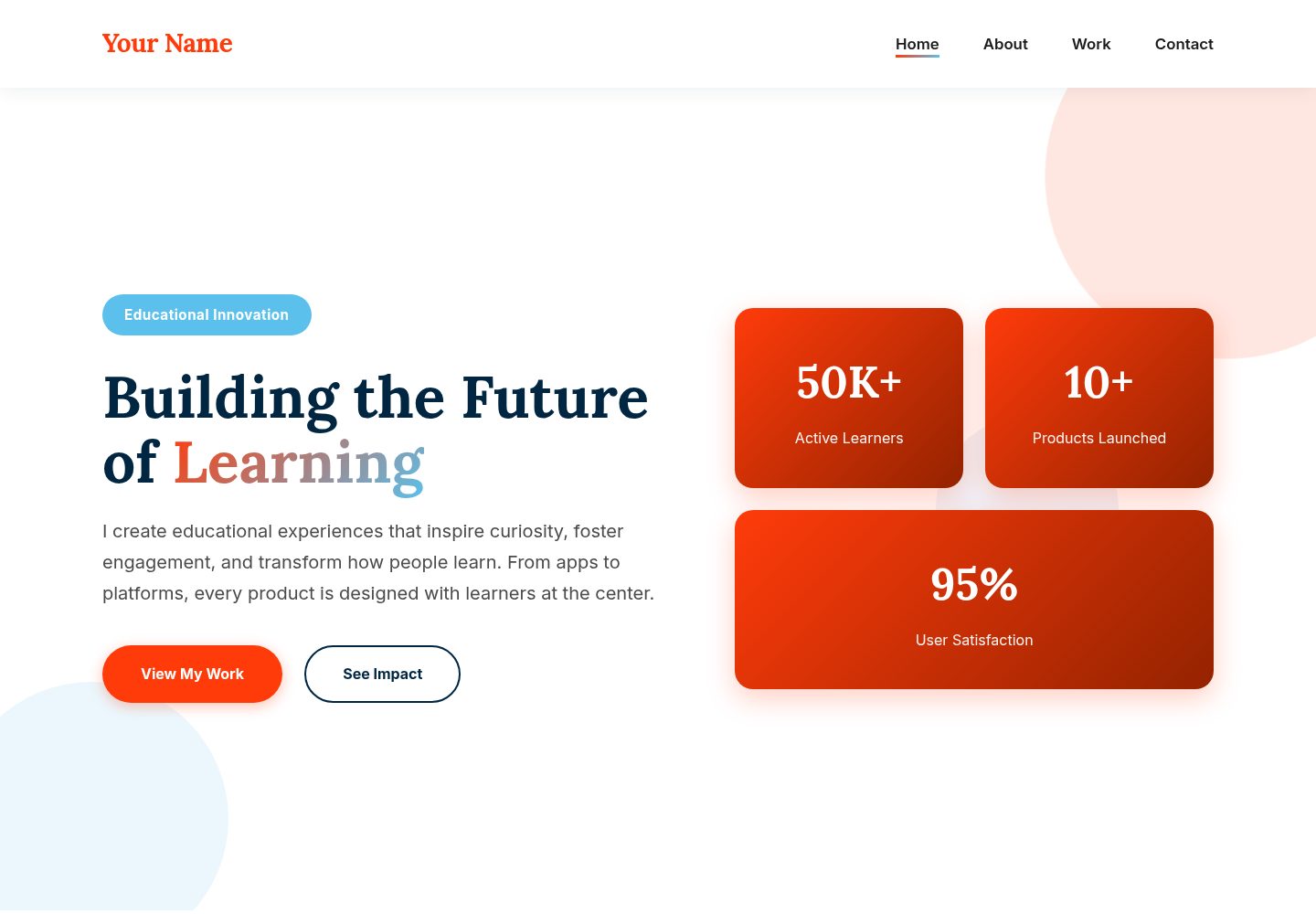
Interactive project gallery: a responsive grid displays projects; clicking opens a modal lightbox with the full description, features, impact, and tags
HTMLPortfolioCorporate Website
personalwebsite5 — HTML Portfolio Template
By zarifazak25
A multi-page portfolio template for EdTech entrepreneurs and learning innovators, comprising Home, About, Portfolio, and Contact pages, centered on an interactive project gallery with category filtering, modal lightbox, and keyboard navigation.
Explore the design
Compare the page layouts and mobile experience. Open any screenshot for a closer look.
Desktop homepage1 / 3
Desktop captureTop of page
Actual screenshot captured by the server browser.
All pages & views 3
Screenshots show visual appearance; interactive behavior may differ.
Recorded 2026-10-13View source
What stands out
A quick read of the recorded project description.
Project category filtering: supports filtering by categories such as Apps, Platforms, and Tools, or viewing all
Keyboard navigation: when the modal is open, use the left and right arrow keys to switch projects and ESC to close
Multi-page structure: includes four pages—Home, About, Portfolio, and Contact—respectively hosting hero/impact, personal story, project showcase, and contact information
Centralized project data configuration: maintain projects in the projects array in portfolio.js using the fields title, category, description, features, impact, and tags
Customizable color scheme: six colors are defined as CSS variables at the top of styles.css, making it easy to replace the theme colors globally
Template Details
This template is a static portfolio website for roles such as EdTech entrepreneurs, educational entrepreneurs, and learning designers, composed of four pages—index.html, about.html, portfolio.html, and contact.html—along with styles.css and portfolio.js. The home page includes hero and impact sections, the about page is for telling one's personal story and philosophy, the portfolio page provides a clickable image grid with a modal lightbox for viewing details, and the contact page offers a contact form and opportunity information.
The project gallery supports filtering by categories such as Apps, Platforms, and Tools. After clicking a project, the modal displays the full description, feature points, impact, and tags, and you can browse and close using arrow keys or the ESC key. Project data is centrally defined in the projects array in portfolio.js, and the README provides an example field structure, making it easy to replace with your own projects.
The template uses HTML5, CSS3 (Grid, Flexbox, CSS variables, animations), and vanilla JavaScript to implement the modal, filtering, and keyboard navigation. Fonts use Google Fonts' Lora and Inter as substitutes for Le Monde Livre and Acumin Pro. The README does not provide a dependency list or framework versions, nor does it explain build steps; it is intended for direct editing of static files. The contact form requires integration with a backend service, and the README only provides the Formspree integration method.
HTMLPortfolioCorporate Website
Is it right for your project?
Use Cases
- EdTech entrepreneurs organizing and showcasing their educational products and startup projects
- Learning designers or product managers presenting educational project cases and impact data with images and text
- Education consultants displaying client projects and outcomes, and receiving collaboration inquiries through the contact page
- Personal portfolio sites that need to filter projects by category and view details in a lightbox
Suitable For
- EdTech founders, educational entrepreneurs
- Learning designers, education product managers
- Education consultants, investors
- Individuals who want to showcase their work on a static multi-page site and maintain project data themselves
Getting started & customization
Use these recorded setup notes alongside the repository instructions for your chosen version.
- 1
The README does not provide dependency installation or build commands; simply edit the HTML, CSS, and JS directly according to the file structure
- 2
Replace the “Your Name” placeholder and other placeholder content such as hero, about, and contact information across all pages
- 3
Place project images in the images folder, and replace the placeholder divs in portfolio.html with img tags
- 4
Add or modify projects in the projects array in portfolio.js according to the field structure given in the README; if there are more than 9 projects, you must also add corresponding gallery-item elements in portfolio.html
- 5
The contact form requires integration with a backend service; the method given in the README is to use Formspree and replace the form ID in the form action
License & source material
Usage conditions & limitations
Free to use · keep license noticeThis entry covers the free version under the MIT license in a public repository; the free scope is the code of this version and does not mean that external services or third-party assets are free.
Must comply with when using
- You are allowed to use, modify, commercially use, and distribute the code of this version for free.
- When distributing copies or substantial portions of the code, retain the original author's copyright notice and the complete MIT license notice.
- The code is provided as is; warranties and limitations of liability are governed by the original license and applicable law.
Additional costs & items to verify
- The README mentions the Formspree form service; actual submission requires configuring a service endpoint, and its usage quotas and fees must be checked separately.
- Demo images, fonts, icons, and other third-party assets must be checked against their respective licenses; they cannot be judged solely by the code's MIT license.
- External services such as domains, hosting, databases, payments, or AI may incur additional charges.
- The contact form requires a backend service to work; the README only provides the Formspree integration method, and you need to register and configure the form ID yourself.
- Using Formspree requires registering an account at formspree.io and creating a form, which is an external service dependency.
- If you use the Le Monde Livre and Acumin Pro fonts, you need to hold the corresponding font licenses yourself; the template uses Lora and Inter as substitutes by default.
- Embedding videos in the portfolio requires using YouTube embed URLs, which involves a third-party platform.
View Original Text Basis
Permission is hereby granted, free of charge
Original License Text
The contact form needs a backend service:
Original README
1. Sign up at [formspree.io](https://formspree.io)
Original README
- If you have Le Monde Livre and Acumin Pro licenses, add them to a `/fonts` folder
Original README
https://github.com/zarifazak25/personalwebsite5/blob/main/LICENSEhttps://github.com/zarifazak25/personalwebsite5/blob/main/README.md<iframe src="https://www.youtube.com/embed/YOUR_VIDEO_ID"
Original README
Compiled by DeepSeek based on repository license and README ·2026-10-13. Results only cover the materials read; dependencies, images, fonts, and subsequent term changes are subject to their respective original texts.
Project checks & description sources
Template Information
- Source platforms
- GitHub
- Documentation and maintenance reference score
- More documented · 88 / 100
- Technologies
- HTML
- Website type
- Portfolio · Corporate Website
How this score is calculated
Our heuristic uses license records (up to 30), a demo link (12), a preview (10), stars (15), recorded maintenance (15), description completeness (8), feature records (5) and classification data (5). It is not a code, security or performance test, or a Google score. A link does not establish tested functionality.
What to verify for this project
- Repository update recorded
- 2025-11-20
- Screenshot last checked
- 2026-10-13
A demo link is listed. Check it with your own content and viewport sizes; its presence does not confirm that forms, authentication or payments work.
The catalog identifies HTML as the primary stack. Check the actual dependency manifest and lockfile for versions and hosting requirements. These notes use recorded metadata, not a code audit or a deployment test.
Use a selection guide →How this description was prepared
AI-assisted description based on catalog records and repository material. Repository authors are not automatically the reviewers of this description.
Review declaration: codex-user-requested-batch-review-20261015 · 2026-10-15
Inspect the recorded source material
SHA-256: 8b4811cb601dde34b71cd16f7ace0c353f3bb36048d3229549fe257f1228e968
2026-10-13T14:58:04.345Z
Source file / repository# 🎨 EdTech Entrepreneur Portfolio
A modern, artistic portfolio website template designed for educational entrepreneurs, EdTech founders, and learning innovation leaders. Features an interactive image gallery with modal lightbox functionality.
## ✨ Key Features
- 🖼️ **Interactive Portfolio Gallery** - Clickable image grid with beautiful modal/lightbox view
- 🎨 **Bold, Artistic Design** - Vibrant color palette and modern aesthetics
- 📱 **Fully Responsive** - Perfect on all devices
- 🔄 **Portfolio Filtering** - Filter projects by category (Apps, Platforms, Tools)
- ⌨️ **Keyboard Navigation** - Arrow keys and ESC to navigate modal
- 🎯 **Entrepreneur-Focused** - Designed for showcasing educational ventures
- 💫 **Smooth Animations** - Floating shapes and transitions
## 🎨 Color Palette
This template uses a vibrant, professional color scheme perfect for creative entrepreneurs:
- **Rust Brown (#942300)** - Warm, grounded accent
- **Blazing Flame (#FF3B0A)** - Primary CTA color for energy
- **Deep Space Blue (#002642)** - Professional, trustworthy secondary
- **Mint Cream (#f1fffа)** - Fresh, light backgrounds
- **Wisteria Blue (#86a5d9)** - Soft, approachable accent
- **Sky Surge (#5bc0eb)** - Bright, optimistic highlights
## 📁 File Structure
```
edtech-portfolio/
├── index.html # Home page with hero and impact sections
├── about.html # About page with story and philosophy
├── portfolio.html # Interactive portfolio gallery
├── contact.html # Contact form and opportunities
├── styles.css # Complete modern styling
├── portfolio.js # Gallery modal functionality
└── README.md # This file
```
## 🖼️ Portfolio Gallery Feature
The standout feature is the **interactive portfolio gallery**:
### How It Works
1. **Gallery Grid** - Projects displayed in a responsive grid
2. **Category Filters** - Filter by Apps, Platforms, Tools, or view All
3. **Click to View** - Click any project to open in modal lightbox
4. **Detailed View** - See full project details, features, and impact
5. **Navigation** - Use arrow buttons or keyboard to browse projects
6. **Close Anytime** - Click X, press ESC, or click outside
### Customizing Projects
Edit `portfolio.js` to add your own projects:
```javascript
const projects = [
{
title: 'Your Project Name',
category: 'Project Type',
description: 'Full project description...',
features: [
'Feature 1',
'Feature 2',
'Feature 3'
],
impact: 'Impact metrics and results...',
tags: ['Tag1', 'Tag2', 'Tag3']
},
// Add more projects...
];
```
## 🚀 Quick Start
### 1. Customize Content
**Update All Pages:**
- Replace "Your Name" throughout all files
- Update hero section with your mission
- Fill in About page with your story
- Add your contact information
- Customize philosophy and expertise sections
**Customize Portfolio:**
- Add your project images to an `images` folder
- Update `portfolio.html` with your project titles
- Edit `portfolio.js` with detailed project information
- Update category filters if needed
### 2. Add Images
1. Create an `images` folder in your project
2. Add project screenshots/mockups
3. Replace placeholder divs in HTML:
```html
<div class="gallery-image">
<img src="images/project1.jpg" alt="Project Name">
<!-- Remove the placeholder div -->
</div>
```
### 3. Personalize Colors (Optional)
Edit `styles.css` (lines 8-13):
```css
:root {
--rust-brown: #942300;
--blazing-flame: #FF3B0A;
--deep-space-blue: #002642;
--mint-cream: #f1fffа;
--wisteria-blue: #86a5d9;
--sky-surge: #5bc0eb;
}
```
## 🌐 Deploying to GitHub Pages
### Personal Site (username.github.io)
1. Create repository: `your-username.github.io`
2. Upload all files
3. Site automatically available at: `https://your-username.github.io`
### Project Site
1. Create any repository (e.g., `portfolio`)
2. Upload files
3. Settings → Pages → Select main branch
4. Site at: `https://your-username.github.io/portfolio`
## 📧 Making Contact Form Work
The contact form needs a backend service:
### Formspree (Recommended)
1. Sign up at [formspree.io](https://formspree.io)
2. Create new form
3. In `contact.html`, update form action:
```html
<form class="contact-form" action="https://formspree.io/f/YOUR_FORM_ID" method="POST">
```
## 💡 Tips for EdTech Entrepreneurs
### Portfolio Best Practices
**Tell Compelling Stories:**
- Focus on the problem you solved
- Highlight measurable impact (users, outcomes, engagement)
- Include both qualitative and quantitative results
- Show your unique approach or innovation
**Showcase Diverse Work:**
- Mobile apps
- Web platforms
- Learning tools
- Content or curriculum
- Research or thought leadership
**Include Context:**
- Target audience (K-12, higher ed, corporate, etc.)
- Technologies used
- Your specific role
- Collaborators or partnerships
### Writing Project Descriptions
For each project in `portfolio.js`, include:
1. **Clear Problem Statement** - What challenge did you address?
2. **Your Solution** - How did your product solve it?
3. **Key Features** - What makes it special or innovative?
4. **Impact Metrics** - Users reached, outcomes achieved, recognition
5. **Technology Stack** - Tools and platforms used
### Adding More Projects
To add more than 9 projects:
1. **Add HTML in portfolio.html:**
```html
<div class="gallery-item" data-category="apps" data-id="10">
<div class="gallery-image">
<div class="image-placeholder">Project 10</div>
<div class="gallery-overlay">
<div class="overlay-content">
<h3>New Project Name</h3>
<p>Category</p>
<span class="view-icon">👁️ Click to View</span>
</div>
</div>
</div>
</div>
```
2. **Add to projects array in portfolio.js:**
```javascript
{
title: 'New Project',
category: 'Category',
description: '...',
features: [...],
impact: '...',
tags: [...]
}
```
## 🎯 Perfect For
- **EdTech Founders** - Showcase your educational ventures
- **Educational Entrepreneurs** - Highlight your innovative products
- **Learning Designers** - Display your portfolio of work
- **Product Managers** - Demonstrate your EdTech projects
- **Consultants** - Present your client work and impact
- **Investors** - Show your portfolio companies
## 🛠️ Technologies Used
- **HTML5** - Semantic markup
- **CSS3** - Modern styling with Grid, Flexbox, CSS Variables, Animations
- **JavaScript** - Modal functionality, filtering, keyboard navigation
- **Google Fonts** - Lora & Inter (fallbacks for Le Monde Livre & Acumin Pro)
## 📱 Browser Support
✅ Chrome/Edge (latest)
✅ Firefox (latest)
✅ Safari (latest)
✅ Mobile browsers
## ⌨️ Keyboard Shortcuts
When modal is open:
- **ESC** - Close modal
- **← Left Arrow** - Previous project
- **→ Right Arrow** - Next project
## 🎨 Customization Ideas
### Adding Video to Portfolio
Replace image placeholder with video embed:
```html
<div class="modal-image-container">
<iframe src="https://www.youtube.com/embed/YOUR_VIDEO_ID"
frameborder="0"
allowfullscreen>
</iframe>
</div>
```
### Adding More Categories
1. Update filter buttons in `portfolio.html`
2. Add `data-category` to gallery items
3. Update filter logic in `portfolio.js` if needed
### Adding External Links
In project data, add:
```javascript
liveUrl: 'https://yourapp.com',
caseStudyUrl: 'https://medium.com/your-case-study'
```
Then update modal links to use these URLs.
## 📚 Additional Resources
### Typography
- If you have Le Monde Livre and Acumin Pro licenses, add them to a `/fonts` folder
- Update `@font-face` rules in CSS
- Current fallbacks (Lora & Inter) are excellent alternatives
### Design Inspiration
- [Awwwards](https://awwwards.com) - Portfolio design inspiration
- [Behance](https://behance.net) - Creative portfolios
- [Dribbble](https://dribbble.com) - UI/UX inspiration
### EdTech Resources
- [EdSurge](https://edsurge.com) - EdTech news and trends
- [Getting Smart](https://gettingsmart.com) - Education innovation
- [EdTech Hub](https://edtechhub.org) - Research and evidence
## 🤝 Contributing
Improvements welcome! Feel free to:
- Fork this repository
- Create enhancements
- Submit pull requests
## 📄 License
Free to use for personal and commercial projects. Attribution appreciated but not required.
## ⭐ Show Your Support
If you use this template:
- Star this repository
- Share with fellow entrepreneurs
- Tag your live site!
## 💬 Questions?
Open an issue or reach out to the community for help.
---
**Built for educational entrepreneurs changing the world through learning innovation** 🚀
*Make learning better for everyone* ✨
Explore similar templates
Compare previews and descriptions within the same stack and category.

simplefolio
Simplefolio is a minimal single-page portfolio template for developers, built with HTML, Bootstrap, SCSS, and Parcel under the MIT license. It includes Hero, About, Projects, Contact, and Footer sections, with content edited in /src/index.html and theme colors controlled by two SCSS variables.
HTML · Portfolio

mazer
Mazer is a free and open-source Bootstrap 5 admin dashboard and landing page template that does not depend on jQuery. It provides prebuilt releases, source builds, and CDN inclusion, and includes dark mode, perfect-scrollbar, and ApexCharts examples.
HTML · Admin dashboard

Freelancer
A bright, single-page Bootstrap portfolio template for freelancers, designers, and small studios. It includes a responsive portfolio grid with modal detail windows and an SB Forms contact form that requires an API token.
HTML · Portfolio

Resume
A single-page resume and CV template from Start Bootstrap, built on Bootstrap with a fixed sidebar and content sections.
HTML · Portfolio

Creative
A single-page marketing template by Start Bootstrap for creative agencies and product services, built on Bootstrap with SCSS, featuring a portfolio grid and call-to-action sections. It includes pre-set SB Forms markers for form integration and npm build scripts for source customization.
HTML · Corporate Website

startbootstrap-agency
Agency is a one-page Bootstrap portfolio theme from Start Bootstrap, MIT licensed. It includes a responsive portfolio grid with modal details and a preconfigured SB Forms contact form that requires an API token.
HTML · Corporate Website