交互式作品画廊:响应式网格展示项目,点击后以模态灯箱查看完整描述、功能、影响与标签
HTML作品集企业官网
personalwebsite5 — HTML 作品集模板
作者 zarifazak25
面向教育科技创业者与学习创新者的多页作品集模板,包含首页、关于、作品集与联系页面,核心是带分类筛选、模态灯箱与键盘导航的交互式作品画廊。
看看你的网站会是什么样
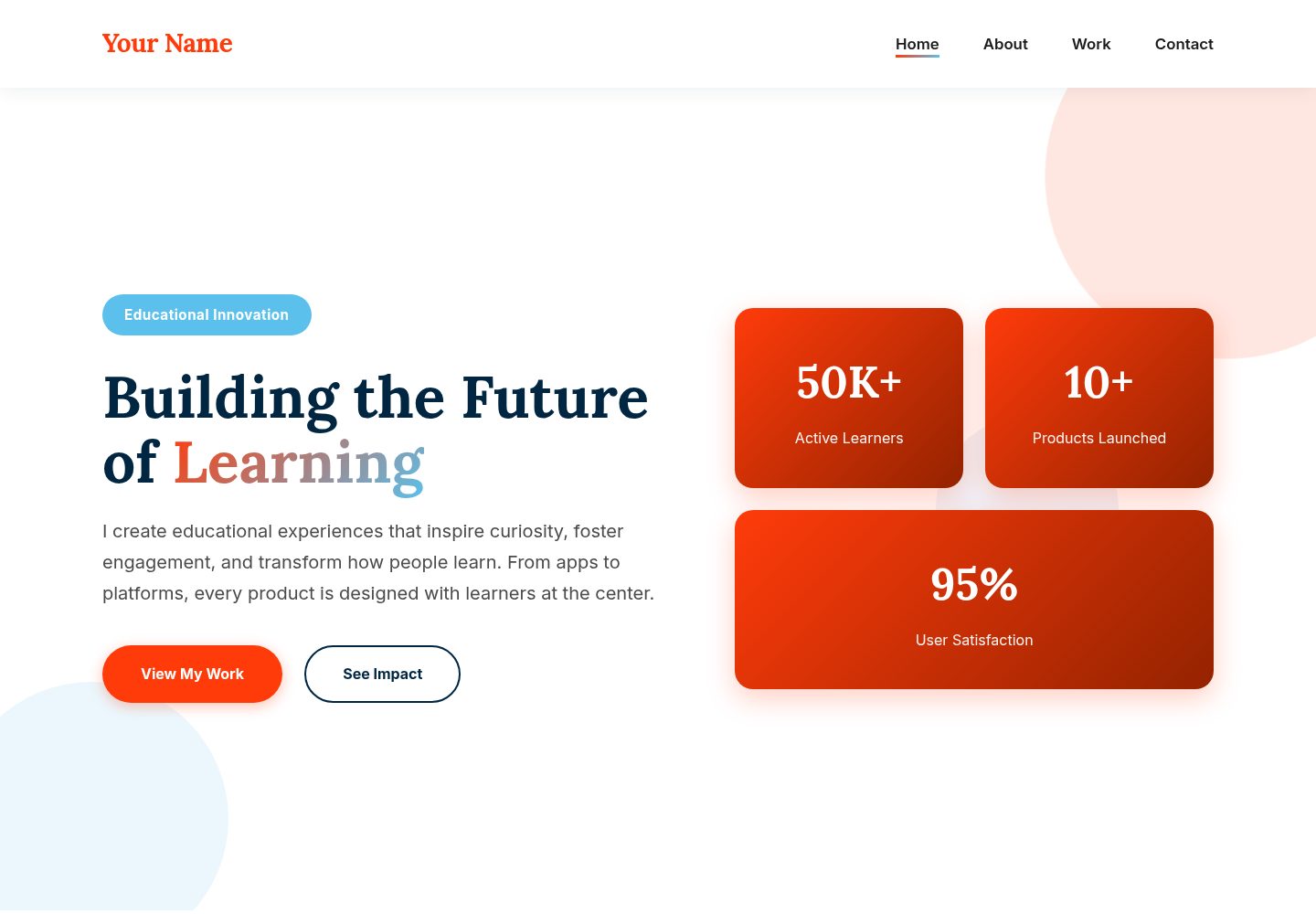
浏览真实页面截图,比较内容排版与手机效果。点击下方缩略图切换,放大查看整页细节。
全部页面与视图 3
截图用于了解视觉与布局,交互效果请以实际项目为准。
采集于 2026-10-13查看来源
值得关注的模板亮点
从已有项目资料中,快速了解它的特点。
作品分类筛选:支持按 Apps、Platforms、Tools 等类别过滤,也可查看全部
键盘导航:模态打开时可用左右方向键切换项目,ESC 关闭
多页结构:包含首页、关于、作品集、联系四个页面,分别承载 hero/impact、个人故事、项目展示与联系信息
项目数据集中配置:在 portfolio.js 的 projects 数组中按 title、category、description、features、impact、tags 字段维护项目
可定制配色:styles.css 顶部以 CSS 变量定义六种颜色,便于整体替换主题色
模板详细介绍
该模板是一个面向教育科技创业者、教育企业家、学习设计师等角色的静态作品集网站,由 index.html、about.html、portfolio.html、contact.html 四个页面以及 styles.css、portfolio.js 组成。首页包含 hero 与 impact 区块,关于页用于讲述个人故事与理念,作品集页提供可点击的图像网格与模态灯箱查看详情,联系页提供联系表单与机会信息。
作品画廊支持按 Apps、Platforms、Tools 等类别筛选,点击项目后在模态框中显示完整描述、功能点、影响与标签,并可用方向键或 ESC 键浏览和关闭。项目数据集中定义在 portfolio.js 的 projects 数组中,README 给出了字段结构示例,便于替换为自己的项目。
模板使用 HTML5、CSS3(Grid、Flexbox、CSS 变量、动画)与原生 JavaScript 实现模态、筛选和键盘导航,字体使用 Google Fonts 的 Lora 与 Inter 作为 Le Monde Livre 与 Acumin Pro 的替代。README 未提供依赖清单或框架版本,也未说明构建步骤,属于直接编辑静态文件的用法。联系表单需要接入后端服务,README 仅给出 Formspree 的接入方式。
HTML作品集企业官网
适合你的项目吗?
适用场景
- 教育科技创业者整理并展示自己的教育产品与创业项目
- 学习设计师或产品经理以图文方式呈现教育类作品案例与影响数据
- 教育领域顾问展示客户项目与成果,并通过联系页接收合作咨询
- 需要按类别筛选作品、并用灯箱查看详情的个人作品集站点
适合人群
- 教育科技创始人、教育企业家
- 学习设计师、教育产品经理
- 教育领域顾问、投资者
- 希望以静态多页站点展示作品并自行维护项目数据的个人
上手与定制指南
结合仓库当前版本的说明,按下面的资料检查内容、配置与运行要求。
- 1
README 未提供依赖安装或构建命令,按文件结构直接编辑 HTML、CSS、JS 即可
- 2
替换所有页面中的“Your Name”及 hero、关于、联系信息等占位内容
- 3
将项目图片放入 images 文件夹,并在 portfolio.html 中把占位 div 替换为 img 标签
- 4
在 portfolio.js 的 projects 数组中按 README 给出的字段结构添加或修改项目;超过 9 个项目需同时在 portfolio.html 增加对应 gallery-item
- 5
联系表单需接入后端服务,README 给出的方式是使用 Formspree 并替换 form action 中的表单 ID
授权与来源资料
使用条件与限制
免费使用 · 保留许可声明本次收录的是公开仓库中采用 MIT 许可的免费版本;免费范围为该版本代码,不代表外部服务或第三方素材免费。
使用时需要遵守
- 允许免费使用、修改、商用和分发该版本代码。
- 分发代码副本或实质性部分时,保留原作者版权声明和完整 MIT 许可声明。
- 代码按现状提供;担保与责任限制以原许可证及适用法律为准。
额外费用与待核对事项
- README 提及 Formspree 表单服务;真实提交需配置服务端点,其使用额度与费用需单独核对。
- 演示图片、字体、图标及其他第三方素材需按各自许可核对,不能仅凭代码的 MIT 许可判断。
- 域名、托管、数据库、支付或 AI 等外部服务可能另外收费。
- 联系表单需要后端服务才能工作,README 仅给出 Formspree 接入方式,需自行注册并配置表单 ID。
- 使用 Formspree 需在 formspree.io 注册账号并创建表单,属于外部服务依赖。
- 若使用 Le Monde Livre 与 Acumin Pro 字体,需自行持有相应字体授权;模板默认使用 Lora 与 Inter 作为替代。
- 在作品集中嵌入视频需使用 YouTube 嵌入地址,涉及第三方平台。
查看原文依据
Permission is hereby granted, free of charge
许可证原文
The contact form needs a backend service:
README 原文
1. Sign up at [formspree.io](https://formspree.io)
README 原文
- If you have Le Monde Livre and Acumin Pro licenses, add them to a `/fonts` folder
README 原文
https://github.com/zarifazak25/personalwebsite5/blob/main/LICENSEhttps://github.com/zarifazak25/personalwebsite5/blob/main/README.md<iframe src="https://www.youtube.com/embed/YOUR_VIDEO_ID"
README 原文
DeepSeek 根据仓库许可证和 README 整理 ·2026-10-13。结果仅覆盖已读取资料,依赖、图片、字体及后续条款变更以各自原文为准。
项目核对记录与介绍依据
模板资料
- 来源平台
- GitHub
- 资料与维护参考分
- 资料较完整 · 88 / 100
- 技术栈
- HTML
- 网站类型
- 作品集 · 企业官网
这个分数如何计算
本站按许可资料(最高30分)、演示链接(12分)、预览图(10分)、Star数(15分)、记录的维护时间(15分)、描述完整度(8分)、功能记录(5分)和分类资料(5分)计算。它不是代码、安全或性能测试,也不是 Google 评分;有链接不代表已实测可用。
这个项目需要核对什么
- 记录的仓库更新时间
- 2025-11-20
- 截图检查日期
- 2026-10-13
已收录演示链接。请用你的内容与屏幕尺寸检查;有演示不代表表单、认证或支付已经可用。
目录记录的主要技术栈是 HTML。请通过依赖清单和锁文件核对实际版本与托管要求。这些说明基于收录资料,不代表代码审计或部署实测。
查看具体选型方法 →介绍的制作与核对状态
介绍由 AI 辅助整理目录与仓库资料。仓库作者不等于这篇介绍的审核者。
审核声明: codex-user-requested-batch-review-20261015 · 2026-10-15
查看当时使用的来源资料
SHA-256: 8b4811cb601dde34b71cd16f7ace0c353f3bb36048d3229549fe257f1228e968
2026-10-13T14:58:04.345Z
来源文件 / 仓库# 🎨 EdTech Entrepreneur Portfolio
A modern, artistic portfolio website template designed for educational entrepreneurs, EdTech founders, and learning innovation leaders. Features an interactive image gallery with modal lightbox functionality.
## ✨ Key Features
- 🖼️ **Interactive Portfolio Gallery** - Clickable image grid with beautiful modal/lightbox view
- 🎨 **Bold, Artistic Design** - Vibrant color palette and modern aesthetics
- 📱 **Fully Responsive** - Perfect on all devices
- 🔄 **Portfolio Filtering** - Filter projects by category (Apps, Platforms, Tools)
- ⌨️ **Keyboard Navigation** - Arrow keys and ESC to navigate modal
- 🎯 **Entrepreneur-Focused** - Designed for showcasing educational ventures
- 💫 **Smooth Animations** - Floating shapes and transitions
## 🎨 Color Palette
This template uses a vibrant, professional color scheme perfect for creative entrepreneurs:
- **Rust Brown (#942300)** - Warm, grounded accent
- **Blazing Flame (#FF3B0A)** - Primary CTA color for energy
- **Deep Space Blue (#002642)** - Professional, trustworthy secondary
- **Mint Cream (#f1fffа)** - Fresh, light backgrounds
- **Wisteria Blue (#86a5d9)** - Soft, approachable accent
- **Sky Surge (#5bc0eb)** - Bright, optimistic highlights
## 📁 File Structure
```
edtech-portfolio/
├── index.html # Home page with hero and impact sections
├── about.html # About page with story and philosophy
├── portfolio.html # Interactive portfolio gallery
├── contact.html # Contact form and opportunities
├── styles.css # Complete modern styling
├── portfolio.js # Gallery modal functionality
└── README.md # This file
```
## 🖼️ Portfolio Gallery Feature
The standout feature is the **interactive portfolio gallery**:
### How It Works
1. **Gallery Grid** - Projects displayed in a responsive grid
2. **Category Filters** - Filter by Apps, Platforms, Tools, or view All
3. **Click to View** - Click any project to open in modal lightbox
4. **Detailed View** - See full project details, features, and impact
5. **Navigation** - Use arrow buttons or keyboard to browse projects
6. **Close Anytime** - Click X, press ESC, or click outside
### Customizing Projects
Edit `portfolio.js` to add your own projects:
```javascript
const projects = [
{
title: 'Your Project Name',
category: 'Project Type',
description: 'Full project description...',
features: [
'Feature 1',
'Feature 2',
'Feature 3'
],
impact: 'Impact metrics and results...',
tags: ['Tag1', 'Tag2', 'Tag3']
},
// Add more projects...
];
```
## 🚀 Quick Start
### 1. Customize Content
**Update All Pages:**
- Replace "Your Name" throughout all files
- Update hero section with your mission
- Fill in About page with your story
- Add your contact information
- Customize philosophy and expertise sections
**Customize Portfolio:**
- Add your project images to an `images` folder
- Update `portfolio.html` with your project titles
- Edit `portfolio.js` with detailed project information
- Update category filters if needed
### 2. Add Images
1. Create an `images` folder in your project
2. Add project screenshots/mockups
3. Replace placeholder divs in HTML:
```html
<div class="gallery-image">
<img src="images/project1.jpg" alt="Project Name">
<!-- Remove the placeholder div -->
</div>
```
### 3. Personalize Colors (Optional)
Edit `styles.css` (lines 8-13):
```css
:root {
--rust-brown: #942300;
--blazing-flame: #FF3B0A;
--deep-space-blue: #002642;
--mint-cream: #f1fffа;
--wisteria-blue: #86a5d9;
--sky-surge: #5bc0eb;
}
```
## 🌐 Deploying to GitHub Pages
### Personal Site (username.github.io)
1. Create repository: `your-username.github.io`
2. Upload all files
3. Site automatically available at: `https://your-username.github.io`
### Project Site
1. Create any repository (e.g., `portfolio`)
2. Upload files
3. Settings → Pages → Select main branch
4. Site at: `https://your-username.github.io/portfolio`
## 📧 Making Contact Form Work
The contact form needs a backend service:
### Formspree (Recommended)
1. Sign up at [formspree.io](https://formspree.io)
2. Create new form
3. In `contact.html`, update form action:
```html
<form class="contact-form" action="https://formspree.io/f/YOUR_FORM_ID" method="POST">
```
## 💡 Tips for EdTech Entrepreneurs
### Portfolio Best Practices
**Tell Compelling Stories:**
- Focus on the problem you solved
- Highlight measurable impact (users, outcomes, engagement)
- Include both qualitative and quantitative results
- Show your unique approach or innovation
**Showcase Diverse Work:**
- Mobile apps
- Web platforms
- Learning tools
- Content or curriculum
- Research or thought leadership
**Include Context:**
- Target audience (K-12, higher ed, corporate, etc.)
- Technologies used
- Your specific role
- Collaborators or partnerships
### Writing Project Descriptions
For each project in `portfolio.js`, include:
1. **Clear Problem Statement** - What challenge did you address?
2. **Your Solution** - How did your product solve it?
3. **Key Features** - What makes it special or innovative?
4. **Impact Metrics** - Users reached, outcomes achieved, recognition
5. **Technology Stack** - Tools and platforms used
### Adding More Projects
To add more than 9 projects:
1. **Add HTML in portfolio.html:**
```html
<div class="gallery-item" data-category="apps" data-id="10">
<div class="gallery-image">
<div class="image-placeholder">Project 10</div>
<div class="gallery-overlay">
<div class="overlay-content">
<h3>New Project Name</h3>
<p>Category</p>
<span class="view-icon">👁️ Click to View</span>
</div>
</div>
</div>
</div>
```
2. **Add to projects array in portfolio.js:**
```javascript
{
title: 'New Project',
category: 'Category',
description: '...',
features: [...],
impact: '...',
tags: [...]
}
```
## 🎯 Perfect For
- **EdTech Founders** - Showcase your educational ventures
- **Educational Entrepreneurs** - Highlight your innovative products
- **Learning Designers** - Display your portfolio of work
- **Product Managers** - Demonstrate your EdTech projects
- **Consultants** - Present your client work and impact
- **Investors** - Show your portfolio companies
## 🛠️ Technologies Used
- **HTML5** - Semantic markup
- **CSS3** - Modern styling with Grid, Flexbox, CSS Variables, Animations
- **JavaScript** - Modal functionality, filtering, keyboard navigation
- **Google Fonts** - Lora & Inter (fallbacks for Le Monde Livre & Acumin Pro)
## 📱 Browser Support
✅ Chrome/Edge (latest)
✅ Firefox (latest)
✅ Safari (latest)
✅ Mobile browsers
## ⌨️ Keyboard Shortcuts
When modal is open:
- **ESC** - Close modal
- **← Left Arrow** - Previous project
- **→ Right Arrow** - Next project
## 🎨 Customization Ideas
### Adding Video to Portfolio
Replace image placeholder with video embed:
```html
<div class="modal-image-container">
<iframe src="https://www.youtube.com/embed/YOUR_VIDEO_ID"
frameborder="0"
allowfullscreen>
</iframe>
</div>
```
### Adding More Categories
1. Update filter buttons in `portfolio.html`
2. Add `data-category` to gallery items
3. Update filter logic in `portfolio.js` if needed
### Adding External Links
In project data, add:
```javascript
liveUrl: 'https://yourapp.com',
caseStudyUrl: 'https://medium.com/your-case-study'
```
Then update modal links to use these URLs.
## 📚 Additional Resources
### Typography
- If you have Le Monde Livre and Acumin Pro licenses, add them to a `/fonts` folder
- Update `@font-face` rules in CSS
- Current fallbacks (Lora & Inter) are excellent alternatives
### Design Inspiration
- [Awwwards](https://awwwards.com) - Portfolio design inspiration
- [Behance](https://behance.net) - Creative portfolios
- [Dribbble](https://dribbble.com) - UI/UX inspiration
### EdTech Resources
- [EdSurge](https://edsurge.com) - EdTech news and trends
- [Getting Smart](https://gettingsmart.com) - Education innovation
- [EdTech Hub](https://edtechhub.org) - Research and evidence
## 🤝 Contributing
Improvements welcome! Feel free to:
- Fork this repository
- Create enhancements
- Submit pull requests
## 📄 License
Free to use for personal and commercial projects. Attribution appreciated but not required.
## ⭐ Show Your Support
If you use this template:
- Star this repository
- Share with fellow entrepreneurs
- Tag your live site!
## 💬 Questions?
Open an issue or reach out to the community for help.
---
**Built for educational entrepreneurs changing the world through learning innovation** 🚀
*Make learning better for everyone* ✨
看看同类模板
对比同技术栈与用途的模板,找到更适合的视觉与内容结构。

simplefolio
⚡️ A minimal portfolio template for Developers
HTML · 作品集

mazer
Free and Open-source Bootstrap 5 Admin Dashboard Template and Landing Page
HTML · 后台

Freelancer
Freelancer 是 Start Bootstrap 出品的单页作品集模板,专为自由职业者、设计师和小型工作室设计。 页面结构清晰,包含多个内容区块、响应式作品集网格,每个作品项目配有模态窗口展示详情。
HTML · 作品集

Resume
Resume 是 Start Bootstrap 推出的简历与 CV 主题,基于 Bootstrap 构建,采用固定侧边栏加内容区块的结构。
HTML · 作品集

Creative
Creative 是 Start Bootstrap 团队维护的一款单页营销模板,定位明确:为创意机构或产品服务提供一个以作品展示和行动号召为核心的落地页。
HTML · 企业官网

startbootstrap-agency
Agency 是 Start Bootstrap 维护的单页代理商作品集主题,基于 Bootstrap 构建,MIT 许可。
HTML · 企业官网