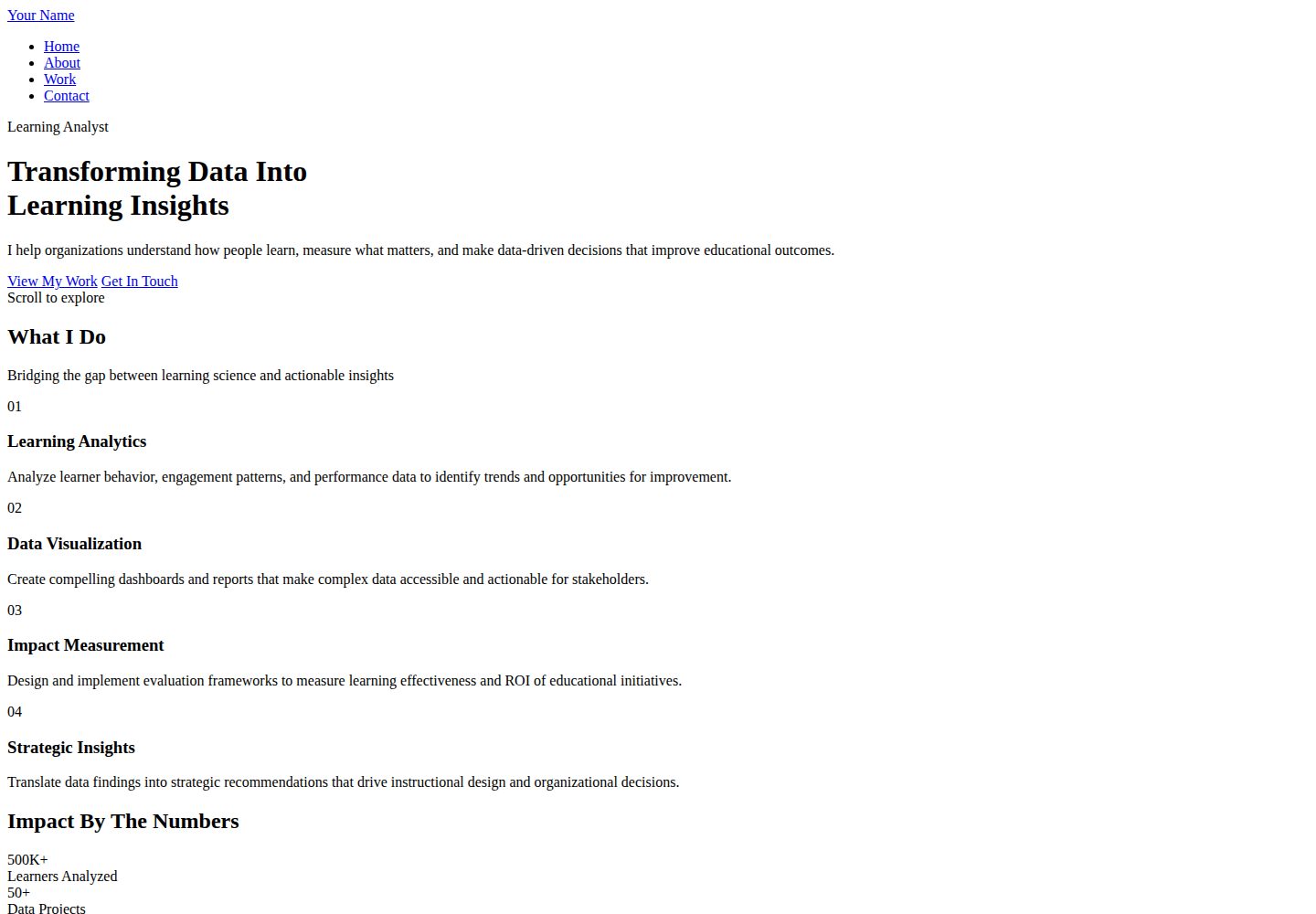
Pure HTML/CSS implementation, no JavaScript dependency, clear and readable page structure
HTMLPortfolioCorporate Website
personalwebsite6 — HTML Portfolio Template
By zarifazak25
A minimalist portfolio template for learning analysts and education data professionals, implemented in pure HTML/CSS, with four pages: home, about, work, and contact. It uses background photography and a low-saturation color palette to present data projects and impact metrics.
Explore the design
Compare the page layouts and mobile experience. Open any screenshot for a closer look.
Desktop homepage1 / 3
Desktop captureTop of page
Actual screenshot captured by the server browser.
All pages & views 3
Screenshots show visual appearance; interactive behavior may differ.
Recorded 2026-10-02View source
What stands out
A quick read of the recorded project description.
Includes four pages: home, about, work, and contact, covering common personal portfolio content
Work page organizes project cards by four dimensions: challenge, solution, impact, and tags
Uses a low-saturation palette of five colors: Space Indigo, Dusty Grape, Lilac Ash, Almond Silk, and Parchment
Headings and body text use Poppins and Inter fonts respectively, loaded via Google Fonts
Provides responsive layouts for desktop and mobile
Template Details
This is a personal portfolio template for learning analysts and data professionals in education. The repository is zarifazak25/personalwebsite6, written in pure HTML/CSS with no JavaScript dependency. The page structure includes index.html (home), about.html (about), work.html (work), and contact.html (contact), with styles.css controlling styles uniformly. The home page features a hero section with background photography to present the personal value proposition and selected works. The work page organizes project cards by four dimensions: challenge, solution, impact, and tags, suitable for presenting analysis processes and quantifiable results.
Visually, it uses a low-saturation palette of five colors: Space Indigo, Dusty Grape, Lilac Ash, Almond Silk, and Parchment. Headings and body text use Poppins and Inter fonts respectively, loaded via Google Fonts. The template includes responsive layouts for both desktop and mobile.
Before use, you need to replace placeholder text and images: the README states that background images should be approximately 1920x1080 and placed in the images directory, then update the corresponding background-image URL in styles.css. The contact form requires integration with a backend service such as Formspree and a form endpoint; otherwise, submissions will not work. Third-party assets such as images, fonts, and icons in the demo need to be checked separately under their respective licenses; the MIT license for the code itself does not cover these assets.
HTMLPortfolioCorporate Website
Is it right for your project?
Use Cases
- Learning analysts organizing personal projects and quantified impact as a job application or collaboration showcase page
- Education data researchers presenting analysis processes, methods, and results
- Instructional designers or assessment specialists showcasing data-driven design decisions
- EdTech professionals building a personal page to introduce their analytical capabilities
Suitable For
- Learning analysts and education data science professionals
- Research analysts and program evaluators
- Individuals needing to showcase data projects and impact metrics
- Static site builders who prefer pure HTML/CSS without JavaScript
Getting started & customization
Use these recorded setup notes alongside the repository instructions for your chosen version.
- 1
Replace placeholder names, value propositions, about information, and contact information on all pages
- 2
Prepare background images of approximately 1920x1080, place them in the images directory, and update the corresponding background-image URL in styles.css
- 3
The contact form requires integration with a service such as Formspree and a form endpoint; otherwise, submissions will not work
- 4
Can be deployed to GitHub Pages, either as a personal site or project site
- 5
Third-party assets such as demo images, fonts, and icons need to be checked separately under their respective licenses
License & source material
Usage conditions & limitations
Free to use · keep license noticeThis entry covers the free version under the MIT license in the public repository; the free scope is the code of this version and does not imply that external services or third-party assets are free.
Must comply with when using
- Permits free use, modification, commercial use, and distribution of this version's code.
- When distributing copies or substantial portions of the code, retain the original author's copyright notice and the full MIT license notice.
- The code is provided as-is; warranties and limitations of liability are governed by the original license and applicable law.
Additional costs & items to verify
- The contact form requires integration with a third-party backend service such as Formspree and a form endpoint; otherwise, submissions will not work, representing an external service dependency.
- Fonts are loaded externally via Google Fonts; they may not display properly in offline or restricted network environments, requiring self-hosting or replacement.
- The README suggests using third-party images such as Unsplash; the licenses for these assets need to be checked separately and are not covered by the MIT code license.
- The README mentions the Formspree form service; actual submissions require configuring a service endpoint, and its usage quotas and fees need to be checked separately.
- Demo images, fonts, icons, and other third-party assets need to be checked under their respective licenses; they cannot be assumed to be covered solely by the code's MIT license.
- External services such as domains, hosting, databases, payments, or AI may incur additional charges.
View Original Text Basis
Permission is hereby granted, free of charge
Original License Text
The contact form needs a backend service:
Original README
Both fonts are loaded from Google Fonts for optimal performance and accessibility.
Original README
https://github.com/zarifazak25/personalwebsite6/blob/main/LICENSEhttps://github.com/zarifazak25/personalwebsite6/blob/main/README.mdUnsplash.com has great free professional photos
Original README
Compiled by DeepSeek based on repository license and README ·2026-10-02. Results only cover the materials read; dependencies, images, fonts, and subsequent term changes are subject to their respective original texts.
Project checks & description sources
Template Information
- Source platforms
- GitHub
- Documentation and maintenance reference score
- More documented · 88 / 100
- Technologies
- HTML
- Website type
- Portfolio · Corporate Website
How this score is calculated
Our heuristic uses license records (up to 30), a demo link (12), a preview (10), stars (15), recorded maintenance (15), description completeness (8), feature records (5) and classification data (5). It is not a code, security or performance test, or a Google score. A link does not establish tested functionality.
What to verify for this project
- Repository update recorded
- 2025-11-25
- Screenshot last checked
- 2026-10-02
A demo link is listed. Check it with your own content and viewport sizes; its presence does not confirm that forms, authentication or payments work.
The catalog identifies HTML as the primary stack. Check the actual dependency manifest and lockfile for versions and hosting requirements. These notes use recorded metadata, not a code audit or a deployment test.
Use a selection guide →How this description was prepared
AI-assisted description based on catalog records and repository material. Repository authors are not automatically the reviewers of this description.
Automatically checked against source and license rules; no manual editorial review.
Inspect the recorded source material
SHA-256: 242ac25fd23a6e4de79942d105544ffff32befce17d8d1b6058cd00019a7022b
2026-10-02T15:33:09.823Z
Source file / repository# 📊 Learning Analyst Portfolio
A modern, minimalist portfolio website designed specifically for learning analysts and data professionals in education. Features elegant typography, background photography, and a focus on clarity and impact.
## ✨ Key Features
- 🎨 **Minimal & Modern Design** - Clean, professional aesthetic that highlights your work
- 📸 **Background Photography** - Dramatic photo backgrounds with elegant overlays
- 🎯 **Purpose-Built** - Specifically designed for learning analytics professionals
- 📊 **Data-Focused** - Showcase your analytics projects and impact metrics
- 📱 **Fully Responsive** - Perfect on all devices
- ⚡ **HTML & CSS Only** - No JavaScript required, pure simplicity
- 🎨 **Sophisticated Color Palette** - Professional yet artistic color scheme
## 🎨 Color Palette
This template uses a sophisticated, professional color scheme:
- **Space Indigo (#22223b)** - Primary dark for text and backgrounds
- **Dusty Grape (#4a4e69)** - Secondary text and elements
- **Lilac Ash (#9a8c98)** - Mid-tone accents and highlights
- **Almond Silk (#c9ada7)** - Light accents and CTAs
- **Parchment (#f2e9e4)** - Lightest background color
## 🔤 Typography
Modern, accessible, web-safe fonts:
- **Poppins** - Headlines and display text (modern, bold)
- **Inter** - Body text (highly readable, professional)
Both fonts are loaded from Google Fonts for optimal performance and accessibility.
## 📁 File Structure
```
analyst-portfolio/
├── index.html # Home page with hero and featured work
├── about.html # Expertise, approach, and background
├── work.html # Detailed project case studies
├── contact.html # Contact form and services
├── styles.css # Complete styling
└── README.md # This file
```
## 🚀 Quick Start
### 1. Customize Content
**Update All Pages:**
- Replace "Your Name" throughout all files
- Update hero section with your value proposition
- Fill in About page with your expertise and background
- Add your actual projects to Work page
- Update contact information
**Add Background Photos:**
The template uses placeholder backgrounds. To add real photos:
1. Prepare your images (recommended: 1920x1080px)
2. Save them in an `images` folder
3. Update CSS background-image URLs:
```css
/* In styles.css, find these lines: */
.hero-bg {
background-image: linear-gradient(...), url('images/hero-photo.jpg');
}
.header-bg {
background-image: linear-gradient(...), url('images/header-photo.jpg');
}
.cta-bg, .stats-bg {
background-image: linear-gradient(...), url('images/cta-photo.jpg');
}
```
**Photo Tips:**
- Use high-quality, professional images
- Images with depth/layers work well
- Darker images work better with text overlays
- Unsplash.com has great free professional photos
### 2. Customize Projects (Work Page)
Each project card includes:
- **Challenge** - The problem you were solving
- **Solution** - Your analytical approach
- **Impact** - Measurable results and outcomes
- **Tags** - Tools and methodologies used
Update the `work.html` file with your actual projects, metrics, and achievements.
### 3. Personalize Colors (Optional)
Edit `styles.css` (lines 8-12):
```css
:root {
--space-indigo: #22223b;
--dusty-grape: #4a4e69;
--lilac-ash: #9a8c98;
--almond-silk: #c9ada7;
--parchment: #f2e9e4;
}
```
## 🌐 Deploying to GitHub Pages
### Personal Site (username.github.io)
1. Create repository: `your-username.github.io`
2. Upload all files including images folder
3. Site automatically available at: `https://your-username.github.io`
### Project Site
1. Create any repository (e.g., `portfolio`)
2. Upload files
3. Settings → Pages → Select main branch
4. Site at: `https://your-username.github.io/portfolio`
## 📧 Making Contact Form Work
The contact form needs a backend service:
### Formspree (Recommended)
1. Sign up at [formspree.io](https://formspree.io)
2. Create new form
3. In `contact.html`, update form tag:
```html
<form class="contact-form" action="https://formspree.io/f/YOUR_FORM_ID" method="POST">
```
## 💡 Tips for Learning Analysts
### Showcasing Your Work
**Be Specific with Metrics:**
- Number of learners analyzed
- Percentage improvements achieved
- Cost savings or ROI demonstrated
- Completion rate increases
- Time saved for stakeholders
**Show Your Process:**
- What data sources you used
- Analytical methods applied
- Tools and technologies employed
- How insights led to action
**Communicate Impact:**
- Focus on outcomes, not just outputs
- Connect analysis to real-world results
- Show before/after comparisons
- Include stakeholder testimonials when possible
### Project Descriptions
For each project in `work.html`, ensure you include:
1. **Context** - Organization type, scale, challenge
2. **Your Role** - What you specifically did
3. **Methodology** - Analytical approach and tools
4. **Deliverables** - Dashboards, reports, recommendations
5. **Impact** - Quantifiable results and decisions influenced
### Building Credibility
**Technical Skills Section:**
- List specific tools (Python, R, Tableau, SQL, etc.)
- Mention statistical methods you're proficient in
- Include certifications or training
- Show breadth and depth of expertise
**Professional Background:**
- Years of experience
- Types of organizations you've worked with
- Academic credentials
- Publications or presentations
## 🎯 Perfect For
- **Learning Analysts** - Showcase data analysis and insights
- **Educational Data Scientists** - Demonstrate technical expertise
- **Research Analysts** - Present program evaluations
- **Assessment Specialists** - Display psychometric work
- **Instructional Designers** - Show data-driven design decisions
- **EdTech Professionals** - Highlight analytics capabilities
## 🛠️ Technologies Used
- **HTML5** - Semantic markup
- **CSS3** - Modern styling with Grid, Flexbox, CSS Variables
- **Google Fonts** - Poppins & Inter
- **No JavaScript** - Pure HTML/CSS for maximum simplicity and accessibility
## 📱 Browser Support
✅ Chrome/Edge (latest)
✅ Firefox (latest)
✅ Safari (latest)
✅ Mobile browsers
## 🎨 Design Philosophy
This template embodies:
- **Clarity** - Information is easy to find and understand
- **Minimalism** - No unnecessary elements, focus on content
- **Professionalism** - Sophisticated design that builds credibility
- **Impact** - Design supports rather than overshadows your work
## 🔧 Customization Ideas
### Adding a Blog Section
Create `blog.html`:
```html
<!-- Use similar structure to work.html -->
<!-- Replace project cards with blog post previews -->
```
### Adding Resume/CV Download
In About page:
```html
<a href="your-resume.pdf" class="btn btn-primary" download>Download Resume</a>
```
### Adding Publications Section
In About page, after Timeline:
```html
<section class="publications">
<h2>Publications & Presentations</h2>
<!-- List your papers, conference talks, etc. -->
</section>
```
### Changing Background Photos by Section
You can use different photos for different pages/sections:
```css
.page-header {
background-image: url('images/about-bg.jpg');
}
.cta {
background-image: url('images/contact-bg.jpg');
}
```
## 📚 Recommended Tools for Learning Analysts
If you're building your portfolio, consider showcasing expertise in:
**Programming & Analysis:**
- Python (pandas, scikit-learn, matplotlib, seaborn)
- R (tidyverse, ggplot2, caret)
- SQL
- Statistical analysis
**Visualization:**
- Tableau
- Power BI
- matplotlib/seaborn
- D3.js
**Learning Analytics Platforms:**
- LMS data (Canvas, Moodle, Blackboard)
- xAPI/SCORM
- Google Analytics
- Custom dashboards
## 🤝 Contributing
Improvements welcome! Feel free to:
- Fork this repository
- Create enhancements
- Submit pull requests
## 📄 License
Free to use for personal and commercial projects. Attribution appreciated but not required.
## ⭐ Show Your Support
If you use this template:
- Star this repository
- Share with fellow analysts
- Tag your live site!
## 💬 Questions?
Open an issue or reach out to the community for help.
---
**Built for learning analysts who let data tell the story** 📊
*Transform data into insights that drive impact* ✨
Explore similar templates
Compare previews and descriptions within the same stack and category.

simplefolio
Simplefolio is a minimal single-page portfolio template for developers, built with HTML, Bootstrap, SCSS, and Parcel under the MIT license. It includes Hero, About, Projects, Contact, and Footer sections, with content edited in /src/index.html and theme colors controlled by two SCSS variables.
HTML · Portfolio

mazer
Mazer is a free and open-source Bootstrap 5 admin dashboard and landing page template that does not depend on jQuery. It provides prebuilt releases, source builds, and CDN inclusion, and includes dark mode, perfect-scrollbar, and ApexCharts examples.
HTML · Admin dashboard

Freelancer
A bright, single-page Bootstrap portfolio template for freelancers, designers, and small studios. It includes a responsive portfolio grid with modal detail windows and an SB Forms contact form that requires an API token.
HTML · Portfolio

Resume
A single-page resume and CV template from Start Bootstrap, built on Bootstrap with a fixed sidebar and content sections.
HTML · Portfolio

Creative
A single-page marketing template by Start Bootstrap for creative agencies and product services, built on Bootstrap with SCSS, featuring a portfolio grid and call-to-action sections. It includes pre-set SB Forms markers for form integration and npm build scripts for source customization.
HTML · Corporate Website

startbootstrap-agency
Agency is a one-page Bootstrap portfolio theme from Start Bootstrap, MIT licensed. It includes a responsive portfolio grid with modal details and a preconfigured SB Forms contact form that requires an API token.
HTML · Corporate Website