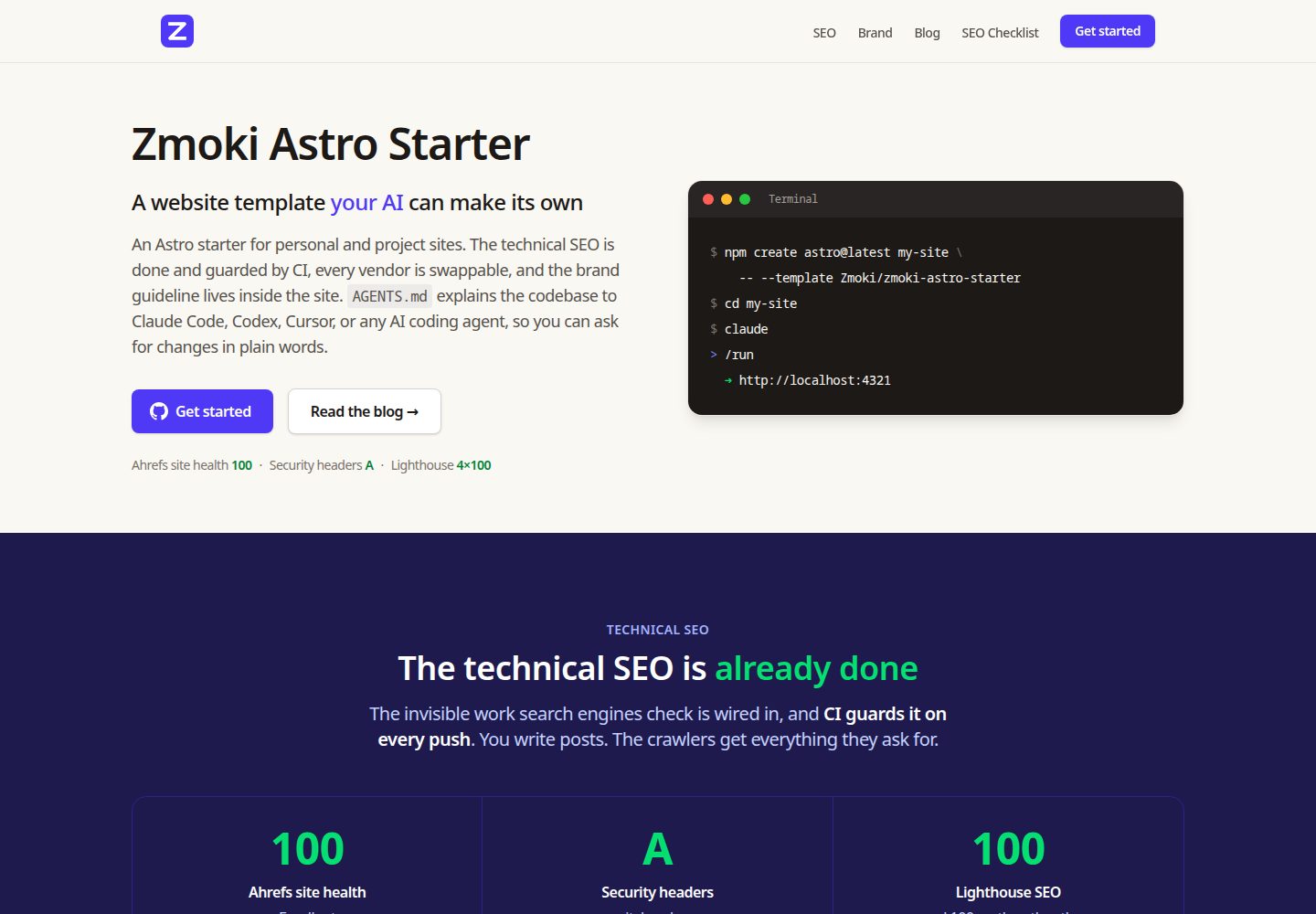
AGENTS.md serves as the technical specification, paired with eight task manuals under .claude/skills/, making it easier for AI coding agents to understand and modify the codebase
AstroStarter
zmoki-astro-starter — Astro Starter Template
By Zmoki
An Astro static starter for personal and project websites, with built-in blog, resource downloads, and legal pages, specifically designed around maintenance by AI coding agents and CI-verified technical SEO.
Explore the design
Compare the page layouts and mobile experience. Open any screenshot for a closer look.
Desktop homepage1 / 3
Desktop captureTop of page
Actual screenshot captured by the server browser.
All pages & views 3
Screenshots show visual appearance; interactive behavior may differ.
Recorded 2026-10-03View source
What stands out
A quick read of the recorded project description.
Technical SEO is completed at build time and guarded by CI: sitemap with images, canonical, two-layer robots, schema.org JSON-LD, build-time OG cards
Deployment targets, analytics, forms, captcha, and image CDN all provide replaceable seams, with analytics and captcha disabled by default
The brand guidelines page /-/astro/brand/ shares design tokens from src/design-tokens.mjs with the site; changing tokens affects both the site and the guidelines page
The three content collections (blog, resources, legal) use zod validation schemas; resources can be configured as email-gated with forms and asset downloads
Fully static output, deployable to any static hosting; the build process includes compilation and drift checks for redirects and response header artifacts
Template Details
zmoki-astro-starter is an Astro starter generalized from zmoki.xyz, used to build personal or project websites. It includes three content collections: blog, resource downloads, and legal pages such as privacy/terms. Its positioning is to let the website be continuously maintained through AI coding agents: AGENTS.md at the repository root serves as the technical specification, CLAUDE.md references it, and tools such as Cursor can read it directly; under .claude/skills/, eight Markdown task manuals are provided: run, brand, redirects, og-images, analytics, structured-data, images, and update-deps. Technical SEO is completed at build time and guarded by CI, including sitemap with images, canonical, two-layer robots, schema.org JSON-LD, build-time generated OG cards, and Google Discover cover image support. The site output is fully static and can be deployed to any static hosting; deployment targets, analytics, forms, captcha, and image CDN all have replaceable seams, with analytics (PUBLIC_ANALYTICS_ENABLED) and captcha (PUBLIC_CAPTCHA_ENABLED) disabled by default. Brand guidelines are presented as an internal noindex page at /-/astro/brand/, sharing the same design tokens as the site. Before use, note: licenses for third-party assets such as demo images, fonts, and icons must be checked separately; external services such as domain, hosting, database, payment, or AI may incur additional charges.
AstroStarter
Is it right for your project?
Use Cases
- Building a static site for a personal blog or portfolio and wanting to maintain it later through AI coding agents
- Projects that need built-in technical SEO (sitemap, canonical, structured data, OG images) with CI preventing regressions
- Content-oriented websites that need email-gated resource downloads and privacy and terms placeholder pages
- Projects that want deployment targets, analytics, captcha, and other external integrations to be replaceable at any time, avoiding vendor lock-in
- Needing a reusable brand guidelines page so design and implementation share the same set of design tokens
Suitable For
- Front-end developers familiar with Astro and Markdown/MDX content workflows
- Individuals or small teams collaborating with AI coding agents such as Claude Code and Cursor
- Content sites that need static hosting and do not rely on a server-side runtime
- Users who want to freely use, modify, and distribute the code under the MIT license
Getting started & customization
Use these recorded setup notes alongside the repository instructions for your chosen version.
- 1
Can be created with npm create astro@latest my-new-site -- --template Zmoki/zmoki-astro-starter, or by using Use this template on GitHub, or by cloning and deleting .git to reinitialize
- 2
After installing dependencies, run npm run dev; the default address is http://localhost:4321
- 3
Follow SETUP.md to edit src/site.config.ts, replace brand identity, add content, and adjust colors
- 4
Analytics and captcha are disabled by default and need to be enabled through environment variables such as PUBLIC_ANALYTICS_ENABLED and PUBLIC_CAPTCHA_ENABLED
- 5
Third-party assets such as demo images, fonts, and icons must be checked against their respective licenses; external services may incur additional charges
License & source material
Usage conditions & limitations
Free to use · keep license noticeThis listing covers the free version under the MIT license in the public repository; the free scope is the code of this version and does not mean external services or third-party assets are free.
Must comply with when using
- Free use, modification, commercial use, and distribution of this version's code are permitted.
- When distributing copies or substantial portions of the code, retain the original author's copyright notice and the complete MIT license notice.
- The code is provided as is; warranties and limitations of liability are governed by the original license and applicable law.
Additional costs & items to verify
- Demo images, fonts, icons, and other third-party assets must be checked against their respective licenses and cannot be judged solely by the code's MIT license.
- External services such as domain, hosting, database, payment, or AI may incur additional charges.
- Analytics is disabled by default and must be explicitly enabled through the PUBLIC_ANALYTICS_ENABLED environment variable; otherwise no analytics script is loaded.
- Captcha is disabled by default and must be enabled through the PUBLIC_CAPTCHA_ENABLED environment variable; once enabled, it relies on the external Cloudflare Turnstile service.
- Original content images must be hosted by yourself on object storage or a CDN (such as R2 or S3) with a custom domain bound; at build time Astro downloads and optimizes them, involving external service costs.
- Form submissions rely on Brevo and backend services to handle captcha verification, contact storage, and resource delivery, requiring configuration of the corresponding external accounts.
- Deployment requires choosing an external hosting platform such as Cloudflare Pages, Netlify, Vercel, or AWS Amplify, which may incur platform fees.
View Original Text Basis
Permission is hereby granted, free of charge
Original License Text
Off by default (`PUBLIC_ANALYTICS_ENABLED`), so local dev and Lighthouse runs stay clean.
Original README
Cloudflare Turnstile is built in, off by default (`PUBLIC_CAPTCHA_ENABLED`).
Original README
host content-image originals on any bucket/CDN (R2, S3, …) behind a custom domain
Original README
Brevo is built in, and the backend handles captcha validation, contact storage, and asset delivery.
Original README
https://github.com/Zmoki/zmoki-astro-starter/blob/main/LICENSEhttps://github.com/Zmoki/zmoki-astro-starter/blob/main/README.mdDeploy target** — Cloudflare Pages (default), Netlify, Vercel, or AWS Amplify.
Original README
Compiled by DeepSeek based on repository license and README ·2026-10-04. Results only cover the materials read; dependencies, images, fonts, and subsequent term changes are subject to their respective original texts.
Project checks & description sources
Template Information
- Source platforms
- GitHub
- Documentation and maintenance reference score
- More documented · 83 / 100
- Technologies
- Astro
- Website type
- Starter
How this score is calculated
Our heuristic uses license records (up to 30), a demo link (12), a preview (10), stars (15), recorded maintenance (15), description completeness (8), feature records (5) and classification data (5). It is not a code, security or performance test, or a Google score. A link does not establish tested functionality.
What to verify for this project
- Repository update recorded
- 2026-07-05
- Screenshot last checked
- 2026-10-04
A demo link is listed. Check it with your own content and viewport sizes; its presence does not confirm that forms, authentication or payments work.
The catalog identifies Astro as the primary stack. Check the actual dependency manifest and lockfile for versions and hosting requirements. These notes use recorded metadata, not a code audit or a deployment test.
Use a selection guide →How this description was prepared
AI-assisted description based on catalog records and repository material. Repository authors are not automatically the reviewers of this description.
Review declaration: [email protected] · 2026-10-05
Inspect the recorded source material
SHA-256: 832473510f69db9df634f8123b4238a909bd146172e8f49a21300bdb63b5a797
2026-10-04T23:40:24.062Z
Source file / repository# zmoki-astro-starter An Astro starter for personal and project websites — posts, resources, and legal pages — built to be **maintained through an AI coding agent**. The technical SEO is done and guarded by CI, every vendor integration is swappable, and the brand guideline lives inside the site. Built from [zmoki.xyz](https://zmoki.xyz) and genericized into a reusable template. **Live demo: [starter.zmoki.xyz](https://starter.zmoki.xyz/)** [](https://securityheaders.com/?q=https%3A%2F%2Fstarter.zmoki.xyz%2F&followRedirects=on) [](https://starter.zmoki.xyz/) ## Highlights - **Astro 7** + **Tailwind CSS 4** + **MDX**, fully static output — deploys to any static host - **AI-ready**: [`AGENTS.md`](./AGENTS.md) is a canonical technical spec any coding agent reads, plus eight task playbooks in `.claude/skills/` - **Technical SEO built in and guarded by CI**: sitemap (with images), canonicals, robots on two layers, schema.org JSON-LD, build-time OG images, Google Discover-ready covers - **No vendor lock-in**: deploy target, analytics, forms, captcha, and image CDN are all swappable behind clean seams - **A living brand system** at `/-/astro/brand/` — color, typography, components, forms, voice & tone — rendered from the same design tokens the site uses - **Perfect Lighthouse scores** (100 in all four categories, desktop and mobile) with Lighthouse CI to keep them ## Working with an AI agent `CLAUDE.md` imports `AGENTS.md`, and Cursor or any other tool reads `AGENTS.md` directly, so any coding agent understands the codebase from the first prompt. The skills in `.claude/skills/` are vendor-neutral Markdown playbooks for the recurring tasks. Conversations look like this: ``` > Re-skin the site to a green accent Claude reads the /brand skill, swaps zmoki-indigo → zmoki-emerald across src/, verifies WCAG AA contrast on every affected pair, rebuilds, and shows you /-/astro/brand/color/ to review. > Redirect /my-old-post to /blog/new-post Claude reads the /redirects skill, adds a row to src/redirects/blog.csv, runs npm run build:redirects, and commits the regenerated host artifact. > Add Plausible analytics alongside PostHog Claude reads the /analytics skill, writes one self-contained provider component that chains onto window.track, registers it in Analytics.astro, and adds the script host to the CSP. > Make my post about pricing eligible for rich results Claude reads the /structured-data skill and adds schema.org JSON-LD per Google's docs; npm run check:sd validates it in CI on every build. > Move the site from Cloudflare to Netlify Claude changes platform.deploy in src/site.config.ts, rebuilds the redirect and header artifacts, and deletes the stale ones. ``` ### Skills (task playbooks) Each skill is plain Markdown in `.claude/skills/<name>/` — Claude Code loads them as `/name`, other tools read the files directly: | Skill | What it covers | | ------------------ | ---------------------------------------------------------------------- | | `/run` | Launch and verify the dev server | | `/brand` | Brand guidelines end to end: colors, typography, voice, brand pages | | `/redirects` | Add or edit URL redirects (compiled per host) | | `/og-images` | Customize the social-share image cards | | `/analytics` | Enable, add, or swap analytics providers; add tracked events | | `/structured-data` | schema.org JSON-LD for Google rich results | | `/images` | Content images: remote originals, optimization, post covers, image SEO | | `/update-deps` | Update npm packages and GitHub Actions in staged, verified commits | ## Features ### Technical SEO, guarded by CI The invisible work search engines check is wired in, and CI turns regressions into red builds: - **Sitemap with images** — every indexable page is registered via one list (`src/lib/page-collections.ts`); post covers ship in the image sitemap (`<image:loc>`). CI (`npm run check:sitemap`) fails if an indexable page is missing, a noindex page is advertised, or an entry goes stale. - **Canonical URLs** — each page declares its own canonical; a cross-posted article can point at the original via frontmatter. Canonical, OG, and structured-data URLs all come from one helper (`src/lib/urls.ts`), so they can't drift apart. - **Robots on both layers** — per-page `<meta name="robots">` from content frontmatter, plus path-level `X-Robots-Tag` response headers. The sitemap honors both. - **Structured data** — schema.org JSON-LD following Google's guidelines (BlogPosting, Organization, ImageObject licenses); `npm run check:sd` validates every block in the built site. - **OG images at build time** — purpose-built 1200×630 social cards rendered by Satori + resvg during `astro build`. No browser, no runtime service, nothing committed. Cards use the site's own design tokens and brand mark, so a re-skin recolors them automatically. - **Google Discover-ready** — posts can carry a real `cover` photo (≥1200px) that becomes the hero, the `BlogPosting.image`, and the image-sitemap entry; `max-image-preview:large` is set site-wide. - **Link integrity** — `npm run check:links` fails the build on broken internal links or hard-coded self-origin URLs. - **Version meta tag** — every page carries the commit hash it was built from, so a crawl maps to an exact version. ### Platform-agnostic integrations Every integration point ships with a working default and a documented seam to swap it: - **Deploy target** — Cloudflare Pages (default), Netlify, Vercel, or AWS Amplify. Redirects (`src/redirects/*.csv`) and response headers (`src/headers/headers.config.ts`) are authored once, platform-neutral, and compiled to the host's format from a single `site.config.ts` setting. The artifacts are committed and drift-checked in CI. - **Analytics** — call sites fire `window.track(event, props)` / `window.identify(id, props)`, never a vendor SDK. Providers stack: PostHog and Google Tag Manager are built in; adding another is one component. Off by default (`PUBLIC_ANALYTICS_ENABLED`), so local dev and Lighthouse runs stay clean. - **Forms** — the resource lead-magnet gate posts through one dispatcher (`Form.astro`); Brevo is built in, and the backend handles captcha validation, contact storage, and asset delivery. - **Captcha** — single-select and self-gating (`Captcha.astro`); Cloudflare Turnstile is built in, off by default (`PUBLIC_CAPTCHA_ENABLED`). - **Image CDN** — host content-image originals on any bucket/CDN (R2, S3, …) behind a custom domain; Astro downloads and optimizes them at build. Decoupled from the deploy host, and the same setting drives the CSP `img-src`. ### Content Three content collections (Content Layer API, zod-validated schemas in `src/content.config.ts`): - **`blog`** — posts with per-post authors (byline + bio + schema.org author), prev/next navigation, optional cover photo - **`resources`** — downloadable resources and external links; a resource with a `form` + `asset` becomes an email-gated lead magnet with a thank-you page fallback download - **`legal`** — privacy and terms placeholders The Markdown pipeline adds anchor links on definition terms, styled external links, and copy buttons on code blocks. RSS is included. ### Brand system An internal, noindex style guide at `/-/astro/brand/` covering color, typography, forms, components, voice & tone, and the OG cards. It renders from `src/design-tokens.mjs` — the same token file Tailwind uses — so changing a token moves the site and the guideline together. All of Tailwind's palettes are pre-generated under the `zmoki-` prefix, and custom scales (like the shipped `zmoki-cream`) slot in beside them. Fonts are self-hosted via Astro's Fonts API (downloaded and subset at build, served same-origin, zero-CLS fallbacks) with the family names in the same token file. ### Performance & security - Lighthouse 100/100/100/100 on desktop and mobile, asserted by a Lighthouse CI workflow on every push and PR - Security headers (CSP, HSTS, `X-Frame-Options`, …) authored in `src/headers/headers.config.ts`, earning an A on securityheaders.com - Fully static output — no server, no runtime dependencies ## Create a site from this template **With `npm create astro`** — scaffold the files into a new folder: ```bash npm create astro@latest my-new-site -- --template Zmoki/zmoki-astro-starter ``` **With GitHub** — click **Use this template → Create a new repository** on the [repo page](https://github.com/Zmoki/zmoki-astro-starter). Best when you want a hosted repo from the start (e.g. to wire up push-to-deploy). **By cloning** — grab it and detach the history: ```bash git clone https://github.com/Zmoki/zmoki-astro-starter.git my-new-site cd my-new-site && rm -rf .git && git init ``` Then: ```bash cd my-new-site npm install npm run dev # http://localhost:4321 ``` …and follow **[SETUP.md](./SETUP.md)**: edit `src/site.config.ts`, replace the brand mark, drop in your content, re-skin the palette. Or open your AI agent and ask it to do the checklist with you. ## Scripts - `npm run dev` — dev server - `npm run build` — production build (also compiles redirects/headers and emits OG images to `dist/og/`) - `npm run preview` — preview the built site - `npm run check` — type check (`astro check`) - `npm run lint` — ESLint - `npm run format` / `format:check` — Prettier - `npm run favicons` — regenerate the favicon set from `public/brand-mark.svg` - `npm run build:redirects` / `check:redirects` — compile redirect CSVs to the host artifact / CI drift guard - `npm run build:headers` / `check:headers` — compile header rules to the host artifact / CI drift guard - `npm run check:sd` / `check:links` / `check:sitemap` — post-build guards: structured data, internal links, sitemap coverage - `npm run lhci:mobile` / `lhci:desktop` — Lighthouse CI - `npm run timeline:blog` — generate `blog-timeline.csv` ## Project structure ``` src/ ├── site.config.ts # everything site-specific (edit this first) ├── design-tokens.mjs # color palette + font families (re-skin here) ├── content.config.ts # content collection schemas ├── components/ # reusable Astro components (+ analytics/, forms/, captcha/) ├── content/ # blog/, resources/, legal/ ├── headers/ # platform-neutral response-header rules ├── images/ # committed content images ├── layouts/ # Base, Post, Resource, Legal, Brand layouts ├── lib/ # URLs, page registry, robots, dates ├── og/ # OG card templates, manifest, theme, fonts ├── pages/ # routes (incl. /-/astro/brand/ design system) ├── redirects/ # platform-neutral redirect CSVs └── styles/ # Tailwind entry point ``` ## CI `.github/workflows/ci.yml` runs on every push and PR to `main`: format check, type check, lint, redirect/header drift checks, build, then the post-build guards (structured data, internal links, sitemap). A separate `lighthouse.yml` workflow asserts the Lighthouse scores. No secrets are required — provider config is committed constants, and analytics/captcha are enabled only for production builds of `main`. ## Docs - **[SETUP.md](./SETUP.md)** — the checklist for spinning up a new site - **[AGENTS.md](./AGENTS.md)** — the full technical spec (read by AI tools, useful for humans too) - **`.claude/skills/`** — per-task playbooks (redirects, brand, analytics, OG images, …)
Explore similar templates
Compare previews and descriptions within the same stack and category.

astrowind
AstroWind is a free, open-source Astro starter theme using Astro and Tailwind CSS, released under the MIT license.
Astro · Blog
accessible-astro-starter
An accessibility-focused Astro 6 starter template with WCAG 2.2 AA practices, Tailwind CSS 4, TypeScript, Prettier, ESLint, form validation, blog and portfolio examples, and preference toggles for dark mode, high contrast, and reduced motion.
Astro · Blog

astro-erudite
astro-erudite is an opinionated, unstyled static blog template built with Astro and native CSS, with no UI or CSS framework and minimal dependencies.
Astro · Portfolio

astro-shopify
A lightweight Shopify headless ecommerce starter template built with Astro and Svelte, integrating the Shopify Storefront API for product and inventory data, with built-in cart state management and basic add-to-cart and checkout flow.
Astro · E-commerce

brutal
Brutal is a neobrutalism Astro starter theme from ElianCodes, derived from the author's personal site and generalized. It includes a Markdown blog collection, build-time RSS and sitemap, image optimization, Tailwind CSS styling, and Biome checks, with no JavaScript by default.
Astro · Starter

qwind
Qwind is a free and open-source website template built on Qwik and Tailwind CSS, featuring directory-based routing via QwikCity, a Markdown blog, dark mode, and static deployment configuration.
Astro · Tool Site