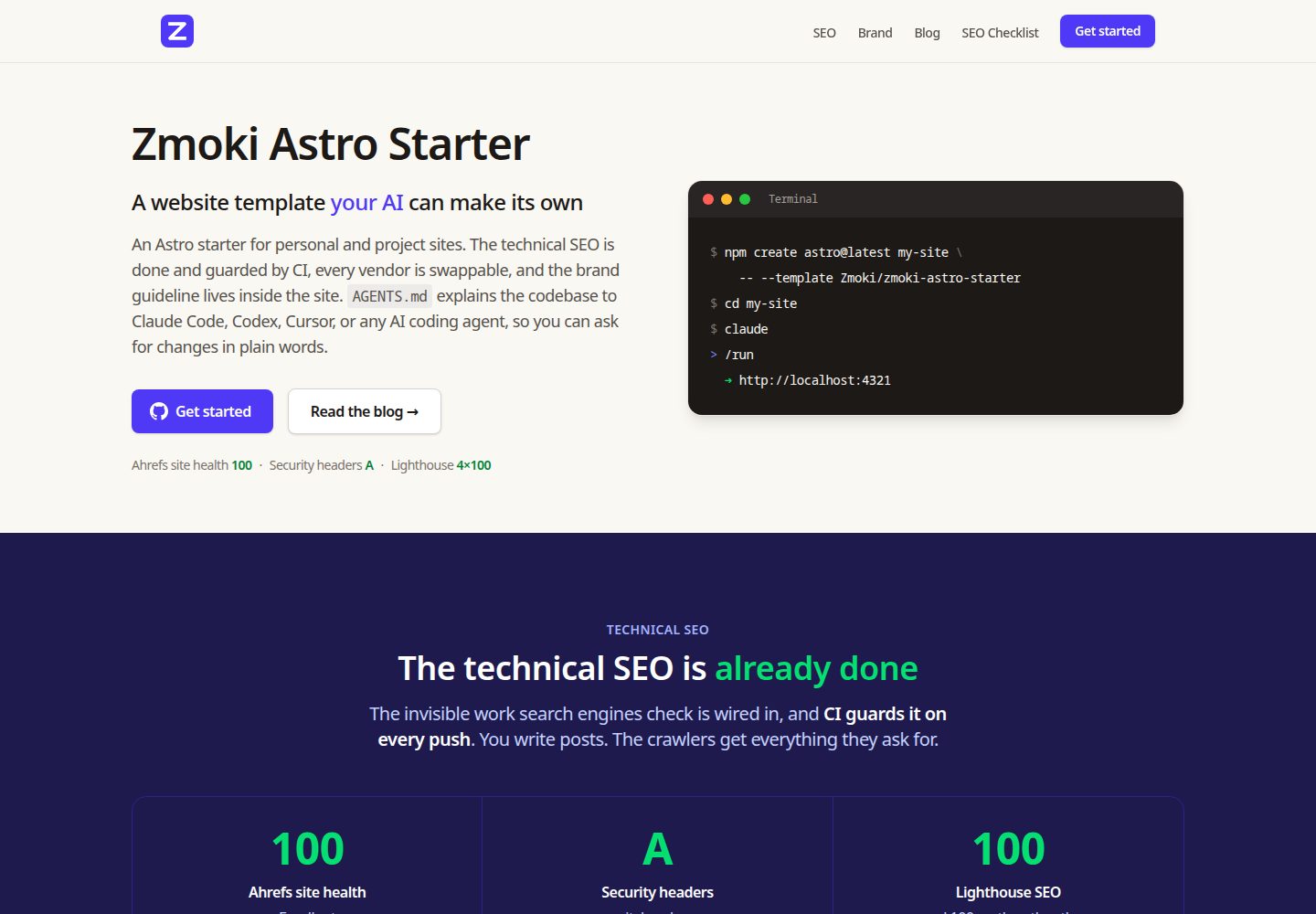
AGENTS.md 作为技术规范,配合 .claude/skills/ 下八个任务手册,便于 AI 编码代理理解和修改代码库
Astro启动器
zmoki-astro-starter — Astro 启动器模板
作者 Zmoki
面向个人与项目网站的 Astro 静态启动器,内置博客、资源下载与法律页面,并围绕 AI 编码代理维护和 CI 校验的技术 SEO 做了专门设计。
看看你的网站会是什么样
浏览真实页面截图,比较内容排版与手机效果。点击下方缩略图切换,放大查看整页细节。
全部页面与视图 3
截图用于了解视觉与布局,交互效果请以实际项目为准。
采集于 2026-10-03查看来源
值得关注的模板亮点
从已有项目资料中,快速了解它的特点。
技术 SEO 在构建期完成并由 CI 守卫:带图片的 sitemap、canonical、两层 robots、schema.org JSON-LD、构建时 OG 卡片
部署目标、分析、表单、验证码和图片 CDN 均提供可替换接缝,默认关闭分析与验证码
品牌规范页面 /-/astro/brand/ 与站点共用 src/design-tokens.mjs 中的设计令牌,改令牌会同时影响站点与规范页
三类内容集合(blog、resources、legal)使用 zod 校验 schema,资源可配置为带表单和资产下载的邮件门控
完全静态输出,可部署到任意静态托管,构建流程包含重定向与响应头产物的编译和漂移检查
模板详细介绍
zmoki-astro-starter 是一个从 zmoki.xyz 通用化而来的 Astro 启动器,用于搭建个人或项目网站,包含博客、资源下载和隐私/条款等法律页面三类内容集合。它的定位是让网站可以通过 AI 编码代理持续维护:仓库根目录的 AGENTS.md 作为技术规范,CLAUDE.md 引用它,Cursor 等工具可直接读取;.claude/skills/ 下提供 run、brand、redirects、og-images、analytics、structured-data、images、update-deps 八个 Markdown 任务手册。技术 SEO 在构建期完成并由 CI 守卫,包括带图片的 sitemap、canonical、两层 robots、schema.org JSON-LD、构建时生成的 OG 卡片和 Google Discover 封面图支持。站点输出为完全静态,可部署到任意静态托管;部署目标、分析、表单、验证码和图片 CDN 都留有可替换的接缝,默认关闭分析(PUBLIC_ANALYTICS_ENABLED)和验证码(PUBLIC_CAPTCHA_ENABLED)。品牌规范以内部 noindex 页面 /-/astro/brand/ 呈现,与站点共用同一份设计令牌。使用前需注意:演示图片、字体、图标等第三方素材的许可需单独核对;域名、托管、数据库、支付或 AI 等外部服务可能另外收费。
Astro启动器
适合你的项目吗?
适用场景
- 为个人博客或作品集搭建静态站点,并希望后续通过 AI 编码代理维护
- 需要内置技术 SEO(sitemap、canonical、结构化数据、OG 图片)且由 CI 防止回归的项目
- 需要邮件门控资源下载、隐私与条款占位页面的内容型网站
- 希望部署目标、分析、验证码等外部集成可随时替换,避免供应商锁定的项目
- 需要一个可复用的品牌规范页面,让设计与实现共用同一套设计令牌
适合人群
- 熟悉 Astro 与 Markdown/MDX 内容工作流的前端开发者
- 使用 Claude Code、Cursor 等 AI 编码代理协作开发的个人或小团队
- 需要静态托管、不依赖服务端运行时的内容站点
- 希望以 MIT 许可自由使用、修改和分发代码的用户
上手与定制指南
结合仓库当前版本的说明,按下面的资料检查内容、配置与运行要求。
- 1
可通过 npm create astro@latest my-new-site -- --template Zmoki/zmoki-astro-starter 创建,或在 GitHub 使用 Use this template,或克隆后删除 .git 重新初始化
- 2
安装依赖后运行 npm run dev,默认地址为 http://localhost:4321
- 3
按 SETUP.md 编辑 src/site.config.ts、替换品牌标识、放入内容并调整配色
- 4
分析与验证码默认关闭,需通过 PUBLIC_ANALYTICS_ENABLED 和 PUBLIC_CAPTCHA_ENABLED 等环境变量启用
- 5
演示图片、字体、图标等第三方素材需按各自许可核对,外部服务可能另外收费
授权与来源资料
使用条件与限制
免费使用 · 保留许可声明本次收录的是公开仓库中采用 MIT 许可的免费版本;免费范围为该版本代码,不代表外部服务或第三方素材免费。
使用时需要遵守
- 允许免费使用、修改、商用和分发该版本代码。
- 分发代码副本或实质性部分时,保留原作者版权声明和完整 MIT 许可声明。
- 代码按现状提供;担保与责任限制以原许可证及适用法律为准。
额外费用与待核对事项
- 演示图片、字体、图标及其他第三方素材需按各自许可核对,不能仅凭代码的 MIT 许可判断。
- 域名、托管、数据库、支付或 AI 等外部服务可能另外收费。
- 分析功能默认关闭,需通过 PUBLIC_ANALYTICS_ENABLED 环境变量显式启用,否则不会加载任何分析脚本。
- 验证码默认关闭,需通过 PUBLIC_CAPTCHA_ENABLED 环境变量启用;启用后依赖 Cloudflare Turnstile 外部服务。
- 内容图片原图需自行托管在对象存储或 CDN(如 R2、S3)并绑定自定义域名,构建时由 Astro 下载优化,涉及外部服务成本。
- 表单提交依赖 Brevo 及后端服务处理验证码校验、联系人存储和资源交付,需配置相应外部账户。
- 部署需选择 Cloudflare Pages、Netlify、Vercel 或 AWS Amplify 等外部托管平台,可能产生平台费用。
查看原文依据
Permission is hereby granted, free of charge
许可证原文
Off by default (`PUBLIC_ANALYTICS_ENABLED`), so local dev and Lighthouse runs stay clean.
README 原文
Cloudflare Turnstile is built in, off by default (`PUBLIC_CAPTCHA_ENABLED`).
README 原文
host content-image originals on any bucket/CDN (R2, S3, …) behind a custom domain
README 原文
Brevo is built in, and the backend handles captcha validation, contact storage, and asset delivery.
README 原文
https://github.com/Zmoki/zmoki-astro-starter/blob/main/LICENSEhttps://github.com/Zmoki/zmoki-astro-starter/blob/main/README.mdDeploy target** — Cloudflare Pages (default), Netlify, Vercel, or AWS Amplify.
README 原文
DeepSeek 根据仓库许可证和 README 整理 ·2026-10-04。结果仅覆盖已读取资料,依赖、图片、字体及后续条款变更以各自原文为准。
项目核对记录与介绍依据
模板资料
- 来源平台
- GitHub
- 资料与维护参考分
- 资料较完整 · 83 / 100
- 技术栈
- Astro
- 网站类型
- 启动器
这个分数如何计算
本站按许可资料(最高30分)、演示链接(12分)、预览图(10分)、Star数(15分)、记录的维护时间(15分)、描述完整度(8分)、功能记录(5分)和分类资料(5分)计算。它不是代码、安全或性能测试,也不是 Google 评分;有链接不代表已实测可用。
这个项目需要核对什么
- 记录的仓库更新时间
- 2026-07-05
- 截图检查日期
- 2026-10-04
已收录演示链接。请用你的内容与屏幕尺寸检查;有演示不代表表单、认证或支付已经可用。
目录记录的主要技术栈是 Astro。请通过依赖清单和锁文件核对实际版本与托管要求。这些说明基于收录资料,不代表代码审计或部署实测。
查看具体选型方法 →介绍的制作与核对状态
介绍由 AI 辅助整理目录与仓库资料。仓库作者不等于这篇介绍的审核者。
审核声明: [email protected] · 2026-10-05
查看当时使用的来源资料
SHA-256: 832473510f69db9df634f8123b4238a909bd146172e8f49a21300bdb63b5a797
2026-10-04T23:40:24.062Z
来源文件 / 仓库# zmoki-astro-starter An Astro starter for personal and project websites — posts, resources, and legal pages — built to be **maintained through an AI coding agent**. The technical SEO is done and guarded by CI, every vendor integration is swappable, and the brand guideline lives inside the site. Built from [zmoki.xyz](https://zmoki.xyz) and genericized into a reusable template. **Live demo: [starter.zmoki.xyz](https://starter.zmoki.xyz/)** [](https://securityheaders.com/?q=https%3A%2F%2Fstarter.zmoki.xyz%2F&followRedirects=on) [](https://starter.zmoki.xyz/) ## Highlights - **Astro 7** + **Tailwind CSS 4** + **MDX**, fully static output — deploys to any static host - **AI-ready**: [`AGENTS.md`](./AGENTS.md) is a canonical technical spec any coding agent reads, plus eight task playbooks in `.claude/skills/` - **Technical SEO built in and guarded by CI**: sitemap (with images), canonicals, robots on two layers, schema.org JSON-LD, build-time OG images, Google Discover-ready covers - **No vendor lock-in**: deploy target, analytics, forms, captcha, and image CDN are all swappable behind clean seams - **A living brand system** at `/-/astro/brand/` — color, typography, components, forms, voice & tone — rendered from the same design tokens the site uses - **Perfect Lighthouse scores** (100 in all four categories, desktop and mobile) with Lighthouse CI to keep them ## Working with an AI agent `CLAUDE.md` imports `AGENTS.md`, and Cursor or any other tool reads `AGENTS.md` directly, so any coding agent understands the codebase from the first prompt. The skills in `.claude/skills/` are vendor-neutral Markdown playbooks for the recurring tasks. Conversations look like this: ``` > Re-skin the site to a green accent Claude reads the /brand skill, swaps zmoki-indigo → zmoki-emerald across src/, verifies WCAG AA contrast on every affected pair, rebuilds, and shows you /-/astro/brand/color/ to review. > Redirect /my-old-post to /blog/new-post Claude reads the /redirects skill, adds a row to src/redirects/blog.csv, runs npm run build:redirects, and commits the regenerated host artifact. > Add Plausible analytics alongside PostHog Claude reads the /analytics skill, writes one self-contained provider component that chains onto window.track, registers it in Analytics.astro, and adds the script host to the CSP. > Make my post about pricing eligible for rich results Claude reads the /structured-data skill and adds schema.org JSON-LD per Google's docs; npm run check:sd validates it in CI on every build. > Move the site from Cloudflare to Netlify Claude changes platform.deploy in src/site.config.ts, rebuilds the redirect and header artifacts, and deletes the stale ones. ``` ### Skills (task playbooks) Each skill is plain Markdown in `.claude/skills/<name>/` — Claude Code loads them as `/name`, other tools read the files directly: | Skill | What it covers | | ------------------ | ---------------------------------------------------------------------- | | `/run` | Launch and verify the dev server | | `/brand` | Brand guidelines end to end: colors, typography, voice, brand pages | | `/redirects` | Add or edit URL redirects (compiled per host) | | `/og-images` | Customize the social-share image cards | | `/analytics` | Enable, add, or swap analytics providers; add tracked events | | `/structured-data` | schema.org JSON-LD for Google rich results | | `/images` | Content images: remote originals, optimization, post covers, image SEO | | `/update-deps` | Update npm packages and GitHub Actions in staged, verified commits | ## Features ### Technical SEO, guarded by CI The invisible work search engines check is wired in, and CI turns regressions into red builds: - **Sitemap with images** — every indexable page is registered via one list (`src/lib/page-collections.ts`); post covers ship in the image sitemap (`<image:loc>`). CI (`npm run check:sitemap`) fails if an indexable page is missing, a noindex page is advertised, or an entry goes stale. - **Canonical URLs** — each page declares its own canonical; a cross-posted article can point at the original via frontmatter. Canonical, OG, and structured-data URLs all come from one helper (`src/lib/urls.ts`), so they can't drift apart. - **Robots on both layers** — per-page `<meta name="robots">` from content frontmatter, plus path-level `X-Robots-Tag` response headers. The sitemap honors both. - **Structured data** — schema.org JSON-LD following Google's guidelines (BlogPosting, Organization, ImageObject licenses); `npm run check:sd` validates every block in the built site. - **OG images at build time** — purpose-built 1200×630 social cards rendered by Satori + resvg during `astro build`. No browser, no runtime service, nothing committed. Cards use the site's own design tokens and brand mark, so a re-skin recolors them automatically. - **Google Discover-ready** — posts can carry a real `cover` photo (≥1200px) that becomes the hero, the `BlogPosting.image`, and the image-sitemap entry; `max-image-preview:large` is set site-wide. - **Link integrity** — `npm run check:links` fails the build on broken internal links or hard-coded self-origin URLs. - **Version meta tag** — every page carries the commit hash it was built from, so a crawl maps to an exact version. ### Platform-agnostic integrations Every integration point ships with a working default and a documented seam to swap it: - **Deploy target** — Cloudflare Pages (default), Netlify, Vercel, or AWS Amplify. Redirects (`src/redirects/*.csv`) and response headers (`src/headers/headers.config.ts`) are authored once, platform-neutral, and compiled to the host's format from a single `site.config.ts` setting. The artifacts are committed and drift-checked in CI. - **Analytics** — call sites fire `window.track(event, props)` / `window.identify(id, props)`, never a vendor SDK. Providers stack: PostHog and Google Tag Manager are built in; adding another is one component. Off by default (`PUBLIC_ANALYTICS_ENABLED`), so local dev and Lighthouse runs stay clean. - **Forms** — the resource lead-magnet gate posts through one dispatcher (`Form.astro`); Brevo is built in, and the backend handles captcha validation, contact storage, and asset delivery. - **Captcha** — single-select and self-gating (`Captcha.astro`); Cloudflare Turnstile is built in, off by default (`PUBLIC_CAPTCHA_ENABLED`). - **Image CDN** — host content-image originals on any bucket/CDN (R2, S3, …) behind a custom domain; Astro downloads and optimizes them at build. Decoupled from the deploy host, and the same setting drives the CSP `img-src`. ### Content Three content collections (Content Layer API, zod-validated schemas in `src/content.config.ts`): - **`blog`** — posts with per-post authors (byline + bio + schema.org author), prev/next navigation, optional cover photo - **`resources`** — downloadable resources and external links; a resource with a `form` + `asset` becomes an email-gated lead magnet with a thank-you page fallback download - **`legal`** — privacy and terms placeholders The Markdown pipeline adds anchor links on definition terms, styled external links, and copy buttons on code blocks. RSS is included. ### Brand system An internal, noindex style guide at `/-/astro/brand/` covering color, typography, forms, components, voice & tone, and the OG cards. It renders from `src/design-tokens.mjs` — the same token file Tailwind uses — so changing a token moves the site and the guideline together. All of Tailwind's palettes are pre-generated under the `zmoki-` prefix, and custom scales (like the shipped `zmoki-cream`) slot in beside them. Fonts are self-hosted via Astro's Fonts API (downloaded and subset at build, served same-origin, zero-CLS fallbacks) with the family names in the same token file. ### Performance & security - Lighthouse 100/100/100/100 on desktop and mobile, asserted by a Lighthouse CI workflow on every push and PR - Security headers (CSP, HSTS, `X-Frame-Options`, …) authored in `src/headers/headers.config.ts`, earning an A on securityheaders.com - Fully static output — no server, no runtime dependencies ## Create a site from this template **With `npm create astro`** — scaffold the files into a new folder: ```bash npm create astro@latest my-new-site -- --template Zmoki/zmoki-astro-starter ``` **With GitHub** — click **Use this template → Create a new repository** on the [repo page](https://github.com/Zmoki/zmoki-astro-starter). Best when you want a hosted repo from the start (e.g. to wire up push-to-deploy). **By cloning** — grab it and detach the history: ```bash git clone https://github.com/Zmoki/zmoki-astro-starter.git my-new-site cd my-new-site && rm -rf .git && git init ``` Then: ```bash cd my-new-site npm install npm run dev # http://localhost:4321 ``` …and follow **[SETUP.md](./SETUP.md)**: edit `src/site.config.ts`, replace the brand mark, drop in your content, re-skin the palette. Or open your AI agent and ask it to do the checklist with you. ## Scripts - `npm run dev` — dev server - `npm run build` — production build (also compiles redirects/headers and emits OG images to `dist/og/`) - `npm run preview` — preview the built site - `npm run check` — type check (`astro check`) - `npm run lint` — ESLint - `npm run format` / `format:check` — Prettier - `npm run favicons` — regenerate the favicon set from `public/brand-mark.svg` - `npm run build:redirects` / `check:redirects` — compile redirect CSVs to the host artifact / CI drift guard - `npm run build:headers` / `check:headers` — compile header rules to the host artifact / CI drift guard - `npm run check:sd` / `check:links` / `check:sitemap` — post-build guards: structured data, internal links, sitemap coverage - `npm run lhci:mobile` / `lhci:desktop` — Lighthouse CI - `npm run timeline:blog` — generate `blog-timeline.csv` ## Project structure ``` src/ ├── site.config.ts # everything site-specific (edit this first) ├── design-tokens.mjs # color palette + font families (re-skin here) ├── content.config.ts # content collection schemas ├── components/ # reusable Astro components (+ analytics/, forms/, captcha/) ├── content/ # blog/, resources/, legal/ ├── headers/ # platform-neutral response-header rules ├── images/ # committed content images ├── layouts/ # Base, Post, Resource, Legal, Brand layouts ├── lib/ # URLs, page registry, robots, dates ├── og/ # OG card templates, manifest, theme, fonts ├── pages/ # routes (incl. /-/astro/brand/ design system) ├── redirects/ # platform-neutral redirect CSVs └── styles/ # Tailwind entry point ``` ## CI `.github/workflows/ci.yml` runs on every push and PR to `main`: format check, type check, lint, redirect/header drift checks, build, then the post-build guards (structured data, internal links, sitemap). A separate `lighthouse.yml` workflow asserts the Lighthouse scores. No secrets are required — provider config is committed constants, and analytics/captcha are enabled only for production builds of `main`. ## Docs - **[SETUP.md](./SETUP.md)** — the checklist for spinning up a new site - **[AGENTS.md](./AGENTS.md)** — the full technical spec (read by AI tools, useful for humans too) - **`.claude/skills/`** — per-task playbooks (redirects, brand, analytics, OG images, …)
看看同类模板
对比同技术栈与用途的模板,找到更适合的视觉与内容结构。

astrowind
⭕️ AstroWind: A free template using Astro v7 and Tailwind CSS v4. Astro starter theme.
Astro · 博客
accessible-astro-starter
Accessible Astro Starter 是一个以无障碍为核心理念的 Astro 6 启动模板,由 incluud 团队维护。
Astro · 博客

astro-erudite
An opinionated, unstyled static blogging template built with Astro and native CSS.
Astro · 作品集

astro-shopify
astro-shopify 是一个面向开发者的轻量级电商启动模板,用于构建基于 Shopify 的无头店面。
Astro · 电商

brutal
A neobrutalism Astro starter theme
Astro · 启动器

qwind
⭕️ Qwind: A template to make your website using Qwik + Tailwind CSS.
Astro · 工具站