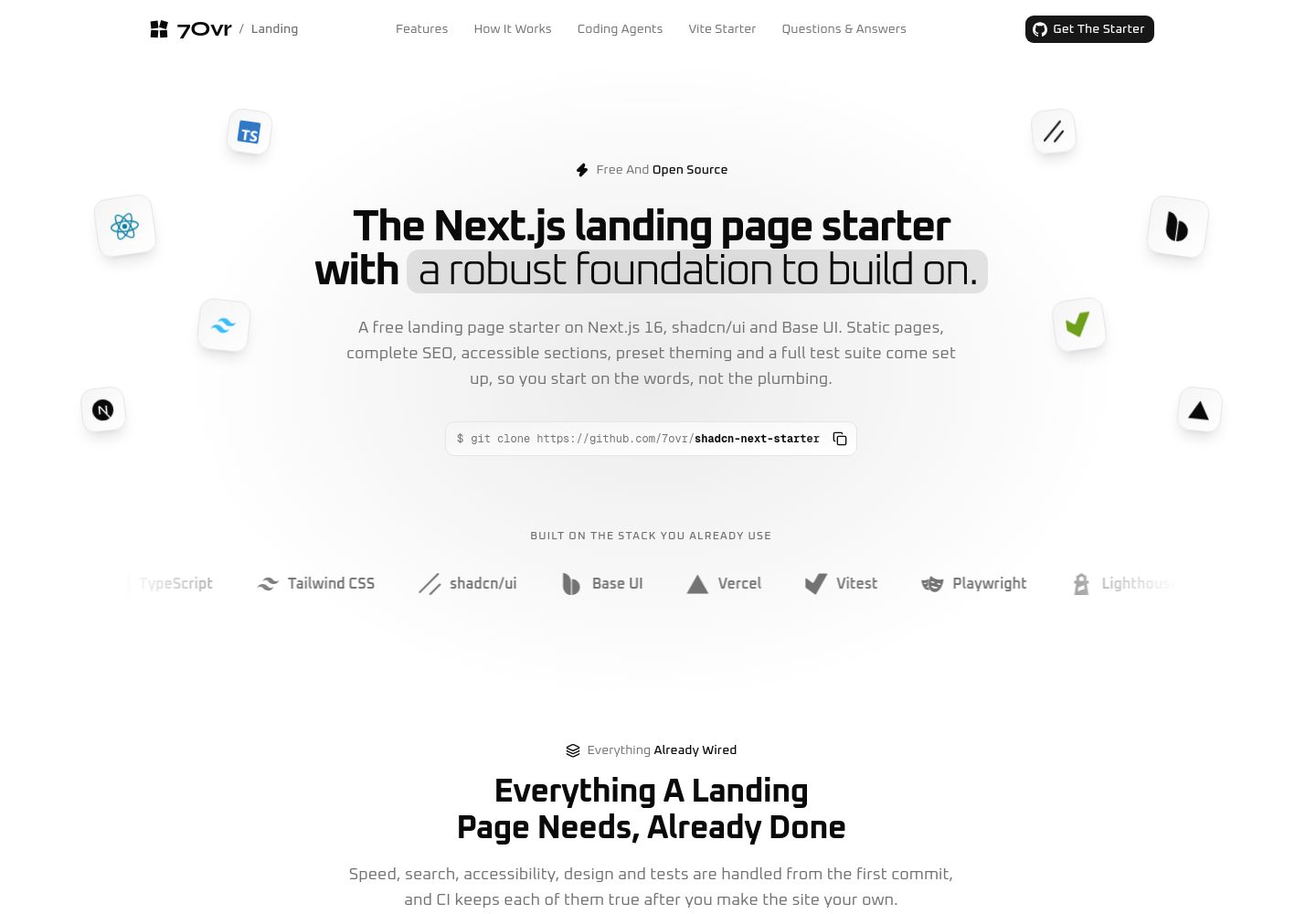
所有路由在构建时预渲染,根布局设置 dynamic = 'error',任何需要请求时数据的页面会导致构建失败
Next.jsReact企业官网启动器
shadcn-next-starter — Next.js 企业官网模板
作者 7ovr
基于 Next.js 与 shadcn/ui 的落地页启动模板,所有页面在构建时预渲染,内置 SEO 元数据、JSON-LD、站点地图与无障碍支持。
看看你的网站会是什么样
浏览真实页面截图,比较内容排版与手机效果。点击下方缩略图切换,放大查看整页细节。
全部页面与视图 2
截图用于了解视觉与布局,交互效果请以实际项目为准。
采集于 2026-09-29查看来源
值得关注的模板亮点
从已有项目资料中,快速了解它的特点。
SEO 元数据、canonical、Open Graph、Twitter 卡片、JSON-LD、robots.txt 与站点地图由统一配置生成
每个区块和 FAQ 答案都直接输出在 HTML 中,不依赖 JavaScript 即可阅读,并包含跳转链接与减少动态效果支持
文案集中在 src/content/ 下的类型化文件,调整标题或段落无需修改组件
主题颜色、圆角与字体由 shadcn 主题令牌控制,更换预设可整体换肤,分享图同步更新
附带 Playwright 端到端测试、Vitest 单元测试与 Lighthouse CI 预算检查,CI 在拉取请求和推送到 master 时运行
模板详细介绍
这是一个面向企业官网与产品落地页的 Next.js 启动模板,使用 shadcn/ui 与 Base UI 构建界面,所有路由在构建时预渲染为静态 HTML。模板把 SEO 所需的部分作为默认配置:标题、描述、canonical、Open Graph、Twitter 卡片、JSON-LD、robots.txt、站点地图和 Web 应用清单都通过统一配置生成,分享图在构建时按当前主题绘制。内容与组件分离,每个区块的文案放在 src/content/ 下的类型化文件中,页面区块在 src/app/page.tsx 中按顺序排列。模板包含 Playwright 端到端测试、Vitest 单元测试和 Lighthouse CI 预算检查,并附带面向编码代理的约定文件。
使用前需要留意:模板要求 Node 24 或更新版本、pnpm 12 或更新版本;主题通过 shadcn 的 theme token 统一控制,更换预设会同时影响站点与分享图。仓库采用 MIT 许可证,但演示图片、字体、图标等第三方素材需单独核对许可,域名、托管等外部服务可能产生费用。模板本身不包含后端、数据库或支付功能,适合作为静态展示型站点的起点。
Next.jsReact企业官网启动器
适合你的项目吗?
适用场景
- 搭建产品落地页或企业官网,需要静态预渲染与完整 SEO 元数据
- 作为新项目的起点,在 shadcn/ui 与 Base UI 基础上继续开发页面区块
- 需要为编码代理提供明确约定的项目,仓库包含 AGENTS.md、CLAUDE.md 与相关技能文件
- 希望用 Playwright 和 Lighthouse 对构建产物做无障碍、SEO 与性能预算检查的团队
适合人群
- 熟悉 Next.js App Router 与 React 服务端组件的开发者
- 需要静态展示型站点、不依赖请求时数据或后端服务的项目
- 希望文案与组件分离、便于非开发者修改内容的团队
- 使用 pnpm 并接受 Node 24 及以上版本的前端项目
上手与定制指南
结合仓库当前版本的说明,按下面的资料检查内容、配置与运行要求。
- 1
需要 Node 24 或更新版本,以及 pnpm 12 或更新版本
- 2
克隆仓库后执行 pnpm install 与 pnpm dev,开发服务器默认运行在 http://localhost:3000
- 3
站点名称、搜索标题与描述、链接在 src/config/site.ts 中配置
- 4
各区块文案在 src/content/ 下按区块分文件维护,页面区块顺序在 src/app/page.tsx 中调整
- 5
站点 URL 来自 SITE_URL 环境变量或 Vercel 生产域名,非生产构建默认输出 noindex
授权与来源资料
使用条件与限制
免费使用 · 保留许可声明本次收录的是公开仓库中的免费 MIT 版本;免费范围为该版本代码,不代表外部服务或第三方素材免费。
使用时需要遵守
- 使用、修改或分发代码时,保留原作者版权声明和完整 MIT 许可证。
- 允许免费使用、修改及商用,也允许分发代码;分发时仍需随附版权与许可声明。
- 代码按现状提供,作者不承诺担保或承担使用责任。
额外费用与待核对事项
- 免费模板本身可用,但 7Ovr 的 Pro 区块属于付费内容:需在 .env 中配置来自 7Ovr 账户的 REGISTRY_TOKEN,才能通过 @7ovr-pro 注册表安装。免费区块(@7ovr/...)无需令牌。
- README 说明品牌标识归各自项目所有,仅堆栈条中的单色图标来自 CC0 的 Simple Icons。MIT 许可仅覆盖代码,演示图片、字体、图标等第三方素材需自行核对许可。
- 运行 pnpm lighthouse 需要本机安装 Chrome 浏览器,否则 Lighthouse 预算检查无法执行。
- 首次运行端到端测试需额外执行 pnpm exec playwright install chromium 下载 Playwright 的 Chromium 浏览器。
- 部署示例以 Vercel 为主,使用其托管服务可能产生费用;在其他主机部署需自行设置 SITE_URL 与 SITE_ENV=production。
- 演示图片、字体、图标及其他第三方素材需按各自许可核对,不能仅凭代码的 MIT 许可判断。
- 域名、托管、数据库、支付或 AI 等外部服务可能另外收费。
查看原文依据
Permission is hereby granted, free of charge
许可证原文
For Pro blocks, set `REGISTRY_TOKEN` in `.env` to the token from your 7Ovr account, then install from the Pro registry:
README 原文
The logos belong to their projects. The single-colour marks in the stack strip come from [Simple Icons](https://simpleicons.org) (CC0).
README 原文
It needs Chrome installed, and writes its reports to `.lighthouseci/`.
README 原文
The first time, install the browser with `pnpm exec playwright install chromium`.
README 原文
https://github.com/7ovr/shadcn-next-starter/blob/master/LICENSEhttps://github.com/7ovr/shadcn-next-starter/blob/master/README.mdOn **Vercel**, use the button above or import the repository, and deploy; nothing needs configuring.
README 原文
依据完整 MIT 许可证与仓库 README 核对 · 2026-09-29。结果仅覆盖已读取资料,依赖、图片、字体及后续条款变更以各自原文为准。
项目核对记录与介绍依据
模板资料
- 来源平台
- GitHub
- 资料与维护参考分
- 资料较完整 · 88 / 100
- 技术栈
- Next.js · React
- 网站类型
- 企业官网 · 启动器
这个分数如何计算
本站按许可资料(最高30分)、演示链接(12分)、预览图(10分)、Star数(15分)、记录的维护时间(15分)、描述完整度(8分)、功能记录(5分)和分类资料(5分)计算。它不是代码、安全或性能测试,也不是 Google 评分;有链接不代表已实测可用。
这个项目需要核对什么
- 记录的仓库更新时间
- 2026-09-28
- 截图检查日期
- 2026-09-29
已收录演示链接。请用你的内容与屏幕尺寸检查;有演示不代表表单、认证或支付已经可用。
目录记录的主要技术栈是 Next.js。请通过依赖清单和锁文件核对实际版本与托管要求。这些说明基于收录资料,不代表代码审计或部署实测。
查看具体选型方法 →介绍的制作与核对状态
介绍由 AI 辅助整理目录与仓库资料。仓库作者不等于这篇介绍的审核者。
已完成服务器许可规则与 AI 来源核对;未经过人工编辑审核。
查看当时使用的来源资料
SHA-256: e96e294935d270ba999dc763d1544d4c98117ff6316ff48aba141e75fbbedd46
2026-09-29T01:09:24.633Z
来源文件 / 仓库<div align="center"> <picture> <source media="(prefers-color-scheme: dark)" srcset=".github/assets/logo-dark.svg" /> <img src=".github/assets/logo-light.svg" alt="7Ovr" width="56" height="56" /> </picture> <h1>7Ovr Landing Starter</h1> <p><strong>A Next.js landing page starter with a robust foundation to build on.</strong><br /> Static pages, complete SEO, accessible sections and one-command theming on shadcn/ui and Base UI, tested with Playwright and Lighthouse and optimized for coding agents.</p> <p> <a href="https://github.com/7ovr/shadcn-next-starter/actions/workflows/ci.yml"><img src="https://github.com/7ovr/shadcn-next-starter/actions/workflows/ci.yml/badge.svg" alt="CI" /></a> <a href="LICENSE"><img src="https://img.shields.io/badge/license-MIT-blue" alt="MIT License" /></a> <img src="https://img.shields.io/badge/node-%3E%3D24-339933?logo=nodedotjs&logoColor=white" alt="Node 24 or newer" /> <img src="https://img.shields.io/badge/pnpm-%3E%3D12-F69220?logo=pnpm&logoColor=white" alt="pnpm 12 or newer" /> <img src="https://img.shields.io/badge/Next.js-16-000000?logo=nextdotjs&logoColor=white" alt="Next.js 16" /> <img src="https://img.shields.io/badge/React-19-61DAFB?logo=react&logoColor=black" alt="React 19" /> <img src="https://img.shields.io/badge/TypeScript-7-3178C6?logo=typescript&logoColor=white" alt="TypeScript 7" /> </p> <p> <a href="#quick-start"><strong>Quick Start</strong></a> · <a href="#whats-inside"><strong>What's Inside</strong></a> · <a href="#seo"><strong>SEO</strong></a> · <a href="#tests"><strong>Tests</strong></a> · <a href="#working-with-coding-agents"><strong>Coding Agents</strong></a> · <a href="#add-blocks-from-7ovr"><strong>Add Blocks</strong></a> · <a href="#deploy"><strong>Deploy</strong></a> </p> </div> <br /> <img src=".github/assets/home-dark.png" alt="The 7Ovr Landing Starter home page: floating stack logos around the headline, a git clone command and a strip of the stack" /> ## Why this starter Most landing page templates look finished and stop there. This one also ships the parts that decide whether a landing page gets found and keeps working. - **Static and fast.** Every route is prerendered at build time, and a Request-time API anywhere fails the build rather than the crawl. - **SEO already done.** Titles, descriptions, canonicals, Open Graph and Twitter cards, a share image drawn from the theme, JSON-LD, `robots.txt` and a sitemap, all from one config file. Preview deploys stay out of search. - **Readable without JavaScript.** Every section and every FAQ answer is in the HTML, with one h1 per page, a skip link and motion that respects reduced motion. - **One preset restyles it all.** Every colour, radius and font comes from shadcn's theme tokens, so `shadcn apply` restyles the whole site, the share image included. - **The copy in one place.** Every section's words live in typed files under `src/content/`, so a new headline never means touching a component. - **Tested like it ships.** Playwright checks the built site with JavaScript on and off, and Lighthouse holds it to performance, accessibility and SEO budgets on every pull request. - **Optimized for coding agents.** `AGENTS.md` holds every convention, `CLAUDE.md` imports it, and four vendored skills keep Claude Code, Codex and Cursor on pattern. ## Quick start You need Node 24 or newer and [pnpm](https://pnpm.io) 12 or newer. ```bash git clone https://github.com/7ovr/shadcn-next-starter cd shadcn-next-starter pnpm install pnpm dev ``` Open http://localhost:3000. Installing also sets up the Git hooks that format and lint your changes on commit. To start a repository of your own instead, use [Use This Template](https://github.com/7ovr/shadcn-next-starter/generate) on GitHub. ## What's inside | Layer | Choice | | ----------- | --------------------------------------------------------------- | | Framework | Next.js 16 with the App Router, every route prerendered | | UI | React 19, shadcn/ui (`base-nova` style) on Base UI | | Styling | Tailwind CSS v4 with light and dark theme tokens | | Language | TypeScript 7 in strict mode | | SEO | Metadata, share image, JSON-LD, robots and sitemap from Next.js | | Unit tests | Vitest and Testing Library | | End to end | Playwright against the production build | | Performance | Lighthouse CI with budgets | | Lint | Oxlint with [`@shadcn/lint`](https://github.com/shadcn-ui/lint) | | Format | oxfmt, which also sorts imports and Tailwind classes | | Hooks | Lefthook, which formats and lints staged files on commit | ## Scripts | Command | What it does | | ----------------------- | -------------------------------------------------------------- | | `pnpm dev` | Start the dev server | | `pnpm build` | Typecheck, then build the site | | `pnpm start` | Serve the production build locally | | `pnpm test` | Run the unit tests once | | `pnpm test:watch` | Run the unit tests and rerun them on every change | | `pnpm test:e2e` | Build the site as a production deploy and run Playwright on it | | `pnpm test:e2e:preview` | The same, built as a preview deploy | | `pnpm lighthouse` | Build for production and check the Lighthouse budgets | | `pnpm lint` | Lint the code | | `pnpm lint:fix` | Lint and fix what can be fixed automatically | | `pnpm typecheck` | Check the types | | `pnpm format` | Format every file | | `pnpm format:check` | Check the formatting without changing files | CI runs `lint`, `format:check`, `typecheck`, `test` and `build` on every pull request and every push to `master`, and next to them `test:e2e`, `test:e2e:preview` and `lighthouse`. To keep a pull request from merging before they pass, require the `check` and `e2e` jobs in your branch protection. ## Project layout ``` src/ ├── app/ │ ├── layout.tsx The skip link, header, footer, theme and site JSON-LD around every page │ ├── page.tsx The home page: its metadata and its sections, in order │ ├── not-found.tsx The 404 page │ ├── opengraph-image.tsx The share image, drawn at build time │ ├── robots.ts, sitemap.ts robots.txt and sitemap.xml │ ├── manifest.ts The web app manifest │ ├── icon.svg The favicon, with favicon.ico and apple-icon.png beside it │ └── globals.css Tailwind, the theme tokens, motion and effects ├── components/ │ ├── hero.tsx, features.tsx One file per section, with its parts beside it │ ├── section.tsx The wrapper, heading, title and description every section builds on │ ├── mockup.tsx The stages and cards the illustrations are drawn from │ ├── site-header.tsx The header, its links and the mobile menu │ ├── site-footer.tsx The footer, its links and the theme toggle │ ├── site-link.tsx Every link: a new tab for other sites, Next's Link for this one │ ├── icons.tsx Brand marks: 7Ovr, GitHub and the stack logos │ └── ui/ shadcn/ui components, as the CLI writes them ├── content/ The copy, one typed file per section, plus the navigation and the 404 ├── config/site.ts The name, the search title and description, and the links ├── hooks/ React hooks, such as the theme toggle's ├── lib/ Metadata, headers, structured data, the share image and the site URL └── test/setup.ts The Vitest setup e2e/ Playwright checks against the built site public/brand/ The 7Ovr mark and logo for JSON-LD, the manifest and the share image playwright.config.ts Builds and serves the site for the Playwright checks lighthouserc.json The Lighthouse budgets ``` ## Architecture Every page is prerendered at build time, so the server only ever sends finished HTML. **Rendering.** `export const dynamic = 'error'` in the root layout fails the build if anything on a page needs the request. Components are Server Components; only the theme toggle, the mobile menu, the copy button and the logo link run in the browser, and the mobile menu's sheet loads the first time it is needed. **Layout.** `src/app/layout.tsx` wraps every page in the skip link, the header, `<main>` and the footer, and adds the site's JSON-LD. **Sections.** `src/app/page.tsx` lists the sections in order. Each one is a file in `src/components/` built on `Section`, and renders the copy it gets from `src/content/`. To add a section, write its content file, build it on `Section` and `SectionHeading`, and place it in `page.tsx`. Add it to `headerNav` in `src/content/navigation.ts` to link it from the header. **Motion.** Entrances, scroll reveals and the illustration loops are CSS only, so nothing waits for JavaScript to appear, and every animation stops when reduced motion is on. ## Make it yours 1. Set the name, the search title and description, and the links in `src/config/site.ts`. 2. Rewrite the copy in `src/content/`, one file per section. 3. Reorder or drop sections in `src/app/page.tsx`. 4. Swap the icons in `src/app/` and the images in `public/brand/` for your own mark. 5. Restyle it with a preset, as described under [Theme](#theme). ## SEO Every page's head comes from one helper, `createMetadata` in `src/lib/metadata.ts`: the title, description, canonical, Open Graph and Twitter cards, and robots. The site also ships a share image drawn at build time in the current theme, JSON-LD for the organisation, the site, the source code and the FAQ, a `robots.txt`, a sitemap and a web app manifest. Every response carries security headers and a static Content Security Policy. The site URL is never hard-coded. It comes from `SITE_URL`, then from Vercel's production domain, so a fresh clone never points its canonicals at this demo. Only production is indexed: Vercel's production deploys, or any host that sets `SITE_ENV=production`. Every other build, previews included, sends `noindex` in the page and in an `X-Robots-Tag` header, while `robots.txt` still lets crawlers in. ### The SEO contract Every promise has a check that fails the build or CI when it breaks. | Promise | Checked by | | ------------------------------------------------------------------------------------ | ---------------------------------------------------- | | Every route is prerendered at build time | `dynamic = 'error'` in `src/app/layout.tsx` | | The head is complete: title, description, canonical, Open Graph, Twitter and robots | `e2e/seo.spec.ts`, `src/lib/metadata.test.ts` | | The JSON-LD matches what the page shows | `e2e/seo.spec.ts`, `src/lib/structured-data.test.ts` | | Every section and every FAQ answer is readable without JavaScript | `e2e/no-javascript.spec.ts` | | One h1, no skipped heading level, landmarks and a skip link | `e2e/seo.spec.ts` | | `robots.txt` lets crawlers in, and the sitemap lists exactly the pages there are | `e2e/seo.spec.ts` | | The share image is 1200x630 and the icons are served at their sizes | `e2e/seo.spec.ts` | | A missing page is a real 404, with noindex and no canonical | `e2e/seo.spec.ts` | | Preview deploys send `noindex` in the page and in a header | `pnpm test:e2e:preview`, `src/lib/headers.test.ts` | | Canonicals point at the deploy's own domain, never at localhost | `src/lib/site-url.test.ts` | | Every response carries the security headers and a static CSP | `e2e/seo.spec.ts`, `src/lib/headers.test.ts` | | The page hydrates without errors, with and without reduced motion | `e2e/interactions.spec.ts` | | At least 90 for performance, 95 for accessibility and best practices and 100 for SEO | `lighthouserc.json` | ## Tests **Unit tests.** Vitest covers the code that decides something, such as the site URL, the metadata, the response headers and the content rules. `pnpm test` runs them in a few seconds. **End to end.** Playwright builds the site and checks what a visitor and a crawler get: the head, the JSON-LD against the page, one h1 and the landmarks, every section and FAQ answer with JavaScript off, the 404, `robots.txt`, the sitemap, the icons and share image, the security headers, and no hydration errors with or without reduced motion. `pnpm test:e2e` checks a production build and `pnpm test:e2e:preview` a preview one, which must stay out of search. The first time, install the browser with `pnpm exec playwright install chromium`. **Lighthouse.** `pnpm lighthouse` builds for production and runs Lighthouse three times with the desktop preset. The median run must score at least 90 for performance, 95 for accessibility and best practices, and 100 for SEO, with LCP under 2.5 s, CLS under 0.1 and Total Blocking Time under 200 ms. It needs Chrome installed, and writes its reports to `.lighthouseci/`. ## Theme Colours, radius and fonts are the shadcn theme tokens in `src/app/globals.css`, with a light and a dark set: Oxanium for the text, Geist Mono for code and Syne for the 7Ovr wordmark. The site follows the system setting; press `d` or use the button in the footer to switch. ### Restyle with a preset One preset code restyles the whole site. Build a preset at [ui.shadcn.com/create](https://ui.shadcn.com/create), then apply its code: ```bash pnpm dlx shadcn@latest apply <code> pnpm format ``` The CLI writes double quotes, so `pnpm format` puts the files it touched back in the house style. If the preset changes a font, the CLI adds the new one to `src/app/layout.tsx` but keeps the old one, so delete the old font's import, its `const` and its classes on `<html>`, and change `FONT` in `src/lib/og.tsx` so the share image follows. The starter's own look is preset `b4Wm`, so `apply b4Wm` takes you back. A preset only sets shadcn's own tokens. If you add a token of your own, a preset leaves it at its old value, so build new shades from the existing tokens instead, such as `bg-primary/10`. Applying a preset also reinstalls the components in `src/components/ui/`, so leave those files as the CLI writes them. ## Add blocks from 7Ovr The 7Ovr registry is already set up in `components.json`. Install any free block by name: ```bash pnpm dlx shadcn@latest add @7ovr/hero-2 ``` The source lands in `src/components/blocks/`. If the CLI asks to overwrite a file in `src/components/ui/`, answer no. Then run `pnpm format` and import the block into a page: ```tsx import HeroBlock from '@/components/blocks/hero-2' ``` Browse every block at [7ovr.com/blocks](https://7ovr.com/blocks). For Pro blocks, set `REGISTRY_TOKEN` in `.env` to the token from your 7Ovr account, then install from the Pro registry: ```bash pnpm dlx shadcn@latest add @7ovr-pro/<name> ``` ## Working with coding agents `AGENTS.md` holds every convention for coding agents: the content model, the design system, motion, SEO, the tests and the checks to run before finishing. `CLAUDE.md` imports it, so Claude Code, Codex and Cursor all read the same rules. Four skills are vendored into `.claude/skills/` for Claude Code and `.agents/skills/` for everything else: `vercel-react-best-practices`, `vercel-composition-patterns`, `shadcn` and `improve`. They are pinned in `skills-lock.json`. Building an app rather than a landing page? The [7Ovr Vite Starter](https://starter.7ovr.com) puts the same stack in a Vite app with TanStack. ## Environment variables Copy `.env.example` to `.env` and fill in what you need. `.env` is ignored by Git. The site reads its variables when it builds, so set them before `pnpm build`. | Variable | Required | Used for | | ---------------- | -------- | ----------------------------------------------------------------------- | | `SITE_URL` | No | The public origin. On Vercel it defaults to the production domain. | | `SITE_ENV` | No | Set to `production` on hosts other than Vercel, so the site is indexed. | | `REGISTRY_TOKEN` | No | Installing 7Ovr Pro blocks. Read by the shadcn CLI, not by the site. | ## Deploy [](https://vercel.com/new/clone?repository-url=https%3A%2F%2Fgithub.com%2F7ovr%2Fshadcn-next-starter&project-name=my-landing-page&repository-name=my-landing-page) On **Vercel**, use the button above or import the repository, and deploy; nothing needs configuring. The production domain becomes the site URL, only production is indexed, and every pull request gets a preview that stays out of search. The site URL is read at build time, so redeploy after you add a custom domain, and redirect the project's `.vercel.app` domain to it in the domain settings, so search engines find one copy of the site. Anywhere else, set `SITE_URL` to your domain and `SITE_ENV=production`, then run `pnpm build` and `pnpm start`. A production build without `SITE_URL` stops with an error, so it never points its canonicals at localhost. ## Credits The logos belong to their projects. The single-colour marks in the stack strip come from [Simple Icons](https://simpleicons.org) (CC0). ## Contributing Issues and pull requests are welcome. Read [CONTRIBUTING.md](CONTRIBUTING.md) for the setup, the conventions and the checks to run, and report security problems privately as described in [SECURITY.md](SECURITY.md). ## License [MIT](LICENSE). Made by [7Ovr](https://7ovr.com).
看看同类模板
对比同技术栈与用途的模板,找到更适合的视觉与内容结构。

ai-website-cloner-template
Clone any website with one command using AI coding agents
Next.js · 启动器

Next.js SaaS Starter
Next.js SaaS Starter 是 Next.js 官方维护的 SaaS 起点模板,定位介于学习资源和可直接部署的脚手架之间。
Next.js · SaaS

Next.js Commerce
Next.js Commerce 是 Vercel 团队维护的电商启动模板,基于 Next.js App Router 构建,采用服务端渲染、React Server Components、Server Actions …
Next.js · 电商

Next-js-Boilerplate
Next-js-Boilerplate 是一个面向 Next.js 16、Tailwind CSS 4 和 TypeScript 的启动器,核心定位是开发者体验优先。
Next.js · 启动器

tailwind-nextjs-starter-blog
tailwind-nextjs-starter-blog 是一个面向个人技术博客的 Next.js 与 Tailwind CSS 启动模板,其 v2 版本基于 App Router 与 React Server Comp…
Next.js · 博客

next-forge
Production-grade Turborepo template for Next.js apps.
Next.js · 启动器