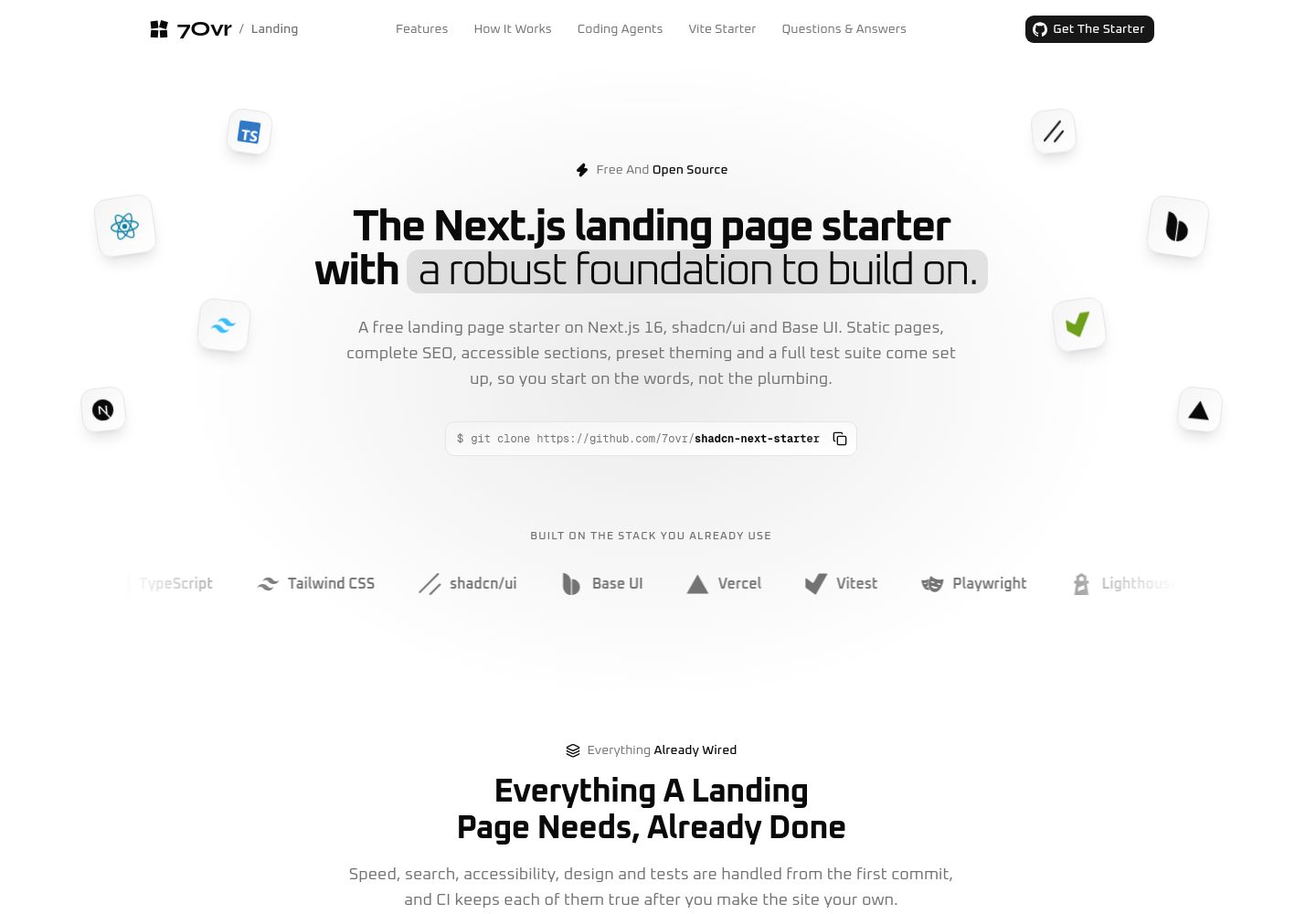
All routes are prerendered at build time, with the root layout setting dynamic = 'error', so any page requiring request-time data will cause the build to fail
Next.jsReactCorporate WebsiteStarter
shadcn-next-starter — Next.js Business Template
By 7ovr
A landing-page starter template based on Next.js and shadcn/ui, with all pages prerendered at build time and built-in SEO metadata, JSON-LD, sitemap, and accessibility support.
Explore the design
Compare the page layouts and mobile experience. Open any screenshot for a closer look.
Desktop homepage1 / 2
Desktop captureTop of page
Actual screenshot captured by the server browser.
All pages & views 2
Screenshots show visual appearance; interactive behavior may differ.
Recorded 2026-09-29View source
What stands out
A quick read of the recorded project description.
SEO metadata, canonical, Open Graph, Twitter cards, JSON-LD, robots.txt, and sitemap are generated from unified configuration
Each section and FAQ answer is output directly in the HTML, readable without relying on JavaScript, and includes skip links and reduced-motion support
Copy is centralized in typed files under src/content/, so adjusting headings or paragraphs does not require modifying components
Theme colors, border radius, and fonts are controlled by shadcn theme tokens; changing the preset can reskin the whole site, and share images update accordingly
Includes Playwright end-to-end tests, Vitest unit tests, and Lighthouse CI budget checks; CI runs on pull requests and pushes to master
Template Details
This is a Next.js starter template for corporate websites and product landing pages, using shadcn/ui and Base UI to build the interface, with all routes prerendered as static HTML at build time. The template treats the parts needed for SEO as default configuration: titles, descriptions, canonical, Open Graph, Twitter cards, JSON-LD, robots.txt, sitemap, and web app manifest are all generated through unified configuration, and share images are drawn at build time according to the current theme. Content and components are separated, with copy for each section placed in typed files under src/content/, and page sections arranged in order in src/app/page.tsx. The template includes Playwright end-to-end tests, Vitest unit tests, and Lighthouse CI budget checks, and comes with convention files for coding agents.
Before use, note the following: the template requires Node 24 or later and pnpm 12 or later; themes are controlled uniformly through shadcn theme tokens, and changing the preset affects both the site and share images. The repository uses the MIT license, but third-party assets such as demo images, fonts, and icons need separate license verification, and external services such as domains and hosting may incur costs. The template itself does not include a backend, database, or payment functionality, and is suitable as a starting point for statically displayed sites.
Next.jsReactCorporate WebsiteStarter
Is it right for your project?
Use Cases
- Building a product landing page or corporate website that needs static prerendering and complete SEO metadata
- Using it as a starting point for a new project to continue developing page sections on top of shadcn/ui and Base UI
- Projects that need clear conventions for coding agents; the repository includes AGENTS.md, CLAUDE.md, and related skill files
- Teams that want to run accessibility, SEO, and performance budget checks on build artifacts with Playwright and Lighthouse
Suitable For
- Developers familiar with the Next.js App Router and React server components
- Projects that need a statically displayed site and do not rely on request-time data or backend services
- Teams that want copy separated from components so non-developers can edit content easily
- Frontend projects that use pnpm and accept Node 24 or later
Getting started & customization
Use these recorded setup notes alongside the repository instructions for your chosen version.
- 1
Requires Node 24 or later and pnpm 12 or later
- 2
After cloning the repository, run pnpm install and pnpm dev; the development server runs at http://localhost:3000 by default
- 3
Site name, search title and description, and links are configured in src/config/site.ts
- 4
Copy for each section is maintained in separate files under src/content/ by section, and the order of page sections is adjusted in src/app/page.tsx
- 5
The site URL comes from the SITE_URL environment variable or the Vercel production domain; non-production builds output noindex by default
License & source material
Usage conditions & limitations
Free to use · keep license noticeThis entry covers the free MIT version in the public repository; the free scope is the code of that version and does not mean external services or third-party assets are free.
Must comply with when using
- When using, modifying, or distributing the code, retain the original author's copyright notice and the complete MIT license.
- Free use, modification, and commercial use are allowed, as is distribution of the code; distribution must still include the copyright and license notice.
- The code is provided as is, and the author does not promise warranties or accept liability for use.
Additional costs & items to verify
- The free template itself is usable, but 7Ovr's Pro blocks are paid content: you need to configure REGISTRY_TOKEN from a 7Ovr account in .env to install via the @7ovr-pro registry. Free blocks (@7ovr/...) do not require a token.
- The README states that brand logos belong to their respective projects, and only the monochrome icons in the stack bar come from CC0 Simple Icons. The MIT license covers only the code; third-party assets such as demo images, fonts, and icons need to be verified independently.
- Running pnpm lighthouse requires Chrome to be installed locally; otherwise the Lighthouse budget check cannot run.
- Running end-to-end tests for the first time requires additionally running pnpm exec playwright install chromium to download Playwright's Chromium browser.
- Deployment examples focus on Vercel, and using its hosting service may incur costs; deploying on other hosts requires setting SITE_URL and SITE_ENV=production yourself.
- Demo images, fonts, icons, and other third-party assets need to be checked against their respective licenses and cannot be judged solely by the code's MIT license.
- External services such as domains, hosting, databases, payments, or AI may incur separate charges.
View Original Text Basis
Permission is hereby granted, free of charge
Original License Text
For Pro blocks, set `REGISTRY_TOKEN` in `.env` to the token from your 7Ovr account, then install from the Pro registry:
Original README
The logos belong to their projects. The single-colour marks in the stack strip come from [Simple Icons](https://simpleicons.org) (CC0).
Original README
It needs Chrome installed, and writes its reports to `.lighthouseci/`.
Original README
The first time, install the browser with `pnpm exec playwright install chromium`.
Original README
https://github.com/7ovr/shadcn-next-starter/blob/master/LICENSEhttps://github.com/7ovr/shadcn-next-starter/blob/master/README.mdOn **Vercel**, use the button above or import the repository, and deploy; nothing needs configuring.
Original README
Based on the full MIT license and the repository README · 2026-09-29. Results only cover the materials read; dependencies, images, fonts, and subsequent term changes are subject to their respective original texts.
Project checks & description sources
Template Information
- Source platforms
- GitHub
- Documentation and maintenance reference score
- More documented · 88 / 100
- Technologies
- Next.js · React
- Website type
- Corporate Website · Starter
How this score is calculated
Our heuristic uses license records (up to 30), a demo link (12), a preview (10), stars (15), recorded maintenance (15), description completeness (8), feature records (5) and classification data (5). It is not a code, security or performance test, or a Google score. A link does not establish tested functionality.
What to verify for this project
- Repository update recorded
- 2026-09-28
- Screenshot last checked
- 2026-09-29
A demo link is listed. Check it with your own content and viewport sizes; its presence does not confirm that forms, authentication or payments work.
The catalog identifies Next.js as the primary stack. Check the actual dependency manifest and lockfile for versions and hosting requirements. These notes use recorded metadata, not a code audit or a deployment test.
Use a selection guide →How this description was prepared
AI-assisted description based on catalog records and repository material. Repository authors are not automatically the reviewers of this description.
Automatically checked against source and license rules; no manual editorial review.
Inspect the recorded source material
SHA-256: e96e294935d270ba999dc763d1544d4c98117ff6316ff48aba141e75fbbedd46
2026-09-29T01:09:24.633Z
Source file / repository<div align="center"> <picture> <source media="(prefers-color-scheme: dark)" srcset=".github/assets/logo-dark.svg" /> <img src=".github/assets/logo-light.svg" alt="7Ovr" width="56" height="56" /> </picture> <h1>7Ovr Landing Starter</h1> <p><strong>A Next.js landing page starter with a robust foundation to build on.</strong><br /> Static pages, complete SEO, accessible sections and one-command theming on shadcn/ui and Base UI, tested with Playwright and Lighthouse and optimized for coding agents.</p> <p> <a href="https://github.com/7ovr/shadcn-next-starter/actions/workflows/ci.yml"><img src="https://github.com/7ovr/shadcn-next-starter/actions/workflows/ci.yml/badge.svg" alt="CI" /></a> <a href="LICENSE"><img src="https://img.shields.io/badge/license-MIT-blue" alt="MIT License" /></a> <img src="https://img.shields.io/badge/node-%3E%3D24-339933?logo=nodedotjs&logoColor=white" alt="Node 24 or newer" /> <img src="https://img.shields.io/badge/pnpm-%3E%3D12-F69220?logo=pnpm&logoColor=white" alt="pnpm 12 or newer" /> <img src="https://img.shields.io/badge/Next.js-16-000000?logo=nextdotjs&logoColor=white" alt="Next.js 16" /> <img src="https://img.shields.io/badge/React-19-61DAFB?logo=react&logoColor=black" alt="React 19" /> <img src="https://img.shields.io/badge/TypeScript-7-3178C6?logo=typescript&logoColor=white" alt="TypeScript 7" /> </p> <p> <a href="#quick-start"><strong>Quick Start</strong></a> · <a href="#whats-inside"><strong>What's Inside</strong></a> · <a href="#seo"><strong>SEO</strong></a> · <a href="#tests"><strong>Tests</strong></a> · <a href="#working-with-coding-agents"><strong>Coding Agents</strong></a> · <a href="#add-blocks-from-7ovr"><strong>Add Blocks</strong></a> · <a href="#deploy"><strong>Deploy</strong></a> </p> </div> <br /> <img src=".github/assets/home-dark.png" alt="The 7Ovr Landing Starter home page: floating stack logos around the headline, a git clone command and a strip of the stack" /> ## Why this starter Most landing page templates look finished and stop there. This one also ships the parts that decide whether a landing page gets found and keeps working. - **Static and fast.** Every route is prerendered at build time, and a Request-time API anywhere fails the build rather than the crawl. - **SEO already done.** Titles, descriptions, canonicals, Open Graph and Twitter cards, a share image drawn from the theme, JSON-LD, `robots.txt` and a sitemap, all from one config file. Preview deploys stay out of search. - **Readable without JavaScript.** Every section and every FAQ answer is in the HTML, with one h1 per page, a skip link and motion that respects reduced motion. - **One preset restyles it all.** Every colour, radius and font comes from shadcn's theme tokens, so `shadcn apply` restyles the whole site, the share image included. - **The copy in one place.** Every section's words live in typed files under `src/content/`, so a new headline never means touching a component. - **Tested like it ships.** Playwright checks the built site with JavaScript on and off, and Lighthouse holds it to performance, accessibility and SEO budgets on every pull request. - **Optimized for coding agents.** `AGENTS.md` holds every convention, `CLAUDE.md` imports it, and four vendored skills keep Claude Code, Codex and Cursor on pattern. ## Quick start You need Node 24 or newer and [pnpm](https://pnpm.io) 12 or newer. ```bash git clone https://github.com/7ovr/shadcn-next-starter cd shadcn-next-starter pnpm install pnpm dev ``` Open http://localhost:3000. Installing also sets up the Git hooks that format and lint your changes on commit. To start a repository of your own instead, use [Use This Template](https://github.com/7ovr/shadcn-next-starter/generate) on GitHub. ## What's inside | Layer | Choice | | ----------- | --------------------------------------------------------------- | | Framework | Next.js 16 with the App Router, every route prerendered | | UI | React 19, shadcn/ui (`base-nova` style) on Base UI | | Styling | Tailwind CSS v4 with light and dark theme tokens | | Language | TypeScript 7 in strict mode | | SEO | Metadata, share image, JSON-LD, robots and sitemap from Next.js | | Unit tests | Vitest and Testing Library | | End to end | Playwright against the production build | | Performance | Lighthouse CI with budgets | | Lint | Oxlint with [`@shadcn/lint`](https://github.com/shadcn-ui/lint) | | Format | oxfmt, which also sorts imports and Tailwind classes | | Hooks | Lefthook, which formats and lints staged files on commit | ## Scripts | Command | What it does | | ----------------------- | -------------------------------------------------------------- | | `pnpm dev` | Start the dev server | | `pnpm build` | Typecheck, then build the site | | `pnpm start` | Serve the production build locally | | `pnpm test` | Run the unit tests once | | `pnpm test:watch` | Run the unit tests and rerun them on every change | | `pnpm test:e2e` | Build the site as a production deploy and run Playwright on it | | `pnpm test:e2e:preview` | The same, built as a preview deploy | | `pnpm lighthouse` | Build for production and check the Lighthouse budgets | | `pnpm lint` | Lint the code | | `pnpm lint:fix` | Lint and fix what can be fixed automatically | | `pnpm typecheck` | Check the types | | `pnpm format` | Format every file | | `pnpm format:check` | Check the formatting without changing files | CI runs `lint`, `format:check`, `typecheck`, `test` and `build` on every pull request and every push to `master`, and next to them `test:e2e`, `test:e2e:preview` and `lighthouse`. To keep a pull request from merging before they pass, require the `check` and `e2e` jobs in your branch protection. ## Project layout ``` src/ ├── app/ │ ├── layout.tsx The skip link, header, footer, theme and site JSON-LD around every page │ ├── page.tsx The home page: its metadata and its sections, in order │ ├── not-found.tsx The 404 page │ ├── opengraph-image.tsx The share image, drawn at build time │ ├── robots.ts, sitemap.ts robots.txt and sitemap.xml │ ├── manifest.ts The web app manifest │ ├── icon.svg The favicon, with favicon.ico and apple-icon.png beside it │ └── globals.css Tailwind, the theme tokens, motion and effects ├── components/ │ ├── hero.tsx, features.tsx One file per section, with its parts beside it │ ├── section.tsx The wrapper, heading, title and description every section builds on │ ├── mockup.tsx The stages and cards the illustrations are drawn from │ ├── site-header.tsx The header, its links and the mobile menu │ ├── site-footer.tsx The footer, its links and the theme toggle │ ├── site-link.tsx Every link: a new tab for other sites, Next's Link for this one │ ├── icons.tsx Brand marks: 7Ovr, GitHub and the stack logos │ └── ui/ shadcn/ui components, as the CLI writes them ├── content/ The copy, one typed file per section, plus the navigation and the 404 ├── config/site.ts The name, the search title and description, and the links ├── hooks/ React hooks, such as the theme toggle's ├── lib/ Metadata, headers, structured data, the share image and the site URL └── test/setup.ts The Vitest setup e2e/ Playwright checks against the built site public/brand/ The 7Ovr mark and logo for JSON-LD, the manifest and the share image playwright.config.ts Builds and serves the site for the Playwright checks lighthouserc.json The Lighthouse budgets ``` ## Architecture Every page is prerendered at build time, so the server only ever sends finished HTML. **Rendering.** `export const dynamic = 'error'` in the root layout fails the build if anything on a page needs the request. Components are Server Components; only the theme toggle, the mobile menu, the copy button and the logo link run in the browser, and the mobile menu's sheet loads the first time it is needed. **Layout.** `src/app/layout.tsx` wraps every page in the skip link, the header, `<main>` and the footer, and adds the site's JSON-LD. **Sections.** `src/app/page.tsx` lists the sections in order. Each one is a file in `src/components/` built on `Section`, and renders the copy it gets from `src/content/`. To add a section, write its content file, build it on `Section` and `SectionHeading`, and place it in `page.tsx`. Add it to `headerNav` in `src/content/navigation.ts` to link it from the header. **Motion.** Entrances, scroll reveals and the illustration loops are CSS only, so nothing waits for JavaScript to appear, and every animation stops when reduced motion is on. ## Make it yours 1. Set the name, the search title and description, and the links in `src/config/site.ts`. 2. Rewrite the copy in `src/content/`, one file per section. 3. Reorder or drop sections in `src/app/page.tsx`. 4. Swap the icons in `src/app/` and the images in `public/brand/` for your own mark. 5. Restyle it with a preset, as described under [Theme](#theme). ## SEO Every page's head comes from one helper, `createMetadata` in `src/lib/metadata.ts`: the title, description, canonical, Open Graph and Twitter cards, and robots. The site also ships a share image drawn at build time in the current theme, JSON-LD for the organisation, the site, the source code and the FAQ, a `robots.txt`, a sitemap and a web app manifest. Every response carries security headers and a static Content Security Policy. The site URL is never hard-coded. It comes from `SITE_URL`, then from Vercel's production domain, so a fresh clone never points its canonicals at this demo. Only production is indexed: Vercel's production deploys, or any host that sets `SITE_ENV=production`. Every other build, previews included, sends `noindex` in the page and in an `X-Robots-Tag` header, while `robots.txt` still lets crawlers in. ### The SEO contract Every promise has a check that fails the build or CI when it breaks. | Promise | Checked by | | ------------------------------------------------------------------------------------ | ---------------------------------------------------- | | Every route is prerendered at build time | `dynamic = 'error'` in `src/app/layout.tsx` | | The head is complete: title, description, canonical, Open Graph, Twitter and robots | `e2e/seo.spec.ts`, `src/lib/metadata.test.ts` | | The JSON-LD matches what the page shows | `e2e/seo.spec.ts`, `src/lib/structured-data.test.ts` | | Every section and every FAQ answer is readable without JavaScript | `e2e/no-javascript.spec.ts` | | One h1, no skipped heading level, landmarks and a skip link | `e2e/seo.spec.ts` | | `robots.txt` lets crawlers in, and the sitemap lists exactly the pages there are | `e2e/seo.spec.ts` | | The share image is 1200x630 and the icons are served at their sizes | `e2e/seo.spec.ts` | | A missing page is a real 404, with noindex and no canonical | `e2e/seo.spec.ts` | | Preview deploys send `noindex` in the page and in a header | `pnpm test:e2e:preview`, `src/lib/headers.test.ts` | | Canonicals point at the deploy's own domain, never at localhost | `src/lib/site-url.test.ts` | | Every response carries the security headers and a static CSP | `e2e/seo.spec.ts`, `src/lib/headers.test.ts` | | The page hydrates without errors, with and without reduced motion | `e2e/interactions.spec.ts` | | At least 90 for performance, 95 for accessibility and best practices and 100 for SEO | `lighthouserc.json` | ## Tests **Unit tests.** Vitest covers the code that decides something, such as the site URL, the metadata, the response headers and the content rules. `pnpm test` runs them in a few seconds. **End to end.** Playwright builds the site and checks what a visitor and a crawler get: the head, the JSON-LD against the page, one h1 and the landmarks, every section and FAQ answer with JavaScript off, the 404, `robots.txt`, the sitemap, the icons and share image, the security headers, and no hydration errors with or without reduced motion. `pnpm test:e2e` checks a production build and `pnpm test:e2e:preview` a preview one, which must stay out of search. The first time, install the browser with `pnpm exec playwright install chromium`. **Lighthouse.** `pnpm lighthouse` builds for production and runs Lighthouse three times with the desktop preset. The median run must score at least 90 for performance, 95 for accessibility and best practices, and 100 for SEO, with LCP under 2.5 s, CLS under 0.1 and Total Blocking Time under 200 ms. It needs Chrome installed, and writes its reports to `.lighthouseci/`. ## Theme Colours, radius and fonts are the shadcn theme tokens in `src/app/globals.css`, with a light and a dark set: Oxanium for the text, Geist Mono for code and Syne for the 7Ovr wordmark. The site follows the system setting; press `d` or use the button in the footer to switch. ### Restyle with a preset One preset code restyles the whole site. Build a preset at [ui.shadcn.com/create](https://ui.shadcn.com/create), then apply its code: ```bash pnpm dlx shadcn@latest apply <code> pnpm format ``` The CLI writes double quotes, so `pnpm format` puts the files it touched back in the house style. If the preset changes a font, the CLI adds the new one to `src/app/layout.tsx` but keeps the old one, so delete the old font's import, its `const` and its classes on `<html>`, and change `FONT` in `src/lib/og.tsx` so the share image follows. The starter's own look is preset `b4Wm`, so `apply b4Wm` takes you back. A preset only sets shadcn's own tokens. If you add a token of your own, a preset leaves it at its old value, so build new shades from the existing tokens instead, such as `bg-primary/10`. Applying a preset also reinstalls the components in `src/components/ui/`, so leave those files as the CLI writes them. ## Add blocks from 7Ovr The 7Ovr registry is already set up in `components.json`. Install any free block by name: ```bash pnpm dlx shadcn@latest add @7ovr/hero-2 ``` The source lands in `src/components/blocks/`. If the CLI asks to overwrite a file in `src/components/ui/`, answer no. Then run `pnpm format` and import the block into a page: ```tsx import HeroBlock from '@/components/blocks/hero-2' ``` Browse every block at [7ovr.com/blocks](https://7ovr.com/blocks). For Pro blocks, set `REGISTRY_TOKEN` in `.env` to the token from your 7Ovr account, then install from the Pro registry: ```bash pnpm dlx shadcn@latest add @7ovr-pro/<name> ``` ## Working with coding agents `AGENTS.md` holds every convention for coding agents: the content model, the design system, motion, SEO, the tests and the checks to run before finishing. `CLAUDE.md` imports it, so Claude Code, Codex and Cursor all read the same rules. Four skills are vendored into `.claude/skills/` for Claude Code and `.agents/skills/` for everything else: `vercel-react-best-practices`, `vercel-composition-patterns`, `shadcn` and `improve`. They are pinned in `skills-lock.json`. Building an app rather than a landing page? The [7Ovr Vite Starter](https://starter.7ovr.com) puts the same stack in a Vite app with TanStack. ## Environment variables Copy `.env.example` to `.env` and fill in what you need. `.env` is ignored by Git. The site reads its variables when it builds, so set them before `pnpm build`. | Variable | Required | Used for | | ---------------- | -------- | ----------------------------------------------------------------------- | | `SITE_URL` | No | The public origin. On Vercel it defaults to the production domain. | | `SITE_ENV` | No | Set to `production` on hosts other than Vercel, so the site is indexed. | | `REGISTRY_TOKEN` | No | Installing 7Ovr Pro blocks. Read by the shadcn CLI, not by the site. | ## Deploy [](https://vercel.com/new/clone?repository-url=https%3A%2F%2Fgithub.com%2F7ovr%2Fshadcn-next-starter&project-name=my-landing-page&repository-name=my-landing-page) On **Vercel**, use the button above or import the repository, and deploy; nothing needs configuring. The production domain becomes the site URL, only production is indexed, and every pull request gets a preview that stays out of search. The site URL is read at build time, so redeploy after you add a custom domain, and redirect the project's `.vercel.app` domain to it in the domain settings, so search engines find one copy of the site. Anywhere else, set `SITE_URL` to your domain and `SITE_ENV=production`, then run `pnpm build` and `pnpm start`. A production build without `SITE_URL` stops with an error, so it never points its canonicals at localhost. ## Credits The logos belong to their projects. The single-colour marks in the stack strip come from [Simple Icons](https://simpleicons.org) (CC0). ## Contributing Issues and pull requests are welcome. Read [CONTRIBUTING.md](CONTRIBUTING.md) for the setup, the conventions and the checks to run, and report security problems privately as described in [SECURITY.md](SECURITY.md). ## License [MIT](LICENSE). Made by [7Ovr](https://7ovr.com).
Explore similar templates
Compare previews and descriptions within the same stack and category.

Next.js SaaS Starter
The official Next.js SaaS starter template, integrating email/password authentication, Stripe Checkout subscriptions, a dashboard with user/team CRUD, basic Owner/Member RBAC, and activity logging.
Next.js · SaaS

Next.js Commerce
Vercel's officially maintained Next.js App Router ecommerce starter with deep Shopify integration, offering a complete product catalog, cart, and checkout flow. Core logic is modular for swapping backends, and community provider versions exist for BigCommerce, Medusa, and Saleor.
Next.js · E-commerce

Next-js-Boilerplate
A developer-first Next.js 16 starter with Tailwind CSS 4 and TypeScript, supporting both App Router and Page Router.
Next.js · Starter

tailwind-nextjs-starter-blog
A Next.js and Tailwind CSS blog starter template using Contentlayer for Markdown/MDX, with built-in SEO, code highlighting, and tags. It targets personal technical blogs and migration from Jekyll/Hugo to React, and supports one-click Vercel deployment.
Next.js · Blog

next-forge
next-forge is a Turborepo-based Next.js template maintained by Vercel, positioned as a starting point for SaaS products.
Next.js · Starter

SaaS-Boilerplate
SaaS-Boilerplate is an open-source SaaS starter template built with Next.js App Router, React 19, TypeScript, Tailwind CSS, and Shadcn UI.
Next.js · SaaS