基于 next-intl 的国际化支持,内置简体中文、英文、日文翻译,自动检测浏览器语言并通过 Cookie 保存偏好
Next.jsReact博客工具站启动器
next-ssg-i18n-blog-starter — Next.js 博客模板
作者 aaakul
基于 Next.js 静态站点生成(SSG)与 next-intl 的多语言博客模板,内置简中、英文、日文翻译,支持 MDX 写作、多语言 SEO 与 RSS。
看看你的网站会是什么样
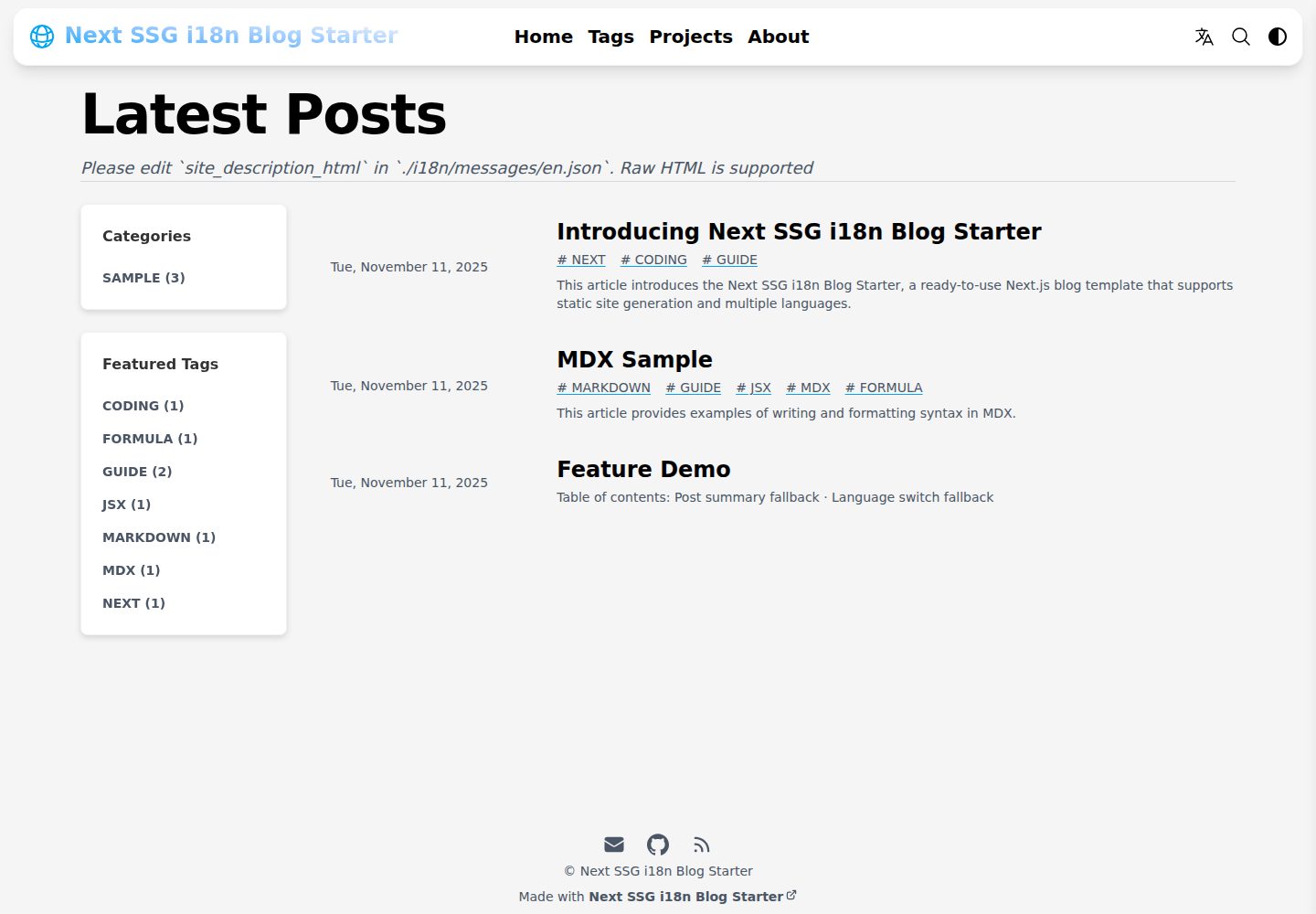
浏览真实页面截图,比较内容排版与手机效果。点击下方缩略图切换,放大查看整页细节。
全部页面与视图 3
截图用于了解视觉与布局,交互效果请以实际项目为准。
采集于 2026-10-14查看来源
值得关注的模板亮点
从已有项目资料中,快速了解它的特点。
多语言 SEO:自动生成 hreflang 标签、Metadata、Open Graph,并用 next-sitemap 生成 robots.txt 与多语言 sitemap
为每种语言生成独立的 RSS/Atom 静态 feed 文件
使用 Contentlayer2 处理 Markdown/MDX,支持 KaTeX 数学公式、GitHub 风格提示块与 rehype-pretty-code 语法高亮
基于 KBar 的零配置站内搜索,以及通过 DisqusJS 集成 Disqus 评论
自动为本地 PNG/JPG 图片生成 WebP 副本,并使用 SVG 占位图
模板详细介绍
这是一个面向多语言博客的 Next.js 静态站点生成(SSG)模板,基于 Tailwind Next.js Starter Blog 改造,使用 next-intl 实现国际化。README 说明其支持自动检测浏览器语言、通过 Cookie 保存语言偏好(默认会话 Cookie,可配置过期时间),并内置简体中文、英文、日文翻译。内容以 Markdown/MDX 编写,由 Contentlayer2 处理,支持 KaTeX 数学公式、GitHub 风格提示块、rehype-pretty-code 语法高亮与代码复制。模板包含多语言 SEO 优化(hreflang、Metadata、Open Graph)、next-sitemap 生成 robots.txt 与多语言 sitemap、feed 生成各语言独立 RSS/Atom 文件,以及基于 KBar 的站内搜索。README 同时说明已从原模板移除 Newsletter、网站分析和引用功能。
使用限制与注意事项:README 未提供性能基准或生产环境验证说明;Disqus 评论需通过 .env 配置并启用 isEnableDisqusJS;部署到子目录需设置 basePath,且构建后需将 out 文件复制到对应子目录;GitHub Pages 自动化部署工作流标注为“即将提供”。
Next.js博客工具站启动器
适合你的项目吗?
适用场景
- 搭建需要同时提供简体中文、英文、日文内容的多语言个人博客
- 以静态站点方式部署博客到 GitHub Pages、Cloudflare Pages、AWS S3 或 Firebase Hosting
- 在 Markdown/MDX 中嵌入 React 组件、数学公式与代码高亮的技术写作
- 需要多语言 SEO 标签、多语言 sitemap 与分语言 RSS 的博客项目
适合人群
- 希望使用 Next.js SSG 构建多语言博客的开发者
- 需要现成 i18n 方案并愿意基于 next-intl 调整翻译文件的用户
- 以 Markdown/MDX 为主要写作方式、需要代码高亮与数学公式支持的博主
- 计划将博客部署到静态托管平台并自行配置构建流程的用户
上手与定制指南
结合仓库当前版本的说明,按下面的资料检查内容、配置与运行要求。
- 1
克隆仓库后运行 npm install 安装依赖,并编辑 ./data/SiteConfig.mjs 配置站点基本信息与社交链接
- 2
在 ./i18n/messages/*.json 中更新 header_title、site_title、site_description 等翻译字段
- 3
替换 ./app/favicon.ico、./app/apple-touch.png、./public/favicon.svg、./public/static/images/avatar.svg 与 twitter-card.jpg 等图标和图片
- 4
启用 Disqus 需参考 ./.env.example 创建 .env 并设置 isEnableDisqusJS 为 true
- 5
构建使用 npm run export,产物在 out 目录;若配置了 basePath,需将 out 内文件复制到对应子目录后再部署
授权与来源资料
使用条件与限制
免费使用 · 保留许可声明本次收录的是公开仓库中采用 MIT 许可的免费版本;免费范围为该版本代码,不代表外部服务或第三方素材免费。
使用时需要遵守
- 允许免费使用、修改、商用和分发该版本代码。
- 分发代码副本或实质性部分时,保留原作者版权声明和完整 MIT 许可声明。
- 代码按现状提供;担保与责任限制以原许可证及适用法律为准。
额外费用与待核对事项
- README 提及 Firebase 集成;启用相关动态功能前需自行配置,并核对 Firebase 的额度与收费。
- 演示图片、字体、图标及其他第三方素材需按各自许可核对,不能仅凭代码的 MIT 许可判断。
- 域名、托管、数据库、支付或 AI 等外部服务可能另外收费。
- 启用 Disqus 评论需参考 ./.env.example 创建 .env 文件并填入 Disqus 配置,同时将 SiteConfig.mjs 中的 isEnableDisqusJS 设为 true。
- 若配置了 basePath(例如 '/blog'),构建后需将 ./out 中的文件复制到 ./out/blog 才能正确部署。
- GitHub Pages 自动化部署工作流(.github/workflows/pages.yml)标注为“即将提供”,当前尚未可用。
- 部署到 Cloudflare Pages 时需在环境变量中设置 SITE_URL 为你的域名。
查看原文依据
Permission is hereby granted, free of charge
许可证原文
To enable Disqus, please refer to `./.env.example` to create a `.env` file containing the Disqus configuration, and make sure that `isEnableDisqusJS` in `SiteConfig.mjs` is set to `true`.
README 原文
**If `basePath` is configured (e.g., '/blog'), the files in `./out` need to be copied to `./out/blog`**
README 原文
A `.github/workflows/pages.yml` configuration file will be available soon. Once enabled, it will automatically build and deploy to GitHub Pages.
README 原文
https://github.com/aaakul/next-ssg-i18n-blog-starter/blob/main/LICENSEhttps://github.com/aaakul/next-ssg-i18n-blog-starter/blob/main/README.md- **Environment variables (advanced) → Add variable**: Variable name: `SITE_URL`, Value: `https://(yourdomain)`
README 原文
DeepSeek 根据仓库许可证和 README 整理 ·2026-10-14。结果仅覆盖已读取资料,依赖、图片、字体及后续条款变更以各自原文为准。
项目核对记录与介绍依据
模板资料
- 来源平台
- GitHub
- 资料与维护参考分
- 资料较完整 · 85 / 100
- 技术栈
- Next.js · React
- 网站类型
- 博客 · 工具站 · 启动器
这个分数如何计算
本站按许可资料(最高30分)、演示链接(12分)、预览图(10分)、Star数(15分)、记录的维护时间(15分)、描述完整度(8分)、功能记录(5分)和分类资料(5分)计算。它不是代码、安全或性能测试,也不是 Google 评分;有链接不代表已实测可用。
这个项目需要核对什么
- 记录的仓库更新时间
- 2026-01-21
- 截图检查日期
- 2026-10-14
已收录演示链接。请用你的内容与屏幕尺寸检查;有演示不代表表单、认证或支付已经可用。
目录记录的主要技术栈是 Next.js。请通过依赖清单和锁文件核对实际版本与托管要求。这些说明基于收录资料,不代表代码审计或部署实测。
查看具体选型方法 →介绍的制作与核对状态
介绍由 AI 辅助整理目录与仓库资料。仓库作者不等于这篇介绍的审核者。
审核声明: codex-user-requested-batch-review-20261015 · 2026-10-15
查看当时使用的来源资料
SHA-256: 3897b1a8c3f10d3f4b2de41ebd690e974968a4e9582acd8206c81095a7a603f8
2026-10-14T14:44:17.109Z
来源文件 / 仓库# Next SSG i18n Blog Starter
- [简体中文](README-zh.md)
- [日本語](README-ja.md)
> [!NOTE]
> This article was translated by AI
[](https://vercel.com/new/clone?repository-url=https%3A%2F%2Fgithub.com%2FAaakul%2Fnext-ssg-i18n-blog-starter)
## Motivation
I was keen on using Next.js's **Static Site Generation (SSG)**. I chose the popular [**Tailwind Next.js Starter Blog**](https://github.com/timlrx/tailwind-nextjs-starter-blog) as the base for my personal blog but ran into many issue when adding **internationalization (i18n)**.
After trying several approaches, I finally achieved stable and efficient i18n support using **[next-intl](https://next-intl.dev/)**, which led to this project. This is a **ready-to-use blog template** that lets you easily set up a **multilingual blog**, even with little coding experience. I also hope this project serves as a good reference for combining SSG and i18n.
---
## Features
Building on the core [features](https://github.com/timlrx/tailwind-nextjs-starter-blog#features) of the Tailwind Next.js Starter Blog, this project integrates i18n and improves the development process. Key features include:
- **Excellent User Experience**: [Near-perfect Lighthouse scores](https://pagespeed.web.dev/analysis/https-next-ssg-i18n-blog-starter-pages-dev-en-blog-sample-intro/mzfi3x5wu6?form_factor=mobile)
- **Out-of-the-Box i18n**: Integrated with [next-intl](https://next-intl.dev/), supporting SSG.
- Automatically detects the user's browser language.
- Saves the user's language preference via a **Cookie** (supports configurable expiration for compliance; defaults to a session cookie).
- Includes translations for Simplified Chinese, English, and Japanese.
- **i18n SEO Optimization**:
- Automatically generates `<link rel="alternate" hreflang="...">` tags, `Metadata`, and `Open Graph` tags.
- Uses [next-sitemap](https://github.com/iamvishnusankar/next-sitemap) to generate `robots.txt` and multilingual `sitemap` files.
- **Multilingual RSS/Atom Feed Support**: Uses [feed](https://github.com/jpmonette/feed) to generate separate static feed files for each language.
- **Modern Styling**: Based on [**Tailwind CSS v4.1**](https://tailwindcss.com/) for easy customization.
- **Zero-Config In-Site Search**: Modified from [`pliny/search`](https://github.com/timlrx/pliny/tree/main/packages/pliny/src/search), powered by [`KBar`](https://github.com/timc1/kbar).
- **Image Loading Optimization**: Automatically create WebP copies for local PNG and JPG images to optimize image loading in modern browsers. Use SVG placeholders to enhance user experience during image loading. For local article banner images in PNG and JPG formats, you do not need to manually set the path for the WebP version.
- **Modern Markdown Authoring**:
- Supports [MDX](https://mdxjs.com/), allowing you to embed JSX/React components directly in Markdown.
- Processes Markdown/MDX files with [`contentlayer2`](https://github.com/timlrx/contentlayer2).
- Syntax highlighting powered by [`rehype-pretty-code`](https://rehype-pretty.pages.dev), including line numbers and highlighting. Code copying is adapted from [`pliny/ui/Pre`](https://github.com/timlrx/pliny/blob/main/packages/pliny/src/ui/Pre.tsx).
- Math formula rendering with [KaTeX](https://katex.org/).
- Supports [GitHub-style alerts](https://docs.github.com/en/get-started/writing-on-github/getting-started-with-writing-and-formatting-on-github/basic-writing-and-formatting-syntax#alerts), implemented via [remark-github-blockquote-alert](https://github.com/jaywcjlove/remark-github-blockquote-alert).
- Support **Disqus** through [DisqusJS](https://github.com/SukkaW/DisqusJS). It can render Disqus comments in regions with internet censorship.
_Features removed from the original template: Newsletter、 website analytics, citation and reference._
---
## Quick Start
1. **Clone the repository**
```bash
git clone https://github.com/Aaakul/next-ssg-i18n-blog-starter.git
```
2. **Install dependencies**
```bash
cd next-ssg-i18n-blog-starter
npm install
```
3. **Configure basic site settings**
Edit `./data/SiteConfig.mjs` to set your website's basic information and social media links.
4. **Localize content**
Update the following fields in `./i18n/messages/*.json`:
- `header_title`: Navigation bar title
- `site_title`: Website title
- `site_description`: Website description
5. **Replace icons and avatar**
Update the following files:
- Site icons: `./app/favicon.ico`, `./app/apple-touch.png`, `./public/favicon.svg`
- Default author avatar: `./public/static/images/avatar.svg`
- Open Graph and Twitter cards image: `./public/static/images/twitter-card.jpg`
6. **Customize the projects page**
Edit `./data/projectsData.ts` to update the projects descriptions.
7. **Configure author information**
Edit the corresponding language file at `./data/authors/.../default.md` (see "Markdown / MDX - Author Page" section).
8. **Add blog posts**
Create new Markdown files in the `./data/blog/` directory (refer to "Markdown / MDX - Articles" section).
---
## Development
Start the development server using Turbopack:
```bash
npm run dev
```
> [!NOTE]
> If you're editing Markdown files or modifying Contentlayer2 config and need **hot reloading**, use **Webpack** mode instead:
```bash
npm run dev:webpack
```
> [!TIP]
> To manually build Contentlayer2 content:
```bash
npm run contentlayer
```
---
## Customization
### Disqus
To enable Disqus, please refer to `./.env.example` to create a `.env` file containing the Disqus configuration, and make sure that `isEnableDisqusJS` in `SiteConfig.mjs` is set to `true`.
### i18n
The project includes built-in support for Simplified Chinese (`zh`), English (`en`), and Japanese (`ja`). Translation files are in `./i18n/messages/`. You can improve these or add more languages.
For information about Translation files, please refer to the [next-intl documentation](https://next-intl.dev/docs/usage/translations)
### Other Customizations
- **Styling**
Adjust the overall style easily via `./tailwind.config.mjs` and `./styles/*.css` to change [Tailwind v4 configuration](https://tailwindcss.com/docs/upgrade-guide) and CSS styles.
To change the theme color (Primary colour), please modify `--color-primary-*: var(--color-sky-*);` in `./styles/global.css` and replace `sky` with another color.
- **MDX Components**
Register custom React components in `components/MDXComponents.tsx` to use them in `.mdx` or `.md` files.
**Note: Use default exports for components to avoid a** [**known Next.js issue**](https://github.com/vercel/next.js/issues/51593).
- **Navigation Bar**
Modify `./components/Header.tsx` to customize the top navigation links.
---
## Markdown / MDX
The project uses [Contentlayer2](https://www.contentlayer.dev/docs/getting-started) to process `.md` and `.mdx` files.
### Frontmatter
Frontmatter follows the [Hugo standard format](https://gohugo.io/content-management/front-matter/). See `./contentlayer.config.ts` for detailed field definitions.
#### Author Page (`./data/authors/**/*.mdx`)
**Required fields:**
```ts
name: string
language: string // Must match a language configured in `SiteConfig`
```
**Optional fields:**
```ts
avatar: string
occupation: string
company: string
mail: string
bilibili: string
youtube: string
mastodon: string
x: string
twitter: string
facebook: string
linkedin: string
threads: string
instagram: string
medium: string
bluesky: string
github: string
```
#### Article (`./data/blog/**/*.mdx`)
**Required fields:**
```ts
title: string
date: string // ISO 8601 format. e.g., '2025-01-01T08:35:00Z'
translationKey: string // Used to link articles across languages
language: string // Must match a language configured in `SiteConfig`
```
**Optional fields:**
```ts
tags: string[]
lastmod: string // Last modified date
draft: boolean // If true, the article will not be built in production
summary: string // Article summary
image: string // The URL of the image used for the article's top banner, Open Graph, and Twitter Card
authors: string[] // Filenames under `./data/authors/`. Defaults to ['default']
layout: string // Page layout. Defaults to 'PostLayout'
isCanonical: boolean // If true, adds <link rel="alternate" hreflang="x-default" ...> tag. Defaults to false
categories: string[] // Article categories
enableComments: boolean // Default to `true`
```
---
**Example: Article with all Frontmatter fields**
```mdx
---
title: 'Introducing Next SSG i18n Blog Starter'
summary: 'This article introduces the Next SSG i18n Blog Starter, a ready-to-use Next.js blog template that supports static site generation and multiple languages'
translationKey: 'intro'
date: '2025-11-11T07:45:00Z'
lastmod: '2025-11-19T07:30:00Z'
tags: ['next', 'coding', 'guide']
categories: ['sample']
language: 'en'
authors: ['default', 'test']
image: '/static/images/twitter-card.jpg'
isCanonical: false
layout: 'PostLayout'
enableComments: true
---
# H1 Title
Some content...
{/* Built-in Table of Contents component */}
<TOCInline toc={props.toc} exclude="section to be excluded" toHeading={2} />
```
> [!IMPORTANT]
> The **`translationKey`** field is vital for **linking multilingual versions** of an article. Ensure all language versions of the same content use the **same value**.
---
## Deployment
This project is built for SSG and deploys easily to any static hosting platform, such as GitHub Pages, Cloudflare Pages, AWS S3, or Firebase Hosting.
### Manual Deployment
Build with Turbopack:
```sh
npm run export
```
After building, upload the `out` directory to your static hosting service.
### Preview Deployment Locally
After building, you can preview the site locally using:
```sh
npx serve out
```
Then open the URL shown in the terminal (default: [http://localhost:3000](http://localhost:3000)) in your browser.
**If `basePath` is configured (e.g., '/blog'), the files in `./out` need to be copied to `./out/blog`**
### Automated Deployment to GitHub Pages
A `.github/workflows/pages.yml` configuration file will be available soon. Once enabled, it will automatically build and deploy to GitHub Pages.
### Automated Deployment to Cloudflare Pages
1. **Fork this repository**.
2. Log in to the [Cloudflare Dashboard](https://dash.cloudflare.com), and go to **Workers and Pages**.
3. Click **Create application → Pages → Import from Git**, connect your GitHub account, and select your forked repository.
4. Set up the build configuration:
- **Build command**: `npm run export`
- **Build output directory**: `out`
- **Environment variables (advanced) → Add variable**: Variable name: `SITE_URL`, Value: `https://(yourdomain)`
5. Click **Save and Deploy**. Cloudflare will complete the first build and deployment automatically.
Every subsequent code push will automatically trigger a new build on Cloudflare Pages.
---
## FAQ
### `basePath` Configuration
Set the `basePath` field in `./data/SiteConfig.mjs` if you're deploying to a subdirectory (e.g., `https://example.com/myblog/`).
### Customizing the `kbar` Command Palette
- [Add Command Palette with kbar - Modern Next.js Blog Series \#26 (Traditional Chinese page)](https://easonchang.com/zh-TW/posts/kbar-command-palette)
- [How can I customize the `kbar` search?](https://github.com/timlrx/tailwind-nextjs-starter-blog/blob/main/faq/customize-kbar-search.md)
### Custom MDX Components
- [How can I add a custom MDX component?](https://github.com/timlrx/tailwind-nextjs-starter-blog/blob/main/faq/custom-mdx-component.md)
---
## Credits
This project is derived from:
- [Tailwind Next.js Starter Blog ](https://github.com/timlrx/tailwind-nextjs-starter-blog)
- [Pliny](https://github.com/timlrx/pliny)
Both created by [**Timothy Lin (timlrx)**](https://github.com/timlrx). Thank you for your invaluable contribution to the open-source community.
---
## License
This project is licensed under the MIT License.
看看同类模板
对比同技术栈与用途的模板,找到更适合的视觉与内容结构。

ai-website-cloner-template
Clone any website with one command using AI coding agents
Next.js · 启动器

Next.js SaaS Starter
Next.js SaaS Starter 是 Next.js 官方维护的 SaaS 起点模板,定位介于学习资源和可直接部署的脚手架之间。
Next.js · SaaS

Next.js Commerce
Next.js Commerce 是 Vercel 团队维护的电商启动模板,基于 Next.js App Router 构建,采用服务端渲染、React Server Components、Server Actions …
Next.js · 电商

Next-js-Boilerplate
Next-js-Boilerplate 是一个面向 Next.js 16、Tailwind CSS 4 和 TypeScript 的启动器,核心定位是开发者体验优先。
Next.js · 启动器

tailwind-nextjs-starter-blog
tailwind-nextjs-starter-blog 是一个面向个人技术博客的 Next.js 与 Tailwind CSS 启动模板,其 v2 版本基于 App Router 与 React Server Comp…
Next.js · 博客

next-forge
Production-grade Turborepo template for Next.js apps.
Next.js · 启动器