Internationalization based on next-intl, with built-in Simplified Chinese, English, and Japanese translations, automatic browser language detection, and cookie-based preference saving
Next.jsReactBlogTool SiteStarter
next-ssg-i18n-blog-starter — Next.js Blog Template
By aaakul
A multilingual blog template based on Next.js static site generation (SSG) and next-intl, with built-in Simplified Chinese, English, and Japanese translations, supporting MDX authoring, multilingual SEO, and RSS.
Explore the design
Compare the page layouts and mobile experience. Open any screenshot for a closer look.
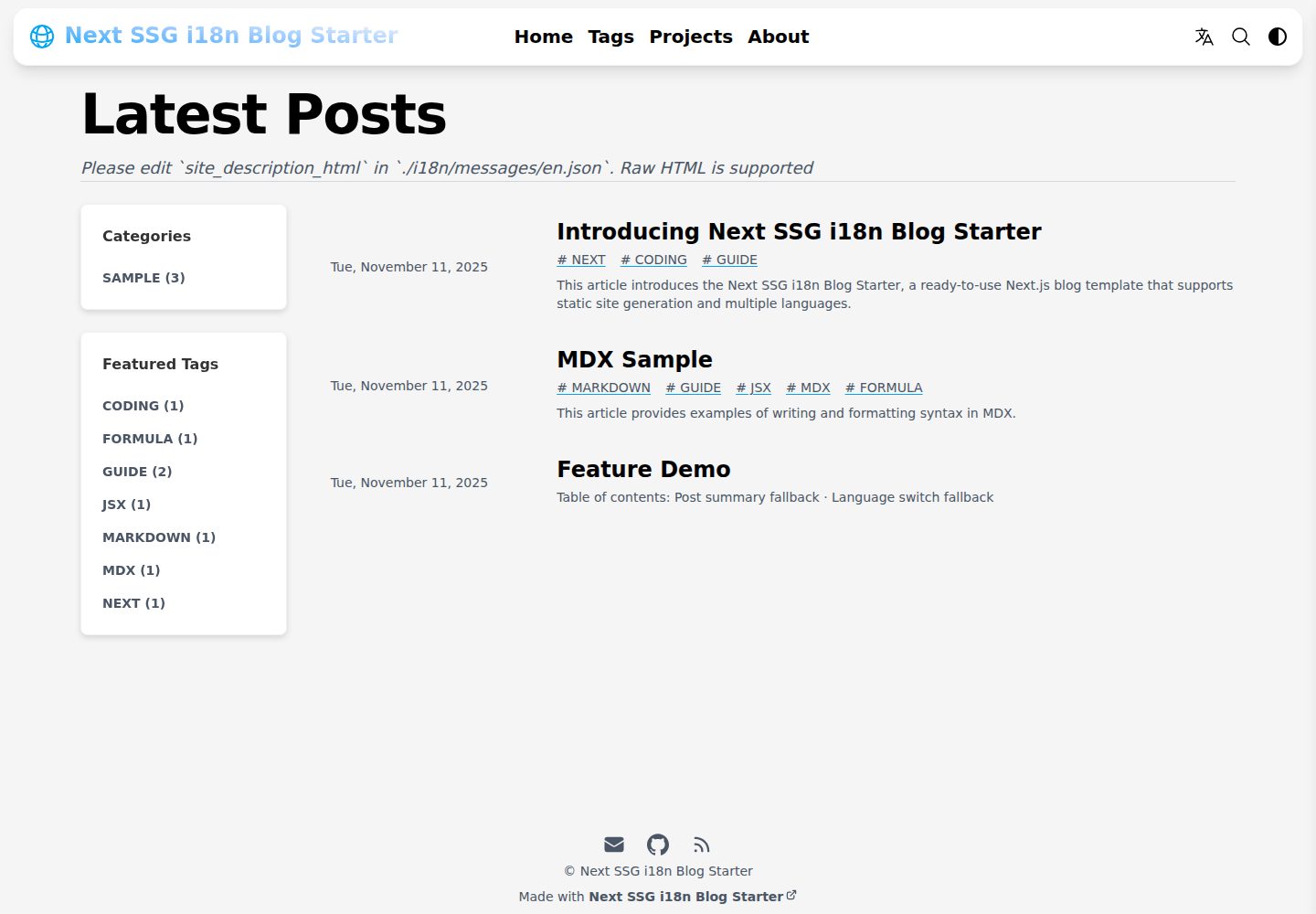
Desktop homepage1 / 3
Desktop captureTop of page
Actual screenshot captured by the server browser.
All pages & views 3
Screenshots show visual appearance; interactive behavior may differ.
Recorded 2026-10-14View source
What stands out
A quick read of the recorded project description.
Multilingual SEO: automatically generates hreflang tags, Metadata, Open Graph, and uses next-sitemap to generate robots.txt and multilingual sitemaps
Generates separate RSS/Atom static feed files for each language
Uses Contentlayer2 to process Markdown/MDX, supporting KaTeX math formulas, GitHub-style callouts, and rehype-pretty-code syntax highlighting
Zero-config KBar-based site search, and Disqus comments integrated via DisqusJS
Automatically generates WebP copies for local PNG/JPG images and uses SVG placeholders
Template Details
This is a Next.js static site generation (SSG) template for multilingual blogs, adapted from the Tailwind Next.js Starter Blog and using next-intl for internationalization. The README states that it supports automatic browser language detection, saves language preferences via cookies (session cookies by default, with configurable expiration), and includes built-in Simplified Chinese, English, and Japanese translations. Content is written in Markdown/MDX and processed by Contentlayer2, supporting KaTeX math formulas, GitHub-style callouts, rehype-pretty-code syntax highlighting, and code copying. The template includes multilingual SEO optimization (hreflang, Metadata, Open Graph), next-sitemap generation of robots.txt and multilingual sitemaps, feed generation of separate RSS/Atom files per language, and KBar-based site search. The README also states that Newsletter, site analytics, and citation features have been removed from the original template.
Usage limitations and notes: The README does not provide performance benchmarks or production environment validation. Disqus comments require configuration via .env and enabling isEnableDisqusJS. Deploying to a subdirectory requires setting basePath, and after building, the out files must be copied to the corresponding subdirectory. The GitHub Pages automated deployment workflow is marked as "coming soon."
Next.jsBlogTool SiteStarter
Is it right for your project?
Use Cases
- Building a multilingual personal blog that provides content in Simplified Chinese, English, and Japanese simultaneously
- Deploying the blog as a static site to GitHub Pages, Cloudflare Pages, AWS S3, or Firebase Hosting
- Technical writing that embeds React components, math formulas, and code highlighting in Markdown/MDX
- Blog projects that require multilingual SEO tags, multilingual sitemaps, and per-language RSS
Suitable For
- Developers who want to build a multilingual blog using Next.js SSG
- Users who need an out-of-the-box i18n solution and are willing to adjust translation files based on next-intl
- Bloggers who primarily write in Markdown/MDX and need code highlighting and math formula support
- Users planning to deploy the blog to a static hosting platform and configure the build process themselves
Getting started & customization
Use these recorded setup notes alongside the repository instructions for your chosen version.
- 1
After cloning the repository, run npm install to install dependencies, and edit ./data/SiteConfig.mjs to configure basic site information and social links
- 2
Update translation fields such as header_title, site_title, and site_description in ./i18n/messages/*.json
- 3
Replace icons and images such as ./app/favicon.ico, ./app/apple-touch.png, ./public/favicon.svg, ./public/static/images/avatar.svg, and twitter-card.jpg
- 4
To enable Disqus, create .env by referring to ./.env.example and set isEnableDisqusJS to true
- 5
Build with npm run export; the output is in the out directory. If basePath is configured, copy the files inside out to the corresponding subdirectory before deploying
License & source material
Usage conditions & limitations
Free to use · keep license noticeThis entry covers the free version of the public repository under the MIT license; the free scope is the code of this version and does not imply that external services or third-party assets are free.
Must comply with when using
- Free use, modification, commercial use, and distribution of this version's code are permitted.
- When distributing copies or substantial portions of the code, retain the original author's copyright notice and the full MIT license notice.
- The code is provided as is; warranties and limitations of liability are governed by the original license and applicable law.
Additional costs & items to verify
- The README mentions Firebase integration; before enabling related dynamic features, you must configure it yourself and check Firebase quotas and charges.
- Demo images, fonts, icons, and other third-party assets must be checked against their respective licenses; they cannot be judged solely by the code's MIT license.
- External services such as domains, hosting, databases, payments, or AI may incur additional charges.
- To enable Disqus comments, create a .env file by referring to ./.env.example and fill in the Disqus configuration, and set isEnableDisqusJS to true in SiteConfig.mjs.
- If basePath is configured (for example, '/blog'), after building you must copy the files in ./out to ./out/blog for correct deployment.
- The GitHub Pages automated deployment workflow (.github/workflows/pages.yml) is marked as "coming soon" and is not currently available.
- When deploying to Cloudflare Pages, set SITE_URL to your domain in the environment variables.
View Original Text Basis
Permission is hereby granted, free of charge
Original License Text
To enable Disqus, please refer to `./.env.example` to create a `.env` file containing the Disqus configuration, and make sure that `isEnableDisqusJS` in `SiteConfig.mjs` is set to `true`.
Original README
**If `basePath` is configured (e.g., '/blog'), the files in `./out` need to be copied to `./out/blog`**
Original README
A `.github/workflows/pages.yml` configuration file will be available soon. Once enabled, it will automatically build and deploy to GitHub Pages.
Original README
https://github.com/aaakul/next-ssg-i18n-blog-starter/blob/main/LICENSEhttps://github.com/aaakul/next-ssg-i18n-blog-starter/blob/main/README.md- **Environment variables (advanced) → Add variable**: Variable name: `SITE_URL`, Value: `https://(yourdomain)`
Original README
Compiled by DeepSeek based on repository license and README ·2026-10-14. Results only cover the materials read; dependencies, images, fonts, and subsequent term changes are subject to their respective original texts.
Project checks & description sources
Template Information
- Source platforms
- GitHub
- Documentation and maintenance reference score
- More documented · 85 / 100
- Technologies
- Next.js · React
- Website type
- Blog · Tool Site · Starter
How this score is calculated
Our heuristic uses license records (up to 30), a demo link (12), a preview (10), stars (15), recorded maintenance (15), description completeness (8), feature records (5) and classification data (5). It is not a code, security or performance test, or a Google score. A link does not establish tested functionality.
What to verify for this project
- Repository update recorded
- 2026-01-21
- Screenshot last checked
- 2026-10-14
A demo link is listed. Check it with your own content and viewport sizes; its presence does not confirm that forms, authentication or payments work.
The catalog identifies Next.js as the primary stack. Check the actual dependency manifest and lockfile for versions and hosting requirements. These notes use recorded metadata, not a code audit or a deployment test.
Use a selection guide →How this description was prepared
AI-assisted description based on catalog records and repository material. Repository authors are not automatically the reviewers of this description.
Review declaration: codex-user-requested-batch-review-20261015 · 2026-10-15
Inspect the recorded source material
SHA-256: 3897b1a8c3f10d3f4b2de41ebd690e974968a4e9582acd8206c81095a7a603f8
2026-10-14T14:44:17.109Z
Source file / repository# Next SSG i18n Blog Starter
- [简体中文](README-zh.md)
- [日本語](README-ja.md)
> [!NOTE]
> This article was translated by AI
[](https://vercel.com/new/clone?repository-url=https%3A%2F%2Fgithub.com%2FAaakul%2Fnext-ssg-i18n-blog-starter)
## Motivation
I was keen on using Next.js's **Static Site Generation (SSG)**. I chose the popular [**Tailwind Next.js Starter Blog**](https://github.com/timlrx/tailwind-nextjs-starter-blog) as the base for my personal blog but ran into many issue when adding **internationalization (i18n)**.
After trying several approaches, I finally achieved stable and efficient i18n support using **[next-intl](https://next-intl.dev/)**, which led to this project. This is a **ready-to-use blog template** that lets you easily set up a **multilingual blog**, even with little coding experience. I also hope this project serves as a good reference for combining SSG and i18n.
---
## Features
Building on the core [features](https://github.com/timlrx/tailwind-nextjs-starter-blog#features) of the Tailwind Next.js Starter Blog, this project integrates i18n and improves the development process. Key features include:
- **Excellent User Experience**: [Near-perfect Lighthouse scores](https://pagespeed.web.dev/analysis/https-next-ssg-i18n-blog-starter-pages-dev-en-blog-sample-intro/mzfi3x5wu6?form_factor=mobile)
- **Out-of-the-Box i18n**: Integrated with [next-intl](https://next-intl.dev/), supporting SSG.
- Automatically detects the user's browser language.
- Saves the user's language preference via a **Cookie** (supports configurable expiration for compliance; defaults to a session cookie).
- Includes translations for Simplified Chinese, English, and Japanese.
- **i18n SEO Optimization**:
- Automatically generates `<link rel="alternate" hreflang="...">` tags, `Metadata`, and `Open Graph` tags.
- Uses [next-sitemap](https://github.com/iamvishnusankar/next-sitemap) to generate `robots.txt` and multilingual `sitemap` files.
- **Multilingual RSS/Atom Feed Support**: Uses [feed](https://github.com/jpmonette/feed) to generate separate static feed files for each language.
- **Modern Styling**: Based on [**Tailwind CSS v4.1**](https://tailwindcss.com/) for easy customization.
- **Zero-Config In-Site Search**: Modified from [`pliny/search`](https://github.com/timlrx/pliny/tree/main/packages/pliny/src/search), powered by [`KBar`](https://github.com/timc1/kbar).
- **Image Loading Optimization**: Automatically create WebP copies for local PNG and JPG images to optimize image loading in modern browsers. Use SVG placeholders to enhance user experience during image loading. For local article banner images in PNG and JPG formats, you do not need to manually set the path for the WebP version.
- **Modern Markdown Authoring**:
- Supports [MDX](https://mdxjs.com/), allowing you to embed JSX/React components directly in Markdown.
- Processes Markdown/MDX files with [`contentlayer2`](https://github.com/timlrx/contentlayer2).
- Syntax highlighting powered by [`rehype-pretty-code`](https://rehype-pretty.pages.dev), including line numbers and highlighting. Code copying is adapted from [`pliny/ui/Pre`](https://github.com/timlrx/pliny/blob/main/packages/pliny/src/ui/Pre.tsx).
- Math formula rendering with [KaTeX](https://katex.org/).
- Supports [GitHub-style alerts](https://docs.github.com/en/get-started/writing-on-github/getting-started-with-writing-and-formatting-on-github/basic-writing-and-formatting-syntax#alerts), implemented via [remark-github-blockquote-alert](https://github.com/jaywcjlove/remark-github-blockquote-alert).
- Support **Disqus** through [DisqusJS](https://github.com/SukkaW/DisqusJS). It can render Disqus comments in regions with internet censorship.
_Features removed from the original template: Newsletter、 website analytics, citation and reference._
---
## Quick Start
1. **Clone the repository**
```bash
git clone https://github.com/Aaakul/next-ssg-i18n-blog-starter.git
```
2. **Install dependencies**
```bash
cd next-ssg-i18n-blog-starter
npm install
```
3. **Configure basic site settings**
Edit `./data/SiteConfig.mjs` to set your website's basic information and social media links.
4. **Localize content**
Update the following fields in `./i18n/messages/*.json`:
- `header_title`: Navigation bar title
- `site_title`: Website title
- `site_description`: Website description
5. **Replace icons and avatar**
Update the following files:
- Site icons: `./app/favicon.ico`, `./app/apple-touch.png`, `./public/favicon.svg`
- Default author avatar: `./public/static/images/avatar.svg`
- Open Graph and Twitter cards image: `./public/static/images/twitter-card.jpg`
6. **Customize the projects page**
Edit `./data/projectsData.ts` to update the projects descriptions.
7. **Configure author information**
Edit the corresponding language file at `./data/authors/.../default.md` (see "Markdown / MDX - Author Page" section).
8. **Add blog posts**
Create new Markdown files in the `./data/blog/` directory (refer to "Markdown / MDX - Articles" section).
---
## Development
Start the development server using Turbopack:
```bash
npm run dev
```
> [!NOTE]
> If you're editing Markdown files or modifying Contentlayer2 config and need **hot reloading**, use **Webpack** mode instead:
```bash
npm run dev:webpack
```
> [!TIP]
> To manually build Contentlayer2 content:
```bash
npm run contentlayer
```
---
## Customization
### Disqus
To enable Disqus, please refer to `./.env.example` to create a `.env` file containing the Disqus configuration, and make sure that `isEnableDisqusJS` in `SiteConfig.mjs` is set to `true`.
### i18n
The project includes built-in support for Simplified Chinese (`zh`), English (`en`), and Japanese (`ja`). Translation files are in `./i18n/messages/`. You can improve these or add more languages.
For information about Translation files, please refer to the [next-intl documentation](https://next-intl.dev/docs/usage/translations)
### Other Customizations
- **Styling**
Adjust the overall style easily via `./tailwind.config.mjs` and `./styles/*.css` to change [Tailwind v4 configuration](https://tailwindcss.com/docs/upgrade-guide) and CSS styles.
To change the theme color (Primary colour), please modify `--color-primary-*: var(--color-sky-*);` in `./styles/global.css` and replace `sky` with another color.
- **MDX Components**
Register custom React components in `components/MDXComponents.tsx` to use them in `.mdx` or `.md` files.
**Note: Use default exports for components to avoid a** [**known Next.js issue**](https://github.com/vercel/next.js/issues/51593).
- **Navigation Bar**
Modify `./components/Header.tsx` to customize the top navigation links.
---
## Markdown / MDX
The project uses [Contentlayer2](https://www.contentlayer.dev/docs/getting-started) to process `.md` and `.mdx` files.
### Frontmatter
Frontmatter follows the [Hugo standard format](https://gohugo.io/content-management/front-matter/). See `./contentlayer.config.ts` for detailed field definitions.
#### Author Page (`./data/authors/**/*.mdx`)
**Required fields:**
```ts
name: string
language: string // Must match a language configured in `SiteConfig`
```
**Optional fields:**
```ts
avatar: string
occupation: string
company: string
mail: string
bilibili: string
youtube: string
mastodon: string
x: string
twitter: string
facebook: string
linkedin: string
threads: string
instagram: string
medium: string
bluesky: string
github: string
```
#### Article (`./data/blog/**/*.mdx`)
**Required fields:**
```ts
title: string
date: string // ISO 8601 format. e.g., '2025-01-01T08:35:00Z'
translationKey: string // Used to link articles across languages
language: string // Must match a language configured in `SiteConfig`
```
**Optional fields:**
```ts
tags: string[]
lastmod: string // Last modified date
draft: boolean // If true, the article will not be built in production
summary: string // Article summary
image: string // The URL of the image used for the article's top banner, Open Graph, and Twitter Card
authors: string[] // Filenames under `./data/authors/`. Defaults to ['default']
layout: string // Page layout. Defaults to 'PostLayout'
isCanonical: boolean // If true, adds <link rel="alternate" hreflang="x-default" ...> tag. Defaults to false
categories: string[] // Article categories
enableComments: boolean // Default to `true`
```
---
**Example: Article with all Frontmatter fields**
```mdx
---
title: 'Introducing Next SSG i18n Blog Starter'
summary: 'This article introduces the Next SSG i18n Blog Starter, a ready-to-use Next.js blog template that supports static site generation and multiple languages'
translationKey: 'intro'
date: '2025-11-11T07:45:00Z'
lastmod: '2025-11-19T07:30:00Z'
tags: ['next', 'coding', 'guide']
categories: ['sample']
language: 'en'
authors: ['default', 'test']
image: '/static/images/twitter-card.jpg'
isCanonical: false
layout: 'PostLayout'
enableComments: true
---
# H1 Title
Some content...
{/* Built-in Table of Contents component */}
<TOCInline toc={props.toc} exclude="section to be excluded" toHeading={2} />
```
> [!IMPORTANT]
> The **`translationKey`** field is vital for **linking multilingual versions** of an article. Ensure all language versions of the same content use the **same value**.
---
## Deployment
This project is built for SSG and deploys easily to any static hosting platform, such as GitHub Pages, Cloudflare Pages, AWS S3, or Firebase Hosting.
### Manual Deployment
Build with Turbopack:
```sh
npm run export
```
After building, upload the `out` directory to your static hosting service.
### Preview Deployment Locally
After building, you can preview the site locally using:
```sh
npx serve out
```
Then open the URL shown in the terminal (default: [http://localhost:3000](http://localhost:3000)) in your browser.
**If `basePath` is configured (e.g., '/blog'), the files in `./out` need to be copied to `./out/blog`**
### Automated Deployment to GitHub Pages
A `.github/workflows/pages.yml` configuration file will be available soon. Once enabled, it will automatically build and deploy to GitHub Pages.
### Automated Deployment to Cloudflare Pages
1. **Fork this repository**.
2. Log in to the [Cloudflare Dashboard](https://dash.cloudflare.com), and go to **Workers and Pages**.
3. Click **Create application → Pages → Import from Git**, connect your GitHub account, and select your forked repository.
4. Set up the build configuration:
- **Build command**: `npm run export`
- **Build output directory**: `out`
- **Environment variables (advanced) → Add variable**: Variable name: `SITE_URL`, Value: `https://(yourdomain)`
5. Click **Save and Deploy**. Cloudflare will complete the first build and deployment automatically.
Every subsequent code push will automatically trigger a new build on Cloudflare Pages.
---
## FAQ
### `basePath` Configuration
Set the `basePath` field in `./data/SiteConfig.mjs` if you're deploying to a subdirectory (e.g., `https://example.com/myblog/`).
### Customizing the `kbar` Command Palette
- [Add Command Palette with kbar - Modern Next.js Blog Series \#26 (Traditional Chinese page)](https://easonchang.com/zh-TW/posts/kbar-command-palette)
- [How can I customize the `kbar` search?](https://github.com/timlrx/tailwind-nextjs-starter-blog/blob/main/faq/customize-kbar-search.md)
### Custom MDX Components
- [How can I add a custom MDX component?](https://github.com/timlrx/tailwind-nextjs-starter-blog/blob/main/faq/custom-mdx-component.md)
---
## Credits
This project is derived from:
- [Tailwind Next.js Starter Blog ](https://github.com/timlrx/tailwind-nextjs-starter-blog)
- [Pliny](https://github.com/timlrx/pliny)
Both created by [**Timothy Lin (timlrx)**](https://github.com/timlrx). Thank you for your invaluable contribution to the open-source community.
---
## License
This project is licensed under the MIT License.
Explore similar templates
Compare previews and descriptions within the same stack and category.

Next.js SaaS Starter
The official Next.js SaaS starter template, integrating email/password authentication, Stripe Checkout subscriptions, a dashboard with user/team CRUD, basic Owner/Member RBAC, and activity logging.
Next.js · SaaS

Next.js Commerce
Vercel's officially maintained Next.js App Router ecommerce starter with deep Shopify integration, offering a complete product catalog, cart, and checkout flow. Core logic is modular for swapping backends, and community provider versions exist for BigCommerce, Medusa, and Saleor.
Next.js · E-commerce

Next-js-Boilerplate
A developer-first Next.js 16 starter with Tailwind CSS 4 and TypeScript, supporting both App Router and Page Router.
Next.js · Starter

tailwind-nextjs-starter-blog
A Next.js and Tailwind CSS blog starter template using Contentlayer for Markdown/MDX, with built-in SEO, code highlighting, and tags. It targets personal technical blogs and migration from Jekyll/Hugo to React, and supports one-click Vercel deployment.
Next.js · Blog

next-forge
next-forge is a Turborepo-based Next.js template maintained by Vercel, positioned as a starting point for SaaS products.
Next.js · Starter

SaaS-Boilerplate
SaaS-Boilerplate is an open-source SaaS starter template built with Next.js App Router, React 19, TypeScript, Tailwind CSS, and Shadcn UI.
Next.js · SaaS