集成 Neon Postgres 与 Drizzle ORM,提供迁移和种子数据脚本
Next.jsReact启动器
next-app-template-demo — Next.js 启动器模板
作者 akshayark97
一个基于 Next.js App Router 的全栈启动模板,集成 Neon Postgres、Drizzle ORM、Stack Auth、Upstash Redis、Vercel Blob、Resend 邮件与 next-intl 多语言,README 提供了从克隆到迁移、环境变量和二次开发的完整步骤。
看看你的网站会是什么样
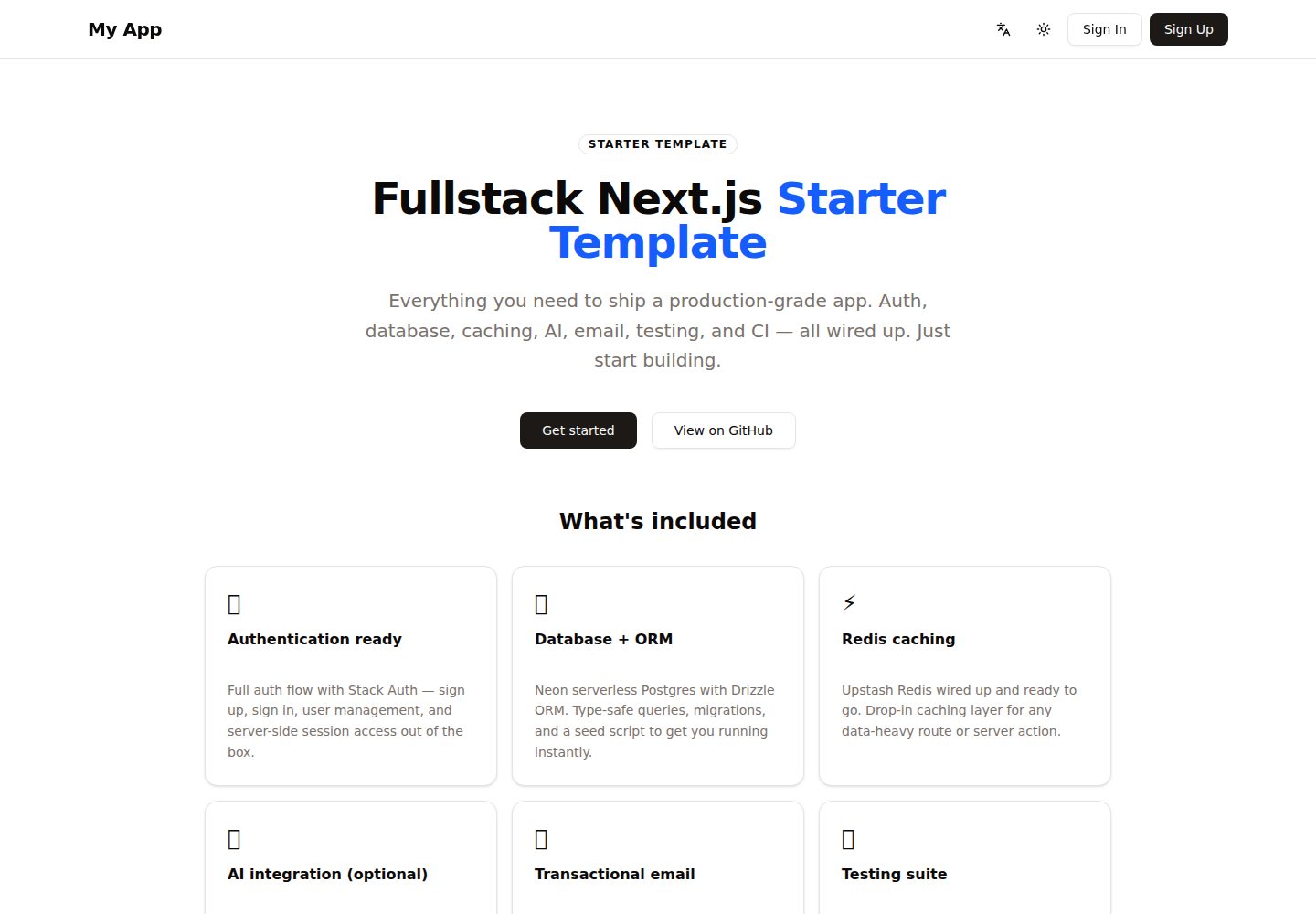
浏览真实页面截图,比较内容排版与手机效果。点击下方缩略图切换,放大查看整页细节。
全部页面与视图 2
截图用于了解视觉与布局,交互效果请以实际项目为准。
采集于 2026-10-14查看来源
值得关注的模板亮点
从已有项目资料中,快速了解它的特点。
使用 Stack Auth 处理认证,认证路由保持非本地化的 /handler 路径
通过 next-intl 实现基于 URL 的多语言路由,内置英语、日语、德语
包含 Upstash Redis 缓存、Vercel Blob 存储与 Resend 事务邮件
可选接入 Vercel AI SDK,默认返回桩实现,需自行选择并配置 provider
提供 Vitest 单元测试与 Playwright E2E 测试脚本
模板详细介绍
该模板是一个 Next.js 全栈启动项目,README 将其描述为“production-ready fullstack Next.js starter”,目标是让开发者克隆后配置环境变量即可开始构建应用,而不必从零搭建基础设施。技术栈覆盖框架(Next.js、React、TypeScript)、数据库(Neon Postgres + Drizzle ORM)、认证(Stack Auth)、缓存(Upstash Redis)、存储(Vercel Blob)、可选 AI(Vercel AI SDK,自带 provider)、邮件(Resend + React Email)、国际化(next-intl,内置英语、日语、德语)、部署(Vercel)、测试(Vitest + Playwright)以及工具链(Biome、Tailwind CSS、shadcn/ui)。
README 给出的上手流程包括:克隆仓库、npm install、复制 .env.example 为 .env.local 并填写值、运行数据库迁移、可选执行种子数据、启动开发服务器,随后访问本地 3000 端口查看起始页。环境变量全部为可选,缺失时依赖它们的特性会被禁用或使用桩实现。二次开发部分说明了如何改品牌(site-config.ts 与 package.json)、重命名示例数据表 resources 并重新生成迁移、替换落地页、在 [locale] 下添加本地化路由、按需接入 AI provider 并配置 src/ai/summarize.ts、以及自定义邮件模板。
国际化采用基于 URL 的语言路由,默认英语,访问根路径会重定向到访问者最匹配的语言,导航栏带语言切换器;消息目录位于 messages/<locale>.json,键类型以 en.json 为准,新增语言需修改 routing.ts、复制并翻译消息文件、在 locale-names.ts 添加显示名。项目结构按 app、ai、cache、components、db、email、i18n、lib、stack 等目录划分,测试分 unit 与 e2e。README 未提供关于性能、安全审计、生产部署细节或各依赖具体版本号的说明。
Next.jsReact启动器
适合你的项目吗?
适用场景
- 需要快速搭建带认证、数据库和国际化能力的 Next.js 全栈项目
- 希望以现成结构为起点,按 README 步骤替换品牌、数据模型和落地页
- 需要为多语言站点(英语、日语、德语)配置 URL 路由和语言切换
- 计划在 Vercel 上部署并接入 Neon、Upstash、Vercel Blob、Resend 等托管服务
- 需要为项目补充 Vitest 单元测试和 Playwright 端到端测试
适合人群
- 熟悉 Next.js App Router 与 TypeScript 的开发者
- 需要全栈启动模板而非仅前端脚手架的团队
- 接受按 README 手动配置环境变量和第三方服务账号的使用者
- 希望使用 Drizzle ORM 管理 Postgres 数据模型的开发者
上手与定制指南
结合仓库当前版本的说明,按下面的资料检查内容、配置与运行要求。
- 1
克隆仓库后执行 npm install,并将 .env.example 复制为 .env.local 填写所需值
- 2
运行 npm run db:migrate 应用数据库迁移,可选执行 npm run db:seed 写入占位数据
- 3
环境变量均为可选,缺少对应变量时相关功能会被禁用或使用桩实现
- 4
使用 npm run dev 启动开发服务器,默认访问 http://localhost:3000
- 5
接入 AI 功能需自行选择 provider、安装适配器并配置 src/ai/summarize.ts
授权与来源资料
使用条件与限制
免费使用 · 保留许可声明本次收录的是公开仓库中采用 MIT 许可的免费版本;免费范围为该版本代码,不代表外部服务或第三方素材免费。
使用时需要遵守
- 允许免费使用、修改、商用和分发该版本代码。
- 分发代码副本或实质性部分时,保留原作者版权声明和完整 MIT 许可声明。
- 代码按现状提供;担保与责任限制以原许可证及适用法律为准。
额外费用与待核对事项
- 演示图片、字体、图标及其他第三方素材需按各自许可核对,不能仅凭代码的 MIT 许可判断。
- 域名、托管、数据库、支付或 AI 等外部服务可能另外收费。
- 所有环境变量均为可选;未配置时依赖它们的特性会被禁用或使用桩实现,因此完整功能需要自行申请并配置第三方服务凭据。
- 数据库功能需要 Neon Postgres 连接字符串(DATABASE_URL),即需要外部 Neon 服务账号。
- 认证功能依赖 Stack Auth,需要配置 Stack Auth 项目 ID 等凭据。
- Redis 缓存功能需要 Upstash Redis 的 REST URL 与 Token,属于外部付费/托管服务。
- 文件上传功能依赖 Vercel Blob,需要 BLOB_READ_WRITE_TOKEN。
- 事务邮件功能依赖 Resend,需要 RESEND_API_KEY。
- AI 功能为可选,需自行选择并配置 LLM provider 的 API Key(如 OPENAI_API_KEY 等)。
- 接入 AI 需自行选择 provider、安装对应适配器并配置 src/ai/summarize.ts,默认仅返回桩实现。
- 部署目标为 Vercel,使用其托管平台。
查看原文依据
Permission is hereby granted, free of charge
许可证原文
Copy `.env.example` to `.env.local`. All variables are optional — the app will start without them, but features that depend on them will be disabled or stub out.
README 原文
| `DATABASE_URL` | Neon Postgres connection string |
README 原文
| `NEXT_PUBLIC_STACK_PROJECT_ID` | Stack Auth |
README 原文
| `UPSTASH_REDIS_REST_URL` | Redis caching |
README 原文
| `BLOB_READ_WRITE_TOKEN` | Vercel Blob uploads |
README 原文
| `RESEND_API_KEY` | Transactional email |
README 原文
| `<PROVIDER>_API_KEY` | AI features (optional) — only if you wire up an LLM provider, e.g. `OPENAI_API_KEY`, `ANTHROPIC_API_KEY`, `GOOGLE_GENERATIVE_AI_API_KEY` |
README 原文
5. **Wire up AI (optional)** — The Vercel AI SDK is included but provider-agnostic. Pick a provider, install its adapter (e.g. `npm install @ai-sdk/openai`), then uncomment and configure `src/ai/summarize.ts`. Skip this entirely if your app doesn't need AI — it returns a stub by default.
README 原文
https://github.com/akshayark97/next-app-template-demo/blob/main/LICENSEhttps://github.com/akshayark97/next-app-template-demo/blob/main/README.md| Deployment | Vercel |
README 原文
DeepSeek 根据仓库许可证和 README 整理 ·2026-10-14。结果仅覆盖已读取资料,依赖、图片、字体及后续条款变更以各自原文为准。
项目核对记录与介绍依据
模板资料
- 来源平台
- GitHub
- 资料与维护参考分
- 资料较完整 · 88 / 100
- 技术栈
- Next.js · React
- 网站类型
- 启动器
这个分数如何计算
本站按许可资料(最高30分)、演示链接(12分)、预览图(10分)、Star数(15分)、记录的维护时间(15分)、描述完整度(8分)、功能记录(5分)和分类资料(5分)计算。它不是代码、安全或性能测试,也不是 Google 评分;有链接不代表已实测可用。
这个项目需要核对什么
- 记录的仓库更新时间
- 2026-06-22
- 截图检查日期
- 2026-10-14
已收录演示链接。请用你的内容与屏幕尺寸检查;有演示不代表表单、认证或支付已经可用。
目录记录的主要技术栈是 Next.js。请通过依赖清单和锁文件核对实际版本与托管要求。这些说明基于收录资料,不代表代码审计或部署实测。
查看具体选型方法 →介绍的制作与核对状态
介绍由 AI 辅助整理目录与仓库资料。仓库作者不等于这篇介绍的审核者。
审核声明: codex-user-requested-batch-review-20261015 · 2026-10-15
查看当时使用的来源资料
SHA-256: cb8cfbe1f8b66173059476b20c688d9b657f96225f47cbc0ca5b6177bd64457b
2026-10-14T19:21:11.361Z
来源文件 / 仓库<img width="3670" height="1916" alt="image" src="https://github.com/user-attachments/assets/70d9b2c2-7099-448c-919d-2eae2580686e" /> # Next.js App Template A production-ready fullstack Next.js starter. Clone it, configure your env vars, and start building your app — not infrastructure. ## Tech stack | Layer | Technology | |---|---| | Framework | Next.js 16, React 19, TypeScript | | Database | Neon (Postgres) + Drizzle ORM | | Auth | Stack Auth | | Caching | Upstash Redis | | Storage | Vercel Blob | | AI (optional) | Vercel AI SDK (bring your own provider) | | Email | Resend + React Email | | i18n | next-intl (English, Japanese, German) | | Deployment | Vercel | | Testing | Vitest + Playwright | | Tooling | Biome, Tailwind CSS v4, shadcn/ui | ## Getting started ```bash # 1. Clone the repo git clone https://github.com/your-org/your-repo my-app cd my-app # 2. Install dependencies npm install # 3. Copy the example env file and fill in your values cp .env.example .env.local # 4. Run database migrations npm run db:migrate # 5. (Optional) Seed the database with placeholder data npm run db:seed # 6. Start the dev server npm run dev ``` Open [http://localhost:3000](http://localhost:3000) to see the starter landing page. ## Environment variables Copy `.env.example` to `.env.local`. All variables are optional — the app will start without them, but features that depend on them will be disabled or stub out. | Variable | Used for | |---|---| | `DATABASE_URL` | Neon Postgres connection string | | `NEXT_PUBLIC_STACK_PROJECT_ID` | Stack Auth | | `NEXT_PUBLIC_STACK_PUBLISHABLE_CLIENT_KEY` | Stack Auth | | `STACK_SECRET_SERVER_KEY` | Stack Auth | | `UPSTASH_REDIS_REST_URL` | Redis caching | | `UPSTASH_REDIS_REST_TOKEN` | Redis caching | | `BLOB_READ_WRITE_TOKEN` | Vercel Blob uploads | | `BLOB_BASE_URL` | Vercel Blob image rendering | | `RESEND_API_KEY` | Transactional email | | `<PROVIDER>_API_KEY` | AI features (optional) — only if you wire up an LLM provider, e.g. `OPENAI_API_KEY`, `ANTHROPIC_API_KEY`, `GOOGLE_GENERATIVE_AI_API_KEY` | ## Building your app 1. **Rebrand** — Edit `src/lib/site-config.ts` to set your app `name`, `description`, and `repoUrl`. These feed the navbar, page title, landing-page buttons, and emails from one place. Also update `name` in `package.json`. 2. **Rename the domain model** — The example table is called `resources`. Rename it (or replace it) in `src/db/schema.ts` and regenerate the migration with `npm run db:generate`. 3. **Update the landing page** — Replace `src/app/(site)/[locale]/page.tsx` with your actual home page, and edit the copy in `messages/*.json`. 4. **Add your routes** — Create localized pages under `src/app/(site)/[locale]/`. Server actions live in `src/app/actions/`. 5. **Wire up AI (optional)** — The Vercel AI SDK is included but provider-agnostic. Pick a provider, install its adapter (e.g. `npm install @ai-sdk/openai`), then uncomment and configure `src/ai/summarize.ts`. Skip this entirely if your app doesn't need AI — it returns a stub by default. 6. **Customise email** — Update `src/email/templates/notification-template.tsx` with your branding. ## Internationalization (i18n) Localized with [next-intl](https://next-intl.dev) using URL-based locale routing. Ships with **English (`en`)**, **Japanese (`ja`)**, and **German (`de`)** — `en` is the default. Visiting `/` redirects to the visitor's best-match locale (e.g. `/en`), and the navbar includes a language switcher. Message catalogs live in `messages/<locale>.json`, and message keys are type-checked against `messages/en.json`. **Add a new language** (e.g. French): 1. Add `"fr"` to `locales` in `src/i18n/routing.ts`. 2. Copy `messages/en.json` → `messages/fr.json` and translate the values. 3. Add a display name in `src/i18n/locale-names.ts` (e.g. `fr: "Français"`). Routing, the language switcher, and message loading pick it up automatically. **A few conventions:** - Use `Link` / `useRouter` from `@/i18n/navigation` for localized routes (they keep the locale prefix); use plain `next/link` for non-localized paths like Stack Auth's `/handler/*`. - Localized pages live under `src/app/(site)/[locale]/`; the auth handler stays non-localized under `src/app/(auth)/` so Stack Auth keeps its fixed `/handler` path. ## Scripts ```bash npm run dev # Start dev server (Turbopack) npm run build # Production build npm run typecheck # TypeScript check npm run lint # Biome lint + format check npm run lint:fix # Auto-fix lint issues npm run db:generate # Generate Drizzle migration npm run db:migrate # Apply migrations npm run db:seed # Seed placeholder data npm run test # Unit tests (Vitest) npm run test:e2e # E2E tests (Playwright) ``` ## Project structure ``` src/ app/ # Next.js App Router pages and server actions ai/ # AI utilities cache/ # Redis client components/ # Shared UI components db/ # Drizzle schema, migrations, seed email/ # Email sending logic and React Email templates i18n/ # next-intl config (routing, navigation, request, locale names) lib/ # Shared data-access helpers stack/ # Stack Auth client/server config proxy.ts # next-intl locale middleware messages/ # Translation catalogs (en.json, ja.json, de.json) test/ unit/ # Vitest unit tests e2e/ # Playwright E2E tests ```
看看同类模板
对比同技术栈与用途的模板,找到更适合的视觉与内容结构。

ai-website-cloner-template
Clone any website with one command using AI coding agents
Next.js · 启动器

Next.js SaaS Starter
Next.js SaaS Starter 是 Next.js 官方维护的 SaaS 起点模板,定位介于学习资源和可直接部署的脚手架之间。
Next.js · SaaS

Next.js Commerce
Next.js Commerce 是 Vercel 团队维护的电商启动模板,基于 Next.js App Router 构建,采用服务端渲染、React Server Components、Server Actions …
Next.js · 电商

Next-js-Boilerplate
Next-js-Boilerplate 是一个面向 Next.js 16、Tailwind CSS 4 和 TypeScript 的启动器,核心定位是开发者体验优先。
Next.js · 启动器

tailwind-nextjs-starter-blog
tailwind-nextjs-starter-blog 是一个面向个人技术博客的 Next.js 与 Tailwind CSS 启动模板,其 v2 版本基于 App Router 与 React Server Comp…
Next.js · 博客

next-forge
Production-grade Turborepo template for Next.js apps.
Next.js · 启动器