Integrates Neon Postgres with Drizzle ORM, providing migration and seed data scripts
Next.jsReactStarter
next-app-template-demo — Next.js Starter Template
By akshayark97
A full-stack starter template based on the Next.js App Router, integrating Neon Postgres, Drizzle ORM, Stack Auth, Upstash Redis, Vercel Blob, Resend email, and next-intl internationalization. The README provides complete steps from cloning to migrations, environment variables, and further development.
Explore the design
Compare the page layouts and mobile experience. Open any screenshot for a closer look.
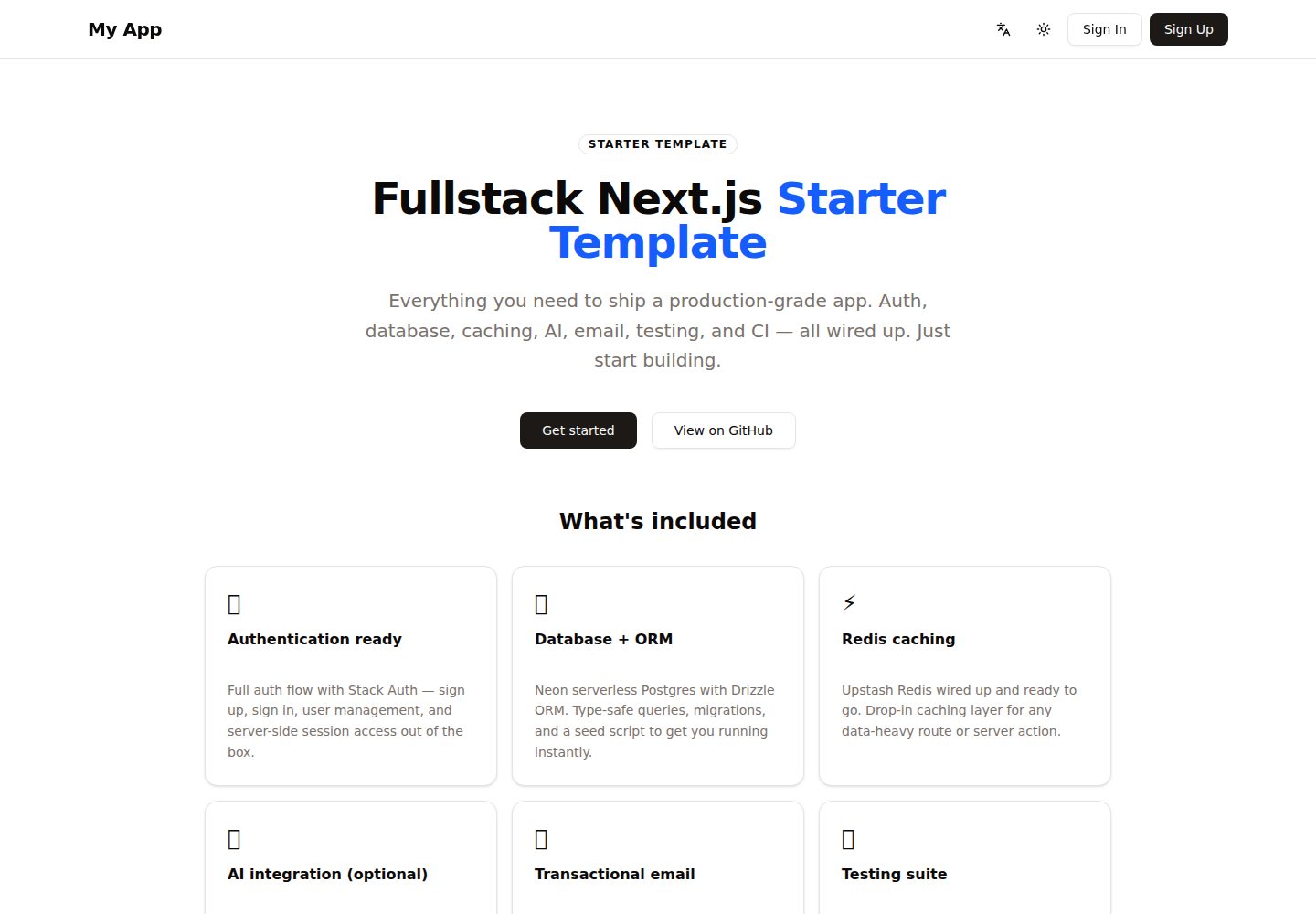
Desktop homepage1 / 2
Desktop captureTop of page
Actual screenshot captured by the server browser.
All pages & views 2
Screenshots show visual appearance; interactive behavior may differ.
Recorded 2026-10-14View source
What stands out
A quick read of the recorded project description.
Uses Stack Auth for authentication, with authentication routes kept at the non-localized /handler path
Implements URL-based multilingual routing via next-intl, with built-in English, Japanese, and German
Includes Upstash Redis caching, Vercel Blob storage, and Resend transactional email
Optional integration with the Vercel AI SDK; returns a stub implementation by default, requiring you to choose and configure a provider
Provides Vitest unit tests and Playwright E2E test scripts
Template Details
This template is a Next.js full-stack starter project. The README describes it as a "production-ready fullstack Next.js starter," with the goal that developers can clone it, configure environment variables, and start building an application without setting up infrastructure from scratch. The tech stack covers the framework (Next.js, React, TypeScript), database (Neon Postgres + Drizzle ORM), authentication (Stack Auth), caching (Upstash Redis), storage (Vercel Blob), optional AI (Vercel AI SDK, with its own provider), email (Resend + React Email), internationalization (next-intl, with built-in English, Japanese, and German), deployment (Vercel), testing (Vitest + Playwright), and tooling (Biome, Tailwind CSS, shadcn/ui).
The README's getting-started flow includes: clone the repository, npm install, copy .env.example to .env.local and fill in values, run database migrations, optionally run seed data, start the development server, then visit local port 3000 to view the starting page. All environment variables are optional; when missing, features that depend on them are disabled or use stub implementations. The further development section explains how to change branding (site-config.ts and package.json), rename the example data table resources and regenerate migrations, replace the landing page, add localized routes under [locale], connect an AI provider as needed and configure src/ai/summarize.ts, and customize email templates.
Internationalization uses URL-based language routing, with English as the default. Visiting the root path redirects to the visitor's best-matching language, and the navigation bar includes a language switcher. Message catalogs are located at messages/<locale>.json, with key types based on en.json. Adding a new language requires modifying routing.ts, copying and translating the message file, and adding the display name in locale-names.ts. The project structure is divided into directories such as app, ai, cache, components, db, email, i18n, lib, and stack, with tests split into unit and e2e. The README does not provide information on performance, security audits, production deployment details, or specific version numbers for each dependency.
Next.jsReactStarter
Is it right for your project?
Use Cases
- Quickly setting up a Next.js full-stack project with authentication, database, and internationalization capabilities
- Using the ready-made structure as a starting point to replace branding, data models, and the landing page according to the README
- Configuring URL routing and language switching for a multilingual site (English, Japanese, German)
- Planning to deploy on Vercel and connect hosted services such as Neon, Upstash, Vercel Blob, and Resend
- Adding Vitest unit tests and Playwright end-to-end tests to the project
Suitable For
- Developers familiar with the Next.js App Router and TypeScript
- Teams that need a full-stack starter template rather than only a frontend scaffold
- Users who accept manually configuring environment variables and third-party service accounts according to the README
- Developers who want to manage Postgres data models using Drizzle ORM
Getting started & customization
Use these recorded setup notes alongside the repository instructions for your chosen version.
- 1
After cloning the repository, run npm install and copy .env.example to .env.local, filling in the required values
- 2
Run npm run db:migrate to apply database migrations; optionally run npm run db:seed to write placeholder data
- 3
All environment variables are optional; when the corresponding variable is missing, related features are disabled or use stub implementations
- 4
Use npm run dev to start the development server, accessible by default at http://localhost:3000
- 5
To integrate AI features, you must choose a provider, install the adapter, and configure src/ai/summarize.ts
License & source material
Usage conditions & limitations
Free to use · keep license noticeThis entry covers the free version under the MIT license in a public repository; the free scope is the code of that version and does not mean external services or third-party assets are free.
Must comply with when using
- You are allowed to use, modify, commercialize, and distribute the code of this version for free.
- When distributing copies or substantial portions of the code, retain the original author's copyright notice and the complete MIT license notice.
- The code is provided as is; warranties and limitations of liability are governed by the original license and applicable law.
Additional costs & items to verify
- Demo images, fonts, icons, and other third-party assets must be checked against their respective licenses and cannot be judged solely by the code's MIT license.
- External services such as domains, hosting, databases, payments, or AI may incur additional charges.
- All environment variables are optional; when not configured, features that depend on them are disabled or use stub implementations, so full functionality requires applying for and configuring third-party service credentials yourself.
- Database functionality requires a Neon Postgres connection string (DATABASE_URL), meaning an external Neon service account is needed.
- Authentication functionality depends on Stack Auth and requires configuring credentials such as the Stack Auth project ID.
- Redis caching functionality requires the Upstash Redis REST URL and Token, which are external paid/hosted services.
- File upload functionality depends on Vercel Blob and requires BLOB_READ_WRITE_TOKEN.
- Transactional email functionality depends on Resend and requires RESEND_API_KEY.
- AI functionality is optional and requires choosing and configuring an LLM provider API Key (such as OPENAI_API_KEY, etc.).
- Integrating AI requires choosing a provider, installing the corresponding adapter, and configuring src/ai/summarize.ts; by default it only returns a stub implementation.
- The deployment target is Vercel, using its hosting platform.
View Original Text Basis
Permission is hereby granted, free of charge
Original License Text
Copy `.env.example` to `.env.local`. All variables are optional — the app will start without them, but features that depend on them will be disabled or stub out.
Original README
| `DATABASE_URL` | Neon Postgres connection string |
Original README
| `NEXT_PUBLIC_STACK_PROJECT_ID` | Stack Auth |
Original README
| `UPSTASH_REDIS_REST_URL` | Redis caching |
Original README
| `BLOB_READ_WRITE_TOKEN` | Vercel Blob uploads |
Original README
| `RESEND_API_KEY` | Transactional email |
Original README
| `<PROVIDER>_API_KEY` | AI features (optional) — only if you wire up an LLM provider, e.g. `OPENAI_API_KEY`, `ANTHROPIC_API_KEY`, `GOOGLE_GENERATIVE_AI_API_KEY` |
Original README
5. **Wire up AI (optional)** — The Vercel AI SDK is included but provider-agnostic. Pick a provider, install its adapter (e.g. `npm install @ai-sdk/openai`), then uncomment and configure `src/ai/summarize.ts`. Skip this entirely if your app doesn't need AI — it returns a stub by default.
Original README
https://github.com/akshayark97/next-app-template-demo/blob/main/LICENSEhttps://github.com/akshayark97/next-app-template-demo/blob/main/README.md| Deployment | Vercel |
Original README
Compiled by DeepSeek based on repository license and README ·2026-10-14. Results only cover the materials read; dependencies, images, fonts, and subsequent term changes are subject to their respective original texts.
Project checks & description sources
Template Information
- Source platforms
- GitHub
- Documentation and maintenance reference score
- More documented · 88 / 100
- Technologies
- Next.js · React
- Website type
- Starter
How this score is calculated
Our heuristic uses license records (up to 30), a demo link (12), a preview (10), stars (15), recorded maintenance (15), description completeness (8), feature records (5) and classification data (5). It is not a code, security or performance test, or a Google score. A link does not establish tested functionality.
What to verify for this project
- Repository update recorded
- 2026-06-22
- Screenshot last checked
- 2026-10-14
A demo link is listed. Check it with your own content and viewport sizes; its presence does not confirm that forms, authentication or payments work.
The catalog identifies Next.js as the primary stack. Check the actual dependency manifest and lockfile for versions and hosting requirements. These notes use recorded metadata, not a code audit or a deployment test.
Use a selection guide →How this description was prepared
AI-assisted description based on catalog records and repository material. Repository authors are not automatically the reviewers of this description.
Review declaration: codex-user-requested-batch-review-20261015 · 2026-10-15
Inspect the recorded source material
SHA-256: cb8cfbe1f8b66173059476b20c688d9b657f96225f47cbc0ca5b6177bd64457b
2026-10-14T19:21:11.361Z
Source file / repository<img width="3670" height="1916" alt="image" src="https://github.com/user-attachments/assets/70d9b2c2-7099-448c-919d-2eae2580686e" /> # Next.js App Template A production-ready fullstack Next.js starter. Clone it, configure your env vars, and start building your app — not infrastructure. ## Tech stack | Layer | Technology | |---|---| | Framework | Next.js 16, React 19, TypeScript | | Database | Neon (Postgres) + Drizzle ORM | | Auth | Stack Auth | | Caching | Upstash Redis | | Storage | Vercel Blob | | AI (optional) | Vercel AI SDK (bring your own provider) | | Email | Resend + React Email | | i18n | next-intl (English, Japanese, German) | | Deployment | Vercel | | Testing | Vitest + Playwright | | Tooling | Biome, Tailwind CSS v4, shadcn/ui | ## Getting started ```bash # 1. Clone the repo git clone https://github.com/your-org/your-repo my-app cd my-app # 2. Install dependencies npm install # 3. Copy the example env file and fill in your values cp .env.example .env.local # 4. Run database migrations npm run db:migrate # 5. (Optional) Seed the database with placeholder data npm run db:seed # 6. Start the dev server npm run dev ``` Open [http://localhost:3000](http://localhost:3000) to see the starter landing page. ## Environment variables Copy `.env.example` to `.env.local`. All variables are optional — the app will start without them, but features that depend on them will be disabled or stub out. | Variable | Used for | |---|---| | `DATABASE_URL` | Neon Postgres connection string | | `NEXT_PUBLIC_STACK_PROJECT_ID` | Stack Auth | | `NEXT_PUBLIC_STACK_PUBLISHABLE_CLIENT_KEY` | Stack Auth | | `STACK_SECRET_SERVER_KEY` | Stack Auth | | `UPSTASH_REDIS_REST_URL` | Redis caching | | `UPSTASH_REDIS_REST_TOKEN` | Redis caching | | `BLOB_READ_WRITE_TOKEN` | Vercel Blob uploads | | `BLOB_BASE_URL` | Vercel Blob image rendering | | `RESEND_API_KEY` | Transactional email | | `<PROVIDER>_API_KEY` | AI features (optional) — only if you wire up an LLM provider, e.g. `OPENAI_API_KEY`, `ANTHROPIC_API_KEY`, `GOOGLE_GENERATIVE_AI_API_KEY` | ## Building your app 1. **Rebrand** — Edit `src/lib/site-config.ts` to set your app `name`, `description`, and `repoUrl`. These feed the navbar, page title, landing-page buttons, and emails from one place. Also update `name` in `package.json`. 2. **Rename the domain model** — The example table is called `resources`. Rename it (or replace it) in `src/db/schema.ts` and regenerate the migration with `npm run db:generate`. 3. **Update the landing page** — Replace `src/app/(site)/[locale]/page.tsx` with your actual home page, and edit the copy in `messages/*.json`. 4. **Add your routes** — Create localized pages under `src/app/(site)/[locale]/`. Server actions live in `src/app/actions/`. 5. **Wire up AI (optional)** — The Vercel AI SDK is included but provider-agnostic. Pick a provider, install its adapter (e.g. `npm install @ai-sdk/openai`), then uncomment and configure `src/ai/summarize.ts`. Skip this entirely if your app doesn't need AI — it returns a stub by default. 6. **Customise email** — Update `src/email/templates/notification-template.tsx` with your branding. ## Internationalization (i18n) Localized with [next-intl](https://next-intl.dev) using URL-based locale routing. Ships with **English (`en`)**, **Japanese (`ja`)**, and **German (`de`)** — `en` is the default. Visiting `/` redirects to the visitor's best-match locale (e.g. `/en`), and the navbar includes a language switcher. Message catalogs live in `messages/<locale>.json`, and message keys are type-checked against `messages/en.json`. **Add a new language** (e.g. French): 1. Add `"fr"` to `locales` in `src/i18n/routing.ts`. 2. Copy `messages/en.json` → `messages/fr.json` and translate the values. 3. Add a display name in `src/i18n/locale-names.ts` (e.g. `fr: "Français"`). Routing, the language switcher, and message loading pick it up automatically. **A few conventions:** - Use `Link` / `useRouter` from `@/i18n/navigation` for localized routes (they keep the locale prefix); use plain `next/link` for non-localized paths like Stack Auth's `/handler/*`. - Localized pages live under `src/app/(site)/[locale]/`; the auth handler stays non-localized under `src/app/(auth)/` so Stack Auth keeps its fixed `/handler` path. ## Scripts ```bash npm run dev # Start dev server (Turbopack) npm run build # Production build npm run typecheck # TypeScript check npm run lint # Biome lint + format check npm run lint:fix # Auto-fix lint issues npm run db:generate # Generate Drizzle migration npm run db:migrate # Apply migrations npm run db:seed # Seed placeholder data npm run test # Unit tests (Vitest) npm run test:e2e # E2E tests (Playwright) ``` ## Project structure ``` src/ app/ # Next.js App Router pages and server actions ai/ # AI utilities cache/ # Redis client components/ # Shared UI components db/ # Drizzle schema, migrations, seed email/ # Email sending logic and React Email templates i18n/ # next-intl config (routing, navigation, request, locale names) lib/ # Shared data-access helpers stack/ # Stack Auth client/server config proxy.ts # next-intl locale middleware messages/ # Translation catalogs (en.json, ja.json, de.json) test/ unit/ # Vitest unit tests e2e/ # Playwright E2E tests ```
Explore similar templates
Compare previews and descriptions within the same stack and category.

Next.js SaaS Starter
The official Next.js SaaS starter template, integrating email/password authentication, Stripe Checkout subscriptions, a dashboard with user/team CRUD, basic Owner/Member RBAC, and activity logging.
Next.js · SaaS

Next.js Commerce
Vercel's officially maintained Next.js App Router ecommerce starter with deep Shopify integration, offering a complete product catalog, cart, and checkout flow. Core logic is modular for swapping backends, and community provider versions exist for BigCommerce, Medusa, and Saleor.
Next.js · E-commerce

Next-js-Boilerplate
A developer-first Next.js 16 starter with Tailwind CSS 4 and TypeScript, supporting both App Router and Page Router.
Next.js · Starter

tailwind-nextjs-starter-blog
A Next.js and Tailwind CSS blog starter template using Contentlayer for Markdown/MDX, with built-in SEO, code highlighting, and tags. It targets personal technical blogs and migration from Jekyll/Hugo to React, and supports one-click Vercel deployment.
Next.js · Blog

next-forge
next-forge is a Turborepo-based Next.js template maintained by Vercel, positioned as a starting point for SaaS products.
Next.js · Starter

SaaS-Boilerplate
SaaS-Boilerplate is an open-source SaaS starter template built with Next.js App Router, React 19, TypeScript, Tailwind CSS, and Shadcn UI.
Next.js · SaaS