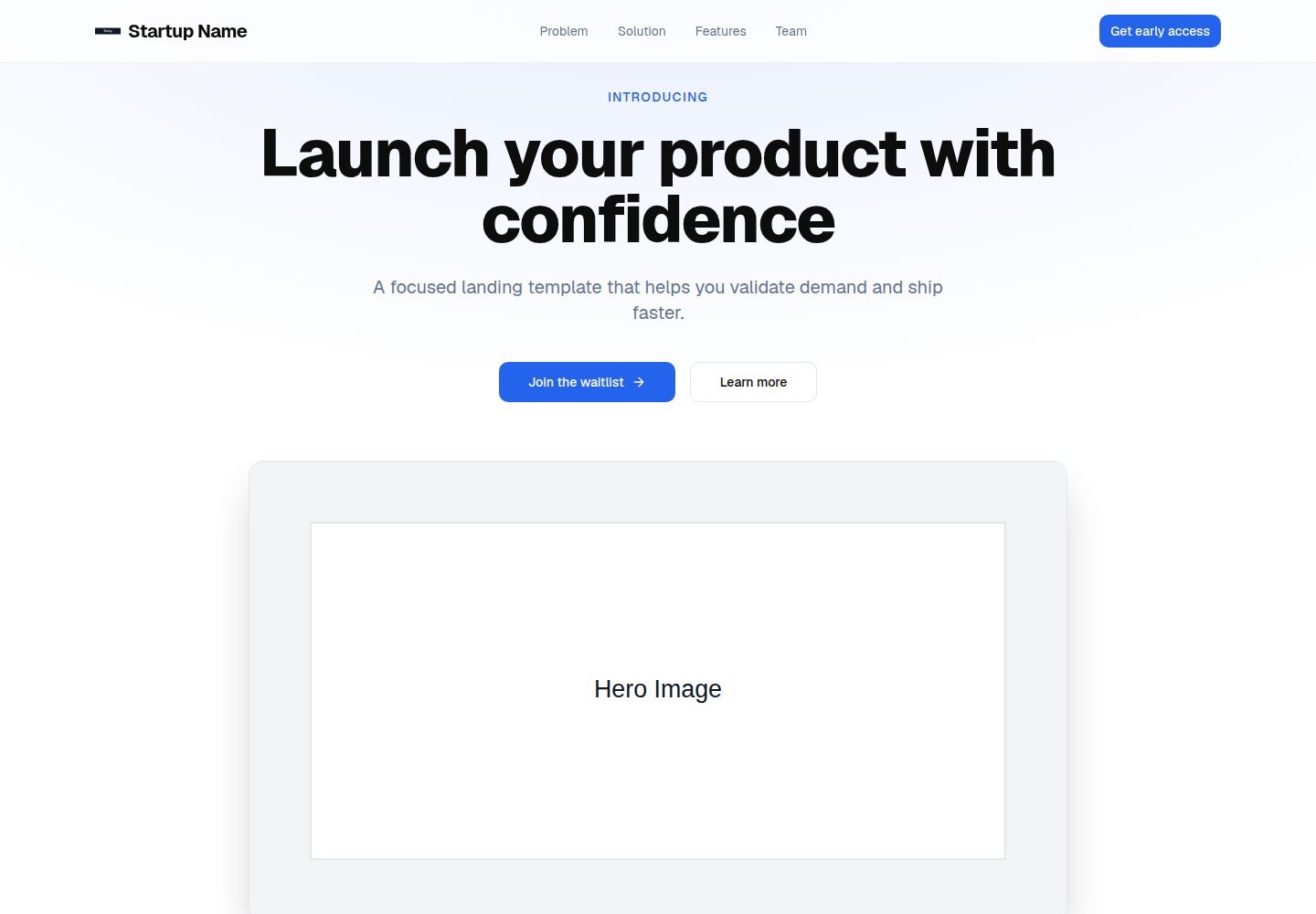
包含 Hero、问题、解决方案、功能、社会证明、团队等落地页区块,可在 config/site.ts 中按区块开关
Next.jsReactSaaS企业官网
startup-landing — Next.js SaaS模板
作者 Alessandro624
面向早期创业团队的 Next.js 落地页模板,包含 Hero、功能、社会证明、团队等区块,并附带带校验的等待列表表单。
看看你的网站会是什么样
浏览真实页面截图,比较内容排版与手机效果。点击下方缩略图切换,放大查看整页细节。
全部页面与视图 2
截图用于了解视觉与布局,交互效果请以实际项目为准。
采集于 2026-10-02查看来源
值得关注的模板亮点
从已有项目资料中,快速了解它的特点。
等待列表表单前后端均使用 Zod 校验,后端路由接入 Supabase 存储与 Resend 通知,并用 Upstash Redis 限流
内置 SEO 元数据、Open Graph、Twitter 卡片、sitemap 与 robots 配置
通过 proxy.ts 设置包含 CSP 的安全响应头
文案、品牌配置、品牌色与静态资源分别集中在 data/content.ts、config/site.ts、globals.css 与 public/ 目录
模板详细介绍
这是一个基于 Next.js App Router 的创业公司落地页模板,仓库采用 MIT 许可。页面结构覆盖 Hero 与 CTA、问题与解决方案、功能、社会证明、团队等常见区块,并可通过 config/site.ts 中的 sections 开关逐块启用或关闭。文案集中在 data/content.ts,品牌名、URL、邮箱、社交账号等在 config/site.ts 中配置,品牌主色通过 styles/globals.css 的 --primary 调整,图片等静态资源放在 public/ 目录。
等待列表表单是模板中功能较完整的部分:前端使用 React Hook Form 与 Zod 校验,后端 /api/waitlist 同样用 Zod 校验输入,并预留 Supabase 存储与 Resend 邮件通知的接入点,API 路由使用 Upstash Redis 做限流。仓库提供 supabase/schema.sql,需在 Supabase SQL 编辑器中执行以建表。
模板还包含 SEO 元数据、Open Graph、Twitter 卡片、sitemap 与 robots,以及通过 proxy.ts 设置的安全响应头(含 CSP);动画使用 Framer Motion,图标使用 Lucide React,字体为 Geist。使用前必须替换所有 [PLACEHOLDER] 占位内容,完整清单见 PLACEHOLDERS.md;siteConfig.url 必须是合法 URL,否则构建会失败。等待列表 API 需要配置 Supabase、Resend 与 Upstash 的环境变量,分析脚本为可选项。
Next.jsSaaS企业官网
适合你的项目吗?
适用场景
- 为早期创业产品搭建介绍页并收集等待列表邮箱
- 为需要快速替换文案与品牌配置的营销落地页提供起始结构
- 在 Next.js 项目中参考带校验、限流与邮件通知的表单 API 实现
适合人群
- 早期创业团队与独立开发者
- 为创业公司制作落地页的代理或自由职业者
- 需要可编辑、结构清晰的落地页代码的产品市场团队
上手与定制指南
结合仓库当前版本的说明,按下面的资料检查内容、配置与运行要求。
- 1
运行 npm install 安装依赖,复制 .env.example 为 .env.local 并填写环境变量
- 2
等待列表 API 需要配置 SUPABASE_URL、SUPABASE_SERVICE_ROLE_KEY、RESEND_API_KEY、RESEND_FROM_EMAIL、RESEND_NOTIFY_EMAIL、UPSTASH_REDIS_REST_URL、UPSTASH_REDIS_REST_TOKEN
- 3
在 Supabase SQL 编辑器中执行 supabase/schema.sql 建表
- 4
替换所有 [PLACEHOLDER] 占位内容,并确保 config/site.ts 中的 siteConfig.url 为合法 URL,否则构建失败
- 5
分析脚本为可选项,按需设置 NEXT_PUBLIC_GA_ID、NEXT_PUBLIC_POSTHOG_KEY 或 NEXT_PUBLIC_META_PIXEL_ID
授权与来源资料
使用条件与限制
免费使用 · 保留许可声明本次收录的是公开仓库中采用 MIT 许可的免费版本;免费范围为该版本代码,不代表外部服务或第三方素材免费。
使用时需要遵守
- 允许免费使用、修改、商用和分发该版本代码。
- 分发代码副本或实质性部分时,保留原作者版权声明和完整 MIT 许可声明。
- 代码按现状提供;担保与责任限制以原许可证及适用法律为准。
额外费用与待核对事项
- 等待列表 API 为可选功能;若启用,必须自行配置 Supabase、Resend 与 Upstash Redis 的账号与 API 密钥(SUPABASE_URL、SUPABASE_SERVICE_ROLE_KEY、RESEND_API_KEY、UPSTASH_REDIS_REST_URL 等),这些均为第三方付费/免费额度受限的外部服务。
- 等待列表表单默认不连接任何数据库或邮件服务,需自行接入 Supabase、Resend 等外部服务并承担其账号与费用。
- 使用等待列表存储前需在 Supabase 中手动执行建表 SQL,依赖外部 Supabase 服务。
- 一键部署按钮需自行替换为个人仓库地址,部署到 Vercel 需自备 Vercel 账号。
- 使用前必须替换全部 [PLACEHOLDER] 占位内容(品牌、文案、图片等),否则页面为占位状态。
- siteConfig.url 必须为合法 URL,否则构建失败。
- 分析脚本(Google Analytics、PostHog、Meta Pixel)为可选,启用需自行申请对应第三方账号与密钥。
- 演示图片、字体、图标及其他第三方素材需按各自许可核对,不能仅凭代码的 MIT 许可判断。
- 域名、托管、数据库、支付或 AI 等外部服务可能另外收费。
查看原文依据
Permission is hereby granted, free of charge
许可证原文
Required for the waitlist API:
README 原文
Connect your database or email provider (Resend, Loops, etc.).
README 原文
Run the SQL in `supabase/schema.sql` inside the Supabase SQL editor.
README 原文
Replace `<YOUR_REPO_URL>` with your GitHub repo URL to enable 1-click deploy.
README 原文
All placeholders use the `[PLACEHOLDER]` format.
README 原文
`siteConfig.url` must be a valid URL or the build will fail.
README 原文
https://github.com/Alessandro624/startup-landing/blob/main/LICENSEhttps://github.com/Alessandro624/startup-landing/blob/main/README.mdSet any of these env vars to enable their scripts in `app/layout.tsx`:
README 原文
DeepSeek 根据仓库许可证和 README 整理 ·2026-10-02。结果仅覆盖已读取资料,依赖、图片、字体及后续条款变更以各自原文为准。
项目核对记录与介绍依据
模板资料
- 来源平台
- GitHub
- 资料与维护参考分
- 资料较完整 · 85 / 100
- 技术栈
- Next.js · React
- 网站类型
- SaaS · 企业官网
这个分数如何计算
本站按许可资料(最高30分)、演示链接(12分)、预览图(10分)、Star数(15分)、记录的维护时间(15分)、描述完整度(8分)、功能记录(5分)和分类资料(5分)计算。它不是代码、安全或性能测试,也不是 Google 评分;有链接不代表已实测可用。
这个项目需要核对什么
- 记录的仓库更新时间
- 2026-05-12
- 截图检查日期
- 2026-10-02
已收录演示链接。请用你的内容与屏幕尺寸检查;有演示不代表表单、认证或支付已经可用。
目录记录的主要技术栈是 Next.js。请通过依赖清单和锁文件核对实际版本与托管要求。这些说明基于收录资料,不代表代码审计或部署实测。
查看具体选型方法 →介绍的制作与核对状态
介绍由 AI 辅助整理目录与仓库资料。仓库作者不等于这篇介绍的审核者。
已完成服务器许可规则与 AI 来源核对;未经过人工编辑审核。
查看当时使用的来源资料
SHA-256: c7afbdf6dbf6280722a4fb0584b52fb191ace6c4814f544328c0b2401b635b23
2026-10-02T06:55:44.542Z
来源文件 / 仓库# Startup Landing - Next.js Template A clean landing page template for startups. Replace placeholders, deploy, done.      --- ## Who this is for - Early-stage founders and teams - Agencies and freelancers building startup landing pages - Product marketing teams that need a fast, editable site --- ## What you get - Hero with CTA - Problem, solution, features, social proof, team - Waitlist form with client and server validation - Supabase storage and Resend notification hooks - Rate limiting on API routes (Upstash) - SEO metadata, Open Graph, Twitter card, sitemap, robots - Security headers with CSP - Framer Motion animations --- ## Tech stack | Layer | Tech | | --- | --- | | Framework | Next.js 16 (App Router) | | Language | TypeScript (strict) | | Styling | Tailwind CSS + CSS variables | | UI | shadcn/ui primitives (Button, Input) | | Animations | Framer Motion | | Icons | Lucide React | | Validation | Zod + React Hook Form | | Data | Supabase | | Email | Resend | | Rate limiting | Upstash Redis | | Fonts | Geist (Vercel) | | Deployment | Vercel | --- ## Demo (Vercel) [](https://vercel.com/new/clone?repository-url=<YOUR_REPO_URL>) Replace `<YOUR_REPO_URL>` with your GitHub repo URL to enable 1-click deploy. --- ## Quick start ```bash # 1. Install npm install # 2. Guided setup (optional) npm run setup # 3. Configure env cp .env.example .env.local # 4. Dev server npm run dev # 5. Type check npm run type-check # 6. Production build npm run build ``` --- ## Replace placeholders (required) All placeholders use the `[PLACEHOLDER]` format. Full list: PLACEHOLDERS.md. 1. **Brand and SEO** - `config/site.ts` -> name, URL, email, socials, analytics - `app/layout.tsx` -> SEO keywords - `app/robots.ts` and `app/sitemap.ts` -> use `siteConfig.url` 2. **Copy** - `data/content.ts` -> text, stats, proof, team 3. **Brand color** - `styles/globals.css` -> update `--primary` 4. **Assets** - `public/` -> logo, hero image, team photos, partner logos, OG image Important: `siteConfig.url` must be a valid URL or the build will fail. --- ## Section toggles Enable or disable sections in `config/site.ts` under `sections`. --- ## Analytics (optional) Set any of these env vars to enable their scripts in `app/layout.tsx`: - `NEXT_PUBLIC_GA_ID` - `NEXT_PUBLIC_POSTHOG_KEY` - `NEXT_PUBLIC_META_PIXEL_ID` --- ## Waitlist API `POST /api/waitlist` validates input with Zod. Connect your database or email provider (Resend, Loops, etc.). ## Supabase schema Run the SQL in `supabase/schema.sql` inside the Supabase SQL editor. --- ## Env vars Required for the waitlist API: - `SUPABASE_URL` - `SUPABASE_SERVICE_ROLE_KEY` - `RESEND_API_KEY` - `RESEND_FROM_EMAIL` - `RESEND_NOTIFY_EMAIL` - `UPSTASH_REDIS_REST_URL` - `UPSTASH_REDIS_REST_TOKEN` Optional analytics: - `NEXT_PUBLIC_GA_ID` - `NEXT_PUBLIC_POSTHOG_KEY` - `NEXT_PUBLIC_META_PIXEL_ID` Server-side env vars must not use the `NEXT_PUBLIC` prefix. --- ## Project structure ```text /app -> Pages and API routes /components/layout -> Navbar, Footer /components/sections -> Landing sections /components/ui -> UI primitives /config/site.ts -> Global config /data/content.ts -> All copy /lib/validations.ts -> Zod schemas /styles/globals.css -> Design tokens /supabase/schema.sql -> Supabase table schema llm.txt -> Project summary for LLM tools proxy.ts -> Security headers ```
看看同类模板
对比同技术栈与用途的模板,找到更适合的视觉与内容结构。

Next.js SaaS Starter
Next.js SaaS Starter 是 Next.js 官方维护的 SaaS 起点模板,定位介于学习资源和可直接部署的脚手架之间。
Next.js · SaaS

SaaS-Boilerplate
🚀🎉📚 SaaS Boilerplate built with Next.js + Tailwind CSS + Shadcn UI + TypeScript. ⚡️ Full-stack React applic…
Next.js · SaaS

create-t3-turbo
create-t3-turbo 是一个面向全栈 TypeScript 的 monorepo 起点,由 T3 OSS 维护,在 Vercel 模板目录中收录。
Next.js · 启动器

saas-starter-kit
🔥 Enterprise SaaS Starter Kit - Kickstart your enterprise app development with the Next.js SaaS boilerplate �…
Next.js · SaaS
saasfly
Your Next SaaS Template or Boilerplate ! A magic trip start with `bun create saasfly` . The more stars, the mo…
Next.js · SaaS

Next-JS-Landing-Page-Starter-Template
🚀 Free NextJS Landing Page Template written in Tailwind CSS 3 and TypeScript ⚡️ Made with developer experienc…
Next.js · 企业官网