基于 HTML 与 Markdown 编写内容,托管于 GitHub Pages
HTML作品集
resume — HTML 作品集模板
作者 allatfortheone
基于 HTML 与 Markdown 的 GitHub Pages 个人作品集模板,由 Academic Pages 派生,适合搭建学术或个人履历型站点。
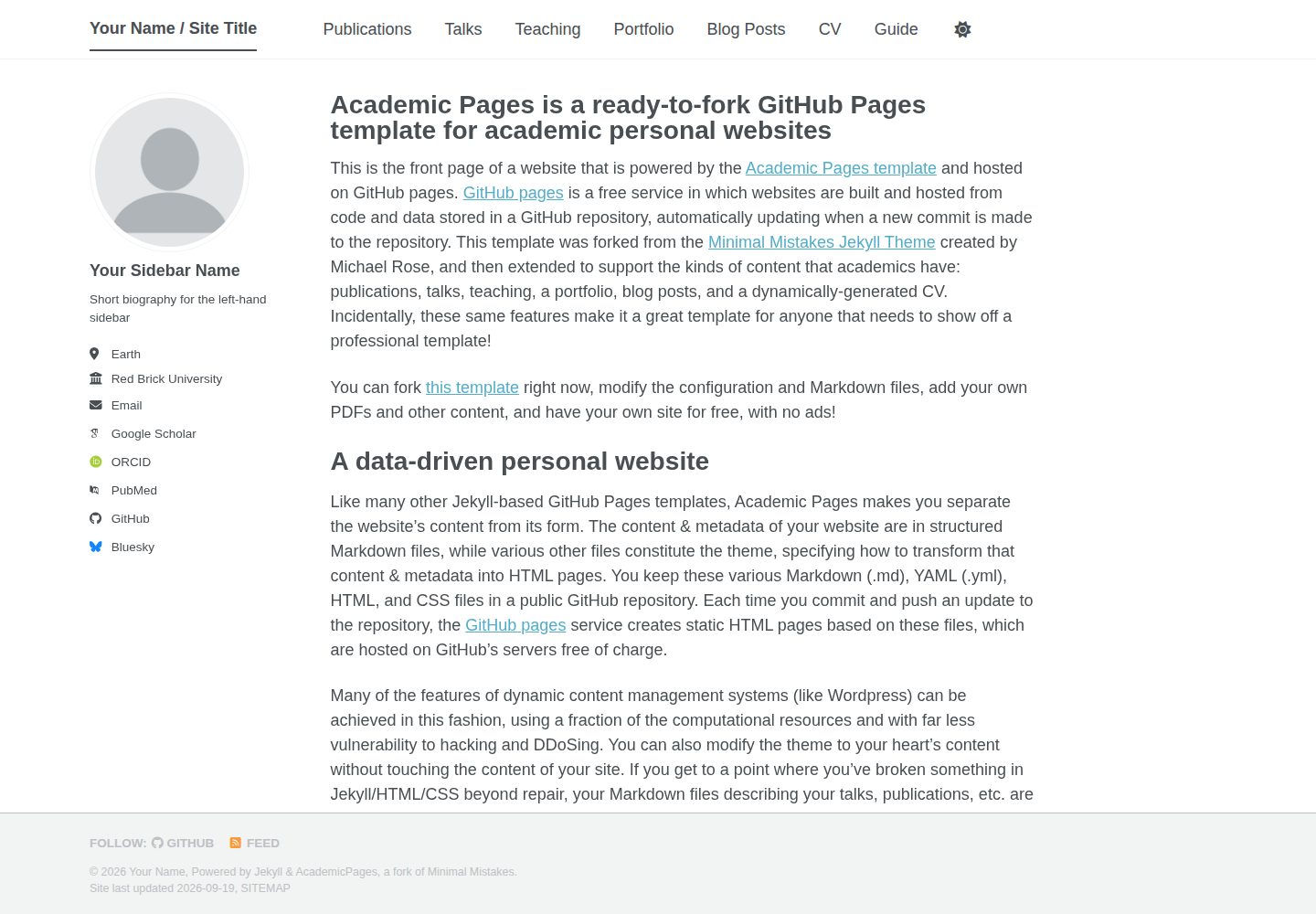
看看你的网站会是什么样
浏览真实页面截图,比较内容排版与手机效果。点击下方缩略图切换,放大查看整页细节。
全部页面与视图 3
截图用于了解视觉与布局,交互效果请以实际项目为准。
采集于 2026-10-02查看来源
值得关注的模板亮点
从已有项目资料中,快速了解它的特点。
通过 Use this template 生成仓库,仓库名即站点地址
支持将 PDF、zip 等文件放入 files/ 目录并提供公开访问路径
提供本地 Jekyll 预览、Docker 容器与 VS Code Dev Container 三种运行方式
可选使用 markdown_generator 中的 Jupyter notebook 或 Python 脚本,从 TSV 文件生成论文与报告类 Markdown
模板详细介绍
该模板是一个面向个人与职业作品集网站的 GitHub Pages 模板,内容以 HTML 与 Markdown 编写。仓库由 allatfortheone 维护,采用 MIT 许可,演示站点为 academicpages.github.io。
使用方式是在 GitHub 上点击 Use this template 生成新仓库,仓库名设为 [你的 GitHub 用户名].github.io,该名称同时作为站点地址;随后配置站点级设置并添加内容。PDF、zip 等文件可放入 files/ 目录,通过 https://[用户名].github.io/files/example.pdf 访问。构建状态可在仓库设置的 GitHub pages 区域查看。
本地预览需要 ruby-dev、bundler 与 nodejs,执行 bundle install 安装依赖,再用 jekyll serve -l -H localhost 在 localhost:4000 启动并自动重建。仓库也提供 Dockerfile 与 docker compose up 方式,以及 VS Code 的 Dev Container 配置。
模板源自 Minimal Mistakes Jekyll 主题,由 Stuart Geiger 派生后独立维护,当前由 Robert Zupko 等人维护。README 说明:若基于模板做了自定义,再同步上游可能产生合并冲突,需要保存 .yml 配置与 Markdown 文件后重新 fork,或手动打补丁;缺陷与功能请求通过上游 GitHub 仓库提交。
HTML作品集
适合你的项目吗?
适用场景
- 搭建个人学术主页,展示论文、报告与个人简介
- 构建职业作品集网站,集中呈现项目与履历信息
- 把已有的 TSV 格式论文或报告数据批量转换为站点页面
适合人群
- 有 GitHub 账号并能使用 GitHub Pages 的个人用户
- 愿意用 Markdown 维护内容、接受 Jekyll 构建流程的使用者
- 需要本地预览或容器化开发环境的开发者
上手与定制指南
结合仓库当前版本的说明,按下面的资料检查内容、配置与运行要求。
- 1
先在 GitHub 点击 Use this template,将仓库命名为 [你的 GitHub 用户名].github.io
- 2
在仓库设置中配置站点级参数,并把附件上传到 files/ 目录
- 3
本地运行需安装 ruby-dev、bundler 与 nodejs,执行 bundle install 后运行 jekyll serve -l -H localhost
- 4
也可使用仓库提供的 Dockerfile 执行 docker compose up,或在 VS Code 中通过 Dev Container 打开
- 5
基于模板自定义后再同步上游可能产生合并冲突,需自行保存配置文件与 Markdown 内容
授权与来源资料
使用条件与限制
免费使用 · 保留许可声明本次收录的是公开仓库中采用 MIT 许可的免费版本;免费范围为该版本代码,不代表外部服务或第三方素材免费。
使用时需要遵守
- 允许免费使用、修改、商用和分发该版本代码。
- 分发代码副本或实质性部分时,保留原作者版权声明和完整 MIT 许可声明。
- 代码按现状提供;担保与责任限制以原许可证及适用法律为准。
额外费用与待核对事项
- 使用该模板需先注册 GitHub 账号并完成邮箱验证,否则无法通过 Use this template 创建仓库并部署站点。
- 仓库必须命名为 [用户名].github.io 且为公开仓库,站点地址即由此决定,无法自定义为其他域名或私有仓库。
- 本地预览需自行安装 ruby-dev、bundler 与 nodejs 等外部依赖,环境不满足时无法本地运行。
- 使用容器方式运行需预先安装 Docker 外部软件,属于额外环境要求。
- 基于模板自定义后再同步上游更新很可能产生合并冲突,需自行保存配置文件与 Markdown 内容或手动打补丁。
- 演示图片、字体、图标及其他第三方素材需按各自许可核对,不能仅凭代码的 MIT 许可判断。
- 域名、托管、数据库、支付或 AI 等外部服务可能另外收费。
查看原文依据
Permission is hereby granted, free of charge
许可证原文
Register a GitHub account if you don't have one and confirm your e-mail (required!)
README 原文
enter your public repository name as "[your GitHub username].github.io", which will also be your website's URL
README 原文
Make sure you have ruby-dev, bundler, and nodejs installed
README 原文
You can use the provided `Dockerfile` to build a container that will run the site for you if you have [Docker](https://www.docker.com/) installed.
README 原文
https://github.com/allatfortheone/resume/blob/master/LICENSEhttps://github.com/allatfortheone/resume/blob/master/README.mdIf you use this template and customize it, you will probably get merge conflicts if you attempt to synchronize.
README 原文
DeepSeek 根据仓库许可证和 README 整理 ·2026-10-02。结果仅覆盖已读取资料,依赖、图片、字体及后续条款变更以各自原文为准。
项目核对记录与介绍依据
模板资料
- 来源平台
- GitHub
- 资料与维护参考分
- 资料一般 · 74 / 100
- 技术栈
- HTML
- 网站类型
- 作品集
这个分数如何计算
本站按许可资料(最高30分)、演示链接(12分)、预览图(10分)、Star数(15分)、记录的维护时间(15分)、描述完整度(8分)、功能记录(5分)和分类资料(5分)计算。它不是代码、安全或性能测试,也不是 Google 评分;有链接不代表已实测可用。
这个项目需要核对什么
- 记录的仓库更新时间
- 2025-06-22
- 截图检查日期
- 2026-10-02
已收录演示链接。请用你的内容与屏幕尺寸检查;有演示不代表表单、认证或支付已经可用。
目录记录的主要技术栈是 HTML。请通过依赖清单和锁文件核对实际版本与托管要求。这些说明基于收录资料,不代表代码审计或部署实测。
查看具体选型方法 →介绍的制作与核对状态
介绍由 AI 辅助整理目录与仓库资料。仓库作者不等于这篇介绍的审核者。
已完成服务器许可规则与 AI 来源核对;未经过人工编辑审核。
查看当时使用的来源资料
SHA-256: 88f94cefc1aff9ccbdce5d08b43aa10b0403e99f68ebf52d13996c590b5892c6
2026-10-02T19:22:13.127Z
来源文件 / 仓库# Academic Pages
**Academic Pages is a GitHub Pages template for personal and professional portfolio-oriented websites.**

# Getting Started
1. Register a GitHub account if you don't have one and confirm your e-mail (required!)
1. Click the "Use this template" button in the top right.
1. On the "New repository" page, enter your public repository name as "[your GitHub username].github.io", which will also be your website's URL.
1. Set site-wide configuration and add your content.
1. Upload any files (like PDFs, .zip files, etc.) to the `files/` directory. They will appear at https://[your GitHub username].github.io/files/example.pdf.
1. Check status by going to the repository settings, in the "GitHub pages" section
1. (Optional) Use the Jupyter notebooks or python scripts in the `markdown_generator` folder to generate markdown files for publications and talks from a TSV file.
See more info at https://academicpages.github.io/
## Running locally
When you are initially working on your website, it is very useful to be able to preview the changes locally before pushing them to GitHub. To work locally you will need to:
1. Clone the repository and made updates as detailed above.
### Using a different IDE
1. Make sure you have ruby-dev, bundler, and nodejs installed
On most Linux distribution and [Windows Subsystem Linux](https://learn.microsoft.com/en-us/windows/wsl/about) the command is:
```bash
sudo apt install ruby-dev ruby-bundler nodejs
```
If you see error `Unable to locate package ruby-bundler`, `Unable to locate package nodejs `, run the following:
```bash
sudo apt update && sudo apt upgrade -y
```
then try run `sudo apt install ruby-dev ruby-bundler nodejs` again.
On MacOS the commands are:
```bash
brew install ruby
brew install node
gem install bundler
```
1. Run `bundle install` to install ruby dependencies. If you get errors, delete Gemfile.lock and try again.
If you see file permission error like `Fetching bundler-2.6.3.gem ERROR: While executing gem (Gem::FilePermissionError) You don't have write permissions for the /var/lib/gems/3.2.0 directory.` or `Bundler::PermissionError: There was an error while trying to write to /usr/local/bin.`
Install Gems Locally (Recommended):
```bash
bundle config set --local path 'vendor/bundle'
```
then try run `bundle install` again. If succeeded, you should see a folder called `vendor` and `.bundle`.
1. Run `jekyll serve -l -H localhost` to generate the HTML and serve it from `localhost:4000` the local server will automatically rebuild and refresh the pages on change.
You may also try `bundle exec jekyll serve -l -H localhost` to ensure jekyll to use specific dependencies on your own local machine.
If you are running on Linux it may be necessary to install some additional dependencies prior to being able to run locally: `sudo apt install build-essential gcc make`
## Using Docker
Working from a different OS, or just want to avoid installing dependencies? You can use the provided `Dockerfile` to build a container that will run the site for you if you have [Docker](https://www.docker.com/) installed.
You can build and execute the container by running the following command in the repository:
```bash
chmod -R 777 .
docker compose up
```
You should now be able to access the website from `localhost:4000`.
### Using the DevContainer in VS Code
If you are using [Visual Studio Code](https://code.visualstudio.com/) you can use the [Dev Container](https://code.visualstudio.com/docs/devcontainers/containers) that comes with this Repository. Normally VS Code detects that a development coontainer configuration is available and asks you if you want to use the container. If this doesn't happen you can manually start the container by **F1->DevContainer: Reopen in Container**. This restarts your VS Code in the container and automatically hosts your academic page locally on http://localhost:4000. All changes will be updated live to that page after a few seconds.
# Maintenance
Bug reports and feature requests to the template should be [submitted via GitHub](https://github.com/academicpages/academicpages.github.io/issues/new/choose). For questions concerning how to style the template, please feel free to start a [new discussion on GitHub](https://github.com/academicpages/academicpages.github.io/discussions).
This repository was forked (then detached) by [Stuart Geiger](https://github.com/staeiou) from the [Minimal Mistakes Jekyll Theme](https://mmistakes.github.io/minimal-mistakes/), which is © 2016 Michael Rose and released under the MIT License (see LICENSE.md). It is currently being maintained by [Robert Zupko](https://github.com/rjzupkoii) and additional maintainers would be welcomed.
## Bugfixes and enhancements
If you have bugfixes and enhancements that you would like to submit as a pull request, you will need to [fork](https://docs.github.com/en/pull-requests/collaborating-with-pull-requests/working-with-forks/fork-a-repo) this repository as opposed to using it as a template. This will also allow you to [synchronize your copy](https://docs.github.com/en/pull-requests/collaborating-with-pull-requests/working-with-forks/syncing-a-fork) of template to your fork as well.
Unfortunately, one logistical issue with a template theme like Academic Pages that makes it a little tricky to get bug fixes and updates to the core theme. If you use this template and customize it, you will probably get merge conflicts if you attempt to synchronize. If you want to save your various .yml configuration files and markdown files, you can delete the repository and fork it again. Or you can manually patch.
---
<div align="center">

[](https://github.com/academicpages/academicpages.github.io/graphs/contributors)
[](https://github.com/academicpages/academicpages.github.io/releases/latest)
[](https://github.com/academicpages/academicpages.github.io/blob/master/LICENSE)
[](https://github.com/academicpages/academicpages.github.io)
[](https://github.com/academicpages/academicpages.github.io/fork)
</div>
看看同类模板
对比同技术栈与用途的模板,找到更适合的视觉与内容结构。

simplefolio
⚡️ A minimal portfolio template for Developers
HTML · 作品集

Freelancer
Freelancer 是 Start Bootstrap 出品的单页作品集模板,专为自由职业者、设计师和小型工作室设计。 页面结构清晰,包含多个内容区块、响应式作品集网格,每个作品项目配有模态窗口展示详情。
HTML · 作品集

Resume
Resume 是 Start Bootstrap 推出的简历与 CV 主题,基于 Bootstrap 构建,采用固定侧边栏加内容区块的结构。
HTML · 作品集

Creative
Creative 是 Start Bootstrap 团队维护的一款单页营销模板,定位明确:为创意机构或产品服务提供一个以作品展示和行动号召为核心的落地页。
HTML · 企业官网

Grayscale
Grayscale 是 Start Bootstrap 出品的深色系单页 HTML 模板,基于 Bootstrap 构建。 它的视觉重心放在大尺寸首屏和清晰的内容分区上,整体氛围偏暗,适合摄影、活动或品牌叙事类网站。
HTML · 企业官网

startbootstrap-stylish-portfolio
Stylish Portfolio 是 Start Bootstrap 维护的单页作品集主题,基于 Bootstrap 构建,采用多个内容区块加离屏导航菜单的结构。
HTML · 作品集