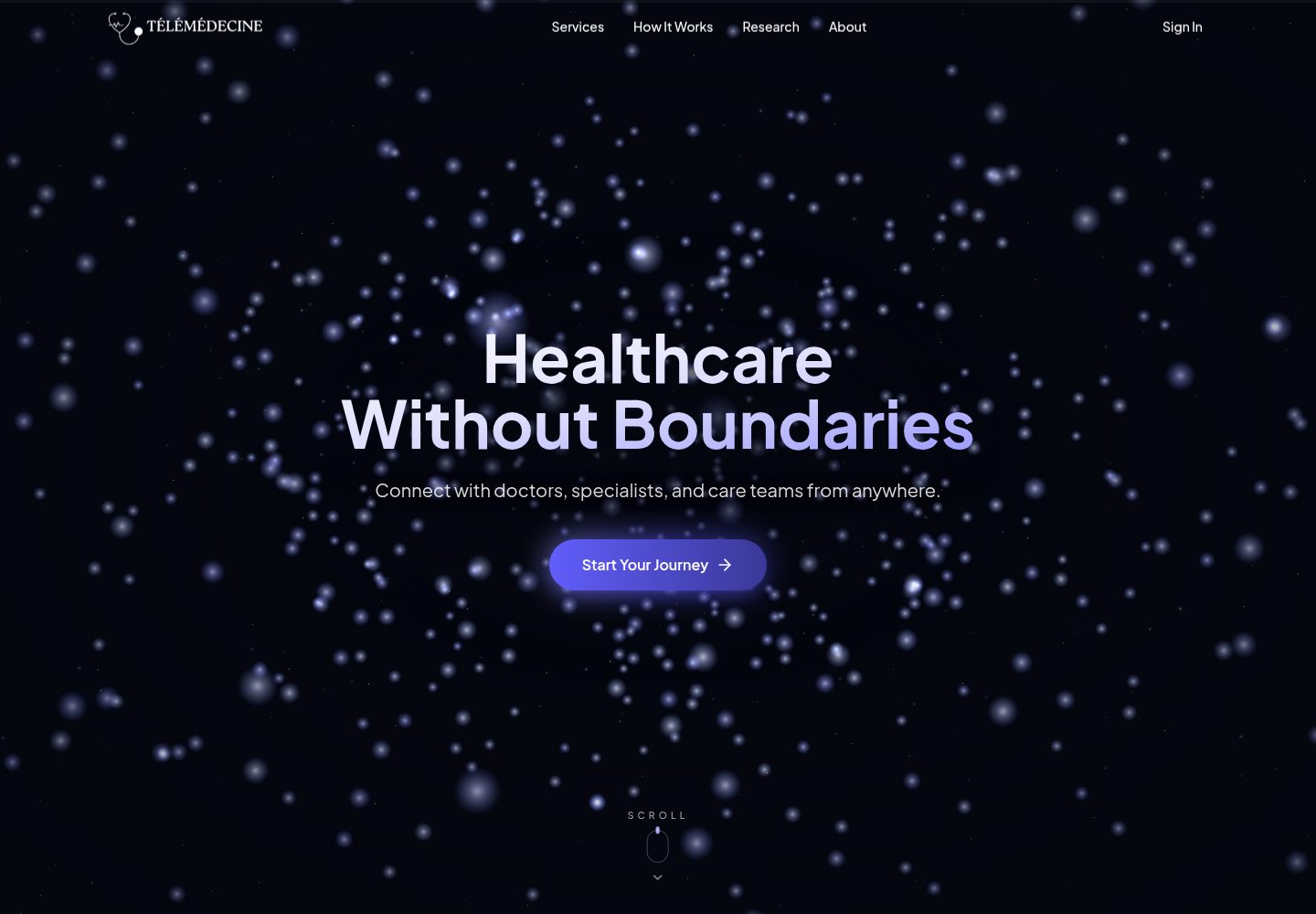
患者端支持按姓名、专科或医院搜索已审核医生,并通过 Stripe Checkout 完成预约支付
Next.jsReact启动器
telemedicine-website — Next.js 启动器模板
作者 aminezouari52
基于 Next.js 与 Express 的开源远程医疗启动器,包含医生搜索与 Stripe 预约支付、LiveKit 视频问诊、AI 健康助手,以及患者、医生、管理员三种角色界面。
看看你的网站会是什么样
浏览真实页面截图,比较内容排版与手机效果。点击下方缩略图切换,放大查看整页细节。
全部页面与视图 2
截图用于了解视觉与布局,交互效果请以实际项目为准。
采集于 2026-10-03查看来源
值得关注的模板亮点
从已有项目资料中,快速了解它的特点。
问诊室集成 LiveKit,提供视频、音频和文字聊天,问诊按整点自动开始与关闭
AI 健康助手可回答症状、化验结果、用药和生命体征问题,支持读取上传的 PDF 与图片
医生端包含资料填写与管理员审核流程、即将到来的问诊列表、历史患者和站内通知
管理员可审核、拒绝和编辑医生资料,并管理患者记录
提供可选演示模式,内置医生与患者登录账号,无需注册即可体验两端流程
模板详细介绍
这是一个远程医疗应用的启动器模板,仓库采用 MIT 许可,代码可免费使用、修改、商用和分发。前端使用 Next.js(App Router),后端为 Node.js + Express + MongoDB,认证使用 Clerk,视频与聊天使用 LiveKit,支付使用 Stripe Checkout,AI 助手通过 Gemini 接入并配合 MongoDB Atlas Vector Search 做向量检索。
功能按角色划分。患者可以按姓名、专科或医院搜索已审核医生,选择时段并通过 Stripe Checkout 支付(未设置价格的医生可免费预约),在预约整点进入包含视频、音频和聊天的问诊室,向 AI 助手询问症状、化验结果、用药和生命体征,并可上传 PDF 与图片供其读取;还能在仪表盘、日历和历史列表中查看问诊记录。医生可以注册并填写专科、医院、价格、每周排班和照片等资料,等待管理员审核,查看即将到来的问诊与历史患者,并接收新预约和问诊开始的站内通知。管理员可以审核、拒绝和编辑医生资料,并管理患者记录。
平台层面,患者与医生有独立的注册页面,问诊按整点自动开始和关闭,落地页为滚动驱动的 3D 页面,布局适配手机、平板和桌面,并提供可选的演示模式,内置现成的医生和患者登录账号。
使用前需要准备 Node.js 20 或更高版本、pnpm 8,以及 MongoDB Atlas、Clerk、Cloudinary、LiveKit、Google AI Studio 和 Stripe 的免费账号;前后端分别通过 .env 文件配置密钥,前端默认运行在 3000 端口,后端在 8000 端口。仓库提供配置、示例数据、支付、AI 助手、演示模式、品牌替换等文档。需要注意的是,模板代码的 MIT 许可不覆盖演示图片、字体、图标等第三方素材,域名、托管、数据库、支付和 AI 等外部服务也可能另行收费。
Next.js启动器
适合你的项目吗?
适用场景
- 在远程医疗产品立项阶段,用现成的前后端结构快速搭建可演示的患者预约与视频问诊流程
- 为诊所或医生团队搭建带排班、审核和支付环节的在线问诊入口
- 在已有医疗系统中验证 LiveKit 视频问诊与 Stripe 支付流程的集成方式
- 作为教学或原型项目,研究 Next.js 与 Express 分离架构下的多角色认证与 AI 助手实现
适合人群
- 需要远程医疗应用起点代码、并愿意自行配置 MongoDB、Clerk、LiveKit、Stripe 和 Gemini 等外部服务的开发者
- 希望基于 MIT 许可代码进行二次开发和品牌替换的团队
- 想参考患者、医生、管理员三角色完整流程与视频问诊实现的前端或全栈工程师
上手与定制指南
结合仓库当前版本的说明,按下面的资料检查内容、配置与运行要求。
- 1
需要 Node.js 20 或更高版本与 pnpm 8,并准备 MongoDB Atlas、Clerk、Cloudinary、LiveKit、Google AI Studio 和 Stripe 的账号
- 2
分别从 apps/backend/.env.example 和 apps/frontend/.env.example 创建 .env 文件并填写各服务密钥
- 3
使用 pnpm dev 同时启动前后端,前端默认在 http://localhost:3000,后端默认在 http://localhost:8000
- 4
可选执行 pnpm -F=backend seed:all 写入示例医生、患者和问诊数据,该命令会先删除已有的医生、患者和问诊记录
- 5
演示图片、字体、图标等第三方素材需按各自许可单独核对,外部服务可能产生额外费用
授权与来源资料
使用条件与限制
免费使用 · 保留许可声明本次收录的是公开仓库中采用 MIT 许可的免费版本;免费范围为该版本代码,不代表外部服务或第三方素材免费。
使用时需要遵守
- 允许免费使用、修改、商用和分发该版本代码。
- 分发代码副本或实质性部分时,保留原作者版权声明和完整 MIT 许可声明。
- 代码按现状提供;担保与责任限制以原许可证及适用法律为准。
额外费用与待核对事项
- 使用前必须自行注册并配置 MongoDB Atlas、Clerk、Cloudinary、LiveKit、Google AI Studio 和 Stripe 账号,并填写各自密钥;缺少这些外部服务账号时应用无法运行。
- 执行 pnpm -F=backend seed:all 会先删除数据库中已有的医生、患者和问诊记录,仅应在示例或开发环境中使用。
- 演示账号仅用于体验线上演示站点,正式部署时应按文档移除演示登录,避免未授权访问。
- 演示图片、字体、图标及其他第三方素材需按各自许可核对,不能仅凭代码的 MIT 许可判断。
- 域名、托管、数据库、支付或 AI 等外部服务可能另外收费。
查看原文依据
Permission is hereby granted, free of charge
许可证原文
You need Node.js 20 or later, [pnpm](https://pnpm.io/) 8, and free accounts with MongoDB Atlas, Clerk, Cloudinary, LiveKit, Google AI Studio and Stripe.
README 原文
This deletes existing doctors, patients and consultations first.
README 原文
https://github.com/aminezouari52/telemedicine-website/blob/master/LICENCEhttps://github.com/aminezouari52/telemedicine-website/blob/master/README.mdthe sign-in page lists a demo patient and a demo doctor account, so you can try both sides without signing up.
README 原文
DeepSeek 根据仓库许可证和 README 整理 ·2026-10-03。结果仅覆盖已读取资料,依赖、图片、字体及后续条款变更以各自原文为准。
项目核对记录与介绍依据
模板资料
- 来源平台
- GitHub
- 资料与维护参考分
- 资料较完整 · 87 / 100
- 技术栈
- Next.js · React
- 网站类型
- 启动器
这个分数如何计算
本站按许可资料(最高30分)、演示链接(12分)、预览图(10分)、Star数(15分)、记录的维护时间(15分)、描述完整度(8分)、功能记录(5分)和分类资料(5分)计算。它不是代码、安全或性能测试,也不是 Google 评分;有链接不代表已实测可用。
这个项目需要核对什么
- 记录的仓库更新时间
- 2026-10-03
- 截图检查日期
- 2026-10-03
已收录演示链接。请用你的内容与屏幕尺寸检查;有演示不代表表单、认证或支付已经可用。
目录记录的主要技术栈是 Next.js。请通过依赖清单和锁文件核对实际版本与托管要求。这些说明基于收录资料,不代表代码审计或部署实测。
查看具体选型方法 →介绍的制作与核对状态
介绍由 AI 辅助整理目录与仓库资料。仓库作者不等于这篇介绍的审核者。
审核声明: [email protected] · 2026-10-04
查看当时使用的来源资料
SHA-256: 80d3103ac306ebd3ae2b0288a584643f0197eb161f9031d081d6c825db72126b
2026-10-03T16:22:47.016Z
来源文件 / 仓库# Télémédecine An open-source telemedicine boilerplate: a working telehealth app you can rebrand and build your product on. It's built with Next.js, Express, MongoDB, Clerk, LiveKit, Stripe and Gemini. **[Live demo](https://bucolic-malabi-07ed64.netlify.app)**: the sign-in page lists a demo patient and a demo doctor account, so you can try both sides without signing up.  ## Table of Contents - [What's included](#whats-included) - [Features](#features) - [Screenshots](#screenshots) - [Tech stack](#tech-stack) - [Getting started](#getting-started) - [Documentation](#documentation) - [Roadmap](#roadmap) - [Contributing](#contributing) - [License](#license) ## Features **Patients** - Search approved doctors by name, specialty or hospital. - Book a time slot and pay through Stripe Checkout. Doctors without a price are booked for free. - Join the consultation when its hour starts, with video, audio and chat. - Ask the AI assistant about symptoms, lab results, medications and vital signs. It can read uploaded PDFs and images, and answers questions about the patient's own profile and past consultations. See [AI assistant](docs/ai-assistant.md). - Follow consultations in a dashboard, a calendar and a history list. **Doctors** - Sign up, complete a profile (specialty, hospital, price, weekly schedule, photo) and wait for an admin's approval. - See upcoming consultations and past patients. - Get in-app notifications for new bookings and for a consultation that is starting. **Admins** - Approve, reject and edit doctors, and manage patient records. **Platform** - Sign-in and sign-up with Clerk, with separate patient and doctor sign-up pages. - Consultations start and close automatically on the hour. - A scroll-driven 3D landing page. - Responsive layout for phones, tablets and desktops. - Optional [demo mode](docs/demo-mode.md) with ready-made doctor and patient logins. ## Screenshots ### Find a doctor  ### Book and pay  ### Video consultation  ### AI assistant  ### Doctor dashboard  ## Tech stack - **Frontend:** Next.js (App Router), Tailwind CSS, shadcn/ui, TanStack Query, Redux Toolkit, React Three Fiber and GSAP for the landing page - **Backend:** Node.js, Express, MongoDB with Mongoose, node-cron - **Authentication:** Clerk - **Video and chat:** LiveKit - **Payments:** Stripe Checkout - **AI:** Gemini through the Vercel AI SDK (chat) and LangChain (embeddings), with MongoDB Atlas Vector Search - **Hosting:** Netlify (frontend) and Render (backend) ## Getting started You need Node.js 20 or later, [pnpm](https://pnpm.io/) 8, and free accounts with MongoDB Atlas, Clerk, Cloudinary, LiveKit, Google AI Studio and Stripe. 1. Clone the repository and install dependencies: ```bash git clone https://github.com/aminezouari52/telemedicine-website.git cd telemedicine-website pnpm install ``` 2. Create `apps/backend/.env` and `apps/frontend/.env` from the `.env.example` file in each folder, and fill in your keys. [Configuration](docs/configuration.md) explains each service. 3. Start both apps: ```bash pnpm dev ``` The frontend runs on http://localhost:3000 and the backend on http://localhost:8000. 4. Optionally, fill the database with sample doctors, patients and consultations: ```bash pnpm -F=backend seed:all ``` This deletes existing doctors, patients and consultations first. See [Sample data](docs/seeding.md). ## Documentation | Guide | What it covers | | -------------------------------------- | ------------------------------------------------------------------------ | | [Configuration](docs/configuration.md) | The services you need, environment variables, and values that must match | | [Sample data](docs/seeding.md) | The seed scripts, what they delete, and the order they run in | | [Payments](docs/payments.md) | Stripe setup, the payment flow, and testing payments locally | | [AI assistant](docs/ai-assistant.md) | What the assistant can do, its setup, and prompts to try | | [Demo mode](docs/demo-mode.md) | Public demo logins: turning them on and removing them | | [Branding](docs/branding.md) | Changing the name, logo, colours and fonts | | [AGENTS.md](AGENTS.md) | Architecture notes and commands, for contributors and AI coding agents | ## Contributing This project is open-source, and I’m excited to collaborate with developers around the world. Pull requests are welcome. For major changes, please open an issue first to discuss what you would like to change. ## License [MIT](https://choosealicense.com/licenses/mit/)
看看同类模板
对比同技术栈与用途的模板,找到更适合的视觉与内容结构。

ai-website-cloner-template
Clone any website with one command using AI coding agents
Next.js · 启动器

Next.js SaaS Starter
Next.js SaaS Starter 是 Next.js 官方维护的 SaaS 起点模板,定位介于学习资源和可直接部署的脚手架之间。
Next.js · SaaS

Next.js Commerce
Next.js Commerce 是 Vercel 团队维护的电商启动模板,基于 Next.js App Router 构建,采用服务端渲染、React Server Components、Server Actions …
Next.js · 电商

Next-js-Boilerplate
Next-js-Boilerplate 是一个面向 Next.js 16、Tailwind CSS 4 和 TypeScript 的启动器,核心定位是开发者体验优先。
Next.js · 启动器

tailwind-nextjs-starter-blog
tailwind-nextjs-starter-blog 是一个面向个人技术博客的 Next.js 与 Tailwind CSS 启动模板,其 v2 版本基于 App Router 与 React Server Comp…
Next.js · 博客

next-forge
Production-grade Turborepo template for Next.js apps.
Next.js · 启动器