The patient side supports searching approved doctors by name, specialty, or hospital, and completing booking payments via Stripe Checkout
Next.jsReactStarter
telemedicine-website — Next.js Starter Template
By aminezouari52
An open-source telemedicine boilerplate built with Next.js and Express, featuring doctor search and Stripe booking payments, LiveKit video consultations, an AI health assistant, and separate interfaces for patients, doctors, and administrators.
Explore the design
Compare the page layouts and mobile experience. Open any screenshot for a closer look.
Desktop homepage1 / 2
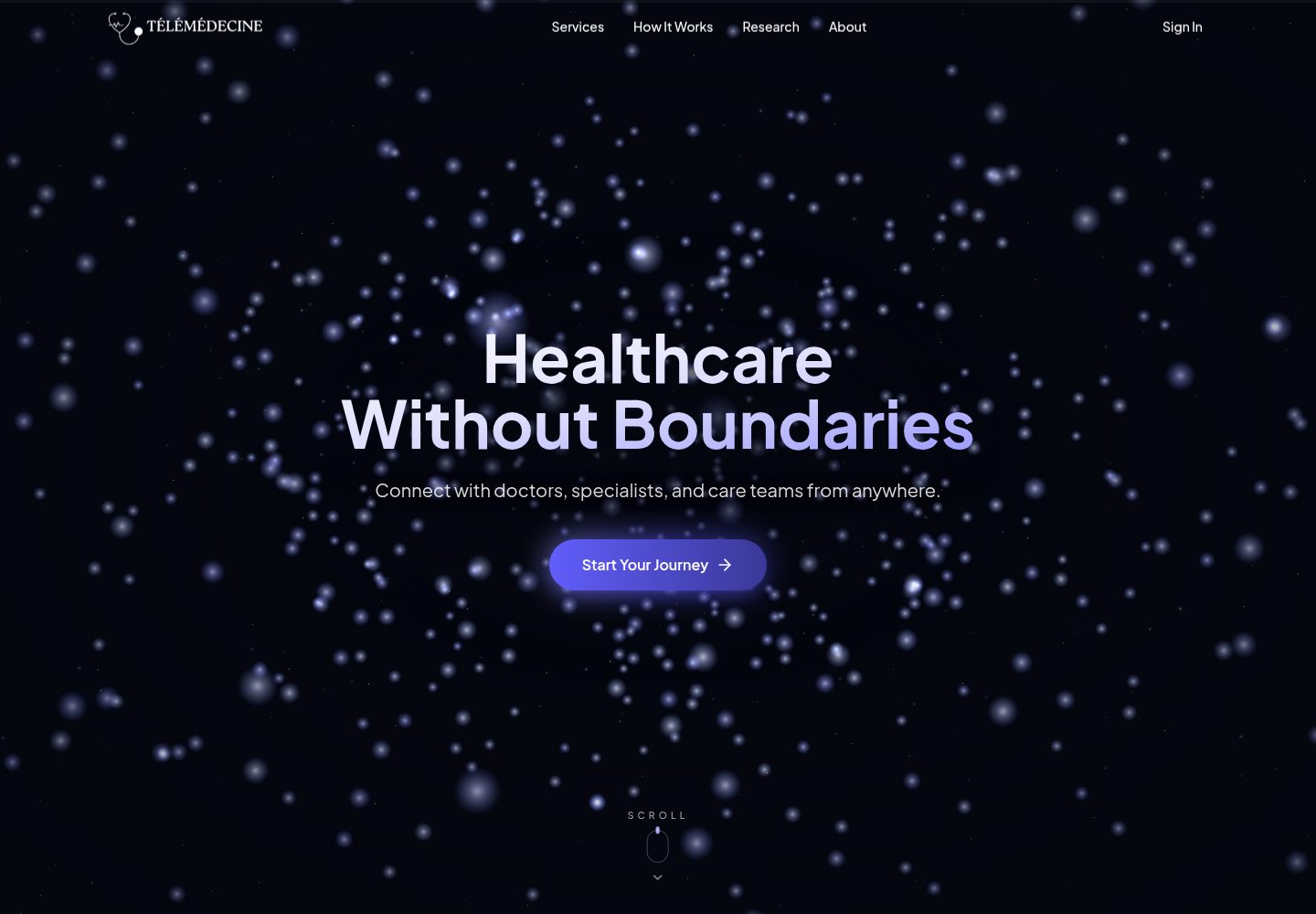
Desktop captureTop of page
Actual screenshot captured by the server browser.
All pages & views 2
Screenshots show visual appearance; interactive behavior may differ.
Recorded 2026-10-03View source
What stands out
A quick read of the recorded project description.
The consultation room integrates LiveKit to provide video, audio, and text chat, with consultations automatically starting and closing on the hour
The AI health assistant can answer questions about symptoms, lab results, medications, and vital signs, and supports reading uploaded PDFs and images
The doctor side includes a profile submission and administrator approval workflow, an upcoming consultations list, past patients, and in-app notifications
Administrators can approve, reject, and edit doctor profiles, and manage patient records
An optional demo mode is provided with built-in doctor and patient login accounts, allowing both sides of the workflow to be experienced without registration
Template Details
This is a boilerplate template for a telemedicine application. The repository is MIT-licensed, and the code may be used, modified, commercialized, and distributed free of charge. The frontend uses Next.js (App Router), the backend uses Node.js + Express + MongoDB, authentication uses Clerk, video and chat use LiveKit, payments use Stripe Checkout, and the AI assistant is integrated through Gemini with MongoDB Atlas Vector Search for vector retrieval.
Features are divided by role. Patients can search for approved doctors by name, specialty, or hospital, select a time slot and pay via Stripe Checkout (doctors without a set price can be booked for free), enter a consultation room with video, audio, and chat at the scheduled hour, ask the AI assistant about symptoms, lab results, medications, and vital signs, and upload PDFs and images for it to read; they can also view consultation records in a dashboard, calendar, and history list. Doctors can register and fill in details such as specialty, hospital, price, weekly schedule, and photo, wait for administrator approval, view upcoming consultations and past patients, and receive in-app notifications for new bookings and consultation starts. Administrators can approve, reject, and edit doctor profiles, and manage patient records.
At the platform level, patients and doctors have separate registration pages, consultations automatically start and close on the hour, the landing page is a scroll-driven 3D page, the layout adapts to mobile, tablet, and desktop, and an optional demo mode is provided with ready-made doctor and patient login accounts.
Before use, you need Node.js 20 or higher, pnpm 8, and free accounts for MongoDB Atlas, Clerk, Cloudinary, LiveKit, Google AI Studio, and Stripe; the frontend and backend are configured with secrets via .env files, with the frontend running on port 3000 and the backend on port 8000 by default. The repository provides documentation on configuration, sample data, payments, the AI assistant, demo mode, and branding replacement. Note that the MIT license for the template code does not cover third-party assets such as demo images, fonts, and icons, and external services such as domain, hosting, database, payment, and AI may incur separate charges.
Next.jsBoilerplate
Is it right for your project?
Use Cases
- During the project initiation phase of a telemedicine product, use the ready-made frontend and backend structure to quickly build a demonstrable patient booking and video consultation workflow
- Build an online consultation portal with scheduling, approval, and payment steps for a clinic or doctor team
- Validate how LiveKit video consultations and Stripe payment flows integrate within an existing medical system
- As a teaching or prototype project, study multi-role authentication and AI assistant implementation under a separated Next.js and Express architecture
Suitable For
- Developers who need starting code for a telemedicine application and are willing to configure external services such as MongoDB, Clerk, LiveKit, Stripe, and Gemini themselves
- Teams that want to carry out secondary development and branding replacement based on MIT-licensed code
- Frontend or full-stack engineers who want to reference the complete three-role workflow for patients, doctors, and administrators and the video consultation implementation
Getting started & customization
Use these recorded setup notes alongside the repository instructions for your chosen version.
- 1
Requires Node.js 20 or higher and pnpm 8, and accounts for MongoDB Atlas, Clerk, Cloudinary, LiveKit, Google AI Studio, and Stripe
- 2
Create .env files from apps/backend/.env.example and apps/frontend/.env.example respectively and fill in the secrets for each service
- 3
Use pnpm dev to start both frontend and backend simultaneously; the frontend defaults to http://localhost:3000 and the backend to http://localhost:8000
- 4
Optionally run pnpm -F=backend seed:all to write sample doctor, patient, and consultation data; this command first deletes existing doctor, patient, and consultation records
- 5
Third-party assets such as demo images, fonts, and icons must be checked separately under their respective licenses, and external services may incur additional charges
License & source material
Usage conditions & limitations
Free to use · keep license noticeThis entry covers the free version in the public repository under the MIT license; the free scope is the code of this version and does not mean that external services or third-party assets are free.
Must comply with when using
- The code of this version may be used, modified, commercialized, and distributed free of charge.
- When distributing copies or substantial portions of the code, retain the original author's copyright notice and the full MIT license notice.
- The code is provided as is; warranties and limitations of liability are governed by the original license and applicable law.
Additional costs & items to verify
- Before use, you must register and configure accounts for MongoDB Atlas, Clerk, Cloudinary, LiveKit, Google AI Studio, and Stripe, and fill in their respective secrets; the application cannot run without these external service accounts.
- Running pnpm -F=backend seed:all first deletes existing doctor, patient, and consultation records in the database, and should only be used in sample or development environments.
- Demo accounts are only for experiencing the online demo site; in a production deployment, demo login should be removed according to the documentation to avoid unauthorized access.
- Demo images, fonts, icons, and other third-party assets must be checked under their respective licenses and cannot be judged solely by the code's MIT license.
- External services such as domain, hosting, database, payment, or AI may incur separate charges.
View Original Text Basis
Permission is hereby granted, free of charge
Original License Text
You need Node.js 20 or later, [pnpm](https://pnpm.io/) 8, and free accounts with MongoDB Atlas, Clerk, Cloudinary, LiveKit, Google AI Studio and Stripe.
Original README
This deletes existing doctors, patients and consultations first.
Original README
https://github.com/aminezouari52/telemedicine-website/blob/master/LICENCEhttps://github.com/aminezouari52/telemedicine-website/blob/master/README.mdthe sign-in page lists a demo patient and a demo doctor account, so you can try both sides without signing up.
Original README
Compiled by DeepSeek based on repository license and README ·2026-10-03. Results only cover the materials read; dependencies, images, fonts, and subsequent term changes are subject to their respective original texts.
Project checks & description sources
Template Information
- Source platforms
- GitHub
- Documentation and maintenance reference score
- More documented · 87 / 100
- Technologies
- Next.js · React
- Website type
- Starter
How this score is calculated
Our heuristic uses license records (up to 30), a demo link (12), a preview (10), stars (15), recorded maintenance (15), description completeness (8), feature records (5) and classification data (5). It is not a code, security or performance test, or a Google score. A link does not establish tested functionality.
What to verify for this project
- Repository update recorded
- 2026-10-03
- Screenshot last checked
- 2026-10-03
A demo link is listed. Check it with your own content and viewport sizes; its presence does not confirm that forms, authentication or payments work.
The catalog identifies Next.js as the primary stack. Check the actual dependency manifest and lockfile for versions and hosting requirements. These notes use recorded metadata, not a code audit or a deployment test.
Use a selection guide →How this description was prepared
AI-assisted description based on catalog records and repository material. Repository authors are not automatically the reviewers of this description.
Review declaration: [email protected] · 2026-10-04
Inspect the recorded source material
SHA-256: 80d3103ac306ebd3ae2b0288a584643f0197eb161f9031d081d6c825db72126b
2026-10-03T16:22:47.016Z
Source file / repository# Télémédecine An open-source telemedicine boilerplate: a working telehealth app you can rebrand and build your product on. It's built with Next.js, Express, MongoDB, Clerk, LiveKit, Stripe and Gemini. **[Live demo](https://bucolic-malabi-07ed64.netlify.app)**: the sign-in page lists a demo patient and a demo doctor account, so you can try both sides without signing up.  ## Table of Contents - [What's included](#whats-included) - [Features](#features) - [Screenshots](#screenshots) - [Tech stack](#tech-stack) - [Getting started](#getting-started) - [Documentation](#documentation) - [Roadmap](#roadmap) - [Contributing](#contributing) - [License](#license) ## Features **Patients** - Search approved doctors by name, specialty or hospital. - Book a time slot and pay through Stripe Checkout. Doctors without a price are booked for free. - Join the consultation when its hour starts, with video, audio and chat. - Ask the AI assistant about symptoms, lab results, medications and vital signs. It can read uploaded PDFs and images, and answers questions about the patient's own profile and past consultations. See [AI assistant](docs/ai-assistant.md). - Follow consultations in a dashboard, a calendar and a history list. **Doctors** - Sign up, complete a profile (specialty, hospital, price, weekly schedule, photo) and wait for an admin's approval. - See upcoming consultations and past patients. - Get in-app notifications for new bookings and for a consultation that is starting. **Admins** - Approve, reject and edit doctors, and manage patient records. **Platform** - Sign-in and sign-up with Clerk, with separate patient and doctor sign-up pages. - Consultations start and close automatically on the hour. - A scroll-driven 3D landing page. - Responsive layout for phones, tablets and desktops. - Optional [demo mode](docs/demo-mode.md) with ready-made doctor and patient logins. ## Screenshots ### Find a doctor  ### Book and pay  ### Video consultation  ### AI assistant  ### Doctor dashboard  ## Tech stack - **Frontend:** Next.js (App Router), Tailwind CSS, shadcn/ui, TanStack Query, Redux Toolkit, React Three Fiber and GSAP for the landing page - **Backend:** Node.js, Express, MongoDB with Mongoose, node-cron - **Authentication:** Clerk - **Video and chat:** LiveKit - **Payments:** Stripe Checkout - **AI:** Gemini through the Vercel AI SDK (chat) and LangChain (embeddings), with MongoDB Atlas Vector Search - **Hosting:** Netlify (frontend) and Render (backend) ## Getting started You need Node.js 20 or later, [pnpm](https://pnpm.io/) 8, and free accounts with MongoDB Atlas, Clerk, Cloudinary, LiveKit, Google AI Studio and Stripe. 1. Clone the repository and install dependencies: ```bash git clone https://github.com/aminezouari52/telemedicine-website.git cd telemedicine-website pnpm install ``` 2. Create `apps/backend/.env` and `apps/frontend/.env` from the `.env.example` file in each folder, and fill in your keys. [Configuration](docs/configuration.md) explains each service. 3. Start both apps: ```bash pnpm dev ``` The frontend runs on http://localhost:3000 and the backend on http://localhost:8000. 4. Optionally, fill the database with sample doctors, patients and consultations: ```bash pnpm -F=backend seed:all ``` This deletes existing doctors, patients and consultations first. See [Sample data](docs/seeding.md). ## Documentation | Guide | What it covers | | -------------------------------------- | ------------------------------------------------------------------------ | | [Configuration](docs/configuration.md) | The services you need, environment variables, and values that must match | | [Sample data](docs/seeding.md) | The seed scripts, what they delete, and the order they run in | | [Payments](docs/payments.md) | Stripe setup, the payment flow, and testing payments locally | | [AI assistant](docs/ai-assistant.md) | What the assistant can do, its setup, and prompts to try | | [Demo mode](docs/demo-mode.md) | Public demo logins: turning them on and removing them | | [Branding](docs/branding.md) | Changing the name, logo, colours and fonts | | [AGENTS.md](AGENTS.md) | Architecture notes and commands, for contributors and AI coding agents | ## Contributing This project is open-source, and I’m excited to collaborate with developers around the world. Pull requests are welcome. For major changes, please open an issue first to discuss what you would like to change. ## License [MIT](https://choosealicense.com/licenses/mit/)
Explore similar templates
Compare previews and descriptions within the same stack and category.

Next.js SaaS Starter
The official Next.js SaaS starter template, integrating email/password authentication, Stripe Checkout subscriptions, a dashboard with user/team CRUD, basic Owner/Member RBAC, and activity logging.
Next.js · SaaS

Next.js Commerce
Vercel's officially maintained Next.js App Router ecommerce starter with deep Shopify integration, offering a complete product catalog, cart, and checkout flow. Core logic is modular for swapping backends, and community provider versions exist for BigCommerce, Medusa, and Saleor.
Next.js · E-commerce

Next-js-Boilerplate
A developer-first Next.js 16 starter with Tailwind CSS 4 and TypeScript, supporting both App Router and Page Router.
Next.js · Starter

tailwind-nextjs-starter-blog
A Next.js and Tailwind CSS blog starter template using Contentlayer for Markdown/MDX, with built-in SEO, code highlighting, and tags. It targets personal technical blogs and migration from Jekyll/Hugo to React, and supports one-click Vercel deployment.
Next.js · Blog

next-forge
next-forge is a Turborepo-based Next.js template maintained by Vercel, positioned as a starting point for SaaS products.
Next.js · Starter

SaaS-Boilerplate
SaaS-Boilerplate is an open-source SaaS starter template built with Next.js App Router, React 19, TypeScript, Tailwind CSS, and Shadcn UI.
Next.js · SaaS