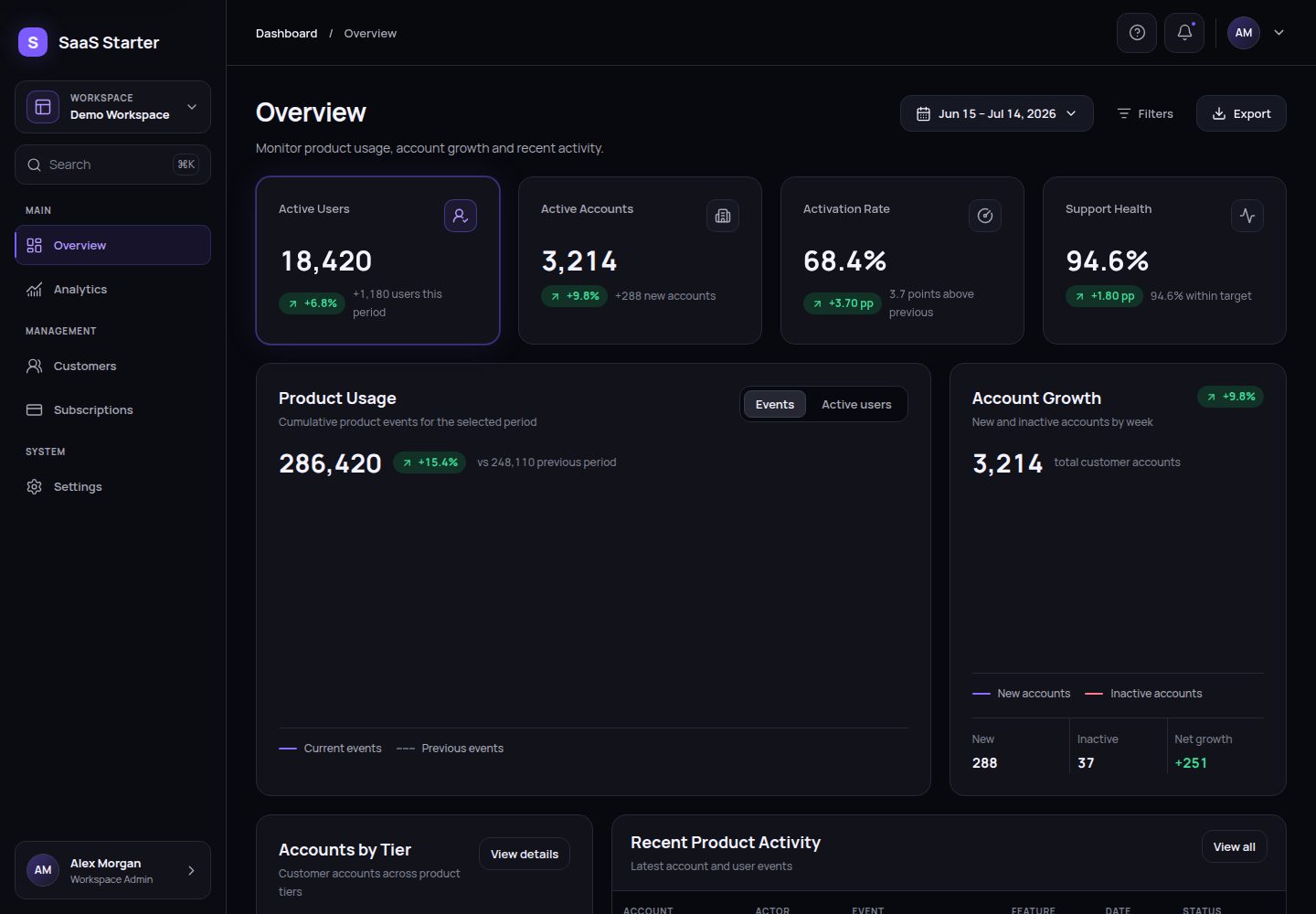
集中式配置:产品、工作区、用户、功能开关与部署设置统一在 src/config 管理
Next.jsReact后台SaaS启动器
laimand-nextjs-saas-kit — Next.js 后台模板
作者 Andress84
基于 Next.js 与 React 的前端 SaaS 后台启动器,提供可配置品牌、功能模块、演示数据、响应式布局与测试脚本。
看看你的网站会是什么样
浏览真实页面截图,比较内容排版与手机效果。点击下方缩略图切换,放大查看整页细节。
全部页面与视图 2
截图用于了解视觉与布局,交互效果请以实际项目为准。
采集于 2026-10-03查看来源
值得关注的模板亮点
从已有项目资料中,快速了解它的特点。
功能模块隔离:路由文件轻量,功能代码按模块放在 src/features,共享组件在 src/components
确定性演示数据:本地演示操作与 CSV/JSON 导出不写入服务器
响应式外壳:桌面端侧边栏与可访问的移动端导航抽屉
测试与检查脚本:包含格式化、lint、严格类型检查、单元测试、可访问性与浏览器检查命令
可移植初始化:通过交互提示或 JSON 文件配置项目,支持 dry-run 预览
模板详细介绍
Laimand Next.js SaaS Kit 是一个纯前端的 Next.js 启动器,用于搭建 B2B SaaS 后台界面。它把产品、工作区、用户、功能开关和部署设置集中到 src/config,路由文件保持轻量,功能代码按模块放在 src/features,共享的图表、表格、布局与 UI 原语放在 src/components,虚构的演示记录集中在 src/data/demo。
项目自带概览、分析、客户、订阅(可选示例)和设置等示例路由,共用同一套应用外壳,包含桌面端侧边栏和移动端导航抽屉。演示操作与 CSV/JSON 导出都是确定性的本地行为,不会写入服务器。
初始化通过 pnpm kit:init 完成,支持交互式提示或读取 JSON 配置文件,并可先 dry-run 预览;pnpm kit:check 校验初始化标记以及 package.json 与 src/config/project-config.ts 的同步。构建默认使用标准 Next.js 输出,设置 GITHUB_PAGES=true 或启用 Pages 后切换为静态导出到 out/,仓库内附带 GitHub Pages 工作流。
需要留意的是,该模板不包含身份认证、授权、后端、数据库、支付、生产级多租户或持久化;订阅模块的开关只控制导航入口的显示,不会删除路由或源码,也不构成路由授权。演示图片、字体、图标等第三方素材需单独核对许可,域名、托管、数据库、支付或 AI 等外部服务可能另行收费。
Next.jsReact后台SaaS启动器
适合你的项目吗?
适用场景
- 作为 B2B SaaS 后台界面的前端起点,在本地替换演示数据与文案后继续开发
- 用 pnpm kit:init 从模板生成新项目,并配置品牌名称、工作区信息与功能开关
- 通过 GITHUB_PAGES=true 或项目配置将站点静态导出到 out/,部署到 GitHub Pages
- 参考订阅模块的开关方式,在导航中隐藏某个功能入口,同时保留其路由与源码作为实现示例
适合人群
- 需要 Next.js 与 React 前端后台外壳、并自行接入后端服务的开发团队
- 希望用配置驱动品牌与功能开关、而非直接改源码的 SaaS 项目
- 需要确定性演示数据与本地导出行为的前端原型或演示环境
- 计划使用 GitHub Pages 静态托管并接受无服务端能力的项目
上手与定制指南
结合仓库当前版本的说明,按下面的资料检查内容、配置与运行要求。
- 1
使用 .nvmrc 指定的 Node.js 版本和 package.json 声明的 pnpm 版本,先执行 corepack enable
- 2
运行 pnpm install --frozen-lockfile 安装锁定依赖,再用 pnpm dev 启动本地开发
- 3
在视为就绪前运行 pnpm kit:check 与 pnpm check;pnpm check:full 会额外在 Chromium、Firefox 和 WebKit 中运行 Playwright
- 4
初始化可执行 pnpm kit:init,或复制 kit.config.example.json 为 kit.config.json 后运行 pnpm kit:init -- --config ./kit.config.json,并可用 --dry-run 预览
- 5
该启动器不包含认证、后端、数据库、支付或持久化,交付前需替换演示数据、演示反馈、导出假设和面向用户的文案
授权与来源资料
使用条件与限制
免费使用 · 保留许可声明本次收录的是公开仓库中采用 MIT 许可的免费版本;免费范围为该版本代码,不代表外部服务或第三方素材免费。
使用时需要遵守
- 允许免费使用、修改、商用和分发该版本代码。
- 分发代码副本或实质性部分时,保留原作者版权声明和完整 MIT 许可声明。
- 代码按现状提供;担保与责任限制以原许可证及适用法律为准。
额外费用与待核对事项
- 该模板仅为前端启动器,不包含身份认证、授权、后端、数据库、支付处理、生产级多租户或持久化能力,不能直接作为生产级 SaaS 或计费系统使用。
- 关闭订阅模块仅隐藏导航入口,/subscriptions 路由与 src/features/subscriptions 源码仍保留,不构成路由授权或源码删除,如需不同行为须自行移除或加固。
- 使用 GitHub Pages 静态导出时无法提供任何服务端功能,仅适用于纯静态托管场景。
- 交付前必须替换虚构演示数据、演示反馈、导出假设以及面向用户的文案,不能直接沿用示例内容。
- pnpm kit:init 不会重命名目录、初始化 Git、配置远程仓库,也不会添加认证、后端、数据库、计费或持久化,这些需自行实现。
- 演示图片、字体、图标及其他第三方素材需按各自许可核对,不能仅凭代码的 MIT 许可判断。
- 域名、托管、数据库、支付或 AI 等外部服务可能另外收费。
查看原文依据
Permission is hereby granted, free of charge
许可证原文
This kit is a frontend starter, not a production SaaS or billing system. It includes no authentication, authorization, backend, database, payment processing, production multi-tenancy, or persistence.
README 原文
Disabling the Subscriptions module removes its navigation entry but deliberately leaves the route and source files available as an implementation example.
README 原文
Static hosting cannot provide server-only features.
README 原文
Replace fictional data, demo feedback, export assumptions, and client-visible copy before delivery.
README 原文
https://github.com/Andress84/laimand-nextjs-saas-kit/blob/main/LICENSEhttps://github.com/Andress84/laimand-nextjs-saas-kit/blob/main/README.mdIt does not rename the containing directory, initialize Git, create or configure a remote, or add authentication, a backend, a database, billing, or persistence.
README 原文
DeepSeek 根据仓库许可证和 README 整理 ·2026-10-03。结果仅覆盖已读取资料,依赖、图片、字体及后续条款变更以各自原文为准。
项目核对记录与介绍依据
模板资料
- 来源平台
- GitHub
- 资料与维护参考分
- 资料较完整 · 85 / 100
- 技术栈
- Next.js · React
- 网站类型
- 后台 · SaaS · 启动器
这个分数如何计算
本站按许可资料(最高30分)、演示链接(12分)、预览图(10分)、Star数(15分)、记录的维护时间(15分)、描述完整度(8分)、功能记录(5分)和分类资料(5分)计算。它不是代码、安全或性能测试,也不是 Google 评分;有链接不代表已实测可用。
这个项目需要核对什么
- 记录的仓库更新时间
- 2026-07-23
- 截图检查日期
- 2026-10-03
已收录演示链接。请用你的内容与屏幕尺寸检查;有演示不代表表单、认证或支付已经可用。
目录记录的主要技术栈是 Next.js。请通过依赖清单和锁文件核对实际版本与托管要求。这些说明基于收录资料,不代表代码审计或部署实测。
查看具体选型方法 →介绍的制作与核对状态
介绍由 AI 辅助整理目录与仓库资料。仓库作者不等于这篇介绍的审核者。
已完成服务器许可规则与 AI 来源核对;未经过人工编辑审核。
查看当时使用的来源资料
SHA-256: b98490ff10ed63ddedaac7bf8684172975f7ce1135662c9657783a597fb0f917
2026-10-03T02:51:56.797Z
来源文件 / 仓库# Laimand Next.js SaaS Kit A reusable, frontend-only Next.js starter for building accessible B2B SaaS dashboards. It combines a configurable application shell, isolated feature modules, deterministic demo data, static-export support, and a tested project initializer. ## Key capabilities - Responsive desktop sidebar and accessible mobile navigation drawer - Centralized product, workspace, user, feature, and deployment configuration - Reusable UI, chart, data-table, layout, and dashboard primitives - Server-first App Router pages with focused client boundaries - Deterministic local demo actions and CSV/JSON exports - Formatting, linting, strict TypeScript, unit, accessibility, responsive, and browser checks - Portable initialization through interactive prompts or a JSON file - Optional static export and GitHub Pages workflow ## Technology stack - Next.js 16.2 and React 19 - TypeScript in strict mode - Tailwind CSS 4 and centralized CSS custom properties - Recharts and Lucide React - pnpm 11 through Corepack on Node.js 24 - Biome, ESLint, Vitest, React Testing Library, Playwright, and Axe ## Included example routes | Route | Example module | | --- | --- | | `/` | Overview | | `/analytics` | Analytics | | `/customers` | Customers | | `/subscriptions` | Optional Subscriptions example | | `/settings` | Settings | The routes share one application shell. Disabling the Subscriptions module removes its navigation entry but deliberately leaves the route and source files available as an implementation example. ## Reusable architecture overview `src/config` owns canonical identity, route metadata, navigation, feature flags, shell composition, and deployment settings. Thin files in `src/app` publish route metadata and render public feature entry points from `src/features`. Shared presentation primitives live in `src/components`, while cross-feature fictional records live in `src/data/demo`. See [Architecture](docs/kit/architecture.md) and [Feature modules](docs/kit/feature-modules.md) for the ownership rules. ## Quick start Use the Node.js version in `.nvmrc` and the pnpm version declared in `package.json`: ~~~bash corepack enable pnpm install --frozen-lockfile pnpm dev ~~~ Open [http://localhost:3000](http://localhost:3000), then run `pnpm kit:check` and `pnpm check` before treating the workspace as ready. More detail is available in [Quick start](docs/kit/quick-start.md). ## Create a project from the kit When this repository is enabled as a GitHub Template Repository: 1. Select **Use this template** on GitHub and create a new repository. 2. Clone the generated repository. 3. Rename the containing directory manually if its local name should differ. 4. Enable Corepack and install the locked dependencies. 5. Inspect `kit.config.example.json`. 6. Preview and apply initialization. 7. Validate the initialized project and replace demo-only content. `pnpm kit:init` configures the current project. It does not rename the containing directory, initialize Git, create or configure a remote, or add authentication, a backend, a database, billing, or persistence. ## Interactive initialization ~~~bash pnpm kit:init ~~~ Press Enter to keep a displayed value. The initializer validates every resolved field before changing its two owned files. See [Initialization](docs/kit/initialization.md). ## JSON-based initialization Copy `kit.config.example.json` to the ignored local file `kit.config.json`, edit it, then run: ~~~bash pnpm kit:init -- --config ./kit.config.json ~~~ Omitted fields keep their current values; unknown or invalid fields fail validation. ## Dry-run initialization Preview a JSON configuration without writing files: ~~~bash pnpm kit:init -- --config ./kit.config.json --dry-run ~~~ For an interactive preview, use `pnpm kit:init -- --dry-run`. ## Configuration validation ~~~bash pnpm kit:check ~~~ This verifies initializer markers and synchronization between `package.json` and `src/config/project-config.ts`. It does not replace the full project checks. ## Project configuration fields | Area | Fields | | --- | --- | | Package and product | `packageName`, `applicationName`, `applicationShortName`, `brandMark`, `applicationDescription` | | Workspace | `workspaceName`, `workspaceMark`, `organizationName`, `workspaceSlug`, `supportEmail` | | Demo user | `userName`, `userInitials`, `userRole` | | Exports | `exportPrefix` | | Features | `subscriptionsModule`, `preloaderEnabled`, `demoModeEnabled` | | Deployment | `githubPagesEnabled`, `githubPagesBasePath` | Validation rules, constraints, and examples are documented in [Configuration](docs/kit/configuration.md). ## Optional Subscriptions example Set `subscriptionsModule` to `false` to hide Subscriptions from desktop and mobile navigation. This is configuration-level discovery control, not source deletion or route authorization: `/subscriptions` and `src/features/subscriptions` remain in the project. Remove or secure them explicitly if a client project requires different behavior. ## Development commands ~~~bash pnpm dev pnpm build pnpm start pnpm format pnpm format:check pnpm lint pnpm lint:fix pnpm typecheck pnpm fix ~~~ ## Testing commands ~~~bash pnpm test pnpm test:watch pnpm test:e2e pnpm test:e2e:ui pnpm check pnpm check:full ~~~ `pnpm check` runs formatting validation, linting, strict type checking, the Vitest suite, and a production build. `pnpm check:full` adds Playwright coverage in Chromium, Firefox, and WebKit. ## GitHub Pages and static export behavior Normal `pnpm build` uses standard Next.js output. Setting `GITHUB_PAGES=true`, or enabling Pages in project configuration, switches to a static export in `out/`. `NEXT_PUBLIC_BASE_PATH` overrides the configured project-site base path at build time. The included `.github/workflows/deploy-pages.yml` builds and deploys on pushes to `main` after GitHub Pages is configured for the generated repository. Static hosting cannot provide server-only features. See [Deployment](docs/kit/deployment.md). ## Portable workflow for another computer Install the declared Node.js version, enable Corepack, clone or create the repository from the template, and run `pnpm install --frozen-lockfile`. Transfer only intentional source and local environment values; do not copy `node_modules`, `.next`, `out`, coverage, or browser reports. Continue with [Portable workflow](docs/kit/portable-workflow.md). ## Repository structure ~~~text . ├── .github/workflows/ # CI and optional GitHub Pages deployment ├── docs/kit/ # Starter-kit documentation ├── e2e/ # Playwright browser tests ├── scripts/kit/ # Portable initializer and validation tooling ├── src/app/ # App Router layouts and thin route entry points ├── src/components/ # Shared charts, tables, layout, UI, and dashboard primitives ├── src/config/ # Canonical project and runtime configuration ├── src/data/demo/ # Shared deterministic fictional data ├── src/features/ # Feature-owned components, data, types, and tests ├── kit.config.example.json └── package.json ~~~ ## Demo-only limitations This kit is a frontend starter, not a production SaaS or billing system. It includes no authentication, authorization, backend, database, payment processing, production multi-tenancy, or persistence. Demo actions and exports are deterministic and local; they do not mutate a server or represent real customer operations. Replace fictional data, demo feedback, export assumptions, and client-visible copy before delivery. Add backend services only when the project requirements call for them. ## Documentation index Start with the [kit documentation index](docs/kit/README.md). It links to quick start, initialization, configuration, architecture, feature modules, deployment, portability, and the client-project checklist.
看看同类模板
对比同技术栈与用途的模板,找到更适合的视觉与内容结构。

ai-website-cloner-template
Clone any website with one command using AI coding agents
Next.js · 启动器

Next.js SaaS Starter
Next.js SaaS Starter 是 Next.js 官方维护的 SaaS 起点模板,定位介于学习资源和可直接部署的脚手架之间。
Next.js · SaaS

Next.js Commerce
Next.js Commerce 是 Vercel 团队维护的电商启动模板,基于 Next.js App Router 构建,采用服务端渲染、React Server Components、Server Actions …
Next.js · 电商

Next-js-Boilerplate
Next-js-Boilerplate 是一个面向 Next.js 16、Tailwind CSS 4 和 TypeScript 的启动器,核心定位是开发者体验优先。
Next.js · 启动器

tailwind-nextjs-starter-blog
tailwind-nextjs-starter-blog 是一个面向个人技术博客的 Next.js 与 Tailwind CSS 启动模板,其 v2 版本基于 App Router 与 React Server Comp…
Next.js · 博客

next-forge
Production-grade Turborepo template for Next.js apps.
Next.js · 启动器