Centralized configuration: products, workspaces, users, feature flags, and deployment settings managed in src/config
Next.jsReactAdmin dashboardSaaSStarter
laimand-nextjs-saas-kit — Next.js Admin dashboard Template
By Andress84
A frontend SaaS dashboard starter built on Next.js and React, offering configurable branding, feature modules, demo data, responsive layouts, and test scripts.
Explore the design
Compare the page layouts and mobile experience. Open any screenshot for a closer look.
Desktop homepage1 / 2
Desktop captureTop of page
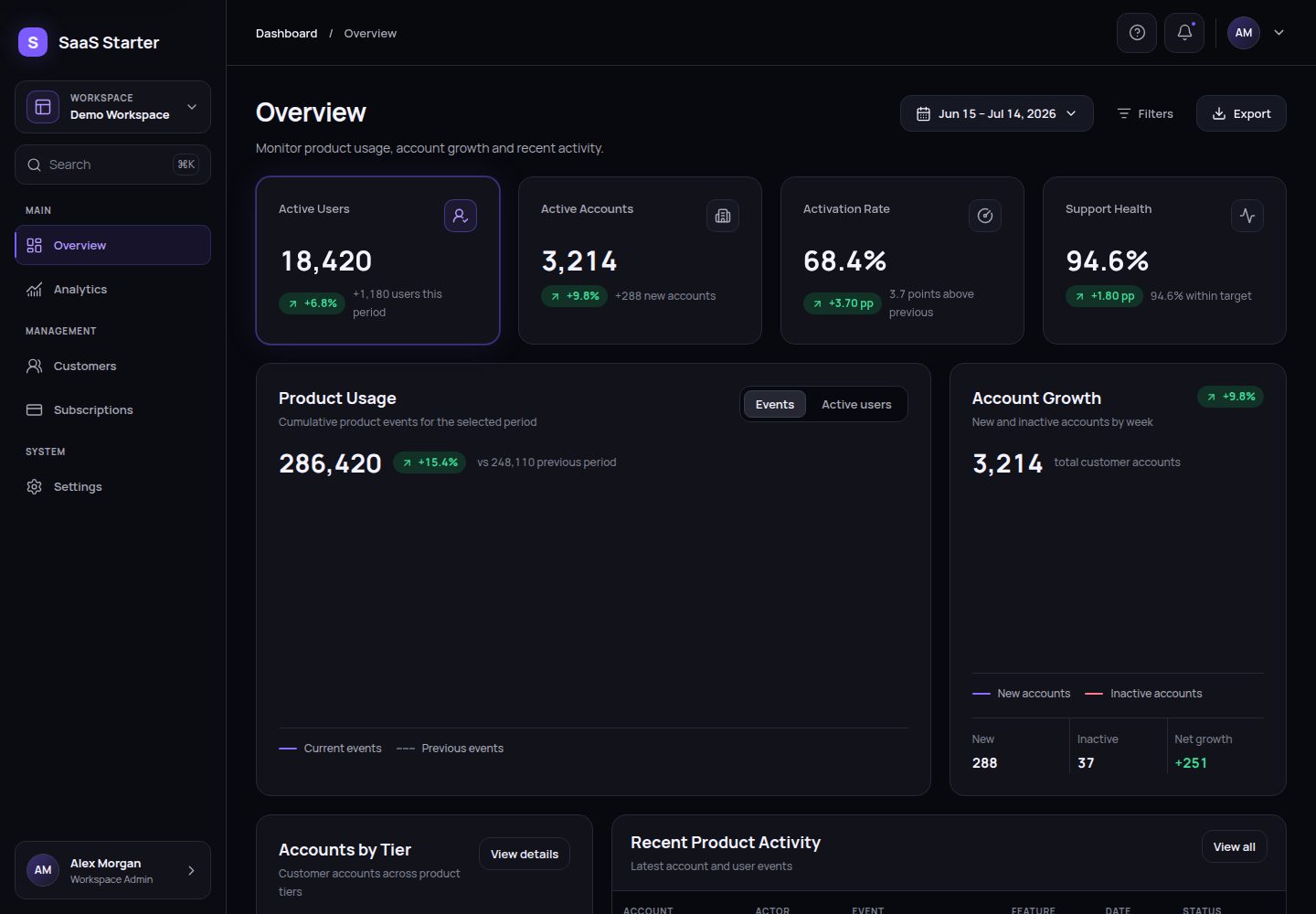
Actual screenshot captured by the server browser.
All pages & views 2
Screenshots show visual appearance; interactive behavior may differ.
Recorded 2026-10-03View source
What stands out
A quick read of the recorded project description.
Feature module isolation: lightweight route files, feature code by module in src/features, shared components in src/components
Deterministic demo data: local demo actions and CSV/JSON exports do not write to a server
Responsive shell: desktop sidebar and accessible mobile navigation drawer
Testing and check scripts: includes formatting, lint, strict type checking, unit tests, accessibility, and browser check commands
Portable initialization: configure the project via interactive prompts or a JSON file, with dry-run preview support
Template Details
Laimand Next.js SaaS Kit is a frontend-only Next.js starter for building B2B SaaS dashboard interfaces. It centralizes products, workspaces, users, feature flags, and deployment settings in src/config, keeps route files lightweight, places feature code by module in src/features, shares charts, tables, layouts, and UI primitives in src/components, and collects fictional demo records in src/data/demo.
The project includes example routes for overview, analytics, customers, subscriptions (optional example), and settings, all sharing the same application shell with a desktop sidebar and a mobile navigation drawer. Demo actions and CSV/JSON exports are deterministic local behaviors and do not write to a server.
Initialization is done via pnpm kit:init, supporting interactive prompts or reading a JSON configuration file, with a dry-run preview option. pnpm kit:check validates initialization markers and synchronization between package.json and src/config/project-config.ts. Builds default to standard Next.js output; setting GITHUB_PAGES=true or enabling Pages switches to static export to out/, and a GitHub Pages workflow is included in the repository.
Note that this template does not include authentication, authorization, backend, database, payments, production-grade multi-tenancy, or persistence; the subscription module toggle only controls the visibility of the navigation entry, does not delete routes or source code, and does not constitute route authorization. Third-party assets such as demo images, fonts, and icons require separate license verification, and external services like domains, hosting, databases, payments, or AI may incur additional costs.
Next.jsReactDashboardSaaSStarter
Is it right for your project?
Use Cases
- As a frontend starting point for a B2B SaaS dashboard interface, continue development after replacing demo data and copy locally
- Generate a new project from the template using pnpm kit:init, and configure brand name, workspace information, and feature flags
- Statically export the site to out/ via GITHUB_PAGES=true or project configuration, and deploy to GitHub Pages
- Refer to the subscription module's toggle approach to hide a feature entry in navigation while keeping its route and source code as an implementation example
Suitable For
- Development teams needing a Next.js and React frontend dashboard shell and integrating their own backend services
- SaaS projects wanting configuration-driven branding and feature flags rather than direct source code changes
- Frontend prototypes or demo environments requiring deterministic demo data and local export behavior
- Projects planning to use GitHub Pages static hosting and accepting no server-side capabilities
Getting started & customization
Use these recorded setup notes alongside the repository instructions for your chosen version.
- 1
Use the Node.js version specified in .nvmrc and the pnpm version declared in package.json; run corepack enable first
- 2
Run pnpm install --frozen-lockfile to install locked dependencies, then pnpm dev to start local development
- 3
Before considering it ready, run pnpm kit:check and pnpm check; pnpm check:full additionally runs Playwright in Chromium, Firefox, and WebKit
- 4
For initialization, run pnpm kit:init, or copy kit.config.example.json to kit.config.json and run pnpm kit:init -- --config ./kit.config.json, with --dry-run for preview
- 5
This starter does not include authentication, backend, database, payments, or persistence; before delivery, replace demo data, demo feedback, export assumptions, and user-facing copy
License & source material
Usage conditions & limitations
Free to use · keep license noticeThis entry covers the free version under the MIT license in the public repository; the free scope is the code of this version and does not imply that external services or third-party assets are free.
Must comply with when using
- Free use, modification, commercial use, and distribution of this version's code are permitted.
- When distributing copies or substantial portions of the code, retain the original author's copyright notice and the full MIT license notice.
- The code is provided as-is; warranties and liability limitations are governed by the original license and applicable law.
Additional costs & items to verify
- This template is a frontend starter only and does not include authentication, authorization, backend, database, payment processing, production-grade multi-tenancy, or persistence; it cannot be used directly as a production-grade SaaS or billing system.
- Disabling the subscription module only hides the navigation entry; the /subscriptions route and src/features/subscriptions source code remain, and this does not constitute route authorization or source code deletion. If different behavior is needed, you must remove or harden it yourself.
- When using GitHub Pages static export, no server-side functionality can be provided; it is only suitable for pure static hosting scenarios.
- Before delivery, you must replace fictional demo data, demo feedback, export assumptions, and user-facing copy; do not directly reuse the example content.
- pnpm kit:init does not rename directories, initialize Git, configure remote repositories, or add authentication, backend, database, billing, or persistence; these must be implemented yourself.
- Demo images, fonts, icons, and other third-party assets require license verification according to their respective licenses; do not judge solely based on the code's MIT license.
- External services such as domains, hosting, databases, payments, or AI may incur additional costs.
View Original Text Basis
Permission is hereby granted, free of charge
Original License Text
This kit is a frontend starter, not a production SaaS or billing system. It includes no authentication, authorization, backend, database, payment processing, production multi-tenancy, or persistence.
Original README
Disabling the Subscriptions module removes its navigation entry but deliberately leaves the route and source files available as an implementation example.
Original README
Static hosting cannot provide server-only features.
Original README
Replace fictional data, demo feedback, export assumptions, and client-visible copy before delivery.
Original README
https://github.com/Andress84/laimand-nextjs-saas-kit/blob/main/LICENSEhttps://github.com/Andress84/laimand-nextjs-saas-kit/blob/main/README.mdIt does not rename the containing directory, initialize Git, create or configure a remote, or add authentication, a backend, a database, billing, or persistence.
Original README
Compiled by DeepSeek based on repository license and README ·2026-10-03. Results only cover the materials read; dependencies, images, fonts, and subsequent term changes are subject to their respective original texts.
Project checks & description sources
Template Information
- Source platforms
- GitHub
- Documentation and maintenance reference score
- More documented · 85 / 100
- Technologies
- Next.js · React
- Website type
- Admin dashboard · SaaS · Starter
How this score is calculated
Our heuristic uses license records (up to 30), a demo link (12), a preview (10), stars (15), recorded maintenance (15), description completeness (8), feature records (5) and classification data (5). It is not a code, security or performance test, or a Google score. A link does not establish tested functionality.
What to verify for this project
- Repository update recorded
- 2026-07-23
- Screenshot last checked
- 2026-10-03
A demo link is listed. Check it with your own content and viewport sizes; its presence does not confirm that forms, authentication or payments work.
The catalog identifies Next.js as the primary stack. Check the actual dependency manifest and lockfile for versions and hosting requirements. These notes use recorded metadata, not a code audit or a deployment test.
Use a selection guide →How this description was prepared
AI-assisted description based on catalog records and repository material. Repository authors are not automatically the reviewers of this description.
Automatically checked against source and license rules; no manual editorial review.
Inspect the recorded source material
SHA-256: b98490ff10ed63ddedaac7bf8684172975f7ce1135662c9657783a597fb0f917
2026-10-03T02:51:56.797Z
Source file / repository# Laimand Next.js SaaS Kit A reusable, frontend-only Next.js starter for building accessible B2B SaaS dashboards. It combines a configurable application shell, isolated feature modules, deterministic demo data, static-export support, and a tested project initializer. ## Key capabilities - Responsive desktop sidebar and accessible mobile navigation drawer - Centralized product, workspace, user, feature, and deployment configuration - Reusable UI, chart, data-table, layout, and dashboard primitives - Server-first App Router pages with focused client boundaries - Deterministic local demo actions and CSV/JSON exports - Formatting, linting, strict TypeScript, unit, accessibility, responsive, and browser checks - Portable initialization through interactive prompts or a JSON file - Optional static export and GitHub Pages workflow ## Technology stack - Next.js 16.2 and React 19 - TypeScript in strict mode - Tailwind CSS 4 and centralized CSS custom properties - Recharts and Lucide React - pnpm 11 through Corepack on Node.js 24 - Biome, ESLint, Vitest, React Testing Library, Playwright, and Axe ## Included example routes | Route | Example module | | --- | --- | | `/` | Overview | | `/analytics` | Analytics | | `/customers` | Customers | | `/subscriptions` | Optional Subscriptions example | | `/settings` | Settings | The routes share one application shell. Disabling the Subscriptions module removes its navigation entry but deliberately leaves the route and source files available as an implementation example. ## Reusable architecture overview `src/config` owns canonical identity, route metadata, navigation, feature flags, shell composition, and deployment settings. Thin files in `src/app` publish route metadata and render public feature entry points from `src/features`. Shared presentation primitives live in `src/components`, while cross-feature fictional records live in `src/data/demo`. See [Architecture](docs/kit/architecture.md) and [Feature modules](docs/kit/feature-modules.md) for the ownership rules. ## Quick start Use the Node.js version in `.nvmrc` and the pnpm version declared in `package.json`: ~~~bash corepack enable pnpm install --frozen-lockfile pnpm dev ~~~ Open [http://localhost:3000](http://localhost:3000), then run `pnpm kit:check` and `pnpm check` before treating the workspace as ready. More detail is available in [Quick start](docs/kit/quick-start.md). ## Create a project from the kit When this repository is enabled as a GitHub Template Repository: 1. Select **Use this template** on GitHub and create a new repository. 2. Clone the generated repository. 3. Rename the containing directory manually if its local name should differ. 4. Enable Corepack and install the locked dependencies. 5. Inspect `kit.config.example.json`. 6. Preview and apply initialization. 7. Validate the initialized project and replace demo-only content. `pnpm kit:init` configures the current project. It does not rename the containing directory, initialize Git, create or configure a remote, or add authentication, a backend, a database, billing, or persistence. ## Interactive initialization ~~~bash pnpm kit:init ~~~ Press Enter to keep a displayed value. The initializer validates every resolved field before changing its two owned files. See [Initialization](docs/kit/initialization.md). ## JSON-based initialization Copy `kit.config.example.json` to the ignored local file `kit.config.json`, edit it, then run: ~~~bash pnpm kit:init -- --config ./kit.config.json ~~~ Omitted fields keep their current values; unknown or invalid fields fail validation. ## Dry-run initialization Preview a JSON configuration without writing files: ~~~bash pnpm kit:init -- --config ./kit.config.json --dry-run ~~~ For an interactive preview, use `pnpm kit:init -- --dry-run`. ## Configuration validation ~~~bash pnpm kit:check ~~~ This verifies initializer markers and synchronization between `package.json` and `src/config/project-config.ts`. It does not replace the full project checks. ## Project configuration fields | Area | Fields | | --- | --- | | Package and product | `packageName`, `applicationName`, `applicationShortName`, `brandMark`, `applicationDescription` | | Workspace | `workspaceName`, `workspaceMark`, `organizationName`, `workspaceSlug`, `supportEmail` | | Demo user | `userName`, `userInitials`, `userRole` | | Exports | `exportPrefix` | | Features | `subscriptionsModule`, `preloaderEnabled`, `demoModeEnabled` | | Deployment | `githubPagesEnabled`, `githubPagesBasePath` | Validation rules, constraints, and examples are documented in [Configuration](docs/kit/configuration.md). ## Optional Subscriptions example Set `subscriptionsModule` to `false` to hide Subscriptions from desktop and mobile navigation. This is configuration-level discovery control, not source deletion or route authorization: `/subscriptions` and `src/features/subscriptions` remain in the project. Remove or secure them explicitly if a client project requires different behavior. ## Development commands ~~~bash pnpm dev pnpm build pnpm start pnpm format pnpm format:check pnpm lint pnpm lint:fix pnpm typecheck pnpm fix ~~~ ## Testing commands ~~~bash pnpm test pnpm test:watch pnpm test:e2e pnpm test:e2e:ui pnpm check pnpm check:full ~~~ `pnpm check` runs formatting validation, linting, strict type checking, the Vitest suite, and a production build. `pnpm check:full` adds Playwright coverage in Chromium, Firefox, and WebKit. ## GitHub Pages and static export behavior Normal `pnpm build` uses standard Next.js output. Setting `GITHUB_PAGES=true`, or enabling Pages in project configuration, switches to a static export in `out/`. `NEXT_PUBLIC_BASE_PATH` overrides the configured project-site base path at build time. The included `.github/workflows/deploy-pages.yml` builds and deploys on pushes to `main` after GitHub Pages is configured for the generated repository. Static hosting cannot provide server-only features. See [Deployment](docs/kit/deployment.md). ## Portable workflow for another computer Install the declared Node.js version, enable Corepack, clone or create the repository from the template, and run `pnpm install --frozen-lockfile`. Transfer only intentional source and local environment values; do not copy `node_modules`, `.next`, `out`, coverage, or browser reports. Continue with [Portable workflow](docs/kit/portable-workflow.md). ## Repository structure ~~~text . ├── .github/workflows/ # CI and optional GitHub Pages deployment ├── docs/kit/ # Starter-kit documentation ├── e2e/ # Playwright browser tests ├── scripts/kit/ # Portable initializer and validation tooling ├── src/app/ # App Router layouts and thin route entry points ├── src/components/ # Shared charts, tables, layout, UI, and dashboard primitives ├── src/config/ # Canonical project and runtime configuration ├── src/data/demo/ # Shared deterministic fictional data ├── src/features/ # Feature-owned components, data, types, and tests ├── kit.config.example.json └── package.json ~~~ ## Demo-only limitations This kit is a frontend starter, not a production SaaS or billing system. It includes no authentication, authorization, backend, database, payment processing, production multi-tenancy, or persistence. Demo actions and exports are deterministic and local; they do not mutate a server or represent real customer operations. Replace fictional data, demo feedback, export assumptions, and client-visible copy before delivery. Add backend services only when the project requirements call for them. ## Documentation index Start with the [kit documentation index](docs/kit/README.md). It links to quick start, initialization, configuration, architecture, feature modules, deployment, portability, and the client-project checklist.
Explore similar templates
Compare previews and descriptions within the same stack and category.

Next.js SaaS Starter
The official Next.js SaaS starter template, integrating email/password authentication, Stripe Checkout subscriptions, a dashboard with user/team CRUD, basic Owner/Member RBAC, and activity logging.
Next.js · SaaS

Next.js Commerce
Vercel's officially maintained Next.js App Router ecommerce starter with deep Shopify integration, offering a complete product catalog, cart, and checkout flow. Core logic is modular for swapping backends, and community provider versions exist for BigCommerce, Medusa, and Saleor.
Next.js · E-commerce

Next-js-Boilerplate
A developer-first Next.js 16 starter with Tailwind CSS 4 and TypeScript, supporting both App Router and Page Router.
Next.js · Starter

tailwind-nextjs-starter-blog
A Next.js and Tailwind CSS blog starter template using Contentlayer for Markdown/MDX, with built-in SEO, code highlighting, and tags. It targets personal technical blogs and migration from Jekyll/Hugo to React, and supports one-click Vercel deployment.
Next.js · Blog

next-forge
next-forge is a Turborepo-based Next.js template maintained by Vercel, positioned as a starting point for SaaS products.
Next.js · Starter

SaaS-Boilerplate
SaaS-Boilerplate is an open-source SaaS starter template built with Next.js App Router, React 19, TypeScript, Tailwind CSS, and Shadcn UI.
Next.js · SaaS