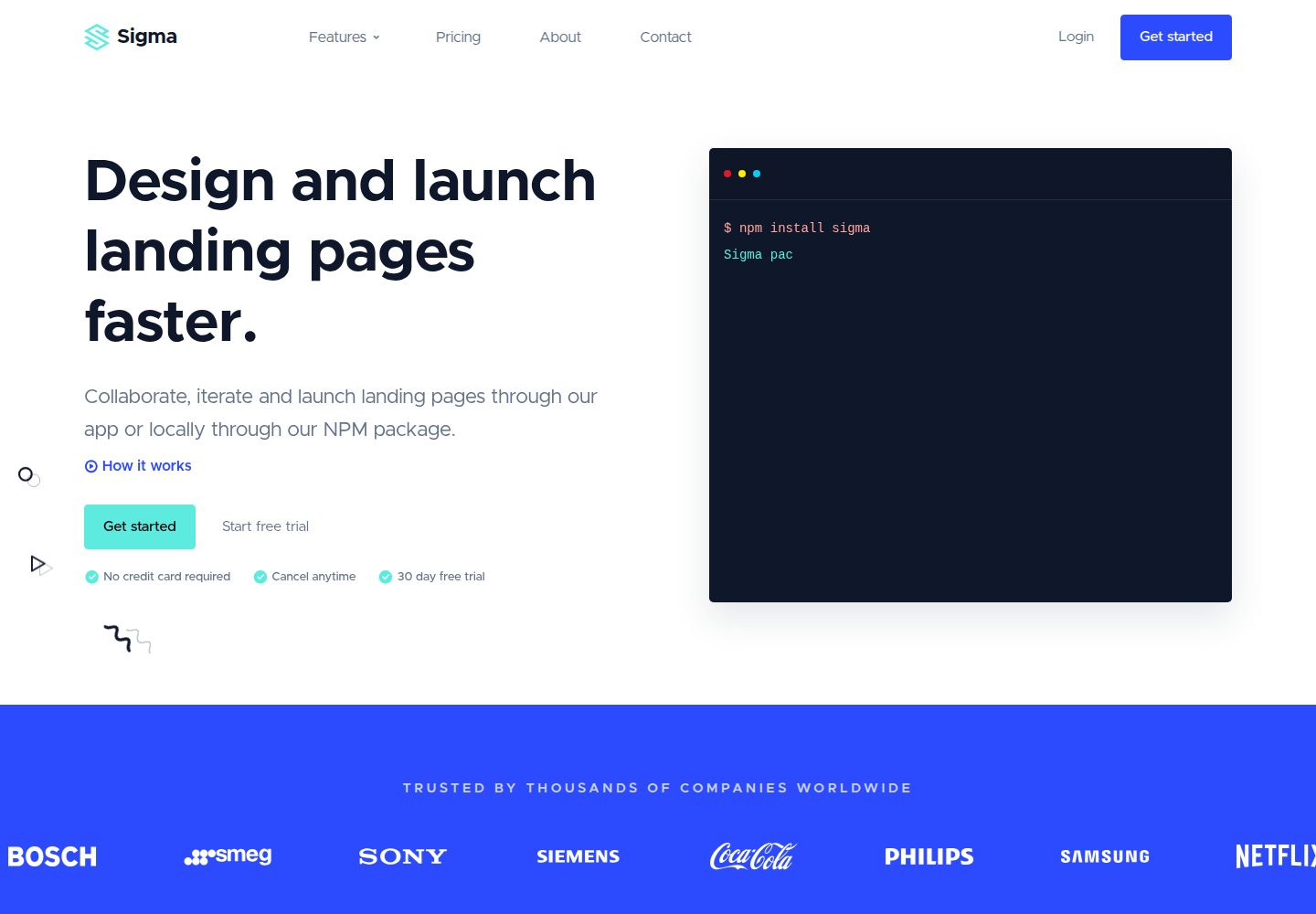
基于 Bootstrap 5 构建,页面在桌面端和移动端均做响应式适配
HTML企业官网
sigma-html-bootstrap — HTML 企业官网模板
作者 arahim007
Sigma 是一个基于 Bootstrap 5 的响应式 HTML 企业官网与营销落地页模板,包含首页、定价、关于我们和联系我们四个页面,采用 Handlebars 与 Webpack 组织源码。
看看你的网站会是什么样
浏览真实页面截图,比较内容排版与手机效果。点击下方缩略图切换,放大查看整页细节。
全部页面与视图 3
截图用于了解视觉与布局,交互效果请以实际项目为准。
采集于 2026-10-01查看来源
值得关注的模板亮点
从已有项目资料中,快速了解它的特点。
包含首页、定价页、关于我们和联系我们共 4 个页面
使用 Handlebars 局部模板与 JSON 数据文件减少重复 HTML
提供视频说明模态框、品牌 Logo 跑马灯、页头 Megamenu、定价表、FAQ、公司评价等组件
源码按 src/html、src/partials、src/data、src/assets 分目录组织,样式入口为 theme.scss
仓库采用 MIT 许可,可免费使用、修改、商用和分发该版本代码
模板详细介绍
Sigma 是面向企业官网或 SAAS 产品落地页的 HTML 模板,使用 Bootstrap 5 构建,页面在桌面端与移动端均做响应式处理。仓库提供已编译的 dist 目录,也提供 src 源码目录:src/html 存放页面,src/partials 存放 Handlebars 局部模板,src/data 存放 JSON 数据文件,src/assets 存放 CSS、JS 与图片等资源。模板通过 Handlebars 模板引擎和 JSON 数据减少重复代码,样式入口为 src/assets/scss/theme.scss。
模板共包含 4 个页面:首页、定价页、关于我们页和联系我们页。首页及内页组件包括 Bootstrap 模态框实现的视频说明组件、品牌 Logo 跑马灯、重点内容区块、最新博客文章区块、功能展示区块、页头 Megamenu、公司评价区块、定价表和 FAQ 组件。
需要注意,这是纯 HTML 模板,不连接数据库,也不能直接在 WordPress 等内容管理系统中使用,需要把代码集成到自己的应用中。若只修改 dist 目录中的文件而不调整源码,之后重新编译会覆盖这些改动。仓库采用 MIT 许可,但演示中使用的图片、字体、图标等第三方素材需按各自许可单独核对。
HTML企业官网
适合你的项目吗?
适用场景
- 搭建企业官网或公司介绍站点
- 制作 SAAS 产品的营销落地页
- 需要快速产出多页面静态站点的前端项目
- 以 Bootstrap 5 为技术栈、希望用 Handlebars 管理重复区块的页面开发
适合人群
- 熟悉 HTML、CSS 与 Bootstrap 的前端开发者
- 需要企业官网或产品落地页静态模板的团队
- 愿意通过 Node.js 与 Webpack 编译源码的开发者
- 接受自行集成后端或内容管理系统、不依赖模板内置数据能力的用户
上手与定制指南
结合仓库当前版本的说明,按下面的资料检查内容、配置与运行要求。
- 1
仅修改 dist 目录中的文件时无需安装依赖,可直接编辑;若修改源码则需安装 Node.js
- 2
在项目根目录运行 npm install 安装依赖,npm start 启动 Webpack 开发服务器,npm run build 重新编译输出到 dist
- 3
新增页面可在 src/html 中复制现有页面并重命名,重启 Webpack 开发服务器后生效
- 4
直接修改 dist 目录的文件会在重新编译时被覆盖,长期维护应改 src 源码
- 5
模板不连接数据库,也不自动适配 WordPress 等内容管理系统,需自行集成到应用中
授权与来源资料
使用条件与限制
免费使用 · 保留许可声明本次收录的是公开仓库中采用 MIT 许可的免费版本;免费范围为该版本代码,不代表外部服务或第三方素材免费。
使用时需要遵守
- 允许免费使用、修改、商用和分发该版本代码。
- 分发代码副本或实质性部分时,保留原作者版权声明和完整 MIT 许可声明。
- 代码按现状提供;担保与责任限制以原许可证及适用法律为准。
额外费用与待核对事项
- 该模板仅为纯 HTML 模板,不连接数据库,也不能直接在 WordPress 等内容管理系统中使用,必须自行将代码集成到自己的应用中。
- 直接修改 dist 目录中的文件后,若再用 Webpack 重新编译,这些改动会被覆盖;长期维护应修改 src 源码。
- 若要编辑源码并重新编译模板,需要本地安装 Node.js 并运行 Webpack 构建流程。
- 演示图片、字体、图标及其他第三方素材需按各自许可核对,不能仅凭代码的 MIT 许可判断。
- 域名、托管、数据库、支付或 AI 等外部服务可能另外收费。
查看原文依据
Permission is hereby granted, free of charge
许可证原文
Please note that this is an HTML template only. It does not connect to a database, and will not automatically work in a content management system (Wordpress etc). You will need to incorporate our code into your application.
README 原文
if you customise anything in this folder directly, and then later recompile the template using webpack, unless you move the dist folder out of the template, your changes will be overridden.
README 原文
https://github.com/arahim007/sigma-html-bootstrap/blob/main/LICENSE.mdhttps://github.com/arahim007/sigma-html-bootstrap/blob/main/README.mdMost developers will be editing the source code and will also be running Webpack to recompile the template files. If that's the case, then ensure that you have Node.js installed.
README 原文
DeepSeek 根据仓库许可证和 README 整理 ·2026-10-01。结果仅覆盖已读取资料,依赖、图片、字体及后续条款变更以各自原文为准。
项目核对记录与介绍依据
模板资料
- 来源平台
- GitHub
- 资料与维护参考分
- 资料一般 · 65 / 100
- 技术栈
- HTML
- 网站类型
- 企业官网
这个分数如何计算
本站按许可资料(最高30分)、演示链接(12分)、预览图(10分)、Star数(15分)、记录的维护时间(15分)、描述完整度(8分)、功能记录(5分)和分类资料(5分)计算。它不是代码、安全或性能测试,也不是 Google 评分;有链接不代表已实测可用。
这个项目需要核对什么
- 记录的仓库更新时间
- 2021-10-30
- 截图检查日期
- 2026-10-01
已收录演示链接。请用你的内容与屏幕尺寸检查;有演示不代表表单、认证或支付已经可用。
目录记录的主要技术栈是 HTML。请通过依赖清单和锁文件核对实际版本与托管要求。这些说明基于收录资料,不代表代码审计或部署实测。
查看具体选型方法 →介绍的制作与核对状态
介绍由 AI 辅助整理目录与仓库资料。仓库作者不等于这篇介绍的审核者。
已完成服务器许可规则与 AI 来源核对;未经过人工编辑审核。
查看当时使用的来源资料
SHA-256: d008666c75ebd42f5017b4cc68918a4e146d5af1e2646c4bbb1366af66d87e02
2026-10-01T02:11:50.841Z
来源文件 / 仓库# Sigma - Bootstrap 5 HTML Responsive Business & SAAS Template/Landing Page ## Overview Sigma is a responsive HTML Bootstrap 5 business or marketing template that will help you convert more of your visitors into customers. It can work well as a simple business website or a landing page for a SAAS application. The template's clean and minimal design means it's easy to modify and painless to integrate with your custom application. And above all, it's free. <strong><a href="https://sigma-html-bootstrap.vercel.app/">View Demo</a> | <a href="https://github.com/PixelRocket-Shop/sigma-html-bootstrap/archive/main.zip">Download ZIP</a></strong>  ## Table of contents - [Requirements](#requirements) - [Quick Start](#quick-start) - [Template Pages](#template-pages) - [Demo Link](#demo-link) - [Template Key Features](#template-key-features) - [Template File Structure](#template-file-structure) - [Handlebars](#handlebars) - [Template JSON Data](#template-json-data) - [Customise Template Styles](#customise-template-styles) - [Create New Pages](#create-new-pages) - [Bootstrap Documentation](#bootstrap-documentation) - [Credits](#credits) - [Contact Us](#contact-us) ## Requirements If you do not intend to work with the template source code (and that means you will not be compiling it or running the Webpack dev server), you do not need to install anything. You can simply navigate to the dist folder and start editing the files. Most developers will be editing the source code and will also be running Webpack to recompile the template files. If that's the case, then ensure that you have Node.js installed. [You can download it from here](https://nodejs.org/en/download/) ## Quick Start - [Download the latest release](https://github.com/PixelRocket-Shop/sigma-html-bootstrap/archive/main.zip) OR clone the repo: `git clone https://github.com/PixelRocket-Shop/sigma-html-bootstrap.git` - Install Node.js if you don't already have it on your system. - Open the project root in your command line. - run `npm install` in your command line. - run `npm start` to start Webpack devserver. - if you want to recompile the template files (which output to the dist folder), run `npm run build` ## Template Pages The template consists of 4 pages: * Homepage * Pricing page * About us page * Contact us page To keep code repetition to a minimum, we've used Handlebars.js as the templating engine and partials to quickly add the same code to different pages. We also use a Handlebars plugin for JSON data - this allows us to use loops and output a single HTML code block instead of repeating the same HTML. ## Demo Link [Demo URL](https://sigma-html-bootstrap.vercel.app/) **Please note that this is an HTML template only. It does not connect to a database, and will not automatically work in a content management system (Wordpress etc). You will need to incorporate our code into your application.** ## Template Key Features * Homepage video explainer component (using Bootstrap modal) * Built with Bootstrap 5 * Fully responsive * Brand logo marquee component * Highlighted content component * Latest blog posts component * Our Features component * Header Megamenu * Company review component * Pricing table component * FAQ component ## Template File structure 📁 dist - Generated version of the template. Go here if you do not want to work with the template source code. But be warned: if you customise anything in this folder directly, and then later recompile the template using webpack, unless you move the dist folder out of the template, your changes will be overridden. 📁 node_modules - Directory where NPM installs dependancies. You will not see this folder until you complete the template installation. You do not need to create this folder. 📁 src - Template source code. Go here to customise your template. 📁 src/assets - Template assets such as CSS, JS, Images etc. 📁 src/data - Template JSON Data files. We use these JSON files to make your job easier to insert content into the template. 📁 src/html - Template pages. Go here to edit existing pages or add new pages. 📁 src/partials - Handlebars partial templates. ## Handlebars Handlebars is a template engine that allows us to keep our template source code as organised and as clean as possible. It cuts down on code duplication and through the use of helper functions, allows template developers to very quickly output large amounts of data with minimal code. [You can read more about it here](https://handlebarsjs.com). ## Template JSON Data The Webpack Handlebars plugin that we use comes with a very handy utility that allows us to pass in JSON files as template data. Please navigate to: src/data. Here is where our template data JSON files reside. You can edit, remove or add your own to this folder. ## Customise Template Styles All of the template's source CSS/SASS files are kept inside the template's assets folder. Navigate to src/assets/scss. Open up theme.scss with your editor. This is the main entry point for all other SASS/CSS files. ## Create New Pages To create a new page, navigate in your code editor to: src/html. To make it easier to get the correct HTML in place, clone an existing page. Rename the newly-created file to whatever URL you require. And that's it. You are now free to open the new page with your code editor, make your changes, and then save the file. Quit Webpack devserver and restart it for the page to show up. ## Bootstrap Documentation Bootstrap already has a comprehensive documentation site that will guide you in setting up and using all default Bootstrap features. Bootstrap 5 is fully integrated to our template's source code. Please refer to Bootstrap's doc site first for any default Bootstrap features: [Visit Bootstrap's Doc Site](https://getbootstrap.com/docs/5.0/getting-started/introduction/) ## Credits [Bootstrap](https://getbootstrap.com/) [AOS.js](https://michalsnik.github.io/aos/) [Unsplash](https://unsplash.com/) [Pexels](https://www.pexels.com/) [Pixabay](https://pixabay.com/) [Swiper.js](https://swiperjs.com/) ## Contact Us You can find our website [here](https://www.pixelrocket.store) or you can email us at [email protected]
看看同类模板
对比同技术栈与用途的模板,找到更适合的视觉与内容结构。

mazer
Free and Open-source Bootstrap 5 Admin Dashboard Template and Landing Page
HTML · 后台

Freelancer
Freelancer 是 Start Bootstrap 出品的单页作品集模板,专为自由职业者、设计师和小型工作室设计。 页面结构清晰,包含多个内容区块、响应式作品集网格,每个作品项目配有模态窗口展示详情。
HTML · 作品集

Creative
Creative 是 Start Bootstrap 团队维护的一款单页营销模板,定位明确:为创意机构或产品服务提供一个以作品展示和行动号召为核心的落地页。
HTML · 企业官网

startbootstrap-agency
Agency 是 Start Bootstrap 维护的单页代理商作品集主题,基于 Bootstrap 构建,MIT 许可。
HTML · 企业官网

startbootstrap-landing-page
这是 Start Bootstrap 系列中一款通用型落地页模板,基于 Bootstrap 构建,定位是给产品或服务做单页推广。
HTML · 企业官网

Landing-Page
Tailwind CSS Starter Template - Landing Page
HTML · 企业官网