基于 Gatsby 与 React 的静态预告页模板
GatsbyReact启动器
react-coming-soon-template — Gatsby 启动器模板
作者 arrlancore
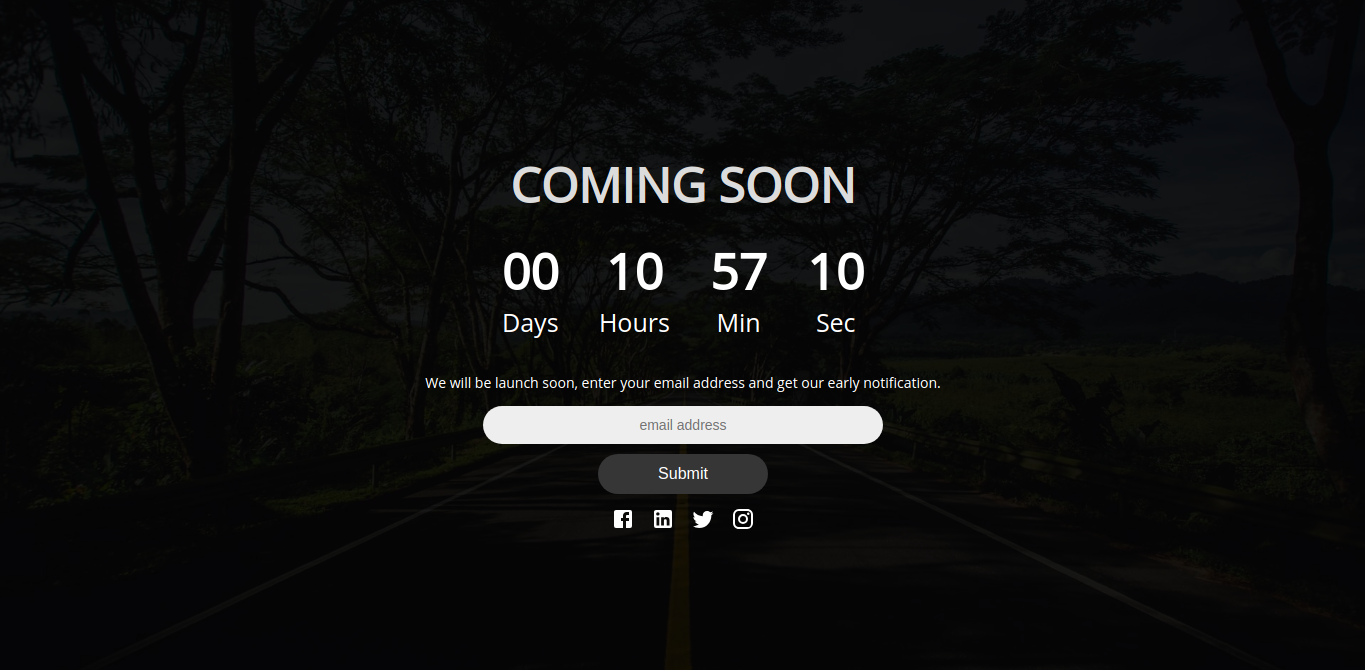
基于 Gatsby 与 React 的“即将上线”页面启动模板,包含倒计时与订阅表单。
看看你的网站会是什么样
浏览真实页面截图,比较内容排版与手机效果。点击下方缩略图切换,放大查看整页细节。
目前有 1 张原始预览,可打开完整图片查看设计细节。
截图用于了解视觉与布局,交互效果请以实际项目为准。
采集于 2026-10-02查看来源
值得关注的模板亮点
从已有项目资料中,快速了解它的特点。
内置动画倒计时器,通过 date 与 time 属性设置目标时间
包含注册/订阅表单,用于在上线前收集潜在客户线索
标题、说明文案在 index.js 中修改,背景图在 layout.css 中替换
README 提供 Firebase CLI 与 Netlify 两种部署流程
采用 MIT 许可,可免费使用、修改、商用与分发
模板详细介绍
这是一个用于搭建网站上线前预告页的启动模板,基于 Gatsby 和 React。README 说明其用途是在网站改版期间保留访客并收集潜在客户线索,页面核心由三部分组成:可自定义的标题与说明文案、动画倒计时器以及注册/订阅表单。
自定义方式较为直接:在 index.js 中修改标题、文案并设置倒计时时间,在 layout.css 中替换背景图片。倒计时通过 Timer 组件的 date 与 time 属性配置,例如 date="10/31/2018" time="19.00"。
部署方面,README 给出两种路径:使用 Firebase CLI(yarn build 后经 firebase login、firebase init、firebase deploy 上传),或通过 Netlify 连接 Git 仓库并将构建命令改为 yarn build。仓库采用 MIT 许可,可免费使用、修改、商用与分发,但需保留版权与许可声明;README 提到的 Firebase 集成需自行配置并核对额度与收费,演示图片、字体、图标等第三方素材的许可需单独确认。
GatsbyReact启动器
适合你的项目吗?
适用场景
- 网站改版期间放置临时预告页,保留现有访客
- 新产品或新服务上线前收集用户邮箱等线索
- 为活动、发布或开业页面添加倒计时与订阅入口
- 作为学习 Gatsby 与 React 页面结构的小型示例项目
适合人群
- 需要一个简单上线前预告页的个人或小团队
- 希望自行修改文案、倒计时与背景图的开发者
- 计划使用 Firebase 或 Netlify 部署静态站点的用户
上手与定制指南
结合仓库当前版本的说明,按下面的资料检查内容、配置与运行要求。
- 1
需要预先安装 Yarn 与 Node.js;若使用 Firebase 托管,还需安装 firebase-tools
- 2
克隆仓库后执行 yarn 安装依赖,依赖包含 gatsby、react、react-helmet 及相关 Gatsby 插件
- 3
在 index.js 中设置标题、文案与 Timer 的 date/time,在 layout.css 中替换背景图
- 4
构建命令为 yarn build;Firebase 部署依次执行 firebase login、firebase init、firebase deploy
- 5
启用 Firebase 相关功能前需自行配置,并核对 Firebase 的额度与收费;第三方素材许可需单独确认
授权与来源资料
使用条件与限制
免费使用 · 保留许可声明本次收录的是公开仓库中采用 MIT 许可的免费版本;免费范围为该版本代码,不代表外部服务或第三方素材免费。
使用时需要遵守
- 允许免费使用、修改、商用和分发该版本代码。
- 分发代码副本或实质性部分时,保留原作者版权声明和完整 MIT 许可声明。
- 代码按现状提供;担保与责任限制以原许可证及适用法律为准。
额外费用与待核对事项
- README 提及 Firebase 集成;启用相关动态功能前需自行配置,并核对 Firebase 的额度与收费。
- 演示图片、字体、图标及其他第三方素材需按各自许可核对,不能仅凭代码的 MIT 许可判断。
- 域名、托管、数据库、支付或 AI 等外部服务可能另外收费。
- 仅在需要将站点托管到 Firebase 时才要求安装 Firebase 工具;不使用 Firebase 托管则无需该依赖。
- Firebase 部署路径需使用 Firebase CLI,并依次执行 firebase login、firebase init、firebase deploy,涉及 Firebase 账号与外部服务。
- Netlify 部署路径需要注册 Netlify 账号(可用 GitHub/GitLab/Bitbucket 或邮箱登录),属于外部服务账号要求。
查看原文依据
Permission is hereby granted, free of charge
许可证原文
- <a href="https://github.com/firebase/firebase-tools">Firebase</a>, if you want to hosting at firebase
README 原文
1. Deploying with firebase CLI
README 原文
https://github.com/arrlancore/react-coming-soon-template/blob/master/LICENSEhttps://github.com/arrlancore/react-coming-soon-template/blob/master/README.md- Sign up with Github/Gitlab/Bitbucket or Email
README 原文
DeepSeek 根据仓库许可证和 README 整理 ·2026-10-04。结果仅覆盖已读取资料,依赖、图片、字体及后续条款变更以各自原文为准。
项目核对记录与介绍依据
模板资料
- 来源平台
- GitHub
- 资料与维护参考分
- 资料较完整 · 77 / 100
- 技术栈
- Gatsby · React
- 网站类型
- 启动器
这个分数如何计算
本站按许可资料(最高30分)、演示链接(12分)、预览图(10分)、Star数(15分)、记录的维护时间(15分)、描述完整度(8分)、功能记录(5分)和分类资料(5分)计算。它不是代码、安全或性能测试,也不是 Google 评分;有链接不代表已实测可用。
这个项目需要核对什么
- 记录的仓库更新时间
- 2023-01-04
- 截图检查日期
- 2026-10-04
已收录演示链接。请用你的内容与屏幕尺寸检查;有演示不代表表单、认证或支付已经可用。
目录记录的主要技术栈是 Gatsby。请通过依赖清单和锁文件核对实际版本与托管要求。这些说明基于收录资料,不代表代码审计或部署实测。
查看具体选型方法 →介绍的制作与核对状态
介绍由 AI 辅助整理目录与仓库资料。仓库作者不等于这篇介绍的审核者。
审核声明: [email protected] · 2026-10-05
查看当时使用的来源资料
SHA-256: d76e47bdc61b44b2ea3a7693c56568a2ec40e1d756038913a58450c97b154c3b
2026-10-04T20:30:34.154Z
来源文件 / 仓库# React coming soon template
Kick off your new website with coming soon starter template.
Coming soon website templates helps you to retain customers when you are busy in revamping your website.
The message you show in the coming soon plays a vital role in retaining the visitors and to collect new leads. So tailor the message to your audience and make a strong first impression for the new users.
There are other two web elements: animated countdown timer and sign-up form.

## 🚀 Prerequisites
- <a href="https://yarnpkg.com/en/">Yarn</a>, follow the installation <a href="https://yarnpkg.com/en/docs/install">guide</a>
- <a href="https://nodejs.org/en/">Node.js</a>
- <a href="https://github.com/firebase/firebase-tools">Firebase</a>, if you want to hosting at firebase
```
$ npm install -g firebase-tools
```
## 🚀 Quick start
Clone the repository. Update as you required and upload to your hosting.
**Simple clone.**
```
$ git clone https://github.com/arrlancore/react-coming-soon-template.git
$ cd react-coming-soon-template
```
## Installation
$ yarn
The following dependencies will be installed:
```
gatsby: ^2.0.0
gatsby-plugin-manifest: ^2.0.2
gatsby-plugin-offline: ^2.0.5
gatsby-plugin-react-helmet: ^3.0.0
react: ^16.5.1
react-dom: ^16.5.1
react-helmet: ^5.2.0
```
## Customising
- Type your own header, message and set the timer in index.js.
- Add your own background image in layout.css.
To set timer add props date and time at Timer component, example:
<Timer date="10/31/2018" time="19.00">
## Deployment
1. Deploying with firebase CLI
Build Project
```sh
$ yarn build
```
Upload to Firebase.
```sh
$ firebase login
$ firebase init
$ firebase deploy
```
2. Deploying with netlify
- Sign up with Github/Gitlab/Bitbucket or Email
- Connect to Git Provider
- Authorize Git Provider
- Pick Your Repository
- Select Branch to Deploy (Default: master)
- Change the build command to `yarn build`
- Click `Deploy` button
## License
This project is licensed under the MIT License - see the [LICENSE](LICENSE) file for details
看看同类模板
对比同技术栈与用途的模板,找到更适合的视觉与内容结构。

gatsby-starter-gcn
gatsby-starter-gcn 是一个面向静态网站构建的 Gatsby 启动器,将内容管理、部署和前端开发串联起来。
Gatsby · 博客

gatsby-starter-morning-dew
:rocket: A Gatsby theme/starter to build lightning-fast blog/websites
Gatsby · 博客

starter-gatsby-blog
这是一个由 Contentful 社区维护的 Gatsby 博客启动器,目标是把静态站点的低维护成本与 Contentful 的友好编辑界面结合起来。
Gatsby · 社区

automatic-gatsbyjs-app-landing-page
Automatic GatsbyJS App Landing Page - Automatically generate iOS app landing page using GatsbyJS
Gatsby · 工具站
gatsby-starter-cv
A simple starter to get up and developing your digital curriculum with GatsbyJS
Gatsby · 启动器

clay-theme
Image-centric Gatsby theme for publishers, portfolios, photographers blogs and more.
Gatsby · 作品集