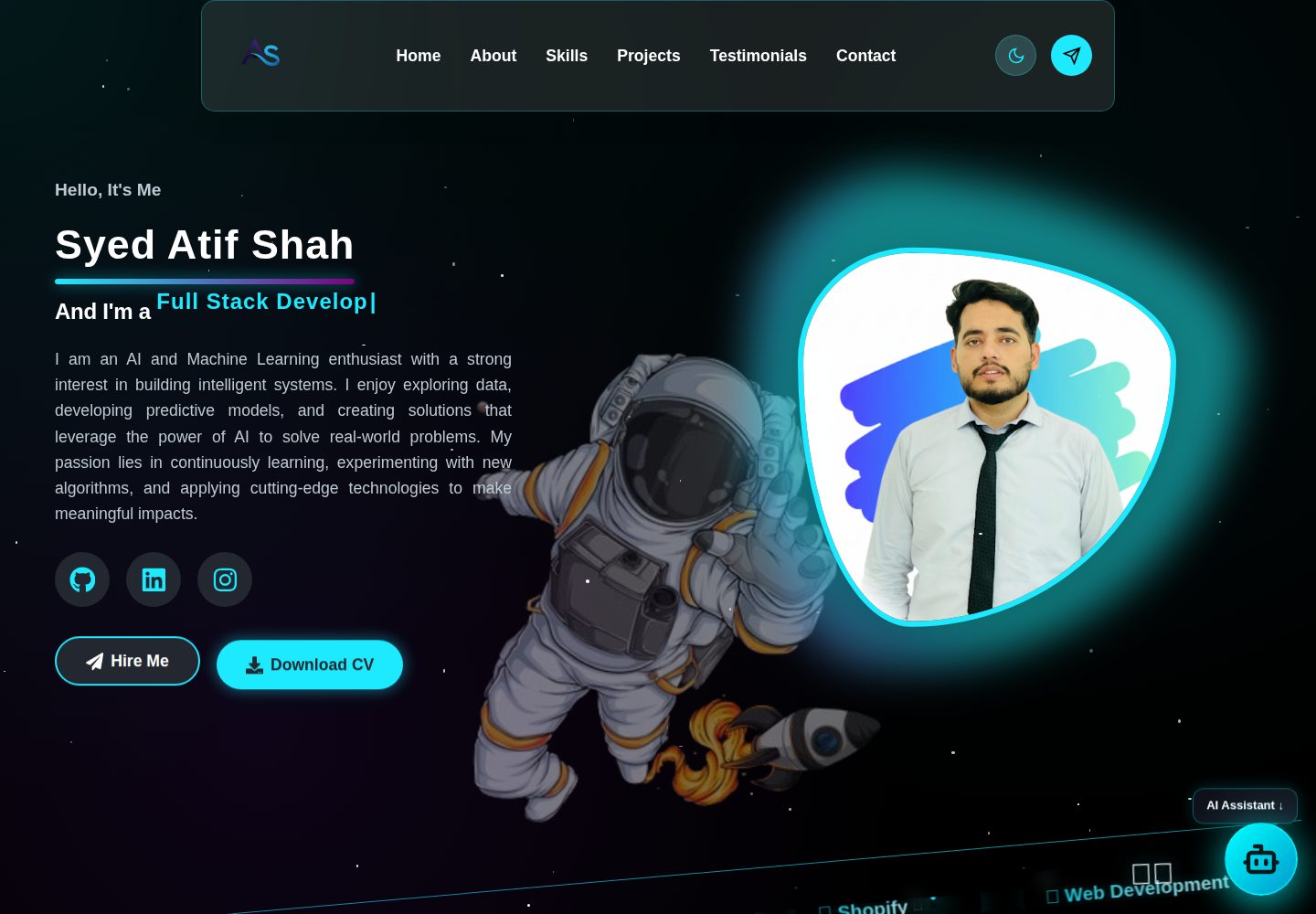
太空主题视觉:宇航员、黑洞、星系等图片与视频资源,配合渐变与发光效果
React作品集
MyPortfolio_2025 — React 作品集模板
作者 ATIFSHAH159
一个以太空为主题的个人作品集网站,React 前端配合 Node.js 后端,包含联系表单邮件服务和基于 Python 的 AI 助手聊天接口。
看看你的网站会是什么样
浏览真实页面截图,比较内容排版与手机效果。点击下方缩略图切换,放大查看整页细节。
全部页面与视图 2
截图用于了解视觉与布局,交互效果请以实际项目为准。
采集于 2026-10-13查看来源
值得关注的模板亮点
从已有项目资料中,快速了解它的特点。
React 前端按页面与组件拆分,样式以独立 CSS 文件组织
Node.js + Express 后端提供联系表单邮件、健康检查与聊天三类接口
AI 助手聊天由 Node 调用 Python 脚本,经 LangChain 接入 Google Gemini
使用 Framer Motion 实现入场与悬停动画,并包含响应式布局
模板详细介绍
MyPortfolio_2025 是 Syed Atif Shah 的个人作品集网站,采用前后端分离结构。前端为 React 应用,按页面拆分为 HomePage、AboutUs、Skills、Projects、Testimonials、ContactPage 等,并配有 Menubar、Footer、Ticker、WorkBanner、Chatbot 等组件,样式以独立 CSS 文件组织;资源目录中存放宇航员、黑洞、星系等图片与视频,用于太空主题的视觉呈现。
后端位于 Server 目录,使用 Node.js 与 Express,提供三个接口:POST /email/contact 通过 Nodemailer 发送联系表单邮件,GET /health 返回服务状态,POST /chat 接收消息并调用 Python 脚本获取 AI 回复。AI 助手部分使用 LangChain 与 Google Gemini,通过 python-dotenv 读取环境变量。
使用前需要分别安装前端与后端依赖,并在 Server 目录配置 .env(端口、前端地址、邮箱账号与应用密码、Google API Key),同时安装 Python 3.10 及以上版本及 langchain-google-genai、langchain-core、python-dotenv、google-generativeai 等包。仓库采用 MIT 许可,可免费使用、修改、商用和分发代码,但演示图片、字体、图标等第三方素材需单独核对许可,域名、托管、邮箱或 AI 等外部服务可能产生费用。
React作品集
适合你的项目吗?
适用场景
- 个人开发者搭建展示技能、项目与经历的作品集网站
- 学习 React 前端与 Express 后端分离结构的参考项目
- 在网站中集成联系表单邮件发送与 AI 聊天助手的实践示例
- 作为太空主题视觉与动画效果的实现参考
适合人群
- 需要个人作品集网站模板的前端开发者
- 希望了解 React + Node.js + Python 混合调用方式的开发者
- 对太空主题 UI 与 Framer Motion 动画感兴趣的开发者
上手与定制指南
结合仓库当前版本的说明,按下面的资料检查内容、配置与运行要求。
- 1
分别进入 frontend 与 Server 目录执行 npm install 安装依赖
- 2
在 Server 目录创建 .env,配置 PORT、FRONTEND_URL、EMAIL_USER、EMAIL_PASS 与 GOOGLE_API_KEY
- 3
AI 助手需要 Python 3.10 及以上环境,并安装 langchain-google-genai、langchain-core、python-dotenv、google-generativeai
- 4
先启动后端(npm run dev 或 npm start),再启动前端(npm start)
- 5
前端默认运行在 3000 端口,后端默认运行在 5000 端口
授权与来源资料
使用条件与限制
免费使用 · 保留许可声明本次收录的是公开仓库中采用 MIT 许可的免费版本;免费范围为该版本代码,不代表外部服务或第三方素材免费。
使用时需要遵守
- 允许免费使用、修改、商用和分发该版本代码。
- 分发代码副本或实质性部分时,保留原作者版权声明和完整 MIT 许可声明。
- 代码按现状提供;担保与责任限制以原许可证及适用法律为准。
额外费用与待核对事项
- 演示图片、字体、图标及其他第三方素材需按各自许可核对,不能仅凭代码的 MIT 许可判断。
- 域名、托管、数据库、支付或 AI 等外部服务可能另外收费。
- 使用联系表单邮件功能需要自备邮箱服务凭据(如 Gmail、Outlook 等),属于外部服务账号要求。
- AI 助手功能需要配置 Google Gemini 的 API Key,属于外部服务密钥要求。
- 邮件发送功能需在 .env 中填写邮箱账号与应用密码,需自行申请邮箱应用专用密码。
- AI 聊天功能依赖本地 Python 3.10+ 环境及额外 pip 包,Node 服务会启动 Python 进程。
- 使用 AI 助手需额外安装这些 Python 依赖包,属于运行环境要求。
查看原文依据
Permission is hereby granted, free of charge
许可证原文
Email service credentials (Gmail, Outlook, etc.)
README 原文
GOOGLE_API_KEY=your-gemini-api-key
README 原文
[email protected] EMAIL_PASS=your-app-password
README 原文
The Node server spawns a Python process to answer chat prompts. Install Python 3.10+ and these packages
README 原文
https://github.com/ATIFSHAH159/MyPortfolio_2025/blob/main/LICENSEhttps://github.com/ATIFSHAH159/MyPortfolio_2025/blob/main/README.mdpip install langchain-google-genai langchain-core python-dotenv google-generativeai
README 原文
DeepSeek 根据仓库许可证和 README 整理 ·2026-10-13。结果仅覆盖已读取资料,依赖、图片、字体及后续条款变更以各自原文为准。
项目核对记录与介绍依据
模板资料
- 来源平台
- GitHub
- 资料与维护参考分
- 资料较完整 · 80 / 100
- 技术栈
- React
- 网站类型
- 作品集
这个分数如何计算
本站按许可资料(最高30分)、演示链接(12分)、预览图(10分)、Star数(15分)、记录的维护时间(15分)、描述完整度(8分)、功能记录(5分)和分类资料(5分)计算。它不是代码、安全或性能测试,也不是 Google 评分;有链接不代表已实测可用。
这个项目需要核对什么
- 记录的仓库更新时间
- 2025-10-25
- 截图检查日期
- 2026-10-13
已收录演示链接。请用你的内容与屏幕尺寸检查;有演示不代表表单、认证或支付已经可用。
目录记录的主要技术栈是 React。请通过依赖清单和锁文件核对实际版本与托管要求。这些说明基于收录资料,不代表代码审计或部署实测。
查看具体选型方法 →介绍的制作与核对状态
介绍由 AI 辅助整理目录与仓库资料。仓库作者不等于这篇介绍的审核者。
审核声明: [email protected] · 2026-10-13
查看当时使用的来源资料
SHA-256: bde1f1cc703e83b06f987bbd3f587f444361f9de40752ad3c1422e494b3928c1
2026-10-13T07:27:25.898Z
来源文件 / 仓库# 🚀 Syed Atif Shah - Portfolio Website
A modern, space-themed portfolio website showcasing my skills, projects, and experience as a Web & Mobile Developer. Built with React.js frontend and Node.js backend, featuring stunning animations, responsive design, and an immersive cosmic experience with full-stack functionality.
## ✨ Features
- **Space-themed Design**: Immersive cosmic experience with animated backgrounds
- **Fully Responsive**: Optimized for all devices (desktop, tablet, mobile)
- **Modern UI/UX**: Glass-morphism effects, smooth animations, and interactive elements
- **Fast Performance**: Optimized React components and efficient rendering
- **Interactive Sections**:
- Hero section with animated astronaut
- Skills showcase with solar system animation
- Project gallery with 3D computer display
- Testimonials carousel
- Contact form with interactive space avatar
- **AI Assistant Chatbot**: Floating, theme-aligned assistant that answers questions about Atif Shah’s profile, skills, and projects
- **Floating Launcher**: Circular "AI" button with floating label; opens a responsive chat panel
- **Smooth Navigation**: Sticky navigation with smooth scrolling
- **Framer Motion Animations**: Beautiful entrance and hover animations
- **Gradient Effects**: Stunning color gradients and glow effects
- **Contact Form**: Functional contact form with email service
- **Interactive Avatar**: Space avatar that responds to user interactions
- **Dynamic Backgrounds**: Animated videos and images that enhance the experience
## 🛠️ Tech Stack
### Frontend
- **Framework**: React.js 18+
- **Styling**: CSS3 with custom properties and animations
- **Animations**: Framer Motion
- **Icons**: lucide-react and react-icons
- **Build Tool**: Create React App
- **HTTP Client**: Fetch API
### Backend
- **Runtime**: Node.js
- **Framework**: Express.js
- **Email Service**: Nodemailer
- **AI Chat Endpoint**: Invokes Python script via Node to get Gemini responses
- **Environment**: dotenv
- **CORS**: Cross-Origin Resource Sharing enabled
- **Body Parser**: JSON and URL-encoded data parsing
### AI Assistant (Python)
- **Orchestration**: LangChain
- **Model**: Google Gemini via `langchain-google-genai`
- **Env Management**: python-dotenv
### Development Tools
- **Version Control**: Git
- **Package Manager**: npm
- **Development Server**: Nodemon (backend)
- **Hot Reload**: React development server
## 📁 Project Structure
```
MyPortfolio/
├── frontend/ # React.js Frontend Application
│ ├── public/
│ │ ├── favicon.ico
│ │ ├── index.html
│ │ ├── logo192.png
│ │ ├── logo512.png
│ │ ├── manifest.json
│ │ └── robots.txt
│ ├── src/
│ │ ├── Components/
│ │ │ ├── Footer.js
│ │ │ ├── Menubar.js
│ │ │ ├── Ticker.js
│ │ │ ├── WorkBanner.js
│ │ │ └── Chatbot.js
│ │ ├── Pages/
│ │ │ ├── AboutUs.js
│ │ │ ├── ContactPage.js
│ │ │ ├── HomePage.js
│ │ │ ├── Projects.js
│ │ │ ├── Skills.js
│ │ │ └── Testimonials.js
│ │ ├── Services/
│ │ │ └── Apis.js
│ │ ├── Assets/
│ │ │ ├── Css/
│ │ │ │ ├── AboutUs.css
│ │ │ │ ├── Chatbot.css
│ │ │ │ ├── ContactPage.css
│ │ │ │ ├── Footer.css
│ │ │ │ ├── HomePage.css
│ │ │ │ ├── Menubar.css
│ │ │ │ ├── Projects.css
│ │ │ │ ├── Skills.css
│ │ │ │ ├── Testimonials.css
│ │ │ │ ├── Ticker.css
│ │ │ │ └── WorkBanner.css
│ │ │ ├── Documents/
│ │ │ │ └── Atif Cv.pdf
│ │ │ ├── Images/
│ │ │ │ ├── About.png
│ │ │ │ ├── astronaut.png
│ │ │ │ ├── astronaut2.jpg
│ │ │ │ ├── astronaut3.png
│ │ │ │ ├── astronaut4.png
│ │ │ │ ├── contactimage.png
│ │ │ │ ├── digital brain (2).png
│ │ │ │ ├── logo.png
│ │ │ │ ├── minirobot.png
│ │ │ │ └── profilepicture.png
│ │ │ └── Videos/
│ │ │ ├── blackhole.mp4
│ │ │ ├── galaxy.mp4
│ │ │ ├── glob.mp4
│ │ │ └── technologies.mp4
│ │ ├── App.css
│ │ ├── App.js
│ │ └── index.js
│ ├── package.json
│ ├── package-lock.json
│
└── Server/
├── Controllers/
│ ├── emailController.js
│ └── chatController.js
├── Routes/
│ ├── emailRoutes.js
│ └── chatRoutes.js
├── AI Assistant/
│ └── chat.py
├── index.js
├── package.json
└── package-lock.json
```
## 🖼️ Screenshots
Below are screenshots of key sections in the application:


## 🚀 Getting Started
### Prerequisites
- Node.js (version 14 or higher)
- npm or yarn package manager
- Git
- Email service credentials (Gmail, Outlook, etc.)
### Installation
1. **Clone the repository**
```bash
git clone https://github.com/ATIFSHAH159/MyPortfolio-2025
cd portfolio
```
2. **Install Frontend Dependencies**
```bash
cd frontend
npm install
```
3. **Install Backend Dependencies**
```bash
cd ../Server
npm install
```
4. **Environment Setup (Server)**
Create a `.env` file in the `Server` directory:
```env
PORT=5000
FRONTEND_URL=http://localhost:3000
[email protected]
EMAIL_PASS=your-app-password
# AI Assistant
GOOGLE_API_KEY=your-gemini-api-key
```
5. **Python Dependencies (for AI Assistant)**
The Node server spawns a Python process to answer chat prompts. Install Python 3.10+ and these packages (in your preferred environment/venv):
```bash
pip install langchain-google-genai langchain-core python-dotenv google-generativeai
```
6. **Start the Backend Server**
```bash
cd Server
npm run dev
# or
npm start
```
7. **Start the Frontend Development Server**
```bash
cd frontend
npm start
```
8. **Open your browser**
- Frontend: [http://localhost:3000](http://localhost:3000)
- Backend API: [http://localhost:5000](http://localhost:5000)
9. **Use the AI Assistant**
- Click the circular "AI" button at the bottom-right (label "AI Assistant ↓").
- The chat opens and auto-focuses the input. Press Enter to send.
- The assistant answers based on curated resume info.
## 🎨 Design Features
### Color Palette
- **Primary**: `#1de9ff` (Cyan)
- **Secondary**: `#8a2be2` (Blue Violet)
- **Background**: Dark space theme with gradients
- **Text**: White with various opacity levels
### Typography
- **Primary Font**: Inter, sans-serif
- **Headings**: Bold weights with gradient text effects
- **Body**: Clean, readable font with proper line heights
### Animations
- **Framer Motion**: Smooth page transitions and component animations
- **CSS Animations**: Floating elements, twinkling stars, and orbital motions
- **Hover Effects**: Interactive buttons and cards with smooth transitions
## 📱 Responsive Design
The portfolio is fully responsive and optimized for:
- **Desktop**: 1200px and above
- **Tablet**: 768px - 1199px
- **Mobile**: 320px - 767px
## 🤝 Contributing
1. Fork the repository
2. Create a feature branch (`git checkout -b feature/AmazingFeature`)
3. Commit your changes (`git commit -m 'Add some AmazingFeature'`)
4. Push to the branch (`git push origin feature/AmazingFeature`)
5. Open a Pull Request
## 📄 License
This project is licensed under the MIT License - see the [LICENSE](LICENSE) file for details.
## 🙏 Acknowledgments
- [Framer Motion](https://www.framer.com/motion/) for smooth animations
- [Create React App](https://create-react-app.dev/) for the development environment
- Space-themed inspiration from various design resources
- All the open-source libraries that made this project possible
## 📞 Contact
If you have any questions or want to collaborate, feel free to reach out:
- **Email**: [[email protected]]
---
## 🔌 API Endpoints
### Email Service
- **POST** `/email/contact` - Send contact form email
- **Body**: `{ name, email, subject, message }`
- **Response**: `{ success: boolean, message: string }`
### Health Check
- **GET** `/health` - Server health status
- **Response**: `{ message: string, timestamp: string }`
### AI Assistant
- **POST** `/chat` - Send a prompt to the AI assistant
- **Body**: `{ message: string }`
- **Response**: `{ success: boolean, response: string }`
---
<p align="center"><strong>⭐Star this repository if you found it helpful!</strong></p>
<p align="center"><strong>Built with ❤️ by Syed Atif Shah</strong></p>
看看同类模板
对比同技术栈与用途的模板,找到更适合的视觉与内容结构。

react-portfolio-template
React powered portfolio website template for developers
React · 作品集

personal-website-react
personal-website-react 是一个面向开发者的个人作品集单页模板,由 React 和 Material-UI 构建,并通过 Create React App 初始化。
React · 作品集

karngyan.com
karngyan.com 是一个面向开发者的个人网站与博客模板,作者用它搭建了自己的站点,并公开了完整代码。 模板的核心定位很明确:让写作者专注于内容,而不是花时间搭建基础设施。
React · 作品集

react-portfolio-template
react-portfolio-template 是一个由 Ryan Balieiro 开发的 React 作品集模板,定位为“sleek, futuristic”,适合开发者展示个人履历。
React · 作品集

portfolio
Personal website, Data scientist portfolio template
React · 作品集

react-portfolio
react-portfolio 是一个面向开发者的个人作品集模板,基于 React 16 和 Create React App 构建,界面样式采用 Material-UI。
React · 作品集