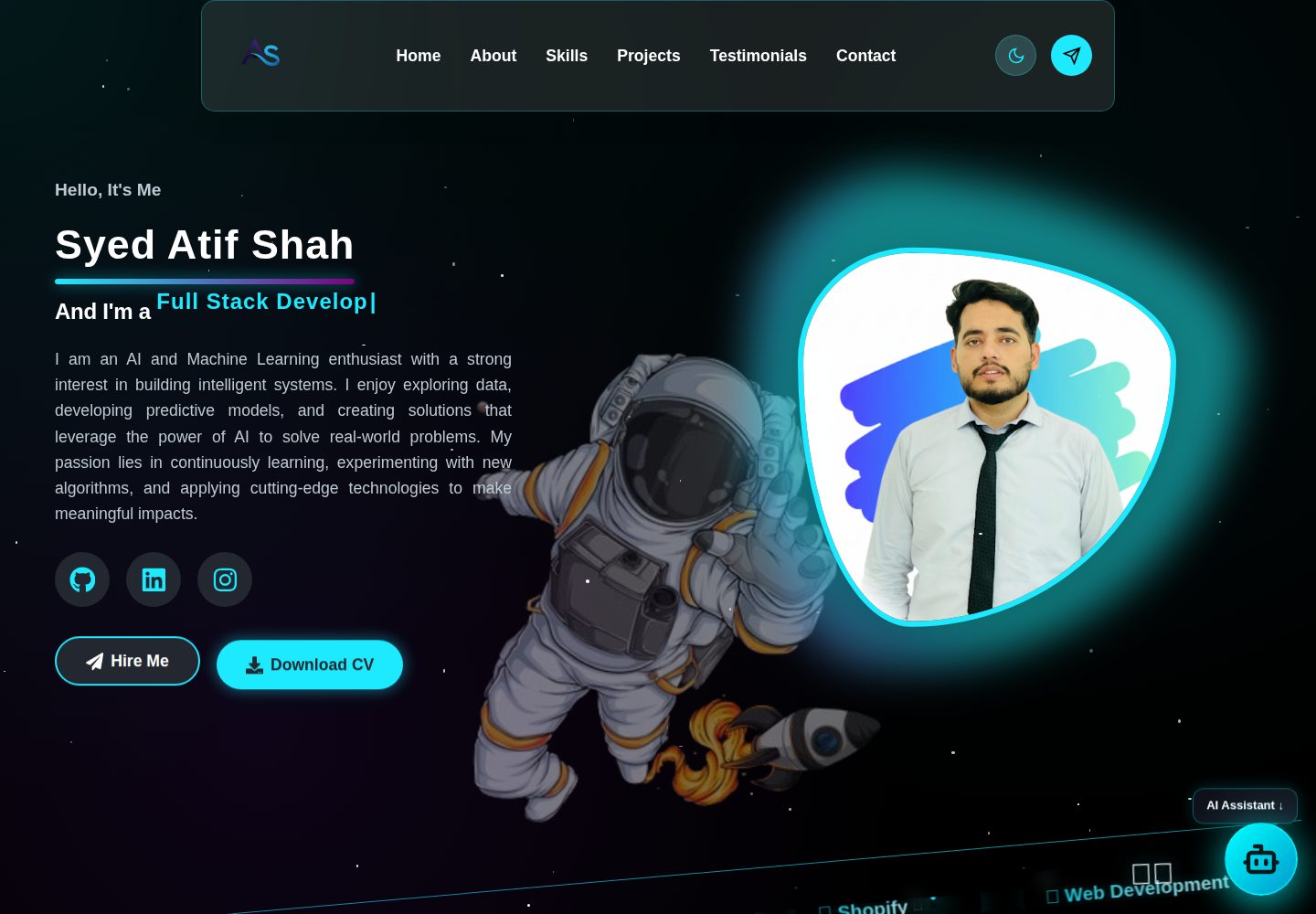
Space-themed visuals: astronaut, black hole, galaxy, and other image and video assets, combined with gradients and glow effects
ReactPortfolio
MyPortfolio_2025 — React Portfolio Template
By ATIFSHAH159
A space-themed personal portfolio website with a React frontend and Node.js backend, including a contact form email service and a Python-based AI assistant chat endpoint.
Explore the design
Compare the page layouts and mobile experience. Open any screenshot for a closer look.
Desktop homepage1 / 2
Desktop captureTop of page
Actual screenshot captured by the server browser.
All pages & views 2
Screenshots show visual appearance; interactive behavior may differ.
Recorded 2026-10-13View source
What stands out
A quick read of the recorded project description.
React frontend split by pages and components, with styles organized in separate CSS files
Node.js + Express backend provides three types of endpoints: contact form email, health check, and chat
AI assistant chat is handled by Node calling a Python script, connecting to Google Gemini via LangChain
Uses Framer Motion for entrance and hover animations, and includes responsive layout
Template Details
MyPortfolio_2025 is the personal portfolio website of Syed Atif Shah, built with a separated frontend and backend structure. The frontend is a React application split by page into HomePage, AboutUs, Skills, Projects, Testimonials, ContactPage, and others, with components such as Menubar, Footer, Ticker, WorkBanner, and Chatbot, and styles organized in separate CSS files; the assets directory stores images and videos of astronauts, black holes, galaxies, and similar content for the space-themed visual presentation.
The backend is located in the Server directory and uses Node.js with Express, providing three endpoints: POST /email/contact sends contact form emails via Nodemailer, GET /health returns service status, and POST /chat receives messages and calls a Python script to obtain AI replies. The AI assistant part uses LangChain and Google Gemini, reading environment variables through python-dotenv.
Before use, frontend and backend dependencies must be installed separately, and a .env must be configured in the Server directory (port, frontend URL, email account and app password, Google API Key), along with Python 3.10 or later and packages such as langchain-google-genai, langchain-core, python-dotenv, and google-generativeai. The repository uses the MIT license, allowing free use, modification, commercial use, and distribution of the code, but third-party assets such as demo images, fonts, and icons require separate license verification, and external services such as domains, hosting, email, or AI may incur costs.
ReactPortfolio
Is it right for your project?
Use Cases
- Individual developers building a portfolio website to showcase skills, projects, and experience
- A reference project for learning the separated structure of a React frontend and Express backend
- A practical example of integrating contact form email sending and an AI chat assistant into a website
- A reference for implementing space-themed visuals and animation effects
Suitable For
- Frontend developers who need a personal portfolio website template
- Developers who want to understand mixed React + Node.js + Python invocation
- Developers interested in space-themed UI and Framer Motion animations
Getting started & customization
Use these recorded setup notes alongside the repository instructions for your chosen version.
- 1
Enter the frontend and Server directories separately and run npm install to install dependencies
- 2
Create a .env in the Server directory and configure PORT, FRONTEND_URL, EMAIL_USER, EMAIL_PASS, and GOOGLE_API_KEY
- 3
The AI assistant requires a Python 3.10 or later environment and installation of langchain-google-genai, langchain-core, python-dotenv, and google-generativeai
- 4
Start the backend first (npm run dev or npm start), then start the frontend (npm start)
- 5
The frontend runs on port 3000 by default, and the backend runs on port 5000 by default
License & source material
Usage conditions & limitations
Free to use · keep license noticeThis entry covers the free version under the MIT license in the public repository; the free scope is the code of this version and does not mean external services or third-party assets are free.
Must comply with when using
- Free use, modification, commercial use, and distribution of this version's code are permitted.
- When distributing copies or substantial portions of the code, retain the original author's copyright notice and the full MIT license notice.
- The code is provided as is; warranties and limitations of liability are governed by the original license and applicable law.
Additional costs & items to verify
- Demo images, fonts, icons, and other third-party assets must be checked against their respective licenses and cannot be judged solely by the code's MIT license.
- External services such as domains, hosting, databases, payments, or AI may incur additional charges.
- Using the contact form email feature requires your own email service credentials (such as Gmail, Outlook, etc.), which is an external service account requirement.
- The AI assistant feature requires configuring a Google Gemini API Key, which is an external service key requirement.
- The email sending feature requires filling in an email account and app password in .env, and you need to apply for an email app-specific password yourself.
- The AI chat feature depends on a local Python 3.10+ environment and additional pip packages, and the Node service will start a Python process.
- Using the AI assistant requires additionally installing these Python dependency packages, which is a runtime environment requirement.
View Original Text Basis
Permission is hereby granted, free of charge
Original License Text
Email service credentials (Gmail, Outlook, etc.)
Original README
GOOGLE_API_KEY=your-gemini-api-key
Original README
[email protected] EMAIL_PASS=your-app-password
Original README
The Node server spawns a Python process to answer chat prompts. Install Python 3.10+ and these packages
Original README
https://github.com/ATIFSHAH159/MyPortfolio_2025/blob/main/LICENSEhttps://github.com/ATIFSHAH159/MyPortfolio_2025/blob/main/README.mdpip install langchain-google-genai langchain-core python-dotenv google-generativeai
Original README
Compiled by DeepSeek based on repository license and README ·2026-10-13. Results only cover the materials read; dependencies, images, fonts, and subsequent term changes are subject to their respective original texts.
Project checks & description sources
Template Information
- Source platforms
- GitHub
- Documentation and maintenance reference score
- More documented · 80 / 100
- Technologies
- React
- Website type
- Portfolio
How this score is calculated
Our heuristic uses license records (up to 30), a demo link (12), a preview (10), stars (15), recorded maintenance (15), description completeness (8), feature records (5) and classification data (5). It is not a code, security or performance test, or a Google score. A link does not establish tested functionality.
What to verify for this project
- Repository update recorded
- 2025-10-25
- Screenshot last checked
- 2026-10-13
A demo link is listed. Check it with your own content and viewport sizes; its presence does not confirm that forms, authentication or payments work.
The catalog identifies React as the primary stack. Check the actual dependency manifest and lockfile for versions and hosting requirements. These notes use recorded metadata, not a code audit or a deployment test.
Use a selection guide →How this description was prepared
AI-assisted description based on catalog records and repository material. Repository authors are not automatically the reviewers of this description.
Review declaration: [email protected] · 2026-10-13
Inspect the recorded source material
SHA-256: bde1f1cc703e83b06f987bbd3f587f444361f9de40752ad3c1422e494b3928c1
2026-10-13T07:27:25.898Z
Source file / repository# 🚀 Syed Atif Shah - Portfolio Website
A modern, space-themed portfolio website showcasing my skills, projects, and experience as a Web & Mobile Developer. Built with React.js frontend and Node.js backend, featuring stunning animations, responsive design, and an immersive cosmic experience with full-stack functionality.
## ✨ Features
- **Space-themed Design**: Immersive cosmic experience with animated backgrounds
- **Fully Responsive**: Optimized for all devices (desktop, tablet, mobile)
- **Modern UI/UX**: Glass-morphism effects, smooth animations, and interactive elements
- **Fast Performance**: Optimized React components and efficient rendering
- **Interactive Sections**:
- Hero section with animated astronaut
- Skills showcase with solar system animation
- Project gallery with 3D computer display
- Testimonials carousel
- Contact form with interactive space avatar
- **AI Assistant Chatbot**: Floating, theme-aligned assistant that answers questions about Atif Shah’s profile, skills, and projects
- **Floating Launcher**: Circular "AI" button with floating label; opens a responsive chat panel
- **Smooth Navigation**: Sticky navigation with smooth scrolling
- **Framer Motion Animations**: Beautiful entrance and hover animations
- **Gradient Effects**: Stunning color gradients and glow effects
- **Contact Form**: Functional contact form with email service
- **Interactive Avatar**: Space avatar that responds to user interactions
- **Dynamic Backgrounds**: Animated videos and images that enhance the experience
## 🛠️ Tech Stack
### Frontend
- **Framework**: React.js 18+
- **Styling**: CSS3 with custom properties and animations
- **Animations**: Framer Motion
- **Icons**: lucide-react and react-icons
- **Build Tool**: Create React App
- **HTTP Client**: Fetch API
### Backend
- **Runtime**: Node.js
- **Framework**: Express.js
- **Email Service**: Nodemailer
- **AI Chat Endpoint**: Invokes Python script via Node to get Gemini responses
- **Environment**: dotenv
- **CORS**: Cross-Origin Resource Sharing enabled
- **Body Parser**: JSON and URL-encoded data parsing
### AI Assistant (Python)
- **Orchestration**: LangChain
- **Model**: Google Gemini via `langchain-google-genai`
- **Env Management**: python-dotenv
### Development Tools
- **Version Control**: Git
- **Package Manager**: npm
- **Development Server**: Nodemon (backend)
- **Hot Reload**: React development server
## 📁 Project Structure
```
MyPortfolio/
├── frontend/ # React.js Frontend Application
│ ├── public/
│ │ ├── favicon.ico
│ │ ├── index.html
│ │ ├── logo192.png
│ │ ├── logo512.png
│ │ ├── manifest.json
│ │ └── robots.txt
│ ├── src/
│ │ ├── Components/
│ │ │ ├── Footer.js
│ │ │ ├── Menubar.js
│ │ │ ├── Ticker.js
│ │ │ ├── WorkBanner.js
│ │ │ └── Chatbot.js
│ │ ├── Pages/
│ │ │ ├── AboutUs.js
│ │ │ ├── ContactPage.js
│ │ │ ├── HomePage.js
│ │ │ ├── Projects.js
│ │ │ ├── Skills.js
│ │ │ └── Testimonials.js
│ │ ├── Services/
│ │ │ └── Apis.js
│ │ ├── Assets/
│ │ │ ├── Css/
│ │ │ │ ├── AboutUs.css
│ │ │ │ ├── Chatbot.css
│ │ │ │ ├── ContactPage.css
│ │ │ │ ├── Footer.css
│ │ │ │ ├── HomePage.css
│ │ │ │ ├── Menubar.css
│ │ │ │ ├── Projects.css
│ │ │ │ ├── Skills.css
│ │ │ │ ├── Testimonials.css
│ │ │ │ ├── Ticker.css
│ │ │ │ └── WorkBanner.css
│ │ │ ├── Documents/
│ │ │ │ └── Atif Cv.pdf
│ │ │ ├── Images/
│ │ │ │ ├── About.png
│ │ │ │ ├── astronaut.png
│ │ │ │ ├── astronaut2.jpg
│ │ │ │ ├── astronaut3.png
│ │ │ │ ├── astronaut4.png
│ │ │ │ ├── contactimage.png
│ │ │ │ ├── digital brain (2).png
│ │ │ │ ├── logo.png
│ │ │ │ ├── minirobot.png
│ │ │ │ └── profilepicture.png
│ │ │ └── Videos/
│ │ │ ├── blackhole.mp4
│ │ │ ├── galaxy.mp4
│ │ │ ├── glob.mp4
│ │ │ └── technologies.mp4
│ │ ├── App.css
│ │ ├── App.js
│ │ └── index.js
│ ├── package.json
│ ├── package-lock.json
│
└── Server/
├── Controllers/
│ ├── emailController.js
│ └── chatController.js
├── Routes/
│ ├── emailRoutes.js
│ └── chatRoutes.js
├── AI Assistant/
│ └── chat.py
├── index.js
├── package.json
└── package-lock.json
```
## 🖼️ Screenshots
Below are screenshots of key sections in the application:


## 🚀 Getting Started
### Prerequisites
- Node.js (version 14 or higher)
- npm or yarn package manager
- Git
- Email service credentials (Gmail, Outlook, etc.)
### Installation
1. **Clone the repository**
```bash
git clone https://github.com/ATIFSHAH159/MyPortfolio-2025
cd portfolio
```
2. **Install Frontend Dependencies**
```bash
cd frontend
npm install
```
3. **Install Backend Dependencies**
```bash
cd ../Server
npm install
```
4. **Environment Setup (Server)**
Create a `.env` file in the `Server` directory:
```env
PORT=5000
FRONTEND_URL=http://localhost:3000
[email protected]
EMAIL_PASS=your-app-password
# AI Assistant
GOOGLE_API_KEY=your-gemini-api-key
```
5. **Python Dependencies (for AI Assistant)**
The Node server spawns a Python process to answer chat prompts. Install Python 3.10+ and these packages (in your preferred environment/venv):
```bash
pip install langchain-google-genai langchain-core python-dotenv google-generativeai
```
6. **Start the Backend Server**
```bash
cd Server
npm run dev
# or
npm start
```
7. **Start the Frontend Development Server**
```bash
cd frontend
npm start
```
8. **Open your browser**
- Frontend: [http://localhost:3000](http://localhost:3000)
- Backend API: [http://localhost:5000](http://localhost:5000)
9. **Use the AI Assistant**
- Click the circular "AI" button at the bottom-right (label "AI Assistant ↓").
- The chat opens and auto-focuses the input. Press Enter to send.
- The assistant answers based on curated resume info.
## 🎨 Design Features
### Color Palette
- **Primary**: `#1de9ff` (Cyan)
- **Secondary**: `#8a2be2` (Blue Violet)
- **Background**: Dark space theme with gradients
- **Text**: White with various opacity levels
### Typography
- **Primary Font**: Inter, sans-serif
- **Headings**: Bold weights with gradient text effects
- **Body**: Clean, readable font with proper line heights
### Animations
- **Framer Motion**: Smooth page transitions and component animations
- **CSS Animations**: Floating elements, twinkling stars, and orbital motions
- **Hover Effects**: Interactive buttons and cards with smooth transitions
## 📱 Responsive Design
The portfolio is fully responsive and optimized for:
- **Desktop**: 1200px and above
- **Tablet**: 768px - 1199px
- **Mobile**: 320px - 767px
## 🤝 Contributing
1. Fork the repository
2. Create a feature branch (`git checkout -b feature/AmazingFeature`)
3. Commit your changes (`git commit -m 'Add some AmazingFeature'`)
4. Push to the branch (`git push origin feature/AmazingFeature`)
5. Open a Pull Request
## 📄 License
This project is licensed under the MIT License - see the [LICENSE](LICENSE) file for details.
## 🙏 Acknowledgments
- [Framer Motion](https://www.framer.com/motion/) for smooth animations
- [Create React App](https://create-react-app.dev/) for the development environment
- Space-themed inspiration from various design resources
- All the open-source libraries that made this project possible
## 📞 Contact
If you have any questions or want to collaborate, feel free to reach out:
- **Email**: [[email protected]]
---
## 🔌 API Endpoints
### Email Service
- **POST** `/email/contact` - Send contact form email
- **Body**: `{ name, email, subject, message }`
- **Response**: `{ success: boolean, message: string }`
### Health Check
- **GET** `/health` - Server health status
- **Response**: `{ message: string, timestamp: string }`
### AI Assistant
- **POST** `/chat` - Send a prompt to the AI assistant
- **Body**: `{ message: string }`
- **Response**: `{ success: boolean, response: string }`
---
<p align="center"><strong>⭐Star this repository if you found it helpful!</strong></p>
<p align="center"><strong>Built with ❤️ by Syed Atif Shah</strong></p>
Explore similar templates
Compare previews and descriptions within the same stack and category.

react-portfolio-template
A React-based developer portfolio template for showcasing projects, work history, and skills. It offers a multi-component layout, dark and light modes, and responsive mobile adaptation, with text and images editable in src/components.
React · Portfolio

personal-website-react
A single-page developer portfolio template built with React and Material-UI, driven by a JSON Resume-compliant resume.json. It offers light/dark theme switching with localStorage persistence, a clean responsive layout, and Create React App tooling for simple builds and static deployment.
React · Portfolio

karngyan.com
A personal website and blog template for developers, built with TanStack Start, React 19, Tailwind CSS v4, and shadcn/ui. It uses MDX for articles with Shiki highlighting and GFM tables, and automatically generates RSS, sitemap, robots.txt, llms.txt, and OG images.
React · Portfolio

react-portfolio-template
A React portfolio template by Ryan Balieiro with a fixed sidebar and page-turn transitions on desktop, bottom navigation on mobile, multilingual support, light/dark themes, and content components for experience, education, skills, projects, and testimonials.
React · Portfolio

portfolio
A data scientist personal portfolio template built with React and MUI, with content centrally managed through configuration files in the assets directory.
React · Portfolio

react-portfolio
A React 16 and Material-UI developer portfolio template that centralizes personal information in a JSON Resume-compliant resume.json, with light/dark theme switching saved to local storage. It currently provides portfolio display only; resume page templates and structured data enhancements are still planned.
React · Portfolio