基于 Vite + Vue 与 Bitrix24 UI 组件库构建
Vue后台
templates-dashboard-vue — Vue 后台模板
作者 bitrix24
基于 Vue 与 Bitrix24 UI 的后台仪表盘模板,内置多页面、可折叠侧边栏、命令面板与明暗主题,可独立运行或嵌入 Bitrix24 门户。
看看你的网站会是什么样
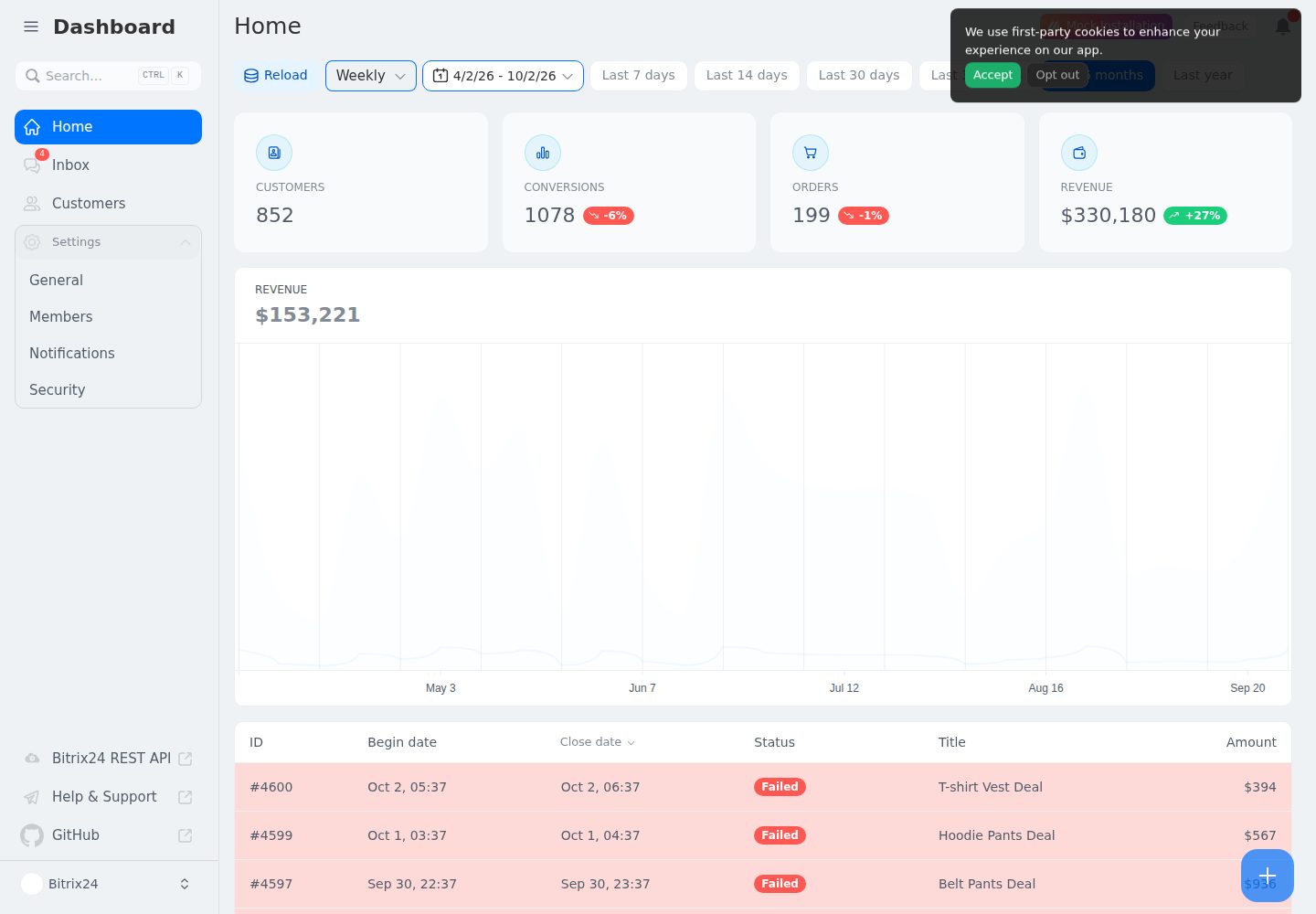
浏览真实页面截图,比较内容排版与手机效果。点击下方缩略图切换,放大查看整页细节。
全部页面与视图 2
截图用于了解视觉与布局,交互效果请以实际项目为准。
采集于 2026-10-02查看来源
值得关注的模板亮点
从已有项目资料中,快速了解它的特点。
支持多页面路由、可折叠侧边栏与命令面板
内置键盘快捷键和明暗主题切换
可独立运行(使用测试数据)或作为 Bitrix24 应用嵌入门户
包含 19 种语言的 vue-i18n 本地化文件
提供 ESLint、vue-tsc、Vitest 与构建的完整校验脚本
模板详细介绍
这是一个用 Vite + Vue 构建的后台仪表盘模板,界面组件来自 Bitrix24 UI,图标使用 @bitrix24/b24icons。模板提供多页面路由、可折叠侧边栏、键盘快捷键、明暗主题和命令面板,并内置 CRM 商机统计相关的状态与格式化逻辑。
模板支持两种运行方式:在 Bitrix24 之外独立打开时渲染生成的测试数据,便于在没有门户的情况下开发界面;嵌入 Bitrix24 门户时通过 @bitrix24/b24jssdk 调用 REST API,需要 crm 和 user_brief 权限。项目包含 19 种语言的本地化文件,使用 vue-i18n 管理文案。
仓库采用 MIT 许可,免费范围是该版本代码;演示图片、字体、图标等第三方素材需按各自许可核对,域名、托管、数据库等外部服务可能另外收费。
Vue后台
适合你的项目吗?
适用场景
- 为 Bitrix24 门户开发内嵌式 CRM 数据看板
- 在无门户环境下独立开发与调试后台界面
- 作为 Vue 后台管理界面的起始模板进行二次开发
- 需要多语言支持的后台数据展示项目
适合人群
- 需要 Vue 后台仪表盘起点的开发者
- 计划将应用嵌入 Bitrix24 门户的团队
- 需要多语言与明暗主题的数据界面项目
上手与定制指南
结合仓库当前版本的说明,按下面的资料检查内容、配置与运行要求。
- 1
需要 Node.js >= 22 与 pnpm >= 12,仓库通过 packageManager 字段固定 pnpm 版本,可运行 corepack enable 自动启用
- 2
克隆仓库后执行 pnpm install 安装依赖,pnpm dev 启动开发服务器(默认 http://localhost:5173)
- 3
可用 pnpm lint、pnpm typecheck、pnpm test 分别运行 ESLint、vue-tsc 与 Vitest,或执行 scripts/check.sh(Windows 用 scripts/check.ps1)运行完整校验
- 4
作为 Bitrix24 应用使用时,需在应用设置中启用 crm 与 user_brief 权限,并配置应用 URL 与安装 URL
- 5
新增语言时在 src/locales 下创建对应 JSON 文件,并在 src/i18n.ts 中注册
授权与来源资料
使用条件与限制
免费使用 · 保留许可声明本次收录的是公开仓库中采用 MIT 许可的免费版本;免费范围为该版本代码,不代表外部服务或第三方素材免费。
使用时需要遵守
- 允许免费使用、修改、商用和分发该版本代码。
- 分发代码副本或实质性部分时,保留原作者版权声明和完整 MIT 许可声明。
- 代码按现状提供;担保与责任限制以原许可证及适用法律为准。
额外费用与待核对事项
- 作为 Bitrix24 应用嵌入使用时,必须在应用设置中启用 crm 与 user_brief 权限,否则无法访问 CRM 实体和用户资料数据。
- 嵌入 Bitrix24 门户时需在 Bitrix24 合作伙伴门户或本地应用中注册应用,并配置应用 URL 与安装 URL,依赖 Bitrix24 平台账号。
- 嵌入门户模式通过 @bitrix24/b24jssdk 调用 Bitrix24 REST API,需要可用的 Bitrix24 门户环境。
- 演示图片、字体、图标及其他第三方素材需按各自许可核对,不能仅凭代码的 MIT 许可判断。
- 域名、托管、数据库、支付或 AI 等外部服务可能另外收费。
查看原文依据
Permission is hereby granted, free of charge
许可证原文
The following permissions must be enabled in the application settings:
README 原文
When registering the application in the Bitrix24 Partner Portal or as a local app, use the following endpoints:
README 原文
https://github.com/bitrix24/templates-dashboard-vue/blob/main/LICENSEhttps://github.com/bitrix24/templates-dashboard-vue/blob/main/README.mdembedded in a portal it talks to the REST API via
README 原文
DeepSeek 根据仓库许可证和 README 整理 ·2026-10-02。结果仅覆盖已读取资料,依赖、图片、字体及后续条款变更以各自原文为准。
项目核对记录与介绍依据
模板资料
- 来源平台
- GitHub
- 资料与维护参考分
- 资料较完整 · 83 / 100
- 技术栈
- Vue
- 网站类型
- 后台
这个分数如何计算
本站按许可资料(最高30分)、演示链接(12分)、预览图(10分)、Star数(15分)、记录的维护时间(15分)、描述完整度(8分)、功能记录(5分)和分类资料(5分)计算。它不是代码、安全或性能测试,也不是 Google 评分;有链接不代表已实测可用。
这个项目需要核对什么
- 记录的仓库更新时间
- 2026-10-02
- 截图检查日期
- 2026-10-02
已收录演示链接。请用你的内容与屏幕尺寸检查;有演示不代表表单、认证或支付已经可用。
目录记录的主要技术栈是 Vue。请通过依赖清单和锁文件核对实际版本与托管要求。这些说明基于收录资料,不代表代码审计或部署实测。
查看具体选型方法 →介绍的制作与核对状态
介绍由 AI 辅助整理目录与仓库资料。仓库作者不等于这篇介绍的审核者。
已完成服务器许可规则与 AI 来源核对;未经过人工编辑审核。
查看当时使用的来源资料
SHA-256: 966a6501671b4ade25858c5b5f1e97886a6eada5916ecb520345041797261234
2026-10-02T15:41:17.074Z
来源文件 / 仓库# Vue Dashboard Template [](https://bitrix24.github.io/b24ui/) Kickstart your project with the Vite + Vue application template — packed with multi‑page support, a collapsible sidebar, keyboard shortcuts, light/dark themes, a command palette, and more, all powered by [Bitrix24 UI](https://bitrix24.github.io/b24ui/). - [Live demo](https://bitrix24.github.io/templates-dashboard-vue/) - [@bitrix24/b24ui](https://bitrix24.github.io/b24ui/docs/getting-started/installation/vue/) - [@bitrix24/b24icons](https://bitrix24.github.io/b24icons/) - [@bitrix24/b24jssdk](https://bitrix24.github.io/b24jssdk/) > The dashboard template for Nuxt is on https://github.com/bitrix24/templates-dashboard. ## Quick Start ```bash [Terminal] git clone https://github.com/bitrix24/templates-dashboard-vue.git <project-name> cd <project-name> ``` ## Prerequisites - **Node.js** `>= 22` - **pnpm** `>= 12` (the repo pins `[email protected]` via the `packageManager` field; run `corepack enable` to pick it up automatically) ## Setup Make sure to install the dependencies: ```bash pnpm install ``` Quality checks: ```bash pnpm lint # ESLint pnpm typecheck # vue-tsc pnpm test # Vitest unit tests ``` Run the full gate (install + lint + test + typecheck + build) with one command: ```bash bash scripts/check.sh # Linux / macOS powershell -ExecutionPolicy Bypass -File scripts/check.ps1 # Windows ``` ## Development Server Start the development server on `http://localhost:5173`: ```bash pnpm dev ``` ## Production Build the application for production: ```bash pnpm build ``` Locally preview production build: ```bash pnpm preview ``` > [!NOTE] > This template works both ways: > - **Standalone** — opened outside Bitrix24 it renders generated test data, so you can develop the UI without a portal. > - **As a Bitrix24 app** — embedded in a portal it talks to the REST API via [@bitrix24/b24jssdk](https://bitrix24.github.io/b24jssdk/). See [As B24 App](#as-b24-app) below. ## Project Structure ``` src/ ├── App.vue # Root component: B24 init, locale, global toaster ├── main.ts # App bootstrap (router, i18n, unhead) ├── i18n.ts # vue-i18n setup and locale loading ├── assets/ # Global CSS and background images ├── components/ # UI components (home, customers, inbox, settings, icons, ...) ├── composables/ │ ├── useB24.ts # Bitrix24 frame lifecycle (init / get / getFrame / helper) │ ├── useDashboard.ts # Shared dashboard state & keyboard shortcuts │ └── useDealStats/ # CRM deal statistics: api, helpers, formatters, mocks ├── layouts/ # Page layouts (default, clear) ├── locales/ # i18n messages (19 locales) ├── pages/ # File-based routes; settings/ holds nested settings pages ├── types/ # Shared TypeScript types ├── utils/ # Small helpers └── route-map.d.ts # Auto-generated route types (do not edit) scripts/ # check.sh / check.ps1 — full local verification ``` # As B24 App A browser-based application for Bitrix24. ## Required Scopes The following permissions must be enabled in the application settings: * `crm` — access to CRM entities. * `user_brief` — access to basic user profile data. ## Configuration When registering the application in the Bitrix24 Partner Portal or as a local app, use the following endpoints: | Parameter | URL | | :--- | :--- | | **Application URL** | `https://your-app.example.com` | | **Installation URL** | `https://your-app.example.com/install` | ## Getting Started 1. Open your **Bitrix24**. 2. Go to **Applications** -> **Add Application** 3. Select **Local Application** 4. Fill in the URLs provided above and check the required **Scopes**. 5. Click **Save** and open the app. # Localization UI strings live in `src/locales/*.json` (19 locales), wired up through `vue-i18n` in `src/i18n.ts`. To add a language, create a new `<lang>.json` next to the existing ones and register it in `src/i18n.ts`.
看看同类模板
对比同技术栈与用途的模板,找到更适合的视觉与内容结构。

vuestic-admin
Vuestic Admin is an open-source, ready-to-use admin template suite designed for rapid development, easy mainte…
Vue · 后台

v3-admin-vite
v3-admin-vite 是一个主打 AI 编程友好体验的 Vue3 后台管理模板,基于 Vue3、Vite、TypeScript、Element Plus 构建。
Vue · 后台

vue-typescript-admin-template
vue-typescript-admin-template 是一套面向后台管理界面的前端解决方案,基于 Vue 2.6、TypeScript 和 Element UI 构建。
Vue · 后台

vue-antd-admin
Vue Antd Admin 是 Ant Design Pro 的 Vue 实现版本,目标是为中后台项目提供一套开箱即用的前端与设计解决方案。
Vue · 后台

coreui-free-vue-admin-template
Free Vue Admin & Dashboard Template Built for AI-Assisted Development
Vue · 后台
nova-admin
A simple and flexible admin template based on Vue3, Vite, TypeScript, NaiveUI
Vue · 后台