所有页面内容由多个 JSON 文件驱动,修改数据即可更新网站
ReactHTML作品集企业官网
json-portfolio — React 作品集模板
作者 brandonabela
基于 React 与 Bootstrap 的多页作品集模板,所有内容由多个 JSON 文件驱动,便于集中维护个人信息、经历、技能与项目。
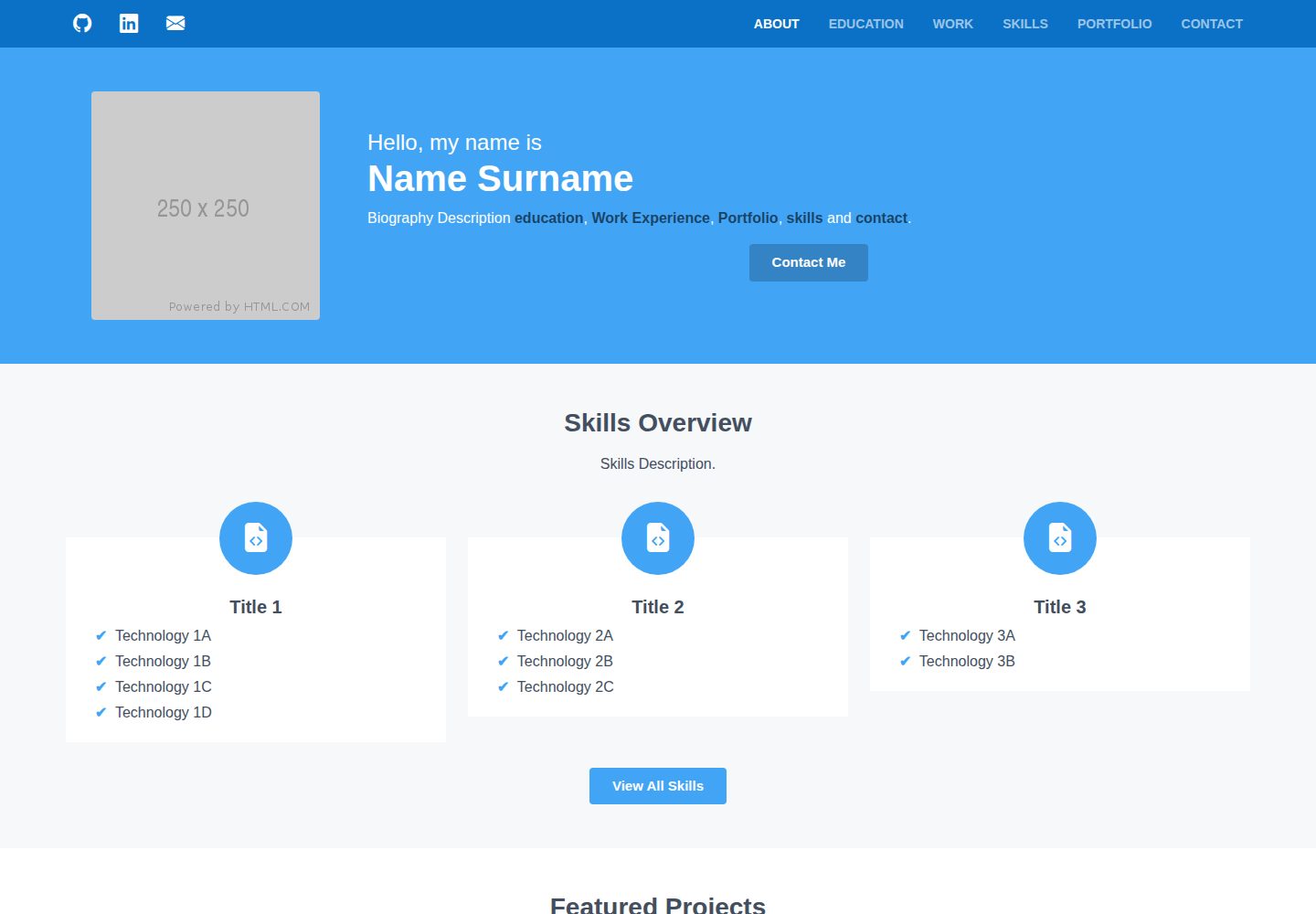
看看你的网站会是什么样
浏览真实页面截图,比较内容排版与手机效果。点击下方缩略图切换,放大查看整页细节。
目前有 1 张原始预览,可打开完整图片查看设计细节。
截图用于了解视觉与布局,交互效果请以实际项目为准。
采集于 2026-10-01查看来源
值得关注的模板亮点
从已有项目资料中,快速了解它的特点。
支持个人简介、社交链接、教育、工作、技能、项目与联系等板块
项目可配置幻灯片、外部链接与 YouTube 视频
通过 Scheme.scss 与 Typography.scss 集中调整颜色、间距与字号
适配手机到桌面等不同屏幕尺寸
模板详细介绍
JSON Portfolio 是一个用 React 构建、通过读取多个 JSON 文件动态生成的多页作品集网站模板。页面覆盖个人简介、社交链接、教育经历、工作经历、技能、项目展示与联系表单,内容结构由 socials.json、profile.json、educations.json、experiences.json、skills.json、projects.json 等文件定义,条目数量可在保持字段结构的前提下增减。项目支持为每个项目配置幻灯片、外部链接与 YouTube 视频,图片按约定命名放入 public/images/projects/ 目录。视觉定制主要通过 styles/Scheme.scss 与 styles/Typography.scss 两个样式文件调整颜色、间距与字号。联系表单使用 Formspree,需要在 profile.json 中填写 Formspree 表单 ID,并自行注册账号创建表单。部署方式为将仓库 fork 为 github-username.github.io,修改 package.json、package-lock.json 与 public/index.html 中的名称、主页地址和标题描述,再在 GitHub Pages 中选择 gh-pages 分支根目录发布。
ReactHTML作品集企业官网
适合你的项目吗?
适用场景
- 个人求职或自由职业者展示工作经历与项目作品
- 需要频繁更新内容、但不想改动页面代码的静态作品集
- 以 GitHub Pages 托管、通过 fork 仓库快速上线的个人站点
适合人群
- 熟悉 React 基础、愿意通过编辑 JSON 维护内容的开发者
- 希望用 GitHub Pages 免费托管静态作品集的人
- 需要展示教育、工作、技能与项目等多板块信息的个人
上手与定制指南
结合仓库当前版本的说明,按下面的资料检查内容、配置与运行要求。
- 1
本地预览:先执行 npm install,再执行 npm start,按 CTRL + C 结束进程
- 2
部署需将仓库 fork 为 github-username.github.io,并同步修改 package.json、package-lock.json 中的名称与主页地址,以及 public/index.html 的标题和描述
- 3
联系表单依赖 Formspree,需自行注册账号创建表单,并将表单 ID 填入 profile.json 的 formspreeId 字段
- 4
个人头像需放在 public/images/ProfilePicture.png,项目图片放在 public/images/projects/ 并按 imageHeading##.png 命名
- 5
GitHub Pages 发布时在仓库设置中选择 gh-pages 分支与 / (root) 目录
授权与来源资料
使用条件与限制
免费使用 · 保留许可声明本次收录的是公开仓库中采用 MIT 许可的免费版本;免费范围为该版本代码,不代表外部服务或第三方素材免费。
使用时需要遵守
- 允许免费使用、修改、商用和分发该版本代码。
- 分发代码副本或实质性部分时,保留原作者版权声明和完整 MIT 许可声明。
- 代码按现状提供;担保与责任限制以原许可证及适用法律为准。
额外费用与待核对事项
- 联系表单依赖第三方服务 Formspree:使用者必须自行注册 Formspree 账号并创建表单,将表单 ID 填入 profile.json 的 formspreeId 字段,否则联系页面无法正常工作。
- 部署流程要求将仓库 fork 并命名为 github-username.github.io,同时修改 package.json、package-lock.json 与 public/index.html 中的名称、主页地址、标题和描述,并在 GitHub Pages 设置中选择 gh-pages 分支根目录。
- 必须提供个人头像文件并放置在 public/images/ProfilePicture.png,否则个人资料页无法正常显示。
- 项目图片必须存放在 public/images/projects/ 目录,并严格按 imageHeading##.png 命名(imageHeading 唯一、序号从 01 起补零),否则项目图片无法被正确加载。
- README 提及 Formspree 表单服务;真实提交需配置服务端点,其使用额度与费用需单独核对。
- 演示图片、字体、图标及其他第三方素材需按各自许可核对,不能仅凭代码的 MIT 许可判断。
- 域名、托管、数据库、支付或 AI 等外部服务可能另外收费。
查看原文依据
Permission is hereby granted, free of charge
许可证原文
The contact page makes use of Formspree ID, which requires a <a href="https://formspree.io/login" target="_blank">Formspree</a> account and creating a new form (**New Form**).
README 原文
1. Fork Repository with ```github-username.github.io``` as your repository name
README 原文
A profile picture is required and be in the following location **```public/images/ProfilePicture.png```**.
README 原文
https://github.com/brandonabela/json-portfolio/blob/master/LICENSEhttps://github.com/brandonabela/json-portfolio/blob/master/README.mdAny project images should be stored in **```public/images/projects/```** where the filename convention of these images is ```imageHeading##.png```.
README 原文
DeepSeek 根据仓库许可证和 README 整理 ·2026-10-01。结果仅覆盖已读取资料,依赖、图片、字体及后续条款变更以各自原文为准。
项目核对记录与介绍依据
模板资料
- 来源平台
- GitHub
- 资料与维护参考分
- 资料较完整 · 77 / 100
- 技术栈
- React · HTML
- 网站类型
- 作品集 · 企业官网
这个分数如何计算
本站按许可资料(最高30分)、演示链接(12分)、预览图(10分)、Star数(15分)、记录的维护时间(15分)、描述完整度(8分)、功能记录(5分)和分类资料(5分)计算。它不是代码、安全或性能测试,也不是 Google 评分;有链接不代表已实测可用。
这个项目需要核对什么
- 记录的仓库更新时间
- 2021-12-04
- 截图检查日期
- 2026-10-01
已收录演示链接。请用你的内容与屏幕尺寸检查;有演示不代表表单、认证或支付已经可用。
目录记录的主要技术栈是 React。请通过依赖清单和锁文件核对实际版本与托管要求。这些说明基于收录资料,不代表代码审计或部署实测。
查看具体选型方法 →介绍的制作与核对状态
介绍由 AI 辅助整理目录与仓库资料。仓库作者不等于这篇介绍的审核者。
已完成服务器许可规则与 AI 来源核对;未经过人工编辑审核。
查看当时使用的来源资料
SHA-256: 4c592d4240580c63488cf8d8d55f1fda14055ba1ad13a0019140f17675d059b2
2026-10-01T15:28:15.246Z
来源文件 / 仓库# JSON Portfolio Website A ReactJs and Bootstrap 5 framework website that dynamically creates a multi-page portfolio site from several JSON files with a central customisation functionality and deployment pipeline. <a href="http://brandonabela.github.io/json-portfolio" target="_blank">DEMO</a> ## Features - Responsive ReactJS website by reading information from multiple JSON files - Automatically deploy website on each commit that has occurred to the project - Adapts to different screen sizes, from phones to desktops - Ability to showcase projects that were defined in JSON files - Ability to define slide-shows, links and videos for projects - All sections are defined through the use of a JSON file - Support personal biography, social media links, education, work, projects and contact sections ## Instructions ### Preview Website: 1. In terminal input ```npm install``` to install the website packages 2. In terminal input ```npm start``` to launch the website in a local environment 3. In terminal press ```CTRL + C``` to terminate the website process ### Deploy Website: 1. Fork Repository with ```github-username.github.io``` as your repository name 2. In ```package.json``` change ```"name": "json-portfolio"``` to ```"name": "github-username"``` 3. In ```package-lock.json``` change ```"name": "json-portfolio"``` to ```"name": "github-username"``` for both the ```root``` and ```packages``` 4. In ```package-lock.json``` change ```"homepage": "."``` to ```"homepage": "https://github-username.github.io/"``` 5. In ```public/index.html``` change ```<title> JSON Portfolio </title>``` to ```<title> Your Name | Portfolio </title>``` 6. In ```public/index.html``` change ```<meta name="description" content="..." />``` to ```<meta name="description" content="Website Description" />``` 7. Modify the JSON files to reflect your details and upload any necessary images 8. Commit the files on the forked repository 9. In Github access the ```repository settings > pages > sources``` and select ```gh-pages``` with ```/ (root)``` folder and then click ```save``` ## Template Instructions This section covers every JSON file that is used by the website to generate the portfolio website. The number of entries in ```educations.json```, ```experiences.json```, ```skills.json``` and ```projects.json``` can be adjusted as long as the same structure is kept. ### Social Links - ```socials.json``` The ```socials.json``` file consists of a predefined list of social media links where the icon is retrieved from <a href="https://icons.getbootstrap.com/" target="_blank">Bootstrap Icons</a>. The icon is only shown when the URL link is populated, otherwise it is not shown. | **Property** | **Description** | | :----------: | :---------------: | | name | Social media name | | link | Social media link | ### Profile - ```profile.json``` The ```profile.json``` file is used to populate the about page and certain details are also shared to other pages. The biography description is used to provide an introduction to the portfolio with the support of links through the use of square brackets, which supports the **education**, **work**, **skills**, **portfolio** and **contact**. A profile picture is required and be in the following location **```public/images/ProfilePicture.png```**. The contact page makes use of Formspree ID, which requires a <a href="https://formspree.io/login" target="_blank">Formspree</a> account and creating a new form (**New Form**). The form id is found in the URL which has the following structure **```https://formspree.io/forms/########/```** where the **#** values represent the form ID. | **Property** | **Description** | **Required** | | :----------: | :--------------------: | :----------: | | name | Full name | ✔️ | | email | Email Address | ✔️ | | heading | Biography Description | ✔️ | | skills | Skills Description | ✔️ | | projects | Projects Description | ✔️ | | experience | Experience Description | ✔️ | | notFound | Not Found Description | ✔️ | | formspreeId | Formspree ID | ✔️ | ### Education - ```educations.json``` | **Property** | **Description** | **Required** | | :----------: | :------------------: | :----------: | | start | Start Date | ✔️ | | end | End Date | ✔️ | | course | Attended Course | ✔️ | | institute | Institution Name | ✔️ | | location | Institution Location | ✔️ | | description | Course Description | ❌ | | bullets | Course Highlights | ❌ | | technologies | Technologies Used | ❌ | ### Experience - ```experiences.json``` | **Property** | **Description** | **Required** | | :----------: | :--------------------: | :----------: | | start | Start Date | ✔️ | | end | End Date | ✔️ | | role | Role Title | ✔️ | | company | Employed Company | ✔️ | | location | Institution Location | ✔️ | | description | Employment Description | ❌ | | bullets | Employment Highlights | ❌ | | technologies | Technologies Used | ❌ | ### Skills - ```skills.json``` | **Property** | **Description** | **Required** | | :----------: | :----------------: | :----------: | | title | Skill Group Name | ✔️ | | icon | Skill Group Icon | ✔️ | | overview | Show in About Page | ✔️ | | technologies | Technologies | ✔️ | ### Projects - ```projects.json``` Any project images should be stored in **```public/images/projects/```** where the filename convention of these images is ```imageHeading##.png```. The ```imageHeading``` must be unique for every project and ```##``` represent the index starting from 1 padded with zeros such as; **01**, **02**, **03**, **etc**. | **Property** | **Description** | **Required** | | :----------: | :-----------------------: | :----------: | | start | Start Date | ✔️ | | end | End Date | ✔️ | | name | Project Name | ✔️ | | description | Project Description | ❌ | | technologies | Technologies | ✔️ | | buttons | Project Links | ❌ | | videos | You Tube Links | ❌ | | images | Amount of Images | ✔️ | | imageHeading | Project Image Suffix Name | ✔️ | | overview | Show in About Page | ✔️ | ## Customisation The website customisation is primarily driven by two primary stylesheets; * ```styles/Scheme.scss``` is used for changing colours and padding of content and section * ```styles/Typography.scss``` is used for setting font sizes of text headings and paragraphs # Contributions Please report any issues or submit pull requests with code changes. I love it when my work helps someone. So, if you're utilizing my project or have been inspired to develop something of your own, please let me know! My social media are featured in my <a href="https://brandonabela.github.io/" target="_blank">portfolio</a>.
看看同类模板
对比同技术栈与用途的模板,找到更适合的视觉与内容结构。

shadcn-landing-page
Free Landing page template using Shadcn, React, Typescript and Tailwind
React · 企业官网

react-saas-template
🌊 Template for building an SaaS / admin website using React + Material-UI
React · 后台
React-Landing-Page-Template
A simple react one page landing page templates for startups/companies
React · 企业官网
landy-react-template
Landy is an open-source React landing page template designed for developers and startups, who want to create a…
React · 企业官网

react-portfolio-template
React powered portfolio website template for developers
React · 作品集

personal-website-react
personal-website-react 是一个面向开发者的个人作品集单页模板,由 React 和 Material-UI 构建,并通过 Create React App 初始化。
React · 作品集