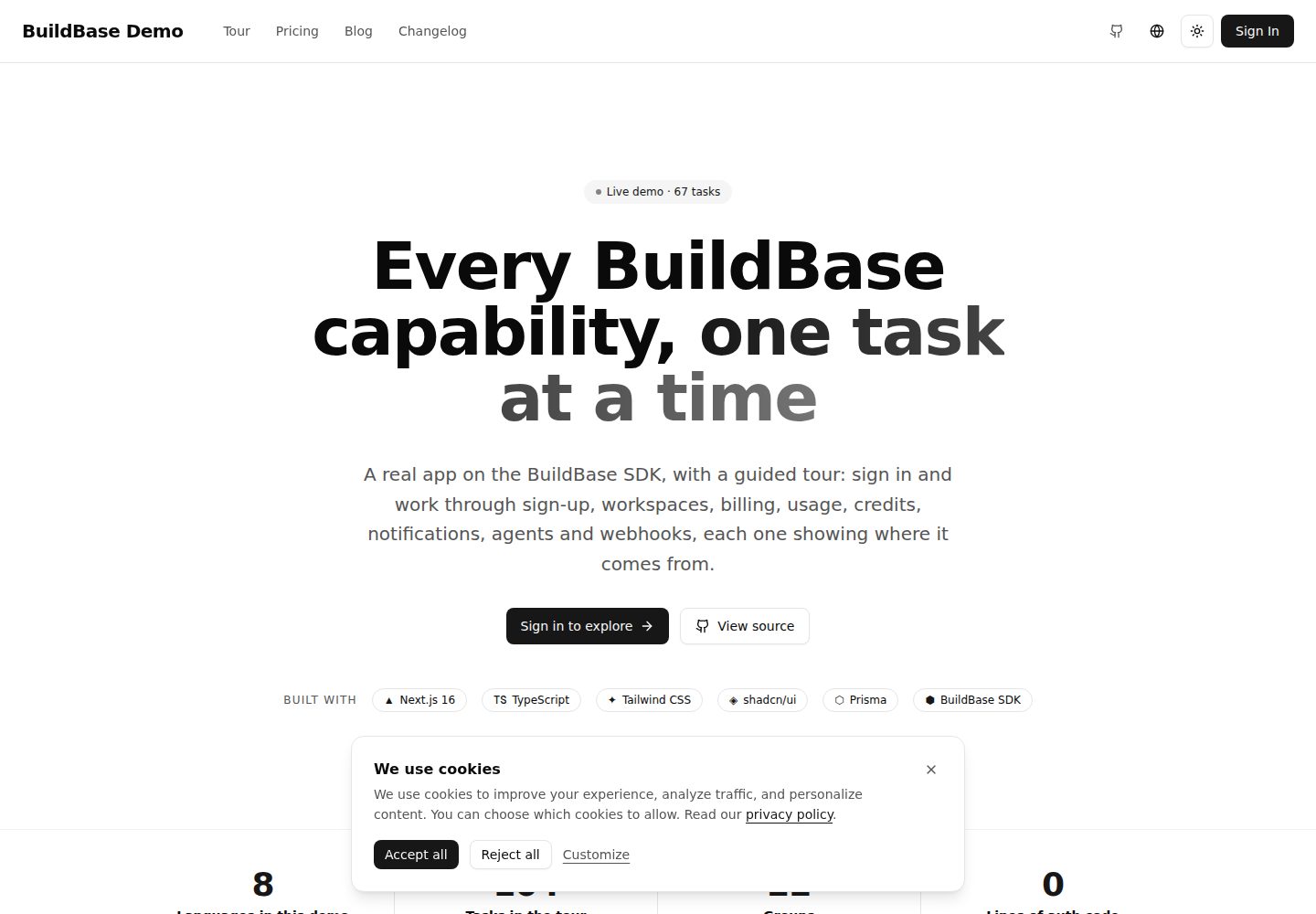
认证、通行密钥与设备信任由 BuildBase 托管页面处理,应用仅保存 httpOnly 会话 cookie,不接触密码
Next.jsReactSaaS启动器
nextjs-starter — Next.js SaaS模板
作者 buildbase-app
基于 Next.js 的 SaaS 启动模板,集成 BuildBase 平台,预置认证、多租户、国际化、计费、GDPR 与 Docker 部署,并附带 67 项引导式功能演示。
看看你的网站会是什么样
浏览真实页面截图,比较内容排版与手机效果。点击下方缩略图切换,放大查看整页细节。
全部页面与视图 3
截图用于了解视觉与布局,交互效果请以实际项目为准。
采集于 2026-10-01查看来源
值得关注的模板亮点
从已有项目资料中,快速了解它的特点。
服务端提供 getSessionContext() 与 getWorkspaceContext(),后者会向平台核验工作区归属与角色
SDK 生命周期事件与 webhook 事件分别写入 Postgres,webhook 会校验签名和时间戳并去重存储
内置 67 项任务、13 个分组的引导演示,进度按账号保存,任务可由 SDK 事件、webhook、应用路由或手动标记完成
应用与 SDK 界面提供八种语言,消息键有类型约束,新增英文键会要求所有语言补齐
通过 @buildbase/sdk/mcp 在 /api/mcp 提供 MCP 服务,并生成 llms.txt、openapi.json 等发现文档
模板详细介绍
这是一个 Next.js SaaS 启动模板,代码托管在 GitHub 的 buildbase-app/nextjs-starter 仓库,采用 MIT 许可。它把应用接到 BuildBase 平台上:注册、登录、通行密钥和设备信任由 BuildBase 托管页面完成,SDK 的 SaaSOSProvider 把会话 id 交给 /api/auth/token,存入名为 bb-session-id 的 httpOnly cookie,应用本身不接触密码。服务端通过 src/lib/buildbase.ts 读取该 cookie 建立客户端,src/lib/server-auth.ts 提供 getSessionContext() 与 getWorkspaceContext(workspaceId) 两个辅助函数,后者会向平台核验调用者是否属于该工作区及其角色。
数据层用 Postgres 与 Prisma。SDK 在浏览器发出 user:created、workspace:changed、workspace:invitation-sent 等生命周期事件,由 saas-provider.tsx 转发到 /api/events,写入 User、Workspace、UserWorkspace;订阅、支付、积分购买等服务端变化经 /api/webhooks/buildbase 校验签名与时间戳后存入 WebhookEvent。模板自带的业务域是“文档”:创建文档会记录 documents 配额用量并消耗一个积分,超出上限且不允许超额时返回 402,同一服务也支撑 MCP 工具。
模板还内置一个 67 项任务、13 个分组的引导演示,内容为英文,界面文案已翻译。任务按 sdk-event、webhook、action、manual 四种方式打勾,进度按账号而非浏览器保存。应用与 SDK 界面提供八种语言(英语、印地语、西班牙语、法语、德语、日语、中文、阿拉伯语,阿拉伯语为从右到左),消息键在 src/i18n/types.ts 中做类型约束。Agent 部分通过 @buildbase/sdk/mcp 的 createAgentStack 在 /api/mcp 提供 MCP 服务,并生成 /.well-known/*、/llms.txt、/auth.md、/openapi.json、/security.txt 等发现文档。
使用前需要准备 BuildBase 组织与 OAuth 客户端、Postgres 连接串、SYSTEM_SECRET、可选的 webhook 密钥与站点 URL,src/env.ts 会在启动时校验必需变量。演示的完整跑通还依赖组织端配置:main-pricing 定价组与两个含 documents 配额和 max-users 限制的方案、analytics 工作区特性、100-credits 积分包、comment-added 通知事件、webhook 端点、VAPID 密钥、已验证的邮件发件人以及测试模式 Stripe 密钥。这些 slug 是应用与组织之间唯一的耦合点,分别集中在 METERING、DEMO_EVENT_SLUG 和 PricingSection 的 slug 属性中。README 也说明了移除引导演示的步骤。
Next.jsSaaS启动器
适合你的项目吗?
适用场景
- 作为自有 SaaS 项目的起点,直接接入 BuildBase 的认证、多租户、计费与通知能力
- 在购买前按引导演示逐项验证 BuildBase 是否覆盖所需能力
- 为已有产品增加 MCP 服务端与 OAuth 发现文档,让 Agent 以用户账号调用受配额约束的工具
- 需要多语言界面(含阿拉伯语从右到左)和按工作区计量用量的 SaaS 应用
适合人群
- 准备用 Next.js 构建多租户 SaaS 并愿意使用 BuildBase 作为后端平台的开发者
- 需要评估 BuildBase 认证、计费、配额、通知与 webhook 能力的团队
- 希望产品同时提供 MCP 工具接口与多语言界面的项目
上手与定制指南
结合仓库当前版本的说明,按下面的资料检查内容、配置与运行要求。
- 1
克隆仓库后复制 .env.example 为 .env.local,填写 BuildBase 服务地址、组织 id、OAuth 客户端 id 与密钥、重定向 URL、Postgres 连接串、SYSTEM_SECRET 等变量
- 2
在 BuildBase 控制台创建 OAuth 客户端,并把 http://localhost:3000 及部署后的 URL 加入重定向 URL 列表
- 3
本地可用 docker compose up db 提供 Postgres,然后执行 npx prisma db push 同步表结构
- 4
要让引导演示全部完成,需在控制台配置 main-pricing 定价组、documents 配额、max-users 限制、analytics 特性、100-credits 积分包、comment-added 通知事件、webhook 端点、VAPID 密钥、已验证发件人和测试模式 Stripe 密钥
- 5
演示中的支付使用测试卡 4242 4242 4242 4242;不再需要引导演示时,可按 README 步骤删除 src/tour 等目录、TourProgress 模型及相关菜单与文案
授权与来源资料
使用条件与限制
免费使用 · 保留许可声明本次收录的是公开仓库中采用 MIT 许可的免费版本;免费范围为该版本代码,不代表外部服务或第三方素材免费。
使用时需要遵守
- 允许免费使用、修改、商用和分发该版本代码。
- 分发代码副本或实质性部分时,保留原作者版权声明和完整 MIT 许可声明。
- 代码按现状提供;担保与责任限制以原许可证及适用法律为准。
额外费用与待核对事项
- 该模板并非独立可用的网站模板,而是与 BuildBase 平台深度绑定的启动模板:认证、会话、多租户、计费、配额、通知、webhook 等核心能力均由 BuildBase 托管服务提供,必须注册 BuildBase 账号并配置组织与 OAuth 客户端才能运行。
- 运行需要外部 BuildBase 服务(托管平台或自建服务器),并需在控制台创建 OAuth 客户端、配置重定向 URL,属于外部服务依赖。
- 引导演示的支付环节依赖 Stripe,需在 BuildBase 控制台配置测试模式 Stripe 密钥;正式使用支付功能则需真实 Stripe 账户,可能产生外部服务费用。
- 邮件通知功能依赖已验证的邮件发件人配置,未配置时邮件通道不可用。
- 浏览器推送功能需要额外配置 VAPID 密钥,否则推送不可用。
- 67 项引导演示的完整跑通依赖组织端大量特定配置(定价组、配额、积分包、通知事件、webhook、VAPID、发件人、Stripe 等),并非开箱即用。
- 引导演示的任务内容仅提供英文,界面框架文案才有多语言翻译。
- 演示图片、字体、图标及其他第三方素材需按各自许可核对,不能仅凭代码的 MIT 许可判断。
- 域名、托管、数据库、支付或 AI 等外部服务可能另外收费。
查看原文依据
Permission is hereby granted, free of charge
许可证原文
A Next.js 16 app wired to [BuildBase](https://buildbase.app), and a guided tour of everything BuildBase gives it.
README 原文
`NEXT_PUBLIC_BUILDBASE_SERVER_URL` | `https://api.console.buildbase.app` for the hosted platform, or your self-hosted server.
README 原文
Stripe keys in test mode. The tour uses card `4242 4242 4242 4242`.
README 原文
A verified email sender, or the email channel stays quiet and the inbox says so.
README 原文
VAPID keys, so browsers can subscribe to push.
README 原文
The tour, though, asks you to hit a limit, spend a credit and receive a specific event, so the demo organization is configured like this.
README 原文
https://github.com/buildbase-app/nextjs-starter/blob/main/LICENSEhttps://github.com/buildbase-app/nextjs-starter/blob/main/README.mdThe tour's task content is English only; its chrome is translated.
README 原文
DeepSeek 根据仓库许可证和 README 整理 ·2026-10-01。结果仅覆盖已读取资料,依赖、图片、字体及后续条款变更以各自原文为准。
项目核对记录与介绍依据
模板资料
- 来源平台
- GitHub
- 资料与维护参考分
- 资料较完整 · 85 / 100
- 技术栈
- Next.js · React
- 网站类型
- SaaS · 启动器
这个分数如何计算
本站按许可资料(最高30分)、演示链接(12分)、预览图(10分)、Star数(15分)、记录的维护时间(15分)、描述完整度(8分)、功能记录(5分)和分类资料(5分)计算。它不是代码、安全或性能测试,也不是 Google 评分;有链接不代表已实测可用。
这个项目需要核对什么
- 记录的仓库更新时间
- 2026-09-26
- 截图检查日期
- 2026-10-01
已收录演示链接。请用你的内容与屏幕尺寸检查;有演示不代表表单、认证或支付已经可用。
目录记录的主要技术栈是 Next.js。请通过依赖清单和锁文件核对实际版本与托管要求。这些说明基于收录资料,不代表代码审计或部署实测。
查看具体选型方法 →介绍的制作与核对状态
介绍由 AI 辅助整理目录与仓库资料。仓库作者不等于这篇介绍的审核者。
已完成服务器许可规则与 AI 来源核对;未经过人工编辑审核。
查看当时使用的来源资料
SHA-256: 9998e8dda44eee77be421ce83f2b39d5cc09b72cd52a7a3b359dc1937b19a552
2026-10-01T00:35:36.465Z
来源文件 / 仓库# BuildBase Next.js starter
A Next.js 16 app wired to [BuildBase](https://buildbase.app), and a guided
tour of everything BuildBase gives it.
<!-- TODO: replace with the deployed demo URL -->
Live demo: https://demo.buildbase.app
The tour is 67 tasks in 13 groups: sign up, create a second workspace, invite
someone by email, subscribe with a test card, hit a quota, spend credits,
switch a feature flag, send yourself a notification, connect Claude over MCP,
watch a webhook land in Postgres, export your data. You can read the whole
list on the home page before you sign in. After you sign in, each task says
why it matters, what to do, and where the capability comes from: the SDK hook
or component, the console screen that configures it, and the file in this repo
that takes part. Tasks that leave a trace tick themselves off; the rest have a
"Mark done" button. Progress follows your account, not your browser.
Use it two ways: clone it as the starting point for your own app, or work
through the tour to decide whether BuildBase does what you need before you
buy. Every screen you click through is in this repo.
## Quick start
```bash
git clone https://github.com/buildbase-app/nextjs-starter
cd nextjs-starter
cp .env.example .env.local
npm install
npx prisma db push
npm run dev
```
The app runs on http://localhost:3000. Fill in `.env.local` first:
| Variable | Where it comes from |
| ------------------------------------ | ------------------------------------------------------------------------------------------------------------------------------------------------------------- |
| `NEXT_PUBLIC_BUILDBASE_SERVER_URL` | `https://api.console.buildbase.app` for the hosted platform, or your self-hosted server. |
| `NEXT_PUBLIC_BUILDBASE_ORG_ID` | The console's organization settings. It is the id in the URL when the console is open. |
| `NEXT_PUBLIC_BUILDBASE_CLIENT_ID` | Console, `/dashboard/admin/auth`. Create an OAuth client and add `http://localhost:3000` (and your deployed URL) to its redirect URLs. |
| `BUILDBASE_CLIENT_SECRET` | The same client's secret. Server only. |
| `NEXT_PUBLIC_BUILDBASE_REDIRECT_URL` | The URL the hosted sign-in returns to. Must be one of the client's redirect URLs. |
| `DATABASE_URL` | A Postgres connection string. `docker compose up db` gives you one locally. |
| `SYSTEM_SECRET` | At least 32 characters, `openssl rand -base64 32`. Signs the workspace tokens this app mints for itself. |
| `BUILDBASE_WEBHOOK_SECRET` | Console, `/dashboard/admin/setting/webhooks`. Create an endpoint for `<your URL>/api/webhooks/buildbase` and paste the signing secret. Optional until you do. |
| `SITE_URL`, `NEXT_PUBLIC_SITE_URL` | Your public URL. Used for canonical links, the MCP server address and the discovery documents. |
`src/env.ts` validates these at boot and refuses to start with a missing
required one, so a typo shows up as a clear message rather than a 500 later.
## What the organization needs for the tour to complete
The app works against any BuildBase organization. The tour, though, asks you
to hit a limit, spend a credit and receive a specific event, so the demo
organization is configured like this. Each row says which console screen it
lives on.
| What | Console screen |
| -------------------------------------------------------------------------------------------------------------------------------------------------------------------------------------- | -------------------------------------- |
| A pricing group with slug `main-pricing`. The pricing page renders whatever it holds. | `/dashboard/admin/subscriptions` |
| Two plans in it, both with a `documents` quota. The smaller plan allows no overage, so "Hit the limit" is reachable; the larger one includes more. | `/dashboard/admin/subscriptions` |
| A `max-users` limit on each plan (3 and 10 on the demo), so "Hit the seat limit" is reachable. | `/dashboard/admin/subscriptions` |
| An `analytics` workspace feature, off on the smaller plan and on for the larger, so "See it switched on" happens by upgrading. | `/dashboard/admin/workspaces/features` |
| A 14-day trial without a card on each plan. | `/dashboard/admin/subscriptions` |
| A credit package with slug `100-credits`, granted by each plan on every period. Creating a document spends one. | `/dashboard/admin/subscriptions` |
| A custom notification event with slug `comment-added`, user-managed, email and push on. Its email template uses the `{{title}}`, `{{message}}` and `{{url}}` merge tags the app sends. | `/dashboard/admin/notifications` |
| A webhook endpoint at `<your URL>/api/webhooks/buildbase` subscribed to `*`. Its secret goes in `BUILDBASE_WEBHOOK_SECRET`. | `/dashboard/admin/setting/webhooks` |
| VAPID keys, so browsers can subscribe to push. | `/dashboard/admin/push` |
| A verified email sender, or the email channel stays quiet and the inbox says so. | `/dashboard/admin/notifications` |
| Stripe keys in test mode. The tour uses card `4242 4242 4242 4242`. | `/dashboard/admin/payment` |
| The OAuth client's redirect URLs include the app's URL. | `/dashboard/admin/auth` |
The slugs (`documents`, `max-users`, `analytics`, `100-credits`,
`comment-added`, `main-pricing`) are the only coupling between the app and the
organization. Each lives in one constant: `METERING` in
`src/lib/documents/service.ts`, `DEMO_EVENT_SLUG` in
`src/components/notifications/demo-event.ts`, and the `slug` prop on
`PricingSection`.
## How it is put together
**Auth and the session.** Sign-up, sign-in, passkeys and device trust happen
on BuildBase's hosted pages. The SDK's `SaaSOSProvider` in
`src/components/saas-provider.tsx` hands the resulting session id to
`/api/auth/token`, which stores it in an httpOnly cookie named `bb-session-id`.
This app never sees a password.
**The server client.** `src/lib/buildbase.ts` builds a server-side client that
reads that cookie. `src/lib/server-auth.ts` exposes two helpers every API route
uses: `getSessionContext()` resolves who is calling from the cookie, and
`getWorkspaceContext(workspaceId)` also checks, against the platform, that they
belong to that workspace and what their role is. Identity in a request body is
a claim; these are the facts.
**Mirroring the platform into Postgres.** The SDK emits lifecycle events in the
browser (`user:created`, `workspace:changed`, `workspace:invitation-sent`,
...). `saas-provider.tsx` forwards them to `/api/events`, which upserts `User`,
`Workspace` and `UserWorkspace`. Server-side changes (a subscription, a
payment, a credit purchase) arrive at `/api/webhooks/buildbase`, which verifies
the signature and timestamp with `verifyWebhookSignature`, stores each event
once in `WebhookEvent`, and shows them on the Events page.
**Documents.** The demo's own product domain, in `src/lib/documents/service.ts`
and `/api/documents/*`. Creating one records usage against the `documents`
quota and spends one credit; a workspace at its cap with no overage gets a 402. The same service backs the MCP tools, so an agent and a person are
metered the same way.
**Agents.** `src/lib/agent/index.ts` calls `createAgentStack` from
`@buildbase/sdk/mcp`. That gives the app an MCP server at `/api/mcp`, OAuth
discovery under `/.well-known/*`, `/llms.txt`, `/auth.md`, `/openapi.json` and
`/security.txt`, all generated from `src/config/site.ts`. An MCP client signs
in with the person's BuildBase account and the app mints it a token in
`/api/auth/oauth2-token`.
**The tour.** `src/tour/catalog.ts` is the content: 13 groups and 67 tasks,
English on purpose. `src/tour/progress.ts` writes one `TourProgress` row per
person per task. A task declares how it gets ticked:
| `detect.kind` | Ticked by |
| ------------- | -------------------------------------------------------------------------------- |
| `sdk-event` | `/api/events`, when the named SDK lifecycle event arrives for the signed-in user |
| `webhook` | `/api/webhooks/buildbase`, for every member of the workspace in the payload |
| `action` | This app's own routes: a document created, a notification sent, a tool called |
| `manual` | The "Mark done" button, for things nothing can observe |
The tour page is `src/app/[locale]/dashboard/tour`, the home-page preview is
`src/components/marketing/tour-preview.tsx`, and `/api/tour` serves progress.
## Scripts
```bash
npm run dev # Next.js with Turbopack (contentlayer builds first)
npm run build # contentlayer, prisma generate, next build, sitemap, pagefind
npm run typecheck # tsc --noEmit
npm run lint # eslint
npm run check # lint + format check + typecheck
npm run test # vitest
npm run test:e2e # playwright (e2e/)
```
Husky runs eslint and prettier on staged files at commit time.
## Languages
The app and the SDK's own screens ship in eight languages: English, Hindi,
Spanish, French, German, Japanese, Chinese and Arabic (right to left). Messages
are typed in `src/i18n/types.ts`, so adding a key in English fails the
typecheck until every locale has it. The tour's task content is English only;
its chrome is translated.
## Make it yours
Point `.env.local` at your own organization and the app runs unchanged. To
remove the tour once you no longer want it:
1. Delete `src/tour`, `src/components/tour`,
`src/app/[locale]/dashboard/tour` and `src/app/api/tour`.
2. Remove the `TourProgress` model from `prisma/schema.prisma` and run
`npx prisma db push`.
3. Remove the `tour` item from `menuItems` in `src/components/app-sidebar.tsx`,
`<TourProgressCard />` from the dashboard page and `<TourPreview />` from
the home page.
4. Remove the `tour` namespace and `nav.tour` from `src/i18n/types.ts` and the
eight files in `src/i18n/messages/`.
5. Delete the `detect(...)` calls in `/api/events`, `/api/webhooks/buildbase`,
`/api/documents`, `/api/notifications/test`, `/api/auth/oauth2-token`,
`/api/user/export` and `src/lib/agent/tools.ts`.
Documents, the inbox, team invitations and the webhook table stand on their
own and are worth keeping as examples of the SDK in use.
## Deployment
Vercel: import the repo, set the variables above, point `DATABASE_URL` at a
hosted Postgres and add the deployed URL to the OAuth client's redirect URLs.
`NEXT_PUBLIC_*` values are baked into the bundle, so changing one needs a
redeploy.
Docker: `docker compose up` builds the app and starts Postgres; the
`POSTGRES_*` variables in `.env.example` configure the container.
## License
MIT
看看同类模板
对比同技术栈与用途的模板,找到更适合的视觉与内容结构。

ai-website-cloner-template
Clone any website with one command using AI coding agents
Next.js · 启动器

Next.js SaaS Starter
Next.js SaaS Starter 是 Next.js 官方维护的 SaaS 起点模板,定位介于学习资源和可直接部署的脚手架之间。
Next.js · SaaS

Next.js Commerce
Next.js Commerce 是 Vercel 团队维护的电商启动模板,基于 Next.js App Router 构建,采用服务端渲染、React Server Components、Server Actions …
Next.js · 电商

Next-js-Boilerplate
Next-js-Boilerplate 是一个面向 Next.js 16、Tailwind CSS 4 和 TypeScript 的启动器,核心定位是开发者体验优先。
Next.js · 启动器

tailwind-nextjs-starter-blog
tailwind-nextjs-starter-blog 是一个面向个人技术博客的 Next.js 与 Tailwind CSS 启动模板,其 v2 版本基于 App Router 与 React Server Comp…
Next.js · 博客

next-forge
Production-grade Turborepo template for Next.js apps.
Next.js · 启动器