Authentication, passkeys, and device trust are handled by BuildBase-hosted pages; the app only stores an httpOnly session cookie and never touches passwords
Next.jsReactSaaSStarter
nextjs-starter — Next.js SaaS Template
By buildbase-app
A Next.js SaaS starter template integrated with the BuildBase platform, pre-configured with authentication, multi-tenancy, internationalization, billing, GDPR, and Docker deployment, plus a 67-item guided feature tour.
Explore the design
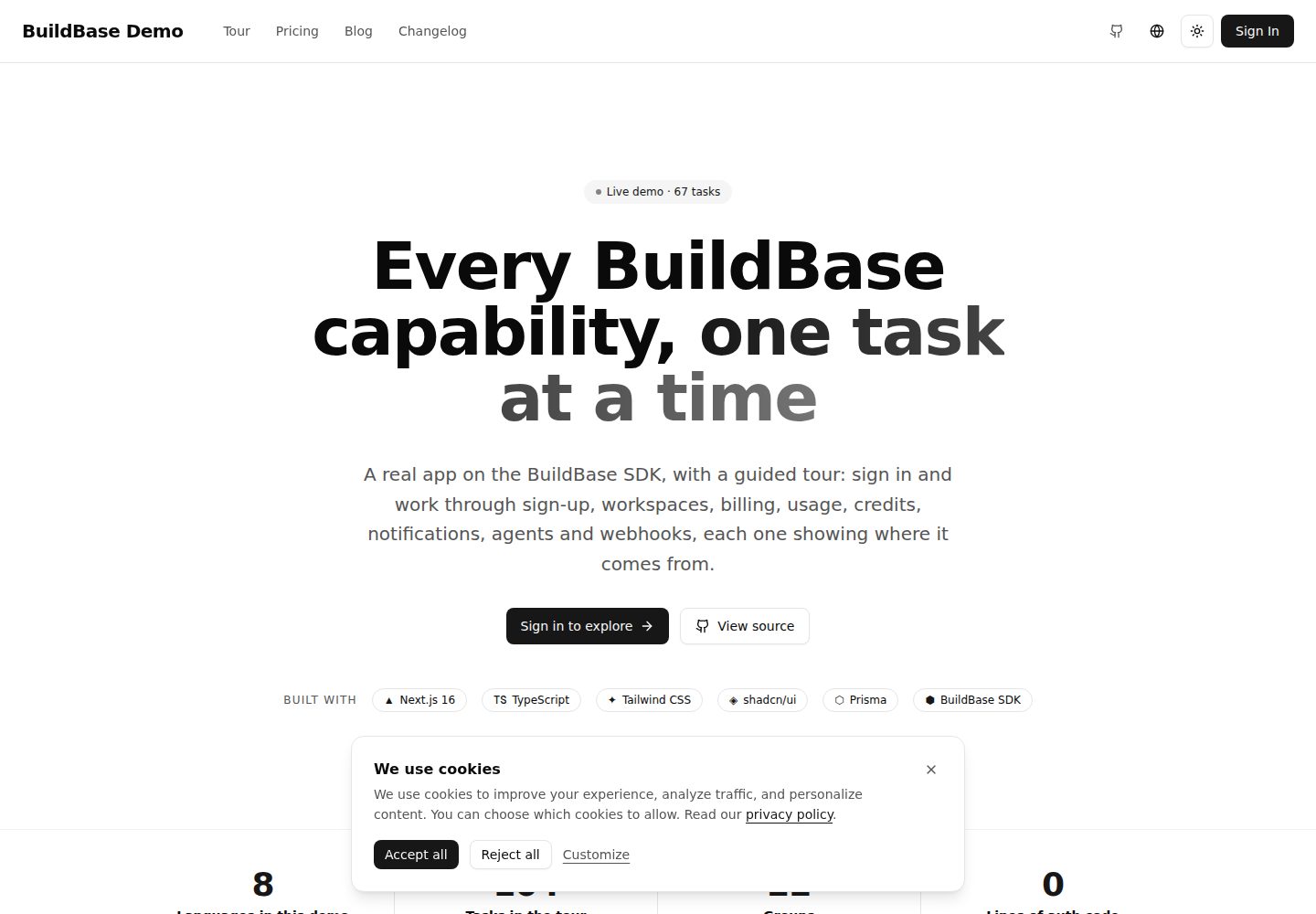
Compare the page layouts and mobile experience. Open any screenshot for a closer look.
Desktop homepage1 / 3
Desktop captureTop of page
Actual screenshot captured by the server browser.
All pages & views 3
Screenshots show visual appearance; interactive behavior may differ.
Recorded 2026-10-01View source
What stands out
A quick read of the recorded project description.
The server provides getSessionContext() and getWorkspaceContext(); the latter verifies workspace membership and role with the platform
SDK lifecycle events and webhook events are written to Postgres separately; webhooks validate signature and timestamp and are stored deduplicated
Includes a guided tour with 67 tasks in 13 groups, with progress saved per account; tasks can be completed by SDK events, webhooks, app routes, or manual marking
The app and SDK interfaces are available in eight languages, with type-constrained message keys; adding a new English key requires all languages to be filled in
Provides MCP service at /api/mcp via @buildbase/sdk/mcp and generates discovery documents such as llms.txt and openapi.json
Template Details
This is a Next.js SaaS starter template hosted in the GitHub repository buildbase-app/nextjs-starter under the MIT license. It connects the application to the BuildBase platform: registration, login, passkeys, and device trust are handled by BuildBase-hosted pages, and the SDK's SaaSOSProvider passes the session id to /api/auth/token, which stores it in an httpOnly cookie named bb-session-id; the application itself never touches passwords. On the server, src/lib/buildbase.ts reads that cookie to create a client, and src/lib/server-auth.ts provides two helper functions, getSessionContext() and getWorkspaceContext(workspaceId); the latter verifies with the platform whether the caller belongs to that workspace and their role.
The data layer uses Postgres and Prisma. The SDK emits lifecycle events in the browser such as user:created, workspace:changed, and workspace:invitation-sent, which saas-provider.tsx forwards to /api/events and writes to User, Workspace, and UserWorkspace; server-side changes such as subscriptions, payments, and credit purchases are validated for signature and timestamp via /api/webhooks/buildbase and stored in WebhookEvent. The template's built-in business domain is "documents": creating a document records documents quota usage and consumes one credit; when the limit is exceeded and overage is not allowed, it returns 402, and the same service also backs MCP tools.
The template also includes a guided tour with 67 tasks in 13 groups, with content in English and interface copy translated. Tasks are checked off in four ways: sdk-event, webhook, action, and manual, and progress is saved per account rather than per browser. The app and SDK interfaces are available in eight languages (English, Hindi, Spanish, French, German, Japanese, Chinese, and Arabic, with Arabic right-to-left), and message keys are type-constrained in src/i18n/types.ts. The Agent part provides MCP service at /api/mcp via createAgentStack from @buildbase/sdk/mcp, and generates discovery documents such as /.well-known/*, /llms.txt, /auth.md, /openapi.json, and /security.txt.
Before use, you need a BuildBase organization and OAuth client, a Postgres connection string, SYSTEM_SECRET, optional webhook secret and site URL; src/env.ts validates required variables at startup. Fully running the tour also depends on organization-side configuration: the main-pricing pricing group and two plans containing documents quota and max-users limits, the analytics workspace feature, the 100-credits credit pack, the comment-added notification event, a webhook endpoint, VAPID keys, a verified email sender, and test-mode Stripe keys. These slugs are the only coupling points between the application and the organization, centralized in METERING, DEMO_EVENT_SLUG, and the slug properties of PricingSection. The README also explains how to remove the guided tour.
Next.jsSaaSStarter
Is it right for your project?
Use Cases
- As a starting point for your own SaaS project, directly integrating BuildBase's authentication, multi-tenancy, billing, and notification capabilities
- To verify item by item through the guided tour whether BuildBase covers the required capabilities before purchasing
- To add an MCP server and OAuth discovery documents to an existing product, letting agents call quota-constrained tools with user accounts
- For SaaS applications that need a multilingual interface (including right-to-left Arabic) and per-workspace usage metering
Suitable For
- Developers preparing to build a multi-tenant SaaS with Next.js and willing to use BuildBase as the backend platform
- Teams that need to evaluate BuildBase's authentication, billing, quota, notification, and webhook capabilities
- Projects that want to provide both an MCP tool interface and a multilingual interface
Getting started & customization
Use these recorded setup notes alongside the repository instructions for your chosen version.
- 1
After cloning the repository, copy .env.example to .env.local and fill in variables such as the BuildBase service address, organization id, OAuth client id and secret, redirect URL, Postgres connection string, and SYSTEM_SECRET
- 2
Create an OAuth client in the BuildBase console and add http://localhost:3000 and the deployed URL to the redirect URL list
- 3
Locally, you can use docker compose up db to provide Postgres, then run npx prisma db push to sync the schema
- 4
To complete the entire guided tour, configure in the console the main-pricing pricing group, documents quota, max-users limit, analytics feature, 100-credits credit pack, comment-added notification event, webhook endpoint, VAPID keys, verified sender, and test-mode Stripe keys
- 5
Payments in the demo use test card 4242 4242 4242 4242; when the guided tour is no longer needed, follow the README steps to delete directories such as src/tour, the TourProgress model, and related menus and copy
License & source material
Usage conditions & limitations
Free to use · keep license noticeThis entry covers the free version under the MIT license in the public repository; the free scope is the code of that version and does not mean external services or third-party assets are free.
Must comply with when using
- You may use, modify, commercialize, and distribute the code of this version for free.
- When distributing copies or substantial portions of the code, retain the original author's copyright notice and the full MIT license notice.
- The code is provided as is; warranties and limitations of liability are governed by the original license and applicable law.
Additional costs & items to verify
- This template is not a standalone website template but a starter deeply tied to the BuildBase platform: core capabilities such as authentication, sessions, multi-tenancy, billing, quotas, notifications, and webhooks are provided by BuildBase hosted services, and you must register a BuildBase account and configure an organization and OAuth client to run it.
- Running it requires an external BuildBase service (hosted platform or self-hosted server), and you need to create an OAuth client and configure redirect URLs in the console, which is an external service dependency.
- The payment part of the guided tour depends on Stripe, and you need to configure test-mode Stripe keys in the BuildBase console; using payment features in production requires a real Stripe account and may incur external service fees.
- Email notification features depend on a verified email sender configuration; without it, the email channel is unavailable.
- Browser push features require additional VAPID key configuration; otherwise push is unavailable.
- Fully running the 67-item guided tour depends on extensive organization-side configuration (pricing group, quotas, credit pack, notification event, webhook, VAPID, sender, Stripe, etc.) and is not out-of-the-box.
- The guided tour task content is only available in English; only the interface framework copy has multilingual translations.
- Demo images, fonts, icons, and other third-party assets must be checked against their respective licenses and cannot be judged solely by the code's MIT license.
- External services such as domains, hosting, databases, payments, or AI may incur additional charges.
View Original Text Basis
Permission is hereby granted, free of charge
Original License Text
A Next.js 16 app wired to [BuildBase](https://buildbase.app), and a guided tour of everything BuildBase gives it.
Original README
`NEXT_PUBLIC_BUILDBASE_SERVER_URL` | `https://api.console.buildbase.app` for the hosted platform, or your self-hosted server.
Original README
Stripe keys in test mode. The tour uses card `4242 4242 4242 4242`.
Original README
A verified email sender, or the email channel stays quiet and the inbox says so.
Original README
VAPID keys, so browsers can subscribe to push.
Original README
The tour, though, asks you to hit a limit, spend a credit and receive a specific event, so the demo organization is configured like this.
Original README
https://github.com/buildbase-app/nextjs-starter/blob/main/LICENSEhttps://github.com/buildbase-app/nextjs-starter/blob/main/README.mdThe tour's task content is English only; its chrome is translated.
Original README
Compiled by DeepSeek based on repository license and README ·2026-10-01. Results only cover the materials read; dependencies, images, fonts, and subsequent term changes are subject to their respective original texts.
Project checks & description sources
Template Information
- Source platforms
- GitHub
- Documentation and maintenance reference score
- More documented · 85 / 100
- Technologies
- Next.js · React
- Website type
- SaaS · Starter
How this score is calculated
Our heuristic uses license records (up to 30), a demo link (12), a preview (10), stars (15), recorded maintenance (15), description completeness (8), feature records (5) and classification data (5). It is not a code, security or performance test, or a Google score. A link does not establish tested functionality.
What to verify for this project
- Repository update recorded
- 2026-09-26
- Screenshot last checked
- 2026-10-01
A demo link is listed. Check it with your own content and viewport sizes; its presence does not confirm that forms, authentication or payments work.
The catalog identifies Next.js as the primary stack. Check the actual dependency manifest and lockfile for versions and hosting requirements. These notes use recorded metadata, not a code audit or a deployment test.
Use a selection guide →How this description was prepared
AI-assisted description based on catalog records and repository material. Repository authors are not automatically the reviewers of this description.
Automatically checked against source and license rules; no manual editorial review.
Inspect the recorded source material
SHA-256: 9998e8dda44eee77be421ce83f2b39d5cc09b72cd52a7a3b359dc1937b19a552
2026-10-01T00:35:36.465Z
Source file / repository# BuildBase Next.js starter
A Next.js 16 app wired to [BuildBase](https://buildbase.app), and a guided
tour of everything BuildBase gives it.
<!-- TODO: replace with the deployed demo URL -->
Live demo: https://demo.buildbase.app
The tour is 67 tasks in 13 groups: sign up, create a second workspace, invite
someone by email, subscribe with a test card, hit a quota, spend credits,
switch a feature flag, send yourself a notification, connect Claude over MCP,
watch a webhook land in Postgres, export your data. You can read the whole
list on the home page before you sign in. After you sign in, each task says
why it matters, what to do, and where the capability comes from: the SDK hook
or component, the console screen that configures it, and the file in this repo
that takes part. Tasks that leave a trace tick themselves off; the rest have a
"Mark done" button. Progress follows your account, not your browser.
Use it two ways: clone it as the starting point for your own app, or work
through the tour to decide whether BuildBase does what you need before you
buy. Every screen you click through is in this repo.
## Quick start
```bash
git clone https://github.com/buildbase-app/nextjs-starter
cd nextjs-starter
cp .env.example .env.local
npm install
npx prisma db push
npm run dev
```
The app runs on http://localhost:3000. Fill in `.env.local` first:
| Variable | Where it comes from |
| ------------------------------------ | ------------------------------------------------------------------------------------------------------------------------------------------------------------- |
| `NEXT_PUBLIC_BUILDBASE_SERVER_URL` | `https://api.console.buildbase.app` for the hosted platform, or your self-hosted server. |
| `NEXT_PUBLIC_BUILDBASE_ORG_ID` | The console's organization settings. It is the id in the URL when the console is open. |
| `NEXT_PUBLIC_BUILDBASE_CLIENT_ID` | Console, `/dashboard/admin/auth`. Create an OAuth client and add `http://localhost:3000` (and your deployed URL) to its redirect URLs. |
| `BUILDBASE_CLIENT_SECRET` | The same client's secret. Server only. |
| `NEXT_PUBLIC_BUILDBASE_REDIRECT_URL` | The URL the hosted sign-in returns to. Must be one of the client's redirect URLs. |
| `DATABASE_URL` | A Postgres connection string. `docker compose up db` gives you one locally. |
| `SYSTEM_SECRET` | At least 32 characters, `openssl rand -base64 32`. Signs the workspace tokens this app mints for itself. |
| `BUILDBASE_WEBHOOK_SECRET` | Console, `/dashboard/admin/setting/webhooks`. Create an endpoint for `<your URL>/api/webhooks/buildbase` and paste the signing secret. Optional until you do. |
| `SITE_URL`, `NEXT_PUBLIC_SITE_URL` | Your public URL. Used for canonical links, the MCP server address and the discovery documents. |
`src/env.ts` validates these at boot and refuses to start with a missing
required one, so a typo shows up as a clear message rather than a 500 later.
## What the organization needs for the tour to complete
The app works against any BuildBase organization. The tour, though, asks you
to hit a limit, spend a credit and receive a specific event, so the demo
organization is configured like this. Each row says which console screen it
lives on.
| What | Console screen |
| -------------------------------------------------------------------------------------------------------------------------------------------------------------------------------------- | -------------------------------------- |
| A pricing group with slug `main-pricing`. The pricing page renders whatever it holds. | `/dashboard/admin/subscriptions` |
| Two plans in it, both with a `documents` quota. The smaller plan allows no overage, so "Hit the limit" is reachable; the larger one includes more. | `/dashboard/admin/subscriptions` |
| A `max-users` limit on each plan (3 and 10 on the demo), so "Hit the seat limit" is reachable. | `/dashboard/admin/subscriptions` |
| An `analytics` workspace feature, off on the smaller plan and on for the larger, so "See it switched on" happens by upgrading. | `/dashboard/admin/workspaces/features` |
| A 14-day trial without a card on each plan. | `/dashboard/admin/subscriptions` |
| A credit package with slug `100-credits`, granted by each plan on every period. Creating a document spends one. | `/dashboard/admin/subscriptions` |
| A custom notification event with slug `comment-added`, user-managed, email and push on. Its email template uses the `{{title}}`, `{{message}}` and `{{url}}` merge tags the app sends. | `/dashboard/admin/notifications` |
| A webhook endpoint at `<your URL>/api/webhooks/buildbase` subscribed to `*`. Its secret goes in `BUILDBASE_WEBHOOK_SECRET`. | `/dashboard/admin/setting/webhooks` |
| VAPID keys, so browsers can subscribe to push. | `/dashboard/admin/push` |
| A verified email sender, or the email channel stays quiet and the inbox says so. | `/dashboard/admin/notifications` |
| Stripe keys in test mode. The tour uses card `4242 4242 4242 4242`. | `/dashboard/admin/payment` |
| The OAuth client's redirect URLs include the app's URL. | `/dashboard/admin/auth` |
The slugs (`documents`, `max-users`, `analytics`, `100-credits`,
`comment-added`, `main-pricing`) are the only coupling between the app and the
organization. Each lives in one constant: `METERING` in
`src/lib/documents/service.ts`, `DEMO_EVENT_SLUG` in
`src/components/notifications/demo-event.ts`, and the `slug` prop on
`PricingSection`.
## How it is put together
**Auth and the session.** Sign-up, sign-in, passkeys and device trust happen
on BuildBase's hosted pages. The SDK's `SaaSOSProvider` in
`src/components/saas-provider.tsx` hands the resulting session id to
`/api/auth/token`, which stores it in an httpOnly cookie named `bb-session-id`.
This app never sees a password.
**The server client.** `src/lib/buildbase.ts` builds a server-side client that
reads that cookie. `src/lib/server-auth.ts` exposes two helpers every API route
uses: `getSessionContext()` resolves who is calling from the cookie, and
`getWorkspaceContext(workspaceId)` also checks, against the platform, that they
belong to that workspace and what their role is. Identity in a request body is
a claim; these are the facts.
**Mirroring the platform into Postgres.** The SDK emits lifecycle events in the
browser (`user:created`, `workspace:changed`, `workspace:invitation-sent`,
...). `saas-provider.tsx` forwards them to `/api/events`, which upserts `User`,
`Workspace` and `UserWorkspace`. Server-side changes (a subscription, a
payment, a credit purchase) arrive at `/api/webhooks/buildbase`, which verifies
the signature and timestamp with `verifyWebhookSignature`, stores each event
once in `WebhookEvent`, and shows them on the Events page.
**Documents.** The demo's own product domain, in `src/lib/documents/service.ts`
and `/api/documents/*`. Creating one records usage against the `documents`
quota and spends one credit; a workspace at its cap with no overage gets a 402. The same service backs the MCP tools, so an agent and a person are
metered the same way.
**Agents.** `src/lib/agent/index.ts` calls `createAgentStack` from
`@buildbase/sdk/mcp`. That gives the app an MCP server at `/api/mcp`, OAuth
discovery under `/.well-known/*`, `/llms.txt`, `/auth.md`, `/openapi.json` and
`/security.txt`, all generated from `src/config/site.ts`. An MCP client signs
in with the person's BuildBase account and the app mints it a token in
`/api/auth/oauth2-token`.
**The tour.** `src/tour/catalog.ts` is the content: 13 groups and 67 tasks,
English on purpose. `src/tour/progress.ts` writes one `TourProgress` row per
person per task. A task declares how it gets ticked:
| `detect.kind` | Ticked by |
| ------------- | -------------------------------------------------------------------------------- |
| `sdk-event` | `/api/events`, when the named SDK lifecycle event arrives for the signed-in user |
| `webhook` | `/api/webhooks/buildbase`, for every member of the workspace in the payload |
| `action` | This app's own routes: a document created, a notification sent, a tool called |
| `manual` | The "Mark done" button, for things nothing can observe |
The tour page is `src/app/[locale]/dashboard/tour`, the home-page preview is
`src/components/marketing/tour-preview.tsx`, and `/api/tour` serves progress.
## Scripts
```bash
npm run dev # Next.js with Turbopack (contentlayer builds first)
npm run build # contentlayer, prisma generate, next build, sitemap, pagefind
npm run typecheck # tsc --noEmit
npm run lint # eslint
npm run check # lint + format check + typecheck
npm run test # vitest
npm run test:e2e # playwright (e2e/)
```
Husky runs eslint and prettier on staged files at commit time.
## Languages
The app and the SDK's own screens ship in eight languages: English, Hindi,
Spanish, French, German, Japanese, Chinese and Arabic (right to left). Messages
are typed in `src/i18n/types.ts`, so adding a key in English fails the
typecheck until every locale has it. The tour's task content is English only;
its chrome is translated.
## Make it yours
Point `.env.local` at your own organization and the app runs unchanged. To
remove the tour once you no longer want it:
1. Delete `src/tour`, `src/components/tour`,
`src/app/[locale]/dashboard/tour` and `src/app/api/tour`.
2. Remove the `TourProgress` model from `prisma/schema.prisma` and run
`npx prisma db push`.
3. Remove the `tour` item from `menuItems` in `src/components/app-sidebar.tsx`,
`<TourProgressCard />` from the dashboard page and `<TourPreview />` from
the home page.
4. Remove the `tour` namespace and `nav.tour` from `src/i18n/types.ts` and the
eight files in `src/i18n/messages/`.
5. Delete the `detect(...)` calls in `/api/events`, `/api/webhooks/buildbase`,
`/api/documents`, `/api/notifications/test`, `/api/auth/oauth2-token`,
`/api/user/export` and `src/lib/agent/tools.ts`.
Documents, the inbox, team invitations and the webhook table stand on their
own and are worth keeping as examples of the SDK in use.
## Deployment
Vercel: import the repo, set the variables above, point `DATABASE_URL` at a
hosted Postgres and add the deployed URL to the OAuth client's redirect URLs.
`NEXT_PUBLIC_*` values are baked into the bundle, so changing one needs a
redeploy.
Docker: `docker compose up` builds the app and starts Postgres; the
`POSTGRES_*` variables in `.env.example` configure the container.
## License
MIT
Explore similar templates
Compare previews and descriptions within the same stack and category.

Next.js SaaS Starter
The official Next.js SaaS starter template, integrating email/password authentication, Stripe Checkout subscriptions, a dashboard with user/team CRUD, basic Owner/Member RBAC, and activity logging.
Next.js · SaaS

Next.js Commerce
Vercel's officially maintained Next.js App Router ecommerce starter with deep Shopify integration, offering a complete product catalog, cart, and checkout flow. Core logic is modular for swapping backends, and community provider versions exist for BigCommerce, Medusa, and Saleor.
Next.js · E-commerce

Next-js-Boilerplate
A developer-first Next.js 16 starter with Tailwind CSS 4 and TypeScript, supporting both App Router and Page Router.
Next.js · Starter

tailwind-nextjs-starter-blog
A Next.js and Tailwind CSS blog starter template using Contentlayer for Markdown/MDX, with built-in SEO, code highlighting, and tags. It targets personal technical blogs and migration from Jekyll/Hugo to React, and supports one-click Vercel deployment.
Next.js · Blog

next-forge
next-forge is a Turborepo-based Next.js template maintained by Vercel, positioned as a starting point for SaaS products.
Next.js · Starter

SaaS-Boilerplate
SaaS-Boilerplate is an open-source SaaS starter template built with Next.js App Router, React 19, TypeScript, Tailwind CSS, and Shadcn UI.
Next.js · SaaS