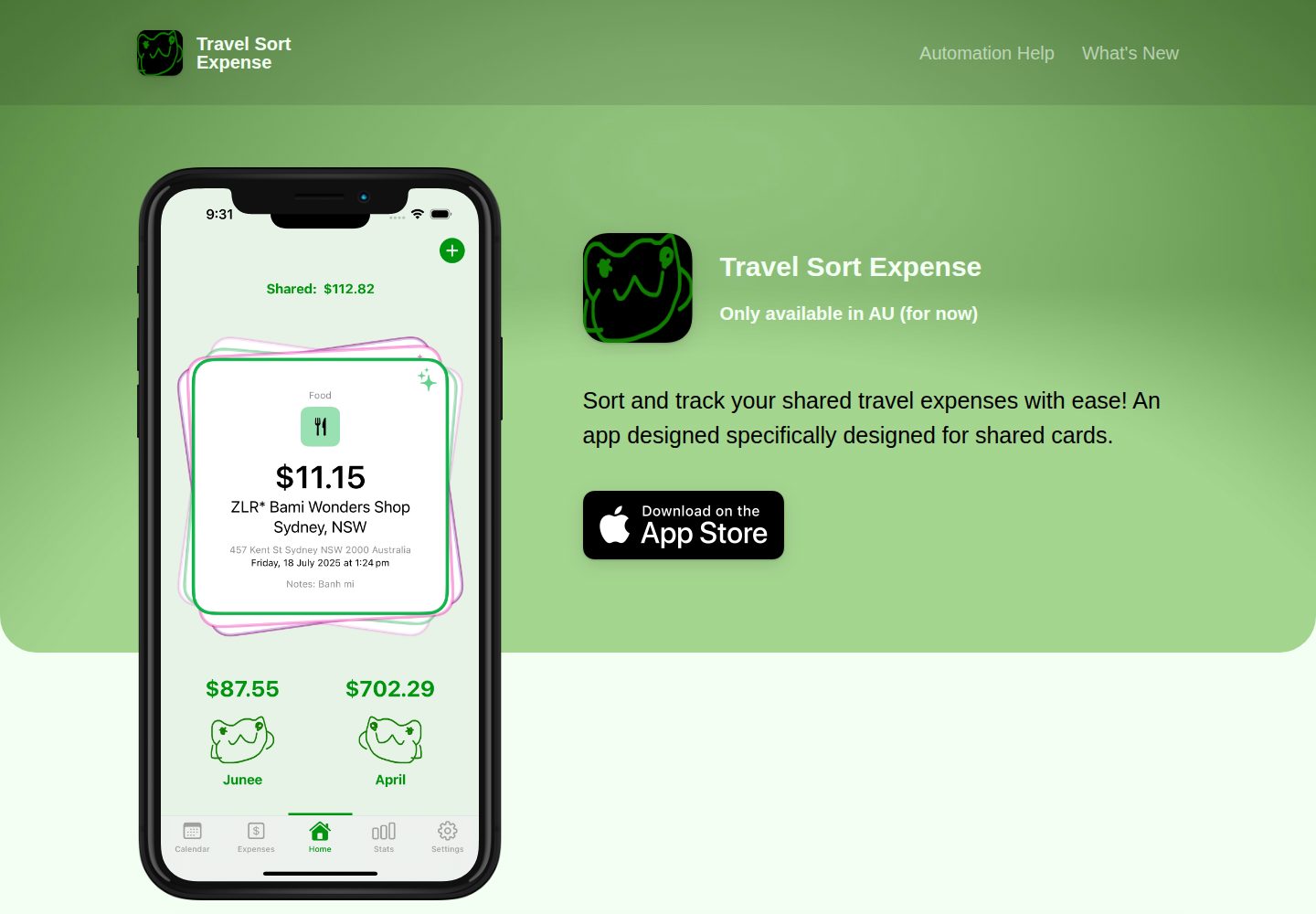
Fork 仓库并填写 iOS App ID 后,站点自动获取应用图标、名称、价格和 App Store 链接
HTML企业官网
travel-sort-expense-landing-page — HTML 企业官网模板
作者 cccsso
基于 Jekyll 的 iOS 应用落地页模板,通过 _config.yml 配置应用信息并部署到 GitHub Pages。
看看你的网站会是什么样
浏览真实页面截图,比较内容排版与手机效果。点击下方缩略图切换,放大查看整页细节。
全部页面与视图 2
截图用于了解视觉与布局,交互效果请以实际项目为准。
采集于 2026-10-13查看来源
值得关注的模板亮点
从已有项目资料中,快速了解它的特点。
站点配置集中在 _config.yml,README 声明无需编写 HTML/CSS 即可自定义
内置隐私政策与更新日志页面,内容为占位文本,可在 _pages 目录中编辑或删除
支持在 assets 目录中放置截图或视频,视频需提供 Safari 与 Chrome/Firefox 两种格式
基于 Jekyll,本地可通过 bundle exec jekyll serve 运行预览
模板详细介绍
这是一个为 iOS 应用设计的落地页模板,README 说明其目标是让用户在约五分钟内创建并部署到 GitHub Pages。使用方式是先 Fork 仓库,然后在 _config.yml 中填写 iOS App ID,站点会自动根据该 ID 获取应用图标、名称、价格和 App Store 链接。模板基于 Jekyll 构建,本地运行需要安装 Ruby 和 Jekyll,并执行 bundle install 与 bundle exec jekyll serve。
可配置项集中在 _config.yml,README 列出的包括应用名称、图标、描述、价格、App Store 与 Play Store 链接、Press Kit 下载链接、封面图与封面遮罩色、背景色、文字颜色、iPhone 设备颜色、个人或公司名称、网站链接、社交与联系方式,以及功能列表(标题、文本、图标)。截图或视频放在 assets 目录,视频需要同时提供 Safari 与 Chrome/Firefox 支持的格式,截图和视频分辨率需为 828x1792、1125x2436 或 1242x2688 之一。
模板自带隐私政策与更新日志页面,内容为占位文本,需自行替换;可在 _pages 目录中编辑对应 markdown 文件,并通过 include_in_header 控制是否出现在顶部导航,也可以删除这两个文件或新增其他 markdown 页面。README 未说明除 GitHub Pages 之外的其他部署方式,也未提供性能、可访问性或浏览器兼容性的具体说明。
HTML企业官网
适合你的项目吗?
适用场景
- 为 iOS 应用快速搭建一个部署在 GitHub Pages 上的介绍页面
- 需要集中在一个配置文件中维护应用名称、价格、链接和功能列表等信息
- 希望在落地页中同时提供隐私政策与更新日志等说明页面
- 需要展示应用截图或视频预览,并控制其分辨率与格式
适合人群
- 希望使用 GitHub Pages 托管 iOS 应用落地页的开发者
- 愿意通过 Fork 仓库并编辑 _config.yml 完成配置的用户
- 本地具备或愿意安装 Ruby 与 Jekyll 环境以预览站点的人
上手与定制指南
结合仓库当前版本的说明,按下面的资料检查内容、配置与运行要求。
- 1
Fork 仓库后确认 GitHub Pages 已启用,站点会发布在 https://your-username.github.io/your-repo-name/
- 2
在 _config.yml 的 ios_app_id 字段填写 iOS App ID 并提交更改
- 3
将截图上传到 assets/screenshot/ 并删除占位文件 yourscreenshot.png;视频上传到 assets/videos/ 并同时提供 Safari 与 Chrome/Firefox 支持的格式
- 4
截图和视频分辨率需为 828x1792、1125x2436 或 1242x2688 之一
- 5
本地运行需安装 Ruby 与 Jekyll,然后执行 bundle install 和 bundle exec jekyll serve
授权与来源资料
使用条件与限制
免费使用 · 保留许可声明本次收录的是公开仓库中采用 MIT 许可的免费版本;免费范围为该版本代码,不代表外部服务或第三方素材免费。
使用时需要遵守
- 允许免费使用、修改、商用和分发该版本代码。
- 分发代码副本或实质性部分时,保留原作者版权声明和完整 MIT 许可声明。
- 代码按现状提供;担保与责任限制以原许可证及适用法律为准。
额外费用与待核对事项
- 演示图片、字体、图标及其他第三方素材需按各自许可核对,不能仅凭代码的 MIT 许可判断。
- 域名、托管、数据库、支付或 AI 等外部服务可能另外收费。
- 使用前需在 _config.yml 中填写 iOS App ID,站点依赖该 ID 自动获取应用信息。
- 本地运行需自行安装 Ruby 与 Jekyll 环境。
- 需确保仓库已启用 GitHub Pages,且站点完全生效可能需要等待一段时间。
- 视频需同时上传 Safari 与 Chrome/Firefox 两种格式的文件。
- 截图和视频必须使用指定分辨率之一(828x1792、1125x2436 或 1242x2688)。
- 自带的隐私政策与更新日志为占位文本,需自行替换为实际内容。
查看原文依据
Permission is hereby granted, free of charge
许可证原文
🗝 Enter iOS App ID in `_config.yml`
README 原文
- install Ruby and Jekyll [https://jekyllrb.com/docs/installation/macos/](https://jekyllrb.com/docs/installation/macos/)
README 原文
_Make sure GitHub Pages is enabled for your repo. It might take some time for the site to propagate entirely._
README 原文
Upload your video to the folder `assets/videos/`. To have support for most browsers, you need to upload two files – one for Safari and one for Chrome/Firefox.
README 原文
The videos and screenshots must have one of the following resolutions:
README 原文
https://github.com/cccsso/travel-sort-expense-landing-page/blob/master/LICENSEhttps://github.com/cccsso/travel-sort-expense-landing-page/blob/master/README.md**Please note:** The Privacy Policy and Changelog provided are written using dummy text, so please adapt each of them for your own app.
README 原文
DeepSeek 根据仓库许可证和 README 整理 ·2026-10-13。结果仅覆盖已读取资料,依赖、图片、字体及后续条款变更以各自原文为准。
项目核对记录与介绍依据
模板资料
- 来源平台
- GitHub
- 资料与维护参考分
- 资料一般 · 74 / 100
- 技术栈
- HTML
- 网站类型
- 企业官网
这个分数如何计算
本站按许可资料(最高30分)、演示链接(12分)、预览图(10分)、Star数(15分)、记录的维护时间(15分)、描述完整度(8分)、功能记录(5分)和分类资料(5分)计算。它不是代码、安全或性能测试,也不是 Google 评分;有链接不代表已实测可用。
这个项目需要核对什么
- 记录的仓库更新时间
- 2025-08-18
- 截图检查日期
- 2026-10-13
已收录演示链接。请用你的内容与屏幕尺寸检查;有演示不代表表单、认证或支付已经可用。
目录记录的主要技术栈是 HTML。请通过依赖清单和锁文件核对实际版本与托管要求。这些说明基于收录资料,不代表代码审计或部署实测。
查看具体选型方法 →介绍的制作与核对状态
介绍由 AI 辅助整理目录与仓库资料。仓库作者不等于这篇介绍的审核者。
审核声明: codex-user-requested-batch-review-20261015 · 2026-10-15
查看当时使用的来源资料
SHA-256: e3eec341242d16d4f2ed6ec2f24b8ec346eb6ca7e190f2a2626b87c151b1da42
2026-10-13T12:34:26.366Z
来源文件 / 仓库# Automatic App Landing Page **Create and deploy an iOS app landing page on GitHub Pages in only five minutes.** Designed for GitHub Pages for super easy set up. 🔧 Fork this repo 🗝 Enter iOS App ID in `_config.yml` 📲 Upload video preview or screenshot 🎨 Customise site in `_config.yml` (no HTML/CSS) 📝 Write Privacy Policy as markdown in `privacypolicy.md` 🕒 Keep a changelog in `CHANGELOG.md` ✅ Site becomes live at GitHub Pages repository URL, e.g. `https://your-username.github.io/your-repo-name/`. <img src="https://emilbaehr.com/files/jayson1.png" width="440"> <img src="https://emilbaehr.com/files/slor1.png" width="440"> ## Running locally - install Ruby and Jekyll [https://jekyllrb.com/docs/installation/macos/](https://jekyllrb.com/docs/installation/macos/) ```bash $ bundle install $ bundle exec jekyll serve ``` ## Quick Start ### Step 1: Fork this repo. After forking the repo, your site will be live immediately on your personal Github Pages account, e.g. `https://yourusername.github.io/your-repo-name/`. [https://cccsso.github.io/travel-sort-expense-landing-page/](https://cccsso.github.io/travel-sort-expense-landing-page/) _Make sure GitHub Pages is enabled for your repo. It might take some time for the site to propagate entirely._ ### Step 2: Enter iOS App ID in `_config.yml` Enter your iOS app ID in the `ios_app_id` field and commit your changes. Your site will automatically rebuild with your app icon, name, price and link to App Store. You can go on with customising almost anything in the `_config.yml` file. Things you can customise in `_config.yml`: - App Name - App Icon - App Description - App Price - App Store Link - Play Store Link - Press Kit Download Link - Cover Image - Cover Overlay Color - Background Color - Text Colors - iPhone Device Color - Your Name / Company Name - Link to Website - Social Links and Contact Info - Feature List (Title, text, icon) ### Step 3: Add screenshot or video #### Adding a screenshot Upload a `.png` or `.jpg` of your app to the folder `assets/screenshot/`. The name does not matter. Be sure to delete the placeholder `yourscreenshot.png`. #### Adding video Upload your video to the folder `assets/videos/`. To have support for most browsers, you need to upload two files – one for Safari and one for Chrome/Firefox. Video formats supported by Chrome and Firefox: - `.webm` - `.ogg` Video formats supported by Safari: - `.mp4` - `.mov` #### Resolutions The videos and screenshots must have one of the following resolutions: - 828x1792 - 1125x2436 - 1242x2688 ### Step 4: Edit (or remove) Privacy Policy and Changelog Your site automatically includes pages for a Privacy Policy and a Changelog. Change the content of these pages by editing the `privacypolicy.md` and `CHANGELOG.md` files in the `_pages` directory. In each of the markdown files, you can set the `include_in_header:` value to either `true` or `false`. This determines if the page is included in the top navigation. By default, only the Changelog is included in the top navigation. The title of the navigation item can also be edited, by editing the `title:` in each markdown file. If you need to, you can create additional markdown based pages just by creating an `.md` file like the `privacypolicy.md` and `CHANGELOG.md` files in the `_pages` directory. **Please note:** The Privacy Policy and Changelog provided are written using dummy text, so please adapt each of them for your own app. You can also choose not to include these pages, by simple deleting the `privacypolicy.md` and `CHANGELOG.md` files. ## Feedback If you have feedback regarding bugs or improvements, open an issue, @ me on Twitter or write me an email. You can find my contact info on my website. I'd love to see the sites you create using this little tool. ## Credits - [Jekyll](https://github.com/jekyll/jekyll) - [FontAwesome](https://fontawesome.github.io/Font-Awesome/) ## Donations [Donations are welcome](https://www.paypal.com/cgi-bin/webscr?cmd=_donations&business=S8ZZT3JXJPN92¤cy_code=USD&source=url) ## Author [Emil Baehr](https://emilbaehr.com/) ## License [MIT License](LICENSE) [Unsplash Photo - Green Textile in Close Up](https://unsplash.com/photos/green-textile-in-close-up-photography-_K6zAyC9yC0)
看看同类模板
对比同技术栈与用途的模板,找到更适合的视觉与内容结构。

mazer
Free and Open-source Bootstrap 5 Admin Dashboard Template and Landing Page
HTML · 后台

Freelancer
Freelancer 是 Start Bootstrap 出品的单页作品集模板,专为自由职业者、设计师和小型工作室设计。 页面结构清晰,包含多个内容区块、响应式作品集网格,每个作品项目配有模态窗口展示详情。
HTML · 作品集

Creative
Creative 是 Start Bootstrap 团队维护的一款单页营销模板,定位明确:为创意机构或产品服务提供一个以作品展示和行动号召为核心的落地页。
HTML · 企业官网

startbootstrap-agency
Agency 是 Start Bootstrap 维护的单页代理商作品集主题,基于 Bootstrap 构建,MIT 许可。
HTML · 企业官网

startbootstrap-landing-page
这是 Start Bootstrap 系列中一款通用型落地页模板,基于 Bootstrap 构建,定位是给产品或服务做单页推广。
HTML · 企业官网

Landing-Page
Tailwind CSS Starter Template - Landing Page
HTML · 企业官网