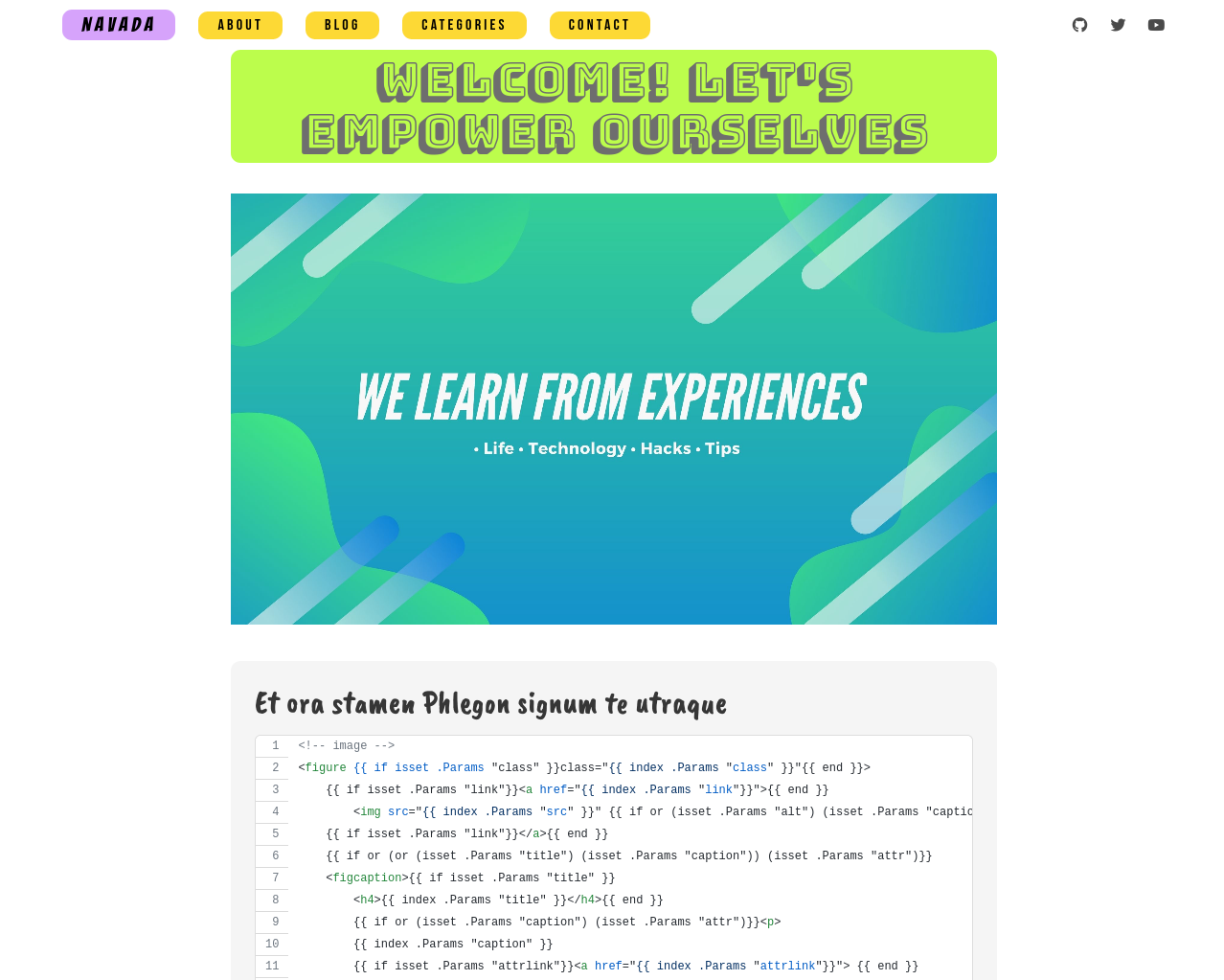
基于 Hugo 的博客主题,提供首页、博客页与页脚等完整页面版式
Hugo博客
navada — Hugo 博客模板
作者 chaitanya4vedi
Navada 是一个基于 Hugo 的博客主题,界面色彩丰富、适配移动端,仓库采用 MIT 许可,附带示例站点配置与示例文章。
看看你的网站会是什么样
浏览真实页面截图,比较内容排版与手机效果。点击下方缩略图切换,放大查看整页细节。
目前有 1 张原始预览,可打开完整图片查看设计细节。
截图用于了解视觉与布局,交互效果请以实际项目为准。
采集于 2026-10-02查看来源
值得关注的模板亮点
从已有项目资料中,快速了解它的特点。
响应式设计,README 同时给出桌面端与移动端截图
仓库内含 exampleSite,附带 config.toml、示例文章与图片资源
文章默认原型包含标题、日期、描述、作者、标签、图片、分类字段
作者与头像可在 config.toml 的 params 中统一配置
代码采用 MIT 许可,允许免费使用、修改、商用与分发
模板详细介绍
Navada 是面向博客及类似内容站点的 Hugo 主题,强调色彩鲜明、视觉吸引力与响应式布局。README 提供了桌面端与移动端的首页、博客页和页脚截图,可用于判断版式风格。
主题仓库包含 exampleSite 目录,其中有 config.toml 配置文件、content 下的示例文章以及 images 图片资源。安装方式为在 Hugo 站点的 themes 目录中克隆仓库,再把示例配置、内容与图片分别复制到站点根目录和 static 目录。文章通过 hugo new 命令创建,默认原型包含标题、日期、描述、草稿、作者、标签、图片和分类字段。作者名称与头像在 config.toml 的 params 中设置,文章图片以 YAML 列表形式声明。
README 中列出评论、多作者支持和 CSS 缓存失效为尚未实现、作者希望后续加入的功能,说明当前版本不包含这些能力。仓库最后更新于 2021 年,Star 数较少。代码采用 MIT 许可,可免费使用、修改、商用和分发,但演示图片、字体、图标等第三方素材需单独核对许可。
Hugo博客
适合你的项目吗?
适用场景
- 用 Hugo 搭建个人博客并希望直接套用现成主题
- 需要色彩鲜明、视觉突出的博客前端样式
- 希望参考主题自带的示例配置和示例文章快速起步
- 在本地或自有服务器上部署静态博客站点
适合人群
- 使用 Hugo 构建博客的开发者
- 偏好色彩丰富、编辑排版风格界面的个人博主
- 需要 MIT 许可、可自由修改主题代码的用户
- 希望以示例站点为起点调整配置与内容结构的人
上手与定制指南
结合仓库当前版本的说明,按下面的资料检查内容、配置与运行要求。
- 1
进入 Hugo 站点的 themes 目录,用 git clone 克隆该仓库
- 2
将 exampleSite 中的 config.toml 与 content 复制到站点根目录,images 复制到 static 目录
- 3
在 config.toml 的 params 中设置 author 与 authorImage
- 4
用 hugo new blog/2021/post-title.md 或 hugo new post-title.md 创建文章
- 5
文章图片需以 YAML 列表形式填写,注意缩进或使用方括号写法
授权与来源资料
使用条件与限制
免费使用 · 保留许可声明本次收录的是公开仓库中采用 MIT 许可的免费版本;免费范围为该版本代码,不代表外部服务或第三方素材免费。
使用时需要遵守
- 允许免费使用、修改、商用和分发该版本代码。
- 分发代码副本或实质性部分时,保留原作者版权声明和完整 MIT 许可声明。
- 代码按现状提供;担保与责任限制以原许可证及适用法律为准。
额外费用与待核对事项
- README 仅请求自愿打赏支持,不构成使用限制;主题代码仍按 MIT 许可免费使用。
- 评论、多作者支持与 CSS 缓存失效为作者计划中、尚未实现的功能,当前版本不包含这些能力。
- 演示图片、字体、图标及其他第三方素材需按各自许可核对,不能仅凭代码的 MIT 许可判断。
- 域名、托管、数据库、支付或 AI 等外部服务可能另外收费。
查看原文依据
Permission is hereby granted, free of charge
许可证原文
If you liked my work please consider supporting me on [BuyMeACoffee](https://www.buymeacoffee.com/chaitanya4vedi)
README 原文
https://github.com/chaitanya4vedi/navada/blob/master/LICENSEhttps://github.com/chaitanya4vedi/navada/blob/master/README.mdSome of the features i would like to include are - - Comments - Multi Author Support - Cache busting for CSS
README 原文
DeepSeek 根据仓库许可证和 README 整理 ·2026-10-02。结果仅覆盖已读取资料,依赖、图片、字体及后续条款变更以各自原文为准。
项目核对记录与介绍依据
模板资料
- 来源平台
- GitHub
- 资料与维护参考分
- 资料一般 · 68 / 100
- 技术栈
- Hugo
- 网站类型
- 博客
这个分数如何计算
本站按许可资料(最高30分)、演示链接(12分)、预览图(10分)、Star数(15分)、记录的维护时间(15分)、描述完整度(8分)、功能记录(5分)和分类资料(5分)计算。它不是代码、安全或性能测试,也不是 Google 评分;有链接不代表已实测可用。
这个项目需要核对什么
- 记录的仓库更新时间
- 2021-12-23
- 截图检查日期
- 2026-10-02
已收录演示链接。请用你的内容与屏幕尺寸检查;有演示不代表表单、认证或支付已经可用。
目录记录的主要技术栈是 Hugo。请通过依赖清单和锁文件核对实际版本与托管要求。这些说明基于收录资料,不代表代码审计或部署实测。
查看具体选型方法 →介绍的制作与核对状态
介绍由 AI 辅助整理目录与仓库资料。仓库作者不等于这篇介绍的审核者。
已完成服务器许可规则与 AI 来源核对;未经过人工编辑审核。
查看当时使用的来源资料
SHA-256: 96ccb7795befcee2860948626fbb5f41761558ebfa9c0d3a8312eaa811466beb
2026-10-02T17:16:19.445Z
来源文件 / 仓库# Navada - Hugo theme
Navada is a fully responsive, colorful and attractive UI theme for Blogs and similar content.
## Check the [Demo](https://navada-hugo.netlify.app/)
### Screenshots on Download page
### Desktop View
| Index Page | Blog Page |
|-------------------------------------------------------|------------------------------------------------------|
|  |  |
### Mobile View
| Index Page | Blog Page |
|------------------------------------------------------|-----------------------------------------------------|
|  |  |
#### Footer
<img src="images/Screenshot-Blog-Footer.png" alt="Footer">
## Installation
In your Hugo website directory, go to themes folder by `$ cd themes` command. Then clone this repo with the `git clone` command.
```bash
$ cd themes
$ git clone https://github.com/chaitanya4vedi/navada.git
```
I have provided `config.toml` file inside the `exampleSite` directory together with some sample posts inside `content` folder and images inside `images` folder. Copy and replace the `config.toml` and `content` folder to the root directory and copy paste `images` folder to the `static` folder of the root directory.
For more information read the official [setup guide](https://gohugo.io/overview/installing/) of Hugo.+
## Writing Posts
Create a new `.md` file in the *content/blog/2021/* folder
or you can simply type this command with your post's title in it
`hugo new blog/2021/post-title.md`
or you can also type `hugo new post-title.md` hugo will automatically create posts inside `content/blog` folder.
## Configs
### Author Name and Image
In the `config.toml` file that you copy pasted from exampleSite to root directory, change the the author name and image to show up on each post.
```
[params]
author = "Janne Kemppainen"
authorImage = "/images/janne.jpg"
```
### Default Archetype
This is the default archetype.
```
---
title: ""
date:
description: ""
draft: true
author: ""
tags: ""
images:
-
categories:
-
---
```
### Images
The images parameter needs to be a list. There are two ways to create a list in YAML so you can use either one of these options:
#### Option 1
```
images:
- /images/blog/03/fields.jpg
```
Note that indentation matters here.
#### Option 2
```
images: ["/images/blog/03/fields.jpg"]
```
## Open to Suggestions and Improvements
I have lots of stuff in my mind to add to this theme. Some of the features i would like to include are -
- Comments
- Multi Author Support
- Cache busting for CSS
If you think i have missed something or you have an idea or suggestion that you want to add, feel free to raise an issue. I am open to improvements for this theme. I will be more than glad to hear from you or take your help. Thank you!
## Credits
Thanks to [Janne Kemppainen](https://twitter.com/pakstech) for the wonderful posts on hugo themes.
----
## Support
Give a 🌟 if you like this project!<br>
If you liked my work please consider supporting me on [BuyMeACoffee](https://www.buymeacoffee.com/chaitanya4vedi)
<a href="https://www.buymeacoffee.com/chaitanya4vedi"><img src="https://img.buymeacoffee.com/button-api/?text=Buy me a coffee&emoji=&slug=chaitanya4vedi&button_colour=FF5F5F&font_colour=ffffff&font_family=Cookie&outline_colour=000000&coffee_colour=FFDD00"></a>
看看同类模板
对比同技术栈与用途的模板,找到更适合的视觉与内容结构。

hugo-PaperMod
PaperMod 是 Hugo 生态里知名度较高的主题之一,定位很明确:给博客和轻量作品集站点提供一套干净、响应式的阅读界面。
Hugo · 作品集

LoveIt
❤️A clean, elegant but advanced blog theme for Hugo 一个简洁、优雅且高效的 Hugo 主题
Hugo · 博客

hugo-coder
A minimalist blog theme for hugo.
Hugo · 博客

blowfish
Personal Website & Blog Theme for Hugo
Hugo · 博客

hugo-paper
🪺 A simple, clean, customizable Hugo theme
Hugo · 博客

hextra
Hextra 是一个 Hugo 主题,定位在文档站与博客之间:既提供侧边栏导航、目录、面包屑、分页这类文档站结构,也能承载博客内容。
Hugo · 文档