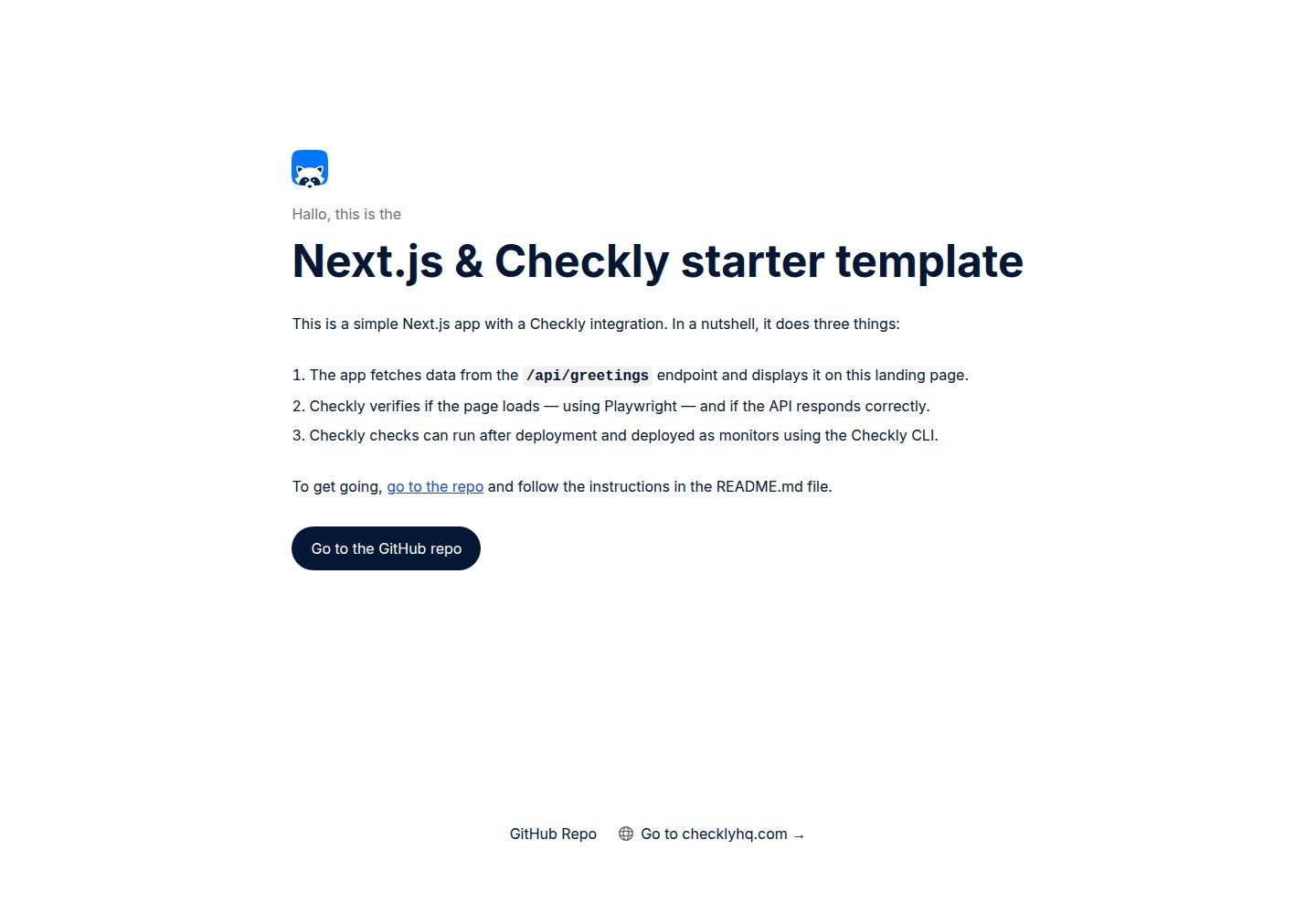
Next.js 应用从 /api/greetings 接口获取数据并展示在首页
Next.jsReact启动器
nextjs-checkly-starter-template — Next.js 启动器模板
作者 checkly
Checkly 官方提供的 Next.js 起步模板,演示如何用 Checkly 在 Vercel 部署前后运行检查,并通过 GitHub Actions 在 CI 中执行。
看看你的网站会是什么样
浏览真实页面截图,比较内容排版与手机效果。点击下方缩略图切换,放大查看整页细节。
全部页面与视图 2
截图用于了解视觉与布局,交互效果请以实际项目为准。
采集于 2026-10-14查看来源
值得关注的模板亮点
从已有项目资料中,快速了解它的特点。
__checks__ 目录中的 Checkly 检查验证页面加载与 API 响应
包含 Checkly CLI 与 GitHub Actions 配置,可在 CI 中运行检查
支持在 Vercel 预览部署与生产部署上分别运行检查
生产部署检查全部通过后可部署为 Checkly 监控器
提供 Vercel Deployment Protection 的绕过配置说明
模板详细介绍
该模板是一个托管在 Vercel 上的简单 Next.js 应用,从 /api/greetings 接口获取数据并展示在首页。__checks__ 目录中的 Checkly 检查用于验证页面能否加载以及 API 是否正常响应。仓库同时包含 Checkly CLI 与 GitHub Actions 配置,用于在 CI 中运行这些检查。
使用方式包括 Fork 仓库、点击 GitHub 的 Use this template,或部署官方 Vercel 模板。克隆并安装依赖后,需要处理 Vercel Deployment Protection:可以启用 Protection Bypass for Automation,或直接为本示例仓库关闭该保护。若保留保护,需勾选自动暴露系统环境变量,并在项目设置中创建 VERCEL_AUTOMATION_BYPASS_SECRET,应用会自动用它请求 /api/greetings。修改 Vercel 项目设置后需重新部署。
检查运行方面,README 说明了用 Checkly CLI 登录、添加 PRODUCTION_URL 与可选的 VERCEL_AUTOMATION_BYPASS_SECRET 环境变量,然后通过 npx checkly test --record 在 Checkly 云中运行检查并记录为测试会话,或用 npx checkly deploy 将检查部署为监控器。CI 部分以 GitHub Actions 为例,需在 Checkly 创建 API key、记录 Account ID,并在 GitHub Actions 中保存为 CHECKLY_API_KEY 和 CHECKLY_ACCOUNT_ID 两个 secret;之后每次 Vercel 部署 webhook 触发时,工作流会运行 __checks__ 中的检查,将 Markdown 报告发布到 GitHub Actions 摘要,预览部署按生成的预览 URL 测试并记录为测试会话,生产部署按生产 URL 测试并在全部通过后部署为监控器。README 提到也可使用其他 CI 平台,并在文档中提供了 Jenkins 和 GitLab CI 的示例配置。
README 未提供该模板的框架版本号、性能数据或生产就绪程度说明。
Next.js启动器
适合你的项目吗?
适用场景
- 在 Vercel 预览部署后自动运行 Checkly 检查,避免将破坏性错误带入生产
- 在生产部署后运行检查并部署为监控器,以发现线上故障
- 在 GitHub Actions 中集成 Checkly 检查并将报告发布到工作流摘要
- 作为学习 Checkly CLI 与 Vercel、GitHub Actions 集成的示例项目
适合人群
- 使用 Next.js 并部署在 Vercel 的开发者
- 希望在 CI 中加入部署前后检查的团队
- 需要了解 Checkly 与 Vercel、GitHub Actions 集成方式的用户
上手与定制指南
结合仓库当前版本的说明,按下面的资料检查内容、配置与运行要求。
- 1
克隆仓库后运行 npm i 安装依赖
- 2
部署到 Vercel 后需处理 Deployment Protection:启用 Protection Bypass for Automation 或为本示例仓库关闭保护
- 3
若保留 Deployment Protection,需勾选自动暴露系统环境变量,并创建 VERCEL_AUTOMATION_BYPASS_SECRET
- 4
使用 npx checkly login 登录,并通过 npx checkly env add 添加 PRODUCTION_URL 及可选的 VERCEL_AUTOMATION_BYPASS_SECRET
- 5
在 GitHub Actions 中配置 CHECKLY_API_KEY 和 CHECKLY_ACCOUNT_ID 两个 secret 以运行 CI 检查
授权与来源资料
使用条件与限制
免费使用 · 保留许可声明本次收录的是公开仓库中采用 Apache-2.0 许可的免费版本;免费范围为该版本代码,不代表外部服务或第三方素材免费。
使用时需要遵守
- 允许免费使用、修改、商用和分发;分发时需随附 Apache-2.0 许可证。
- 修改过的文件需显著标明改动,并保留相关版权、专利、商标及归属声明。
- 若原项目附有 NOTICE 文件,分发衍生作品时需保留其中适用的归属声明。
- 许可包含适用的贡献者专利授权;发起许可所述专利诉讼会终止该专利授权,且不授予商标使用权。
- 代码按现状提供;担保与责任限制以原许可证及适用法律为准。
额外费用与待核对事项
- 演示图片、字体、图标及其他第三方素材需按各自许可核对,不能仅凭代码的 Apache-2.0 许可判断。
- 域名、托管、数据库、支付或 AI 等外部服务可能另外收费。
- 使用 Checkly CLI 前需要登录 Checkly 账号,若没有账号需先注册,属于外部服务账号要求。
- 需要将 Vercel 生产环境 URL 添加为 Checkly 环境变量 PRODUCTION_URL 才能运行检查。
- 若启用了 Vercel Deployment Protection,需要额外添加 VERCEL_AUTOMATION_BYPASS_SECRET 密钥。
- 在 CI 中运行检查需要在 Checkly 用户设置中创建 API key。
- 需要将 Checkly API key 与 Account ID 保存为 GitHub Actions 的 CHECKLY_API_KEY 和 CHECKLY_ACCOUNT_ID 密钥。
- 若保留 Vercel Deployment Protection,需在项目设置中创建 VERCEL_AUTOMATION_BYPASS_SECRET,应用会自动用它请求 /api/greetings。
查看原文依据
no-charge, royalty-free, irrevocable copyright license
许可证原文
Use the Checkly CLI to login, or [create an account](https://app.checklyhq.com/signup) if you don't already have one.
README 原文
npx checkly env add "PRODUCTION_URL" "<your Vercel Production URL>"
README 原文
npx checkly env add --secret "VERCEL_AUTOMATION_BYPASS_SECRET" "<secret>"
README 原文
1. Create an API key in [**User Settings > API keys**](https://app.checklyhq.com/settings/user/api-keys).
README 原文
3. Save your API key and Account ID as secrets named `CHECKLY_API_KEY` and `CHECKLY_ACCOUNT_ID` in your GitHub Actions configuration.
README 原文
https://github.com/checkly/nextjs-checkly-starter-template/blob/main/LICENSEhttps://github.com/checkly/nextjs-checkly-starter-template/blob/main/README.md2. You create a `VERCEL_AUTOMATION_BYPASS_SECRET` in **Project Settings > Deployment Protection**. Our app will automatically use this for fetching from the `/api/greetings` endpoint.
README 原文
DeepSeek 根据仓库许可证和 README 整理 ·2026-10-14。结果仅覆盖已读取资料,依赖、图片、字体及后续条款变更以各自原文为准。
项目核对记录与介绍依据
模板资料
- 来源平台
- GitHub
- 资料与维护参考分
- 资料较完整 · 83 / 100
- 技术栈
- Next.js · React
- 网站类型
- 启动器
这个分数如何计算
本站按许可资料(最高30分)、演示链接(12分)、预览图(10分)、Star数(15分)、记录的维护时间(15分)、描述完整度(8分)、功能记录(5分)和分类资料(5分)计算。它不是代码、安全或性能测试,也不是 Google 评分;有链接不代表已实测可用。
这个项目需要核对什么
- 记录的仓库更新时间
- 2025-12-17
- 截图检查日期
- 2026-10-14
已收录演示链接。请用你的内容与屏幕尺寸检查;有演示不代表表单、认证或支付已经可用。
目录记录的主要技术栈是 Next.js。请通过依赖清单和锁文件核对实际版本与托管要求。这些说明基于收录资料,不代表代码审计或部署实测。
查看具体选型方法 →介绍的制作与核对状态
介绍由 AI 辅助整理目录与仓库资料。仓库作者不等于这篇介绍的审核者。
审核声明: codex-user-requested-batch-review-20261015 · 2026-10-15
查看当时使用的来源资料
SHA-256: ddacb25289b37da43efba1d54ca4b5f6944bda66b832ac4cc419f1fc46c1f2f6
2026-10-14T05:48:35.080Z
来源文件 / 仓库# Next.js & Checkly Starter Template This repo showcases a simple Next.js app, hosted on Vercel, that uses Checkly to run checks before and after deployment in CI. It includes the following features: 1. A Next.js app that fetches data from the `/api/greetings` endpoint and displays it on the landing page. 2. Checkly checks in the `__checks__` directory verify if the page loads and if the API responds correctly. 3. The necessary Checkly CLI and GitHub Actions configuration to run these checks in CI. [](https://vercel.com/new/clone?repository-url=https%3A%2F%2Fgithub.com%2Fcheckly%2Fnextjs-checkly-starter-template) ## Getting started There are a couple ways to use this template: - Forking the repo / clicking "Use this template" in the top right corner - Deploying the official [Vercel template](https://vercel.com/templates/Next.js/nextjs-checkly) Either way, get started by cloning your repo and installing dependencies: ```bash git clone https://github.com/checkly/nextjs-checkly-starter-template.git # replace with your repo link cd nextjs-checkly-starter-template npm i ``` ### Vercel Deployment Protection Before running our checks, let's make sure Vercel Deployment Protection is configured to work with Checkly. If you chose to fork or use the template on GitHub, go ahead and deploy your repo to Vercel [in the dashboard](https://vercel.com/new) or with the CLI: ```bash vercel ``` By default, Vercel Preview Deployments are protected and only accessible by logged-in members of your Vercel team. We want to be able to access these from our Checkly checks as well. We can bypass Vercel Deployment Protection by either: - Enabling [Protection Bypass for Automation](https://vercel.com/docs/deployment-protection/methods-to-bypass-deployment-protection/protection-bypass-automation) - Disabling Vercel Deployment Protection altogether for this example repo  If you choose to keep Deployment Protection on, ensure: 1. The **Automatically expose [System Environment Variables](https://vercel.com/docs/environment-variables/system-environment-variables)** setting (in **Project Settings > Environment Variables**) is checked; and 2. You create a `VERCEL_AUTOMATION_BYPASS_SECRET` in **Project Settings > Deployment Protection**. Our app will automatically use this for fetching from the `/api/greetings` endpoint. Redeploy after applying any changes to your project settings in Vercel. Each deployment will alert you of anything it's missing on the landing page. ## Running checks ### Configuring testing & monitoring for production Use the Checkly CLI to login, or [create an account](https://app.checklyhq.com/signup) if you don't already have one. ```bash npx checkly login ``` We have a Vercel Production URL for our app, similar to `https://nextjs-checkly-starter-template-checkly.vercel.app`. Let's add this to our Checkly environment variables: ```bash npx checkly env add "PRODUCTION_URL" "<your Vercel Production URL>" ``` Now would be a good time to also add your Vercel Deployment Protection bypass secret, if you created one earlier: ```bash npx checkly env add --secret "VERCEL_AUTOMATION_BYPASS_SECRET" "<secret>" ``` We're ready to go! Let's run our checks in the `__checks__` directory in the Checkly cloud, and record them as a [test session](https://checklyhq.com/docs/testing/#test-sessions): ```bash npx checkly test --record ``` Check it out in the [Checkly test sessions dashboard](https://app.checklyhq.com/test-sessions). You can also deploy the checks as monitors: ```bash npx checkly deploy ``` Great! We're all set up with testing & monitoring our Production Deployments, which you can check out in the [Checkly home dashboard](https://app.checklyhq.com). Let's do the same for our Vercel Preview environment. ### Running checks in CI You can run your Checkly checks right after any Vercel Preview Deployment, and then deploy your checks as monitors on Checkly. This is a powerful strategy to make sure you never ship breaking errors to Production, while at the same time surfacing any outages in your Production Deployments. This example uses GitHub Actions — check out the workflow in [`.github/workflows/checkly.yml`](/.github/workflows/checkly.yml) — but you can use any other CI platform. We have [example configs for Jenkins and GitLab CI in our docs](https://checklyhq.com/docs/cicd). 1. Create an API key in [**User Settings > API keys**](https://app.checklyhq.com/settings/user/api-keys). 2. Take note of your Checkly Account ID in [**Account Settings > General**](https://app.checklyhq.com/settings/account/general). 3. Save your API key and Account ID as secrets named `CHECKLY_API_KEY` and `CHECKLY_ACCOUNT_ID` in your GitHub Actions configuration.  Now, on every deployment webhook that GitHub receives from Vercel, the GitHub Actions workflow will run the checks in the `__checks__` directory. - A Markdown-formatted report will be posted as a comment in the GitHub Actions summary. - Preview Deployments are tested against the generated Preview Deployment URL, and recorded as test sessions in Checkly. - Production Deployments are tested against the Production URL, and deployed as monitors in Checkly if all checks pass. That's it for this example! If you have questions or feedback, please drop us a note in our [Slack community](https://checklyhq.com/slack). ## Further reading - Official [Checkly integration from the Vercel Marketplace](https://vercel.com/integrations/checkly) - Checkly docs on [integrating with Vercel](https://checklyhq.com/docs/cicd/vercel) - Checkly docs on [integrating with GitHub Actions](https://checklyhq.com/docs/cicd/github-actions) - Vercel docs on [running tests](https://vercel.com/guides/how-can-i-run-end-to-end-tests-after-my-vercel-preview-deployment)
看看同类模板
对比同技术栈与用途的模板,找到更适合的视觉与内容结构。

ai-website-cloner-template
Clone any website with one command using AI coding agents
Next.js · 启动器

Next.js SaaS Starter
Next.js SaaS Starter 是 Next.js 官方维护的 SaaS 起点模板,定位介于学习资源和可直接部署的脚手架之间。
Next.js · SaaS

Next.js Commerce
Next.js Commerce 是 Vercel 团队维护的电商启动模板,基于 Next.js App Router 构建,采用服务端渲染、React Server Components、Server Actions …
Next.js · 电商

Next-js-Boilerplate
Next-js-Boilerplate 是一个面向 Next.js 16、Tailwind CSS 4 和 TypeScript 的启动器,核心定位是开发者体验优先。
Next.js · 启动器

tailwind-nextjs-starter-blog
tailwind-nextjs-starter-blog 是一个面向个人技术博客的 Next.js 与 Tailwind CSS 启动模板,其 v2 版本基于 App Router 与 React Server Comp…
Next.js · 博客

next-forge
Production-grade Turborepo template for Next.js apps.
Next.js · 启动器