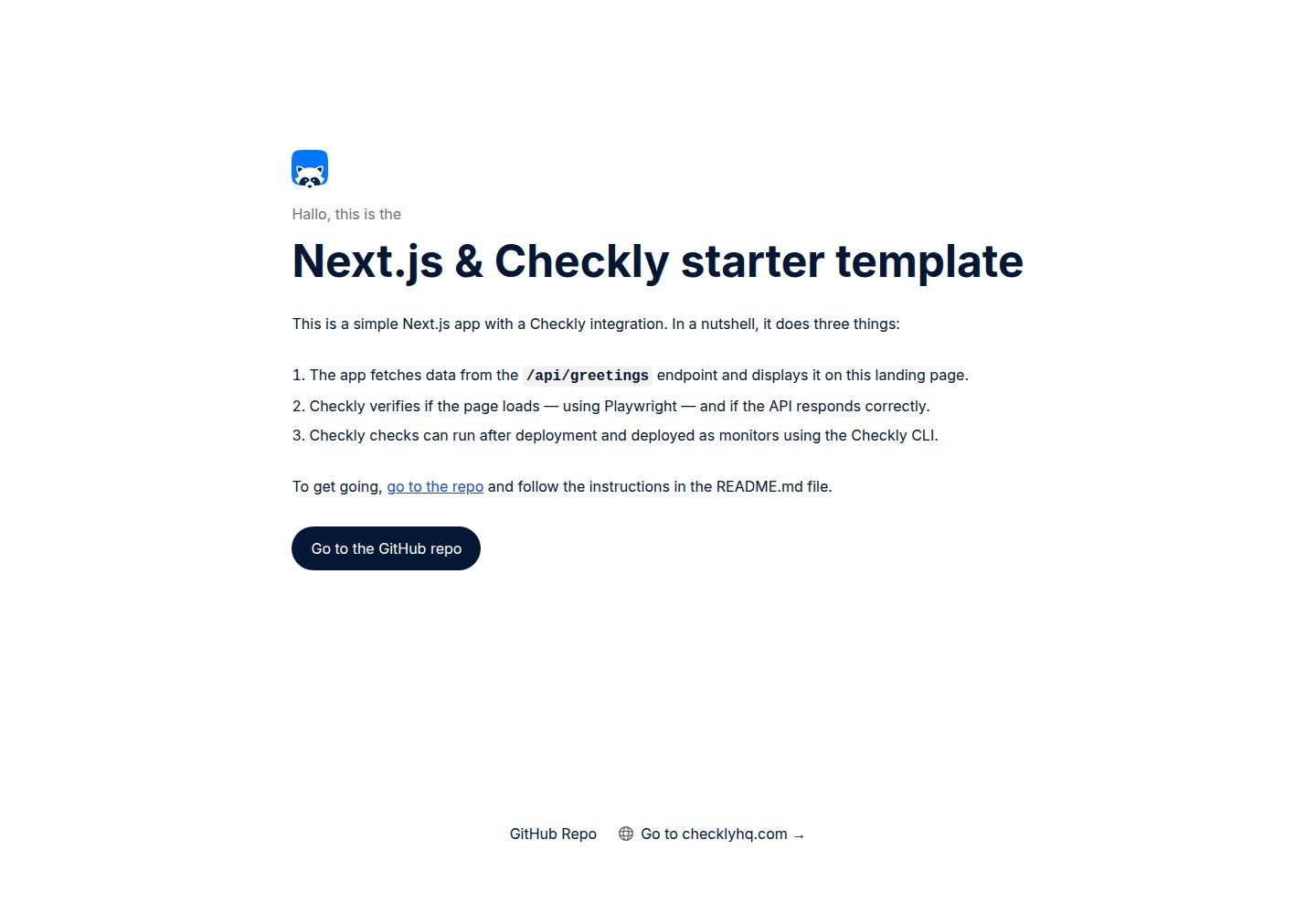
The Next.js application fetches data from the /api/greetings endpoint and displays it on the homepage
Next.jsReactStarter
nextjs-checkly-starter-template — Next.js Starter Template
By checkly
Checkly's official Next.js starter template, demonstrating how to run checks with Checkly before and after Vercel deployments, and execute them in CI via GitHub Actions.
Explore the design
Compare the page layouts and mobile experience. Open any screenshot for a closer look.
Desktop homepage1 / 2
Desktop captureTop of page
Actual screenshot captured by the server browser.
All pages & views 2
Screenshots show visual appearance; interactive behavior may differ.
Recorded 2026-10-14View source
What stands out
A quick read of the recorded project description.
Checkly checks in the __checks__ directory verify page loading and API responses
Includes Checkly CLI and GitHub Actions configurations to run checks in CI
Supports running checks separately on Vercel preview deployments and production deployments
After all production deployment checks pass, they can be deployed as Checkly monitors
Provides instructions for bypassing Vercel Deployment Protection
Template Details
This template is a simple Next.js application hosted on Vercel that fetches data from the /api/greetings endpoint and displays it on the homepage. The Checkly checks in the __checks__ directory verify that the page loads and that the API responds correctly. The repository also includes Checkly CLI and GitHub Actions configurations for running these checks in CI.
Usage options include forking the repository, clicking GitHub's Use this template, or deploying the official Vercel template. After cloning and installing dependencies, you need to handle Vercel Deployment Protection: either enable Protection Bypass for Automation, or disable the protection directly for this example repository. If you keep the protection, you must check the option to automatically expose system environment variables and create VERCEL_AUTOMATION_BYPASS_SECRET in the project settings; the application will automatically use it to request /api/greetings. After changing Vercel project settings, redeploy.
Regarding running checks, the README explains logging in with the Checkly CLI, adding the PRODUCTION_URL and optional VERCEL_AUTOMATION_BYPASS_SECRET environment variables, then running checks in Checkly Cloud and recording them as a test session via npx checkly test --record, or deploying the checks as monitors via npx checkly deploy. The CI section uses GitHub Actions as an example: create an API key in Checkly, note the Account ID, and save them as the CHECKLY_API_KEY and CHECKLY_ACCOUNT_ID secrets in GitHub Actions; thereafter, each time a Vercel deployment webhook triggers, the workflow runs the checks in __checks__, publishes a Markdown report to the GitHub Actions summary, tests preview deployments against the generated preview URL and records them as a test session, and tests production deployments against the production URL and deploys them as monitors after all pass. The README mentions that other CI platforms can also be used, and provides example configurations for Jenkins and GitLab CI in the documentation.
The README does not provide the template's framework version numbers, performance data, or production-readiness statements.
Next.jsStarter
Is it right for your project?
Use Cases
- Automatically run Checkly checks after Vercel preview deployments to avoid bringing breaking errors into production
- Run checks after production deployments and deploy them as monitors to detect live failures
- Integrate Checkly checks in GitHub Actions and publish reports to the workflow summary
- Serve as an example project for learning Checkly CLI integration with Vercel and GitHub Actions
Suitable For
- Developers using Next.js and deploying on Vercel
- Teams wanting to add pre- and post-deployment checks in CI
- Users who need to understand how Checkly integrates with Vercel and GitHub Actions
Getting started & customization
Use these recorded setup notes alongside the repository instructions for your chosen version.
- 1
After cloning the repository, run npm i to install dependencies
- 2
After deploying to Vercel, handle Deployment Protection: enable Protection Bypass for Automation or disable protection for this example repository
- 3
If keeping Deployment Protection, check the option to automatically expose system environment variables and create VERCEL_AUTOMATION_BYPASS_SECRET
- 4
Log in with npx checkly login, and add PRODUCTION_URL and optional VERCEL_AUTOMATION_BYPASS_SECRET via npx checkly env add
- 5
Configure the CHECKLY_API_KEY and CHECKLY_ACCOUNT_ID secrets in GitHub Actions to run CI checks
License & source material
Usage conditions & limitations
Free to use · keep license noticeThis entry covers the free version under the Apache-2.0 license in the public repository; the free scope is the code of this version and does not mean external services or third-party assets are free.
Must comply with when using
- Free use, modification, commercial use, and distribution are permitted; when distributing, include the Apache-2.0 license.
- Modified files must prominently indicate changes, and retain relevant copyright, patent, trademark, and attribution notices.
- If the original project includes a NOTICE file, retain applicable attribution notices when distributing derivative works.
- The license includes an applicable contributor patent grant; initiating patent litigation as described in the license terminates that patent grant, and no trademark use rights are granted.
- The code is provided as-is; warranties and limitations of liability are governed by the original license and applicable law.
Additional costs & items to verify
- Demo images, fonts, icons, and other third-party assets must be checked against their respective licenses; they cannot be judged solely by the code's Apache-2.0 license.
- External services such as domains, hosting, databases, payments, or AI may incur additional charges.
- Using the Checkly CLI requires logging into a Checkly account; if you do not have one, you must register first, which is an external service account requirement.
- You need to add the Vercel production environment URL as the Checkly environment variable PRODUCTION_URL to run checks.
- If Vercel Deployment Protection is enabled, you need to additionally add the VERCEL_AUTOMATION_BYPASS_SECRET secret.
- Running checks in CI requires creating an API key in Checkly user settings.
- You need to save the Checkly API key and Account ID as the GitHub Actions secrets CHECKLY_API_KEY and CHECKLY_ACCOUNT_ID.
- If keeping Vercel Deployment Protection, create VERCEL_AUTOMATION_BYPASS_SECRET in the project settings; the application will automatically use it to request /api/greetings.
View Original Text Basis
no-charge, royalty-free, irrevocable copyright license
Original License Text
Use the Checkly CLI to login, or [create an account](https://app.checklyhq.com/signup) if you don't already have one.
Original README
npx checkly env add "PRODUCTION_URL" "<your Vercel Production URL>"
Original README
npx checkly env add --secret "VERCEL_AUTOMATION_BYPASS_SECRET" "<secret>"
Original README
1. Create an API key in [**User Settings > API keys**](https://app.checklyhq.com/settings/user/api-keys).
Original README
3. Save your API key and Account ID as secrets named `CHECKLY_API_KEY` and `CHECKLY_ACCOUNT_ID` in your GitHub Actions configuration.
Original README
https://github.com/checkly/nextjs-checkly-starter-template/blob/main/LICENSEhttps://github.com/checkly/nextjs-checkly-starter-template/blob/main/README.md2. You create a `VERCEL_AUTOMATION_BYPASS_SECRET` in **Project Settings > Deployment Protection**. Our app will automatically use this for fetching from the `/api/greetings` endpoint.
Original README
Compiled by DeepSeek based on repository license and README ·2026-10-14. Results only cover the materials read; dependencies, images, fonts, and subsequent term changes are subject to their respective original texts.
Project checks & description sources
Template Information
- Source platforms
- GitHub
- Documentation and maintenance reference score
- More documented · 83 / 100
- Technologies
- Next.js · React
- Website type
- Starter
How this score is calculated
Our heuristic uses license records (up to 30), a demo link (12), a preview (10), stars (15), recorded maintenance (15), description completeness (8), feature records (5) and classification data (5). It is not a code, security or performance test, or a Google score. A link does not establish tested functionality.
What to verify for this project
- Repository update recorded
- 2025-12-17
- Screenshot last checked
- 2026-10-14
A demo link is listed. Check it with your own content and viewport sizes; its presence does not confirm that forms, authentication or payments work.
The catalog identifies Next.js as the primary stack. Check the actual dependency manifest and lockfile for versions and hosting requirements. These notes use recorded metadata, not a code audit or a deployment test.
Use a selection guide →How this description was prepared
AI-assisted description based on catalog records and repository material. Repository authors are not automatically the reviewers of this description.
Review declaration: codex-user-requested-batch-review-20261015 · 2026-10-15
Inspect the recorded source material
SHA-256: ddacb25289b37da43efba1d54ca4b5f6944bda66b832ac4cc419f1fc46c1f2f6
2026-10-14T05:48:35.080Z
Source file / repository# Next.js & Checkly Starter Template This repo showcases a simple Next.js app, hosted on Vercel, that uses Checkly to run checks before and after deployment in CI. It includes the following features: 1. A Next.js app that fetches data from the `/api/greetings` endpoint and displays it on the landing page. 2. Checkly checks in the `__checks__` directory verify if the page loads and if the API responds correctly. 3. The necessary Checkly CLI and GitHub Actions configuration to run these checks in CI. [](https://vercel.com/new/clone?repository-url=https%3A%2F%2Fgithub.com%2Fcheckly%2Fnextjs-checkly-starter-template) ## Getting started There are a couple ways to use this template: - Forking the repo / clicking "Use this template" in the top right corner - Deploying the official [Vercel template](https://vercel.com/templates/Next.js/nextjs-checkly) Either way, get started by cloning your repo and installing dependencies: ```bash git clone https://github.com/checkly/nextjs-checkly-starter-template.git # replace with your repo link cd nextjs-checkly-starter-template npm i ``` ### Vercel Deployment Protection Before running our checks, let's make sure Vercel Deployment Protection is configured to work with Checkly. If you chose to fork or use the template on GitHub, go ahead and deploy your repo to Vercel [in the dashboard](https://vercel.com/new) or with the CLI: ```bash vercel ``` By default, Vercel Preview Deployments are protected and only accessible by logged-in members of your Vercel team. We want to be able to access these from our Checkly checks as well. We can bypass Vercel Deployment Protection by either: - Enabling [Protection Bypass for Automation](https://vercel.com/docs/deployment-protection/methods-to-bypass-deployment-protection/protection-bypass-automation) - Disabling Vercel Deployment Protection altogether for this example repo  If you choose to keep Deployment Protection on, ensure: 1. The **Automatically expose [System Environment Variables](https://vercel.com/docs/environment-variables/system-environment-variables)** setting (in **Project Settings > Environment Variables**) is checked; and 2. You create a `VERCEL_AUTOMATION_BYPASS_SECRET` in **Project Settings > Deployment Protection**. Our app will automatically use this for fetching from the `/api/greetings` endpoint. Redeploy after applying any changes to your project settings in Vercel. Each deployment will alert you of anything it's missing on the landing page. ## Running checks ### Configuring testing & monitoring for production Use the Checkly CLI to login, or [create an account](https://app.checklyhq.com/signup) if you don't already have one. ```bash npx checkly login ``` We have a Vercel Production URL for our app, similar to `https://nextjs-checkly-starter-template-checkly.vercel.app`. Let's add this to our Checkly environment variables: ```bash npx checkly env add "PRODUCTION_URL" "<your Vercel Production URL>" ``` Now would be a good time to also add your Vercel Deployment Protection bypass secret, if you created one earlier: ```bash npx checkly env add --secret "VERCEL_AUTOMATION_BYPASS_SECRET" "<secret>" ``` We're ready to go! Let's run our checks in the `__checks__` directory in the Checkly cloud, and record them as a [test session](https://checklyhq.com/docs/testing/#test-sessions): ```bash npx checkly test --record ``` Check it out in the [Checkly test sessions dashboard](https://app.checklyhq.com/test-sessions). You can also deploy the checks as monitors: ```bash npx checkly deploy ``` Great! We're all set up with testing & monitoring our Production Deployments, which you can check out in the [Checkly home dashboard](https://app.checklyhq.com). Let's do the same for our Vercel Preview environment. ### Running checks in CI You can run your Checkly checks right after any Vercel Preview Deployment, and then deploy your checks as monitors on Checkly. This is a powerful strategy to make sure you never ship breaking errors to Production, while at the same time surfacing any outages in your Production Deployments. This example uses GitHub Actions — check out the workflow in [`.github/workflows/checkly.yml`](/.github/workflows/checkly.yml) — but you can use any other CI platform. We have [example configs for Jenkins and GitLab CI in our docs](https://checklyhq.com/docs/cicd). 1. Create an API key in [**User Settings > API keys**](https://app.checklyhq.com/settings/user/api-keys). 2. Take note of your Checkly Account ID in [**Account Settings > General**](https://app.checklyhq.com/settings/account/general). 3. Save your API key and Account ID as secrets named `CHECKLY_API_KEY` and `CHECKLY_ACCOUNT_ID` in your GitHub Actions configuration.  Now, on every deployment webhook that GitHub receives from Vercel, the GitHub Actions workflow will run the checks in the `__checks__` directory. - A Markdown-formatted report will be posted as a comment in the GitHub Actions summary. - Preview Deployments are tested against the generated Preview Deployment URL, and recorded as test sessions in Checkly. - Production Deployments are tested against the Production URL, and deployed as monitors in Checkly if all checks pass. That's it for this example! If you have questions or feedback, please drop us a note in our [Slack community](https://checklyhq.com/slack). ## Further reading - Official [Checkly integration from the Vercel Marketplace](https://vercel.com/integrations/checkly) - Checkly docs on [integrating with Vercel](https://checklyhq.com/docs/cicd/vercel) - Checkly docs on [integrating with GitHub Actions](https://checklyhq.com/docs/cicd/github-actions) - Vercel docs on [running tests](https://vercel.com/guides/how-can-i-run-end-to-end-tests-after-my-vercel-preview-deployment)
Explore similar templates
Compare previews and descriptions within the same stack and category.

Next.js SaaS Starter
The official Next.js SaaS starter template, integrating email/password authentication, Stripe Checkout subscriptions, a dashboard with user/team CRUD, basic Owner/Member RBAC, and activity logging.
Next.js · SaaS

Next.js Commerce
Vercel's officially maintained Next.js App Router ecommerce starter with deep Shopify integration, offering a complete product catalog, cart, and checkout flow. Core logic is modular for swapping backends, and community provider versions exist for BigCommerce, Medusa, and Saleor.
Next.js · E-commerce

Next-js-Boilerplate
A developer-first Next.js 16 starter with Tailwind CSS 4 and TypeScript, supporting both App Router and Page Router.
Next.js · Starter

tailwind-nextjs-starter-blog
A Next.js and Tailwind CSS blog starter template using Contentlayer for Markdown/MDX, with built-in SEO, code highlighting, and tags. It targets personal technical blogs and migration from Jekyll/Hugo to React, and supports one-click Vercel deployment.
Next.js · Blog

next-forge
next-forge is a Turborepo-based Next.js template maintained by Vercel, positioned as a starting point for SaaS products.
Next.js · Starter

SaaS-Boilerplate
SaaS-Boilerplate is an open-source SaaS starter template built with Next.js App Router, React 19, TypeScript, Tailwind CSS, and Shadcn UI.
Next.js · SaaS