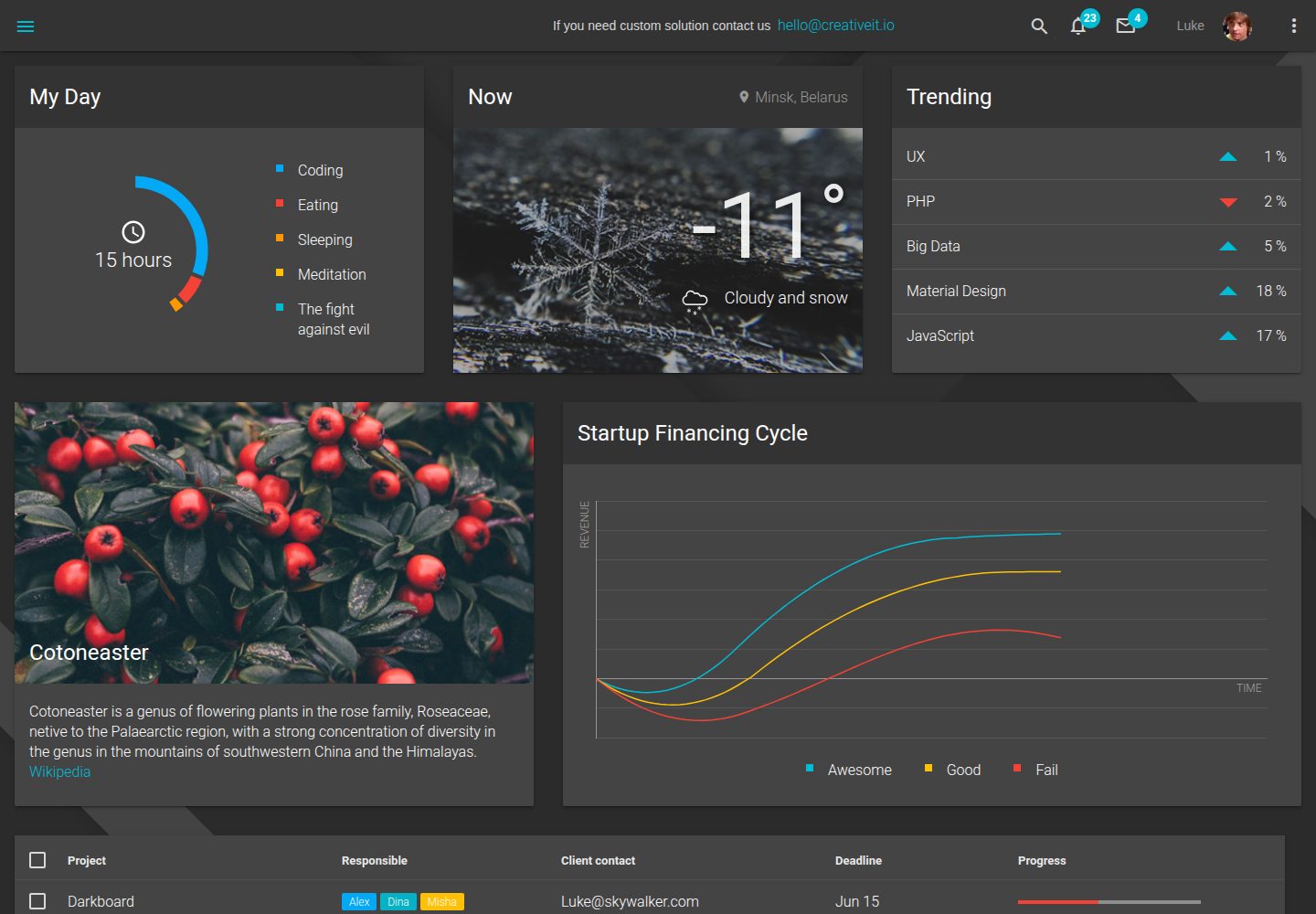
深色 Material Design 后台界面,基于 Material Design Lite 组件库
HTML后台
material-dashboard-lite — HTML 后台模板
作者 CreativeIT
基于 Material Design Lite 的免费深色后台管理模板,使用 HTML、SCSS 与 ES6 构建,不依赖 JavaScript 框架。
看看你的网站会是什么样
浏览真实页面截图,比较内容排版与手机效果。点击下方缩略图切换,放大查看整页细节。
全部页面与视图 2
截图用于了解视觉与布局,交互效果请以实际项目为准。
采集于 2026-10-02查看来源
值得关注的模板亮点
从已有项目资料中,快速了解它的特点。
不依赖 JavaScript 框架,使用 HTML5、SCSS 与 ES6 编写
采用 BEM 结构的 Sass,可通过 src/variables.scss 调整主题变量
使用 D3 与 NVD3 构建图表组件
通过 Gulp 完成构建与本地预览,支持 watch 监听源码变更
MIT 许可,允许免费使用、修改、商用和分发
模板详细介绍
Material Dashboard Lite 是 CreativeIT 发布的一款深色主题后台管理模板,界面组件基于 Google 的 Material Design Lite 实现。模板不依赖任何 JavaScript 框架,页面结构与样式由 HTML5、SCSS 和 ES6 编写,并借助 Babel 与 Gulp 完成构建。图表部分使用 D3 与 NVD3 绘制。
项目采用 BEM 命名结构组织 Sass,可通过修改 src/variables.scss 调整主题变量,再重新执行构建使改动生效。由于 Material Design Lite 本身尚未实现 select 元素,模板额外依赖 getmdl-select 插件来补齐下拉选择组件。仓库 README 说明项目仍在开发中,后续功能可关注其 issues 列表。
许可方面,仓库采用 MIT 许可证,允许免费使用、修改、商用和分发该版本代码,分发时需保留版权声明与完整许可声明。演示图片、字体、图标等第三方素材需按各自许可单独核对,域名、托管等外部服务可能另行收费。
HTML后台
适合你的项目吗?
适用场景
- 搭建深色风格的后台管理界面原型
- 在 Material Design Lite 基础上定制主题变量与组件样式
- 作为学习 HTML、SCSS、ES6 与 Gulp 构建流程的示例项目
- 为需要图表展示的管理页面提供 D3/NVD3 集成参考
适合人群
- 需要深色 Material Design 后台模板的前端开发者
- 希望基于 SCSS 变量快速调整主题样式的项目
- 不打算引入 JavaScript 框架的静态后台页面
- 对 MIT 许可代码有商用或分发需求的团队
上手与定制指南
结合仓库当前版本的说明,按下面的资料检查内容、配置与运行要求。
- 1
克隆仓库后进入目录执行 npm install 安装 npm 依赖
- 2
执行 bower install 安装 Bower 组件
- 3
使用 gulp build 构建项目,gulp serve 查看运行结果
- 4
修改 src/variables.scss 后需重新执行 gulp build 使主题变量生效
- 5
下拉选择组件依赖 getmdl-select 插件,图表依赖 D3 与 NVD3
授权与来源资料
使用条件与限制
免费使用 · 保留许可声明本次收录的是公开仓库中采用 MIT 许可的免费版本;免费范围为该版本代码,不代表外部服务或第三方素材免费。
使用时需要遵守
- 允许免费使用、修改、商用和分发该版本代码。
- 分发代码副本或实质性部分时,保留原作者版权声明和完整 MIT 许可声明。
- 代码按现状提供;担保与责任限制以原许可证及适用法律为准。
额外费用与待核对事项
- README 明确说明项目仍在开发中,功能尚不完整,后续会有更多内容,因此不应将其视为已完成或可直接用于生产环境的成品。
- 下拉选择组件依赖第三方 getmdl-select 插件,该插件为独立项目,其许可与维护情况需单独核实。
- 图表功能依赖 D3 与 NVD3 两个第三方库,使用前需分别确认其许可条款。
- README 提供付费定制与商业合作渠道,属于可选增值服务,不影响免费代码的使用。
- 演示图片、字体、图标及其他第三方素材需按各自许可核对,不能仅凭代码的 MIT 许可判断。
- 域名、托管、数据库、支付或 AI 等外部服务可能另外收费。
查看原文依据
Permission is hereby granted, free of charge
许可证原文
We are still working on the project and there will be much more awesome
README 原文
the project depends on [getmdl-select plugin](https://github.com/CreativeIT/getmdl-select)
README 原文
Also project uses [d3](https://d3js.org/) and [nvd3](http://nvd3.org/) to build charts
README 原文
https://github.com/CreativeIT/material-dashboard-lite/blob/master/LICENSEhttps://github.com/CreativeIT/material-dashboard-lite/blob/master/README.mdWe are ready to bring value to your business. Visit our site [creativeit.io](http://creativeit.io/)
README 原文
DeepSeek 根据仓库许可证和 README 整理 ·2026-10-02。结果仅覆盖已读取资料,依赖、图片、字体及后续条款变更以各自原文为准。
项目核对记录与介绍依据
模板资料
- 来源平台
- GitHub
- 资料与维护参考分
- 资料较完整 · 76 / 100
- 技术栈
- HTML
- 网站类型
- 后台
这个分数如何计算
本站按许可资料(最高30分)、演示链接(12分)、预览图(10分)、Star数(15分)、记录的维护时间(15分)、描述完整度(8分)、功能记录(5分)和分类资料(5分)计算。它不是代码、安全或性能测试,也不是 Google 评分;有链接不代表已实测可用。
这个项目需要核对什么
- 记录的仓库更新时间
- 2020-09-03
- 截图检查日期
- 2026-10-02
已收录演示链接。请用你的内容与屏幕尺寸检查;有演示不代表表单、认证或支付已经可用。
目录记录的主要技术栈是 HTML。请通过依赖清单和锁文件核对实际版本与托管要求。这些说明基于收录资料,不代表代码审计或部署实测。
查看具体选型方法 →介绍的制作与核对状态
介绍由 AI 辅助整理目录与仓库资料。仓库作者不等于这篇介绍的审核者。
已完成服务器许可规则与 AI 来源核对;未经过人工编辑审核。
查看当时使用的来源资料
SHA-256: 7ff785d45304ae8dc4ea006c055fe7d4971a9633f9d14bc2ae715133d474bd96
2026-10-02T07:13:20.279Z
来源文件 / 仓库# Material Dashboard Lite
Welcome to first dark dashboard on the Material Design Lite!
<a target="_blank" href="http://material-dashboard-lite.creativeit.io"><img src="https://trello-attachments.s3.amazonaws.com/56af74f7f1b5b81a201453c4/2000x1105/796e1dae05e88ba87162dd8bbf188e65/Darkboard_Showcase_1_3.png"/></a>
Its much more fun with the [demo](http://material-dashboard-lite.creativeit.io).
Material admin template is absolutely free for commercial usage theme, that uses google's implementation of material design — [Material Design Lite](http://www.getmdl.io) library. It doesn’t rely on any JavaScript frameworks and aims to be responsive and optimized for cross-device usage. All components are created with CSS (scss), JavaScript (es6), and HTML5.
>**Important**: We are still working on the project and there will be much more awesome, check out our [issues](https://github.com/CreativeIT/material-dashboard-lite/issues) to see what features are coming soon.
# SETUP and USAGE
The steps bellow will take you through cloning your own fork, installing dependencies and building:
1. Fork and/or clone our repository. To use Git from command line, see the [Setting up Git](https://help.github.com/articles/set-up-git/) and [Fork a repo](https://help.github.com/articles/fork-a-repo/) articles.
```
git clone https://github.com/CreativeIT/material-dashboard-lite.git
```
2. Open your copied repo folder in terminal and install [npm](https://www.npmjs.com/) components with command:
```
cd material-dashboard-lite
npm install
```
3. Install [bower](http://bower.io/) components with command:
```
bower install
```
4. Now you are able to build project with [gulp](http://gulpjs.com/):
```
gulp build
```
5. To see the result use command:
```
gulp serve
```
# FEATURES
* [Material Design](http://www.google.com/design/spec/material-design/introduction.html) via [Material Design Lite](http://getmdl.io)
* Ecmascript 6 (with [babel](https://babeljs.io/))
* Responsive dark material design. DARK, Carl!
* User experience focused
* [Sass](http://sass-lang.com/)
* [Gulp](http://gulpjs.com/) build
* [D3](https://d3js.org/) and [NVD3](http://nvd3.org/)
* MIT License
# Additional
Since the project uses [BEM](http://getbem.com) structure with sass, it can be customized in easy way by editing `src/variables.scss` file. To take effect you must run `gulp build` in terminal again. Also you may want to use `gulp watch`, that will run default command every time you modify any file in source folder. You can use `gulp default`if you don't want to minify js-files.
Google hasn't implemented select element yet ([see why here](http://37.media.tumblr.com/6a9fcffde2da977266b0ea99b15d5803/tumblr_n42cjjsriB1smcbm7o1_400.gif)), that is why the project depends on [getmdl-select plugin](https://github.com/CreativeIT/getmdl-select). Also project uses [d3](https://d3js.org/) and [nvd3](http://nvd3.org/) to build charts and chart components.
# Hire us
We are ready to bring value to your business. Visit our site [creativeit.io](http://creativeit.io/) or drop us a line <[email protected]>. We will be happy to help you!
# Credits
UI components built with [Material Design Lite](http://www.getmdl.io).
Designed with passion and coffee by CreativeIT
# Support the project
* Star the repo
* Create issue report or feature request
* [Tweet about it](https://twitter.com/intent/tweet?text=Wow!%20New%20%23free%20dark%20%23dashboard%20on%20%23MaterialDesignLite!%0Ahttp://creativeit.github.io/material-dashboard-lite/index.html%0A&via=CreativeITeam&hashtags=materialDesign,responsive,UI,JS)
* Follow [us on Twitter](https://twitter.com/intent/follow?screen_name=CreativeITeam)
看看同类模板
对比同技术栈与用途的模板,找到更适合的视觉与内容结构。

gentelella
Free admin dashboard template — vanilla JS, SCSS, Vite 8. No Bootstrap, no jQuery.
HTML · 后台

coreui-free-bootstrap-admin-template
Free Bootstrap Admin & Dashboard Template Built for AI-Assisted Development
HTML · 后台

dashboards
Responsive dashboard templates 📊✨
HTML · 后台

SB Admin 2
SB Admin 2 是 Start Bootstrap 推出的开源后台模板,基于 Bootstrap 构建,整体风格偏向经典管理界面。
HTML · 后台

Adminator-admin-dashboard
Adminator is easy to use and well design admin dashboard template with dark mode for web apps, websites, servi…
HTML · 后台

SB Admin
SB Admin 是 Start Bootstrap 推出的开源后台管理模板,基于 Bootstrap 构建,定位是简洁、实用的管理界面。
HTML · 后台