基于 React、TypeScript、Vite 和 Tailwind CSS 构建
ViteReact启动器
lab-starter — Vite 启动器模板
作者 creativoma
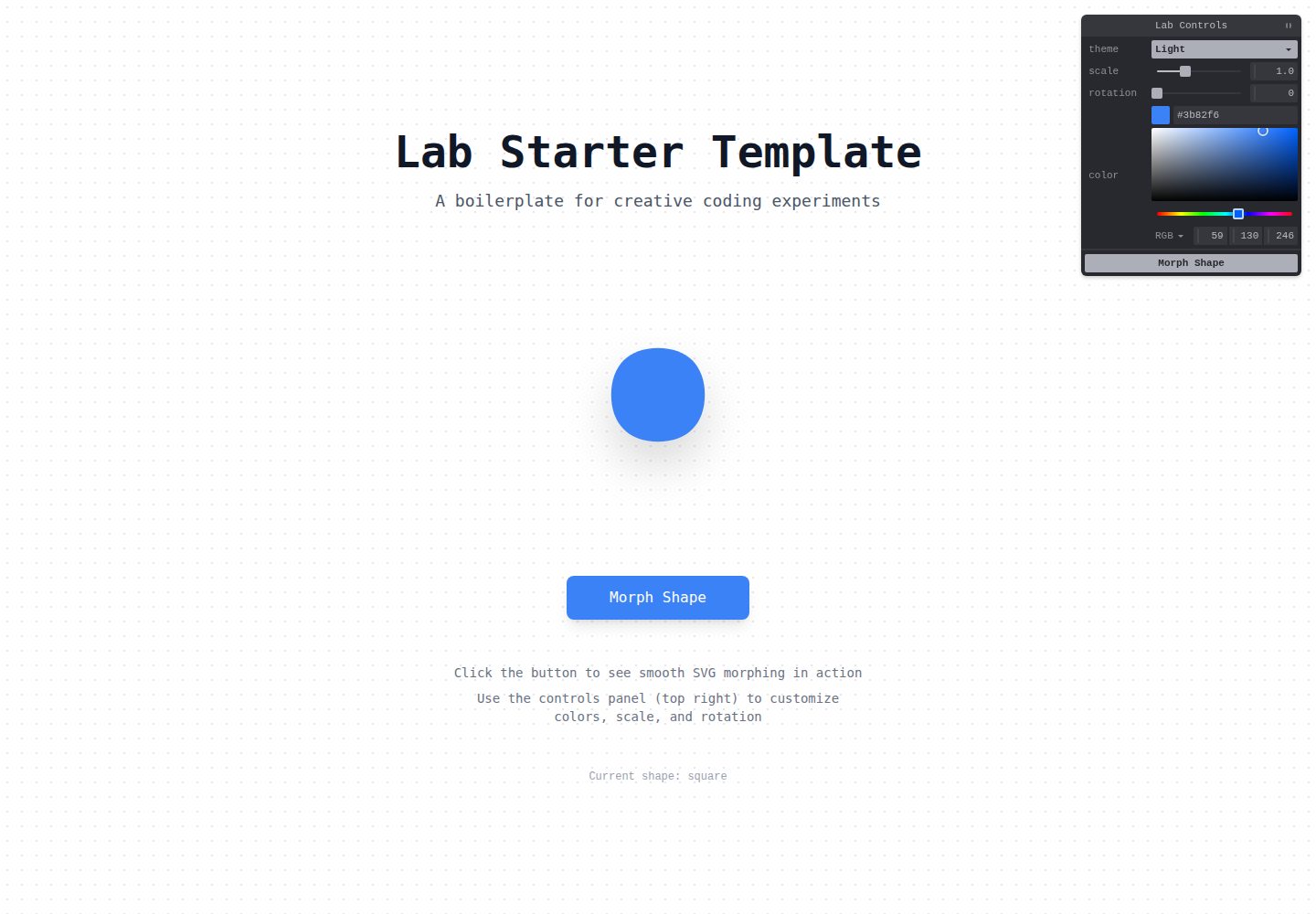
Lab Starter 是一个基于 React、TypeScript、Vite 和 Tailwind CSS 的创意编程实验模板,集成 Tweakpane 用于实时参数调节,包含可复用组件与可移除的演示应用。
看看你的网站会是什么样
浏览真实页面截图,比较内容排版与手机效果。点击下方缩略图切换,放大查看整页细节。
全部页面与视图 2
截图用于了解视觉与布局,交互效果请以实际项目为准。
采集于 2026-10-17查看来源
值得关注的模板亮点
从已有项目资料中,快速了解它的特点。
集成 Tweakpane 用于实时参数控制
提供可复用的 Background 圆点网格背景组件,支持主题
提供 TweakpanePanel 通用控制面板包装组件
包含 cn() 类名合并与 withViewTransition() 视图过渡工具函数
starter 代码与 demo 应用分离,便于移除演示内容
模板详细介绍
Lab Starter 是面向创意编程实验与交互演示的启动模板。README 说明其技术栈为 React、TypeScript、Vite、Tailwind CSS,并使用 Tweakpane 提供实时参数控制面板。模板分为两部分:starter kit 提供可复用组件与工具,包括带主题支持的圆点网格背景组件 Background、Tweakpane 控制面板包装组件 TweakpanePanel,以及 Tailwind 类名合并函数 cn() 和 View Transitions API 包装函数 withViewTransition();demo 目录则是一个参考实现,展示如何使用这些能力。开始新项目时,README 建议删除 src/demo 并替换 App.tsx 内容,也可暂时保留 demo 作为参考。安装需要 Node.js 18+ 和 pnpm(或 npm/yarn),通过 pnpm install 安装依赖,pnpm dev 启动开发服务器(默认 http://localhost:5173),pnpm build 构建生产版本,pnpm preview 预览生产构建。README 未提供性能、生产就绪程度或除 Tweakpane 外的具体集成说明。
ViteReact启动器
适合你的项目吗?
适用场景
- 创意编程实验与交互式原型开发
- 需要实时调节参数的数据可视化或动画演示
- 教学项目中展示 React 与 Tweakpane 的结合使用
- 作为新项目起点,删除 demo 后替换为自己的应用
适合人群
- 希望快速搭建创意编程实验环境的开发者
- 需要 Tweakpane 参数控制面板的交互演示项目
- 使用 React、TypeScript、Vite 和 Tailwind CSS 技术栈的前端项目
上手与定制指南
结合仓库当前版本的说明,按下面的资料检查内容、配置与运行要求。
- 1
需要 Node.js 18+,推荐使用 pnpm,也可使用 npm 或 yarn
- 2
克隆仓库后运行 pnpm install 安装依赖
- 3
运行 pnpm dev 启动开发服务器,默认地址为 http://localhost:5173
- 4
运行 pnpm build 构建生产版本,pnpm preview 预览生产构建
- 5
开始新项目时可删除 src/demo 目录并更新 src/App.tsx,或暂时保留 demo 作为参考
授权与来源资料
使用条件与限制
免费使用 · 保留许可声明本次收录的是公开仓库中采用 MIT 许可的免费版本;免费范围为该版本代码,不代表外部服务或第三方素材免费。
使用时需要遵守
- 允许免费使用、修改、商用和分发该版本代码。
- 分发代码副本或实质性部分时,保留原作者版权声明和完整 MIT 许可声明。
- 代码按现状提供;担保与责任限制以原许可证及适用法律为准。
额外费用与待核对事项
- 演示图片、字体、图标及其他第三方素材需按各自许可核对,不能仅凭代码的 MIT 许可判断。
- 域名、托管、数据库、支付或 AI 等外部服务可能另外收费。
查看原文依据
https://github.com/creativoma/lab-starter/blob/main/LICENSEhttps://github.com/creativoma/lab-starter/blob/main/README.mdPermission is hereby granted, free of charge
许可证原文
DeepSeek 根据仓库许可证和 README 整理 ·2026-10-17。结果仅覆盖已读取资料,依赖、图片、字体及后续条款变更以各自原文为准。
项目核对记录与介绍依据
模板资料
- 来源平台
- GitHub
- 资料与维护参考分
- 资料较完整 · 88 / 100
- 技术栈
- Vite · React
- 网站类型
- 启动器
这个分数如何计算
本站按许可资料(最高30分)、演示链接(12分)、预览图(10分)、Star数(15分)、记录的维护时间(15分)、描述完整度(8分)、功能记录(5分)和分类资料(5分)计算。它不是代码、安全或性能测试,也不是 Google 评分;有链接不代表已实测可用。
这个项目需要核对什么
- 记录的仓库更新时间
- 2025-12-28
- 截图检查日期
- 2026-10-17
已收录演示链接。请用你的内容与屏幕尺寸检查;有演示不代表表单、认证或支付已经可用。
目录记录的主要技术栈是 Vite。请通过依赖清单和锁文件核对实际版本与托管要求。这些说明基于收录资料,不代表代码审计或部署实测。
查看具体选型方法 →介绍的制作与核对状态
介绍由 AI 辅助整理目录与仓库资料。仓库作者不等于这篇介绍的审核者。
审核声明: codex-user-requested-batch-review-20261018 · 2026-10-18
查看当时使用的来源资料
SHA-256: 10eaaf85c354df7bde544b889ba358f957fbabfb8ba4506d4dd5343e806d8c7c
2026-10-17T01:36:16.958Z
来源文件 / 仓库# Lab Starter
A modern template for creative coding experiments and interactive demos. Built with React, TypeScript, Vite, and Tailwind CSS, featuring [Tweakpane](https://tweakpane.github.io/docs/) for live parameter controls.
## Features
- **React 19** - Modern hooks and concurrent features
- **TypeScript** - Full type safety
- **Vite** - Fast development and optimized builds
- **Tailwind CSS v4** - Utility-first styling
- **Tweakpane** - Interactive parameter controls
- **ESLint** - Code linting and formatting
- **Modular architecture** - Clear separation between starter code and demo
## Getting Started
### Prerequisites
- Node.js 18+
- pnpm (recommended), npm, or yarn
### Installation
```bash
# Clone or use this template
git clone <your-repo-url>
cd lab-starter
# Install dependencies
pnpm install
# Start development server
pnpm dev
```
The app will be running at `http://localhost:5173`
### Build for Production
```bash
pnpm build
```
### Preview Production Build
```bash
pnpm preview
```
## Template Structure
This template includes two main parts:
### Starter Kit
Reusable components and utilities:
- `src/components/` - Reusable React components
- `Background.tsx` - Dot grid background with theme support
- `TweakpanePanel.tsx` - Generic wrapper for Tweakpane controls
- `src/lib/` - Utility functions
- `cn()` - Tailwind class merging with conflict resolution
- `withViewTransition()` - View Transitions API wrapper
- Configuration files - Prettier, ESLint, EditorConfig
### Demo Application
A reference implementation demonstrating the starter capabilities:
- `src/demo/` - Complete demo application
- `DemoApp.tsx` - Main demo component
- `useDemoControls.ts` - Tweakpane configuration
- `constants.ts` - Demo constants
- `utils.ts` - Demo utilities
## Starting a New Project
### Remove Demo (Recommended)
1. Delete the demo folder:
```bash
rm -rf src/demo
```
2. Update `src/App.tsx`:
```tsx
export const App = () => {
return <div>{/* Your application */}</div>;
};
```
### Keep Demo as Reference
Alternatively, keep the demo folder during initial development and remove it later.
## Use Cases
- Creative coding experiments
- Interactive demos and prototypes
- Data visualizations
- Animation showcases
- Educational projects
## Component Usage
### TweakpanePanel Component
Use the reusable `TweakpanePanel` component to add controls:
```tsx
import { TweakpanePanel } from "@/components/TweakpanePanel";
import { useState } from "react";
export const MyLab = () => {
const [value, setValue] = useState(100);
const setupControls = (pane) => {
const params = { myValue: value };
pane
.addBinding(params, "myValue", { min: 0, max: 200 })
.on("change", (ev) => setValue(ev.value));
};
return (
<>
<TweakpanePanel title="My Controls" onInit={setupControls} />
<div>Value: {value}</div>
</>
);
};
```
### Background Component
```tsx
import { Background } from "@/components/Background";
<Background theme="dark">
<YourContent />
</Background>;
```
### Utility Functions
```tsx
import { cn, withViewTransition } from "@/lib/utils";
// Merge Tailwind classes
const className = cn("px-4 py-2", isDark && "bg-gray-900", "px-6");
// Smooth transitions
withViewTransition(() => {
setState(newValue);
});
```
## Tech Stack Details
- **React 19.2** - UI library
- **TypeScript 5.9** - Type system
- **Vite 7.3** - Build tool
- **Tailwind CSS 4.1** - Styling
- **Tweakpane 4.0** - Control panel
- **ESLint 9** - Linting
## Browser Support
- All modern browsers (Chrome, Firefox, Safari, Edge)
- Best experience on latest versions
## Project Structure
```
lab-starter/
├── src/
│ ├── components/ # Reusable components (STARTER)
│ │ ├── Background.tsx
│ │ └── TweakpanePanel.tsx
│ ├── lib/ # Utility functions (STARTER)
│ │ └── utils.ts
│ ├── demo/ # Demo application (removable)
│ │ ├── DemoApp.tsx
│ │ ├── useDemoControls.ts
│ │ ├── constants.ts
│ │ └── utils.ts
│ ├── App.tsx # Main entry point
│ ├── main.tsx # React entry point
│ ├── global.css # Global styles
│ └── vite-env.d.ts # TypeScript declarations
├── .github/ # GitHub templates
│ ├── ISSUE_TEMPLATE/
│ └── PULL_REQUEST_TEMPLATE.md
├── public/ # Static assets
├── .editorconfig # Editor configuration
├── .nvmrc # Node.js version
├── .prettierrc.json # Prettier configuration
├── CHANGELOG.md # Version history
├── CONTRIBUTING.md # Contribution guidelines
├── eslint.config.js # ESLint configuration
├── index.html # HTML entry point
├── package.json # Dependencies and scripts
├── tsconfig.json # TypeScript configuration
├── vite.config.ts # Vite configuration
└── README.md # Documentation
```
## Contributing
Contributions are welcome. Please read [CONTRIBUTING.md](CONTRIBUTING.md) for guidelines.
## License
See [LICENSE](LICENSE) file for details.
## Resources
- [Tweakpane Documentation](https://tweakpane.github.io/docs/)
- [Tailwind CSS v4 Documentation](https://tailwindcss.com/docs)
- [Vite Documentation](https://vite.dev/)
- [React Documentation](https://react.dev/)
看看同类模板
对比同技术栈与用途的模板,找到更适合的视觉与内容结构。

cove
The Cove Stack: 🏝️ minimal TanStack Start template with Vite+, Better Auth, Drizzle ORM, shadcn/ui
Vite · SaaS

vite-react-boilerplate
A production ready, scalable starter template for Vite + React
Vite · 启动器

vital
Starter template for Vite with React (TypeScript). Supports Tailwind. Vitest and @react/testing-library config…
Vite · 启动器

react-vite-admin
This Starter utilizes React, Recoil, React Query, React Hooks, Typescript, Axios And Vite. 全新技术栈的后台管理系统
Vite · 后台

typescript-react_best_practices-vite_template
<⚡⚛️> Start your React project with Vite following code best practices (TypeScript, Linting, testing, CI/CD…)
Vite · 启动器

cloudflare-starter-kit
Template (boilerplate) repository for scaffolding Cloudflare Workers projects
Vite · 启动器